<!DOCTYPE html>
    <html lang="vi" xmlns="http://www.w3.org/1999/xhtml" prefix="og: http://ogp.me/ns#">
    <head>
<title>Cách loại trừ file khi quét bằng Norton Antivirus</title>
<meta name="description" content="Cách loại trừ file khi quét bằng Norton Antivirus - Savefile - Tin Tức -...">
<meta name="author" content=".: Nguoicodonvn2008.info - Cõi lòng người cô đơn :.">
<meta name="copyright" content=".: Nguoicodonvn2008.info - Cõi lòng người cô đơn :. [admin@nguoicodonvn2008.info]">
<meta name="robots" content="index, archive, follow, noodp">
<meta name="googlebot" content="index,archive,follow,noodp">
<meta name="msnbot" content="all,index,follow">
<meta name="generator" content="NukeViet v4.5">
<meta http-equiv="Content-Type" content="text/html; charset=utf-8">
<meta property="og:title" content="Cách loại trừ file khi quét bằng Norton Antivirus">
<meta property="og:type" content="website">
<meta property="og:description" content="Savefile - Tin Tức - https&#x3A;&#x002F;&#x002F;www.nguoicodonvn2008.info&#x002F;vi&#x002F;news&#x002F;savefile&#x002F;kien-thuc-may-tinh&#x002F;cach-loai-tru-file-khi-quet-bang-norton-antivirus-2313.html">
<meta property="og:site_name" content=".&#x3A; Nguoicodonvn2008.info - Cõi lòng người cô đơn &#x3A;.">
<meta property="og:url" content="https://www.nguoicodonvn2008.info/vi/news/savefile/kien-thuc-may-tinh/cach-loai-tru-file-khi-quet-bang-norton-antivirus-2313.html">
<link rel="shortcut icon" href="https://www.nguoicodonvn2008.info/favicon.ico">
<link rel="canonical" href="https://www.nguoicodonvn2008.info/vi/news/savefile/kien-thuc-may-tinh/cach-loai-tru-file-khi-quet-bang-norton-antivirus-2313.html">
<link rel="alternate" href="https://www.nguoicodonvn2008.info/vi/news/rss/" title="Tin Tức" type="application/rss+xml">
<link rel="alternate" href="https://www.nguoicodonvn2008.info/vi/news/rss/karaoke-dual/" title="Tin Tức - Karaoke Dual" type="application/rss+xml">
<link rel="alternate" href="https://www.nguoicodonvn2008.info/vi/news/rss/nhac-tre/" title="Tin Tức - Nhạc trẻ" type="application/rss+xml">
<link rel="alternate" href="https://www.nguoicodonvn2008.info/vi/news/rss/tru-tinh/" title="Tin Tức - Trữ tình" type="application/rss+xml">
<link rel="alternate" href="https://www.nguoicodonvn2008.info/vi/news/rss/nuoc-ngoai/" title="Tin Tức - Nước ngoài" type="application/rss+xml">
<link rel="alternate" href="https://www.nguoicodonvn2008.info/vi/news/rss/remix/" title="Tin Tức - Remix" type="application/rss+xml">
<link rel="alternate" href="https://www.nguoicodonvn2008.info/vi/news/rss/tam-su-tinh-yeu/" title="Tin Tức - Tâm sự tình yêu" type="application/rss+xml">
<link rel="alternate" href="https://www.nguoicodonvn2008.info/vi/news/rss/tho-suu-tam/" title="Tin Tức - Thơ sưu tầm" type="application/rss+xml">
<link rel="alternate" href="https://www.nguoicodonvn2008.info/vi/news/rss/cuoc-song/" title="Tin Tức - Cuộc sống" type="application/rss+xml">
<link rel="alternate" href="https://www.nguoicodonvn2008.info/vi/news/rss/phan-mem/" title="Tin Tức - Phần mềm" type="application/rss+xml">
<link rel="alternate" href="https://www.nguoicodonvn2008.info/vi/news/rss/kien-thuc-may-tinh/" title="Tin Tức - Kiến thức máy tính" type="application/rss+xml">
<link rel="alternate" href="https://www.nguoicodonvn2008.info/vi/news/rss/hoc-tap/" title="Tin Tức - Học tập" type="application/rss+xml">
<link rel="alternate" href="https://www.nguoicodonvn2008.info/vi/news/rss/tai-lieu/" title="Tin Tức - Tài liệu" type="application/rss+xml">
<link rel="alternate" href="https://www.nguoicodonvn2008.info/vi/news/rss/de-thi/" title="Tin Tức - Đề thi" type="application/rss+xml">
<link rel="preload" as="style" href="https://www.nguoicodonvn2008.info/assets/css/font-awesome.min.css" type="text/css">
<link rel="preload" as="style" href="https://www.nguoicodonvn2008.info/themes/default/css/bootstrap.non-responsive.css" type="text/css">
<link rel="preload" as="style" href="https://www.nguoicodonvn2008.info/themes/default/css/style.css" type="text/css">
<link rel="preload" as="style" href="https://www.nguoicodonvn2008.info/themes/default/css/style.non-responsive.css" type="text/css">
<link rel="preload" as="style" href="https://www.nguoicodonvn2008.info/themes/default/css/news.css" type="text/css">
<link rel="preload" as="style" href="https://www.nguoicodonvn2008.info/themes/default/css/custom.css" type="text/css">
<link rel="preload" as="script" href="https://www.nguoicodonvn2008.info/assets/js/jquery/jquery.min.js" type="text/javascript">
<link rel="preload" as="script" href="https://www.nguoicodonvn2008.info/assets/js/language/vi.js" type="text/javascript">
<link rel="preload" as="script" href="https://www.nguoicodonvn2008.info/assets/js/DOMPurify/purify3.js" type="text/javascript">
<link rel="preload" as="script" href="https://www.nguoicodonvn2008.info/assets/js/global.js" type="text/javascript">
<link rel="preload" as="script" href="https://www.nguoicodonvn2008.info/assets/js/site.js" type="text/javascript">
<link rel="preload" as="script" href="https://www.nguoicodonvn2008.info/themes/default/js/news.js" type="text/javascript">
<link rel="preload" as="script" href="https://www.nguoicodonvn2008.info/themes/default/js/main.js" type="text/javascript">
<link rel="preload" as="script" href="https://www.nguoicodonvn2008.info/themes/default/js/custom.js" type="text/javascript">
<link rel="preload" as="script" href="https://www.nguoicodonvn2008.info/themes/default/js/bootstrap.min.js" type="text/javascript">
<link rel="stylesheet" href="https://www.nguoicodonvn2008.info/assets/css/font-awesome.min.css">
<link rel="stylesheet" href="https://www.nguoicodonvn2008.info/themes/default/css/bootstrap.non-responsive.css">
<link rel="stylesheet" href="https://www.nguoicodonvn2008.info/themes/default/css/style.css">
<link rel="stylesheet" href="https://www.nguoicodonvn2008.info/themes/default/css/style.non-responsive.css">
<link rel="StyleSheet" href="https://www.nguoicodonvn2008.info/themes/default/css/news.css">
<link rel="stylesheet" href="https://www.nguoicodonvn2008.info/themes/default/css/custom.css">
<style type="text/css">
	body{background: #fff;}
</style>
    </head>
    <body>
<div id="print">
	<div id="hd_print">
		<h2 class="pull-left">.&#x3A; Nguoicodonvn2008.info - Cõi lòng người cô đơn &#x3A;.</h2>
		<p class="pull-right"><a title=".&#x3A; Nguoicodonvn2008.info - Cõi lòng người cô đơn &#x3A;." href="https://www.nguoicodonvn2008.info/">https://www.nguoicodonvn2008.info</a></p>
	</div>
	<div class="clear"></div>
	<hr />
	<div id="content">
		<h1>Cách loại trừ file khi quét bằng Norton Antivirus</h1>
		<ul class="list-inline">
			<li>Thứ hai - 06/07/2020 00:52</li>
			<li class="hidden-print txtrequired"><em class="fa fa-print">&nbsp;</em><a title="In ra" href="javascript:;" onclick="window.print()">In ra</a></li>
			<li class="hidden-print txtrequired"><em class="fa fa-power-off">&nbsp;</em><a title="Đóng cửa sổ này" href="javascript:;" onclick="window.close()">Đóng cửa sổ này</a></li>
		</ul>
		<div class="clear"></div>
		<div id="hometext">
		</div>
				<div class="imghome">
			<img alt="Cách loại trừ file khi quét bằng Norton Antivirus" src="https://st.quantrimang.com/photos/image/2020/07/03/loai-tru-file-khi-quet-bang-norton-antivirus-5.jpg" width="460" class="img-thumbnail" />
		</div>
		<div class="clear"></div>
		<div id="bodytext" class="clearfix">
			<p style="text-align: justify;">Norton Antivirus hoặc Norton Security có thể liên tục cảnh báo bạn rằng một file hoặc thư mục cụ thể có virus, mặc dù bạn biết chắc là không. Bạn có thể hướng dẫn các chương trình này bỏ qua những file hoặc thư mục cụ thể trong quá trình quét để tránh các thông báo không chính xác.</p>

<p style="text-align: justify;">Hướng dẫn trong bài viết này áp dụng với Norton Antivirus và Norton Security cho Windows và Mac.</p>

<h2 style="text-align: justify;">Thêm file vào whitelist trong Norton Antivirus</h2>

<p style="text-align: justify;">Giống như hầu hết&nbsp;các chương trình diệt virus&nbsp;tốt khác, phần mềm Norton AV cho phép bạn liệt kê whitelist (danh sách trắng) hoặc loại trừ các file và thư mục khỏi quá trình quét. Bạn có thể yêu cầu phần mềm bỏ qua một file hoặc thư mục, chặn nó khỏi tầm nhìn của chương trình. Vì vậy, Norton sẽ không cho bạn biết có virus ở đó hay không.</p>

<p style="text-align: justify;">Loại trừ toàn bộ thư mục khỏi quá trình quét không phải lúc nào cũng là lựa chọn khôn ngoan, đặc biệt là các thư mục thường xuyên có những file mới, chẳng hạn như thư mục&nbsp;<strong>Downloads.</strong></p>

<h2 style="text-align: justify;">Loại trừ file và thư mục khỏi quá trình quét của Norton Antivirus</h2>

<p style="text-align: justify;">Có hàng tá chương trình diệt virus Norton Security trên thị trường, nhưng quá trình loại trừ các file về cơ bản là giống nhau. Ví dụ, để loại trừ các file và thư mục cụ thể khỏi quá trình quét Norton Security trong Windows 10:</p>

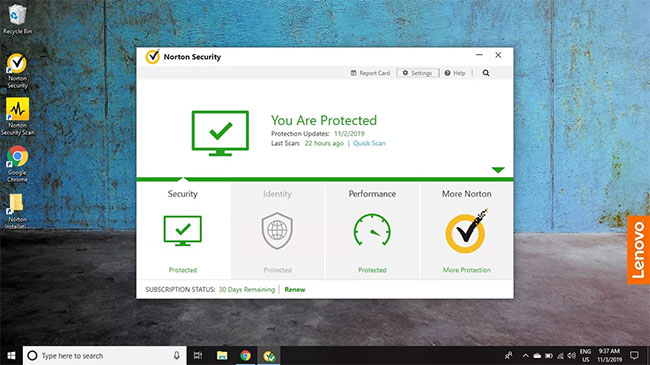
<p style="text-align: justify;">1. Mở phần mềm diệt virus Norton và chọn&nbsp;<strong>Settings.</strong></p>

<figure>
<div style="text-align: justify;"><img alt="Mở phần mềm diệt virus Norton và chọn Settings" data-i="0" data-src="https://st.quantrimang.com/photos/image/2020/07/03/loai-tru-file-khi-quet-bang-norton-antivirus-1.jpg" data-was-processed="true" height="365" src="https://st.quantrimang.com/photos/image/2020/07/03/loai-tru-file-khi-quet-bang-norton-antivirus-1.jpg" width="650" /></div>

<figcaption>
<div style="text-align: justify;">Mở phần mềm diệt virus Norton và chọn Settings</div>
</figcaption>
</figure>

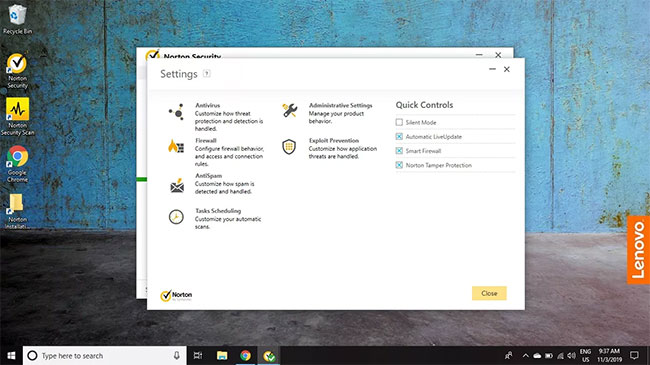
<p style="text-align: justify;">2. Chọn&nbsp;<strong>Antivirus.</strong></p>

<figure>
<div style="text-align: justify;"><img alt="Chọn Antivirus" data-i="1" data-src="https://st.quantrimang.com/photos/image/2020/07/03/loai-tru-file-khi-quet-bang-norton-antivirus-2.jpg" data-was-processed="true" height="365" src="https://st.quantrimang.com/photos/image/2020/07/03/loai-tru-file-khi-quet-bang-norton-antivirus-2.jpg" width="650" /></div>

<figcaption>
<div style="text-align: justify;">Chọn Antivirus</div>
</figcaption>
</figure>

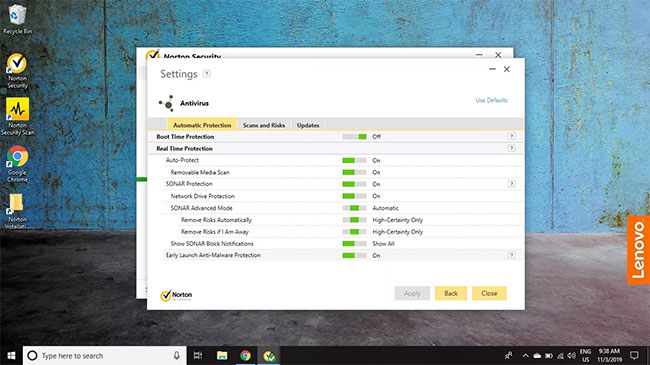
<p style="text-align: justify;">3. Chọn tab&nbsp;<strong>Scans and Risks</strong>.</p>

<figure>
<div style="text-align: justify;"><img alt="Chọn tab Scans and Risks" data-i="2" data-src="https://st.quantrimang.com/photos/image/2020/07/03/loai-tru-file-khi-quet-bang-norton-antivirus-3.jpg" data-was-processed="true" height="365" src="https://st.quantrimang.com/photos/image/2020/07/03/loai-tru-file-khi-quet-bang-norton-antivirus-3.jpg" width="650" /></div>

<figcaption>
<div style="text-align: justify;">Chọn tab Scans and Risks</div>
</figcaption>
</figure>

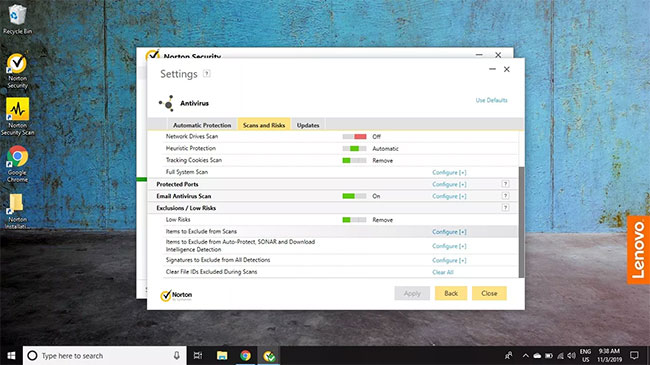
<p style="text-align: justify;">4. Cuộn xuống phần&nbsp;<strong>Exclusions/Low Risks</strong>&nbsp;và chọn&nbsp;<strong>Exclude From Scans</strong>&nbsp;bên cạnh&nbsp;<strong>Items to Exclude From Scans</strong>.</p>

<p style="text-align: justify;"><strong>Lưu ý</strong>: Chọn&nbsp;<strong>Clear Files IDs Excluded During Scans</strong>&nbsp;để reset lại cài đặt loại trừ.</p>

<figure>
<div style="text-align: justify;"><img alt="Cuộn xuống phần Exclusions/Low Risks và chọn Exclude From Scans" data-i="3" data-src="https://st.quantrimang.com/photos/image/2020/07/03/loai-tru-file-khi-quet-bang-norton-antivirus-4.jpg" data-was-processed="true" height="365" src="https://st.quantrimang.com/photos/image/2020/07/03/loai-tru-file-khi-quet-bang-norton-antivirus-4.jpg" width="650" /></div>

<figcaption>
<div style="text-align: justify;">Cuộn xuống phần Exclusions/Low Risks và chọn Exclude From Scans</div>
</figcaption>
</figure>

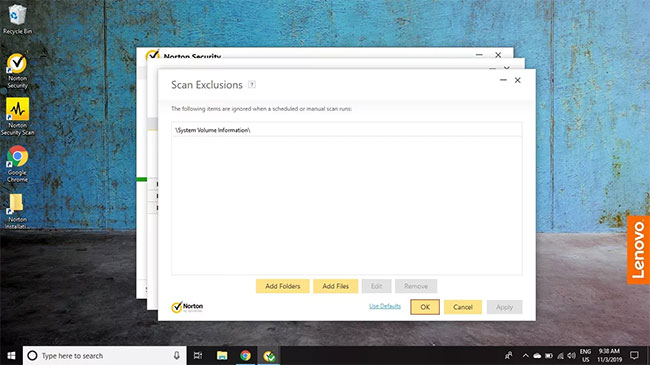
<p style="text-align: justify;">5. Chọn&nbsp;<strong>Add Folders</strong>&nbsp;hoặc&nbsp;<strong>Add Files</strong>&nbsp;và chọn file/thư mục bạn muốn loại trừ. Khi bạn kết thúc, chọn&nbsp;<strong>OK</strong>&nbsp;để lưu các thay đổi.</p>

<figure>
<div style="text-align: justify;"><img alt="Chọn file/thư mục bạn muốn loại trừ" data-i="4" data-src="https://st.quantrimang.com/photos/image/2020/07/03/loai-tru-file-khi-quet-bang-norton-antivirus-5.jpg" data-was-processed="true" height="365" src="https://st.quantrimang.com/photos/image/2020/07/03/loai-tru-file-khi-quet-bang-norton-antivirus-5.jpg" width="650" /></div>

<figcaption>
<div style="text-align: justify;">Chọn file/thư mục bạn muốn loại trừ</div>
</figcaption>
</figure>

<p style="text-align: justify;">Tại thời điểm này, bạn có thể thoát khỏi mọi cửa sổ đang mở và đóng phần mềm Norton.</p>

<p style="text-align: justify;"><strong>Cảnh báo:</strong>&nbsp;Chỉ loại trừ các file và thư mục nếu bạn tự tin rằng chúng không bị nhiễm virus. Bất cứ điều gì mà phần mềm diệt virus bỏ qua có thể sẽ bị nhiễm virus sau này và Norton sẽ không thể làm gì, nếu những file đó được loại trừ khỏi quá trình quét và bảo vệ thời gian thực.</p>

<h2 style="text-align: justify;">Loại trừ file khỏi quá trình quét của Norton Antivirus trên di động</h2>

<p style="text-align: justify;">Ứng dụng Norton Security and Antivirus cho Android và iOS không cho phép bạn loại trừ các file và thư mục cụ thể trong menu cài đặt. Thay vào đó, bạn phải yêu cầu Norton bỏ qua các file sau khi chúng được phát hiện.</p>
		</div>
				<div id="author">
						<p>
				<strong>Nguồn tin:</strong>
				Quantrimang.com
			</p>
		</div>
	</div>
	<div id="footer" class="clearfix">
		<div id="url">
			<strong>URL của bản tin này: </strong><a href="https://www.nguoicodonvn2008.info/vi/news/savefile/kien-thuc-may-tinh/cach-loai-tru-file-khi-quet-bang-norton-antivirus-2313.html" title="Cách loại trừ file khi quét bằng Norton Antivirus">https://www.nguoicodonvn2008.info/vi/news/savefile/kien-thuc-may-tinh/cach-loai-tru-file-khi-quet-bang-norton-antivirus-2313.html</a>

		</div>
		<div class="clear"></div>
		<div class="copyright">
			&copy; .&#x3A; Nguoicodonvn2008.info - Cõi lòng người cô đơn &#x3A;.
		</div>
		<div id="contact">
			<a href="mailto:admin@nguoicodonvn2008.info">admin@nguoicodonvn2008.info</a>
		</div>
	</div>
</div>
        <div id="timeoutsess" class="chromeframe">
            Bạn đã không sử dụng Site, <a onclick="timeoutsesscancel();" href="https://www.nguoicodonvn2008.info/#">Bấm vào đây để duy trì trạng thái đăng nhập</a>. Thời gian chờ: <span id="secField"> 60 </span> giây
        </div>
        <div id="openidResult" class="nv-alert" style="display:none"></div>
        <div id="openidBt" data-result="" data-redirect=""></div>
		</script>
		<div class="car-top">
  <span><img src="https://www.nguoicodonvn2008.info/themes/default/images/car.png" alt=""></span>
</div>
<script src="https://www.nguoicodonvn2008.info/assets/js/jquery/jquery.min.js"></script>
<script>var nv_base_siteurl="/",nv_lang_data="vi",nv_lang_interface="vi",nv_name_variable="nv",nv_fc_variable="op",nv_lang_variable="language",nv_module_name="news",nv_func_name="savefile",nv_is_user=0, nv_my_ofs=-4,nv_my_abbr="EDT",nv_cookie_prefix="nv4c_e856T",nv_check_pass_mstime=1738000,nv_area_admin=0,nv_safemode=0,theme_responsive=0,nv_recaptcha_ver=2,nv_recaptcha_sitekey="",nv_recaptcha_type="image",XSSsanitize=1;</script>
<script src="https://www.nguoicodonvn2008.info/assets/js/language/vi.js"></script>
<script src="https://www.nguoicodonvn2008.info/assets/js/DOMPurify/purify3.js"></script>
<script src="https://www.nguoicodonvn2008.info/assets/js/global.js"></script>
<script src="https://www.nguoicodonvn2008.info/assets/js/site.js"></script>
<script src="https://www.nguoicodonvn2008.info/themes/default/js/news.js"></script>
<script src="https://www.nguoicodonvn2008.info/themes/default/js/main.js"></script>
<script src="https://www.nguoicodonvn2008.info/themes/default/js/custom.js"></script>
<script type="application/ld+json">
        {
            "@context": "https://schema.org",
            "@type": "Organization",
            "url": "https://www.nguoicodonvn2008.info",
            "logo": "https://www.nguoicodonvn2008.info/uploads/angel.gif"
        }
        </script>
<script src="https://www.nguoicodonvn2008.info/themes/default/js/bootstrap.min.js"></script>
<script type="text/javascript">
var $scrolltop = $('.car-top');
$scrolltop.on('click', function () {
    $('html,body').animate({
        scrollTop: 0
    }, 800);
    $(this).addClass("car-run");
    setTimeout(function(){ $scrolltop.removeClass('car-run');}, 1000);
    return false;
});
$(window).on('scroll', function ()
{ 
    if($(window).scrollTop() >= 200)
    {
        $scrolltop.addClass("show");
        $scrolltop.addClass("car-down");
    }
    else
    {
       $scrolltop.removeClass("show");
       setTimeout(function(){ $scrolltop.removeClass('car-down');}, 300);
    }
});
</script>
</body>
</html>