<!DOCTYPE html>
    <html lang="vi" xmlns="http://www.w3.org/1999/xhtml" prefix="og: http://ogp.me/ns#">
    <head>
<title>Cách loại bỏ Microsoft Rewards khỏi menu Start</title>
<meta name="description" content="Cách loại bỏ Microsoft Rewards khỏi menu Start - Savefile - Tin Tức -...">
<meta name="author" content=".: Nguoicodonvn2008.info - Cõi lòng người cô đơn :.">
<meta name="copyright" content=".: Nguoicodonvn2008.info - Cõi lòng người cô đơn :. [admin@nguoicodonvn2008.info]">
<meta name="robots" content="index, archive, follow, noodp">
<meta name="googlebot" content="index,archive,follow,noodp">
<meta name="msnbot" content="all,index,follow">
<meta name="generator" content="NukeViet v4.5">
<meta http-equiv="Content-Type" content="text/html; charset=utf-8">
<meta property="og:title" content="Cách loại bỏ Microsoft Rewards khỏi menu Start">
<meta property="og:type" content="website">
<meta property="og:description" content="Savefile - Tin Tức - https&#x3A;&#x002F;&#x002F;www.nguoicodonvn2008.info&#x002F;vi&#x002F;news&#x002F;savefile&#x002F;kien-thuc-may-tinh&#x002F;cach-loai-bo-microsoft-rewards-khoi-menu-start-2182.html">
<meta property="og:site_name" content=".&#x3A; Nguoicodonvn2008.info - Cõi lòng người cô đơn &#x3A;.">
<meta property="og:url" content="https://www.nguoicodonvn2008.info/vi/news/savefile/kien-thuc-may-tinh/cach-loai-bo-microsoft-rewards-khoi-menu-start-2182.html">
<link rel="shortcut icon" href="https://www.nguoicodonvn2008.info/favicon.ico">
<link rel="canonical" href="https://www.nguoicodonvn2008.info/vi/news/savefile/kien-thuc-may-tinh/cach-loai-bo-microsoft-rewards-khoi-menu-start-2182.html">
<link rel="alternate" href="https://www.nguoicodonvn2008.info/vi/news/rss/" title="Tin Tức" type="application/rss+xml">
<link rel="alternate" href="https://www.nguoicodonvn2008.info/vi/news/rss/karaoke-dual/" title="Tin Tức - Karaoke Dual" type="application/rss+xml">
<link rel="alternate" href="https://www.nguoicodonvn2008.info/vi/news/rss/nhac-tre/" title="Tin Tức - Nhạc trẻ" type="application/rss+xml">
<link rel="alternate" href="https://www.nguoicodonvn2008.info/vi/news/rss/tru-tinh/" title="Tin Tức - Trữ tình" type="application/rss+xml">
<link rel="alternate" href="https://www.nguoicodonvn2008.info/vi/news/rss/nuoc-ngoai/" title="Tin Tức - Nước ngoài" type="application/rss+xml">
<link rel="alternate" href="https://www.nguoicodonvn2008.info/vi/news/rss/remix/" title="Tin Tức - Remix" type="application/rss+xml">
<link rel="alternate" href="https://www.nguoicodonvn2008.info/vi/news/rss/tam-su-tinh-yeu/" title="Tin Tức - Tâm sự tình yêu" type="application/rss+xml">
<link rel="alternate" href="https://www.nguoicodonvn2008.info/vi/news/rss/tho-suu-tam/" title="Tin Tức - Thơ sưu tầm" type="application/rss+xml">
<link rel="alternate" href="https://www.nguoicodonvn2008.info/vi/news/rss/cuoc-song/" title="Tin Tức - Cuộc sống" type="application/rss+xml">
<link rel="alternate" href="https://www.nguoicodonvn2008.info/vi/news/rss/phan-mem/" title="Tin Tức - Phần mềm" type="application/rss+xml">
<link rel="alternate" href="https://www.nguoicodonvn2008.info/vi/news/rss/kien-thuc-may-tinh/" title="Tin Tức - Kiến thức máy tính" type="application/rss+xml">
<link rel="alternate" href="https://www.nguoicodonvn2008.info/vi/news/rss/hoc-tap/" title="Tin Tức - Học tập" type="application/rss+xml">
<link rel="alternate" href="https://www.nguoicodonvn2008.info/vi/news/rss/tai-lieu/" title="Tin Tức - Tài liệu" type="application/rss+xml">
<link rel="alternate" href="https://www.nguoicodonvn2008.info/vi/news/rss/de-thi/" title="Tin Tức - Đề thi" type="application/rss+xml">
<link rel="preload" as="style" href="https://www.nguoicodonvn2008.info/assets/css/font-awesome.min.css" type="text/css">
<link rel="preload" as="style" href="https://www.nguoicodonvn2008.info/themes/default/css/bootstrap.non-responsive.css" type="text/css">
<link rel="preload" as="style" href="https://www.nguoicodonvn2008.info/themes/default/css/style.css" type="text/css">
<link rel="preload" as="style" href="https://www.nguoicodonvn2008.info/themes/default/css/style.non-responsive.css" type="text/css">
<link rel="preload" as="style" href="https://www.nguoicodonvn2008.info/themes/default/css/news.css" type="text/css">
<link rel="preload" as="style" href="https://www.nguoicodonvn2008.info/themes/default/css/custom.css" type="text/css">
<link rel="preload" as="script" href="https://www.nguoicodonvn2008.info/assets/js/jquery/jquery.min.js" type="text/javascript">
<link rel="preload" as="script" href="https://www.nguoicodonvn2008.info/assets/js/language/vi.js" type="text/javascript">
<link rel="preload" as="script" href="https://www.nguoicodonvn2008.info/assets/js/DOMPurify/purify3.js" type="text/javascript">
<link rel="preload" as="script" href="https://www.nguoicodonvn2008.info/assets/js/global.js" type="text/javascript">
<link rel="preload" as="script" href="https://www.nguoicodonvn2008.info/assets/js/site.js" type="text/javascript">
<link rel="preload" as="script" href="https://www.nguoicodonvn2008.info/themes/default/js/news.js" type="text/javascript">
<link rel="preload" as="script" href="https://www.nguoicodonvn2008.info/themes/default/js/main.js" type="text/javascript">
<link rel="preload" as="script" href="https://www.nguoicodonvn2008.info/themes/default/js/custom.js" type="text/javascript">
<link rel="preload" as="script" href="https://www.nguoicodonvn2008.info/themes/default/js/bootstrap.min.js" type="text/javascript">
<link rel="stylesheet" href="https://www.nguoicodonvn2008.info/assets/css/font-awesome.min.css">
<link rel="stylesheet" href="https://www.nguoicodonvn2008.info/themes/default/css/bootstrap.non-responsive.css">
<link rel="stylesheet" href="https://www.nguoicodonvn2008.info/themes/default/css/style.css">
<link rel="stylesheet" href="https://www.nguoicodonvn2008.info/themes/default/css/style.non-responsive.css">
<link rel="StyleSheet" href="https://www.nguoicodonvn2008.info/themes/default/css/news.css">
<link rel="stylesheet" href="https://www.nguoicodonvn2008.info/themes/default/css/custom.css">
<style type="text/css">
	body{background: #fff;}
</style>
    </head>
    <body>
<div id="print">
	<div id="hd_print">
		<h2 class="pull-left">.&#x3A; Nguoicodonvn2008.info - Cõi lòng người cô đơn &#x3A;.</h2>
		<p class="pull-right"><a title=".&#x3A; Nguoicodonvn2008.info - Cõi lòng người cô đơn &#x3A;." href="https://www.nguoicodonvn2008.info/">https://www.nguoicodonvn2008.info</a></p>
	</div>
	<div class="clear"></div>
	<hr />
	<div id="content">
		<h1>Cách loại bỏ Microsoft Rewards khỏi menu Start</h1>
		<ul class="list-inline">
			<li>Thứ ba - 09/06/2020 00:58</li>
			<li class="hidden-print txtrequired"><em class="fa fa-print">&nbsp;</em><a title="In ra" href="javascript:;" onclick="window.print()">In ra</a></li>
			<li class="hidden-print txtrequired"><em class="fa fa-power-off">&nbsp;</em><a title="Đóng cửa sổ này" href="javascript:;" onclick="window.close()">Đóng cửa sổ này</a></li>
		</ul>
		<div class="clear"></div>
		<div id="hometext">
		</div>
				<div class="imghome">
			<img alt="Cách loại bỏ Microsoft Rewards khỏi menu Start" src="https://st.quantrimang.com/photos/image/2020/06/08/loai-bo-microsoft-rewards-4.jpg" width="460" class="img-thumbnail" />
		</div>
		<div class="clear"></div>
		<div id="bodytext" class="clearfix">
			<p style="text-align: justify;">Nếu huy hiệu Microsoft Rewards hiển thị thông báo liên tục, hãy làm theo các bước sau để xóa Microsoft Rewards khỏi menu Start.</p>

<h2 style="text-align: justify;">Microsoft Rewards trong Windows 10</h2>

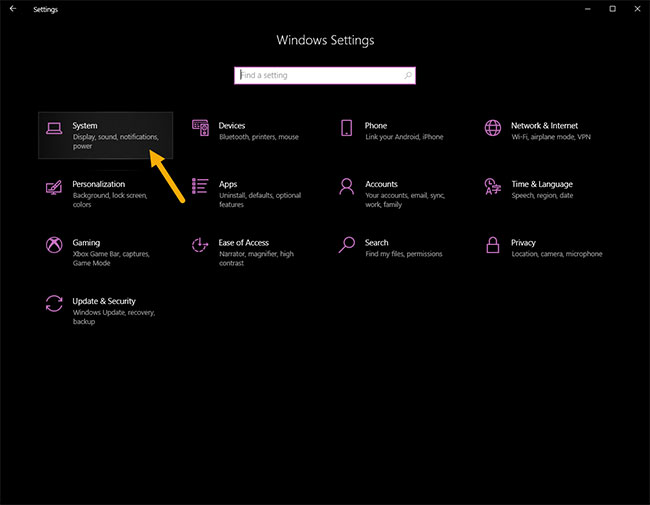
<p style="text-align: justify;">Windows 10 hiển thị một huy hiệu nhỏ (biểu tượng huy chương) trên đầu menu Start để khuyến khích người dùng tham gia vào Microsoft Rewards. Trong trường hợp bạn chưa biết, chương trình Microsoft Rewards cho bạn điểm khi&nbsp;sử dụng tìm kiếm Bing. Khi kiếm đủ điểm, bạn có thể đổi các điểm đó trong những cửa hàng cục bộ hoặc trực tuyến. Ví dụ, bạn có thể đổi điểm để mua thẻ thành viên Xbox Game Pass, Xbox Live Gold, Xbox console, v.v...</p>

<figure>
<div style="text-align: justify;"><img alt="Windows 10 hiển thị một huy hiệu nhỏ trên đầu menu Start để khuyến khích người dùng tham gia vào Microsoft Rewards" data-i="0" data-src="https://st.quantrimang.com/photos/image/2020/06/08/loai-bo-microsoft-rewards-1.jpg" data-was-processed="true" height="196" src="https://st.quantrimang.com/photos/image/2020/06/08/loai-bo-microsoft-rewards-1.jpg" width="650" /></div>

<figcaption>
<div style="text-align: justify;">Windows 10 hiển thị một huy hiệu nhỏ trên đầu menu Start để khuyến khích người dùng tham gia vào Microsoft Rewards</div>
</figcaption>
</figure>

<p style="text-align: justify;">Vấn đề là, chương trình Microsoft Rewards chỉ khả dụng ở một số khu vực. Ngay cả khi chương trình không có sẵn ở quốc gia của bạn hoặc bạn không tham gia, menu Start vẫn có thể hiển thị huy hiệu Microsoft Awards trong menu Start. Đôi khi, huy hiệu này thậm chí có thể hiển thị thông báo trực tiếp trong menu Start.</p>

<p style="text-align: justify;">Nếu không thích việc này, hãy làm theo hướng dẫn bên dưới để loại bỏ huy hiệu Microsoft Rewards khỏi menu Start của Windows 10.</p>

<div style="text-align: justify;">&nbsp;</div>

<h2 style="text-align: justify;">Các bước để loại bỏ huy hiệu Microsoft Rewards trong menu Start</h2>

<p style="text-align: justify;">Thực hiện theo các bước được liệt kê bên dưới để xóa huy hiệu Microsoft Rewards trong menu Start.</p>

<p style="text-align: justify;">1. Mở ứng dụng&nbsp;<strong>Settings.</strong></p>

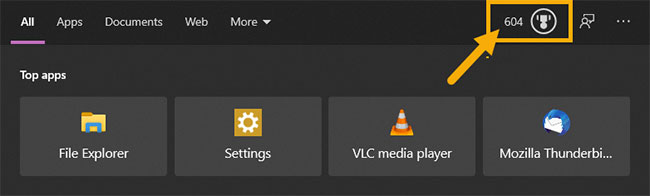
<p style="text-align: justify;">2. Chuyển đến trang&nbsp;<strong>Search.</strong></p>

<figure>
<div style="text-align: justify;"><img alt="Chuyển đến trang Search" data-i="1" data-src="https://st.quantrimang.com/photos/image/2020/06/08/loai-bo-microsoft-rewards-2.jpg" data-was-processed="true" height="505" src="https://st.quantrimang.com/photos/image/2020/06/08/loai-bo-microsoft-rewards-2.jpg" width="650" /></div>

<figcaption>
<div style="text-align: justify;">Chuyển đến trang Search</div>
</figcaption>
</figure>

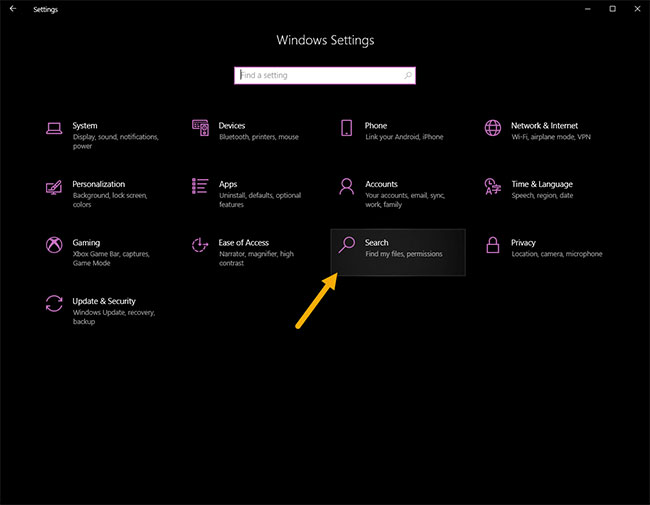
<p style="text-align: justify;">3. Chuyển đến trang&nbsp;<strong>Permission &amp; History</strong>.</p>

<p style="text-align: justify;">4. Trên bảng điều khiển bên phải, tắt&nbsp;<strong>Microsoft Account trongCloud Search Content</strong>.</p>

<figure>
<div style="text-align: justify;"><img alt="Tắt Microsoft Account trongCloud Search Content" data-i="2" data-src="https://st.quantrimang.com/photos/image/2020/06/08/loai-bo-microsoft-rewards-3.jpg" data-was-processed="true" height="505" src="https://st.quantrimang.com/photos/image/2020/06/08/loai-bo-microsoft-rewards-3.jpg" width="650" /></div>

<figcaption>
<div style="text-align: justify;">Tắt Microsoft Account trongCloud Search Content</div>
</figcaption>
</figure>

<p style="text-align: justify;">5. Thay đổi được lưu tự động.</p>

<p style="text-align: justify;">6. Đóng ứng dụng&nbsp;<strong>Settings.</strong></p>

<p style="text-align: justify;">Từ giờ, bạn sẽ không thấy biểu tượng huy hiệu Microsoft Rewards trong menu Start nữa. Nếu muốn, bạn cũng có thể ngăn Windows hiển thị kết quả tìm kiếm từ tài khoản cơ quan hoặc trường học. Chỉ cần tắt tùy chọn&nbsp;<strong>Work or school account</strong>&nbsp;trong&nbsp;<strong>Cloud Search Content</strong>.</p>

<p style="text-align: justify;">Để hoàn nguyên các thay đổi và hiển thị biểu tượng Microsoft Rewards trong menu Start, hãy làm theo các bước tương tự nhưng bật công tắc chuyển đổi trong Microsoft Account ở bước 4.</p>

<h2 style="text-align: justify;">Vô hiệu hóa mẹo, thủ thuật và thông báo gợi ý</h2>

<p style="text-align: justify;">Cùng với Microsoft Rewards, Windows 10 cũng sẽ hiển thị các thông báo không thường xuyên cho những mẹo, thủ thuật, ứng dụng được đề xuất và để quảng cáo các dịch vụ Windows và Microsoft khác.</p>

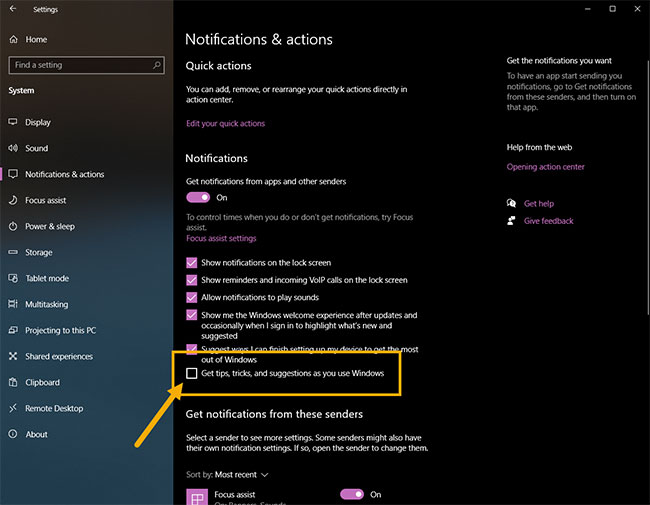
<p style="text-align: justify;">Các bước để vô hiệu hóa mẹo, thủ thuật và thông báo gợi ý như sau:</p>

<p style="text-align: justify;">1. Mở&nbsp;<strong>Settings.</strong></p>

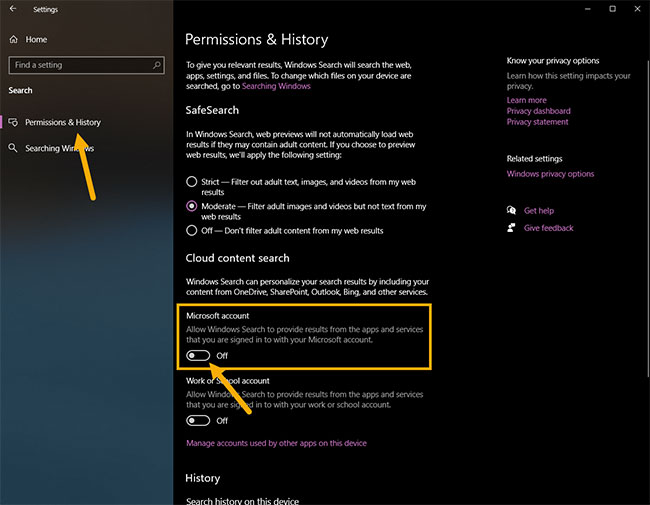
<p style="text-align: justify;">2. Chuyển đến&nbsp;<strong>System.</strong></p>

<figure>
<div style="text-align: justify;"><img alt="Chuyển đến System" data-i="3" data-src="https://st.quantrimang.com/photos/image/2020/06/08/loai-bo-microsoft-rewards-4.jpg" data-was-processed="true" height="505" src="https://st.quantrimang.com/photos/image/2020/06/08/loai-bo-microsoft-rewards-4.jpg" width="650" /></div>

<figcaption>
<div style="text-align: justify;">Chuyển đến System</div>
</figcaption>
</figure>

<p style="text-align: justify;">3. Vào trang&nbsp;<strong>Notifications &amp; Actions</strong>.</p>

<p style="text-align: justify;">4. Trên trang bên phải, bỏ chọn hộp kiểm&nbsp;<strong>Get tips, tricks, and suggestions as you use Windows</strong>.</p>

<figure>
<div style="text-align: justify;"><img alt="Bỏ chọn hộp kiểm Get tips, tricks, and suggestions as you use Windows" data-i="4" data-src="https://st.quantrimang.com/photos/image/2020/06/08/loai-bo-microsoft-rewards-5.jpg" data-was-processed="true" height="505" src="https://st.quantrimang.com/photos/image/2020/06/08/loai-bo-microsoft-rewards-5.jpg" width="650" /></div>

<figcaption>
<div style="text-align: justify;">Bỏ chọn hộp kiểm Get tips, tricks, and suggestions as you use Windows</div>
</figcaption>
</figure>

<p style="text-align: justify;">5. Đóng ứng dụng&nbsp;<strong>Settings.</strong></p>

<p style="text-align: justify;">Windows sẽ không còn hiển thị mẹo, thủ thuật và thông báo đề xuất trong trung tâm thông báo hoặc trong menu Start nữa. Nếu bạn muốn các thông báo đó quay lại, hãy làm theo các bước tương tự và chọn hộp kiểm trong bước 4.</p>
		</div>
				<div id="author">
						<p>
				<strong>Nguồn tin:</strong>
				Quantrimang.com
			</p>
		</div>
	</div>
	<div id="footer" class="clearfix">
		<div id="url">
			<strong>URL của bản tin này: </strong><a href="https://www.nguoicodonvn2008.info/vi/news/savefile/kien-thuc-may-tinh/cach-loai-bo-microsoft-rewards-khoi-menu-start-2182.html" title="Cách loại bỏ Microsoft Rewards khỏi menu Start">https://www.nguoicodonvn2008.info/vi/news/savefile/kien-thuc-may-tinh/cach-loai-bo-microsoft-rewards-khoi-menu-start-2182.html</a>

		</div>
		<div class="clear"></div>
		<div class="copyright">
			&copy; .&#x3A; Nguoicodonvn2008.info - Cõi lòng người cô đơn &#x3A;.
		</div>
		<div id="contact">
			<a href="mailto:admin@nguoicodonvn2008.info">admin@nguoicodonvn2008.info</a>
		</div>
	</div>
</div>
        <div id="timeoutsess" class="chromeframe">
            Bạn đã không sử dụng Site, <a onclick="timeoutsesscancel();" href="https://www.nguoicodonvn2008.info/#">Bấm vào đây để duy trì trạng thái đăng nhập</a>. Thời gian chờ: <span id="secField"> 60 </span> giây
        </div>
        <div id="openidResult" class="nv-alert" style="display:none"></div>
        <div id="openidBt" data-result="" data-redirect=""></div>
		</script>
		<div class="car-top">
  <span><img src="https://www.nguoicodonvn2008.info/themes/default/images/car.png" alt=""></span>
</div>
<script src="https://www.nguoicodonvn2008.info/assets/js/jquery/jquery.min.js"></script>
<script>var nv_base_siteurl="/",nv_lang_data="vi",nv_lang_interface="vi",nv_name_variable="nv",nv_fc_variable="op",nv_lang_variable="language",nv_module_name="news",nv_func_name="savefile",nv_is_user=0, nv_my_ofs=-4,nv_my_abbr="EDT",nv_cookie_prefix="nv4c_e856T",nv_check_pass_mstime=1738000,nv_area_admin=0,nv_safemode=0,theme_responsive=0,nv_recaptcha_ver=2,nv_recaptcha_sitekey="",nv_recaptcha_type="image",XSSsanitize=1;</script>
<script src="https://www.nguoicodonvn2008.info/assets/js/language/vi.js"></script>
<script src="https://www.nguoicodonvn2008.info/assets/js/DOMPurify/purify3.js"></script>
<script src="https://www.nguoicodonvn2008.info/assets/js/global.js"></script>
<script src="https://www.nguoicodonvn2008.info/assets/js/site.js"></script>
<script src="https://www.nguoicodonvn2008.info/themes/default/js/news.js"></script>
<script src="https://www.nguoicodonvn2008.info/themes/default/js/main.js"></script>
<script src="https://www.nguoicodonvn2008.info/themes/default/js/custom.js"></script>
<script type="application/ld+json">
        {
            "@context": "https://schema.org",
            "@type": "Organization",
            "url": "https://www.nguoicodonvn2008.info",
            "logo": "https://www.nguoicodonvn2008.info/uploads/angel.gif"
        }
        </script>
<script src="https://www.nguoicodonvn2008.info/themes/default/js/bootstrap.min.js"></script>
<script type="text/javascript">
var $scrolltop = $('.car-top');
$scrolltop.on('click', function () {
    $('html,body').animate({
        scrollTop: 0
    }, 800);
    $(this).addClass("car-run");
    setTimeout(function(){ $scrolltop.removeClass('car-run');}, 1000);
    return false;
});
$(window).on('scroll', function ()
{ 
    if($(window).scrollTop() >= 200)
    {
        $scrolltop.addClass("show");
        $scrolltop.addClass("car-down");
    }
    else
    {
       $scrolltop.removeClass("show");
       setTimeout(function(){ $scrolltop.removeClass('car-down');}, 300);
    }
});
</script>
</body>
</html>