<!DOCTYPE html>
    <html lang="vi" xmlns="http://www.w3.org/1999/xhtml" prefix="og: http://ogp.me/ns#">
    <head>
<title>Cách lên lịch quét trong Microsoft Defender Antivirus trên Windows 10</title>
<meta name="description" content="Cách lên lịch quét trong Microsoft Defender Antivirus trên Windows 10 - Savefile - Tin Tức -...">
<meta name="author" content=".: Nguoicodonvn2008.info - Cõi lòng người cô đơn :.">
<meta name="copyright" content=".: Nguoicodonvn2008.info - Cõi lòng người cô đơn :. [admin@nguoicodonvn2008.info]">
<meta name="robots" content="index, archive, follow, noodp">
<meta name="googlebot" content="index,archive,follow,noodp">
<meta name="msnbot" content="all,index,follow">
<meta name="generator" content="NukeViet v4.5">
<meta http-equiv="Content-Type" content="text/html; charset=utf-8">
<meta property="og:title" content="Cách lên lịch quét trong Microsoft Defender Antivirus trên Windows 10">
<meta property="og:type" content="website">
<meta property="og:description" content="Savefile - Tin Tức - https&#x3A;&#x002F;&#x002F;www.nguoicodonvn2008.info&#x002F;vi&#x002F;news&#x002F;savefile&#x002F;kien-thuc-may-tinh&#x002F;cach-len-lich-quet-trong-microsoft-defender-antivirus-tren-windows-10-2288.html">
<meta property="og:site_name" content=".&#x3A; Nguoicodonvn2008.info - Cõi lòng người cô đơn &#x3A;.">
<meta property="og:url" content="https://www.nguoicodonvn2008.info/vi/news/savefile/kien-thuc-may-tinh/cach-len-lich-quet-trong-microsoft-defender-antivirus-tren-windows-10-2288.html">
<link rel="shortcut icon" href="https://www.nguoicodonvn2008.info/favicon.ico">
<link rel="canonical" href="https://www.nguoicodonvn2008.info/vi/news/savefile/kien-thuc-may-tinh/cach-len-lich-quet-trong-microsoft-defender-antivirus-tren-windows-10-2288.html">
<link rel="alternate" href="https://www.nguoicodonvn2008.info/vi/news/rss/" title="Tin Tức" type="application/rss+xml">
<link rel="alternate" href="https://www.nguoicodonvn2008.info/vi/news/rss/karaoke-dual/" title="Tin Tức - Karaoke Dual" type="application/rss+xml">
<link rel="alternate" href="https://www.nguoicodonvn2008.info/vi/news/rss/nhac-tre/" title="Tin Tức - Nhạc trẻ" type="application/rss+xml">
<link rel="alternate" href="https://www.nguoicodonvn2008.info/vi/news/rss/tru-tinh/" title="Tin Tức - Trữ tình" type="application/rss+xml">
<link rel="alternate" href="https://www.nguoicodonvn2008.info/vi/news/rss/nuoc-ngoai/" title="Tin Tức - Nước ngoài" type="application/rss+xml">
<link rel="alternate" href="https://www.nguoicodonvn2008.info/vi/news/rss/remix/" title="Tin Tức - Remix" type="application/rss+xml">
<link rel="alternate" href="https://www.nguoicodonvn2008.info/vi/news/rss/tam-su-tinh-yeu/" title="Tin Tức - Tâm sự tình yêu" type="application/rss+xml">
<link rel="alternate" href="https://www.nguoicodonvn2008.info/vi/news/rss/tho-suu-tam/" title="Tin Tức - Thơ sưu tầm" type="application/rss+xml">
<link rel="alternate" href="https://www.nguoicodonvn2008.info/vi/news/rss/cuoc-song/" title="Tin Tức - Cuộc sống" type="application/rss+xml">
<link rel="alternate" href="https://www.nguoicodonvn2008.info/vi/news/rss/phan-mem/" title="Tin Tức - Phần mềm" type="application/rss+xml">
<link rel="alternate" href="https://www.nguoicodonvn2008.info/vi/news/rss/kien-thuc-may-tinh/" title="Tin Tức - Kiến thức máy tính" type="application/rss+xml">
<link rel="alternate" href="https://www.nguoicodonvn2008.info/vi/news/rss/hoc-tap/" title="Tin Tức - Học tập" type="application/rss+xml">
<link rel="alternate" href="https://www.nguoicodonvn2008.info/vi/news/rss/tai-lieu/" title="Tin Tức - Tài liệu" type="application/rss+xml">
<link rel="alternate" href="https://www.nguoicodonvn2008.info/vi/news/rss/de-thi/" title="Tin Tức - Đề thi" type="application/rss+xml">
<link rel="preload" as="style" href="https://www.nguoicodonvn2008.info/assets/css/font-awesome.min.css" type="text/css">
<link rel="preload" as="style" href="https://www.nguoicodonvn2008.info/themes/default/css/bootstrap.non-responsive.css" type="text/css">
<link rel="preload" as="style" href="https://www.nguoicodonvn2008.info/themes/default/css/style.css" type="text/css">
<link rel="preload" as="style" href="https://www.nguoicodonvn2008.info/themes/default/css/style.non-responsive.css" type="text/css">
<link rel="preload" as="style" href="https://www.nguoicodonvn2008.info/themes/default/css/news.css" type="text/css">
<link rel="preload" as="style" href="https://www.nguoicodonvn2008.info/themes/default/css/custom.css" type="text/css">
<link rel="preload" as="script" href="https://www.nguoicodonvn2008.info/assets/js/jquery/jquery.min.js" type="text/javascript">
<link rel="preload" as="script" href="https://www.nguoicodonvn2008.info/assets/js/language/vi.js" type="text/javascript">
<link rel="preload" as="script" href="https://www.nguoicodonvn2008.info/assets/js/DOMPurify/purify3.js" type="text/javascript">
<link rel="preload" as="script" href="https://www.nguoicodonvn2008.info/assets/js/global.js" type="text/javascript">
<link rel="preload" as="script" href="https://www.nguoicodonvn2008.info/assets/js/site.js" type="text/javascript">
<link rel="preload" as="script" href="https://www.nguoicodonvn2008.info/themes/default/js/news.js" type="text/javascript">
<link rel="preload" as="script" href="https://www.nguoicodonvn2008.info/themes/default/js/main.js" type="text/javascript">
<link rel="preload" as="script" href="https://www.nguoicodonvn2008.info/themes/default/js/custom.js" type="text/javascript">
<link rel="preload" as="script" href="https://www.nguoicodonvn2008.info/themes/default/js/bootstrap.min.js" type="text/javascript">
<link rel="stylesheet" href="https://www.nguoicodonvn2008.info/assets/css/font-awesome.min.css">
<link rel="stylesheet" href="https://www.nguoicodonvn2008.info/themes/default/css/bootstrap.non-responsive.css">
<link rel="stylesheet" href="https://www.nguoicodonvn2008.info/themes/default/css/style.css">
<link rel="stylesheet" href="https://www.nguoicodonvn2008.info/themes/default/css/style.non-responsive.css">
<link rel="StyleSheet" href="https://www.nguoicodonvn2008.info/themes/default/css/news.css">
<link rel="stylesheet" href="https://www.nguoicodonvn2008.info/themes/default/css/custom.css">
<style type="text/css">
	body{background: #fff;}
</style>
    </head>
    <body>
<div id="print">
	<div id="hd_print">
		<h2 class="pull-left">.&#x3A; Nguoicodonvn2008.info - Cõi lòng người cô đơn &#x3A;.</h2>
		<p class="pull-right"><a title=".&#x3A; Nguoicodonvn2008.info - Cõi lòng người cô đơn &#x3A;." href="https://www.nguoicodonvn2008.info/">https://www.nguoicodonvn2008.info</a></p>
	</div>
	<div class="clear"></div>
	<hr />
	<div id="content">
		<h1>Cách lên lịch quét trong Microsoft Defender Antivirus trên Windows 10</h1>
		<ul class="list-inline">
			<li>Thứ ba - 30/06/2020 00:57</li>
			<li class="hidden-print txtrequired"><em class="fa fa-print">&nbsp;</em><a title="In ra" href="javascript:;" onclick="window.print()">In ra</a></li>
			<li class="hidden-print txtrequired"><em class="fa fa-power-off">&nbsp;</em><a title="Đóng cửa sổ này" href="javascript:;" onclick="window.close()">Đóng cửa sổ này</a></li>
		</ul>
		<div class="clear"></div>
		<div id="hometext">
		</div>
				<div class="imghome">
			<img alt="Cách lên lịch quét trong Microsoft Defender Antivirus trên Windows 10" src="https://st.quantrimang.com/photos/image/2020/06/29/len-lich-quet-trong-microsoft-defender-antivirus-1.jpg" width="460" class="img-thumbnail" />
		</div>
		<div class="clear"></div>
		<div id="bodytext" class="clearfix">
			<p style="text-align: justify;">Bắt đầu với Windows 10 phiên bản 2004, Windows Defender Offline được đổi tên thành Microsoft Defender Offline.</p>

<h2 style="text-align: justify;">Đôi nét về Microsoft Defender Antivirus</h2>

<p style="text-align: justify;">Microsoft Defender Antivirus giúp bảo vệ PC chống lại&nbsp;malware (phần mềm độc hại)&nbsp;như virus, phần mềm gián điệp và phần mềm không mong muốn khác. Phần mềm độc hại có thể lây nhiễm sang PC mà bạn không biết: Nó có thể tự cài đặt từ một email, khi bạn kết nối với Internet hoặc khi bạn cài đặt một số ứng dụng nhất định bằng USB, CD, DVD hoặc phương tiện di động khác. Một số phần mềm độc hại cũng có thể được lập trình để chạy vào những thời điểm không mong muốn, chứ không chỉ khi nó được cài đặt.</p>

<p style="text-align: justify;">Windows Defender Antivirus&nbsp;thường xuyên quét thiết bị để giúp giữ an toàn. Windows cố gắng làm điều này trong khi bạn không sử dụng thiết bị để nó không can thiệp vào công việc của bạn. Bạn cũng có thể lên lịch Windows Defender Antivirus để quét theo thời gian và tần suất mong muốn.</p>

<p style="text-align: justify;">Hướng dẫn này sẽ chỉ cho bạn cách lên lịch quét trong Microsoft Defender Antivirus trên Windows 10.</p>

<div style="text-align: justify;">&nbsp;</div>

<h2 style="text-align: justify;">Cách lên lịch quét trong Microsoft Defender Antivirus trên Windows 10</h2>

<p style="text-align: justify;">Đây là cách thực hiện:</p>

<p style="text-align: justify;">1. Nhấn các phím&nbsp;<code>Win</code>+<code>R</code>&nbsp;để mở&nbsp;<strong>Run</strong>, nhập&nbsp;<strong>taskchd.msc</strong>&nbsp;vào&nbsp;<strong>Run</strong>&nbsp;và nhấn&nbsp;<strong>OK</strong>&nbsp;để mở&nbsp;<strong>Task Scheduler.</strong></p>

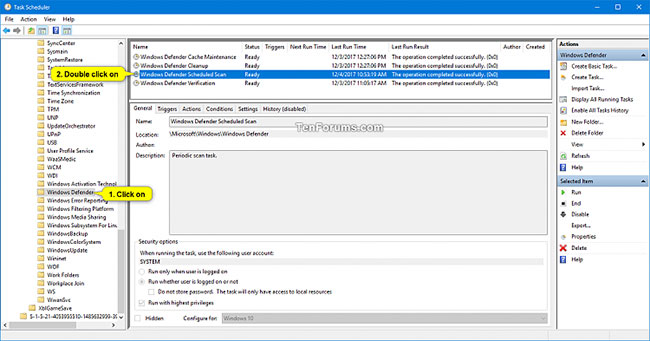
<p style="text-align: justify;">2. Mở rộng thư mục&nbsp;<strong>Task Scheduler Library &gt; Microsoft &gt; Windows</strong>&nbsp;trong ngăn bên trái của&nbsp;<strong>Task Scheduler</strong>&nbsp;và nhấp vào thư mục&nbsp;<strong>Windows Defender.</strong></p>

<p style="text-align: justify;">3. Nhấp đúp chuột vào tác vụ&nbsp;<strong>Windows Defender Scheduled Scan</strong>&nbsp;trong ngăn giữa của&nbsp;<strong>Task Scheduler.</strong></p>

<figure>
<div style="text-align: justify;"><img alt="Nhấp đúp chuột vào tác vụ Windows Defender Scheduled Scan" data-i="0" data-src="https://st.quantrimang.com/photos/image/2020/06/29/len-lich-quet-trong-microsoft-defender-antivirus-1.jpg" data-was-processed="true" height="341" src="https://st.quantrimang.com/photos/image/2020/06/29/len-lich-quet-trong-microsoft-defender-antivirus-1.jpg" width="650" /></div>

<figcaption>
<div style="text-align: justify;">Nhấp đúp chuột vào tác vụ Windows Defender Scheduled Scan</div>
</figcaption>
</figure>

<p style="text-align: justify;">4. Nhấp vào tab&nbsp;<strong>Triggers</strong>&nbsp;và nhấn nút&nbsp;<strong>New.</strong></p>

<p style="text-align: justify;">5. Thực hiện các hành động sau đây để tạo trình kích hoạt mới:</p>

<p style="text-align: justify;">A) Chọn&nbsp;<strong>On a schedule</strong>&nbsp;trong menu drop-down&nbsp;<strong>Begin the task</strong>.</p>

<p style="text-align: justify;">B) Chọn&nbsp;<strong>One time, Daily, Weekly</strong>&nbsp;hoặc<strong>&nbsp;Monthly</strong>&nbsp;cho tần suất bạn muốn quét.</p>

<p style="text-align: justify;">C) Chọn thời điểm bạn muốn quét trong&nbsp;<strong>Start.</strong></p>

<p style="text-align: justify;">D) Nhấn&nbsp;<strong>OK</strong>&nbsp;khi hoàn thành.</p>

<figure>
<div style="text-align: justify;"><img alt="Tạo trình kích hoạt mới" data-i="1" data-src="https://st.quantrimang.com/photos/image/2020/06/29/len-lich-quet-trong-microsoft-defender-antivirus-2.jpg" data-was-processed="true" height="516" src="https://st.quantrimang.com/photos/image/2020/06/29/len-lich-quet-trong-microsoft-defender-antivirus-2.jpg" width="591" /></div>

<figcaption>
<div style="text-align: justify;">Tạo trình kích hoạt mới</div>
</figcaption>
</figure>

<p style="text-align: justify;">6. Bây giờ, bạn sẽ thấy nhiệm vụ theo lịch trình mới được liệt kê. Nếu muốn xóa một tác vụ theo lịch trình, bạn sẽ chọn tác vụ muốn xóa và nhấp vào nút&nbsp;<strong>Delete.</strong></p>

<figure>
<div style="text-align: justify;"><img alt="Nhiệm vụ theo lịch trình mới được liệt kê" data-i="2" data-src="https://st.quantrimang.com/photos/image/2020/06/29/len-lich-quet-trong-microsoft-defender-antivirus-3.jpg" data-was-processed="true" height="480" src="https://st.quantrimang.com/photos/image/2020/06/29/len-lich-quet-trong-microsoft-defender-antivirus-3.jpg" width="632" /></div>

<figcaption>
<div style="text-align: justify;">Nhiệm vụ theo lịch trình mới được liệt kê</div>
</figcaption>
</figure>

<p style="text-align: justify;">7. Nhấp vào tab&nbsp;<strong>Conditions</strong>, chọn hoặc bỏ chọn cài đặt&nbsp;<strong>Power</strong>&nbsp;bên dưới để biết bạn muốn gì và nhấn&nbsp;<strong>OK.</strong></p>

<ul>
	<li style="text-align: justify;"><strong>Start the task only if the computer is on AC power</strong>

	<ul>
		<li><strong>Stop if the computer switches to battery power</strong></li>
	</ul>
	</li>
	<li style="text-align: justify;"><strong>Wake the computer to run this task</strong></li>
</ul>

<figure>
<div style="text-align: justify;"><img alt="Chọn hoặc bỏ chọn cài đặt Power" data-i="3" data-src="https://st.quantrimang.com/photos/image/2020/06/29/len-lich-quet-trong-microsoft-defender-antivirus-4.jpg" data-was-processed="true" height="480" src="https://st.quantrimang.com/photos/image/2020/06/29/len-lich-quet-trong-microsoft-defender-antivirus-4.jpg" width="632" /></div>

<figcaption>
<div style="text-align: justify;">Chọn hoặc bỏ chọn cài đặt Power</div>
</figcaption>
</figure>

<p style="text-align: justify;">8. Bây giờ, bạn có thể đóng&nbsp;<strong>Task Scheduler</strong>&nbsp;nếu muốn.</p>
		</div>
				<div id="author">
						<p>
				<strong>Nguồn tin:</strong>
				Quantrimang.com
			</p>
		</div>
	</div>
	<div id="footer" class="clearfix">
		<div id="url">
			<strong>URL của bản tin này: </strong><a href="https://www.nguoicodonvn2008.info/vi/news/savefile/kien-thuc-may-tinh/cach-len-lich-quet-trong-microsoft-defender-antivirus-tren-windows-10-2288.html" title="Cách lên lịch quét trong Microsoft Defender Antivirus trên Windows 10">https://www.nguoicodonvn2008.info/vi/news/savefile/kien-thuc-may-tinh/cach-len-lich-quet-trong-microsoft-defender-antivirus-tren-windows-10-2288.html</a>

		</div>
		<div class="clear"></div>
		<div class="copyright">
			&copy; .&#x3A; Nguoicodonvn2008.info - Cõi lòng người cô đơn &#x3A;.
		</div>
		<div id="contact">
			<a href="mailto:admin@nguoicodonvn2008.info">admin@nguoicodonvn2008.info</a>
		</div>
	</div>
</div>
        <div id="timeoutsess" class="chromeframe">
            Bạn đã không sử dụng Site, <a onclick="timeoutsesscancel();" href="https://www.nguoicodonvn2008.info/#">Bấm vào đây để duy trì trạng thái đăng nhập</a>. Thời gian chờ: <span id="secField"> 60 </span> giây
        </div>
        <div id="openidResult" class="nv-alert" style="display:none"></div>
        <div id="openidBt" data-result="" data-redirect=""></div>
		</script>
		<div class="car-top">
  <span><img src="https://www.nguoicodonvn2008.info/themes/default/images/car.png" alt=""></span>
</div>
<script src="https://www.nguoicodonvn2008.info/assets/js/jquery/jquery.min.js"></script>
<script>var nv_base_siteurl="/",nv_lang_data="vi",nv_lang_interface="vi",nv_name_variable="nv",nv_fc_variable="op",nv_lang_variable="language",nv_module_name="news",nv_func_name="savefile",nv_is_user=0, nv_my_ofs=-4,nv_my_abbr="EDT",nv_cookie_prefix="nv4c_e856T",nv_check_pass_mstime=1738000,nv_area_admin=0,nv_safemode=0,theme_responsive=0,nv_recaptcha_ver=2,nv_recaptcha_sitekey="",nv_recaptcha_type="image",XSSsanitize=1;</script>
<script src="https://www.nguoicodonvn2008.info/assets/js/language/vi.js"></script>
<script src="https://www.nguoicodonvn2008.info/assets/js/DOMPurify/purify3.js"></script>
<script src="https://www.nguoicodonvn2008.info/assets/js/global.js"></script>
<script src="https://www.nguoicodonvn2008.info/assets/js/site.js"></script>
<script src="https://www.nguoicodonvn2008.info/themes/default/js/news.js"></script>
<script src="https://www.nguoicodonvn2008.info/themes/default/js/main.js"></script>
<script src="https://www.nguoicodonvn2008.info/themes/default/js/custom.js"></script>
<script type="application/ld+json">
        {
            "@context": "https://schema.org",
            "@type": "Organization",
            "url": "https://www.nguoicodonvn2008.info",
            "logo": "https://www.nguoicodonvn2008.info/uploads/angel.gif"
        }
        </script>
<script src="https://www.nguoicodonvn2008.info/themes/default/js/bootstrap.min.js"></script>
<script type="text/javascript">
var $scrolltop = $('.car-top');
$scrolltop.on('click', function () {
    $('html,body').animate({
        scrollTop: 0
    }, 800);
    $(this).addClass("car-run");
    setTimeout(function(){ $scrolltop.removeClass('car-run');}, 1000);
    return false;
});
$(window).on('scroll', function ()
{ 
    if($(window).scrollTop() >= 200)
    {
        $scrolltop.addClass("show");
        $scrolltop.addClass("car-down");
    }
    else
    {
       $scrolltop.removeClass("show");
       setTimeout(function(){ $scrolltop.removeClass('car-down');}, 300);
    }
});
</script>
</body>
</html>