<!DOCTYPE html>
    <html lang="vi" xmlns="http://www.w3.org/1999/xhtml" prefix="og: http://ogp.me/ns#">
    <head>
<title>Cách làm việc với biến môi trường trong Rust</title>
<meta name="description" content="Cách làm việc với biến môi trường trong Rust - Savefile - Tin Tức -...">
<meta name="author" content=".: Nguoicodonvn2008.info - Cõi lòng người cô đơn :.">
<meta name="copyright" content=".: Nguoicodonvn2008.info - Cõi lòng người cô đơn :. [admin@nguoicodonvn2008.info]">
<meta name="robots" content="index, archive, follow, noodp">
<meta name="googlebot" content="index,archive,follow,noodp">
<meta name="msnbot" content="all,index,follow">
<meta name="generator" content="NukeViet v4.5">
<meta http-equiv="Content-Type" content="text/html; charset=utf-8">
<meta property="og:title" content="Cách làm việc với biến môi trường trong Rust">
<meta property="og:type" content="website">
<meta property="og:description" content="Savefile - Tin Tức - https&#x3A;&#x002F;&#x002F;www.nguoicodonvn2008.info&#x002F;vi&#x002F;news&#x002F;savefile&#x002F;kien-thuc-may-tinh&#x002F;cach-lam-viec-voi-bien-moi-truong-trong-rust-7150.html">
<meta property="og:site_name" content=".&#x3A; Nguoicodonvn2008.info - Cõi lòng người cô đơn &#x3A;.">
<meta property="og:url" content="https://www.nguoicodonvn2008.info/vi/news/savefile/kien-thuc-may-tinh/cach-lam-viec-voi-bien-moi-truong-trong-rust-7150.html">
<link rel="shortcut icon" href="https://www.nguoicodonvn2008.info/favicon.ico">
<link rel="canonical" href="https://www.nguoicodonvn2008.info/vi/news/savefile/kien-thuc-may-tinh/cach-lam-viec-voi-bien-moi-truong-trong-rust-7150.html">
<link rel="alternate" href="https://www.nguoicodonvn2008.info/vi/news/rss/" title="Tin Tức" type="application/rss+xml">
<link rel="alternate" href="https://www.nguoicodonvn2008.info/vi/news/rss/karaoke-dual/" title="Tin Tức - Karaoke Dual" type="application/rss+xml">
<link rel="alternate" href="https://www.nguoicodonvn2008.info/vi/news/rss/nhac-tre/" title="Tin Tức - Nhạc trẻ" type="application/rss+xml">
<link rel="alternate" href="https://www.nguoicodonvn2008.info/vi/news/rss/tru-tinh/" title="Tin Tức - Trữ tình" type="application/rss+xml">
<link rel="alternate" href="https://www.nguoicodonvn2008.info/vi/news/rss/nuoc-ngoai/" title="Tin Tức - Nước ngoài" type="application/rss+xml">
<link rel="alternate" href="https://www.nguoicodonvn2008.info/vi/news/rss/remix/" title="Tin Tức - Remix" type="application/rss+xml">
<link rel="alternate" href="https://www.nguoicodonvn2008.info/vi/news/rss/tam-su-tinh-yeu/" title="Tin Tức - Tâm sự tình yêu" type="application/rss+xml">
<link rel="alternate" href="https://www.nguoicodonvn2008.info/vi/news/rss/tho-suu-tam/" title="Tin Tức - Thơ sưu tầm" type="application/rss+xml">
<link rel="alternate" href="https://www.nguoicodonvn2008.info/vi/news/rss/cuoc-song/" title="Tin Tức - Cuộc sống" type="application/rss+xml">
<link rel="alternate" href="https://www.nguoicodonvn2008.info/vi/news/rss/phan-mem/" title="Tin Tức - Phần mềm" type="application/rss+xml">
<link rel="alternate" href="https://www.nguoicodonvn2008.info/vi/news/rss/kien-thuc-may-tinh/" title="Tin Tức - Kiến thức máy tính" type="application/rss+xml">
<link rel="alternate" href="https://www.nguoicodonvn2008.info/vi/news/rss/hoc-tap/" title="Tin Tức - Học tập" type="application/rss+xml">
<link rel="alternate" href="https://www.nguoicodonvn2008.info/vi/news/rss/tai-lieu/" title="Tin Tức - Tài liệu" type="application/rss+xml">
<link rel="alternate" href="https://www.nguoicodonvn2008.info/vi/news/rss/de-thi/" title="Tin Tức - Đề thi" type="application/rss+xml">
<link rel="preload" as="style" href="https://www.nguoicodonvn2008.info/assets/css/font-awesome.min.css" type="text/css">
<link rel="preload" as="style" href="https://www.nguoicodonvn2008.info/themes/default/css/bootstrap.non-responsive.css" type="text/css">
<link rel="preload" as="style" href="https://www.nguoicodonvn2008.info/themes/default/css/style.css" type="text/css">
<link rel="preload" as="style" href="https://www.nguoicodonvn2008.info/themes/default/css/style.non-responsive.css" type="text/css">
<link rel="preload" as="style" href="https://www.nguoicodonvn2008.info/themes/default/css/news.css" type="text/css">
<link rel="preload" as="style" href="https://www.nguoicodonvn2008.info/themes/default/css/custom.css" type="text/css">
<link rel="preload" as="script" href="https://www.nguoicodonvn2008.info/assets/js/jquery/jquery.min.js" type="text/javascript">
<link rel="preload" as="script" href="https://www.nguoicodonvn2008.info/assets/js/language/vi.js" type="text/javascript">
<link rel="preload" as="script" href="https://www.nguoicodonvn2008.info/assets/js/DOMPurify/purify3.js" type="text/javascript">
<link rel="preload" as="script" href="https://www.nguoicodonvn2008.info/assets/js/global.js" type="text/javascript">
<link rel="preload" as="script" href="https://www.nguoicodonvn2008.info/assets/js/site.js" type="text/javascript">
<link rel="preload" as="script" href="https://www.nguoicodonvn2008.info/themes/default/js/news.js" type="text/javascript">
<link rel="preload" as="script" href="https://www.nguoicodonvn2008.info/themes/default/js/main.js" type="text/javascript">
<link rel="preload" as="script" href="https://www.nguoicodonvn2008.info/themes/default/js/custom.js" type="text/javascript">
<link rel="preload" as="script" href="https://www.nguoicodonvn2008.info/themes/default/js/bootstrap.min.js" type="text/javascript">
<link rel="stylesheet" href="https://www.nguoicodonvn2008.info/assets/css/font-awesome.min.css">
<link rel="stylesheet" href="https://www.nguoicodonvn2008.info/themes/default/css/bootstrap.non-responsive.css">
<link rel="stylesheet" href="https://www.nguoicodonvn2008.info/themes/default/css/style.css">
<link rel="stylesheet" href="https://www.nguoicodonvn2008.info/themes/default/css/style.non-responsive.css">
<link rel="StyleSheet" href="https://www.nguoicodonvn2008.info/themes/default/css/news.css">
<link rel="stylesheet" href="https://www.nguoicodonvn2008.info/themes/default/css/custom.css">
<style type="text/css">
	body{background: #fff;}
</style>
    </head>
    <body>
<div id="print">
	<div id="hd_print">
		<h2 class="pull-left">.&#x3A; Nguoicodonvn2008.info - Cõi lòng người cô đơn &#x3A;.</h2>
		<p class="pull-right"><a title=".&#x3A; Nguoicodonvn2008.info - Cõi lòng người cô đơn &#x3A;." href="https://www.nguoicodonvn2008.info/">https://www.nguoicodonvn2008.info</a></p>
	</div>
	<div class="clear"></div>
	<hr />
	<div id="content">
		<h1>Cách làm việc với biến môi trường trong Rust</h1>
		<ul class="list-inline">
			<li>Thứ bảy - 03/06/2023 00:53</li>
			<li class="hidden-print txtrequired"><em class="fa fa-print">&nbsp;</em><a title="In ra" href="javascript:;" onclick="window.print()">In ra</a></li>
			<li class="hidden-print txtrequired"><em class="fa fa-power-off">&nbsp;</em><a title="Đóng cửa sổ này" href="javascript:;" onclick="window.close()">Đóng cửa sổ này</a></li>
		</ul>
		<div class="clear"></div>
		<div id="hometext">
		</div>
				<div class="imghome">
			<img alt="Cách làm việc với biến môi trường trong Rust" src="https://st.quantrimang.com/photos/image/2023/06/02/Rust-bien-moi-truong-7.jpg" width="460" class="img-thumbnail" />
		</div>
		<div class="clear"></div>
		<div id="bodytext" class="clearfix">
			<p style="text-align: justify;">Ở bài viết này, hãy cùng nhau học cách dùng&nbsp;<strong>crate dotenv</strong>&nbsp;và mô đun<strong>&nbsp;std::env</strong>&nbsp;để tương tác với các biến môi trường trong&nbsp;Rust, đồng thời, xử lý thông tin nhạy cảm.</p>

<p style="text-align: justify;"><img alt="Biến môi trường trong Rust" data-i="0" data-src="https://st.quantrimang.com/photos/image/2023/06/02/Rust-bien-moi-truong-7.jpg" data-was-processed="true" height="340" src="https://st.quantrimang.com/photos/image/2023/06/02/Rust-bien-moi-truong-7.jpg" width="650" /></p>

<p style="text-align: justify;">Biến môi trường đóng vai trò quan trọng trong việc cấu hình và tùy biến hành vi của phần mềm hiện đại, cung cấp phương thức linh hoạt để truyền tải thông tin tới ứng dụng mà không cần tới các giá trị mã hóa cứng.</p>

<p style="text-align: justify;">Biến môi trường là những cặp key-value năng động trong một môi trường của hệ điều hành hoặc một file biến môi trường để truy cập trong suốt runtime. Khác giá trị mã hóa cứng, biến môi trường cho độ linh hoạt và thích ứng tốt hơn vì bạn có thể dễ dàng chỉnh sửa chúng.</p>

<p style="text-align: justify;">Hiện có nhiều gói và mô đun để tương tác với biến môi trường trong hệ sinh thái của Rust, bao gồm các crate bên thứ ba&nbsp;<strong>dotenv</strong>,&nbsp;<strong>envy</strong>&nbsp;và&nbsp;<strong>config</strong>&nbsp;và dùng mô đun có sẵn của Rust.</p>

<h2 style="text-align: justify;">Crate dotenv là gì?</h2>

<p style="text-align: justify;">Crate dotenv là một công cụ đáng giá trong việc quản lý biến môi trường ở dự án Rust. Crate dotenv cung cấp tích hợp đơn giản và các chức năng dễ dùng. Chúng đơn giản hóa quá trình tải &amp; truy cập biến môi trường từ file biến môi trường.</p>

<p style="text-align: justify;">Các tính năng của dotenv crate bao gồm tải biến môi trường liền mạch, phương pháp xử lý lỗi cho các biến bị thiếu, tương tác với mô đun std::env…</p>

<p style="text-align: justify;">Thêm crate dotenv vào các phần phụ thuộc của file Cargo để bắt đầu tương tác với biến môi trường bằng gói này.</p>

<pre id="pre0">
<code>&#91;dependencies&#93;
dotenv = &quot;0.15.0&quot;</code></pre>

<p style="text-align: justify;">Chạy lệnh này trong terminal của thư mục dự án để tạo file biến môi trường và chèn một cặp key-value.</p>

<pre id="pre1">
<code>echo DATABASE_URL=database.db &gt; .env</code></pre>

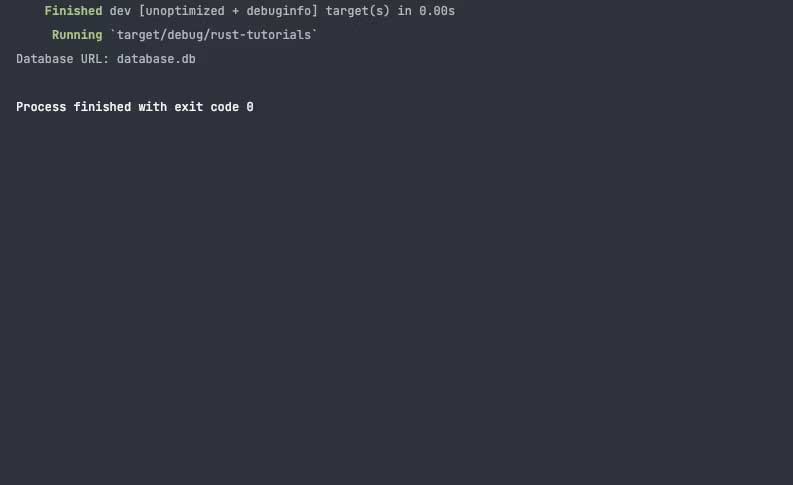
<p style="text-align: justify;">Đây là cách bạn có thể tải file môi trường và truy xuất giá trị của một cặp từ file này.</p>

<pre id="pre2">
<code>use std::env;
use dotenv::dotenv;

fn main() {

    dotenv().ok(); // Load the .env file

    // Đọc giá trị từ file .env
    let database_url = env::var(&quot;DATABASE_URL&quot;).expect(&quot;You&#039;ve not set the DATABASE_URL&quot;);

    // In giá trị này
    println!(&quot;Database URL: {}&quot;, database_url);

}</code></pre>

<p style="text-align: justify;">Hàm<strong>&nbsp;main</strong>&nbsp;tải file .env với hàm&nbsp;<strong>ok</strong>, đọc giá trị từ file này với hàm&nbsp;<strong>evn::var&nbsp;</strong>và xử lý các lỗi có thể bằng hàm&nbsp;<strong>expect</strong>.</p>

<p style="text-align: justify;"><img alt="Cách dùng biến môi trường trong Rust" data-i="1" data-src="https://st.quantrimang.com/photos/image/2023/06/02/bien-moi-truong-rust-1.jpg" data-was-processed="true" height="398" src="https://st.quantrimang.com/photos/image/2023/06/02/bien-moi-truong-rust-1.jpg" width="650" /></p>

<h2 style="text-align: justify;">Mô dun std::env</h2>

<p style="text-align: justify;">Thay vì dùng các gói bên thứ ba, bạn có thể sử dụng mô đun std::env để đọc biến môi trường từ máy.</p>

<p style="text-align: justify;">Đầu tiên, bạn cần nhập mô đun env trong file Rust như sau:</p>

<pre id="pre3">
<code>use std::env;</code></pre>

<p style="text-align: justify;">Sau khi nhập mô đun<strong>&nbsp;std::env</strong>, bạn có thể đọc và viết biến môi trường.</p>

<p style="text-align: justify;">Đây là cách bạn có thể đọc biến môi trường PWD (Present Working Directory) với mô đun&nbsp;<strong>std::env</strong>.</p>

<pre id="pre4">
<code>use std::env;

fn main() {

    // Truy xuất giá trị của biến môi trường &quot;PWD&quot; 
    let variable = env::var(&quot;PWD&quot;).expect(&quot;Error: Working directory environment variable not found&quot;);

    // In giá trị kết hợp với key &quot;PWD&quot; 
    println!(&quot;Value associated with the PWD key: {}&quot;, variable);

}</code></pre>

<p style="text-align: justify;">Hàm&nbsp;<strong>main&nbsp;</strong>in giá trị này cùng với key PWD sau khi biến này xuất giá trị bằng hàm&nbsp;<strong>env::var</strong>.</p>

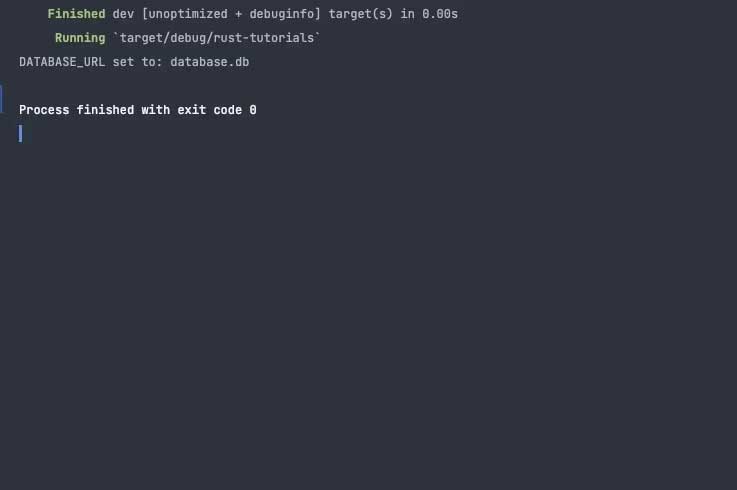
<p style="text-align: justify;">Ngoài ra, bạn có thể dùng<strong>&nbsp;std::env&nbsp;</strong>của hàm&nbsp;<strong>set_var</strong>&nbsp;để thiết lập biến môi trường.</p>

<pre id="pre5">
<code>use std::env;

fn main() -&gt; Result&lt;(), Box&lt;dyn std::error::Error&gt;&gt; {

    // Đặt biến môi trường &quot;DATABASE_URL&quot; sang &quot;database.db&quot;
    env::set_var(&quot;DATABASE_URL&quot;, &quot;database.db&quot;);

    // Truy xuất giá trị của biến môi trường &quot;DATABASE_URL&quot; 
    let env_variable = env::var(&quot;DATABASE_URL&quot;);

    // Kiểm tra xemtruy xuất giá trị của biến môi trường đã thành công hay chưa
    if env_variable.is_err() {

        // Nếu không tìm thấy biến môi trường, xuất thông báo lỗi
        println!(&quot;Error: DATABASE_URL not found&quot;);

    } else {

        // Nếu tìm thấy biến môi trường, in giá trị của nó
        println!(&quot;DATABASE_URL set to: {}&quot;, env_variable.unwrap());

    }

    Ok(())
}</code></pre>

<p style="text-align: justify;">Hàm main đặt biến môi trường với hàm&nbsp;<strong>set_var</strong>&nbsp;nhận cặp&nbsp;<strong>key-value</strong>. Sau khi thiết lập biến môi trường, hàm này in giá trị được liên kết với key.</p>

<p style="text-align: justify;"><img alt="Kết quả sau khi dùng biến môi trường" data-i="2" data-src="https://st.quantrimang.com/photos/image/2023/06/02/bien-moi-truong-rust-2.jpg" data-was-processed="true" height="432" src="https://st.quantrimang.com/photos/image/2023/06/02/bien-moi-truong-rust-2.jpg" width="650" /></p>

<p style="text-align: justify;">Biến môi trường là công cụ hữu ích trong việc xử lý dữ liệu động. Hi vọng bài viết trên giúp bạn hiểu rõ hơn về biến môi trường trong Rust.</p>
		</div>
				<div id="author">
						<p>
				<strong>Nguồn tin:</strong>
				Quantrimang.com
			</p>
		</div>
	</div>
	<div id="footer" class="clearfix">
		<div id="url">
			<strong>URL của bản tin này: </strong><a href="https://www.nguoicodonvn2008.info/vi/news/savefile/kien-thuc-may-tinh/cach-lam-viec-voi-bien-moi-truong-trong-rust-7150.html" title="Cách làm việc với biến môi trường trong Rust">https://www.nguoicodonvn2008.info/vi/news/savefile/kien-thuc-may-tinh/cach-lam-viec-voi-bien-moi-truong-trong-rust-7150.html</a>

		</div>
		<div class="clear"></div>
		<div class="copyright">
			&copy; .&#x3A; Nguoicodonvn2008.info - Cõi lòng người cô đơn &#x3A;.
		</div>
		<div id="contact">
			<a href="mailto:admin@nguoicodonvn2008.info">admin@nguoicodonvn2008.info</a>
		</div>
	</div>
</div>
        <div id="timeoutsess" class="chromeframe">
            Bạn đã không sử dụng Site, <a onclick="timeoutsesscancel();" href="https://www.nguoicodonvn2008.info/#">Bấm vào đây để duy trì trạng thái đăng nhập</a>. Thời gian chờ: <span id="secField"> 60 </span> giây
        </div>
        <div id="openidResult" class="nv-alert" style="display:none"></div>
        <div id="openidBt" data-result="" data-redirect=""></div>
		</script>
		<div class="car-top">
  <span><img src="https://www.nguoicodonvn2008.info/themes/default/images/car.png" alt=""></span>
</div>
<div id="run_cronjobs" style="visibility:hidden;display:none;"><img alt="cron" src="/index.php?second=cronjobs&amp;p=q30YkF8J" width="1" height="1" /></div>
<script src="https://www.nguoicodonvn2008.info/assets/js/jquery/jquery.min.js"></script>
<script>var nv_base_siteurl="/",nv_lang_data="vi",nv_lang_interface="vi",nv_name_variable="nv",nv_fc_variable="op",nv_lang_variable="language",nv_module_name="news",nv_func_name="savefile",nv_is_user=0, nv_my_ofs=-4,nv_my_abbr="EDT",nv_cookie_prefix="nv4c_e856T",nv_check_pass_mstime=1738000,nv_area_admin=0,nv_safemode=0,theme_responsive=0,nv_recaptcha_ver=2,nv_recaptcha_sitekey="",nv_recaptcha_type="image",XSSsanitize=1;</script>
<script src="https://www.nguoicodonvn2008.info/assets/js/language/vi.js"></script>
<script src="https://www.nguoicodonvn2008.info/assets/js/DOMPurify/purify3.js"></script>
<script src="https://www.nguoicodonvn2008.info/assets/js/global.js"></script>
<script src="https://www.nguoicodonvn2008.info/assets/js/site.js"></script>
<script src="https://www.nguoicodonvn2008.info/themes/default/js/news.js"></script>
<script src="https://www.nguoicodonvn2008.info/themes/default/js/main.js"></script>
<script src="https://www.nguoicodonvn2008.info/themes/default/js/custom.js"></script>
<script type="application/ld+json">
        {
            "@context": "https://schema.org",
            "@type": "Organization",
            "url": "https://www.nguoicodonvn2008.info",
            "logo": "https://www.nguoicodonvn2008.info/uploads/angel.gif"
        }
        </script>
<script src="https://www.nguoicodonvn2008.info/themes/default/js/bootstrap.min.js"></script>
<script type="text/javascript">
var $scrolltop = $('.car-top');
$scrolltop.on('click', function () {
    $('html,body').animate({
        scrollTop: 0
    }, 800);
    $(this).addClass("car-run");
    setTimeout(function(){ $scrolltop.removeClass('car-run');}, 1000);
    return false;
});
$(window).on('scroll', function ()
{ 
    if($(window).scrollTop() >= 200)
    {
        $scrolltop.addClass("show");
        $scrolltop.addClass("car-down");
    }
    else
    {
       $scrolltop.removeClass("show");
       setTimeout(function(){ $scrolltop.removeClass('car-down');}, 300);
    }
});
</script>
</body>
</html>