<!DOCTYPE html>
    <html lang="vi" xmlns="http://www.w3.org/1999/xhtml" prefix="og: http://ogp.me/ns#">
    <head>
<title>Cách làm cho script có thể thực thi ở mọi nơi trong Linux</title>
<meta name="description" content="Cách làm cho script có thể thực thi ở mọi nơi trong Linux - Savefile - Tin Tức -...">
<meta name="author" content=".: Nguoicodonvn2008.info - Cõi lòng người cô đơn :.">
<meta name="copyright" content=".: Nguoicodonvn2008.info - Cõi lòng người cô đơn :. [admin@nguoicodonvn2008.info]">
<meta name="robots" content="index, archive, follow, noodp">
<meta name="googlebot" content="index,archive,follow,noodp">
<meta name="msnbot" content="all,index,follow">
<meta name="generator" content="NukeViet v4.5">
<meta http-equiv="Content-Type" content="text/html; charset=utf-8">
<meta property="og:title" content="Cách làm cho script có thể thực thi ở mọi nơi trong Linux">
<meta property="og:type" content="website">
<meta property="og:description" content="Savefile - Tin Tức - https&#x3A;&#x002F;&#x002F;www.nguoicodonvn2008.info&#x002F;vi&#x002F;news&#x002F;savefile&#x002F;kien-thuc-may-tinh&#x002F;cach-lam-cho-script-co-the-thuc-thi-o-moi-noi-trong-linux-1624.html">
<meta property="og:site_name" content=".&#x3A; Nguoicodonvn2008.info - Cõi lòng người cô đơn &#x3A;.">
<meta property="og:url" content="https://www.nguoicodonvn2008.info/vi/news/savefile/kien-thuc-may-tinh/cach-lam-cho-script-co-the-thuc-thi-o-moi-noi-trong-linux-1624.html">
<link rel="shortcut icon" href="https://www.nguoicodonvn2008.info/favicon.ico">
<link rel="canonical" href="https://www.nguoicodonvn2008.info/vi/news/savefile/kien-thuc-may-tinh/cach-lam-cho-script-co-the-thuc-thi-o-moi-noi-trong-linux-1624.html">
<link rel="alternate" href="https://www.nguoicodonvn2008.info/vi/news/rss/" title="Tin Tức" type="application/rss+xml">
<link rel="alternate" href="https://www.nguoicodonvn2008.info/vi/news/rss/karaoke-dual/" title="Tin Tức - Karaoke Dual" type="application/rss+xml">
<link rel="alternate" href="https://www.nguoicodonvn2008.info/vi/news/rss/nhac-tre/" title="Tin Tức - Nhạc trẻ" type="application/rss+xml">
<link rel="alternate" href="https://www.nguoicodonvn2008.info/vi/news/rss/tru-tinh/" title="Tin Tức - Trữ tình" type="application/rss+xml">
<link rel="alternate" href="https://www.nguoicodonvn2008.info/vi/news/rss/nuoc-ngoai/" title="Tin Tức - Nước ngoài" type="application/rss+xml">
<link rel="alternate" href="https://www.nguoicodonvn2008.info/vi/news/rss/remix/" title="Tin Tức - Remix" type="application/rss+xml">
<link rel="alternate" href="https://www.nguoicodonvn2008.info/vi/news/rss/tam-su-tinh-yeu/" title="Tin Tức - Tâm sự tình yêu" type="application/rss+xml">
<link rel="alternate" href="https://www.nguoicodonvn2008.info/vi/news/rss/tho-suu-tam/" title="Tin Tức - Thơ sưu tầm" type="application/rss+xml">
<link rel="alternate" href="https://www.nguoicodonvn2008.info/vi/news/rss/cuoc-song/" title="Tin Tức - Cuộc sống" type="application/rss+xml">
<link rel="alternate" href="https://www.nguoicodonvn2008.info/vi/news/rss/phan-mem/" title="Tin Tức - Phần mềm" type="application/rss+xml">
<link rel="alternate" href="https://www.nguoicodonvn2008.info/vi/news/rss/kien-thuc-may-tinh/" title="Tin Tức - Kiến thức máy tính" type="application/rss+xml">
<link rel="alternate" href="https://www.nguoicodonvn2008.info/vi/news/rss/hoc-tap/" title="Tin Tức - Học tập" type="application/rss+xml">
<link rel="alternate" href="https://www.nguoicodonvn2008.info/vi/news/rss/tai-lieu/" title="Tin Tức - Tài liệu" type="application/rss+xml">
<link rel="alternate" href="https://www.nguoicodonvn2008.info/vi/news/rss/de-thi/" title="Tin Tức - Đề thi" type="application/rss+xml">
<link rel="preload" as="style" href="https://www.nguoicodonvn2008.info/assets/css/font-awesome.min.css" type="text/css">
<link rel="preload" as="style" href="https://www.nguoicodonvn2008.info/themes/default/css/bootstrap.non-responsive.css" type="text/css">
<link rel="preload" as="style" href="https://www.nguoicodonvn2008.info/themes/default/css/style.css" type="text/css">
<link rel="preload" as="style" href="https://www.nguoicodonvn2008.info/themes/default/css/style.non-responsive.css" type="text/css">
<link rel="preload" as="style" href="https://www.nguoicodonvn2008.info/themes/default/css/news.css" type="text/css">
<link rel="preload" as="style" href="https://www.nguoicodonvn2008.info/themes/default/css/custom.css" type="text/css">
<link rel="preload" as="script" href="https://www.nguoicodonvn2008.info/assets/js/jquery/jquery.min.js" type="text/javascript">
<link rel="preload" as="script" href="https://www.nguoicodonvn2008.info/assets/js/language/vi.js" type="text/javascript">
<link rel="preload" as="script" href="https://www.nguoicodonvn2008.info/assets/js/DOMPurify/purify3.js" type="text/javascript">
<link rel="preload" as="script" href="https://www.nguoicodonvn2008.info/assets/js/global.js" type="text/javascript">
<link rel="preload" as="script" href="https://www.nguoicodonvn2008.info/assets/js/site.js" type="text/javascript">
<link rel="preload" as="script" href="https://www.nguoicodonvn2008.info/themes/default/js/news.js" type="text/javascript">
<link rel="preload" as="script" href="https://www.nguoicodonvn2008.info/themes/default/js/main.js" type="text/javascript">
<link rel="preload" as="script" href="https://www.nguoicodonvn2008.info/themes/default/js/custom.js" type="text/javascript">
<link rel="preload" as="script" href="https://www.nguoicodonvn2008.info/themes/default/js/bootstrap.min.js" type="text/javascript">
<link rel="stylesheet" href="https://www.nguoicodonvn2008.info/assets/css/font-awesome.min.css">
<link rel="stylesheet" href="https://www.nguoicodonvn2008.info/themes/default/css/bootstrap.non-responsive.css">
<link rel="stylesheet" href="https://www.nguoicodonvn2008.info/themes/default/css/style.css">
<link rel="stylesheet" href="https://www.nguoicodonvn2008.info/themes/default/css/style.non-responsive.css">
<link rel="StyleSheet" href="https://www.nguoicodonvn2008.info/themes/default/css/news.css">
<link rel="stylesheet" href="https://www.nguoicodonvn2008.info/themes/default/css/custom.css">
<style type="text/css">
	body{background: #fff;}
</style>
    </head>
    <body>
<div id="print">
	<div id="hd_print">
		<h2 class="pull-left">.&#x3A; Nguoicodonvn2008.info - Cõi lòng người cô đơn &#x3A;.</h2>
		<p class="pull-right"><a title=".&#x3A; Nguoicodonvn2008.info - Cõi lòng người cô đơn &#x3A;." href="https://www.nguoicodonvn2008.info/">https://www.nguoicodonvn2008.info</a></p>
	</div>
	<div class="clear"></div>
	<hr />
	<div id="content">
		<h1>Cách làm cho script có thể thực thi ở mọi nơi trong Linux</h1>
		<ul class="list-inline">
			<li>Thứ ba - 04/02/2020 23:57</li>
			<li class="hidden-print txtrequired"><em class="fa fa-print">&nbsp;</em><a title="In ra" href="javascript:;" onclick="window.print()">In ra</a></li>
			<li class="hidden-print txtrequired"><em class="fa fa-power-off">&nbsp;</em><a title="Đóng cửa sổ này" href="javascript:;" onclick="window.close()">Đóng cửa sổ này</a></li>
		</ul>
		<div class="clear"></div>
		<div id="hometext">
		</div>
				<div class="imghome">
			<img alt="Cách làm cho script có thể thực thi ở mọi nơi trong Linux" src="https://st.quantrimang.com/photos/image/2020/02/05/lam-script-co-the-thuc-thi-o-moi-noi-trong-linux-2.jpg" width="460" class="img-thumbnail" />
		</div>
		<div class="clear"></div>
		<div id="bodytext" class="clearfix">
			<p style="text-align: justify;">Khi tạo Bash script và lưu nó vào một thư mục, bạn sẽ thấy rằng mình chỉ có thể thực thi script khi ở trong thư mục đó. Bạn đã bao giờ tự hỏi làm thế nào&nbsp;<code>ls</code>,&nbsp;<code>imagemagick</code>,&nbsp;<code>apache</code>&nbsp;và&nbsp;<code>squid</code>&nbsp;có thể được cài đặt trong các thư mục khác nhau nhưng vẫn có thể truy cập ở mọi nơi? Điều đó bởi vì các đường dẫn riêng của chúng đã được thêm vào biến&nbsp;<strong>“Path”</strong>. Bằng cách thêm nhiều đường dẫn đến nó, bạn cũng có thể làm cho script của mình có thể thực thi được ở mọi nơi.</p>

<h2 style="text-align: justify;">Thêm đường dẫn đến Bash</h2>

<p style="text-align: justify;">Bạn có thể điều chỉnh Path theo 3 cấp độ khác nhau. Bash là cấp độ đầu tiên. Mọi thứ ta thấy ở đây sẽ ảnh hưởng đến Bash. Mọi thứ chạy trong đó, nhưng không có tác dụng gì bên ngoài Bash.</p>

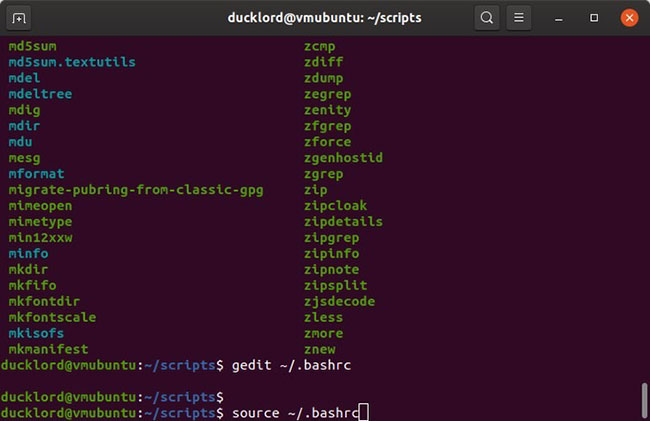
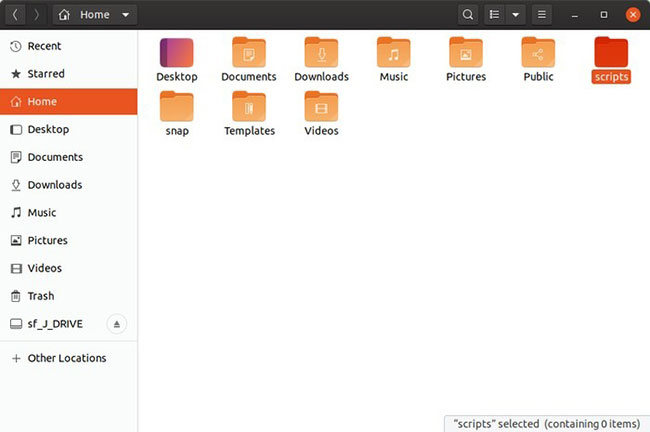
<p style="text-align: justify;">Giả sử bạn có một bộ sưu tập các script trong thư mục bạn muốn truy cập từ mọi nơi.</p>

<figure>
<div style="text-align: justify;"><img alt="Bộ sưu tập script" data-i="0" data-src="https://st.quantrimang.com/photos/image/2020/02/05/lam-script-co-the-thuc-thi-o-moi-noi-trong-linux-1.jpg" data-was-processed="true" height="432" src="https://st.quantrimang.com/photos/image/2020/02/05/lam-script-co-the-thuc-thi-o-moi-noi-trong-linux-1.jpg" width="650" /></div>

<figcaption>
<div style="text-align: justify;">Bộ sưu tập script</div>
</figcaption>
</figure>

<p style="text-align: justify;">Để thực hiện điều này, bạn có thể thêm đường dẫn của chúng vào&nbsp;<strong>“~/.bashrc”</strong>. Bạn có thể mở file&nbsp;<strong>.bashrc</strong>&nbsp;(nó nằm trong thư mục&nbsp;<strong>Home</strong>, nhưng được ẩn theo mặc định) trong trình soạn thảo văn bản yêu thích của bạn, như&nbsp;<strong>gedit</strong>.</p>

<p style="text-align: justify;">Đi đến cuối file và thêm:</p>

<pre id="pre0">
<code>PATH=&quot;/path_of/the_folder_we/want_to_add_to:$PATH&quot;</code></pre>

<p style="text-align: justify;">Ví dụ, nếu bạn giữ các script thực thi của mình trong thư mục&nbsp;<strong>“/home/myname/scripts”</strong>, thì lệnh sẽ là:</p>

<pre id="pre1">
<code>export PATH=&quot;/home/myname/scripts:$PATH&quot;</code></pre>

<figure>
<div style="text-align: justify;"><img alt="Thêm đường dẫn đến Path" data-i="1" data-src="https://st.quantrimang.com/photos/image/2020/02/05/lam-script-co-the-thuc-thi-o-moi-noi-trong-linux-2.jpg" data-was-processed="true" height="421" src="https://st.quantrimang.com/photos/image/2020/02/05/lam-script-co-the-thuc-thi-o-moi-noi-trong-linux-2.jpg" width="650" /></div>

<figcaption>
<div style="text-align: justify;">Thêm đường dẫn đến Path</div>
</figcaption>
</figure>

<p style="text-align: justify;">Để ghi lại thay đổi, hãy lưu file, thoát trình soạn thảo văn bản, sau đó nhập lệnh này vào terminal:</p>

<pre id="pre2">
<code>source ~/.bashrc</code></pre>

<figure>
<div style="text-align: justify;"><img alt="Lưu và thoát để áp dụng thay đổi" data-i="2" data-src="https://st.quantrimang.com/photos/image/2020/02/05/lam-script-co-the-thuc-thi-o-moi-noi-trong-linux-3.jpg" data-was-processed="true" height="149" src="https://st.quantrimang.com/photos/image/2020/02/05/lam-script-co-the-thuc-thi-o-moi-noi-trong-linux-3.jpg" width="650" /></div>

<figcaption>
<div style="text-align: justify;">Lưu và thoát để áp dụng thay đổi</div>
</figcaption>
</figure>

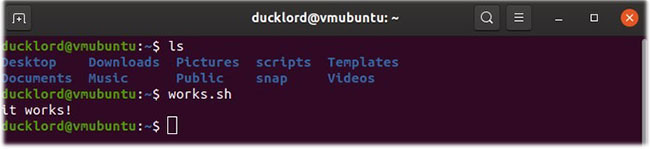
<p style="text-align: justify;">Sau đó, di chuyển đến nhiều thư mục khác nhau và cố gắng chạy các script từ đó.</p>

<div style="text-align: justify;">&nbsp;</div>

<h2 style="text-align: justify;">Thêm đường dẫn vào Profile</h2>

<p style="text-align: justify;">Nếu bạn muốn nội dung của thư mục có thể truy cập từ bên ngoài các ràng buộc (constraint) của Bash, thay vào đó hãy thêm nó vào biến&nbsp;<strong>Profile</strong>.</p>

<p style="text-align: justify;">Mở file&nbsp;<strong>.profile</strong>&nbsp;với trình soạn thảo văn bản yêu thích của bạn.</p>

<p style="text-align: justify;">Ở phần cuối của file, nhập:</p>

<pre id="pre3">
<code>export PATH=&quot;$PATH:$HOME/scripts&quot;</code></pre>

<p style="text-align: justify;">Bạn phải đăng xuất và đăng nhập lại để áp dụng thay đổi.</p>

<figure>
<div style="text-align: justify;"><img alt="Bạn có thể chỉnh sửa file “.pam environment” thay vì “.profile”" data-i="3" data-src="https://st.quantrimang.com/photos/image/2020/02/05/lam-script-co-the-thuc-thi-o-moi-noi-trong-linux-4.jpg" data-was-processed="true" height="254" src="https://st.quantrimang.com/photos/image/2020/02/05/lam-script-co-the-thuc-thi-o-moi-noi-trong-linux-4.jpg" width="650" /></div>

<figcaption>
<div style="text-align: justify;">Bạn có thể chỉnh sửa file “.pam environment” thay vì “.profile”</div>
</figcaption>
</figure>

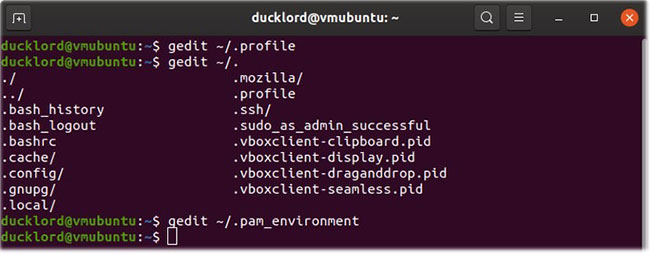
<p style="text-align: justify;">Trong&nbsp;<a href="https://quantrimang.com/meo-va-thu-thuat-sau-khi-cai-dat-ubuntu-84487" title="Mẹo và thủ thuật sau khi cài đặt Ubuntu">Ubuntu</a>&nbsp;và các dẫn xuất (derivative) của nó, bạn có thể chỉnh sửa file&nbsp;<strong>“.pam environment”</strong>&nbsp;thay vì&nbsp;<strong>“.profile”</strong>.</p>

<p style="text-align: justify;">Mở file&nbsp;<strong>“.pam_environment”</strong>&nbsp;trong trình soạn thảo văn bản. Nếu file không tồn tại, hãy tạo nó.</p>

<p style="text-align: justify;">Trong file, hãy nhập:</p>

<pre id="pre4">
<code>PATH DEFAULT=${PATH}:/home/@{PAM_USER}/scripts</code></pre>

<p style="text-align: justify;">Lưu ý rằng thay vì đường dẫn được hardcode hoàn toàn và không giống như trong file profile, ở đây ta sẽ sử dụng một biến. Bằng cách này, mỗi thư mục&nbsp;<strong>“/home/USER_NAME/scripts”</strong>&nbsp;của người dùng sẽ được thêm vào Path.</p>

<p style="text-align: justify;">Như khi chỉnh sửa file .profile, bạn phải đăng xuất và đăng nhập lại để những thay đổi có hiệu lực.</p>

<h2 style="text-align: justify;">Thêm đường dẫn đến môi trường (environment)</h2>

<p style="text-align: justify;">Cách thích hợp để có thể truy cập nội dung của một thư mục từ nhiều người dùng, chia sẻ cùng một máy tính là thêm nó vào biến môi trường (environment). Mở một terminal và nhập:</p>

<pre id="pre5">
<code>sudo nano /etc/environment</code></pre>

<p style="text-align: justify;">Biến Path ở đó chứa một loạt các thư mục trong dấu ngoặc kép, được phân tách bằng dấu hai chấm, tương tự như:</p>

<pre id="pre6">
<code>PATH=&quot;/usr/local/sbin:/usr/local/bin:/usr/sbin&quot;</code></pre>

<p style="text-align: justify;">Để bao gồm thư mục của riêng bạn trong danh sách đó, ngay sau đường dẫn cuối cùng, trước khi đóng ngoặc kép, hãy nhập dấu hai chấm và đường dẫn đến thư mục đó. Nếu thư mục của bạn là&nbsp;<strong>“/home/your_username/scripts”</strong>, thì nó sẽ giống như thế này:</p>

<pre id="pre7">
<code>PATH=&quot;/usr/local/sbin:/usr/local/bin:/usr/sbin:/usr/bin:/sbin:/bin:/usr/games:/usr/local/games:/home/YOUR_USERNAME/scripts&quot;</code></pre>

<p style="text-align: justify;">Hãy đăng xuất và đăng nhập lại để áp dụng các thay đổi.</p>

<p style="text-align: justify;">Với các thủ thuật trên, bạn sẽ có thể chạy các script của mình từ bất kỳ đâu trong&nbsp;Linux.</p>
		</div>
				<div id="author">
						<p>
				<strong>Nguồn tin:</strong>
				Quantrimang.com
			</p>
		</div>
	</div>
	<div id="footer" class="clearfix">
		<div id="url">
			<strong>URL của bản tin này: </strong><a href="https://www.nguoicodonvn2008.info/vi/news/savefile/kien-thuc-may-tinh/cach-lam-cho-script-co-the-thuc-thi-o-moi-noi-trong-linux-1624.html" title="Cách làm cho script có thể thực thi ở mọi nơi trong Linux">https://www.nguoicodonvn2008.info/vi/news/savefile/kien-thuc-may-tinh/cach-lam-cho-script-co-the-thuc-thi-o-moi-noi-trong-linux-1624.html</a>

		</div>
		<div class="clear"></div>
		<div class="copyright">
			&copy; .&#x3A; Nguoicodonvn2008.info - Cõi lòng người cô đơn &#x3A;.
		</div>
		<div id="contact">
			<a href="mailto:admin@nguoicodonvn2008.info">admin@nguoicodonvn2008.info</a>
		</div>
	</div>
</div>
        <div id="timeoutsess" class="chromeframe">
            Bạn đã không sử dụng Site, <a onclick="timeoutsesscancel();" href="https://www.nguoicodonvn2008.info/#">Bấm vào đây để duy trì trạng thái đăng nhập</a>. Thời gian chờ: <span id="secField"> 60 </span> giây
        </div>
        <div id="openidResult" class="nv-alert" style="display:none"></div>
        <div id="openidBt" data-result="" data-redirect=""></div>
		</script>
		<div class="car-top">
  <span><img src="https://www.nguoicodonvn2008.info/themes/default/images/car.png" alt=""></span>
</div>
<script src="https://www.nguoicodonvn2008.info/assets/js/jquery/jquery.min.js"></script>
<script>var nv_base_siteurl="/",nv_lang_data="vi",nv_lang_interface="vi",nv_name_variable="nv",nv_fc_variable="op",nv_lang_variable="language",nv_module_name="news",nv_func_name="savefile",nv_is_user=0, nv_my_ofs=-4,nv_my_abbr="EDT",nv_cookie_prefix="nv4c_e856T",nv_check_pass_mstime=1738000,nv_area_admin=0,nv_safemode=0,theme_responsive=0,nv_recaptcha_ver=2,nv_recaptcha_sitekey="",nv_recaptcha_type="image",XSSsanitize=1;</script>
<script src="https://www.nguoicodonvn2008.info/assets/js/language/vi.js"></script>
<script src="https://www.nguoicodonvn2008.info/assets/js/DOMPurify/purify3.js"></script>
<script src="https://www.nguoicodonvn2008.info/assets/js/global.js"></script>
<script src="https://www.nguoicodonvn2008.info/assets/js/site.js"></script>
<script src="https://www.nguoicodonvn2008.info/themes/default/js/news.js"></script>
<script src="https://www.nguoicodonvn2008.info/themes/default/js/main.js"></script>
<script src="https://www.nguoicodonvn2008.info/themes/default/js/custom.js"></script>
<script type="application/ld+json">
        {
            "@context": "https://schema.org",
            "@type": "Organization",
            "url": "https://www.nguoicodonvn2008.info",
            "logo": "https://www.nguoicodonvn2008.info/uploads/angel.gif"
        }
        </script>
<script src="https://www.nguoicodonvn2008.info/themes/default/js/bootstrap.min.js"></script>
<script type="text/javascript">
var $scrolltop = $('.car-top');
$scrolltop.on('click', function () {
    $('html,body').animate({
        scrollTop: 0
    }, 800);
    $(this).addClass("car-run");
    setTimeout(function(){ $scrolltop.removeClass('car-run');}, 1000);
    return false;
});
$(window).on('scroll', function ()
{ 
    if($(window).scrollTop() >= 200)
    {
        $scrolltop.addClass("show");
        $scrolltop.addClass("car-down");
    }
    else
    {
       $scrolltop.removeClass("show");
       setTimeout(function(){ $scrolltop.removeClass('car-down');}, 300);
    }
});
</script>
</body>
</html>