<!DOCTYPE html>
    <html lang="vi" xmlns="http://www.w3.org/1999/xhtml" prefix="og: http://ogp.me/ns#">
    <head>
<title>Cách kiểm tra tất cả các service đang chạy trong Linux</title>
<meta name="description" content="Cách kiểm tra tất cả các service đang chạy trong Linux - Savefile - Tin Tức -...">
<meta name="author" content=".: Nguoicodonvn2008.info - Cõi lòng người cô đơn :.">
<meta name="copyright" content=".: Nguoicodonvn2008.info - Cõi lòng người cô đơn :. [admin@nguoicodonvn2008.info]">
<meta name="robots" content="index, archive, follow, noodp">
<meta name="googlebot" content="index,archive,follow,noodp">
<meta name="msnbot" content="all,index,follow">
<meta name="generator" content="NukeViet v4.5">
<meta http-equiv="Content-Type" content="text/html; charset=utf-8">
<meta property="og:title" content="Cách kiểm tra tất cả các service đang chạy trong Linux">
<meta property="og:type" content="website">
<meta property="og:description" content="Savefile - Tin Tức - https&#x3A;&#x002F;&#x002F;www.nguoicodonvn2008.info&#x002F;vi&#x002F;news&#x002F;savefile&#x002F;kien-thuc-may-tinh&#x002F;cach-kiem-tra-tat-ca-cac-service-dang-chay-trong-linux-2178.html">
<meta property="og:site_name" content=".&#x3A; Nguoicodonvn2008.info - Cõi lòng người cô đơn &#x3A;.">
<meta property="og:url" content="https://www.nguoicodonvn2008.info/vi/news/savefile/kien-thuc-may-tinh/cach-kiem-tra-tat-ca-cac-service-dang-chay-trong-linux-2178.html">
<link rel="shortcut icon" href="https://www.nguoicodonvn2008.info/favicon.ico">
<link rel="canonical" href="https://www.nguoicodonvn2008.info/vi/news/savefile/kien-thuc-may-tinh/cach-kiem-tra-tat-ca-cac-service-dang-chay-trong-linux-2178.html">
<link rel="alternate" href="https://www.nguoicodonvn2008.info/vi/news/rss/" title="Tin Tức" type="application/rss+xml">
<link rel="alternate" href="https://www.nguoicodonvn2008.info/vi/news/rss/karaoke-dual/" title="Tin Tức - Karaoke Dual" type="application/rss+xml">
<link rel="alternate" href="https://www.nguoicodonvn2008.info/vi/news/rss/nhac-tre/" title="Tin Tức - Nhạc trẻ" type="application/rss+xml">
<link rel="alternate" href="https://www.nguoicodonvn2008.info/vi/news/rss/tru-tinh/" title="Tin Tức - Trữ tình" type="application/rss+xml">
<link rel="alternate" href="https://www.nguoicodonvn2008.info/vi/news/rss/nuoc-ngoai/" title="Tin Tức - Nước ngoài" type="application/rss+xml">
<link rel="alternate" href="https://www.nguoicodonvn2008.info/vi/news/rss/remix/" title="Tin Tức - Remix" type="application/rss+xml">
<link rel="alternate" href="https://www.nguoicodonvn2008.info/vi/news/rss/tam-su-tinh-yeu/" title="Tin Tức - Tâm sự tình yêu" type="application/rss+xml">
<link rel="alternate" href="https://www.nguoicodonvn2008.info/vi/news/rss/tho-suu-tam/" title="Tin Tức - Thơ sưu tầm" type="application/rss+xml">
<link rel="alternate" href="https://www.nguoicodonvn2008.info/vi/news/rss/cuoc-song/" title="Tin Tức - Cuộc sống" type="application/rss+xml">
<link rel="alternate" href="https://www.nguoicodonvn2008.info/vi/news/rss/phan-mem/" title="Tin Tức - Phần mềm" type="application/rss+xml">
<link rel="alternate" href="https://www.nguoicodonvn2008.info/vi/news/rss/kien-thuc-may-tinh/" title="Tin Tức - Kiến thức máy tính" type="application/rss+xml">
<link rel="alternate" href="https://www.nguoicodonvn2008.info/vi/news/rss/hoc-tap/" title="Tin Tức - Học tập" type="application/rss+xml">
<link rel="alternate" href="https://www.nguoicodonvn2008.info/vi/news/rss/tai-lieu/" title="Tin Tức - Tài liệu" type="application/rss+xml">
<link rel="alternate" href="https://www.nguoicodonvn2008.info/vi/news/rss/de-thi/" title="Tin Tức - Đề thi" type="application/rss+xml">
<link rel="preload" as="style" href="https://www.nguoicodonvn2008.info/assets/css/font-awesome.min.css" type="text/css">
<link rel="preload" as="style" href="https://www.nguoicodonvn2008.info/themes/default/css/bootstrap.non-responsive.css" type="text/css">
<link rel="preload" as="style" href="https://www.nguoicodonvn2008.info/themes/default/css/style.css" type="text/css">
<link rel="preload" as="style" href="https://www.nguoicodonvn2008.info/themes/default/css/style.non-responsive.css" type="text/css">
<link rel="preload" as="style" href="https://www.nguoicodonvn2008.info/themes/default/css/news.css" type="text/css">
<link rel="preload" as="style" href="https://www.nguoicodonvn2008.info/themes/default/css/custom.css" type="text/css">
<link rel="preload" as="script" href="https://www.nguoicodonvn2008.info/assets/js/jquery/jquery.min.js" type="text/javascript">
<link rel="preload" as="script" href="https://www.nguoicodonvn2008.info/assets/js/language/vi.js" type="text/javascript">
<link rel="preload" as="script" href="https://www.nguoicodonvn2008.info/assets/js/DOMPurify/purify3.js" type="text/javascript">
<link rel="preload" as="script" href="https://www.nguoicodonvn2008.info/assets/js/global.js" type="text/javascript">
<link rel="preload" as="script" href="https://www.nguoicodonvn2008.info/assets/js/site.js" type="text/javascript">
<link rel="preload" as="script" href="https://www.nguoicodonvn2008.info/themes/default/js/news.js" type="text/javascript">
<link rel="preload" as="script" href="https://www.nguoicodonvn2008.info/themes/default/js/main.js" type="text/javascript">
<link rel="preload" as="script" href="https://www.nguoicodonvn2008.info/themes/default/js/custom.js" type="text/javascript">
<link rel="preload" as="script" href="https://www.nguoicodonvn2008.info/themes/default/js/bootstrap.min.js" type="text/javascript">
<link rel="stylesheet" href="https://www.nguoicodonvn2008.info/assets/css/font-awesome.min.css">
<link rel="stylesheet" href="https://www.nguoicodonvn2008.info/themes/default/css/bootstrap.non-responsive.css">
<link rel="stylesheet" href="https://www.nguoicodonvn2008.info/themes/default/css/style.css">
<link rel="stylesheet" href="https://www.nguoicodonvn2008.info/themes/default/css/style.non-responsive.css">
<link rel="StyleSheet" href="https://www.nguoicodonvn2008.info/themes/default/css/news.css">
<link rel="stylesheet" href="https://www.nguoicodonvn2008.info/themes/default/css/custom.css">
<style type="text/css">
	body{background: #fff;}
</style>
    </head>
    <body>
<div id="print">
	<div id="hd_print">
		<h2 class="pull-left">.&#x3A; Nguoicodonvn2008.info - Cõi lòng người cô đơn &#x3A;.</h2>
		<p class="pull-right"><a title=".&#x3A; Nguoicodonvn2008.info - Cõi lòng người cô đơn &#x3A;." href="https://www.nguoicodonvn2008.info/">https://www.nguoicodonvn2008.info</a></p>
	</div>
	<div class="clear"></div>
	<hr />
	<div id="content">
		<h1>Cách kiểm tra tất cả các service đang chạy trong Linux</h1>
		<ul class="list-inline">
			<li>Thứ ba - 09/06/2020 00:50</li>
			<li class="hidden-print txtrequired"><em class="fa fa-print">&nbsp;</em><a title="In ra" href="javascript:;" onclick="window.print()">In ra</a></li>
			<li class="hidden-print txtrequired"><em class="fa fa-power-off">&nbsp;</em><a title="Đóng cửa sổ này" href="javascript:;" onclick="window.close()">Đóng cửa sổ này</a></li>
		</ul>
		<div class="clear"></div>
		<div id="hometext">
		</div>
				<div class="imghome">
			<img alt="Cách kiểm tra tất cả các service đang chạy trong Linux" src="https://st.quantrimang.com/photos/image/2020/06/09/service-chay-trong-linux-14.jpg" width="460" class="img-thumbnail" />
		</div>
		<div class="clear"></div>
		<div id="bodytext" class="clearfix">
			<p style="text-align: justify;">Khi sử dụng bất kỳ phân phối Linux nào, một số tiến trình và service sẽ cùng chạy. Một số service có thể chạy trong nền mà người dùng không hề hay biết. Việc chạy các service không cần thiết có thể tiêu tốn nhiều tài nguyên hệ thống hoặc gây ra vấn đề bảo mật.</p>

<p style="text-align: justify;">Do đó, cần phải biết tất cả các service đang chạy trên hệ thống. Trong bài viết này,&nbsp;<strong>Quantrimang.com</strong>&nbsp;sẽ chỉ cho bạn tất cả các cách có thể áp dụng để liệt kê những service đang chạy trên máy tính Linux.</p>

<h2 style="text-align: justify;">Cách kiểm tra các service đang chạy trong Linux</h2>

<p style="text-align: justify;">Trước tiên, hãy hiểu rõ về các service Linux. Nếu service có một script, thì nó đi kèm với 3 trạng thái:</p>

<ul>
	<li style="text-align: justify;">start (bắt đầu)</li>
	<li style="text-align: justify;">stop (dừng)</li>
	<li style="text-align: justify;">restart (khởi động lại)</li>
</ul>

<p style="text-align: justify;">Tất cả được thực hiện với lệnh -&nbsp;<strong>service.</strong>&nbsp;Ví dụ, để khởi động lại service&nbsp;<strong>network-manager,</strong>&nbsp;hãy chạy lệnh sau:</p>

<pre id="pre0">
<code>sudo service network-manager restart</code></pre>

<p style="text-align: justify;">Lệnh service tham chiếu mỗi service bằng cách sử dụng script init được lưu trữ trong&nbsp;<strong>/etc/init.d</strong>&nbsp;cho&nbsp;Ubuntu&nbsp;và bất kỳ bản phân phối dựa trên Debian nào khác, và&nbsp;<strong>etc/rc.d/init.d</strong>&nbsp;cho các bản phân phối Linux dựa trên RedHat. Một số tên service thay đổi theo từng bản phân phối. Ví dụ, service web server Apache là&nbsp;<strong>httpd</strong>&nbsp;trên CentOS và&nbsp;<strong>Apache2</strong>&nbsp;trên Ubuntu.</p>

<p style="text-align: justify;">Rất nhiều bản phân phối Linux thuộc các hệ thống init sau:</p>

<ul>
	<li style="text-align: justify;"><strong>System V (SysV)</strong>, là hệ thống init ban đầu.</li>
	<li style="text-align: justify;"><strong>Upstart</strong></li>
	<li style="text-align: justify;"><strong>systemd</strong>, là hệ thống init mới nhất tính đến thời điểm bài viết.</li>
</ul>

<div style="text-align: justify;">&nbsp;</div>

<h3 style="text-align: justify;">Kiểm tra tất cả các service đang chạy trong hệ thống System V (SysV) init</h3>

<p style="text-align: justify;">Hãy cùng xem một số lệnh Terminal mà bạn có thể sử dụng để liệt kê tất cả các service đang chạy trong hệ thống SysV init.</p>

<pre id="pre1">
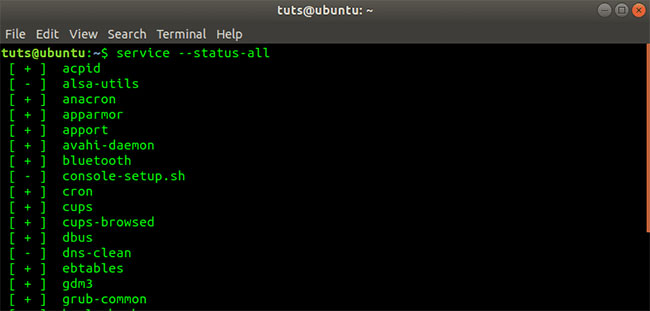
<code>service --status-all</code></pre>

<figure>
<div style="text-align: justify;"><img alt="Đầu ra lệnh service –status-all" data-i="0" data-src="https://st.quantrimang.com/photos/image/2020/06/09/service-chay-trong-linux-1.jpg" data-was-processed="true" height="311" src="https://st.quantrimang.com/photos/image/2020/06/09/service-chay-trong-linux-1.jpg" width="650" /></div>

<figcaption>
<div style="text-align: justify;">Đầu ra lệnh service –status-all</div>
</figcaption>
</figure>

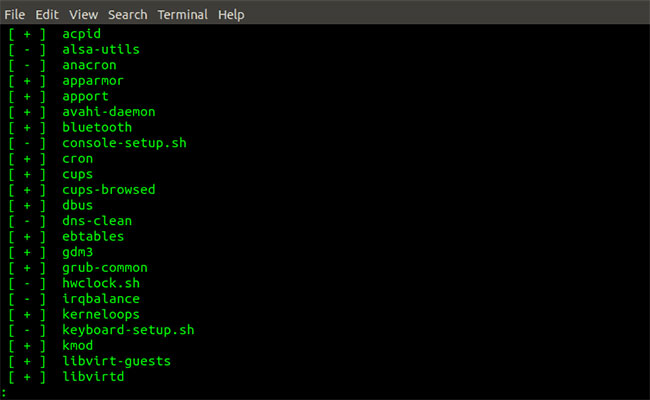
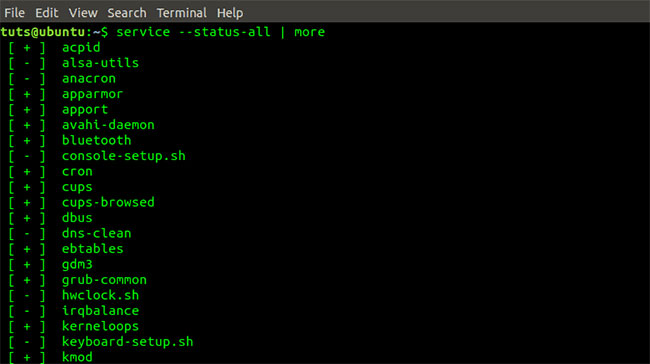
<p style="text-align: justify;">Lệnh trên liệt kê tất cả các service đang chạy trong hệ thống. Trong trường hợp các service đang chạy rất nhiều, bạn có thể sử dụng các tham số bổ sung -&nbsp;<strong>more</strong>&nbsp;và&nbsp;<strong>less</strong>&nbsp;để liệt kê các service trong chế độ xem một cách có tổ chức và rõ ràng.</p>

<pre id="pre2">
<code>service --status-all | less</code></pre>

<figure>
<div style="text-align: justify;"><img alt="Đầu ra lệnh service –status-all | Less" data-i="1" data-src="https://st.quantrimang.com/photos/image/2020/06/09/service-chay-trong-linux-2.jpg" data-was-processed="true" height="400" src="https://st.quantrimang.com/photos/image/2020/06/09/service-chay-trong-linux-2.jpg" width="650" /></div>

<figcaption>
<div style="text-align: justify;">Đầu ra lệnh service –status-all | Less</div>
</figcaption>
</figure>

<pre id="pre3">
<code>service --status-all | more</code></pre>

<figure>
<div style="text-align: justify;"><img alt="Đầu ra lệnh service –status-all | More" data-i="2" data-src="https://st.quantrimang.com/photos/image/2020/06/09/service-chay-trong-linux-3.jpg" data-was-processed="true" height="364" src="https://st.quantrimang.com/photos/image/2020/06/09/service-chay-trong-linux-3.jpg" width="650" /></div>

<figcaption>
<div style="text-align: justify;">Đầu ra lệnh service –status-all | More</div>
</figcaption>
</figure>

<p style="text-align: justify;">Để chỉ liệt kê các service hiện đang chạy trên hệ thống, hãy thực thi lệnh bên dưới:</p>

<pre id="pre4">
<code>service --status-all | grep running</code></pre>

<p style="text-align: justify;">Để xem trạng thái của một service cụ thể, hãy thực thi lệnh bên dưới:</p>

<pre id="pre5">
<code>service --status-all | grep &#91;service_name&#93;
 e.g
 service --status-all | grep httpd</code></pre>

<p style="text-align: justify;">Ngoài ra, bạn có thể thực thi lệnh bên dưới để xem trạng thái của một service cụ thể.</p>

<pre id="pre6">
<code>service httpd status</code></pre>

<p style="text-align: justify;">Để liệt kê tất cả các service được kích hoạt trong khi boot, hãy thực thi lệnh bên dưới:</p>

<pre id="pre7">
<code>chkconfig --list</code></pre>

<h3 style="text-align: justify;">Kiểm tra tất cả các service đang chạy trong hệ thống Upstart init</h3>

<p style="text-align: justify;">Để liệt kê tất cả các service trên máy Linux chạy hệ thống Upstart init, hãy thực thi lệnh bên dưới:</p>

<pre id="pre8">
<code>initctl list</code></pre>

<div style="text-align: justify;">&nbsp;</div>

<h3 style="text-align: justify;">Kiểm tra tất cả các service đang chạy trong hệ thống Systemd init</h3>

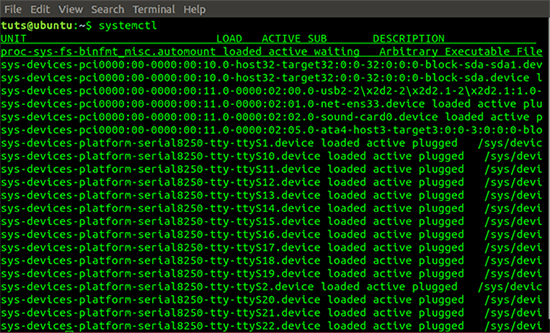
<p style="text-align: justify;">Để liệt kê tất cả các service trên máy Linux đang chạy hệ thống Systemd init, hãy thực thi lệnh dưới đây:</p>

<pre id="pre9">
<code>systemctl</code></pre>

<figure>
<div style="text-align: justify;"><img alt="Đầu ra lệnh systemctl " data-i="3" data-src="https://st.quantrimang.com/photos/image/2020/06/09/service-chay-trong-linux-4.png" data-was-processed="true" height="333" src="https://st.quantrimang.com/photos/image/2020/06/09/service-chay-trong-linux-4.png" width="550" /></div>

<figcaption>
<div style="text-align: justify;">Đầu ra lệnh systemctl</div>
</figcaption>
</figure>

<p style="text-align: justify;">Từ lệnh trên, ta thấy rằng dữ liệu được hiển thị trong 5 cột, cụ thể là&nbsp;<strong>UNIT, LOAD, ACTIVE, SUB</strong>&nbsp;và<strong>&nbsp;DESCRIPTION</strong>.</p>

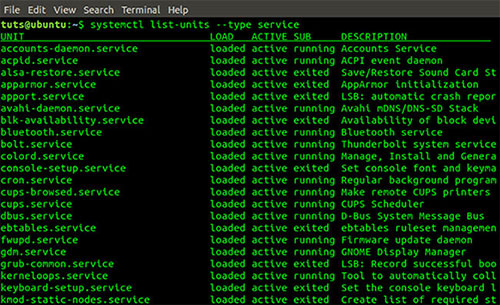
<p style="text-align: justify;">Bạn cũng có thể liệt kê các service đang chạy dựa trên loại của chúng bằng lệnh sau:</p>

<pre id="pre10">
<code>systemctl list-units --type service</code></pre>

<figure>
<div style="text-align: justify;"><img alt="Đầu ra lệnh systemctl list-units –type" data-i="4" data-src="https://st.quantrimang.com/photos/image/2020/06/09/service-chay-trong-linux-5.jpg" data-was-processed="true" height="305" src="https://st.quantrimang.com/photos/image/2020/06/09/service-chay-trong-linux-5.jpg" width="500" /></div>

<figcaption>
<div style="text-align: justify;">Đầu ra lệnh systemctl list-units –type</div>
</figcaption>
</figure>

<p style="text-align: justify;">Bạn cũng có thể liệt kê các service dựa trên trạng thái hiện tại của chúng. Kết quả tương đối giống với đầu ra của lệnh trước nhưng đơn giản hơn một chút.</p>

<pre id="pre11">
<code>systemctl list-unit-files --type service</code></pre>

<figure>
<div style="text-align: justify;"><img alt="systemctl list-unit-files | grep enabled" data-i="5" data-src="https://st.quantrimang.com/photos/image/2020/06/09/service-chay-trong-linux-6.jpg" data-was-processed="true" height="366" src="https://st.quantrimang.com/photos/image/2020/06/09/service-chay-trong-linux-6.jpg" width="650" /></div>

<figcaption>
<div style="text-align: justify;">systemctl list-unit-files | grep enabled</div>
</figcaption>
</figure>

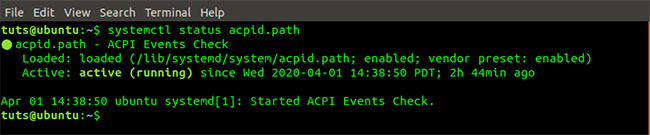
<p style="text-align: justify;">Để liệt kê trạng thái của một service cụ thể, hãy thực thi lệnh bên dưới:</p>

<pre id="pre12">
<code>systemctl status &#91;service_name&#93;
 e.g
 systemctl status acpid.path</code></pre>

<figure>
<div style="text-align: justify;"><img alt="Lệnh systemctl status acpid.path" data-i="6" data-src="https://st.quantrimang.com/photos/image/2020/06/09/service-chay-trong-linux-7.jpg" data-was-processed="true" height="135" src="https://st.quantrimang.com/photos/image/2020/06/09/service-chay-trong-linux-7.jpg" width="650" /></div>

<figcaption>
<div style="text-align: justify;">Lệnh systemctl status acpid.path</div>
</figcaption>
</figure>

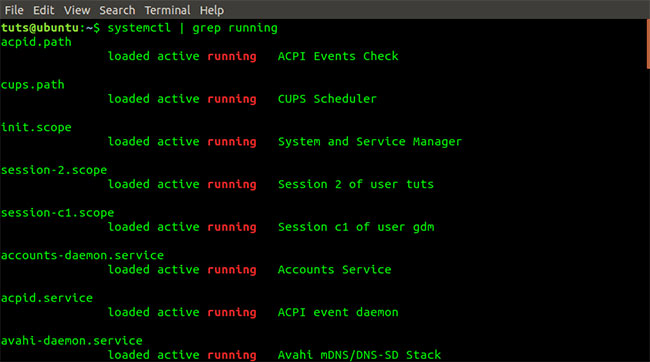
<p style="text-align: justify;">Để chỉ liệt kê các service hiện đang chạy trên hệ thống, hãy thực thi lệnh bên dưới:</p>

<pre id="pre13">
<code>systemctl | grep running</code></pre>

<figure>
<div style="text-align: justify;"><img alt="Lệnh systemctl | grep running" data-i="7" data-src="https://st.quantrimang.com/photos/image/2020/06/09/service-chay-trong-linux-8.jpg" data-was-processed="true" height="362" src="https://st.quantrimang.com/photos/image/2020/06/09/service-chay-trong-linux-8.jpg" width="650" /></div>

<figcaption>
<div style="text-align: justify;">Lệnh systemctl | grep running</div>
</figcaption>
</figure>

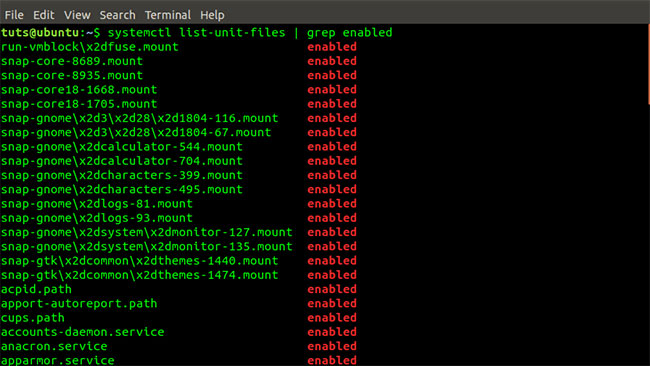
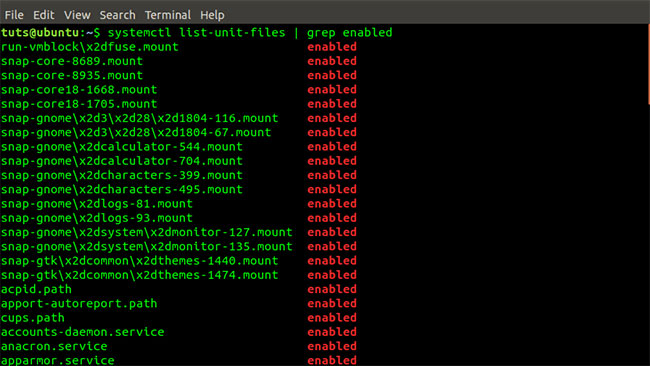
<p style="text-align: justify;">Để liệt kê tất cả các service được kích hoạt trong khi boot, hãy thực thi lệnh bên dưới:</p>

<pre id="pre14">
<code>systemctl list-unit-files | grep enabled</code></pre>

<figure>
<div style="text-align: justify;"><img alt="Lệnh systemctl list-unit-files | grep enabled" data-i="8" data-src="https://st.quantrimang.com/photos/image/2020/06/09/service-chay-trong-linux-9.jpg" data-was-processed="true" height="366" src="https://st.quantrimang.com/photos/image/2020/06/09/service-chay-trong-linux-9.jpg" width="650" /></div>

<figcaption>
<div style="text-align: justify;">Lệnh systemctl list-unit-files | grep enabled</div>
</figcaption>
</figure>

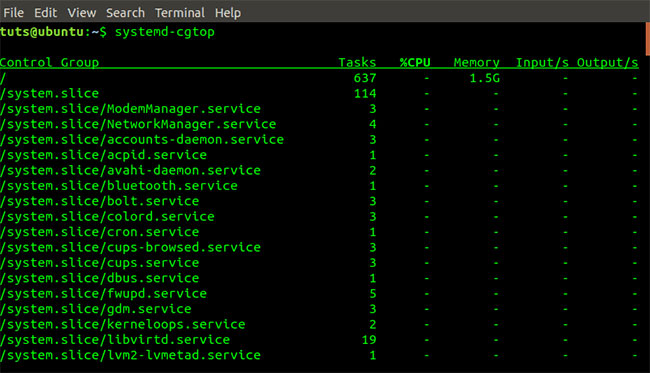
<p style="text-align: justify;">Bạn cũng có thể xem các control group (nhóm điều khiển) hàng đầu và việc sử dụng tài nguyên hệ thống của chúng như&nbsp;<strong>I/O, CPU, Tasks</strong>&nbsp;và<strong>&nbsp;Memory</strong>&nbsp;bằng lệnh&nbsp;<strong>systemd-cgtop.</strong></p>

<pre id="pre15">
<code>systemd-cgtop</code></pre>

<figure>
<div style="text-align: justify;"><img alt="Đầu ra lệnh systemd-cgtop" data-i="9" data-src="https://st.quantrimang.com/photos/image/2020/06/09/service-chay-trong-linux-10.jpg" data-was-processed="true" height="373" src="https://st.quantrimang.com/photos/image/2020/06/09/service-chay-trong-linux-10.jpg" width="650" /></div>

<figcaption>
<div style="text-align: justify;">Đầu ra lệnh systemd-cgtop</div>
</figcaption>
</figure>

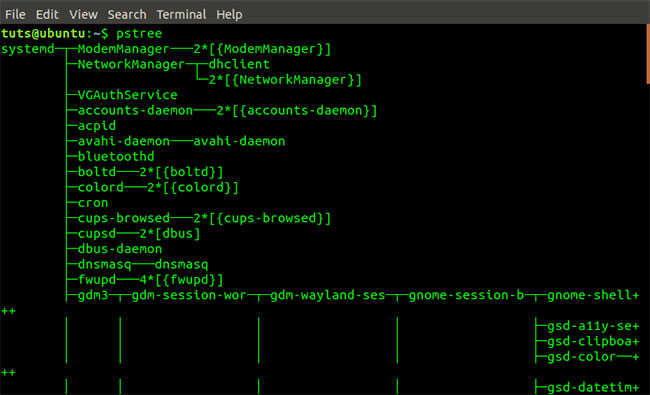
<p style="text-align: justify;">Cũng có thể sử dụng&nbsp;<strong>pstree</strong>&nbsp;để liệt kê tất cả các service đang chạy trong hệ thống. Pstree lấy thông tin này từ đầu ra hệ thống Systemd.</p>

<pre id="pre16">
<code>pstree</code></pre>

<figure>
<div style="text-align: justify;"><img alt="Đầu ra lệnh pstree" data-i="10" data-src="https://st.quantrimang.com/photos/image/2020/06/09/service-chay-trong-linux-11.jpg" data-was-processed="true" height="395" src="https://st.quantrimang.com/photos/image/2020/06/09/service-chay-trong-linux-11.jpg" width="650" /></div>

<figcaption>
<div style="text-align: justify;">Đầu ra lệnh pstree</div>
</figcaption>
</figure>

<p style="text-align: justify;">Pstree cũng có thể được sử dụng với hệ thống System V int. Nó lấy đầu ra từ hệ thống SysVinit.</p>

<pre id="pre17">
<code>pstree</code></pre>

<p style="text-align: justify;">Bạn cũng có thể sử dụng tiện ích chkservice để kiểm tra tất cả các service đang chạy trong hệ thống Systemd. Tiện ích này không được cài đặt sẵn. Tuy nhiên, bạn có thể cài đặt qua Terminal bằng lệnh bên dưới:</p>

<pre id="pre18">
<code>sudo apt-get install chkservice</code></pre>

<figure>
<div style="text-align: justify;"><img alt="Lệnh cài đặt chkservice" data-i="11" data-src="https://st.quantrimang.com/photos/image/2020/06/09/service-chay-trong-linux-12.jpg" data-was-processed="true" height="120" src="https://st.quantrimang.com/photos/image/2020/06/09/service-chay-trong-linux-12.jpg" width="650" /></div>

<figcaption>
<div style="text-align: justify;">Lệnh cài đặt chkservice</div>
</figcaption>
</figure>

<p style="text-align: justify;">Để bắt đầu chkservice, hãy thực thi lệnh dưới đây. Lưu ý, bạn cần có quyền superuser.</p>

<pre id="pre19">
<code>sudo chkservice</code></pre>

<figure>
<div style="text-align: justify;"><img alt="Lệnh bắt đầu chkservice" data-i="12" data-src="https://st.quantrimang.com/photos/image/2020/06/09/service-chay-trong-linux-13.jpg" data-was-processed="true" height="396" src="https://st.quantrimang.com/photos/image/2020/06/09/service-chay-trong-linux-13.jpg" width="650" /></div>

<figcaption>
<div style="text-align: justify;">Lệnh bắt đầu chkservice</div>
</figcaption>
</figure>

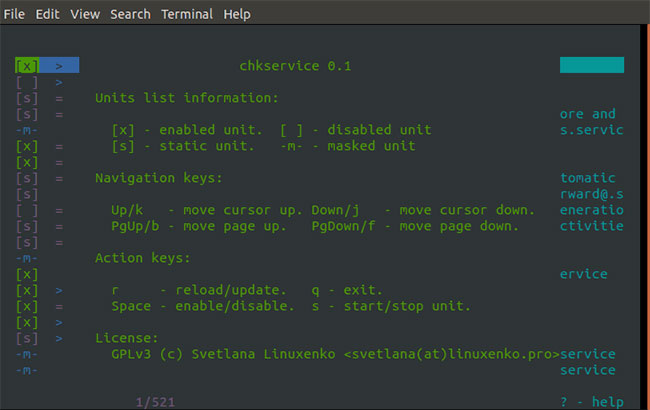
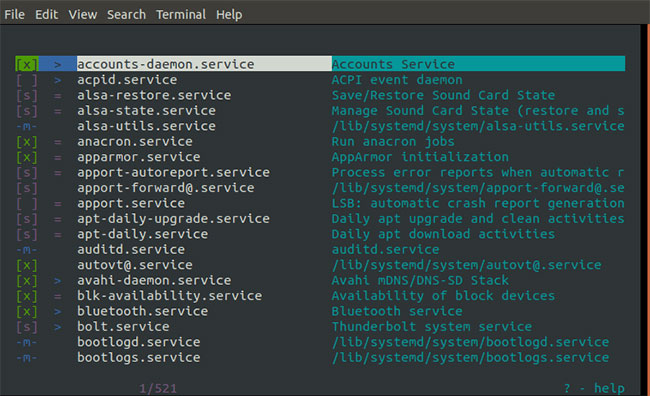
<p style="text-align: justify;">Để xem tất cả các tính năng đi kèm với công cụ tuyệt vời này, hãy nhấn phím&nbsp;<code>?</code>&nbsp;để mở menu&nbsp;<strong>Help.</strong></p>

<figure>
<div style="text-align: justify;"><img alt="Nhấn phím ? để mở menu Help" data-i="13" data-src="https://st.quantrimang.com/photos/image/2020/06/09/service-chay-trong-linux-14.jpg" data-was-processed="true" height="410" src="https://st.quantrimang.com/photos/image/2020/06/09/service-chay-trong-linux-14.jpg" width="650" /></div>

<figcaption>
<div style="text-align: justify;">Nhấn phím ? để mở menu Help</div>
</figcaption>
</figure>
		</div>
				<div id="author">
						<p>
				<strong>Nguồn tin:</strong>
				Quantrimang.com
			</p>
		</div>
	</div>
	<div id="footer" class="clearfix">
		<div id="url">
			<strong>URL của bản tin này: </strong><a href="https://www.nguoicodonvn2008.info/vi/news/savefile/kien-thuc-may-tinh/cach-kiem-tra-tat-ca-cac-service-dang-chay-trong-linux-2178.html" title="Cách kiểm tra tất cả các service đang chạy trong Linux">https://www.nguoicodonvn2008.info/vi/news/savefile/kien-thuc-may-tinh/cach-kiem-tra-tat-ca-cac-service-dang-chay-trong-linux-2178.html</a>

		</div>
		<div class="clear"></div>
		<div class="copyright">
			&copy; .&#x3A; Nguoicodonvn2008.info - Cõi lòng người cô đơn &#x3A;.
		</div>
		<div id="contact">
			<a href="mailto:admin@nguoicodonvn2008.info">admin@nguoicodonvn2008.info</a>
		</div>
	</div>
</div>
        <div id="timeoutsess" class="chromeframe">
            Bạn đã không sử dụng Site, <a onclick="timeoutsesscancel();" href="https://www.nguoicodonvn2008.info/#">Bấm vào đây để duy trì trạng thái đăng nhập</a>. Thời gian chờ: <span id="secField"> 60 </span> giây
        </div>
        <div id="openidResult" class="nv-alert" style="display:none"></div>
        <div id="openidBt" data-result="" data-redirect=""></div>
		</script>
		<div class="car-top">
  <span><img src="https://www.nguoicodonvn2008.info/themes/default/images/car.png" alt=""></span>
</div>
<script src="https://www.nguoicodonvn2008.info/assets/js/jquery/jquery.min.js"></script>
<script>var nv_base_siteurl="/",nv_lang_data="vi",nv_lang_interface="vi",nv_name_variable="nv",nv_fc_variable="op",nv_lang_variable="language",nv_module_name="news",nv_func_name="savefile",nv_is_user=0, nv_my_ofs=-4,nv_my_abbr="EDT",nv_cookie_prefix="nv4c_e856T",nv_check_pass_mstime=1738000,nv_area_admin=0,nv_safemode=0,theme_responsive=0,nv_recaptcha_ver=2,nv_recaptcha_sitekey="",nv_recaptcha_type="image",XSSsanitize=1;</script>
<script src="https://www.nguoicodonvn2008.info/assets/js/language/vi.js"></script>
<script src="https://www.nguoicodonvn2008.info/assets/js/DOMPurify/purify3.js"></script>
<script src="https://www.nguoicodonvn2008.info/assets/js/global.js"></script>
<script src="https://www.nguoicodonvn2008.info/assets/js/site.js"></script>
<script src="https://www.nguoicodonvn2008.info/themes/default/js/news.js"></script>
<script src="https://www.nguoicodonvn2008.info/themes/default/js/main.js"></script>
<script src="https://www.nguoicodonvn2008.info/themes/default/js/custom.js"></script>
<script type="application/ld+json">
        {
            "@context": "https://schema.org",
            "@type": "Organization",
            "url": "https://www.nguoicodonvn2008.info",
            "logo": "https://www.nguoicodonvn2008.info/uploads/angel.gif"
        }
        </script>
<script src="https://www.nguoicodonvn2008.info/themes/default/js/bootstrap.min.js"></script>
<script type="text/javascript">
var $scrolltop = $('.car-top');
$scrolltop.on('click', function () {
    $('html,body').animate({
        scrollTop: 0
    }, 800);
    $(this).addClass("car-run");
    setTimeout(function(){ $scrolltop.removeClass('car-run');}, 1000);
    return false;
});
$(window).on('scroll', function ()
{ 
    if($(window).scrollTop() >= 200)
    {
        $scrolltop.addClass("show");
        $scrolltop.addClass("car-down");
    }
    else
    {
       $scrolltop.removeClass("show");
       setTimeout(function(){ $scrolltop.removeClass('car-down');}, 300);
    }
});
</script>
</body>
</html>