<!DOCTYPE html>
    <html lang="vi" xmlns="http://www.w3.org/1999/xhtml" prefix="og: http://ogp.me/ns#">
    <head>
<title>Cách kiểm tra phiên bản Bluetooth trong Windows 10</title>
<meta name="description" content="Cách kiểm tra phiên bản Bluetooth trong Windows 10 - Savefile - Tin Tức -...">
<meta name="author" content=".: Nguoicodonvn2008.info - Cõi lòng người cô đơn :.">
<meta name="copyright" content=".: Nguoicodonvn2008.info - Cõi lòng người cô đơn :. [admin@nguoicodonvn2008.info]">
<meta name="robots" content="index, archive, follow, noodp">
<meta name="googlebot" content="index,archive,follow,noodp">
<meta name="msnbot" content="all,index,follow">
<meta name="generator" content="NukeViet v4.5">
<meta http-equiv="Content-Type" content="text/html; charset=utf-8">
<meta property="og:title" content="Cách kiểm tra phiên bản Bluetooth trong Windows 10">
<meta property="og:type" content="website">
<meta property="og:description" content="Savefile - Tin Tức - https&#x3A;&#x002F;&#x002F;www.nguoicodonvn2008.info&#x002F;vi&#x002F;news&#x002F;savefile&#x002F;kien-thuc-may-tinh&#x002F;cach-kiem-tra-phien-ban-bluetooth-trong-windows-10-2307.html">
<meta property="og:site_name" content=".&#x3A; Nguoicodonvn2008.info - Cõi lòng người cô đơn &#x3A;.">
<meta property="og:url" content="https://www.nguoicodonvn2008.info/vi/news/savefile/kien-thuc-may-tinh/cach-kiem-tra-phien-ban-bluetooth-trong-windows-10-2307.html">
<link rel="shortcut icon" href="https://www.nguoicodonvn2008.info/favicon.ico">
<link rel="canonical" href="https://www.nguoicodonvn2008.info/vi/news/savefile/kien-thuc-may-tinh/cach-kiem-tra-phien-ban-bluetooth-trong-windows-10-2307.html">
<link rel="alternate" href="https://www.nguoicodonvn2008.info/vi/news/rss/" title="Tin Tức" type="application/rss+xml">
<link rel="alternate" href="https://www.nguoicodonvn2008.info/vi/news/rss/karaoke-dual/" title="Tin Tức - Karaoke Dual" type="application/rss+xml">
<link rel="alternate" href="https://www.nguoicodonvn2008.info/vi/news/rss/nhac-tre/" title="Tin Tức - Nhạc trẻ" type="application/rss+xml">
<link rel="alternate" href="https://www.nguoicodonvn2008.info/vi/news/rss/tru-tinh/" title="Tin Tức - Trữ tình" type="application/rss+xml">
<link rel="alternate" href="https://www.nguoicodonvn2008.info/vi/news/rss/nuoc-ngoai/" title="Tin Tức - Nước ngoài" type="application/rss+xml">
<link rel="alternate" href="https://www.nguoicodonvn2008.info/vi/news/rss/remix/" title="Tin Tức - Remix" type="application/rss+xml">
<link rel="alternate" href="https://www.nguoicodonvn2008.info/vi/news/rss/tam-su-tinh-yeu/" title="Tin Tức - Tâm sự tình yêu" type="application/rss+xml">
<link rel="alternate" href="https://www.nguoicodonvn2008.info/vi/news/rss/tho-suu-tam/" title="Tin Tức - Thơ sưu tầm" type="application/rss+xml">
<link rel="alternate" href="https://www.nguoicodonvn2008.info/vi/news/rss/cuoc-song/" title="Tin Tức - Cuộc sống" type="application/rss+xml">
<link rel="alternate" href="https://www.nguoicodonvn2008.info/vi/news/rss/phan-mem/" title="Tin Tức - Phần mềm" type="application/rss+xml">
<link rel="alternate" href="https://www.nguoicodonvn2008.info/vi/news/rss/kien-thuc-may-tinh/" title="Tin Tức - Kiến thức máy tính" type="application/rss+xml">
<link rel="alternate" href="https://www.nguoicodonvn2008.info/vi/news/rss/hoc-tap/" title="Tin Tức - Học tập" type="application/rss+xml">
<link rel="alternate" href="https://www.nguoicodonvn2008.info/vi/news/rss/tai-lieu/" title="Tin Tức - Tài liệu" type="application/rss+xml">
<link rel="alternate" href="https://www.nguoicodonvn2008.info/vi/news/rss/de-thi/" title="Tin Tức - Đề thi" type="application/rss+xml">
<link rel="preload" as="style" href="https://www.nguoicodonvn2008.info/assets/css/font-awesome.min.css" type="text/css">
<link rel="preload" as="style" href="https://www.nguoicodonvn2008.info/themes/default/css/bootstrap.non-responsive.css" type="text/css">
<link rel="preload" as="style" href="https://www.nguoicodonvn2008.info/themes/default/css/style.css" type="text/css">
<link rel="preload" as="style" href="https://www.nguoicodonvn2008.info/themes/default/css/style.non-responsive.css" type="text/css">
<link rel="preload" as="style" href="https://www.nguoicodonvn2008.info/themes/default/css/news.css" type="text/css">
<link rel="preload" as="style" href="https://www.nguoicodonvn2008.info/themes/default/css/custom.css" type="text/css">
<link rel="preload" as="script" href="https://www.nguoicodonvn2008.info/assets/js/jquery/jquery.min.js" type="text/javascript">
<link rel="preload" as="script" href="https://www.nguoicodonvn2008.info/assets/js/language/vi.js" type="text/javascript">
<link rel="preload" as="script" href="https://www.nguoicodonvn2008.info/assets/js/DOMPurify/purify3.js" type="text/javascript">
<link rel="preload" as="script" href="https://www.nguoicodonvn2008.info/assets/js/global.js" type="text/javascript">
<link rel="preload" as="script" href="https://www.nguoicodonvn2008.info/assets/js/site.js" type="text/javascript">
<link rel="preload" as="script" href="https://www.nguoicodonvn2008.info/themes/default/js/news.js" type="text/javascript">
<link rel="preload" as="script" href="https://www.nguoicodonvn2008.info/themes/default/js/main.js" type="text/javascript">
<link rel="preload" as="script" href="https://www.nguoicodonvn2008.info/themes/default/js/custom.js" type="text/javascript">
<link rel="preload" as="script" href="https://www.nguoicodonvn2008.info/themes/default/js/bootstrap.min.js" type="text/javascript">
<link rel="stylesheet" href="https://www.nguoicodonvn2008.info/assets/css/font-awesome.min.css">
<link rel="stylesheet" href="https://www.nguoicodonvn2008.info/themes/default/css/bootstrap.non-responsive.css">
<link rel="stylesheet" href="https://www.nguoicodonvn2008.info/themes/default/css/style.css">
<link rel="stylesheet" href="https://www.nguoicodonvn2008.info/themes/default/css/style.non-responsive.css">
<link rel="StyleSheet" href="https://www.nguoicodonvn2008.info/themes/default/css/news.css">
<link rel="stylesheet" href="https://www.nguoicodonvn2008.info/themes/default/css/custom.css">
<style type="text/css">
	body{background: #fff;}
</style>
    </head>
    <body>
<div id="print">
	<div id="hd_print">
		<h2 class="pull-left">.&#x3A; Nguoicodonvn2008.info - Cõi lòng người cô đơn &#x3A;.</h2>
		<p class="pull-right"><a title=".&#x3A; Nguoicodonvn2008.info - Cõi lòng người cô đơn &#x3A;." href="https://www.nguoicodonvn2008.info/">https://www.nguoicodonvn2008.info</a></p>
	</div>
	<div class="clear"></div>
	<hr />
	<div id="content">
		<h1>Cách kiểm tra phiên bản Bluetooth trong Windows 10</h1>
		<ul class="list-inline">
			<li>Thứ bảy - 04/07/2020 00:54</li>
			<li class="hidden-print txtrequired"><em class="fa fa-print">&nbsp;</em><a title="In ra" href="javascript:;" onclick="window.print()">In ra</a></li>
			<li class="hidden-print txtrequired"><em class="fa fa-power-off">&nbsp;</em><a title="Đóng cửa sổ này" href="javascript:;" onclick="window.close()">Đóng cửa sổ này</a></li>
		</ul>
		<div class="clear"></div>
		<div id="hometext">
		</div>
				<div class="imghome">
			<img alt="Cách kiểm tra phiên bản Bluetooth trong Windows 10" src="https://www.softpedia.com/get/System/System-Info/Bluetooth-Version-finder.shtml" width="460" class="img-thumbnail" />
		</div>
		<div class="clear"></div>
		<div id="bodytext" class="clearfix">
			<p style="text-align: justify;">Như chúng ta đã biết,&nbsp;Bluetooth&nbsp;là một công nghệ không dây tầm ngắn cho phép truyền dữ liệu không dây giữa hai thiết bị hỗ trợ Bluetooth được đặt gần nhau trong một phạm vi nhất định. Nếu thiết bị Windows của bạn có hỗ trợ Bluetooth, đôi khi bạn có thể muốn biết phiên bản Bluetooth mà thiết bị Windows của mình đang sử dụng là gì để từ đó xác định xem nó hỗ trợ những tính năng nào và bạn có thể làm gì với thiết bị đó.</p>

<p style="text-align: justify;">Ví dụ: bắt đầu từ&nbsp;Windows 10&nbsp;phiên bản 1803 (bản cập nhật tháng 4 năm 2018), thiết bị của bạn phải có Bluetooth 4.0 trở lên và có hỗ trợ&nbsp;Low Energy&nbsp;(LE) nếu muốn sử dụng tính năng chia sẻ gần (Nearby sharing) để gửi tệp và liên kết đến các thiết bị xung quanh thông qua Bluetooth.</p>

<div style="text-align: justify;">&nbsp;</div>

<p style="text-align: justify;">Bài viết này sẽ hướng dẫn cho bạn cách tìm ra phiên bản Bluetooth hiện đang được sử dụng trên các thiết bị&nbsp;Windows 7,&nbsp;Windows 8&nbsp;hoặc Windows 10 trên PC của bạn. Dưới đây là cách thức tiến hành.</p>

<h2 style="text-align: justify;">Kiểm tra phiên bản Bluetooth thông qua Device Manager</h2>

<p style="text-align: justify;"><strong>Bước 1</strong>: Bật kết nối Bluetooth trên thiết bị của bạn.</p>

<p style="text-align: justify;"><strong>Bước 2</strong>: Nhấn tổ hợp phím&nbsp;<strong>Win + R</strong>&nbsp;để mở cửa sổ&nbsp;<strong>Run</strong>, nhập từ khóa&nbsp;<strong>devmgmt.msc</strong>vào ô tìm kiếm trong&nbsp;<strong>Run</strong>&nbsp;và nhấp vào&nbsp;<strong>OK</strong>&nbsp;để mở trình quản lý thiết bị&nbsp;<strong>Device Manager.</strong></p>

<div style="text-align: justify;">&nbsp;</div>

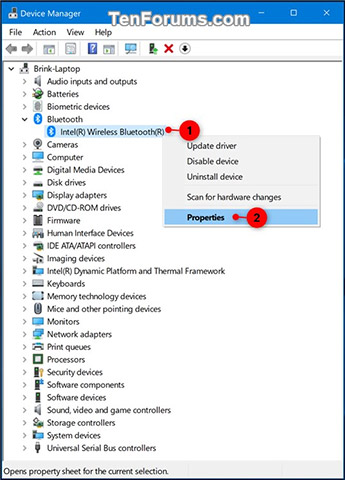
<p style="text-align: justify;"><strong>Bước 3</strong>: Mở rộng kết nối Bluetooth đang bật trong trình quản lý thiết bị và nhấp đúp vào biểu tượng bộ điều hợp Bluetooth hoặc nhấp chuột phải cũng như nhấn và giữ trên biểu tượng bộ điều hợp Bluetooth và nhấp vào&nbsp;<strong>Properties</strong>&nbsp;(xem ảnh chụp màn hình bên dưới).</p>

<p style="text-align: justify;"><img alt="Nhấp chuột phải hoặc nhấn và giữ trên biểu tượng bộ điều hợp Bluetooth của bạn và nhấp vào Properties" data-i="0" data-src="https://st.quantrimang.com/photos/image/2018/12/11/kiem-tra-phien-ban-bluetooth-trong-windows1.jpg" data-was-processed="true" height="480" src="https://st.quantrimang.com/photos/image/2018/12/11/kiem-tra-phien-ban-bluetooth-trong-windows1.jpg" width="345" /></p>

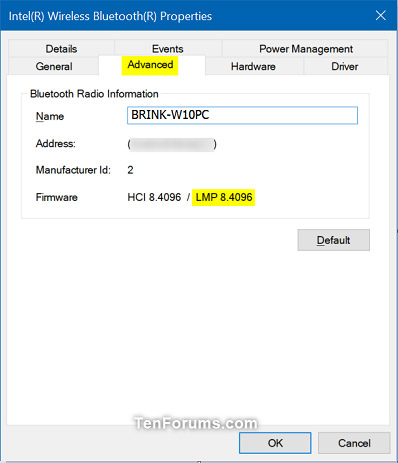
<p style="text-align: justify;"><strong>Bước 4</strong>: Trong mục&nbsp;<strong>Properties</strong>, bạn nhấp vào tab&nbsp;<strong>Advanced</strong>&nbsp;và xem xem số&nbsp;<strong>LMP</strong>&nbsp;(Link Manager Protocol - giao thức quản lý liên kết) là bao nhiêu, ví dụ: &quot;8.4096&quot;.</p>

<p style="text-align: justify;"><img alt="Trong mục Properties, bạn nhấp vào tab Advanced và xem xem số LMP" data-i="1" data-src="https://st.quantrimang.com/photos/image/2018/12/11/kiem-tra-phien-ban-bluetooth-trong-windows2.jpg" data-was-processed="true" height="463" src="https://st.quantrimang.com/photos/image/2018/12/11/kiem-tra-phien-ban-bluetooth-trong-windows2.jpg" width="398" /></p>

<p style="text-align: justify;"><strong>Bước 5</strong>: So sánh số&nbsp;<strong>LMP</strong>&nbsp;mà bạn có (ví dụ: &quot;8.4096&quot;) với các số trong bảng bên dưới để xem xem thiết bị của bạn đang sở hữu phiên bản Bluetooth nào.</p>

<table border="1">
	<tbody>
		<tr>
			<td>
			<p style="text-align: justify;"><strong>LMP</strong></p>
			</td>
			<td>
			<p style="text-align: justify;"><strong>Phiên bản Bluetooth</strong></p>
			</td>
		</tr>
		<tr>
			<td>
			<p style="text-align: justify;">0</p>
			</td>
			<td>
			<p style="text-align: justify;">Bluetooth 1.0b</p>
			</td>
		</tr>
		<tr>
			<td>
			<p style="text-align: justify;">1</p>
			</td>
			<td>
			<p style="text-align: justify;">Bluetooth 1.1</p>
			</td>
		</tr>
		<tr>
			<td>
			<p style="text-align: justify;">2</p>
			</td>
			<td>
			<p style="text-align: justify;">Bluetooth 1.2</p>
			</td>
		</tr>
		<tr>
			<td>
			<p style="text-align: justify;">3.x</p>
			</td>
			<td>
			<p style="text-align: justify;">Bluetooth 2.0 + EDR</p>
			</td>
		</tr>
		<tr>
			<td>
			<p style="text-align: justify;">4.x</p>
			</td>
			<td>
			<p style="text-align: justify;">Bluetooth 2.1 + EDR</p>
			</td>
		</tr>
		<tr>
			<td>
			<p style="text-align: justify;">5.x</p>
			</td>
			<td>
			<p style="text-align: justify;">Bluetooth 3.0 + HS</p>
			</td>
		</tr>
		<tr>
			<td>
			<p style="text-align: justify;">6.x</p>
			</td>
			<td>
			<p style="text-align: justify;">Bluetooth 4.0</p>
			</td>
		</tr>
		<tr>
			<td>
			<p style="text-align: justify;">7.x</p>
			</td>
			<td>
			<p style="text-align: justify;">Bluetooth 4.1</p>
			</td>
		</tr>
		<tr>
			<td>
			<p style="text-align: justify;">8.x</p>
			</td>
			<td>
			<p style="text-align: justify;">Bluetooth 4.2</p>
			</td>
		</tr>
		<tr>
			<td>
			<p style="text-align: justify;">9.x</p>
			</td>
			<td>
			<p style="text-align: justify;">Bluetooth 5.0</p>
			</td>
		</tr>
		<tr>
			<td>
			<p style="text-align: justify;">10</p>
			</td>
			<td>
			<p style="text-align: justify;">Bluetooth 5.1</p>
			</td>
		</tr>
		<tr>
			<td>
			<p style="text-align: justify;">11</p>
			</td>
			<td>
			<p style="text-align: justify;">Bluetooth 5.2</p>
			</td>
		</tr>
	</tbody>
</table>

<p style="text-align: justify;"><strong>Bước 6</strong>: Sau khi hoàn tất, bạn có thể đóng mục&nbsp;<strong>Properties</strong>&nbsp;và trình quản lý thiết bị nếu muốn.</p>

<div style="text-align: justify;">&nbsp;</div>

<h2 style="text-align: justify;">Kiểm tra phiên bản Bluetooth bằng Bluetooth Version Finder</h2>

<p style="text-align: justify;">Đây là một ứng dụng nhỏ có thể hiển thị cho bạn phiên bản Bluetooth trên máy tính. Bạn có thể tải xuống ứng dụng&nbsp;<strong>Bluetooth Version Finder</strong>&nbsp;trên máy tính của mình.</p>

<p style="text-align: justify;">1.&nbsp;Tải xuống&nbsp;<strong>Bluetooth Version Finder</strong>&nbsp;trên máy tính muốn kiểm tra phiên bản Bluetooth:<br  />
<span style="color:rgb(192, 57, 43);"><strong>https://www.softpedia.com/get/System/System-Info/Bluetooth-Version-finder.shtml</strong></span></p>

<p style="text-align: justify;">2. Giải nén file&nbsp;<strong>btVersion.zip</strong>&nbsp;trên máy tính .</p>

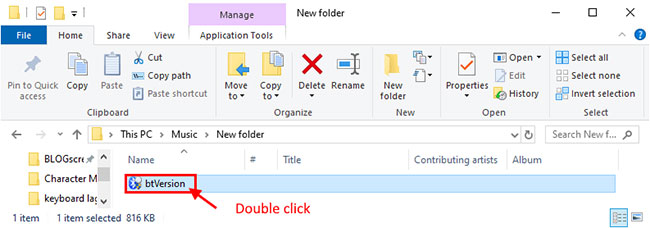
<p style="text-align: justify;">3. Bây giờ, nhấp đúp chuột vào btversion để chạy nó trên máy tính của bạn.</p>

<figure>
<div style="text-align: justify;"><img alt="Nhấp đúp chuột vào btversion để chạy nó trên máy tính" data-i="2" data-src="https://st.quantrimang.com/photos/image/2020/07/04/kiem-tra-phien-ban-bluetooth-1.jpg" data-was-processed="true" height="228" src="https://st.quantrimang.com/photos/image/2020/07/04/kiem-tra-phien-ban-bluetooth-1.jpg" width="650" /></div>

<figcaption>
<div style="text-align: justify;">Nhấp đúp chuột vào btversion để chạy nó trên máy tính</div>
</figcaption>
</figure>

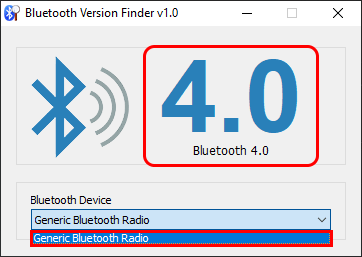
<p style="text-align: justify;">4. Bây giờ, trong cửa sổ Bluetooth Version Finder, nhấp vào menu drop-down và chọn thiết bị Bluetooth. Phiên bản Bluetooth sẽ được hiển thị trên cửa sổ cho thiết bị được chọn.</p>

<figure>
<div style="text-align: justify;"><img alt="Nhấp vào menu drop-down và chọn thiết bị Bluetooth để hiển thị thông tin về phiên bản Bluetooth" data-i="3" data-src="https://st.quantrimang.com/photos/image/2020/07/04/kiem-tra-phien-ban-bluetooth-2.png" data-was-processed="true" height="257" src="https://st.quantrimang.com/photos/image/2020/07/04/kiem-tra-phien-ban-bluetooth-2.png" width="362" /></div>

<figcaption>
<div style="text-align: justify;">Nhấp vào menu drop-down và chọn thiết bị Bluetooth để hiển thị thông tin về phiên bản Bluetooth</div>
</figcaption>
</figure>

<p style="text-align: justify;">Bằng phương pháp này, bạn sẽ có thể kiểm tra phiên bản Bluetooth của driver trên máy tính.</p>

<h2 style="text-align: justify;">Thay đổi phiên bản Bluetooth</h2>

<p style="text-align: justify;">Bạn không thể thay đổi phiên bản Bluetooth trên hệ thống của mình mà không cần nâng cấp phần cứng. Một bản cập nhật firmware hoặc driver sẽ không thực hiện được điều gì. Bạn có thể có một thiết bị hỗ trợ các phiên bản Bluetooth mới và cũ hơn. Ví dụ, thiết bị chạy Bluetooth 4 cũng sẽ có thể kết nối thiết bị yêu cầu Bluetooth 3, tuy nhiên điều này thiên về khả năng tương thích ngược.</p>

<p style="text-align: justify;">Bạn có thể kiểm tra với nhà cung cấp phần cứng để xem Bluetooth trên hệ thống của bạn có thể được thay thế hay bạn có thể mua một dongle để kết nối qua cổng USB không.</p>

<p style="text-align: justify;">Hy vọng hướng dẫn này hữu ích với bạn!</p>
		</div>
				<div id="author">
						<p>
				<strong>Nguồn tin:</strong>
				Quantrimang.com
			</p>
		</div>
	</div>
	<div id="footer" class="clearfix">
		<div id="url">
			<strong>URL của bản tin này: </strong><a href="https://www.nguoicodonvn2008.info/vi/news/savefile/kien-thuc-may-tinh/cach-kiem-tra-phien-ban-bluetooth-trong-windows-10-2307.html" title="Cách kiểm tra phiên bản Bluetooth trong Windows 10">https://www.nguoicodonvn2008.info/vi/news/savefile/kien-thuc-may-tinh/cach-kiem-tra-phien-ban-bluetooth-trong-windows-10-2307.html</a>

		</div>
		<div class="clear"></div>
		<div class="copyright">
			&copy; .&#x3A; Nguoicodonvn2008.info - Cõi lòng người cô đơn &#x3A;.
		</div>
		<div id="contact">
			<a href="mailto:admin@nguoicodonvn2008.info">admin@nguoicodonvn2008.info</a>
		</div>
	</div>
</div>
        <div id="timeoutsess" class="chromeframe">
            Bạn đã không sử dụng Site, <a onclick="timeoutsesscancel();" href="https://www.nguoicodonvn2008.info/#">Bấm vào đây để duy trì trạng thái đăng nhập</a>. Thời gian chờ: <span id="secField"> 60 </span> giây
        </div>
        <div id="openidResult" class="nv-alert" style="display:none"></div>
        <div id="openidBt" data-result="" data-redirect=""></div>
		</script>
		<div class="car-top">
  <span><img src="https://www.nguoicodonvn2008.info/themes/default/images/car.png" alt=""></span>
</div>
<script src="https://www.nguoicodonvn2008.info/assets/js/jquery/jquery.min.js"></script>
<script>var nv_base_siteurl="/",nv_lang_data="vi",nv_lang_interface="vi",nv_name_variable="nv",nv_fc_variable="op",nv_lang_variable="language",nv_module_name="news",nv_func_name="savefile",nv_is_user=0, nv_my_ofs=-4,nv_my_abbr="EDT",nv_cookie_prefix="nv4c_e856T",nv_check_pass_mstime=1738000,nv_area_admin=0,nv_safemode=0,theme_responsive=0,nv_recaptcha_ver=2,nv_recaptcha_sitekey="",nv_recaptcha_type="image",XSSsanitize=1;</script>
<script src="https://www.nguoicodonvn2008.info/assets/js/language/vi.js"></script>
<script src="https://www.nguoicodonvn2008.info/assets/js/DOMPurify/purify3.js"></script>
<script src="https://www.nguoicodonvn2008.info/assets/js/global.js"></script>
<script src="https://www.nguoicodonvn2008.info/assets/js/site.js"></script>
<script src="https://www.nguoicodonvn2008.info/themes/default/js/news.js"></script>
<script src="https://www.nguoicodonvn2008.info/themes/default/js/main.js"></script>
<script src="https://www.nguoicodonvn2008.info/themes/default/js/custom.js"></script>
<script type="application/ld+json">
        {
            "@context": "https://schema.org",
            "@type": "Organization",
            "url": "https://www.nguoicodonvn2008.info",
            "logo": "https://www.nguoicodonvn2008.info/uploads/angel.gif"
        }
        </script>
<script src="https://www.nguoicodonvn2008.info/themes/default/js/bootstrap.min.js"></script>
<script type="text/javascript">
var $scrolltop = $('.car-top');
$scrolltop.on('click', function () {
    $('html,body').animate({
        scrollTop: 0
    }, 800);
    $(this).addClass("car-run");
    setTimeout(function(){ $scrolltop.removeClass('car-run');}, 1000);
    return false;
});
$(window).on('scroll', function ()
{ 
    if($(window).scrollTop() >= 200)
    {
        $scrolltop.addClass("show");
        $scrolltop.addClass("car-down");
    }
    else
    {
       $scrolltop.removeClass("show");
       setTimeout(function(){ $scrolltop.removeClass('car-down');}, 300);
    }
});
</script>
</body>
</html>