<!DOCTYPE html>
    <html lang="vi" xmlns="http://www.w3.org/1999/xhtml" prefix="og: http://ogp.me/ns#">
    <head>
<title>Cách kiểm tra chính tả trong Linux Terminal</title>
<meta name="description" content="Cách kiểm tra chính tả trong Linux Terminal - Savefile - Tin Tức -...">
<meta name="author" content=".: Nguoicodonvn2008.info - Cõi lòng người cô đơn :.">
<meta name="copyright" content=".: Nguoicodonvn2008.info - Cõi lòng người cô đơn :. [admin@nguoicodonvn2008.info]">
<meta name="robots" content="index, archive, follow, noodp">
<meta name="googlebot" content="index,archive,follow,noodp">
<meta name="msnbot" content="all,index,follow">
<meta name="generator" content="NukeViet v4.5">
<meta http-equiv="Content-Type" content="text/html; charset=utf-8">
<meta property="og:title" content="Cách kiểm tra chính tả trong Linux Terminal">
<meta property="og:type" content="website">
<meta property="og:description" content="Savefile - Tin Tức - https&#x3A;&#x002F;&#x002F;www.nguoicodonvn2008.info&#x002F;vi&#x002F;news&#x002F;savefile&#x002F;kien-thuc-may-tinh&#x002F;cach-kiem-tra-chinh-ta-trong-linux-terminal-1911.html">
<meta property="og:site_name" content=".&#x3A; Nguoicodonvn2008.info - Cõi lòng người cô đơn &#x3A;.">
<meta property="og:url" content="https://www.nguoicodonvn2008.info/vi/news/savefile/kien-thuc-may-tinh/cach-kiem-tra-chinh-ta-trong-linux-terminal-1911.html">
<link rel="shortcut icon" href="https://www.nguoicodonvn2008.info/favicon.ico">
<link rel="canonical" href="https://www.nguoicodonvn2008.info/vi/news/savefile/kien-thuc-may-tinh/cach-kiem-tra-chinh-ta-trong-linux-terminal-1911.html">
<link rel="alternate" href="https://www.nguoicodonvn2008.info/vi/news/rss/" title="Tin Tức" type="application/rss+xml">
<link rel="alternate" href="https://www.nguoicodonvn2008.info/vi/news/rss/karaoke-dual/" title="Tin Tức - Karaoke Dual" type="application/rss+xml">
<link rel="alternate" href="https://www.nguoicodonvn2008.info/vi/news/rss/nhac-tre/" title="Tin Tức - Nhạc trẻ" type="application/rss+xml">
<link rel="alternate" href="https://www.nguoicodonvn2008.info/vi/news/rss/tru-tinh/" title="Tin Tức - Trữ tình" type="application/rss+xml">
<link rel="alternate" href="https://www.nguoicodonvn2008.info/vi/news/rss/nuoc-ngoai/" title="Tin Tức - Nước ngoài" type="application/rss+xml">
<link rel="alternate" href="https://www.nguoicodonvn2008.info/vi/news/rss/remix/" title="Tin Tức - Remix" type="application/rss+xml">
<link rel="alternate" href="https://www.nguoicodonvn2008.info/vi/news/rss/tam-su-tinh-yeu/" title="Tin Tức - Tâm sự tình yêu" type="application/rss+xml">
<link rel="alternate" href="https://www.nguoicodonvn2008.info/vi/news/rss/tho-suu-tam/" title="Tin Tức - Thơ sưu tầm" type="application/rss+xml">
<link rel="alternate" href="https://www.nguoicodonvn2008.info/vi/news/rss/cuoc-song/" title="Tin Tức - Cuộc sống" type="application/rss+xml">
<link rel="alternate" href="https://www.nguoicodonvn2008.info/vi/news/rss/phan-mem/" title="Tin Tức - Phần mềm" type="application/rss+xml">
<link rel="alternate" href="https://www.nguoicodonvn2008.info/vi/news/rss/kien-thuc-may-tinh/" title="Tin Tức - Kiến thức máy tính" type="application/rss+xml">
<link rel="alternate" href="https://www.nguoicodonvn2008.info/vi/news/rss/hoc-tap/" title="Tin Tức - Học tập" type="application/rss+xml">
<link rel="alternate" href="https://www.nguoicodonvn2008.info/vi/news/rss/tai-lieu/" title="Tin Tức - Tài liệu" type="application/rss+xml">
<link rel="alternate" href="https://www.nguoicodonvn2008.info/vi/news/rss/de-thi/" title="Tin Tức - Đề thi" type="application/rss+xml">
<link rel="preload" as="style" href="https://www.nguoicodonvn2008.info/assets/css/font-awesome.min.css" type="text/css">
<link rel="preload" as="style" href="https://www.nguoicodonvn2008.info/themes/default/css/bootstrap.non-responsive.css" type="text/css">
<link rel="preload" as="style" href="https://www.nguoicodonvn2008.info/themes/default/css/style.css" type="text/css">
<link rel="preload" as="style" href="https://www.nguoicodonvn2008.info/themes/default/css/style.non-responsive.css" type="text/css">
<link rel="preload" as="style" href="https://www.nguoicodonvn2008.info/themes/default/css/news.css" type="text/css">
<link rel="preload" as="style" href="https://www.nguoicodonvn2008.info/themes/default/css/custom.css" type="text/css">
<link rel="preload" as="script" href="https://www.nguoicodonvn2008.info/assets/js/jquery/jquery.min.js" type="text/javascript">
<link rel="preload" as="script" href="https://www.nguoicodonvn2008.info/assets/js/language/vi.js" type="text/javascript">
<link rel="preload" as="script" href="https://www.nguoicodonvn2008.info/assets/js/DOMPurify/purify3.js" type="text/javascript">
<link rel="preload" as="script" href="https://www.nguoicodonvn2008.info/assets/js/global.js" type="text/javascript">
<link rel="preload" as="script" href="https://www.nguoicodonvn2008.info/assets/js/site.js" type="text/javascript">
<link rel="preload" as="script" href="https://www.nguoicodonvn2008.info/themes/default/js/news.js" type="text/javascript">
<link rel="preload" as="script" href="https://www.nguoicodonvn2008.info/themes/default/js/main.js" type="text/javascript">
<link rel="preload" as="script" href="https://www.nguoicodonvn2008.info/themes/default/js/custom.js" type="text/javascript">
<link rel="preload" as="script" href="https://www.nguoicodonvn2008.info/themes/default/js/bootstrap.min.js" type="text/javascript">
<link rel="stylesheet" href="https://www.nguoicodonvn2008.info/assets/css/font-awesome.min.css">
<link rel="stylesheet" href="https://www.nguoicodonvn2008.info/themes/default/css/bootstrap.non-responsive.css">
<link rel="stylesheet" href="https://www.nguoicodonvn2008.info/themes/default/css/style.css">
<link rel="stylesheet" href="https://www.nguoicodonvn2008.info/themes/default/css/style.non-responsive.css">
<link rel="StyleSheet" href="https://www.nguoicodonvn2008.info/themes/default/css/news.css">
<link rel="stylesheet" href="https://www.nguoicodonvn2008.info/themes/default/css/custom.css">
<style type="text/css">
	body{background: #fff;}
</style>
    </head>
    <body>
<div id="print">
	<div id="hd_print">
		<h2 class="pull-left">.&#x3A; Nguoicodonvn2008.info - Cõi lòng người cô đơn &#x3A;.</h2>
		<p class="pull-right"><a title=".&#x3A; Nguoicodonvn2008.info - Cõi lòng người cô đơn &#x3A;." href="https://www.nguoicodonvn2008.info/">https://www.nguoicodonvn2008.info</a></p>
	</div>
	<div class="clear"></div>
	<hr />
	<div id="content">
		<h1>Cách kiểm tra chính tả trong Linux Terminal</h1>
		<ul class="list-inline">
			<li>Thứ hai - 30/03/2020 01:09</li>
			<li class="hidden-print txtrequired"><em class="fa fa-print">&nbsp;</em><a title="In ra" href="javascript:;" onclick="window.print()">In ra</a></li>
			<li class="hidden-print txtrequired"><em class="fa fa-power-off">&nbsp;</em><a title="Đóng cửa sổ này" href="javascript:;" onclick="window.close()">Đóng cửa sổ này</a></li>
		</ul>
		<div class="clear"></div>
		<div id="hometext">
		</div>
				<div class="imghome">
			<img alt="Cách kiểm tra chính tả trong Linux Terminal" src="https://st.quantrimang.com/photos/image/2020/03/27/kiem-tra-chinh-ta-trong-terminal-10.jpg" width="460" class="img-thumbnail" />
		</div>
		<div class="clear"></div>
		<div id="bodytext" class="clearfix">
			<p style="text-align: justify;">Hầu hết các trình soạn thảo văn bản thường đi kèm với trình kiểm tra chính tả để kiểm tra chính tả cho phần văn bản của bạn. Nhưng bạn có biết rằng&nbsp;Linux&nbsp;cũng có tiện ích kiểm tra chính tả dòng lệnh trong Terminal?</p>

<p style="text-align: justify;">Tiện ích đó được gọi là&nbsp;<strong>aspell</strong>&nbsp;và được cài đặt theo mặc định trên&nbsp;Ubuntu. Công cụ này có nhiều switch có sẵn, khiến người dùng thực sự phải đánh giá cao khả năng của nó. Đây là cách bạn có thể sử dụng aspell để kiểm tra chính tả trong Terminal.</p>

<h2 style="text-align: justify;">Giới thiệu về aspell</h2>

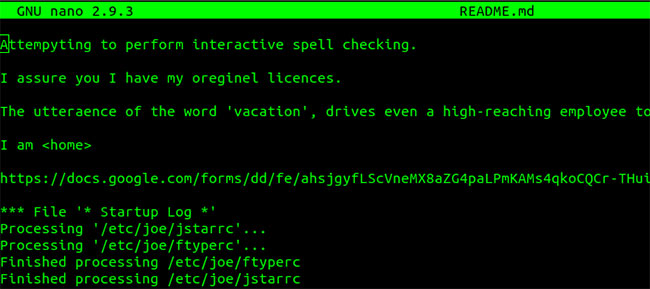
<p style="text-align: justify;">Bài viết làm việc với một file có tên là&nbsp;<strong>README.md</strong>, trong đó một số từ đã viết sai chính tả.</p>

<figure>
<div style="text-align: justify;"><img alt="File README.md" data-i="0" data-src="https://st.quantrimang.com/photos/image/2020/03/27/kiem-tra-chinh-ta-trong-terminal-1.jpg" data-was-processed="true" height="289" src="https://st.quantrimang.com/photos/image/2020/03/27/kiem-tra-chinh-ta-trong-terminal-1.jpg" width="650" /></div>

<figcaption>
<div style="text-align: justify;">File README.md</div>
</figcaption>
</figure>

<p style="text-align: justify;">Ví dụ sẽ chạy nó thông qua trình kiểm tra chính tả bằng lệnh sau. Switch&nbsp;<strong>-c</strong>&nbsp;được sử dụng để chỉ định file cần kiểm tra.</p>

<pre id="pre0">
<code>aspell -c README.md</code></pre>

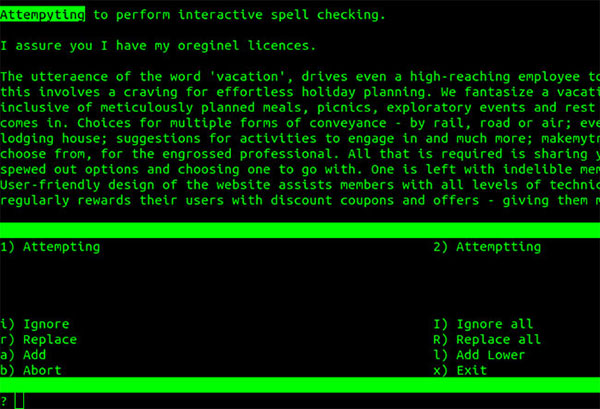
<p style="text-align: justify;">Lệnh này sẽ mở ra một cửa sổ tương tác như dưới đây. Trong phần trên cùng, nội dung file được hiển thị.&nbsp;<strong>aspell</strong>&nbsp;đã tìm ra các chỗ viết sai chính tả. Bây giờ, nó sẽ nhắc từng lỗi một, kèm theo phương án sửa lỗi được đề xuất mà người dùng có thể chọn. Ở đây,&nbsp;<strong>“Attempyting”</strong>&nbsp;là lỗi chính tả đầu tiên.</p>

<p style="text-align: justify;">Phần dưới cùng chứa những từ gợi ý để thay thế từ sai. Cần nhập giá trị số gần các từ được đề xuất để trình kiểm tra chính tả thực hiện công việc của nó.</p>

<figure>
<div style="text-align: justify;"><img alt="Phần dưới cùng chứa những từ gợi ý để thay thế từ sai" data-i="1" data-src="https://st.quantrimang.com/photos/image/2020/03/27/kiem-tra-chinh-ta-trong-terminal-2.jpg" data-was-processed="true" height="409" src="https://st.quantrimang.com/photos/image/2020/03/27/kiem-tra-chinh-ta-trong-terminal-2.jpg" width="600" /></div>

<figcaption>
<div style="text-align: justify;">Phần dưới cùng chứa những từ gợi ý để thay thế từ sai</div>
</figcaption>
</figure>

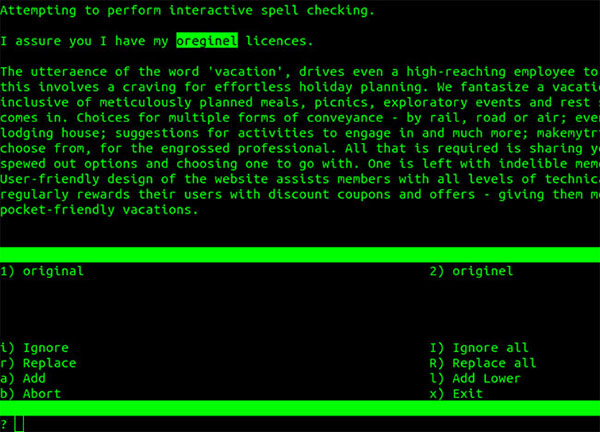
<p style="text-align: justify;">Sau khi gõ&nbsp;<code>1</code>,&nbsp;<strong>aspell</strong>&nbsp;sẽ chuyển sang từ sai tiếp theo và hiển thị các đề xuất để sửa nó.</p>

<figure>
<div style="text-align: justify;"><img alt="Tất cả các chỉnh sửa cần thiết có thể được thực hiện" data-i="2" data-src="https://st.quantrimang.com/photos/image/2020/03/27/kiem-tra-chinh-ta-trong-terminal-3.jpg" data-was-processed="true" height="432" src="https://st.quantrimang.com/photos/image/2020/03/27/kiem-tra-chinh-ta-trong-terminal-3.jpg" width="600" /></div>

<figcaption>
<div style="text-align: justify;">Tất cả các chỉnh sửa cần thiết có thể được thực hiện</div>
</figcaption>
</figure>

<p style="text-align: justify;">Theo cách này, tất cả các chỉnh sửa cần thiết có thể được thực hiện. Khi tất cả các thay đổi đã được thực hiện đối với một file, trình kiểm tra chính tả tương tác sẽ tự thoát. Một bản sao lưu cho file này được tạo ra với phần mở rộng .bak.&nbsp;<strong>README.md</strong>&nbsp;là file đã được sửa và file&nbsp;<strong>README.md.bak</strong>&nbsp;là file có lỗi chính tả.</p>

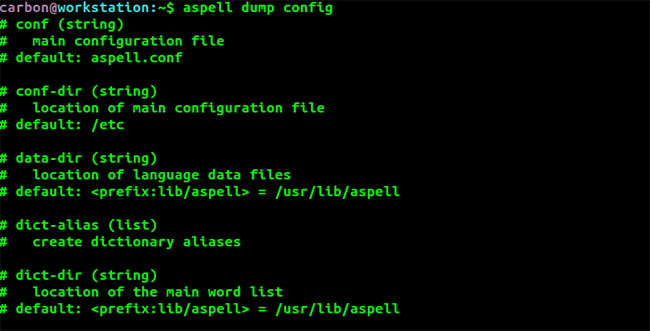
<p style="text-align: justify;">File cấu hình nằm trong&nbsp;<strong>/etc/aspell.conf.</strong>&nbsp;Nội dung tương tự có thể được xem bằng lệnh sau:</p>

<pre id="pre1">
<code>aspell dump config</code></pre>

<figure>
<div style="text-align: justify;"><img alt="File cấu hình nằm trong /etc/aspell.conf" data-i="3" data-src="https://st.quantrimang.com/photos/image/2020/03/27/kiem-tra-chinh-ta-trong-terminal-4.jpg" data-was-processed="true" height="331" src="https://st.quantrimang.com/photos/image/2020/03/27/kiem-tra-chinh-ta-trong-terminal-4.jpg" width="650" /></div>

<figcaption>
<div style="text-align: justify;">File cấu hình nằm trong /etc/aspell.conf</div>
</figcaption>
</figure>

<p style="text-align: justify;">Kết quả có thông tin về từ điển đang sử dụng, vị trí của danh sách từ để kiểm tra, v.v...</p>

<figure>
<div style="text-align: justify;"><img alt="Kết quả có thông tin về từ điển đang sử dụng" data-i="4" data-src="https://st.quantrimang.com/photos/image/2020/03/27/kiem-tra-chinh-ta-trong-terminal-5.jpg" data-was-processed="true" height="60" src="https://st.quantrimang.com/photos/image/2020/03/27/kiem-tra-chinh-ta-trong-terminal-5.jpg" width="650" /></div>

<figcaption>
<div style="text-align: justify;">Kết quả có thông tin về từ điển đang sử dụng</div>
</figcaption>
</figure>

<h2 style="text-align: justify;">Sử dụng từ điển khác</h2>

<p style="text-align: justify;">Hãy xem xét file&nbsp;<strong>country.txt</strong>&nbsp;có hai phiên bản chính tả cho từ&nbsp;<strong>“recognize”.</strong>&nbsp;Phiên bản có&nbsp;<strong>“s”</strong>&nbsp;tương ứng với tiếng Anh Anh và phiên bản có&nbsp;<strong>“z”</strong>&nbsp;tương ứng với tiếng Anh Mỹ.</p>

<p style="text-align: justify;">Từ điển tiếng Anh Ấn tương tự như từ điển tiếng Anh Anh. Giả sử bạn muốn thực hiện kiểm tra chính tả trên file này dựa trên từ điển tiếng Anh Mỹ.</p>

<figure>
<div style="text-align: justify;"><img alt="File country.txt" data-i="5" data-src="https://st.quantrimang.com/photos/image/2020/03/27/kiem-tra-chinh-ta-trong-terminal-6.jpg" data-was-processed="true" height="108" src="https://st.quantrimang.com/photos/image/2020/03/27/kiem-tra-chinh-ta-trong-terminal-6.jpg" width="650" /></div>

<figcaption>
<div style="text-align: justify;">File country.txt</div>
</figcaption>
</figure>

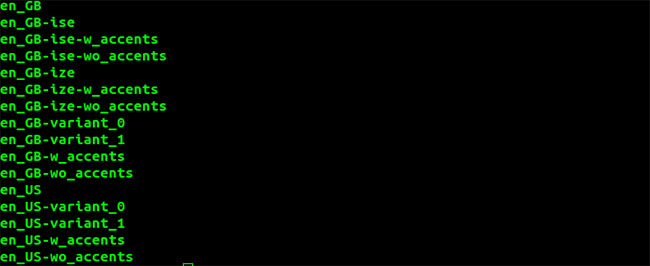
<p style="text-align: justify;">Lệnh sau cho thấy một danh sách dài các từ điển có sẵn.</p>

<pre id="pre2">
<code>apsell dump dicts</code></pre>

<figure>
<div style="text-align: justify;"><img alt="Danh sách dài các từ điển có sẵn" data-i="6" data-src="https://st.quantrimang.com/photos/image/2020/03/27/kiem-tra-chinh-ta-trong-terminal-7.jpg" data-was-processed="true" height="266" src="https://st.quantrimang.com/photos/image/2020/03/27/kiem-tra-chinh-ta-trong-terminal-7.jpg" width="650" /></div>

<figcaption>
<div style="text-align: justify;">Danh sách dài các từ điển có sẵn</div>
</figcaption>
</figure>

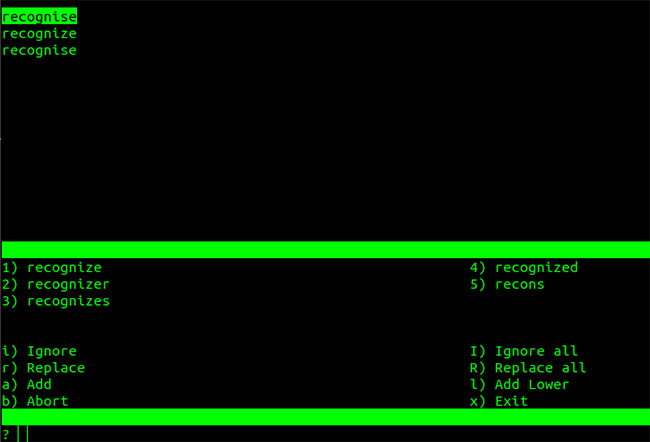
<p style="text-align: justify;">Bạn có thể chỉ định từ điển để sử dụng trong kiểm tra chính tả, bằng cách dùng switch&nbsp;<strong>-d.</strong>&nbsp;Sử dụng từ điển tiếng Anh Mỹ như dưới đây.</p>

<pre id="pre3">
<code>aspell -d en_US -c &quot;country.txt&quot;</code></pre>

<p style="text-align: justify;">Lỗi đầu tiên là từ&nbsp;<strong>“recognise”</strong>&nbsp;với chữ&nbsp;<strong>s</strong>&nbsp;và đề xuất được đưa ra là thay thế&nbsp;<strong>s</strong>&nbsp;bằng&nbsp;<strong>z</strong>.</p>

<figure>
<div style="text-align: justify;"><img alt="Lỗi đầu tiên là từ “recognise”" data-i="7" data-src="https://st.quantrimang.com/photos/image/2020/03/27/kiem-tra-chinh-ta-trong-terminal-8.jpg" data-was-processed="true" height="442" src="https://st.quantrimang.com/photos/image/2020/03/27/kiem-tra-chinh-ta-trong-terminal-8.jpg" width="650" /></div>

<figcaption>
<div style="text-align: justify;">Lỗi đầu tiên là từ “recognise”</div>
</figcaption>
</figure>

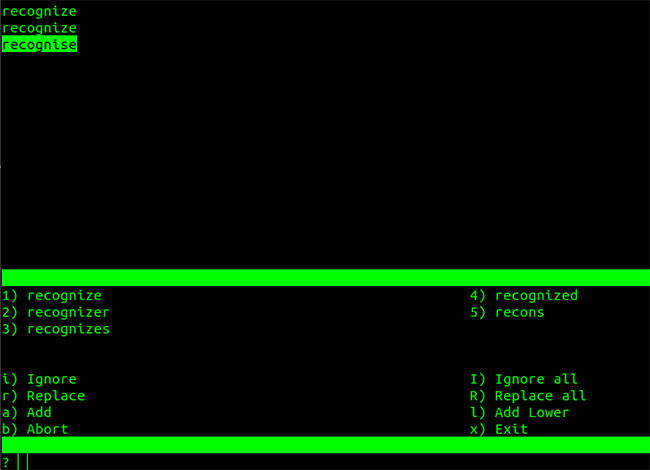
<p style="text-align: justify;">Khi việc hiệu chỉnh được thực hiện, dòng thứ ba trong file được xác định là lỗi và có thể được sửa chữa.</p>

<figure>
<div style="text-align: justify;"><img alt="Việc hiệu chỉnh được thực hiện" data-i="8" data-src="https://st.quantrimang.com/photos/image/2020/03/27/kiem-tra-chinh-ta-trong-terminal-9.jpg" data-was-processed="true" height="470" src="https://st.quantrimang.com/photos/image/2020/03/27/kiem-tra-chinh-ta-trong-terminal-9.jpg" width="650" /></div>

<figcaption>
<div style="text-align: justify;">Việc hiệu chỉnh được thực hiện</div>
</figcaption>
</figure>

<div style="text-align: justify;">&nbsp;</div>

<h2 style="text-align: justify;">Sử dụng chữ có dấu</h2>

<p style="text-align: justify;">Một số ngôn ngữ kết hợp các chữ cái có dấu như trong file&nbsp;<strong>accent-example.txt</strong>&nbsp;được hiển thị bên dưới.</p>

<figure>
<div style="text-align: justify;"><img alt="File accent-example.txt" data-i="9" data-src="https://st.quantrimang.com/photos/image/2020/03/27/kiem-tra-chinh-ta-trong-terminal-10.jpg" data-was-processed="true" height="124" src="https://st.quantrimang.com/photos/image/2020/03/27/kiem-tra-chinh-ta-trong-terminal-10.jpg" width="650" /></div>

<figcaption>
<div style="text-align: justify;">File accent-example.txt</div>
</figcaption>
</figure>

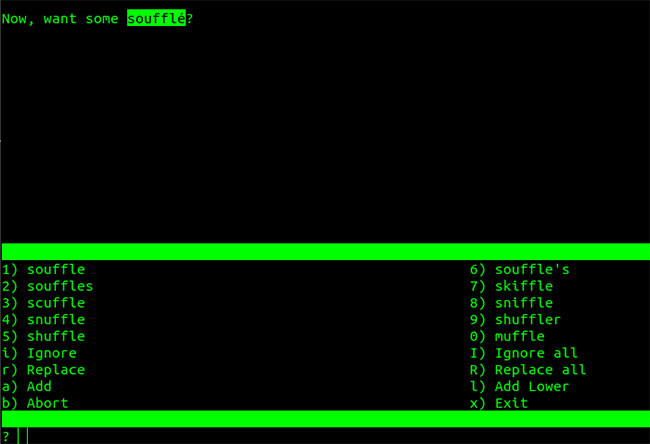
<p style="text-align: justify;">Việc thực hiện kiểm tra chính tả trên file này bằng từ điển mặc định sẽ coi chữ cái có dấu là một lỗi.</p>

<pre id="pre4">
<code>aspell -c accents-example.txt</code></pre>

<figure>
<div style="text-align: justify;"><img alt="Tđiển mặc định sẽ coi chữ cái có dấu là một lỗi" data-i="10" data-src="https://st.quantrimang.com/photos/image/2020/03/27/kiem-tra-chinh-ta-trong-terminal-11.jpg" data-was-processed="true" height="444" src="https://st.quantrimang.com/photos/image/2020/03/27/kiem-tra-chinh-ta-trong-terminal-11.jpg" width="650" /></div>

<figcaption>
<div style="text-align: justify;">Tđiển mặc định sẽ coi chữ cái có dấu là một lỗi</div>
</figcaption>
</figure>

<p style="text-align: justify;">Các đề xuất được cung cấp thay thế chữ cái có dấu bằng chữ thông thường. Trong trường hợp này, bạn có thể sử dụng một từ điển hỗ trợ các chữ cái có dấu để xử lý những file đó.</p>

<pre id="pre5">
<code>aspell -d en-w_accents -c accents-example.txt</code></pre>

<p style="text-align: justify;">Từ điển đã chỉ định chấp nhận các chữ cái có dấu và file&nbsp;<strong>accents-example.txt</strong>&nbsp;thành công vượt qua bài kiểm tra chính tả.</p>

<h2 style="text-align: justify;">Những lựa chọn khác</h2>

<p style="text-align: justify;"><strong>aspell</strong>&nbsp;cũng có thể được sử dụng với các file HTML/XML và những file Tex/LaTex bằng cách cung cấp các switch được xác định trước. Nó cũng có thể được cấu hình để xử lý các từ có gạch nối và bỏ qua các chữ cái viết hoa hoặc viết thường.</p>

<p style="text-align: justify;">Danh sách đầy đủ các tùy chọn và switch có sẵn cho aspell có thể được tìm thấy trong trang&nbsp;<strong>man</strong>&nbsp;và trong hướng dẫn&nbsp;<strong>Texinfo.</strong></p>
		</div>
				<div id="author">
						<p>
				<strong>Nguồn tin:</strong>
				Quantrimang.com
			</p>
		</div>
	</div>
	<div id="footer" class="clearfix">
		<div id="url">
			<strong>URL của bản tin này: </strong><a href="https://www.nguoicodonvn2008.info/vi/news/savefile/kien-thuc-may-tinh/cach-kiem-tra-chinh-ta-trong-linux-terminal-1911.html" title="Cách kiểm tra chính tả trong Linux Terminal">https://www.nguoicodonvn2008.info/vi/news/savefile/kien-thuc-may-tinh/cach-kiem-tra-chinh-ta-trong-linux-terminal-1911.html</a>

		</div>
		<div class="clear"></div>
		<div class="copyright">
			&copy; .&#x3A; Nguoicodonvn2008.info - Cõi lòng người cô đơn &#x3A;.
		</div>
		<div id="contact">
			<a href="mailto:admin@nguoicodonvn2008.info">admin@nguoicodonvn2008.info</a>
		</div>
	</div>
</div>
        <div id="timeoutsess" class="chromeframe">
            Bạn đã không sử dụng Site, <a onclick="timeoutsesscancel();" href="https://www.nguoicodonvn2008.info/#">Bấm vào đây để duy trì trạng thái đăng nhập</a>. Thời gian chờ: <span id="secField"> 60 </span> giây
        </div>
        <div id="openidResult" class="nv-alert" style="display:none"></div>
        <div id="openidBt" data-result="" data-redirect=""></div>
		</script>
		<div class="car-top">
  <span><img src="https://www.nguoicodonvn2008.info/themes/default/images/car.png" alt=""></span>
</div>
<script src="https://www.nguoicodonvn2008.info/assets/js/jquery/jquery.min.js"></script>
<script>var nv_base_siteurl="/",nv_lang_data="vi",nv_lang_interface="vi",nv_name_variable="nv",nv_fc_variable="op",nv_lang_variable="language",nv_module_name="news",nv_func_name="savefile",nv_is_user=0, nv_my_ofs=-4,nv_my_abbr="EDT",nv_cookie_prefix="nv4c_e856T",nv_check_pass_mstime=1738000,nv_area_admin=0,nv_safemode=0,theme_responsive=0,nv_recaptcha_ver=2,nv_recaptcha_sitekey="",nv_recaptcha_type="image",XSSsanitize=1;</script>
<script src="https://www.nguoicodonvn2008.info/assets/js/language/vi.js"></script>
<script src="https://www.nguoicodonvn2008.info/assets/js/DOMPurify/purify3.js"></script>
<script src="https://www.nguoicodonvn2008.info/assets/js/global.js"></script>
<script src="https://www.nguoicodonvn2008.info/assets/js/site.js"></script>
<script src="https://www.nguoicodonvn2008.info/themes/default/js/news.js"></script>
<script src="https://www.nguoicodonvn2008.info/themes/default/js/main.js"></script>
<script src="https://www.nguoicodonvn2008.info/themes/default/js/custom.js"></script>
<script type="application/ld+json">
        {
            "@context": "https://schema.org",
            "@type": "Organization",
            "url": "https://www.nguoicodonvn2008.info",
            "logo": "https://www.nguoicodonvn2008.info/uploads/angel.gif"
        }
        </script>
<script src="https://www.nguoicodonvn2008.info/themes/default/js/bootstrap.min.js"></script>
<script type="text/javascript">
var $scrolltop = $('.car-top');
$scrolltop.on('click', function () {
    $('html,body').animate({
        scrollTop: 0
    }, 800);
    $(this).addClass("car-run");
    setTimeout(function(){ $scrolltop.removeClass('car-run');}, 1000);
    return false;
});
$(window).on('scroll', function ()
{ 
    if($(window).scrollTop() >= 200)
    {
        $scrolltop.addClass("show");
        $scrolltop.addClass("car-down");
    }
    else
    {
       $scrolltop.removeClass("show");
       setTimeout(function(){ $scrolltop.removeClass('car-down');}, 300);
    }
});
</script>
</body>
</html>