<!DOCTYPE html>
    <html lang="vi" xmlns="http://www.w3.org/1999/xhtml" prefix="og: http://ogp.me/ns#">
    <head>
<title>Cách kiểm tra các chương trình &amp; driver bị ảnh hưởng khi khôi phục hệ thống</title>
<meta name="description" content="Cách kiểm tra các chương trình &amp; driver bị ảnh hưởng khi khôi phục hệ thống - Savefile - Tin Tức -...">
<meta name="author" content=".: Nguoicodonvn2008.info - Cõi lòng người cô đơn :.">
<meta name="copyright" content=".: Nguoicodonvn2008.info - Cõi lòng người cô đơn :. [admin@nguoicodonvn2008.info]">
<meta name="robots" content="index, archive, follow, noodp">
<meta name="googlebot" content="index,archive,follow,noodp">
<meta name="msnbot" content="all,index,follow">
<meta name="generator" content="NukeViet v4.5">
<meta http-equiv="Content-Type" content="text/html; charset=utf-8">
<meta property="og:title" content="Cách kiểm tra các chương trình &amp; driver bị ảnh hưởng khi khôi phục hệ thống">
<meta property="og:type" content="website">
<meta property="og:description" content="Savefile - Tin Tức -...">
<meta property="og:site_name" content=".&#x3A; Nguoicodonvn2008.info - Cõi lòng người cô đơn &#x3A;.">
<meta property="og:url" content="https://www.nguoicodonvn2008.info/vi/news/savefile/kien-thuc-may-tinh/cach-kiem-tra-cac-chuong-trinh-driver-bi-anh-huong-khi-khoi-phuc-he-thong-3064.html">
<link rel="shortcut icon" href="https://www.nguoicodonvn2008.info/favicon.ico">
<link rel="canonical" href="https://www.nguoicodonvn2008.info/vi/news/savefile/kien-thuc-may-tinh/cach-kiem-tra-cac-chuong-trinh-driver-bi-anh-huong-khi-khoi-phuc-he-thong-3064.html">
<link rel="alternate" href="https://www.nguoicodonvn2008.info/vi/news/rss/" title="Tin Tức" type="application/rss+xml">
<link rel="alternate" href="https://www.nguoicodonvn2008.info/vi/news/rss/karaoke-dual/" title="Tin Tức - Karaoke Dual" type="application/rss+xml">
<link rel="alternate" href="https://www.nguoicodonvn2008.info/vi/news/rss/nhac-tre/" title="Tin Tức - Nhạc trẻ" type="application/rss+xml">
<link rel="alternate" href="https://www.nguoicodonvn2008.info/vi/news/rss/tru-tinh/" title="Tin Tức - Trữ tình" type="application/rss+xml">
<link rel="alternate" href="https://www.nguoicodonvn2008.info/vi/news/rss/nuoc-ngoai/" title="Tin Tức - Nước ngoài" type="application/rss+xml">
<link rel="alternate" href="https://www.nguoicodonvn2008.info/vi/news/rss/remix/" title="Tin Tức - Remix" type="application/rss+xml">
<link rel="alternate" href="https://www.nguoicodonvn2008.info/vi/news/rss/tam-su-tinh-yeu/" title="Tin Tức - Tâm sự tình yêu" type="application/rss+xml">
<link rel="alternate" href="https://www.nguoicodonvn2008.info/vi/news/rss/tho-suu-tam/" title="Tin Tức - Thơ sưu tầm" type="application/rss+xml">
<link rel="alternate" href="https://www.nguoicodonvn2008.info/vi/news/rss/cuoc-song/" title="Tin Tức - Cuộc sống" type="application/rss+xml">
<link rel="alternate" href="https://www.nguoicodonvn2008.info/vi/news/rss/phan-mem/" title="Tin Tức - Phần mềm" type="application/rss+xml">
<link rel="alternate" href="https://www.nguoicodonvn2008.info/vi/news/rss/kien-thuc-may-tinh/" title="Tin Tức - Kiến thức máy tính" type="application/rss+xml">
<link rel="alternate" href="https://www.nguoicodonvn2008.info/vi/news/rss/hoc-tap/" title="Tin Tức - Học tập" type="application/rss+xml">
<link rel="alternate" href="https://www.nguoicodonvn2008.info/vi/news/rss/tai-lieu/" title="Tin Tức - Tài liệu" type="application/rss+xml">
<link rel="alternate" href="https://www.nguoicodonvn2008.info/vi/news/rss/de-thi/" title="Tin Tức - Đề thi" type="application/rss+xml">
<link rel="preload" as="style" href="https://www.nguoicodonvn2008.info/assets/css/font-awesome.min.css" type="text/css">
<link rel="preload" as="style" href="https://www.nguoicodonvn2008.info/themes/default/css/bootstrap.non-responsive.css" type="text/css">
<link rel="preload" as="style" href="https://www.nguoicodonvn2008.info/themes/default/css/style.css" type="text/css">
<link rel="preload" as="style" href="https://www.nguoicodonvn2008.info/themes/default/css/style.non-responsive.css" type="text/css">
<link rel="preload" as="style" href="https://www.nguoicodonvn2008.info/themes/default/css/news.css" type="text/css">
<link rel="preload" as="style" href="https://www.nguoicodonvn2008.info/themes/default/css/custom.css" type="text/css">
<link rel="preload" as="script" href="https://www.nguoicodonvn2008.info/assets/js/jquery/jquery.min.js" type="text/javascript">
<link rel="preload" as="script" href="https://www.nguoicodonvn2008.info/assets/js/language/vi.js" type="text/javascript">
<link rel="preload" as="script" href="https://www.nguoicodonvn2008.info/assets/js/DOMPurify/purify3.js" type="text/javascript">
<link rel="preload" as="script" href="https://www.nguoicodonvn2008.info/assets/js/global.js" type="text/javascript">
<link rel="preload" as="script" href="https://www.nguoicodonvn2008.info/assets/js/site.js" type="text/javascript">
<link rel="preload" as="script" href="https://www.nguoicodonvn2008.info/themes/default/js/news.js" type="text/javascript">
<link rel="preload" as="script" href="https://www.nguoicodonvn2008.info/themes/default/js/main.js" type="text/javascript">
<link rel="preload" as="script" href="https://www.nguoicodonvn2008.info/themes/default/js/custom.js" type="text/javascript">
<link rel="preload" as="script" href="https://www.nguoicodonvn2008.info/themes/default/js/bootstrap.min.js" type="text/javascript">
<link rel="stylesheet" href="https://www.nguoicodonvn2008.info/assets/css/font-awesome.min.css">
<link rel="stylesheet" href="https://www.nguoicodonvn2008.info/themes/default/css/bootstrap.non-responsive.css">
<link rel="stylesheet" href="https://www.nguoicodonvn2008.info/themes/default/css/style.css">
<link rel="stylesheet" href="https://www.nguoicodonvn2008.info/themes/default/css/style.non-responsive.css">
<link rel="StyleSheet" href="https://www.nguoicodonvn2008.info/themes/default/css/news.css">
<link rel="stylesheet" href="https://www.nguoicodonvn2008.info/themes/default/css/custom.css">
<style type="text/css">
	body{background: #fff;}
</style>
    </head>
    <body>
<div id="print">
	<div id="hd_print">
		<h2 class="pull-left">.&#x3A; Nguoicodonvn2008.info - Cõi lòng người cô đơn &#x3A;.</h2>
		<p class="pull-right"><a title=".&#x3A; Nguoicodonvn2008.info - Cõi lòng người cô đơn &#x3A;." href="https://www.nguoicodonvn2008.info/">https://www.nguoicodonvn2008.info</a></p>
	</div>
	<div class="clear"></div>
	<hr />
	<div id="content">
		<h1>Cách kiểm tra các chương trình &amp; driver bị ảnh hưởng khi khôi phục hệ thống</h1>
		<ul class="list-inline">
			<li>Thứ ba - 10/11/2020 23:55</li>
			<li class="hidden-print txtrequired"><em class="fa fa-print">&nbsp;</em><a title="In ra" href="javascript:;" onclick="window.print()">In ra</a></li>
			<li class="hidden-print txtrequired"><em class="fa fa-power-off">&nbsp;</em><a title="Đóng cửa sổ này" href="javascript:;" onclick="window.close()">Đóng cửa sổ này</a></li>
		</ul>
		<div class="clear"></div>
		<div id="hometext">
		</div>
				<div class="imghome">
			<img alt="Cách kiểm tra các chương trình &amp; driver bị ảnh hưởng khi khôi phục hệ thống" src="https://st.quantrimang.com/photos/image/2020/11/10/chuong-trinh-driver-nao-bi-anh-huong-khi-khoi-phuc-he-thong-1.jpg" width="460" class="img-thumbnail" />
		</div>
		<div class="clear"></div>
		<div id="bodytext" class="clearfix">
			<p style="text-align: justify;">System Restore (Khôi phục hệ thống)&nbsp;là một trong những tính năng ít được biết đến hơn có trong tất cả các phiên bản gần đây của hệ điều hành Windows. Tính năng này, khi được bật (bị tắt theo mặc định trong Windows 10 vì một số lý do), cho phép bạn khôi phục cài đặt Windows 10 của mình về một ngày trước đó.</p>

<p style="text-align: justify;">Trong khi khôi phục Windows 10 về điểm khôi phục đã tạo trước đó, bạn có thể muốn biết tất cả các chương trình và driver sẽ bị ảnh hưởng nếu bạn khôi phục Windows 10 bằng điểm khôi phục đã chọn.</p>

<h2 style="text-align: justify;">Kiểm tra chương trình và driver nào sẽ bị ảnh hưởng khi thực hiện khôi phục hệ thống</h2>

<p style="text-align: justify;"><strong>Bước 1</strong>: Gõ&nbsp;<strong>Rstrui.exe</strong>&nbsp;vào thanh tìm kiếm&nbsp;<strong>Start/Taskbar</strong>, sau đó nhấn phím&nbsp;<strong>Enter</strong>&nbsp;để mở nhanh cửa sổ System Restore. Ngoài ra, nhập&nbsp;<strong>sysdmp.cpl</strong>, nhấn phím<strong>&nbsp;Enter</strong>, chuyển sang tab&nbsp;<strong>System Protection</strong>, sau đó nhấp vào nút&nbsp;<strong>System Restore.</strong></p>

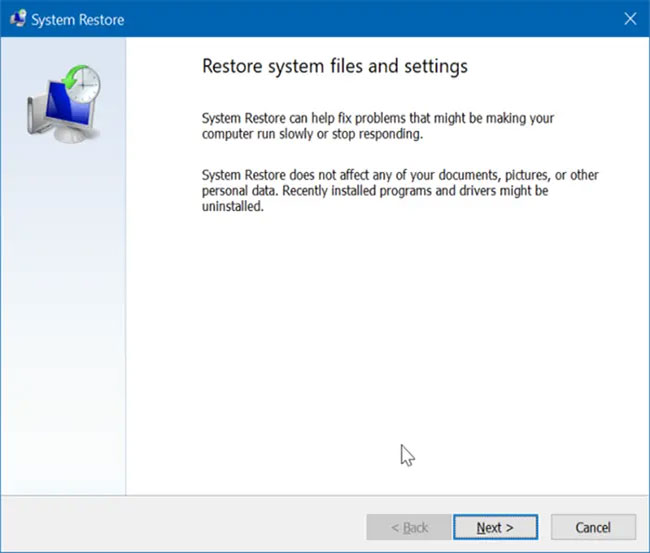
<p style="text-align: justify;"><strong>Bước 2</strong>: Nhấp vào nút&nbsp;<strong>Next</strong>&nbsp;để xem tất cả các điểm khôi phục được tạo gần đây có sẵn trên PC.</p>

<figure>
<div style="text-align: justify;"><img alt="Nhấp vào nút Next để xem tất cả các điểm khôi phục được tạo gần đây" data-i="0" data-src="https://st.quantrimang.com/photos/image/2020/11/10/chuong-trinh-driver-nao-bi-anh-huong-khi-khoi-phuc-he-thong-1.jpg" data-was-processed="true" height="553" src="https://st.quantrimang.com/photos/image/2020/11/10/chuong-trinh-driver-nao-bi-anh-huong-khi-khoi-phuc-he-thong-1.jpg" width="650" /></div>

<figcaption>
<div style="text-align: justify;">Nhấp vào nút Next để xem tất cả các điểm khôi phục được tạo gần đây</div>
</figcaption>
</figure>

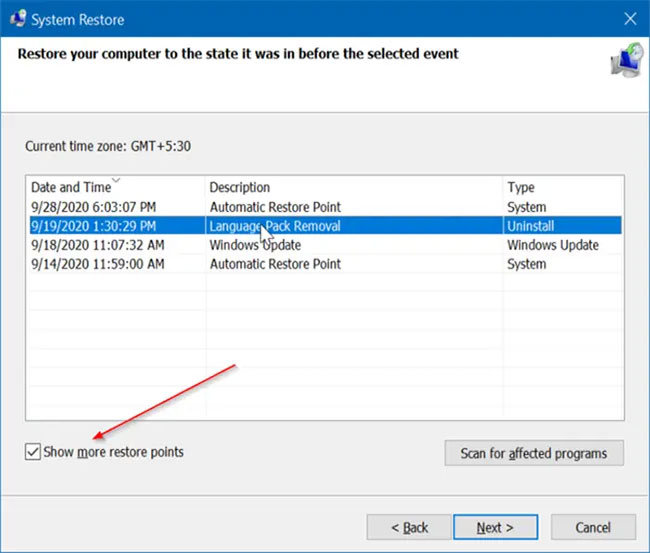
<p style="text-align: justify;"><strong>Bước 3</strong>: Tại đây, chọn hộp kiểm&nbsp;<strong>Show more restore points</strong>&nbsp;(để xem các điểm khôi phục có sẵn), sau đó chọn điểm khôi phục mà bạn muốn khôi phục cài đặt Windows 10 của mình.</p>

<figure>
<div style="text-align: justify;"><img alt="Chọn hộp kiểm Show more restore points" data-i="1" data-src="https://st.quantrimang.com/photos/image/2020/11/10/chuong-trinh-driver-nao-bi-anh-huong-khi-khoi-phuc-he-thong-2.jpg" data-was-processed="true" height="553" src="https://st.quantrimang.com/photos/image/2020/11/10/chuong-trinh-driver-nao-bi-anh-huong-khi-khoi-phuc-he-thong-2.jpg" width="650" /></div>

<figcaption>
<div style="text-align: justify;">Chọn hộp kiểm Show more restore points</div>
</figcaption>
</figure>

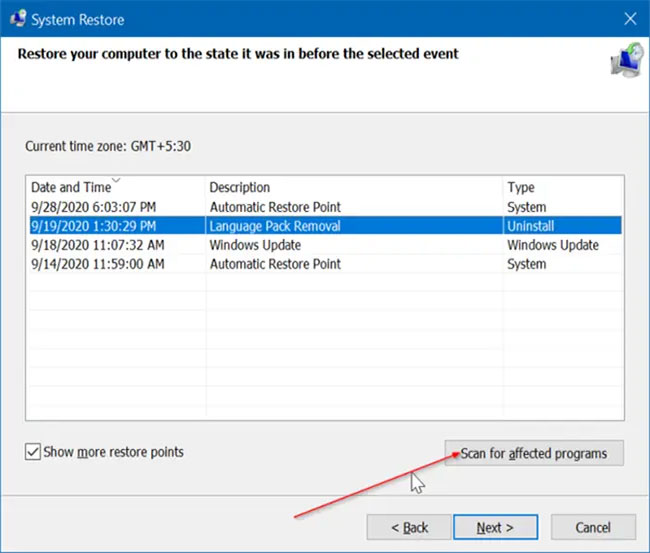
<p style="text-align: justify;"><strong>Bước 4</strong>: Bây giờ, để kiểm tra các chương trình và driver bị ảnh hưởng, hãy nhấp vào nút&nbsp;<strong>Scan for affected programs</strong>. Windows sẽ quét các chương trình và driver được cài đặt hoặc cập nhật khi tạo điểm khôi phục đã chọn.</p>

<figure>
<div style="text-align: justify;"><img alt="Nhấp vào nút Scan for affected programs" data-i="2" data-src="https://st.quantrimang.com/photos/image/2020/11/10/chuong-trinh-driver-nao-bi-anh-huong-khi-khoi-phuc-he-thong-3.jpg" data-was-processed="true" height="553" src="https://st.quantrimang.com/photos/image/2020/11/10/chuong-trinh-driver-nao-bi-anh-huong-khi-khoi-phuc-he-thong-3.jpg" width="650" /></div>

<figcaption>
<div style="text-align: justify;">Nhấp vào nút Scan for affected programs</div>
</figcaption>
</figure>

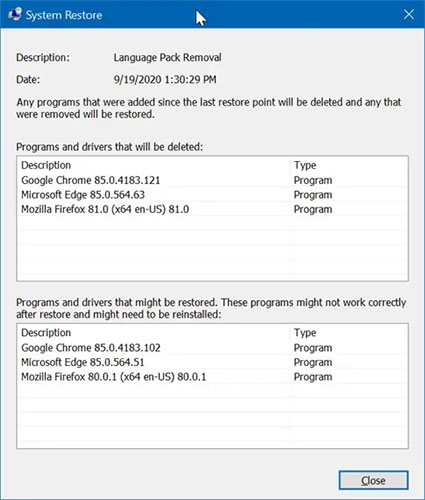
<p style="text-align: justify;"><strong>Bước 5</strong>: Như bạn có thể thấy trong hình dưới đây, hộp thoại hiển thị tất cả các chương trình và driver bị ảnh hưởng. Ngoài các chương trình và driver, bảng còn hiển thị phiên bản của chương trình hoặc driver mà chương trình hoặc driver sẽ được khôi phục.</p>

<figure>
<div style="text-align: justify;"><img alt="Hộp thoại hiển thị tất cả các chương trình và driver bị ảnh hưởng" data-i="3" data-src="https://st.quantrimang.com/photos/image/2020/11/10/chuong-trinh-driver-nao-bi-anh-huong-khi-khoi-phuc-he-thong-4.jpg" data-was-processed="true" height="500" src="https://st.quantrimang.com/photos/image/2020/11/10/chuong-trinh-driver-nao-bi-anh-huong-khi-khoi-phuc-he-thong-4.jpg" width="425" /></div>

<figcaption>
<div style="text-align: justify;">Hộp thoại hiển thị tất cả các chương trình và driver bị ảnh hưởng</div>
</figcaption>
</figure>

<p style="text-align: justify;"><strong>Bước 6</strong>: Nhấp vào nút&nbsp;<strong>Close</strong>&nbsp;để thoát khỏi hộp thoại.</p>
		</div>
				<div id="author">
						<p>
				<strong>Nguồn tin:</strong>
				Quantrimang.com
			</p>
		</div>
	</div>
	<div id="footer" class="clearfix">
		<div id="url">
			<strong>URL của bản tin này: </strong><a href="https://www.nguoicodonvn2008.info/vi/news/savefile/kien-thuc-may-tinh/cach-kiem-tra-cac-chuong-trinh-driver-bi-anh-huong-khi-khoi-phuc-he-thong-3064.html" title="Cách kiểm tra các chương trình &amp; driver bị ảnh hưởng khi khôi phục hệ thống">https://www.nguoicodonvn2008.info/vi/news/savefile/kien-thuc-may-tinh/cach-kiem-tra-cac-chuong-trinh-driver-bi-anh-huong-khi-khoi-phuc-he-thong-3064.html</a>

		</div>
		<div class="clear"></div>
		<div class="copyright">
			&copy; .&#x3A; Nguoicodonvn2008.info - Cõi lòng người cô đơn &#x3A;.
		</div>
		<div id="contact">
			<a href="mailto:admin@nguoicodonvn2008.info">admin@nguoicodonvn2008.info</a>
		</div>
	</div>
</div>
        <div id="timeoutsess" class="chromeframe">
            Bạn đã không sử dụng Site, <a onclick="timeoutsesscancel();" href="https://www.nguoicodonvn2008.info/#">Bấm vào đây để duy trì trạng thái đăng nhập</a>. Thời gian chờ: <span id="secField"> 60 </span> giây
        </div>
        <div id="openidResult" class="nv-alert" style="display:none"></div>
        <div id="openidBt" data-result="" data-redirect=""></div>
		</script>
		<div class="car-top">
  <span><img src="https://www.nguoicodonvn2008.info/themes/default/images/car.png" alt=""></span>
</div>
<script src="https://www.nguoicodonvn2008.info/assets/js/jquery/jquery.min.js"></script>
<script>var nv_base_siteurl="/",nv_lang_data="vi",nv_lang_interface="vi",nv_name_variable="nv",nv_fc_variable="op",nv_lang_variable="language",nv_module_name="news",nv_func_name="savefile",nv_is_user=0, nv_my_ofs=-4,nv_my_abbr="EDT",nv_cookie_prefix="nv4c_e856T",nv_check_pass_mstime=1738000,nv_area_admin=0,nv_safemode=0,theme_responsive=0,nv_recaptcha_ver=2,nv_recaptcha_sitekey="",nv_recaptcha_type="image",XSSsanitize=1;</script>
<script src="https://www.nguoicodonvn2008.info/assets/js/language/vi.js"></script>
<script src="https://www.nguoicodonvn2008.info/assets/js/DOMPurify/purify3.js"></script>
<script src="https://www.nguoicodonvn2008.info/assets/js/global.js"></script>
<script src="https://www.nguoicodonvn2008.info/assets/js/site.js"></script>
<script src="https://www.nguoicodonvn2008.info/themes/default/js/news.js"></script>
<script src="https://www.nguoicodonvn2008.info/themes/default/js/main.js"></script>
<script src="https://www.nguoicodonvn2008.info/themes/default/js/custom.js"></script>
<script type="application/ld+json">
        {
            "@context": "https://schema.org",
            "@type": "Organization",
            "url": "https://www.nguoicodonvn2008.info",
            "logo": "https://www.nguoicodonvn2008.info/uploads/angel.gif"
        }
        </script>
<script src="https://www.nguoicodonvn2008.info/themes/default/js/bootstrap.min.js"></script>
<script type="text/javascript">
var $scrolltop = $('.car-top');
$scrolltop.on('click', function () {
    $('html,body').animate({
        scrollTop: 0
    }, 800);
    $(this).addClass("car-run");
    setTimeout(function(){ $scrolltop.removeClass('car-run');}, 1000);
    return false;
});
$(window).on('scroll', function ()
{ 
    if($(window).scrollTop() >= 200)
    {
        $scrolltop.addClass("show");
        $scrolltop.addClass("car-down");
    }
    else
    {
       $scrolltop.removeClass("show");
       setTimeout(function(){ $scrolltop.removeClass('car-down');}, 300);
    }
});
</script>
</body>
</html>