<!DOCTYPE html>
    <html lang="vi" xmlns="http://www.w3.org/1999/xhtml" prefix="og: http://ogp.me/ns#">
    <head>
<title>Cách kích hoạt&#x002F;vô hiệu hóa policy Enable Win32 long paths trong Windows 10</title>
<meta name="description" content="Cách kích hoạt&#x002F;vô hiệu hóa policy Enable Win32 long paths trong Windows 10 - Savefile - Tin Tức -...">
<meta name="author" content=".: Nguoicodonvn2008.info - Cõi lòng người cô đơn :.">
<meta name="copyright" content=".: Nguoicodonvn2008.info - Cõi lòng người cô đơn :. [admin@nguoicodonvn2008.info]">
<meta name="robots" content="index, archive, follow, noodp">
<meta name="googlebot" content="index,archive,follow,noodp">
<meta name="msnbot" content="all,index,follow">
<meta name="generator" content="NukeViet v4.5">
<meta http-equiv="Content-Type" content="text/html; charset=utf-8">
<meta property="og:title" content="Cách kích hoạt&#x002F;vô hiệu hóa policy Enable Win32 long paths trong Windows 10">
<meta property="og:type" content="website">
<meta property="og:description" content="Savefile - Tin Tức -...">
<meta property="og:site_name" content=".&#x3A; Nguoicodonvn2008.info - Cõi lòng người cô đơn &#x3A;.">
<meta property="og:url" content="https://www.nguoicodonvn2008.info/vi/news/savefile/kien-thuc-may-tinh/cach-kich-hoat-vo-hieu-hoa-policy-enable-win32-long-paths-trong-windows-10-3125.html">
<link rel="shortcut icon" href="https://www.nguoicodonvn2008.info/favicon.ico">
<link rel="canonical" href="https://www.nguoicodonvn2008.info/vi/news/savefile/kien-thuc-may-tinh/cach-kich-hoat-vo-hieu-hoa-policy-enable-win32-long-paths-trong-windows-10-3125.html">
<link rel="alternate" href="https://www.nguoicodonvn2008.info/vi/news/rss/" title="Tin Tức" type="application/rss+xml">
<link rel="alternate" href="https://www.nguoicodonvn2008.info/vi/news/rss/karaoke-dual/" title="Tin Tức - Karaoke Dual" type="application/rss+xml">
<link rel="alternate" href="https://www.nguoicodonvn2008.info/vi/news/rss/nhac-tre/" title="Tin Tức - Nhạc trẻ" type="application/rss+xml">
<link rel="alternate" href="https://www.nguoicodonvn2008.info/vi/news/rss/tru-tinh/" title="Tin Tức - Trữ tình" type="application/rss+xml">
<link rel="alternate" href="https://www.nguoicodonvn2008.info/vi/news/rss/nuoc-ngoai/" title="Tin Tức - Nước ngoài" type="application/rss+xml">
<link rel="alternate" href="https://www.nguoicodonvn2008.info/vi/news/rss/remix/" title="Tin Tức - Remix" type="application/rss+xml">
<link rel="alternate" href="https://www.nguoicodonvn2008.info/vi/news/rss/tam-su-tinh-yeu/" title="Tin Tức - Tâm sự tình yêu" type="application/rss+xml">
<link rel="alternate" href="https://www.nguoicodonvn2008.info/vi/news/rss/tho-suu-tam/" title="Tin Tức - Thơ sưu tầm" type="application/rss+xml">
<link rel="alternate" href="https://www.nguoicodonvn2008.info/vi/news/rss/cuoc-song/" title="Tin Tức - Cuộc sống" type="application/rss+xml">
<link rel="alternate" href="https://www.nguoicodonvn2008.info/vi/news/rss/phan-mem/" title="Tin Tức - Phần mềm" type="application/rss+xml">
<link rel="alternate" href="https://www.nguoicodonvn2008.info/vi/news/rss/kien-thuc-may-tinh/" title="Tin Tức - Kiến thức máy tính" type="application/rss+xml">
<link rel="alternate" href="https://www.nguoicodonvn2008.info/vi/news/rss/hoc-tap/" title="Tin Tức - Học tập" type="application/rss+xml">
<link rel="alternate" href="https://www.nguoicodonvn2008.info/vi/news/rss/tai-lieu/" title="Tin Tức - Tài liệu" type="application/rss+xml">
<link rel="alternate" href="https://www.nguoicodonvn2008.info/vi/news/rss/de-thi/" title="Tin Tức - Đề thi" type="application/rss+xml">
<link rel="preload" as="style" href="https://www.nguoicodonvn2008.info/assets/css/font-awesome.min.css" type="text/css">
<link rel="preload" as="style" href="https://www.nguoicodonvn2008.info/themes/default/css/bootstrap.non-responsive.css" type="text/css">
<link rel="preload" as="style" href="https://www.nguoicodonvn2008.info/themes/default/css/style.css" type="text/css">
<link rel="preload" as="style" href="https://www.nguoicodonvn2008.info/themes/default/css/style.non-responsive.css" type="text/css">
<link rel="preload" as="style" href="https://www.nguoicodonvn2008.info/themes/default/css/news.css" type="text/css">
<link rel="preload" as="style" href="https://www.nguoicodonvn2008.info/themes/default/css/custom.css" type="text/css">
<link rel="preload" as="script" href="https://www.nguoicodonvn2008.info/assets/js/jquery/jquery.min.js" type="text/javascript">
<link rel="preload" as="script" href="https://www.nguoicodonvn2008.info/assets/js/language/vi.js" type="text/javascript">
<link rel="preload" as="script" href="https://www.nguoicodonvn2008.info/assets/js/DOMPurify/purify3.js" type="text/javascript">
<link rel="preload" as="script" href="https://www.nguoicodonvn2008.info/assets/js/global.js" type="text/javascript">
<link rel="preload" as="script" href="https://www.nguoicodonvn2008.info/assets/js/site.js" type="text/javascript">
<link rel="preload" as="script" href="https://www.nguoicodonvn2008.info/themes/default/js/news.js" type="text/javascript">
<link rel="preload" as="script" href="https://www.nguoicodonvn2008.info/themes/default/js/main.js" type="text/javascript">
<link rel="preload" as="script" href="https://www.nguoicodonvn2008.info/themes/default/js/custom.js" type="text/javascript">
<link rel="preload" as="script" href="https://www.nguoicodonvn2008.info/themes/default/js/bootstrap.min.js" type="text/javascript">
<link rel="stylesheet" href="https://www.nguoicodonvn2008.info/assets/css/font-awesome.min.css">
<link rel="stylesheet" href="https://www.nguoicodonvn2008.info/themes/default/css/bootstrap.non-responsive.css">
<link rel="stylesheet" href="https://www.nguoicodonvn2008.info/themes/default/css/style.css">
<link rel="stylesheet" href="https://www.nguoicodonvn2008.info/themes/default/css/style.non-responsive.css">
<link rel="StyleSheet" href="https://www.nguoicodonvn2008.info/themes/default/css/news.css">
<link rel="stylesheet" href="https://www.nguoicodonvn2008.info/themes/default/css/custom.css">
<style type="text/css">
	body{background: #fff;}
</style>
    </head>
    <body>
<div id="print">
	<div id="hd_print">
		<h2 class="pull-left">.&#x3A; Nguoicodonvn2008.info - Cõi lòng người cô đơn &#x3A;.</h2>
		<p class="pull-right"><a title=".&#x3A; Nguoicodonvn2008.info - Cõi lòng người cô đơn &#x3A;." href="https://www.nguoicodonvn2008.info/">https://www.nguoicodonvn2008.info</a></p>
	</div>
	<div class="clear"></div>
	<hr />
	<div id="content">
		<h1>Cách kích hoạt&#x002F;vô hiệu hóa policy Enable Win32 long paths trong Windows 10</h1>
		<ul class="list-inline">
			<li>Thứ hai - 23/11/2020 23:51</li>
			<li class="hidden-print txtrequired"><em class="fa fa-print">&nbsp;</em><a title="In ra" href="javascript:;" onclick="window.print()">In ra</a></li>
			<li class="hidden-print txtrequired"><em class="fa fa-power-off">&nbsp;</em><a title="Đóng cửa sổ này" href="javascript:;" onclick="window.close()">Đóng cửa sổ này</a></li>
		</ul>
		<div class="clear"></div>
		<div id="hometext">
		</div>
				<div class="imghome">
			<img alt="Cách kích hoạt&#x002F;vô hiệu hóa policy Enable Win32 long paths trong Windows 10" src="https://st.quantrimang.com/photos/image/2020/11/23/kich-hoat-policy-enable-win32-long-paths-1.jpg" width="460" class="img-thumbnail" />
		</div>
		<div class="clear"></div>
		<div id="bodytext" class="clearfix">
			<p style="text-align: justify;">Theo mặc định, giới hạn độ dài đường dẫn tối đa trong Windows là 260 ký tự. Đường dẫn cục bộ được cấu trúc theo thứ tự sau: Ký tự ổ đĩa, dấu hai chấm, dấu gạch chéo ngược, tên các thành phần được phân tách bằng dấu gạch chéo ngược và ký tự rỗng kết thúc.</p>

<h2 style="text-align: justify;">Policy Win32 long paths cho phép sử dụng những đường dẫn dài</h2>

<p style="text-align: justify;">Bắt đầu với Windows 10 build 14352, bạn có thể kích hoạt NTFS long paths (đường dẫn dài NTFS) để cho phép các ứng dụng win32 được kê khai và ứng dụng Windows Store truy cập các đường dẫn vượt quá giới hạn 260 ký tự thông thường cho mỗi node. Bật cài đặt này sẽ làm cho các đường dẫn dài có thể truy cập được trong quá trình.</p>

<p style="text-align: justify;">Bắt đầu với Windows build 1607, policy này đã thay đổi và hiện được gọi là Win32 long paths.</p>

<p style="text-align: justify;">Hướng dẫn này sẽ chỉ cho bạn cách kích hoạt hoặc vô hiệu hóa policy Win32 long paths để có đường dẫn dài hơn 260 ký tự cho tất cả người dùng trong Windows 10.</p>

<p style="text-align: justify;"><strong>Lưu ý:</strong></p>

<p style="text-align: justify;">Bạn phải đăng nhập với quyền admin để có thể kích hoạt hoặc vô hiệu hóa policy Win32 long paths.</p>

<p style="text-align: justify;">Kích hoạt NTFS (Win32) long paths sẽ cho phép các ứng dụng win32 đã kê khai và ứng dụng Windows Store truy cập đường dẫn vượt quá giới hạn 260 ký tự bình thường cho mỗi node trên hệ thống file hỗ trợ nó. Kích hoạt cài đặt này sẽ làm cho các đường dẫn dài có thể truy cập được trong quá trình.</p>

<p style="text-align: justify;">Điều này thực sự có nghĩa là một ứng dụng phải có dòng sau trong file manifest của nó:</p>

<pre id="pre0">
<code>&lt;longPathAware&gt;true&lt;/longPathAware&gt;</code></pre>

<p style="text-align: justify;">Manifest là một file nhỏ chứa thông tin bổ sung về tiến trình EXE như thông tin về khả năng tương thích và nhận biết DPI, v.v...</p>

<p style="text-align: justify;">Bên cạnh việc nhà phát triển ứng dụng thêm file manifest, cài đặt Group Policy này phải được kích hoạt cho NTFS long paths.</p>

<div style="text-align: justify;">&nbsp;</div>

<h2 style="text-align: justify;">Kích hoạt hoặc vô hiệu hóa Win32 long paths bằng Group Policy</h2>

<p style="text-align: justify;">Local Group Policy Editor chỉ khả dụng trong các phiên bản Windows 10 Pro, Enterprise và Education.</p>

<p style="text-align: justify;">1.&nbsp;Mở Local Group Policy Editor.</p>

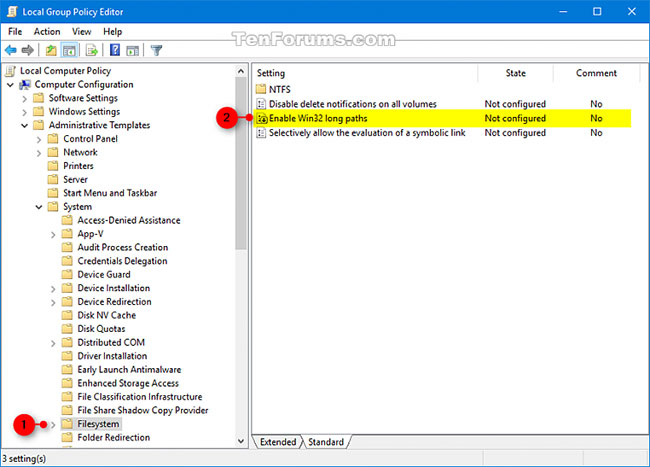
<p style="text-align: justify;">2. Điều hướng đến vị trí bên dưới trong phần bên trái của Local Group Policy Editor:</p>

<pre id="pre1">
<code>Computer Configuration\Administrative Templates\System\Filesystem</code></pre>

<figure>
<div style="text-align: justify;"><img alt="Điều hướng đến vị trí như hình trong Local Group Policy Editor" data-i="0" data-src="https://st.quantrimang.com/photos/image/2020/11/23/kich-hoat-policy-enable-win32-long-paths-1.jpg" data-was-processed="true" height="467" src="https://st.quantrimang.com/photos/image/2020/11/23/kich-hoat-policy-enable-win32-long-paths-1.jpg" width="650" /></div>

<figcaption>
<div style="text-align: justify;">Điều hướng đến vị trí như hình trong Local Group Policy Editor</div>
</figcaption>
</figure>

<p style="text-align: justify;">3. Ở bên phải của&nbsp;<strong>Filesystem</strong>&nbsp;trong&nbsp;<strong>Local Group Policy Editor</strong>, nhấp đúp vào policy&nbsp;<strong>Enable Win32 long paths</strong>&nbsp;để chỉnh sửa nó.</p>

<p style="text-align: justify;">4. Thực hiện bước 5 (để kích hoạt) hoặc bước 6 (để vô hiệu hóa) bên dưới, tùy thuộc vào những gì bạn muốn làm.</p>

<div style="text-align: justify;">&nbsp;</div>

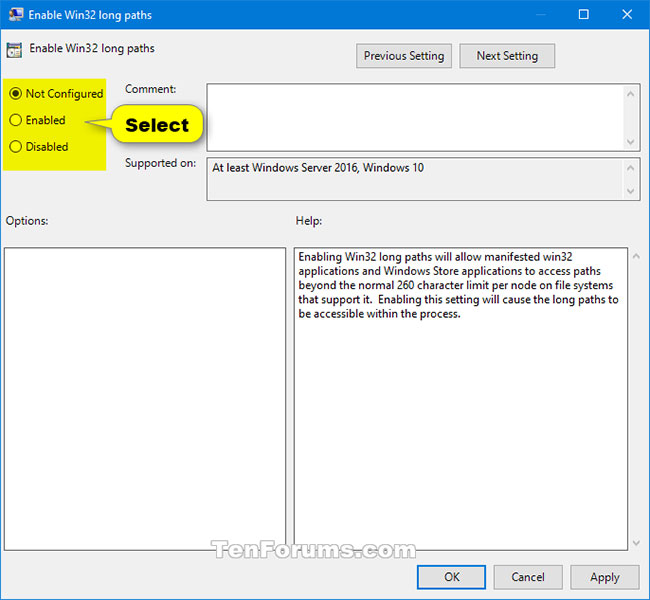
<p style="text-align: justify;">5. Để kích hoạt policy Win32 Long Paths, chọn&nbsp;<strong>Enabled</strong>, nhấp vào&nbsp;<strong>OK</strong>&nbsp;và chuyển sang bước 7 bên dưới.</p>

<p style="text-align: justify;">6. Để vô hiệu hóa policy Win32 Long Path, chọn&nbsp;<strong>Not Configured</strong>&nbsp;hoặc&nbsp;<strong>Disabled</strong>, nhấn vào&nbsp;<strong>OK</strong>&nbsp;và chuyển sang bước 7 bên dưới.&nbsp;<strong>Not Configured</strong>&nbsp;là cài đặt mặc định.</p>

<figure>
<div style="text-align: justify;"><img alt="Not Configured là cài đặt mặc định" data-i="1" data-src="https://st.quantrimang.com/photos/image/2020/11/23/kich-hoat-policy-enable-win32-long-paths-2.jpg" data-was-processed="true" height="600" src="https://st.quantrimang.com/photos/image/2020/11/23/kich-hoat-policy-enable-win32-long-paths-2.jpg" width="650" /></div>

<figcaption>
<div style="text-align: justify;">Not Configured là cài đặt mặc định</div>
</figcaption>
</figure>

<p style="text-align: justify;">7. Khi hoàn tất, bạn có thể đóng Local Group Policy Editor nếu muốn.</p>
		</div>
				<div id="author">
						<p>
				<strong>Nguồn tin:</strong>
				Quantrimang.com
			</p>
		</div>
	</div>
	<div id="footer" class="clearfix">
		<div id="url">
			<strong>URL của bản tin này: </strong><a href="https://www.nguoicodonvn2008.info/vi/news/savefile/kien-thuc-may-tinh/cach-kich-hoat-vo-hieu-hoa-policy-enable-win32-long-paths-trong-windows-10-3125.html" title="Cách kích hoạt&#x002F;vô hiệu hóa policy Enable Win32 long paths trong Windows 10">https://www.nguoicodonvn2008.info/vi/news/savefile/kien-thuc-may-tinh/cach-kich-hoat-vo-hieu-hoa-policy-enable-win32-long-paths-trong-windows-10-3125.html</a>

		</div>
		<div class="clear"></div>
		<div class="copyright">
			&copy; .&#x3A; Nguoicodonvn2008.info - Cõi lòng người cô đơn &#x3A;.
		</div>
		<div id="contact">
			<a href="mailto:admin@nguoicodonvn2008.info">admin@nguoicodonvn2008.info</a>
		</div>
	</div>
</div>
        <div id="timeoutsess" class="chromeframe">
            Bạn đã không sử dụng Site, <a onclick="timeoutsesscancel();" href="https://www.nguoicodonvn2008.info/#">Bấm vào đây để duy trì trạng thái đăng nhập</a>. Thời gian chờ: <span id="secField"> 60 </span> giây
        </div>
        <div id="openidResult" class="nv-alert" style="display:none"></div>
        <div id="openidBt" data-result="" data-redirect=""></div>
		</script>
		<div class="car-top">
  <span><img src="https://www.nguoicodonvn2008.info/themes/default/images/car.png" alt=""></span>
</div>
<script src="https://www.nguoicodonvn2008.info/assets/js/jquery/jquery.min.js"></script>
<script>var nv_base_siteurl="/",nv_lang_data="vi",nv_lang_interface="vi",nv_name_variable="nv",nv_fc_variable="op",nv_lang_variable="language",nv_module_name="news",nv_func_name="savefile",nv_is_user=0, nv_my_ofs=-4,nv_my_abbr="EDT",nv_cookie_prefix="nv4c_e856T",nv_check_pass_mstime=1738000,nv_area_admin=0,nv_safemode=0,theme_responsive=0,nv_recaptcha_ver=2,nv_recaptcha_sitekey="",nv_recaptcha_type="image",XSSsanitize=1;</script>
<script src="https://www.nguoicodonvn2008.info/assets/js/language/vi.js"></script>
<script src="https://www.nguoicodonvn2008.info/assets/js/DOMPurify/purify3.js"></script>
<script src="https://www.nguoicodonvn2008.info/assets/js/global.js"></script>
<script src="https://www.nguoicodonvn2008.info/assets/js/site.js"></script>
<script src="https://www.nguoicodonvn2008.info/themes/default/js/news.js"></script>
<script src="https://www.nguoicodonvn2008.info/themes/default/js/main.js"></script>
<script src="https://www.nguoicodonvn2008.info/themes/default/js/custom.js"></script>
<script type="application/ld+json">
        {
            "@context": "https://schema.org",
            "@type": "Organization",
            "url": "https://www.nguoicodonvn2008.info",
            "logo": "https://www.nguoicodonvn2008.info/uploads/angel.gif"
        }
        </script>
<script src="https://www.nguoicodonvn2008.info/themes/default/js/bootstrap.min.js"></script>
<script type="text/javascript">
var $scrolltop = $('.car-top');
$scrolltop.on('click', function () {
    $('html,body').animate({
        scrollTop: 0
    }, 800);
    $(this).addClass("car-run");
    setTimeout(function(){ $scrolltop.removeClass('car-run');}, 1000);
    return false;
});
$(window).on('scroll', function ()
{ 
    if($(window).scrollTop() >= 200)
    {
        $scrolltop.addClass("show");
        $scrolltop.addClass("car-down");
    }
    else
    {
       $scrolltop.removeClass("show");
       setTimeout(function(){ $scrolltop.removeClass('car-down');}, 300);
    }
});
</script>
</body>
</html>