<!DOCTYPE html>
    <html lang="vi" xmlns="http://www.w3.org/1999/xhtml" prefix="og: http://ogp.me/ns#">
    <head>
<title>Cách kích hoạt&#x002F;vô hiệu hóa màn hình “Let&#039;s finish setting up your device” trên Windows 11</title>
<meta name="description" content="Cách kích hoạt&#x002F;vô hiệu hóa màn hình “Let&#039;s finish setting up your device” trên Windows 11 - Savefile - Tin Tức -...">
<meta name="author" content=".: Nguoicodonvn2008.info - Cõi lòng người cô đơn :.">
<meta name="copyright" content=".: Nguoicodonvn2008.info - Cõi lòng người cô đơn :. [admin@nguoicodonvn2008.info]">
<meta name="robots" content="index, archive, follow, noodp">
<meta name="googlebot" content="index,archive,follow,noodp">
<meta name="msnbot" content="all,index,follow">
<meta name="generator" content="NukeViet v4.5">
<meta http-equiv="Content-Type" content="text/html; charset=utf-8">
<meta property="og:title" content="Cách kích hoạt&#x002F;vô hiệu hóa màn hình “Let&#039;s finish setting up your device” trên Windows 11">
<meta property="og:type" content="website">
<meta property="og:description" content="Savefile - Tin Tức -...">
<meta property="og:site_name" content=".&#x3A; Nguoicodonvn2008.info - Cõi lòng người cô đơn &#x3A;.">
<meta property="og:url" content="https://www.nguoicodonvn2008.info/vi/news/savefile/kien-thuc-may-tinh/cach-kich-hoat-vo-hieu-hoa-man-hinh-let-s-finish-setting-up-your-device-tren-windows-11-8072.html">
<link rel="shortcut icon" href="https://www.nguoicodonvn2008.info/favicon.ico">
<link rel="canonical" href="https://www.nguoicodonvn2008.info/vi/news/savefile/kien-thuc-may-tinh/cach-kich-hoat-vo-hieu-hoa-man-hinh-let-s-finish-setting-up-your-device-tren-windows-11-8072.html">
<link rel="alternate" href="https://www.nguoicodonvn2008.info/vi/news/rss/" title="Tin Tức" type="application/rss+xml">
<link rel="alternate" href="https://www.nguoicodonvn2008.info/vi/news/rss/karaoke-dual/" title="Tin Tức - Karaoke Dual" type="application/rss+xml">
<link rel="alternate" href="https://www.nguoicodonvn2008.info/vi/news/rss/nhac-tre/" title="Tin Tức - Nhạc trẻ" type="application/rss+xml">
<link rel="alternate" href="https://www.nguoicodonvn2008.info/vi/news/rss/tru-tinh/" title="Tin Tức - Trữ tình" type="application/rss+xml">
<link rel="alternate" href="https://www.nguoicodonvn2008.info/vi/news/rss/nuoc-ngoai/" title="Tin Tức - Nước ngoài" type="application/rss+xml">
<link rel="alternate" href="https://www.nguoicodonvn2008.info/vi/news/rss/remix/" title="Tin Tức - Remix" type="application/rss+xml">
<link rel="alternate" href="https://www.nguoicodonvn2008.info/vi/news/rss/tam-su-tinh-yeu/" title="Tin Tức - Tâm sự tình yêu" type="application/rss+xml">
<link rel="alternate" href="https://www.nguoicodonvn2008.info/vi/news/rss/tho-suu-tam/" title="Tin Tức - Thơ sưu tầm" type="application/rss+xml">
<link rel="alternate" href="https://www.nguoicodonvn2008.info/vi/news/rss/cuoc-song/" title="Tin Tức - Cuộc sống" type="application/rss+xml">
<link rel="alternate" href="https://www.nguoicodonvn2008.info/vi/news/rss/phan-mem/" title="Tin Tức - Phần mềm" type="application/rss+xml">
<link rel="alternate" href="https://www.nguoicodonvn2008.info/vi/news/rss/kien-thuc-may-tinh/" title="Tin Tức - Kiến thức máy tính" type="application/rss+xml">
<link rel="alternate" href="https://www.nguoicodonvn2008.info/vi/news/rss/hoc-tap/" title="Tin Tức - Học tập" type="application/rss+xml">
<link rel="alternate" href="https://www.nguoicodonvn2008.info/vi/news/rss/tai-lieu/" title="Tin Tức - Tài liệu" type="application/rss+xml">
<link rel="alternate" href="https://www.nguoicodonvn2008.info/vi/news/rss/de-thi/" title="Tin Tức - Đề thi" type="application/rss+xml">
<link rel="preload" as="style" href="https://www.nguoicodonvn2008.info/assets/css/font-awesome.min.css" type="text/css">
<link rel="preload" as="style" href="https://www.nguoicodonvn2008.info/themes/default/css/bootstrap.non-responsive.css" type="text/css">
<link rel="preload" as="style" href="https://www.nguoicodonvn2008.info/themes/default/css/style.css" type="text/css">
<link rel="preload" as="style" href="https://www.nguoicodonvn2008.info/themes/default/css/style.non-responsive.css" type="text/css">
<link rel="preload" as="style" href="https://www.nguoicodonvn2008.info/themes/default/css/news.css" type="text/css">
<link rel="preload" as="style" href="https://www.nguoicodonvn2008.info/themes/default/css/custom.css" type="text/css">
<link rel="preload" as="script" href="https://www.nguoicodonvn2008.info/assets/js/jquery/jquery.min.js" type="text/javascript">
<link rel="preload" as="script" href="https://www.nguoicodonvn2008.info/assets/js/language/vi.js" type="text/javascript">
<link rel="preload" as="script" href="https://www.nguoicodonvn2008.info/assets/js/DOMPurify/purify3.js" type="text/javascript">
<link rel="preload" as="script" href="https://www.nguoicodonvn2008.info/assets/js/global.js" type="text/javascript">
<link rel="preload" as="script" href="https://www.nguoicodonvn2008.info/assets/js/site.js" type="text/javascript">
<link rel="preload" as="script" href="https://www.nguoicodonvn2008.info/themes/default/js/news.js" type="text/javascript">
<link rel="preload" as="script" href="https://www.nguoicodonvn2008.info/themes/default/js/main.js" type="text/javascript">
<link rel="preload" as="script" href="https://www.nguoicodonvn2008.info/themes/default/js/custom.js" type="text/javascript">
<link rel="preload" as="script" href="https://www.nguoicodonvn2008.info/themes/default/js/bootstrap.min.js" type="text/javascript">
<link rel="stylesheet" href="https://www.nguoicodonvn2008.info/assets/css/font-awesome.min.css">
<link rel="stylesheet" href="https://www.nguoicodonvn2008.info/themes/default/css/bootstrap.non-responsive.css">
<link rel="stylesheet" href="https://www.nguoicodonvn2008.info/themes/default/css/style.css">
<link rel="stylesheet" href="https://www.nguoicodonvn2008.info/themes/default/css/style.non-responsive.css">
<link rel="StyleSheet" href="https://www.nguoicodonvn2008.info/themes/default/css/news.css">
<link rel="stylesheet" href="https://www.nguoicodonvn2008.info/themes/default/css/custom.css">
<style type="text/css">
	body{background: #fff;}
</style>
    </head>
    <body>
<div id="print">
	<div id="hd_print">
		<h2 class="pull-left">.&#x3A; Nguoicodonvn2008.info - Cõi lòng người cô đơn &#x3A;.</h2>
		<p class="pull-right"><a title=".&#x3A; Nguoicodonvn2008.info - Cõi lòng người cô đơn &#x3A;." href="https://www.nguoicodonvn2008.info/">https://www.nguoicodonvn2008.info</a></p>
	</div>
	<div class="clear"></div>
	<hr />
	<div id="content">
		<h1>Cách kích hoạt&#x002F;vô hiệu hóa màn hình “Let&#039;s finish setting up your device” trên Windows 11</h1>
		<ul class="list-inline">
			<li>Thứ năm - 15/02/2024 03:33</li>
			<li class="hidden-print txtrequired"><em class="fa fa-print">&nbsp;</em><a title="In ra" href="javascript:;" onclick="window.print()">In ra</a></li>
			<li class="hidden-print txtrequired"><em class="fa fa-power-off">&nbsp;</em><a title="Đóng cửa sổ này" href="javascript:;" onclick="window.close()">Đóng cửa sổ này</a></li>
		</ul>
		<div class="clear"></div>
		<div id="hometext">
		</div>
				<div class="imghome">
			<img alt="Cách kích hoạt&#x002F;vô hiệu hóa màn hình “Let&#039;s finish setting up your device” trên Windows 11" src="https://st.quantrimang.com/photos/image/2024/01/31/kich-hoat-vo-hieu-hoa-let-s-finish-setting-up-your-device-windows-11-3.jpg" width="460" class="img-thumbnail" />
		</div>
		<div class="clear"></div>
		<div id="bodytext" class="clearfix">
			<p style="text-align: justify;">Hướng dẫn sẽ chỉ cho bạn cách kích hoạt hoặc vô hiệu hóa màn hình &quot;Let&#039;s finish setting up your device&quot; cho tài khoản của bạn trong&nbsp;Windows 11.</p>

<p style="text-align: justify;">Màn hình Let&#039;s finish setting up your device là một SCOOBE (Second-Chance Out Of Box Experience) có thể hiển thị khi bạn đăng nhập để đề xuất các cách tận dụng tối đa Windows và hoàn tất thiết lập thiết bị này.</p>

<p style="text-align: justify;">Bắt đầu với Windows 11 build 25309, Microsoft đang thử nghiệm SCOOBE với tên người dùng của bạn được đưa vào tiêu đề.</p>

<h2 style="text-align: justify;">Kích hoạt hoặc vô hiệu hóa &quot;Let&#039;s finish setting up your device&quot; trong Settings</h2>

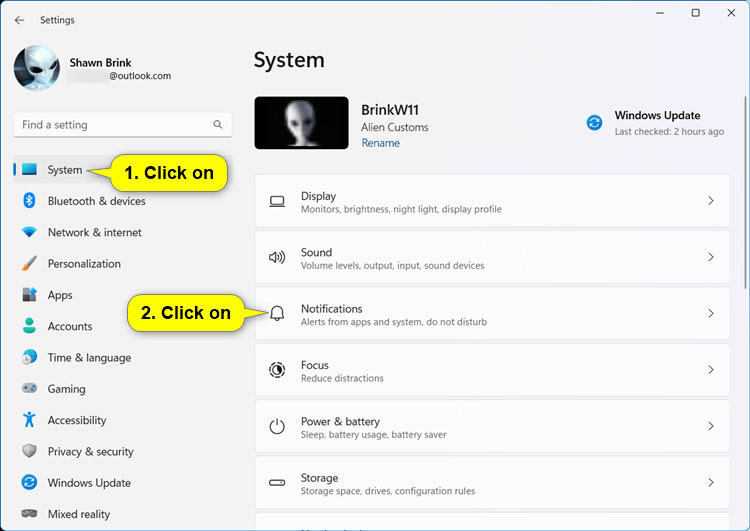
<p style="text-align: justify;">1.&nbsp;Mở Settings&nbsp;(<strong>Win + I</strong>).</p>

<p style="text-align: justify;">2. Nhấn vào&nbsp;<strong>System</strong>&nbsp;ở bên trái và nhấp vào&nbsp;<strong>Notifications</strong>&nbsp;ở bên phải.</p>

<figure>
<div style="text-align: justify;"><img alt="Mở System &gt; Notifications" data-i="0" data-src="https://st.quantrimang.com/photos/image/2024/01/31/kich-hoat-vo-hieu-hoa-let-s-finish-setting-up-your-device-windows-11-1.jpg" data-was-processed="true" height="531" src="https://st.quantrimang.com/photos/image/2024/01/31/kich-hoat-vo-hieu-hoa-let-s-finish-setting-up-your-device-windows-11-1.jpg" width="750" /></div>

<figcaption>
<div style="text-align: justify;">Mở System &gt; Notifications</div>
</figcaption>
</figure>

<p style="text-align: justify;">3. Thực hiện một trong các hành động sau tùy thuộc vào nội dung nào có sẵn cho cài đặt này:</p>

<div style="text-align: justify;"><iframe allowtransparency="true" data-google-container-id="a!2" data-google-query-id="CPnXnLb3rIQDFVZeDwId9uwPOA" data-load-complete="true" frameborder="0" height="0" hspace="0" id="aswift_1" marginheight="0" marginwidth="0" name="aswift_1" sandbox="" scrolling="no" vspace="0" width="694"></iframe></div>

<ul>
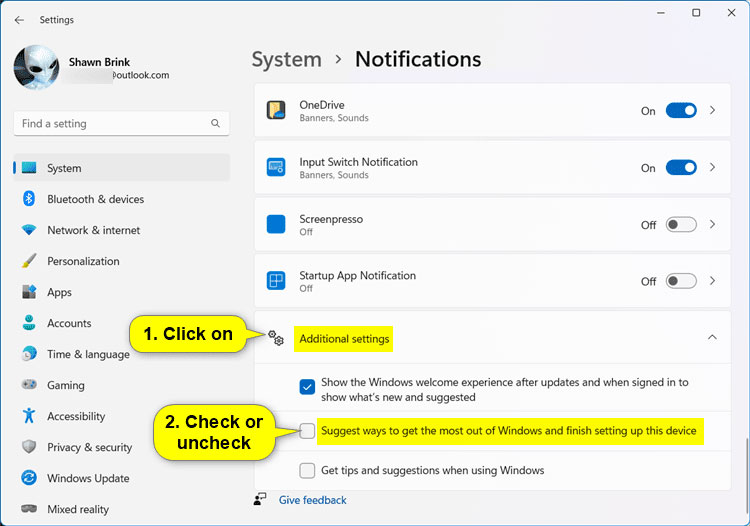
	<li style="text-align: justify;">Nhấp vào&nbsp;<strong>Additional settings&nbsp;</strong>để mở rộng nó và chọn (kích hoạt - mặc định) hoặc bỏ chọn (vô hiệu hóa)&nbsp;<strong>Suggest ways to get the most out of Windows and finish setting up this device</strong>&nbsp;tùy theo những gì bạn muốn.</li>
</ul>

<figure>
<div style="text-align: justify;"><img alt="Chọn hoặc bỏ chọn Suggest ways to get the most out of Windows and finish setting up this device" data-adbro-processed="true" data-i="1" data-src="https://st.quantrimang.com/photos/image/2024/01/31/kich-hoat-vo-hieu-hoa-let-s-finish-setting-up-your-device-windows-11-2.jpg" data-was-processed="true" height="526" src="https://st.quantrimang.com/photos/image/2024/01/31/kich-hoat-vo-hieu-hoa-let-s-finish-setting-up-your-device-windows-11-2.jpg" width="750" /></div>

<figcaption>
<div style="text-align: justify;">Chọn hoặc bỏ chọn Suggest ways to get the most out of Windows and finish setting up this device</div>
</figcaption>
</figure>

<ul>
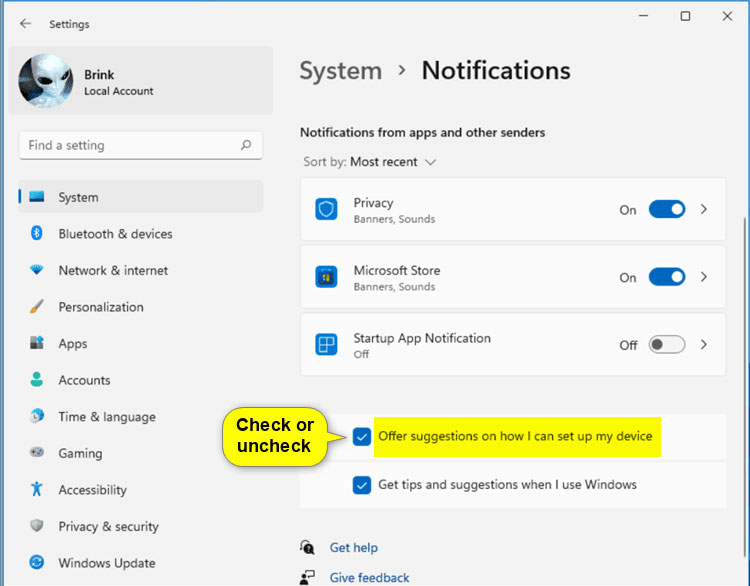
	<li style="text-align: justify;">Chọn (kích hoạt - mặc định) hoặc bỏ chọn (vô hiệu hóa)&nbsp;<strong>Offer suggestions on how I can set up my device</strong>&nbsp;theo ý muốn của bạn.</li>
</ul>

<figure>
<div style="text-align: justify;"><img alt="Chọn hoặc bỏ chọn Offer suggestions on how I can set up my device" data-i="2" data-src="https://st.quantrimang.com/photos/image/2024/01/31/kich-hoat-vo-hieu-hoa-let-s-finish-setting-up-your-device-windows-11-3.jpg" data-was-processed="true" height="586" src="https://st.quantrimang.com/photos/image/2024/01/31/kich-hoat-vo-hieu-hoa-let-s-finish-setting-up-your-device-windows-11-3.jpg" width="750" /></div>

<figcaption>
<div style="text-align: justify;">Chọn hoặc bỏ chọn Offer suggestions on how I can set up my device</div>
</figcaption>
</figure>

<div style="text-align: justify;"><iframe allowtransparency="true" data-google-container-id="a!3" data-google-query-id="CLnXpOT3rIQDFT1TDwIdvycEYA" data-load-complete="true" frameborder="0" height="0" hspace="0" id="aswift_2" marginheight="0" marginwidth="0" name="aswift_2" sandbox="" scrolling="no" vspace="0" width="694"></iframe></div>

<p style="text-align: justify;">4. Bây giờ, bạn có thể đóng Settings nếu muốn.</p>

<h2 style="text-align: justify;">Kích hoạt hoặc vô hiệu hóa &quot;Let&#039;s finish setting up your device&quot; bằng file REG</h2>

<p style="text-align: justify;">1. Thực hiện bước 2 (kích hoạt) hoặc bước 3 (vô hiệu hóa) bên dưới theo ý muốn của bạn.</p>

<p style="text-align: justify;">2. Để kích hoạt &quot;Let&#039;s finish setting up your device&quot; (đây là thiết lập mặc định), tải xuống file REG bên dưới và chuyển sang bước 4.​</p>

<p style="text-align: justify;"><strong>Enable_Lets_finish_setting_up_your_device.reg​<br />
<span style="color:rgb(192, 57, 43);">https://www.elevenforum.com/attachments/enable_lets_finish_setting_up_your_device-reg.24290/?hash=035c2c7259dc2245a79fe2c2fa7f361b</span></strong></p>

<p style="text-align: justify;">Nội dung file REG mang tính chất tham khảo:</p>

<pre id="pre0">
<code>Code:
Windows Registry Editor Version 5.00

&#91;HKEY_CURRENT_USER\Software\Microsoft\Windows\CurrentVersion\UserProfileEngagement&#93;
&quot;ScoobeSystemSettingEnabled&quot;=dword:00000001</code></pre>

<p style="text-align: justify;">3. Để vô hiệu hóa &quot;Let&#039;s finish setting up your device&quot;, tải xuống file REG bên dưới và chuyển sang bước 4.​</p>

<p style="text-align: justify;"><strong>Disable_Lets_finish_setting_up_your_device.reg<br />
<span style="color:rgb(192, 57, 43);">https://www.elevenforum.com/attachments/disable_lets_finish_setting_up_your_device-reg.24289/?hash=035c2c7259dc2245a79fe2c2fa7f361b</span></strong></p>

<p style="text-align: justify;">Nội dung file REG mang tính chất tham khảo:</p>

<pre id="pre1">
<code>Code:
Windows Registry Editor Version 5.00

&#91;HKEY_CURRENT_USER\Software\Microsoft\Windows\CurrentVersion\UserProfileEngagement&#93;
&quot;ScoobeSystemSettingEnabled&quot;=dword:00000000</code></pre>

<p style="text-align: justify;">4. Lưu file .reg vào desktop của bạn.</p>

<p style="text-align: justify;">5. Nhấp đúp chuột vào file .reg đã tải xuống để hợp nhất nó.</p>

<p style="text-align: justify;">6. Khi được nhắc, hãy nhấn vào&nbsp;<strong>Run &gt; Yes (UAC) &gt; Yes &gt; OK</strong>&nbsp;để phê duyệt việc hợp nhất.</p>

<p style="text-align: justify;">7. Bây giờ, bạn có thể xóa file .reg đã tải xuống nếu muốn.</p>

<div style="text-align: justify;">&nbsp;</div>
		</div>
				<div id="author">
						<p>
				<strong>Nguồn tin:</strong>
				Quantrimang.com
			</p>
		</div>
	</div>
	<div id="footer" class="clearfix">
		<div id="url">
			<strong>URL của bản tin này: </strong><a href="https://www.nguoicodonvn2008.info/vi/news/savefile/kien-thuc-may-tinh/cach-kich-hoat-vo-hieu-hoa-man-hinh-let-s-finish-setting-up-your-device-tren-windows-11-8072.html" title="Cách kích hoạt&#x002F;vô hiệu hóa màn hình “Let&#039;s finish setting up your device” trên Windows 11">https://www.nguoicodonvn2008.info/vi/news/savefile/kien-thuc-may-tinh/cach-kich-hoat-vo-hieu-hoa-man-hinh-let-s-finish-setting-up-your-device-tren-windows-11-8072.html</a>

		</div>
		<div class="clear"></div>
		<div class="copyright">
			&copy; .&#x3A; Nguoicodonvn2008.info - Cõi lòng người cô đơn &#x3A;.
		</div>
		<div id="contact">
			<a href="mailto:admin@nguoicodonvn2008.info">admin@nguoicodonvn2008.info</a>
		</div>
	</div>
</div>
        <div id="timeoutsess" class="chromeframe">
            Bạn đã không sử dụng Site, <a onclick="timeoutsesscancel();" href="https://www.nguoicodonvn2008.info/#">Bấm vào đây để duy trì trạng thái đăng nhập</a>. Thời gian chờ: <span id="secField"> 60 </span> giây
        </div>
        <div id="openidResult" class="nv-alert" style="display:none"></div>
        <div id="openidBt" data-result="" data-redirect=""></div>
		</script>
		<div class="car-top">
  <span><img src="https://www.nguoicodonvn2008.info/themes/default/images/car.png" alt=""></span>
</div>
<script src="https://www.nguoicodonvn2008.info/assets/js/jquery/jquery.min.js"></script>
<script>var nv_base_siteurl="/",nv_lang_data="vi",nv_lang_interface="vi",nv_name_variable="nv",nv_fc_variable="op",nv_lang_variable="language",nv_module_name="news",nv_func_name="savefile",nv_is_user=0, nv_my_ofs=-4,nv_my_abbr="EDT",nv_cookie_prefix="nv4c_e856T",nv_check_pass_mstime=1738000,nv_area_admin=0,nv_safemode=0,theme_responsive=0,nv_recaptcha_ver=2,nv_recaptcha_sitekey="",nv_recaptcha_type="image",XSSsanitize=1;</script>
<script src="https://www.nguoicodonvn2008.info/assets/js/language/vi.js"></script>
<script src="https://www.nguoicodonvn2008.info/assets/js/DOMPurify/purify3.js"></script>
<script src="https://www.nguoicodonvn2008.info/assets/js/global.js"></script>
<script src="https://www.nguoicodonvn2008.info/assets/js/site.js"></script>
<script src="https://www.nguoicodonvn2008.info/themes/default/js/news.js"></script>
<script src="https://www.nguoicodonvn2008.info/themes/default/js/main.js"></script>
<script src="https://www.nguoicodonvn2008.info/themes/default/js/custom.js"></script>
<script type="application/ld+json">
        {
            "@context": "https://schema.org",
            "@type": "Organization",
            "url": "https://www.nguoicodonvn2008.info",
            "logo": "https://www.nguoicodonvn2008.info/uploads/angel.gif"
        }
        </script>
<script src="https://www.nguoicodonvn2008.info/themes/default/js/bootstrap.min.js"></script>
<script type="text/javascript">
var $scrolltop = $('.car-top');
$scrolltop.on('click', function () {
    $('html,body').animate({
        scrollTop: 0
    }, 800);
    $(this).addClass("car-run");
    setTimeout(function(){ $scrolltop.removeClass('car-run');}, 1000);
    return false;
});
$(window).on('scroll', function ()
{ 
    if($(window).scrollTop() >= 200)
    {
        $scrolltop.addClass("show");
        $scrolltop.addClass("car-down");
    }
    else
    {
       $scrolltop.removeClass("show");
       setTimeout(function(){ $scrolltop.removeClass('car-down');}, 300);
    }
});
</script>
</body>
</html>