<!DOCTYPE html>
    <html lang="vi" xmlns="http://www.w3.org/1999/xhtml" prefix="og: http://ogp.me/ns#">
    <head>
<title>Cách kích hoạt DNS over HTTPS trong Chrome, Edge và Firefox</title>
<meta name="description" content="Cách kích hoạt DNS over HTTPS trong Chrome, Edge và Firefox - Savefile - Tin Tức -...">
<meta name="author" content=".: Nguoicodonvn2008.info - Cõi lòng người cô đơn :.">
<meta name="copyright" content=".: Nguoicodonvn2008.info - Cõi lòng người cô đơn :. [admin@nguoicodonvn2008.info]">
<meta name="robots" content="index, archive, follow, noodp">
<meta name="googlebot" content="index,archive,follow,noodp">
<meta name="msnbot" content="all,index,follow">
<meta name="generator" content="NukeViet v4.5">
<meta http-equiv="Content-Type" content="text/html; charset=utf-8">
<meta property="og:title" content="Cách kích hoạt DNS over HTTPS trong Chrome, Edge và Firefox">
<meta property="og:type" content="website">
<meta property="og:description" content="Savefile - Tin Tức - https&#x3A;&#x002F;&#x002F;www.nguoicodonvn2008.info&#x002F;vi&#x002F;news&#x002F;savefile&#x002F;kien-thuc-may-tinh&#x002F;cach-kich-hoat-dns-over-https-trong-chrome-edge-va-firefox-1792.html">
<meta property="og:site_name" content=".&#x3A; Nguoicodonvn2008.info - Cõi lòng người cô đơn &#x3A;.">
<meta property="og:url" content="https://www.nguoicodonvn2008.info/vi/news/savefile/kien-thuc-may-tinh/cach-kich-hoat-dns-over-https-trong-chrome-edge-va-firefox-1792.html">
<link rel="shortcut icon" href="https://www.nguoicodonvn2008.info/favicon.ico">
<link rel="canonical" href="https://www.nguoicodonvn2008.info/vi/news/savefile/kien-thuc-may-tinh/cach-kich-hoat-dns-over-https-trong-chrome-edge-va-firefox-1792.html">
<link rel="alternate" href="https://www.nguoicodonvn2008.info/vi/news/rss/" title="Tin Tức" type="application/rss+xml">
<link rel="alternate" href="https://www.nguoicodonvn2008.info/vi/news/rss/karaoke-dual/" title="Tin Tức - Karaoke Dual" type="application/rss+xml">
<link rel="alternate" href="https://www.nguoicodonvn2008.info/vi/news/rss/nhac-tre/" title="Tin Tức - Nhạc trẻ" type="application/rss+xml">
<link rel="alternate" href="https://www.nguoicodonvn2008.info/vi/news/rss/tru-tinh/" title="Tin Tức - Trữ tình" type="application/rss+xml">
<link rel="alternate" href="https://www.nguoicodonvn2008.info/vi/news/rss/nuoc-ngoai/" title="Tin Tức - Nước ngoài" type="application/rss+xml">
<link rel="alternate" href="https://www.nguoicodonvn2008.info/vi/news/rss/remix/" title="Tin Tức - Remix" type="application/rss+xml">
<link rel="alternate" href="https://www.nguoicodonvn2008.info/vi/news/rss/tam-su-tinh-yeu/" title="Tin Tức - Tâm sự tình yêu" type="application/rss+xml">
<link rel="alternate" href="https://www.nguoicodonvn2008.info/vi/news/rss/tho-suu-tam/" title="Tin Tức - Thơ sưu tầm" type="application/rss+xml">
<link rel="alternate" href="https://www.nguoicodonvn2008.info/vi/news/rss/cuoc-song/" title="Tin Tức - Cuộc sống" type="application/rss+xml">
<link rel="alternate" href="https://www.nguoicodonvn2008.info/vi/news/rss/phan-mem/" title="Tin Tức - Phần mềm" type="application/rss+xml">
<link rel="alternate" href="https://www.nguoicodonvn2008.info/vi/news/rss/kien-thuc-may-tinh/" title="Tin Tức - Kiến thức máy tính" type="application/rss+xml">
<link rel="alternate" href="https://www.nguoicodonvn2008.info/vi/news/rss/hoc-tap/" title="Tin Tức - Học tập" type="application/rss+xml">
<link rel="alternate" href="https://www.nguoicodonvn2008.info/vi/news/rss/tai-lieu/" title="Tin Tức - Tài liệu" type="application/rss+xml">
<link rel="alternate" href="https://www.nguoicodonvn2008.info/vi/news/rss/de-thi/" title="Tin Tức - Đề thi" type="application/rss+xml">
<link rel="preload" as="style" href="https://www.nguoicodonvn2008.info/assets/css/font-awesome.min.css" type="text/css">
<link rel="preload" as="style" href="https://www.nguoicodonvn2008.info/themes/default/css/bootstrap.non-responsive.css" type="text/css">
<link rel="preload" as="style" href="https://www.nguoicodonvn2008.info/themes/default/css/style.css" type="text/css">
<link rel="preload" as="style" href="https://www.nguoicodonvn2008.info/themes/default/css/style.non-responsive.css" type="text/css">
<link rel="preload" as="style" href="https://www.nguoicodonvn2008.info/themes/default/css/news.css" type="text/css">
<link rel="preload" as="style" href="https://www.nguoicodonvn2008.info/themes/default/css/custom.css" type="text/css">
<link rel="preload" as="script" href="https://www.nguoicodonvn2008.info/assets/js/jquery/jquery.min.js" type="text/javascript">
<link rel="preload" as="script" href="https://www.nguoicodonvn2008.info/assets/js/language/vi.js" type="text/javascript">
<link rel="preload" as="script" href="https://www.nguoicodonvn2008.info/assets/js/DOMPurify/purify3.js" type="text/javascript">
<link rel="preload" as="script" href="https://www.nguoicodonvn2008.info/assets/js/global.js" type="text/javascript">
<link rel="preload" as="script" href="https://www.nguoicodonvn2008.info/assets/js/site.js" type="text/javascript">
<link rel="preload" as="script" href="https://www.nguoicodonvn2008.info/themes/default/js/news.js" type="text/javascript">
<link rel="preload" as="script" href="https://www.nguoicodonvn2008.info/themes/default/js/main.js" type="text/javascript">
<link rel="preload" as="script" href="https://www.nguoicodonvn2008.info/themes/default/js/custom.js" type="text/javascript">
<link rel="preload" as="script" href="https://www.nguoicodonvn2008.info/themes/default/js/bootstrap.min.js" type="text/javascript">
<link rel="stylesheet" href="https://www.nguoicodonvn2008.info/assets/css/font-awesome.min.css">
<link rel="stylesheet" href="https://www.nguoicodonvn2008.info/themes/default/css/bootstrap.non-responsive.css">
<link rel="stylesheet" href="https://www.nguoicodonvn2008.info/themes/default/css/style.css">
<link rel="stylesheet" href="https://www.nguoicodonvn2008.info/themes/default/css/style.non-responsive.css">
<link rel="StyleSheet" href="https://www.nguoicodonvn2008.info/themes/default/css/news.css">
<link rel="stylesheet" href="https://www.nguoicodonvn2008.info/themes/default/css/custom.css">
<style type="text/css">
	body{background: #fff;}
</style>
    </head>
    <body>
<div id="print">
	<div id="hd_print">
		<h2 class="pull-left">.&#x3A; Nguoicodonvn2008.info - Cõi lòng người cô đơn &#x3A;.</h2>
		<p class="pull-right"><a title=".&#x3A; Nguoicodonvn2008.info - Cõi lòng người cô đơn &#x3A;." href="https://www.nguoicodonvn2008.info/">https://www.nguoicodonvn2008.info</a></p>
	</div>
	<div class="clear"></div>
	<hr />
	<div id="content">
		<h1>Cách kích hoạt DNS over HTTPS trong Chrome, Edge và Firefox</h1>
		<ul class="list-inline">
			<li>Thứ bảy - 07/03/2020 00:05</li>
			<li class="hidden-print txtrequired"><em class="fa fa-print">&nbsp;</em><a title="In ra" href="javascript:;" onclick="window.print()">In ra</a></li>
			<li class="hidden-print txtrequired"><em class="fa fa-power-off">&nbsp;</em><a title="Đóng cửa sổ này" href="javascript:;" onclick="window.close()">Đóng cửa sổ này</a></li>
		</ul>
		<div class="clear"></div>
		<div id="hometext">
		</div>
				<div class="imghome">
			<img alt="Cách kích hoạt DNS over HTTPS trong Chrome, Edge và Firefox" src="https://st.quantrimang.com/photos/image/2020/03/06/kich-hoat-dns-over-https-4.jpg" width="460" class="img-thumbnail" />
		</div>
		<div class="clear"></div>
		<div id="bodytext" class="clearfix">
			<p>DNS over HTTPS&nbsp;mã hóa DNS lookup để tăng tính riêng tư. Dưới đây là cách bật DNS over HTTPS trong trình duyệt Chrome, Edge và Firefox.</p>

<p>Bất cứ khi nào bạn cố gắng truy cập một trang web trong trình duyệt, trình duyệt sẽ tự động dịch địa chỉ trang web mà người dùng có thể đọc được thành&nbsp;địa chỉ IP. Tuy nhiên, các trình duyệt web vốn không biết trang web nào tương ứng với địa chỉ IP nào. Vì vậy, chúng yêu cầu một máy chủ DNS (Domain Name System) cung cấp địa chỉ IP thực tế của trang web mục tiêu. Khi đã biết địa chỉ IP, trình duyệt sẽ đưa bạn đến trang web bạn đang tìm kiếm. Tất cả điều này xảy ra trong 1/1000 giây.</p>

<p>Vấn đề là, quá trình giao tiếp giữa trình duyệt web và máy chủ DNS không được mã hóa. Vì vậy, bất cứ ai cũng có thể thấy những trang web bạn đang truy cập. Điều này không tốt cho sự riêng tư. Vì vậy, hầu hết các trình duyệt web lớn như Chrome, Edge và Firefox đều đang triển khai DNS over HTTPS. Khi DNS over HTTPS được kích hoạt, tất cả các yêu cầu DNS sẽ được thực hiện qua kết nối HTTPS. Vì kết nối HTTPS là kết nối được mã hóa, nên không ai có thể xem trang web nào bạn đang truy cập.</p>

<h2>Kích hoạt DNS over HTTPS trong Chrome</h2>

<p>Đối với trình duyệt Google Chrome, hãy làm như sau:</p>

<p>1. Trước tiên, hãy mở Chrome bằng cách tìm kiếm nó trong menu Start. Sau khi mở, bạn sẽ thấy nó trên thanh tác vụ. Nhấp chuột phải vào nó và chọn tùy chọn&nbsp;<strong>Pin to taskbar</strong>. Điều này là cần thiết để có quyền truy cập vào shortcut Chrome. Nếu bạn đã ghim hoặc có một shortcut trên màn hình, hãy bỏ qua bước này.</p>

<p>2. Bây giờ, nhấp chuột phải vào biểu tượng thanh tác vụ Chrome. Từ các tùy chọn, nhấp chuột phải lần nữa vào&nbsp;<strong>&quot;Google Chrome&quot;</strong>&nbsp;và chọn tùy chọn&nbsp;<strong>&quot;Properties&quot;.</strong>&nbsp;Ngoài ra, bạn cũng có thể nhấp chuột phải vào biểu tượng shortcut trên màn hình của Chrome và chọn tùy chọn&nbsp;<strong>Properties</strong>&nbsp;tương tự.</p>

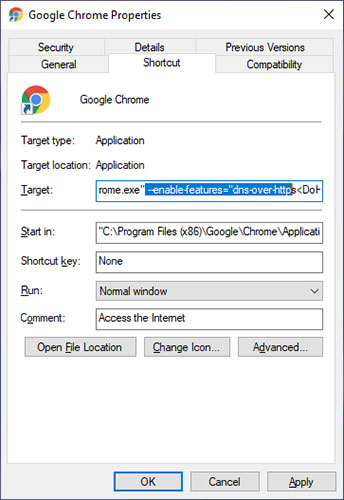
<p>3. Hành động trên sẽ mở cửa sổ&nbsp;<strong>Properties</strong>&nbsp;của Google Chrome. Tại đây, thêm code này vào cuối trường&nbsp;<strong>&quot;Target&quot;.</strong></p>

<p>Với code dưới đây, bạn sẽ sử dụng service Cloudflare DNS dưới dạng DoH. Nếu bạn muốn sử dụng một số service DNS khác thì hãy sửa đổi địa chỉ máy chủ. Tùy thuộc vào service DNS, địa chỉ máy chủ sẽ khác nhau.</p>

<pre id="pre0">
<code>--enable-features=&quot;dns-over-https&lt;DoHTrial&quot; --force-fieldtrials=&quot;DoHTrial/Group1&quot; --force-fieldtrial-params=&quot;DoHTrial.Group1:server/https%3A%2F%2F1.1.1.1%2Fdns-query/method/POST</code></pre>

<figure><img alt="Thêm code vào cuối trường &#039;Target&#039;" data-i="0" data-src="https://st.quantrimang.com/photos/image/2020/03/06/kich-hoat-dns-over-https-1.jpg" data-was-processed="true" height="500" src="https://st.quantrimang.com/photos/image/2020/03/06/kich-hoat-dns-over-https-1.jpg" width="344" />
<figcaption>Thêm code vào cuối trường &quot;Target&quot;</figcaption>
</figure>

<p>4. Nhấp vào&nbsp;<strong>Apply &gt; OK</strong>&nbsp;để lưu các thay đổi.</p>

<p>5. Cuối cùng, khởi chạy lại trình duyệt Chrome.</p>

<h2>Kích hoạt DNS over HTTPS trong Edge Chromium</h2>

<p>Microsoft cũng đã thêm hỗ trợ cho DNS over HTTPS trong trình duyệt Edge Chromium. Vì đây vẫn là một tính năng thử nghiệm, bạn cần vào trang&nbsp;<strong>Flags</strong>&nbsp;để truy cập cài đặt. Xin lưu ý rằng các bước bên dưới chỉ có thể áp dụng cho trình duyệt Edge Chromium và không áp dụng cho trình duyệt Edge cũ hoặc Internet Explorer.</p>

<p>1. Trước tiên, hãy mở trình duyệt Edge Chromium nếu nó chưa được mở. Sau khi mở, gõ&nbsp;<strong>&quot;edge:\\flags&quot;</strong>&nbsp;vào thanh địa chỉ và nhấn&nbsp;<code>Enter</code>.</p>

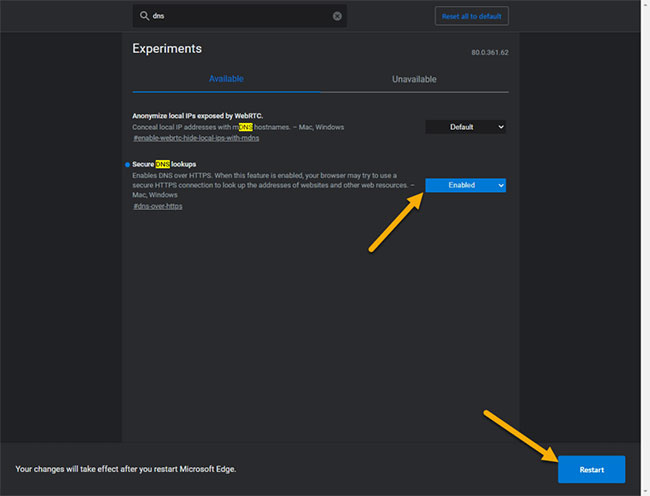
<p>2. Hành động trên sẽ mở trang&nbsp;<strong>Edge Experiments.</strong>&nbsp;Trong thanh tìm kiếm hàng đầu, nhập DNS. Hành động này sẽ lọc kết quả và bạn sẽ thấy mục&nbsp;<strong>&quot;Secure DNS Lookups&quot;</strong>.</p>

<p>3. Chọn&nbsp;<strong>Enabled</strong>&nbsp;từ menu drop-down bên cạnh tùy chọn&nbsp;<strong>&quot;Secure DNS Lookups&quot;</strong>&nbsp;và sau đó bấm vào nút&nbsp;<strong>&quot;Relaunch&quot;.</strong>&nbsp;Khởi chạy lại trình duyệt sẽ áp dụng các cài đặt.</p>

<figure><img alt="Kích hoạt DNS over HTTPS trong Edge Chromium" data-i="1" data-src="https://st.quantrimang.com/photos/image/2020/03/06/kich-hoat-dns-over-https-2.jpg" data-was-processed="true" height="496" src="https://st.quantrimang.com/photos/image/2020/03/06/kich-hoat-dns-over-https-2.jpg" width="650" />
<figcaption>Kích hoạt DNS over HTTPS trong Edge Chromium</figcaption>
</figure>
&nbsp;

<h2>Kích hoạt DNS over HTTPS trong Firefox</h2>

<p>Firefox đã tiến thêm một bước và bật DNS over HTTPS theo mặc định. Tuy nhiên, tại thời điểm bài viết, tính năng này chỉ được kích hoạt ở một số quốc gia và cũng chỉ áp dụng cho một số người dùng. Nhưng tin tốt là, tùy chọn có sẵn trực tiếp trên trang&nbsp;<strong>Settings.</strong></p>

<p>1. Trước tiên, hãy mở trình duyệt Firefox nếu nó chưa được mở. Tiếp theo, nhấp vào biểu tượng&nbsp;<strong>Menu</strong>&nbsp;(ba đường ngang) ở góc trên bên phải và chọn tùy chọn&nbsp;<strong>Options.</strong></p>

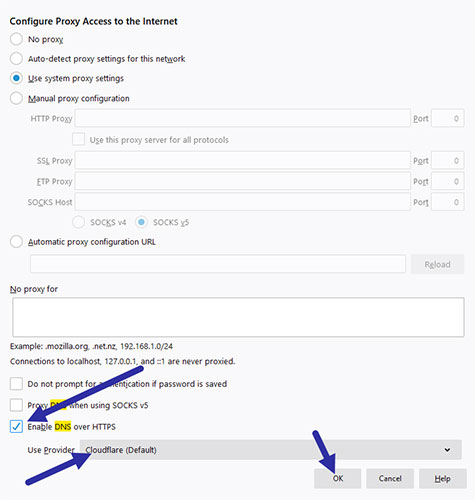
<p>2. Tùy chọn ta đang tìm kiếm được ẩn rất kỹ. Rất may, trang cài đặt có chức năng tìm kiếm. Vì vậy, hãy nhập DNS vào thanh tìm kiếm trên đầu. Tiếp theo, nhấp vào nút&nbsp;<strong>&quot;Settings&quot;</strong>&nbsp;trong phần&nbsp;<strong>&quot;Network Settings&quot;.</strong></p>

<p>3. Bây giờ, chọn hộp kiểm&nbsp;<strong>&quot;Enable DNS over HTTPS&quot;</strong>. Theo mặc định, Firefox sử dụng Cloudflare làm nhà cung cấp DNS. Nếu bạn muốn sử dụng một số service DNS khác, hãy chọn&nbsp;<strong>Custom</strong>&nbsp;từ menu drop-down. Nhấp&nbsp;<strong>OK</strong>&nbsp;để lưu các thay đổi.</p>

<p>Khởi động lại trình duyệt và tính năng sẽ được kích hoạt.</p>

<figure><img alt="Kích hoạt DNS over HTTPS trong Firefox" data-i="2" data-src="https://st.quantrimang.com/photos/image/2020/03/06/kich-hoat-dns-over-https-3.jpg" data-was-processed="true" height="500" src="https://st.quantrimang.com/photos/image/2020/03/06/kich-hoat-dns-over-https-3.jpg" width="475" />
<figcaption>Kích hoạt DNS over HTTPS trong Firefox</figcaption>
</figure>

<h2>Xác minh DNS over HTTPS có đang hoạt động</h2>

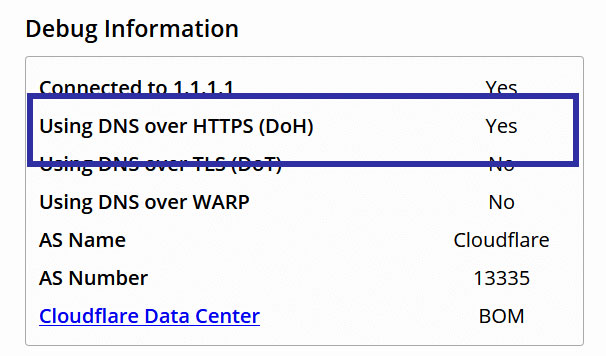
<p>Sau khi cấu hình trình duyệt, bạn nên xác minh xem cài đặt DNS over HTTPS có hoạt động tốt không. Để làm điều đó, chỉ cần truy cập URL này. Nó sẽ quét kết nối và liệt kê kết quả. Nếu DNS over HTTPS hoạt động như bình thường, bạn sẽ thấy&nbsp;<strong>&quot;Yes&quot;</strong>&nbsp;ngay bên cạnh&nbsp;<strong>&quot;Using DNS over HTTPS (DOH)&quot;</strong>.</p>

<figure><img alt="Bạn sẽ thấy &#039;Yes&#039; ngay bên cạnh &#039;Using DNS over HTTPS (DOH)&#039;" data-i="3" data-src="https://st.quantrimang.com/photos/image/2020/03/06/kich-hoat-dns-over-https-4.jpg" data-was-processed="true" height="356" src="https://st.quantrimang.com/photos/image/2020/03/06/kich-hoat-dns-over-https-4.jpg" width="606" />
<figcaption>Bạn sẽ thấy &quot;Yes&quot; ngay bên cạnh &quot;Using DNS over HTTPS (DOH)&quot;</figcaption>
</figure>
		</div>
				<div id="author">
						<p>
				<strong>Nguồn tin:</strong>
				Quantrimang.com
			</p>
		</div>
	</div>
	<div id="footer" class="clearfix">
		<div id="url">
			<strong>URL của bản tin này: </strong><a href="https://www.nguoicodonvn2008.info/vi/news/savefile/kien-thuc-may-tinh/cach-kich-hoat-dns-over-https-trong-chrome-edge-va-firefox-1792.html" title="Cách kích hoạt DNS over HTTPS trong Chrome, Edge và Firefox">https://www.nguoicodonvn2008.info/vi/news/savefile/kien-thuc-may-tinh/cach-kich-hoat-dns-over-https-trong-chrome-edge-va-firefox-1792.html</a>

		</div>
		<div class="clear"></div>
		<div class="copyright">
			&copy; .&#x3A; Nguoicodonvn2008.info - Cõi lòng người cô đơn &#x3A;.
		</div>
		<div id="contact">
			<a href="mailto:admin@nguoicodonvn2008.info">admin@nguoicodonvn2008.info</a>
		</div>
	</div>
</div>
        <div id="timeoutsess" class="chromeframe">
            Bạn đã không sử dụng Site, <a onclick="timeoutsesscancel();" href="https://www.nguoicodonvn2008.info/#">Bấm vào đây để duy trì trạng thái đăng nhập</a>. Thời gian chờ: <span id="secField"> 60 </span> giây
        </div>
        <div id="openidResult" class="nv-alert" style="display:none"></div>
        <div id="openidBt" data-result="" data-redirect=""></div>
		</script>
		<div class="car-top">
  <span><img src="https://www.nguoicodonvn2008.info/themes/default/images/car.png" alt=""></span>
</div>
<script src="https://www.nguoicodonvn2008.info/assets/js/jquery/jquery.min.js"></script>
<script>var nv_base_siteurl="/",nv_lang_data="vi",nv_lang_interface="vi",nv_name_variable="nv",nv_fc_variable="op",nv_lang_variable="language",nv_module_name="news",nv_func_name="savefile",nv_is_user=0, nv_my_ofs=-4,nv_my_abbr="EDT",nv_cookie_prefix="nv4c_e856T",nv_check_pass_mstime=1738000,nv_area_admin=0,nv_safemode=0,theme_responsive=0,nv_recaptcha_ver=2,nv_recaptcha_sitekey="",nv_recaptcha_type="image",XSSsanitize=1;</script>
<script src="https://www.nguoicodonvn2008.info/assets/js/language/vi.js"></script>
<script src="https://www.nguoicodonvn2008.info/assets/js/DOMPurify/purify3.js"></script>
<script src="https://www.nguoicodonvn2008.info/assets/js/global.js"></script>
<script src="https://www.nguoicodonvn2008.info/assets/js/site.js"></script>
<script src="https://www.nguoicodonvn2008.info/themes/default/js/news.js"></script>
<script src="https://www.nguoicodonvn2008.info/themes/default/js/main.js"></script>
<script src="https://www.nguoicodonvn2008.info/themes/default/js/custom.js"></script>
<script type="application/ld+json">
        {
            "@context": "https://schema.org",
            "@type": "Organization",
            "url": "https://www.nguoicodonvn2008.info",
            "logo": "https://www.nguoicodonvn2008.info/uploads/angel.gif"
        }
        </script>
<script src="https://www.nguoicodonvn2008.info/themes/default/js/bootstrap.min.js"></script>
<script type="text/javascript">
var $scrolltop = $('.car-top');
$scrolltop.on('click', function () {
    $('html,body').animate({
        scrollTop: 0
    }, 800);
    $(this).addClass("car-run");
    setTimeout(function(){ $scrolltop.removeClass('car-run');}, 1000);
    return false;
});
$(window).on('scroll', function ()
{ 
    if($(window).scrollTop() >= 200)
    {
        $scrolltop.addClass("show");
        $scrolltop.addClass("car-down");
    }
    else
    {
       $scrolltop.removeClass("show");
       setTimeout(function(){ $scrolltop.removeClass('car-down');}, 300);
    }
});
</script>
</body>
</html>