<!DOCTYPE html>
    <html lang="vi" xmlns="http://www.w3.org/1999/xhtml" prefix="og: http://ogp.me/ns#">
    <head>
<title>Cách khôi phục thư mục “inetpub” trên Windows 11, Windows 10</title>
<meta name="description" content="Cách khôi phục thư mục “inetpub” trên Windows 11, Windows 10 - Savefile - Tin Tức -...">
<meta name="author" content=".: Nguoicodonvn2008.info - Cõi lòng người cô đơn :.">
<meta name="copyright" content=".: Nguoicodonvn2008.info - Cõi lòng người cô đơn :. [admin@nguoicodonvn2008.info]">
<meta name="robots" content="index, archive, follow, noodp">
<meta name="googlebot" content="index,archive,follow,noodp">
<meta name="msnbot" content="all,index,follow">
<meta name="generator" content="NukeViet v4.5">
<meta http-equiv="Content-Type" content="text/html; charset=utf-8">
<meta property="og:title" content="Cách khôi phục thư mục “inetpub” trên Windows 11, Windows 10">
<meta property="og:type" content="website">
<meta property="og:description" content="Savefile - Tin Tức - https&#x3A;&#x002F;&#x002F;www.nguoicodonvn2008.info&#x002F;vi&#x002F;news&#x002F;savefile&#x002F;kien-thuc-may-tinh&#x002F;cach-khoi-phuc-thu-muc-inetpub-tren-windows-11-windows-10-10529.html">
<meta property="og:site_name" content=".&#x3A; Nguoicodonvn2008.info - Cõi lòng người cô đơn &#x3A;.">
<meta property="og:url" content="https://www.nguoicodonvn2008.info/vi/news/savefile/kien-thuc-may-tinh/cach-khoi-phuc-thu-muc-inetpub-tren-windows-11-windows-10-10529.html">
<link rel="shortcut icon" href="https://www.nguoicodonvn2008.info/favicon.ico">
<link rel="canonical" href="https://www.nguoicodonvn2008.info/vi/news/savefile/kien-thuc-may-tinh/cach-khoi-phuc-thu-muc-inetpub-tren-windows-11-windows-10-10529.html">
<link rel="alternate" href="https://www.nguoicodonvn2008.info/vi/news/rss/" title="Tin Tức" type="application/rss+xml">
<link rel="alternate" href="https://www.nguoicodonvn2008.info/vi/news/rss/karaoke-dual/" title="Tin Tức - Karaoke Dual" type="application/rss+xml">
<link rel="alternate" href="https://www.nguoicodonvn2008.info/vi/news/rss/nhac-tre/" title="Tin Tức - Nhạc trẻ" type="application/rss+xml">
<link rel="alternate" href="https://www.nguoicodonvn2008.info/vi/news/rss/tru-tinh/" title="Tin Tức - Trữ tình" type="application/rss+xml">
<link rel="alternate" href="https://www.nguoicodonvn2008.info/vi/news/rss/nuoc-ngoai/" title="Tin Tức - Nước ngoài" type="application/rss+xml">
<link rel="alternate" href="https://www.nguoicodonvn2008.info/vi/news/rss/remix/" title="Tin Tức - Remix" type="application/rss+xml">
<link rel="alternate" href="https://www.nguoicodonvn2008.info/vi/news/rss/tam-su-tinh-yeu/" title="Tin Tức - Tâm sự tình yêu" type="application/rss+xml">
<link rel="alternate" href="https://www.nguoicodonvn2008.info/vi/news/rss/tho-suu-tam/" title="Tin Tức - Thơ sưu tầm" type="application/rss+xml">
<link rel="alternate" href="https://www.nguoicodonvn2008.info/vi/news/rss/cuoc-song/" title="Tin Tức - Cuộc sống" type="application/rss+xml">
<link rel="alternate" href="https://www.nguoicodonvn2008.info/vi/news/rss/phan-mem/" title="Tin Tức - Phần mềm" type="application/rss+xml">
<link rel="alternate" href="https://www.nguoicodonvn2008.info/vi/news/rss/kien-thuc-may-tinh/" title="Tin Tức - Kiến thức máy tính" type="application/rss+xml">
<link rel="alternate" href="https://www.nguoicodonvn2008.info/vi/news/rss/hoc-tap/" title="Tin Tức - Học tập" type="application/rss+xml">
<link rel="alternate" href="https://www.nguoicodonvn2008.info/vi/news/rss/tai-lieu/" title="Tin Tức - Tài liệu" type="application/rss+xml">
<link rel="alternate" href="https://www.nguoicodonvn2008.info/vi/news/rss/de-thi/" title="Tin Tức - Đề thi" type="application/rss+xml">
<link rel="preload" as="style" href="https://www.nguoicodonvn2008.info/assets/css/font-awesome.min.css" type="text/css">
<link rel="preload" as="style" href="https://www.nguoicodonvn2008.info/themes/default/css/bootstrap.non-responsive.css" type="text/css">
<link rel="preload" as="style" href="https://www.nguoicodonvn2008.info/themes/default/css/style.css" type="text/css">
<link rel="preload" as="style" href="https://www.nguoicodonvn2008.info/themes/default/css/style.non-responsive.css" type="text/css">
<link rel="preload" as="style" href="https://www.nguoicodonvn2008.info/themes/default/css/news.css" type="text/css">
<link rel="preload" as="style" href="https://www.nguoicodonvn2008.info/themes/default/css/custom.css" type="text/css">
<link rel="preload" as="script" href="https://www.nguoicodonvn2008.info/assets/js/jquery/jquery.min.js" type="text/javascript">
<link rel="preload" as="script" href="https://www.nguoicodonvn2008.info/assets/js/language/vi.js" type="text/javascript">
<link rel="preload" as="script" href="https://www.nguoicodonvn2008.info/assets/js/DOMPurify/purify3.js" type="text/javascript">
<link rel="preload" as="script" href="https://www.nguoicodonvn2008.info/assets/js/global.js" type="text/javascript">
<link rel="preload" as="script" href="https://www.nguoicodonvn2008.info/assets/js/site.js" type="text/javascript">
<link rel="preload" as="script" href="https://www.nguoicodonvn2008.info/themes/default/js/news.js" type="text/javascript">
<link rel="preload" as="script" href="https://www.nguoicodonvn2008.info/themes/default/js/main.js" type="text/javascript">
<link rel="preload" as="script" href="https://www.nguoicodonvn2008.info/themes/default/js/custom.js" type="text/javascript">
<link rel="preload" as="script" href="https://www.nguoicodonvn2008.info/themes/default/js/bootstrap.min.js" type="text/javascript">
<link rel="stylesheet" href="https://www.nguoicodonvn2008.info/assets/css/font-awesome.min.css">
<link rel="stylesheet" href="https://www.nguoicodonvn2008.info/themes/default/css/bootstrap.non-responsive.css">
<link rel="stylesheet" href="https://www.nguoicodonvn2008.info/themes/default/css/style.css">
<link rel="stylesheet" href="https://www.nguoicodonvn2008.info/themes/default/css/style.non-responsive.css">
<link rel="StyleSheet" href="https://www.nguoicodonvn2008.info/themes/default/css/news.css">
<link rel="stylesheet" href="https://www.nguoicodonvn2008.info/themes/default/css/custom.css">
<style type="text/css">
	body{background: #fff;}
</style>
    </head>
    <body>
<div id="print">
	<div id="hd_print">
		<h2 class="pull-left">.&#x3A; Nguoicodonvn2008.info - Cõi lòng người cô đơn &#x3A;.</h2>
		<p class="pull-right"><a title=".&#x3A; Nguoicodonvn2008.info - Cõi lòng người cô đơn &#x3A;." href="https://www.nguoicodonvn2008.info/">https://www.nguoicodonvn2008.info</a></p>
	</div>
	<div class="clear"></div>
	<hr />
	<div id="content">
		<h1>Cách khôi phục thư mục “inetpub” trên Windows 11, Windows 10</h1>
		<ul class="list-inline">
			<li>Thứ hai - 09/06/2025 00:00</li>
			<li class="hidden-print txtrequired"><em class="fa fa-print">&nbsp;</em><a title="In ra" href="javascript:;" onclick="window.print()">In ra</a></li>
			<li class="hidden-print txtrequired"><em class="fa fa-power-off">&nbsp;</em><a title="Đóng cửa sổ này" href="javascript:;" onclick="window.close()">Đóng cửa sổ này</a></li>
		</ul>
		<div class="clear"></div>
		<div id="hometext">
		</div>
				<div class="imghome">
			<img alt="Cách khôi phục thư mục “inetpub” trên Windows 11, Windows 10" src="https://st.quantrimang.com/photos/image/2025/06/08/inetpub-Windows-11-4.png" width="460" class="img-thumbnail" />
		</div>
		<div class="clear"></div>
		<div id="bodytext" class="clearfix">
			<p style="text-align: justify;">Nếu bạn đã xóa thư mục “inetpub”, cái thư mục được tạo ra sau Bản cập nhật&nbsp;Windows&nbsp;tháng 4 năm 2025 - bạn cần khôi phục lại ngay lập tức, nếu không hệ thống của bạn sẽ vẫn dễ bị tổn thương trước các mối đe dọa bảo mật tiềm ẩn.</p>

<p style="text-align: justify;">Microsoft đã thông báo rằng thư mục này có thể được khôi phục khi bạn bật dịch vụ IIS, hoặc bạn cũng có thể sử dụng một script PowerShell mới được phát hành vào ngày 28 tháng 5.</p>

<p style="text-align: justify;"><img alt="inetpub" data-i="0" data-src="https://st.quantrimang.com/photos/image/2025/06/08/inetpub-Windows-11-1.png" data-was-processed="true" height="366" src="https://st.quantrimang.com/photos/image/2025/06/08/inetpub-Windows-11-1.png" width="640" /></p>

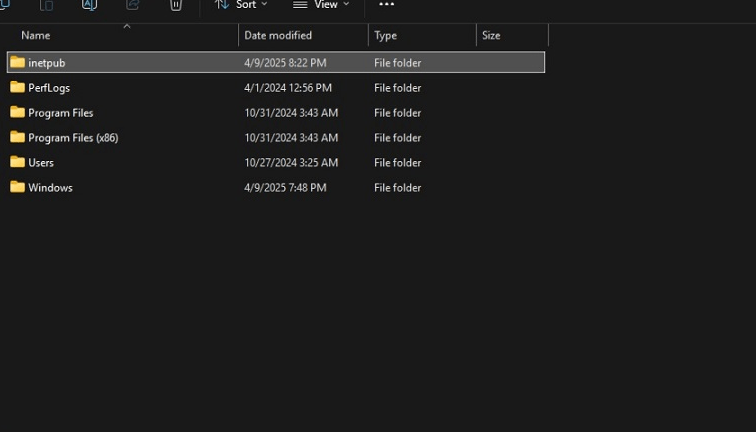
<p style="text-align: justify;">Với những ai chưa biết,&nbsp;<a data-type="internal" href="https://quantrimang.com/cong-nghe/windows-11-tips" title="Windows 11">Windows 11</a>&nbsp;24H2 và các phiên bản Windows cũ hơn, bao gồm Windows 10, đã tạo ra một thư mục có tên “inetpub” sau các Bản cập nhật tháng 4 năm 2025. Thư mục trống này thường liên quan đến Internet Information Services (IIS) – một dịch vụ gốc của Windows cho phép các nhà phát triển lưu trữ website hoặc ứng dụng trên Windows 11.</p>

<h2 style="text-align: justify;">Thư mục inetpub trống trong Windows 11 KB5055523</h2>

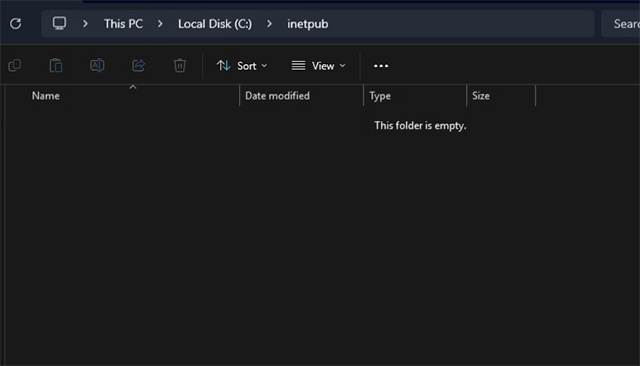
<p style="text-align: justify;">Trong trường hợp của Windows 11, Microsoft đã tạo thư mục (C:\inetpub) cùng với bản KB5055523 hoặc mới hơn, thư mục này không chứa gì cả và phần thuộc tính cho thấy thư mục này có dung lượng bằng 0 byte.</p>

<p style="text-align: justify;"><img alt="inetpub" data-i="1" data-src="https://st.quantrimang.com/photos/image/2025/06/08/inetpub-Windows-11-2.png" data-was-processed="true" height="366" src="https://st.quantrimang.com/photos/image/2025/06/08/inetpub-Windows-11-2.png" width="640" /></p>

<p style="text-align: justify;">Sau đó, Microsoft đã cập nhật tài liệu của mình và thông báo rằng thư mục “inetpub” được tạo ra như một phần của bản vá bảo mật cho CVE-2025-21204, và nó sẽ xuất hiện bất kể bạn có bật IIS hay không. Một vài lời khuyên cho rằng bạn không nên xóa nó, và nếu chẳng may lỡ tay xóa thì hãy khôi phục lại theo hướng dẫn của Microsoft trước đó.</p>

<p style="text-align: justify;"><img alt="inetpub" data-i="2" data-src="https://st.quantrimang.com/photos/image/2025/06/08/inetpub-Windows-11-2.png" data-was-processed="true" height="366" src="https://st.quantrimang.com/photos/image/2025/06/08/inetpub-Windows-11-2.png" width="640" /></p>

<p style="text-align: justify;">“Lỗi bảo mật CVE-2025-21204 xảy ra do sự cố giải quyết liên kết không đúng cách trước khi truy cập tệp (‘theo dõi liên kết’) trong Windows Update Stack, điều này có thể có nghĩa là, trên các thiết bị chưa được vá, Windows Update có thể theo các symbolic link (liên kết tượng trưng) theo cách cho phép kẻ tấn công nội bộ đánh lừa hệ thống để truy cập hoặc sửa đổi các tệp hoặc thư mục không mong muốn”, Microsoft ghi chú trong tài liệu.</p>

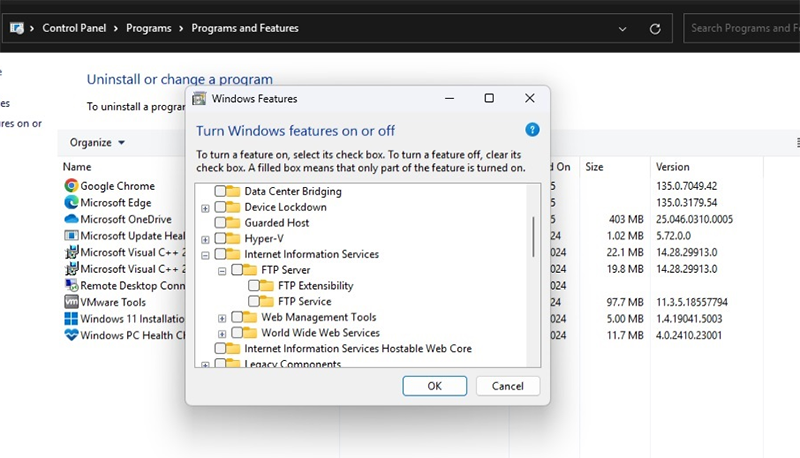
<p style="text-align: justify;">Trước đó, Microsoft đã nói với Windows Latest rằng thư mục “inetpub” có thể được tạo lại với cùng mức độ bảo mật bằng cách bật Internet Information Services (IIS) từ Control Panel &gt; Programs &gt; Programs &amp; Features &gt; Turn Windows features on or off.</p>

<h2 style="text-align: justify;">Dịch vụ Internet Information Services (IIS)</h2>

<p style="text-align: justify;"><img alt="inetpub" data-i="3" data-src="https://st.quantrimang.com/photos/image/2025/06/08/inetpub-Windows-11-3.png" data-was-processed="true" height="366" src="https://st.quantrimang.com/photos/image/2025/06/08/inetpub-Windows-11-3.png" width="640" /></p>

<p style="text-align: justify;">Tuy nhiên, đó là điều mà hầu hết mọi người không muốn làm, vì IIS cũng tạo thêm nhiều thư mục phụ, vốn không cần thiết nếu bạn không phải là nhà phát triển.</p>

<p style="text-align: justify;">Nếu đã lỡ xóa thư mục đó, thì bạn có thể sử dụng một script PowerShell mới có thể tái tạo thư mục này, và bạn không cần bật IIS nữa, theo cách dưới đây:</p>

<h3 style="text-align: justify;">Cách sử dụng PowerShell script để khôi phục “inetpub” và vá CVE-2025-21204</h3>

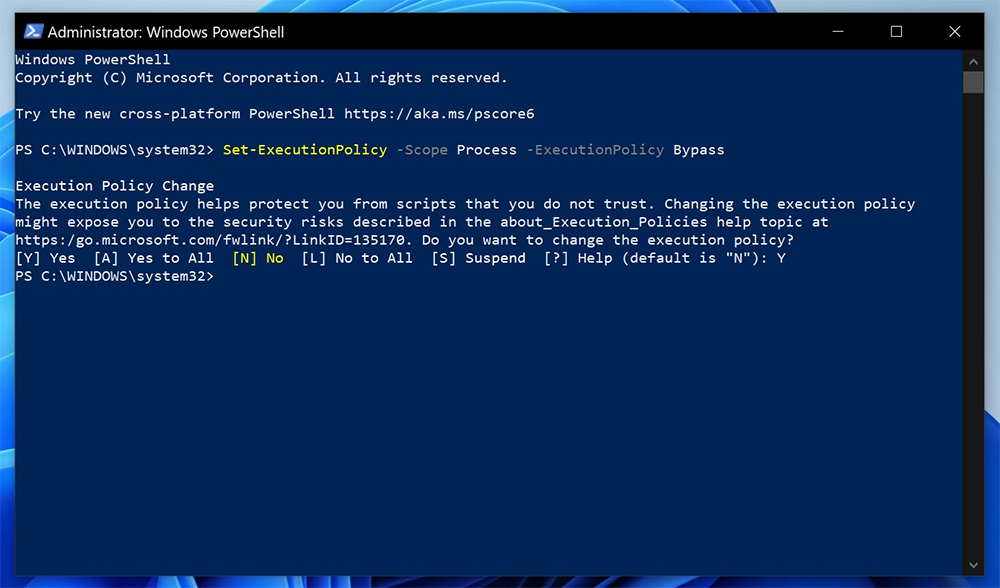
<p style="text-align: justify;"><strong>Bước 1:&nbsp;</strong>Chạy PowerShell dưới quyền Administrator.</p>

<p style="text-align: justify;"><img alt="inetpub" data-i="4" data-src="https://st.quantrimang.com/photos/image/2025/06/08/inetpub-Windows-11-4.png" data-was-processed="true" height="376" src="https://st.quantrimang.com/photos/image/2025/06/08/inetpub-Windows-11-4.png" width="640" /></p>

<p style="text-align: justify;">Bạn không thể làm điều này bằng tài khoản không có quyền quản trị vì chúng ta đang cố thay đổi quyền truy cập thư mục (ACL) và cài đặt mô-đun. Những thao tác này yêu cầu quyền admin.</p>

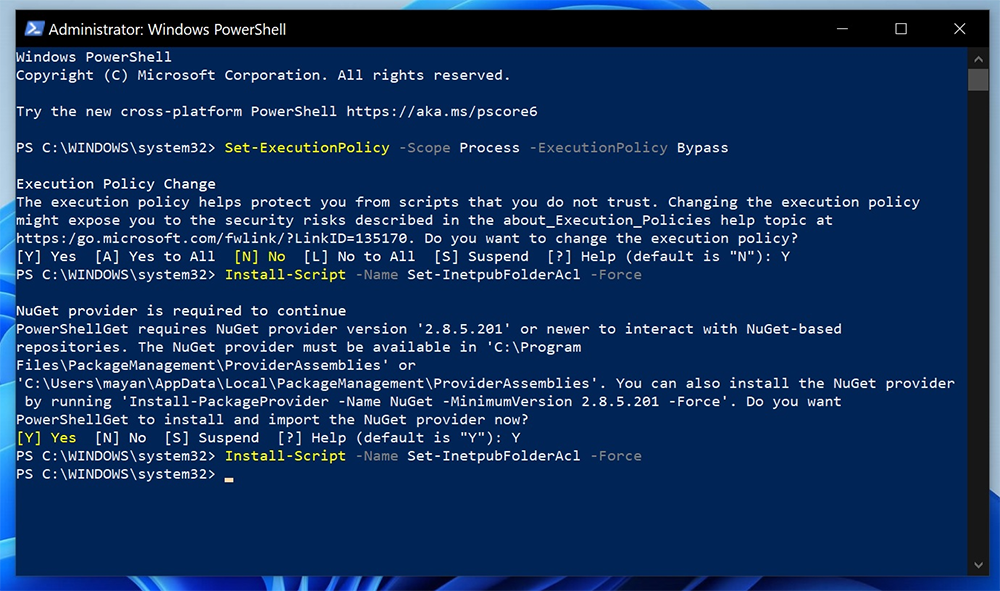
<p style="text-align: justify;"><strong>Bước 2:</strong>&nbsp;Trong PowerShell, trước tiên hãy cho phép các tập lệnh và mô-đun đã ký từ Thư viện PowerShell của Microsoft bằng lệnh sau:&nbsp;<strong>Set-ExecutionPolicy -Scope Process -ExecutionPolicy Bypass.</strong></p>

<p style="text-align: justify;"><img alt="inetpub" data-i="5" data-src="https://st.quantrimang.com/photos/image/2025/06/08/inetpub-Windows-11-4.png" data-was-processed="true" height="376" src="https://st.quantrimang.com/photos/image/2025/06/08/inetpub-Windows-11-4.png" width="640" /></p>

<p style="text-align: justify;"><strong>Bước 3:&nbsp;</strong>Tải script từ PowerShell Gallery với câu lệnh -&nbsp;<strong>Install-Script -Name Set-InetpubFolderAcl -Force</strong></p>

<p style="text-align: justify;"><img alt="inetpub" data-i="6" data-src="https://st.quantrimang.com/photos/image/2025/06/08/inetpub-Windows-11-4.png" data-was-processed="true" height="376" src="https://st.quantrimang.com/photos/image/2025/06/08/inetpub-Windows-11-4.png" width="640" /></p>

<p style="text-align: justify;"><strong>Bước 4: Cài đặt NuGet Provider (nếu được hỏi):&nbsp;</strong>Trong một số trường hợp, bạn sẽ được hỏi có muốn cài đặt “NuGet Provider” hay không nếu chưa có sẵn. Chỉ cần trả lời “Y” để tiếp tục, rồi chạy lại lệnh Install-Script.</p>

<p style="text-align: justify;"><img alt="inetpub" data-i="7" data-src="https://st.quantrimang.com/photos/image/2025/06/08/inetpub-Windows-11-5.png" data-was-processed="true" height="378" src="https://st.quantrimang.com/photos/image/2025/06/08/inetpub-Windows-11-5.png" width="640" /></p>

<p style="text-align: justify;"><strong>Bước 5:</strong>&nbsp;Chạy script để tạo lại thư mục:&nbsp;<strong>Set-InetpubFolderAcl</strong></p>

<p style="text-align: justify;">Nếu bạn gặp lỗi kiểu “command not found”, hãy chạy bằng đường dẫn đầy đủ dưới đây</p>

<p style="text-align: justify;">&amp; &quot;C:\Program Files\WindowsPowerShell\Scripts\Set-InetpubFolderAcl.ps1&quot;</p>

<p style="text-align: justify;">Sau khi hoàn tất toàn bộ các bước trên, bạn sẽ thấy thư mục inetpub hiển thị lại trong ổ C của mình.</p>

<div style="text-align: justify;">&nbsp;</div>
		</div>
				<div id="author">
						<p>
				<strong>Nguồn tin:</strong>
				Quantrimang.com:
			</p>
		</div>
	</div>
	<div id="footer" class="clearfix">
		<div id="url">
			<strong>URL của bản tin này: </strong><a href="https://www.nguoicodonvn2008.info/vi/news/savefile/kien-thuc-may-tinh/cach-khoi-phuc-thu-muc-inetpub-tren-windows-11-windows-10-10529.html" title="Cách khôi phục thư mục “inetpub” trên Windows 11, Windows 10">https://www.nguoicodonvn2008.info/vi/news/savefile/kien-thuc-may-tinh/cach-khoi-phuc-thu-muc-inetpub-tren-windows-11-windows-10-10529.html</a>

		</div>
		<div class="clear"></div>
		<div class="copyright">
			&copy; .&#x3A; Nguoicodonvn2008.info - Cõi lòng người cô đơn &#x3A;.
		</div>
		<div id="contact">
			<a href="mailto:admin@nguoicodonvn2008.info">admin@nguoicodonvn2008.info</a>
		</div>
	</div>
</div>
        <div id="timeoutsess" class="chromeframe">
            Bạn đã không sử dụng Site, <a onclick="timeoutsesscancel();" href="https://www.nguoicodonvn2008.info/#">Bấm vào đây để duy trì trạng thái đăng nhập</a>. Thời gian chờ: <span id="secField"> 60 </span> giây
        </div>
        <div id="openidResult" class="nv-alert" style="display:none"></div>
        <div id="openidBt" data-result="" data-redirect=""></div>
		</script>
		<div class="car-top">
  <span><img src="https://www.nguoicodonvn2008.info/themes/default/images/car.png" alt=""></span>
</div>
<script src="https://www.nguoicodonvn2008.info/assets/js/jquery/jquery.min.js"></script>
<script>var nv_base_siteurl="/",nv_lang_data="vi",nv_lang_interface="vi",nv_name_variable="nv",nv_fc_variable="op",nv_lang_variable="language",nv_module_name="news",nv_func_name="savefile",nv_is_user=0, nv_my_ofs=-4,nv_my_abbr="EDT",nv_cookie_prefix="nv4c_e856T",nv_check_pass_mstime=1738000,nv_area_admin=0,nv_safemode=0,theme_responsive=0,nv_recaptcha_ver=2,nv_recaptcha_sitekey="",nv_recaptcha_type="image",XSSsanitize=1;</script>
<script src="https://www.nguoicodonvn2008.info/assets/js/language/vi.js"></script>
<script src="https://www.nguoicodonvn2008.info/assets/js/DOMPurify/purify3.js"></script>
<script src="https://www.nguoicodonvn2008.info/assets/js/global.js"></script>
<script src="https://www.nguoicodonvn2008.info/assets/js/site.js"></script>
<script src="https://www.nguoicodonvn2008.info/themes/default/js/news.js"></script>
<script src="https://www.nguoicodonvn2008.info/themes/default/js/main.js"></script>
<script src="https://www.nguoicodonvn2008.info/themes/default/js/custom.js"></script>
<script type="application/ld+json">
        {
            "@context": "https://schema.org",
            "@type": "Organization",
            "url": "https://www.nguoicodonvn2008.info",
            "logo": "https://www.nguoicodonvn2008.info/uploads/angel.gif"
        }
        </script>
<script src="https://www.nguoicodonvn2008.info/themes/default/js/bootstrap.min.js"></script>
<script type="text/javascript">
var $scrolltop = $('.car-top');
$scrolltop.on('click', function () {
    $('html,body').animate({
        scrollTop: 0
    }, 800);
    $(this).addClass("car-run");
    setTimeout(function(){ $scrolltop.removeClass('car-run');}, 1000);
    return false;
});
$(window).on('scroll', function ()
{ 
    if($(window).scrollTop() >= 200)
    {
        $scrolltop.addClass("show");
        $scrolltop.addClass("car-down");
    }
    else
    {
       $scrolltop.removeClass("show");
       setTimeout(function(){ $scrolltop.removeClass('car-down');}, 300);
    }
});
</script>
</body>
</html>