<!DOCTYPE html>
    <html lang="vi" xmlns="http://www.w3.org/1999/xhtml" prefix="og: http://ogp.me/ns#">
    <head>
<title>Cách khôi phục các mục yêu thích và dấu trang vô tình bị xóa trong Microsoft Edge</title>
<meta name="description" content="Cách khôi phục các mục yêu thích và dấu trang vô tình bị xóa trong Microsoft Edge - Savefile - Tin Tức -...">
<meta name="author" content=".: Nguoicodonvn2008.info - Cõi lòng người cô đơn :.">
<meta name="copyright" content=".: Nguoicodonvn2008.info - Cõi lòng người cô đơn :. [admin@nguoicodonvn2008.info]">
<meta name="robots" content="index, archive, follow, noodp">
<meta name="googlebot" content="index,archive,follow,noodp">
<meta name="msnbot" content="all,index,follow">
<meta name="generator" content="NukeViet v4.5">
<meta http-equiv="Content-Type" content="text/html; charset=utf-8">
<meta property="og:title" content="Cách khôi phục các mục yêu thích và dấu trang vô tình bị xóa trong Microsoft Edge">
<meta property="og:type" content="website">
<meta property="og:description" content="Savefile - Tin Tức -...">
<meta property="og:site_name" content=".&#x3A; Nguoicodonvn2008.info - Cõi lòng người cô đơn &#x3A;.">
<meta property="og:url" content="https://www.nguoicodonvn2008.info/vi/news/savefile/kien-thuc-may-tinh/cach-khoi-phuc-cac-muc-yeu-thich-va-dau-trang-vo-tinh-bi-xoa-trong-microsoft-edge-7761.html">
<link rel="shortcut icon" href="https://www.nguoicodonvn2008.info/favicon.ico">
<link rel="canonical" href="https://www.nguoicodonvn2008.info/vi/news/savefile/kien-thuc-may-tinh/cach-khoi-phuc-cac-muc-yeu-thich-va-dau-trang-vo-tinh-bi-xoa-trong-microsoft-edge-7761.html">
<link rel="alternate" href="https://www.nguoicodonvn2008.info/vi/news/rss/" title="Tin Tức" type="application/rss+xml">
<link rel="alternate" href="https://www.nguoicodonvn2008.info/vi/news/rss/karaoke-dual/" title="Tin Tức - Karaoke Dual" type="application/rss+xml">
<link rel="alternate" href="https://www.nguoicodonvn2008.info/vi/news/rss/nhac-tre/" title="Tin Tức - Nhạc trẻ" type="application/rss+xml">
<link rel="alternate" href="https://www.nguoicodonvn2008.info/vi/news/rss/tru-tinh/" title="Tin Tức - Trữ tình" type="application/rss+xml">
<link rel="alternate" href="https://www.nguoicodonvn2008.info/vi/news/rss/nuoc-ngoai/" title="Tin Tức - Nước ngoài" type="application/rss+xml">
<link rel="alternate" href="https://www.nguoicodonvn2008.info/vi/news/rss/remix/" title="Tin Tức - Remix" type="application/rss+xml">
<link rel="alternate" href="https://www.nguoicodonvn2008.info/vi/news/rss/tam-su-tinh-yeu/" title="Tin Tức - Tâm sự tình yêu" type="application/rss+xml">
<link rel="alternate" href="https://www.nguoicodonvn2008.info/vi/news/rss/tho-suu-tam/" title="Tin Tức - Thơ sưu tầm" type="application/rss+xml">
<link rel="alternate" href="https://www.nguoicodonvn2008.info/vi/news/rss/cuoc-song/" title="Tin Tức - Cuộc sống" type="application/rss+xml">
<link rel="alternate" href="https://www.nguoicodonvn2008.info/vi/news/rss/phan-mem/" title="Tin Tức - Phần mềm" type="application/rss+xml">
<link rel="alternate" href="https://www.nguoicodonvn2008.info/vi/news/rss/kien-thuc-may-tinh/" title="Tin Tức - Kiến thức máy tính" type="application/rss+xml">
<link rel="alternate" href="https://www.nguoicodonvn2008.info/vi/news/rss/hoc-tap/" title="Tin Tức - Học tập" type="application/rss+xml">
<link rel="alternate" href="https://www.nguoicodonvn2008.info/vi/news/rss/tai-lieu/" title="Tin Tức - Tài liệu" type="application/rss+xml">
<link rel="alternate" href="https://www.nguoicodonvn2008.info/vi/news/rss/de-thi/" title="Tin Tức - Đề thi" type="application/rss+xml">
<link rel="preload" as="style" href="https://www.nguoicodonvn2008.info/assets/css/font-awesome.min.css" type="text/css">
<link rel="preload" as="style" href="https://www.nguoicodonvn2008.info/themes/default/css/bootstrap.non-responsive.css" type="text/css">
<link rel="preload" as="style" href="https://www.nguoicodonvn2008.info/themes/default/css/style.css" type="text/css">
<link rel="preload" as="style" href="https://www.nguoicodonvn2008.info/themes/default/css/style.non-responsive.css" type="text/css">
<link rel="preload" as="style" href="https://www.nguoicodonvn2008.info/themes/default/css/news.css" type="text/css">
<link rel="preload" as="style" href="https://www.nguoicodonvn2008.info/themes/default/css/custom.css" type="text/css">
<link rel="preload" as="script" href="https://www.nguoicodonvn2008.info/assets/js/jquery/jquery.min.js" type="text/javascript">
<link rel="preload" as="script" href="https://www.nguoicodonvn2008.info/assets/js/language/vi.js" type="text/javascript">
<link rel="preload" as="script" href="https://www.nguoicodonvn2008.info/assets/js/DOMPurify/purify3.js" type="text/javascript">
<link rel="preload" as="script" href="https://www.nguoicodonvn2008.info/assets/js/global.js" type="text/javascript">
<link rel="preload" as="script" href="https://www.nguoicodonvn2008.info/assets/js/site.js" type="text/javascript">
<link rel="preload" as="script" href="https://www.nguoicodonvn2008.info/themes/default/js/news.js" type="text/javascript">
<link rel="preload" as="script" href="https://www.nguoicodonvn2008.info/themes/default/js/main.js" type="text/javascript">
<link rel="preload" as="script" href="https://www.nguoicodonvn2008.info/themes/default/js/custom.js" type="text/javascript">
<link rel="preload" as="script" href="https://www.nguoicodonvn2008.info/themes/default/js/bootstrap.min.js" type="text/javascript">
<link rel="stylesheet" href="https://www.nguoicodonvn2008.info/assets/css/font-awesome.min.css">
<link rel="stylesheet" href="https://www.nguoicodonvn2008.info/themes/default/css/bootstrap.non-responsive.css">
<link rel="stylesheet" href="https://www.nguoicodonvn2008.info/themes/default/css/style.css">
<link rel="stylesheet" href="https://www.nguoicodonvn2008.info/themes/default/css/style.non-responsive.css">
<link rel="StyleSheet" href="https://www.nguoicodonvn2008.info/themes/default/css/news.css">
<link rel="stylesheet" href="https://www.nguoicodonvn2008.info/themes/default/css/custom.css">
<style type="text/css">
	body{background: #fff;}
</style>
    </head>
    <body>
<div id="print">
	<div id="hd_print">
		<h2 class="pull-left">.&#x3A; Nguoicodonvn2008.info - Cõi lòng người cô đơn &#x3A;.</h2>
		<p class="pull-right"><a title=".&#x3A; Nguoicodonvn2008.info - Cõi lòng người cô đơn &#x3A;." href="https://www.nguoicodonvn2008.info/">https://www.nguoicodonvn2008.info</a></p>
	</div>
	<div class="clear"></div>
	<hr />
	<div id="content">
		<h1>Cách khôi phục các mục yêu thích và dấu trang vô tình bị xóa trong Microsoft Edge</h1>
		<ul class="list-inline">
			<li>Thứ hai - 13/11/2023 08:52</li>
			<li class="hidden-print txtrequired"><em class="fa fa-print">&nbsp;</em><a title="In ra" href="javascript:;" onclick="window.print()">In ra</a></li>
			<li class="hidden-print txtrequired"><em class="fa fa-power-off">&nbsp;</em><a title="Đóng cửa sổ này" href="javascript:;" onclick="window.close()">Đóng cửa sổ này</a></li>
		</ul>
		<div class="clear"></div>
		<div id="hometext">
		</div>
				<div class="imghome">
			<img alt="Cách khôi phục các mục yêu thích và dấu trang vô tình bị xóa trong Microsoft Edge" src="https://st.quantrimang.com/photos/image/2023/11/13/khoi-phuc-muc-yeu-thich-va-dau-trang-bi-xoa-trong-ms-edge-3.jpg" width="460" class="img-thumbnail" />
		</div>
		<div class="clear"></div>
		<div id="bodytext" class="clearfix">
			<p style="text-align: justify;">Nếu bạn vô tình xóa một mục yêu thích khỏi thanh tìm kiếm, thanh yêu thích hoặc trang yêu thích, Microsoft Edge sẽ cho phép bạn khôi phục mục đó và đó là một quy trình rất đơn giản.</p>

<h2 style="text-align: justify;">Cách khôi phục các mục yêu thích vô tình bị xóa trong Edge</h2>

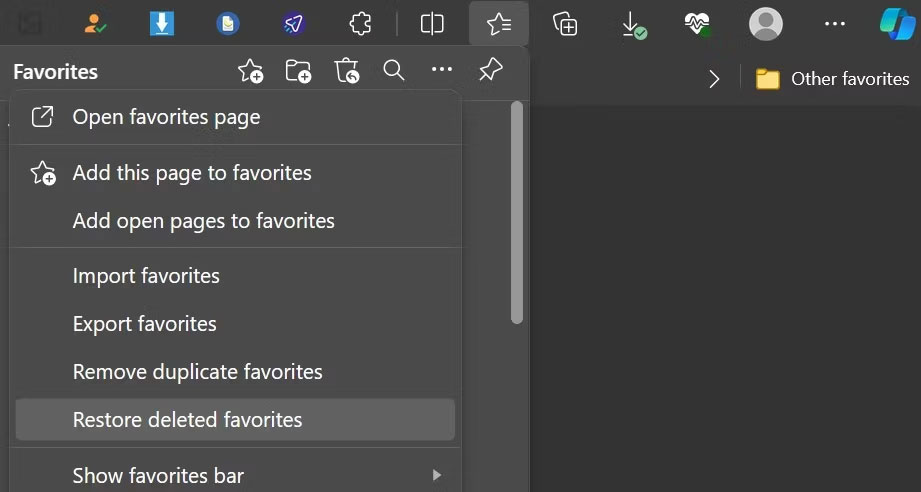
<p style="text-align: justify;">Khi bạn vô tình xóa một mục khỏi trang yêu thích, Edge sẽ cung cấp cho bạn tùy chọn hoàn tác để khôi phục mục đó. Nhấp vào nút&nbsp;<strong>Undo</strong>&nbsp;ở góc trên bên phải để khôi phục lại.</p>

<figure>
<div style="text-align: justify;"><img alt="Nhấp vào tùy chọn Undo để khôi phục mục yêu thích vô tình bị xóa" data-i="0" data-src="https://st.quantrimang.com/photos/image/2023/11/13/khoi-phuc-muc-yeu-thich-va-dau-trang-bi-xoa-trong-ms-edge-1.jpg" data-was-processed="true" height="433" src="https://st.quantrimang.com/photos/image/2023/11/13/khoi-phuc-muc-yeu-thich-va-dau-trang-bi-xoa-trong-ms-edge-1.jpg" width="1500" /></div>

<figcaption>
<div style="text-align: justify;">Nhấp vào tùy chọn Undo để khôi phục mục yêu thích vô tình bị xóa</div>
</figcaption>
</figure>

<p style="text-align: justify;">Tuy nhiên, bạn có thể không thấy tùy chọn hoàn tác nếu bạn đã xóa mục yêu thích thông qua thanh mục yêu thích hoặc thanh tìm kiếm. Trong trường hợp đó, bạn sẽ phải khôi phục chúng từ trang yêu thích:</p>

<p style="text-align: justify;">1. Nhấp vào biểu tượng hình ngôi sao có ba đường ngang xuyên qua ở góc trên bên phải. Ngoài ra, bạn có thể nhấn phím tắt&nbsp;<strong>CTRL + Shift + O</strong>.</p>

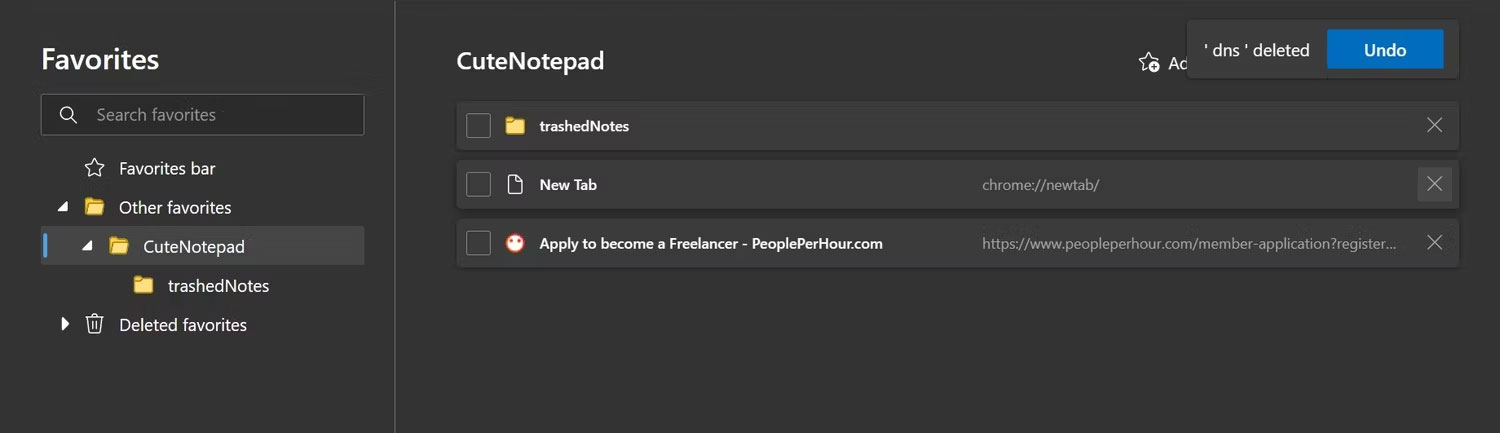
<p style="text-align: justify;">2. Nhấp vào ba dấu chấm ngang (<strong>More options</strong>) trong menu Favorites.</p>

<div style="text-align: justify;"><iframe allowtransparency="true" data-google-container-id="a!2" data-google-query-id="CJSj0ciPwYIDFaENewcdCIkIXQ" data-load-complete="true" frameborder="0" height="0" hspace="0" id="aswift_1" marginheight="0" marginwidth="0" name="aswift_1" sandbox="" scrolling="no" vspace="0" width="694"></iframe></div>

<figure>
<div style="text-align: justify;"><img alt="Nhấp vào ba dấu chấm ngang ở góc trên bên phải hoặc menu Favorites" data-i="1" data-src="https://st.quantrimang.com/photos/image/2023/11/13/khoi-phuc-muc-yeu-thich-va-dau-trang-bi-xoa-trong-ms-edge-2.jpg" data-was-processed="true" height="429" src="https://st.quantrimang.com/photos/image/2023/11/13/khoi-phuc-muc-yeu-thich-va-dau-trang-bi-xoa-trong-ms-edge-2.jpg" width="919" /></div>

<figcaption>
<div style="text-align: justify;">Nhấp vào ba dấu chấm ngang ở góc trên bên phải hoặc menu Favorites</div>
</figcaption>
</figure>

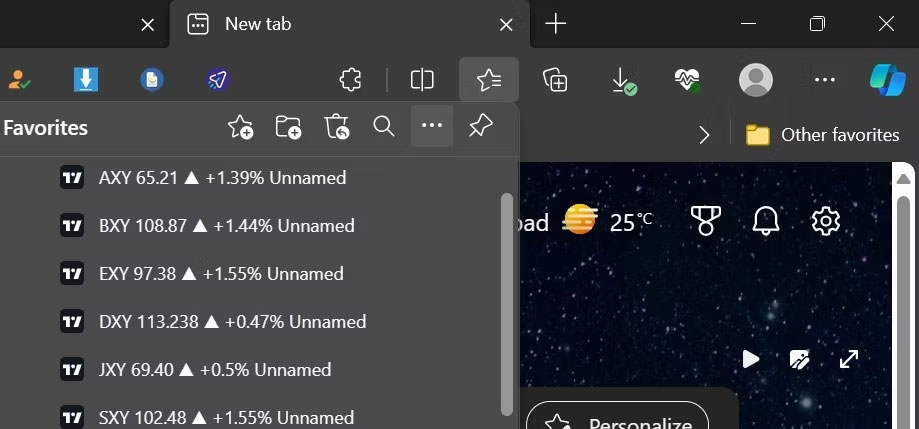
<p style="text-align: justify;">3. Sau đó, nhấp vào&nbsp;<strong>Restore deleted favorites</strong>.</p>

<figure>
<ul>
	<li data-block-reason="4" data-trans-vn="Che nội dung" style="text-align: justify;">&nbsp;</li>
	<li data-block-reason="2" data-trans-vn="Không quan tâm" style="text-align: justify;">&nbsp;</li>
	<li data-block-reason="3" data-trans-vn="Không phù hợp" style="text-align: justify;">&nbsp;</li>
	<li data-block-reason="1" data-trans-vn="Thấy quá nhiều" style="text-align: justify;">&nbsp;</li>
</ul>

<div style="text-align: justify;"><br />
<img alt="Mở trang yêu thích bằng cách nhấp vào Restore deleted favorites trong Edge" data-adbro-processed="true" data-i="2" data-src="https://st.quantrimang.com/photos/image/2023/11/13/khoi-phuc-muc-yeu-thich-va-dau-trang-bi-xoa-trong-ms-edge-3.jpg" data-was-processed="true" height="492" src="https://st.quantrimang.com/photos/image/2023/11/13/khoi-phuc-muc-yeu-thich-va-dau-trang-bi-xoa-trong-ms-edge-3.jpg" width="921" /><br />
&nbsp;&nbsp;&nbsp;</div>

<figcaption>
<div style="text-align: justify;">Mở trang yêu thích bằng cách nhấp vào Restore deleted favorites trong Edge</div>
</figcaption>
</figure>

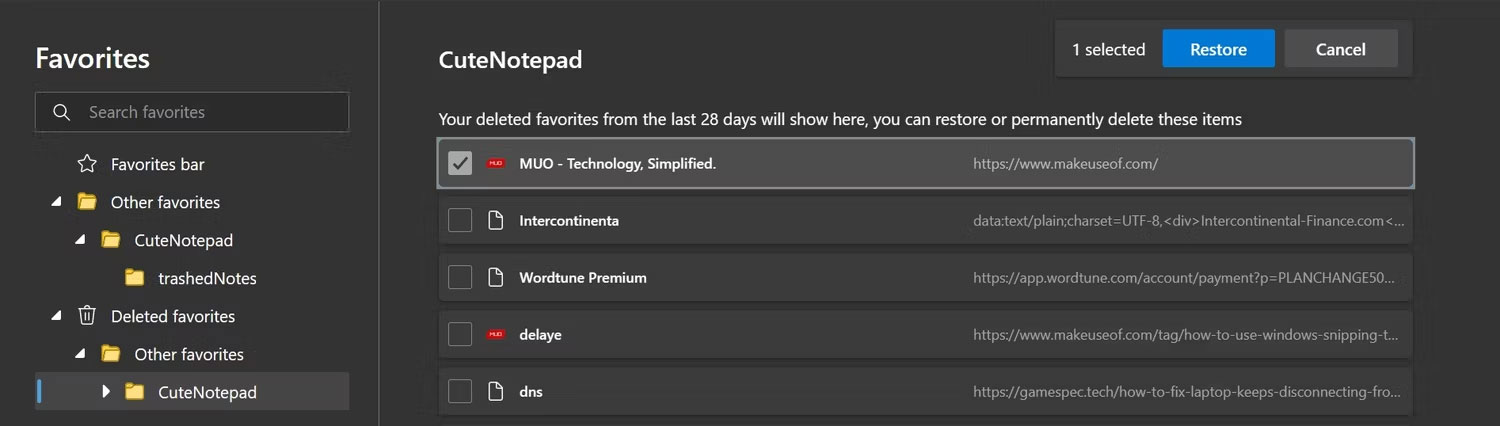
<p style="text-align: justify;">4. Tại đây, bạn có thể xem danh sách các mục yêu thích bạn đã xóa trong 28 ngày qua.</p>

<p style="text-align: justify;">5. Để khôi phục một mục yêu thích cụ thể, hãy mở rộng thư mục con nơi mục đó được lưu, chọn hộp bên cạnh mục đó và nhấp vào&nbsp;<strong>Restore.</strong></p>

<figure>
<div style="text-align: justify;"><img alt="Khôi phục mục yêu thích đã xóa trong Edge" data-i="3" data-src="https://st.quantrimang.com/photos/image/2023/11/13/khoi-phuc-muc-yeu-thich-va-dau-trang-bi-xoa-trong-ms-edge-4.jpg" data-was-processed="true" height="426" src="https://st.quantrimang.com/photos/image/2023/11/13/khoi-phuc-muc-yeu-thich-va-dau-trang-bi-xoa-trong-ms-edge-4.jpg" width="1500" /></div>

<figcaption>
<div style="text-align: justify;">Khôi phục mục yêu thích đã xóa trong Edge</div>
</figcaption>
</figure>

<div style="text-align: justify;"><iframe allowtransparency="true" data-google-container-id="a!3" data-google-query-id="CMqHn8mPwYIDFdltYAodgwkD7Q" data-load-complete="true" frameborder="0" height="0" hspace="0" id="aswift_2" marginheight="0" marginwidth="0" name="aswift_2" sandbox="" scrolling="no" vspace="0" width="694"></iframe></div>

<p style="text-align: justify;">Bạn chỉ có thể khôi phục các mục yêu thích đã bị xóa trong vòng 28 ngày qua. Ngoài ra, các mục yêu thích phải được đồng bộ trước khi bạn xóa chúng.</p>

<p style="text-align: justify;">Tại thời điểm viết bài, ứng dụng di động Edge không cung cấp tùy chọn khôi phục các mục yêu thích đã xóa. Tuy nhiên, bạn có thể khôi phục các mục yêu thích đã bị xóa thông qua ứng dụng di động từ trình duyệt Edge trên máy tính của mình. Do đó, nếu vô tình xóa một mục yêu thích khỏi ứng dụng di động, bạn có thể đăng nhập vào trình duyệt Edge trên máy tính để bàn và khôi phục nó theo hướng dẫn ở trên.</p>

<p style="text-align: justify;">Khi bạn vô tình xóa một mục yêu thích trong Edge, điều đó không có nghĩa là mục đó sẽ biến mất vĩnh viễn. Hy vọng rằng bây giờ bạn đã hiểu rõ hơn về cách phục hồi chúng. Việc khôi phục các mục yêu thích đã xóa của bạn rất dễ dàng.</p>
		</div>
				<div id="author">
						<p>
				<strong>Nguồn tin:</strong>
				Quantrimang.com
			</p>
		</div>
	</div>
	<div id="footer" class="clearfix">
		<div id="url">
			<strong>URL của bản tin này: </strong><a href="https://www.nguoicodonvn2008.info/vi/news/savefile/kien-thuc-may-tinh/cach-khoi-phuc-cac-muc-yeu-thich-va-dau-trang-vo-tinh-bi-xoa-trong-microsoft-edge-7761.html" title="Cách khôi phục các mục yêu thích và dấu trang vô tình bị xóa trong Microsoft Edge">https://www.nguoicodonvn2008.info/vi/news/savefile/kien-thuc-may-tinh/cach-khoi-phuc-cac-muc-yeu-thich-va-dau-trang-vo-tinh-bi-xoa-trong-microsoft-edge-7761.html</a>

		</div>
		<div class="clear"></div>
		<div class="copyright">
			&copy; .&#x3A; Nguoicodonvn2008.info - Cõi lòng người cô đơn &#x3A;.
		</div>
		<div id="contact">
			<a href="mailto:admin@nguoicodonvn2008.info">admin@nguoicodonvn2008.info</a>
		</div>
	</div>
</div>
        <div id="timeoutsess" class="chromeframe">
            Bạn đã không sử dụng Site, <a onclick="timeoutsesscancel();" href="https://www.nguoicodonvn2008.info/#">Bấm vào đây để duy trì trạng thái đăng nhập</a>. Thời gian chờ: <span id="secField"> 60 </span> giây
        </div>
        <div id="openidResult" class="nv-alert" style="display:none"></div>
        <div id="openidBt" data-result="" data-redirect=""></div>
		</script>
		<div class="car-top">
  <span><img src="https://www.nguoicodonvn2008.info/themes/default/images/car.png" alt=""></span>
</div>
<div id="run_cronjobs" style="visibility:hidden;display:none;"><img alt="cron" src="/index.php?second=cronjobs&amp;p=x6X3BWgK" width="1" height="1" /></div>
<script src="https://www.nguoicodonvn2008.info/assets/js/jquery/jquery.min.js"></script>
<script>var nv_base_siteurl="/",nv_lang_data="vi",nv_lang_interface="vi",nv_name_variable="nv",nv_fc_variable="op",nv_lang_variable="language",nv_module_name="news",nv_func_name="savefile",nv_is_user=0, nv_my_ofs=-4,nv_my_abbr="EDT",nv_cookie_prefix="nv4c_e856T",nv_check_pass_mstime=1738000,nv_area_admin=0,nv_safemode=0,theme_responsive=0,nv_recaptcha_ver=2,nv_recaptcha_sitekey="",nv_recaptcha_type="image",XSSsanitize=1;</script>
<script src="https://www.nguoicodonvn2008.info/assets/js/language/vi.js"></script>
<script src="https://www.nguoicodonvn2008.info/assets/js/DOMPurify/purify3.js"></script>
<script src="https://www.nguoicodonvn2008.info/assets/js/global.js"></script>
<script src="https://www.nguoicodonvn2008.info/assets/js/site.js"></script>
<script src="https://www.nguoicodonvn2008.info/themes/default/js/news.js"></script>
<script src="https://www.nguoicodonvn2008.info/themes/default/js/main.js"></script>
<script src="https://www.nguoicodonvn2008.info/themes/default/js/custom.js"></script>
<script type="application/ld+json">
        {
            "@context": "https://schema.org",
            "@type": "Organization",
            "url": "https://www.nguoicodonvn2008.info",
            "logo": "https://www.nguoicodonvn2008.info/uploads/angel.gif"
        }
        </script>
<script src="https://www.nguoicodonvn2008.info/themes/default/js/bootstrap.min.js"></script>
<script type="text/javascript">
var $scrolltop = $('.car-top');
$scrolltop.on('click', function () {
    $('html,body').animate({
        scrollTop: 0
    }, 800);
    $(this).addClass("car-run");
    setTimeout(function(){ $scrolltop.removeClass('car-run');}, 1000);
    return false;
});
$(window).on('scroll', function ()
{ 
    if($(window).scrollTop() >= 200)
    {
        $scrolltop.addClass("show");
        $scrolltop.addClass("car-down");
    }
    else
    {
       $scrolltop.removeClass("show");
       setTimeout(function(){ $scrolltop.removeClass('car-down');}, 300);
    }
});
</script>
</body>
</html>