<!DOCTYPE html>
    <html lang="vi" xmlns="http://www.w3.org/1999/xhtml" prefix="og: http://ogp.me/ns#">
    <head>
<title>Cách khởi động lại service thông qua systemctl trong Linux</title>
<meta name="description" content="Cách khởi động lại service thông qua systemctl trong Linux - Savefile - Tin Tức -...">
<meta name="author" content=".: Nguoicodonvn2008.info - Cõi lòng người cô đơn :.">
<meta name="copyright" content=".: Nguoicodonvn2008.info - Cõi lòng người cô đơn :. [admin@nguoicodonvn2008.info]">
<meta name="robots" content="index, archive, follow, noodp">
<meta name="googlebot" content="index,archive,follow,noodp">
<meta name="msnbot" content="all,index,follow">
<meta name="generator" content="NukeViet v4.5">
<meta http-equiv="Content-Type" content="text/html; charset=utf-8">
<meta property="og:title" content="Cách khởi động lại service thông qua systemctl trong Linux">
<meta property="og:type" content="website">
<meta property="og:description" content="Savefile - Tin Tức - https&#x3A;&#x002F;&#x002F;www.nguoicodonvn2008.info&#x002F;vi&#x002F;news&#x002F;savefile&#x002F;kien-thuc-may-tinh&#x002F;cach-khoi-dong-lai-service-thong-qua-systemctl-trong-linux-2854.html">
<meta property="og:site_name" content=".&#x3A; Nguoicodonvn2008.info - Cõi lòng người cô đơn &#x3A;.">
<meta property="og:url" content="https://www.nguoicodonvn2008.info/vi/news/savefile/kien-thuc-may-tinh/cach-khoi-dong-lai-service-thong-qua-systemctl-trong-linux-2854.html">
<link rel="shortcut icon" href="https://www.nguoicodonvn2008.info/favicon.ico">
<link rel="canonical" href="https://www.nguoicodonvn2008.info/vi/news/savefile/kien-thuc-may-tinh/cach-khoi-dong-lai-service-thong-qua-systemctl-trong-linux-2854.html">
<link rel="alternate" href="https://www.nguoicodonvn2008.info/vi/news/rss/" title="Tin Tức" type="application/rss+xml">
<link rel="alternate" href="https://www.nguoicodonvn2008.info/vi/news/rss/karaoke-dual/" title="Tin Tức - Karaoke Dual" type="application/rss+xml">
<link rel="alternate" href="https://www.nguoicodonvn2008.info/vi/news/rss/nhac-tre/" title="Tin Tức - Nhạc trẻ" type="application/rss+xml">
<link rel="alternate" href="https://www.nguoicodonvn2008.info/vi/news/rss/tru-tinh/" title="Tin Tức - Trữ tình" type="application/rss+xml">
<link rel="alternate" href="https://www.nguoicodonvn2008.info/vi/news/rss/nuoc-ngoai/" title="Tin Tức - Nước ngoài" type="application/rss+xml">
<link rel="alternate" href="https://www.nguoicodonvn2008.info/vi/news/rss/remix/" title="Tin Tức - Remix" type="application/rss+xml">
<link rel="alternate" href="https://www.nguoicodonvn2008.info/vi/news/rss/tam-su-tinh-yeu/" title="Tin Tức - Tâm sự tình yêu" type="application/rss+xml">
<link rel="alternate" href="https://www.nguoicodonvn2008.info/vi/news/rss/tho-suu-tam/" title="Tin Tức - Thơ sưu tầm" type="application/rss+xml">
<link rel="alternate" href="https://www.nguoicodonvn2008.info/vi/news/rss/cuoc-song/" title="Tin Tức - Cuộc sống" type="application/rss+xml">
<link rel="alternate" href="https://www.nguoicodonvn2008.info/vi/news/rss/phan-mem/" title="Tin Tức - Phần mềm" type="application/rss+xml">
<link rel="alternate" href="https://www.nguoicodonvn2008.info/vi/news/rss/kien-thuc-may-tinh/" title="Tin Tức - Kiến thức máy tính" type="application/rss+xml">
<link rel="alternate" href="https://www.nguoicodonvn2008.info/vi/news/rss/hoc-tap/" title="Tin Tức - Học tập" type="application/rss+xml">
<link rel="alternate" href="https://www.nguoicodonvn2008.info/vi/news/rss/tai-lieu/" title="Tin Tức - Tài liệu" type="application/rss+xml">
<link rel="alternate" href="https://www.nguoicodonvn2008.info/vi/news/rss/de-thi/" title="Tin Tức - Đề thi" type="application/rss+xml">
<link rel="preload" as="style" href="https://www.nguoicodonvn2008.info/assets/css/font-awesome.min.css" type="text/css">
<link rel="preload" as="style" href="https://www.nguoicodonvn2008.info/themes/default/css/bootstrap.non-responsive.css" type="text/css">
<link rel="preload" as="style" href="https://www.nguoicodonvn2008.info/themes/default/css/style.css" type="text/css">
<link rel="preload" as="style" href="https://www.nguoicodonvn2008.info/themes/default/css/style.non-responsive.css" type="text/css">
<link rel="preload" as="style" href="https://www.nguoicodonvn2008.info/themes/default/css/news.css" type="text/css">
<link rel="preload" as="style" href="https://www.nguoicodonvn2008.info/themes/default/css/custom.css" type="text/css">
<link rel="preload" as="script" href="https://www.nguoicodonvn2008.info/assets/js/jquery/jquery.min.js" type="text/javascript">
<link rel="preload" as="script" href="https://www.nguoicodonvn2008.info/assets/js/language/vi.js" type="text/javascript">
<link rel="preload" as="script" href="https://www.nguoicodonvn2008.info/assets/js/DOMPurify/purify3.js" type="text/javascript">
<link rel="preload" as="script" href="https://www.nguoicodonvn2008.info/assets/js/global.js" type="text/javascript">
<link rel="preload" as="script" href="https://www.nguoicodonvn2008.info/assets/js/site.js" type="text/javascript">
<link rel="preload" as="script" href="https://www.nguoicodonvn2008.info/themes/default/js/news.js" type="text/javascript">
<link rel="preload" as="script" href="https://www.nguoicodonvn2008.info/themes/default/js/main.js" type="text/javascript">
<link rel="preload" as="script" href="https://www.nguoicodonvn2008.info/themes/default/js/custom.js" type="text/javascript">
<link rel="preload" as="script" href="https://www.nguoicodonvn2008.info/themes/default/js/bootstrap.min.js" type="text/javascript">
<link rel="stylesheet" href="https://www.nguoicodonvn2008.info/assets/css/font-awesome.min.css">
<link rel="stylesheet" href="https://www.nguoicodonvn2008.info/themes/default/css/bootstrap.non-responsive.css">
<link rel="stylesheet" href="https://www.nguoicodonvn2008.info/themes/default/css/style.css">
<link rel="stylesheet" href="https://www.nguoicodonvn2008.info/themes/default/css/style.non-responsive.css">
<link rel="StyleSheet" href="https://www.nguoicodonvn2008.info/themes/default/css/news.css">
<link rel="stylesheet" href="https://www.nguoicodonvn2008.info/themes/default/css/custom.css">
<style type="text/css">
	body{background: #fff;}
</style>
    </head>
    <body>
<div id="print">
	<div id="hd_print">
		<h2 class="pull-left">.&#x3A; Nguoicodonvn2008.info - Cõi lòng người cô đơn &#x3A;.</h2>
		<p class="pull-right"><a title=".&#x3A; Nguoicodonvn2008.info - Cõi lòng người cô đơn &#x3A;." href="https://www.nguoicodonvn2008.info/">https://www.nguoicodonvn2008.info</a></p>
	</div>
	<div class="clear"></div>
	<hr />
	<div id="content">
		<h1>Cách khởi động lại service thông qua systemctl trong Linux</h1>
		<ul class="list-inline">
			<li>Thứ tư - 07/10/2020 00:55</li>
			<li class="hidden-print txtrequired"><em class="fa fa-print">&nbsp;</em><a title="In ra" href="javascript:;" onclick="window.print()">In ra</a></li>
			<li class="hidden-print txtrequired"><em class="fa fa-power-off">&nbsp;</em><a title="Đóng cửa sổ này" href="javascript:;" onclick="window.close()">Đóng cửa sổ này</a></li>
		</ul>
		<div class="clear"></div>
		<div id="hometext">
		</div>
				<div class="imghome">
			<img alt="Cách khởi động lại service thông qua systemctl trong Linux" src="https://st.quantrimang.com/photos/image/2020/10/01/khoi-dong-lai-service-qua-systemctl-1.jpg" width="460" class="img-thumbnail" />
		</div>
		<div class="clear"></div>
		<div id="bodytext" class="clearfix">
			<p style="text-align: justify;">Service là một tiến trình nền tự động chạy khi bạn khởi động hệ thống của mình. Đối với người dùng thông thường và đặc biệt là quản trị viên hệ thống, khởi động lại service là một tác vụ quản trị hệ thống phổ biến mà bạn thường phải thực hiện trong khi cấu hình cài đặt hệ thống hoặc cài đặt một ứng dụng mới.</p>

<p style="text-align: justify;">Trong bài viết này, bạn đọc sẽ tìm hiểu về cách khởi động lại một service thông qua systemctl trên Linux. Systemctl về cơ bản là một ứng dụng hệ thống dòng lệnh được sử dụng để quản lý các service hệ thống và cho phép bắt đầu, dừng, khởi động lại, bật, tắt và xem trạng thái của mọi service.</p>

<p style="text-align: justify;">Bài viết đã sử dụng Debian 10 để chạy các lệnh và quy trình được đề cập bên dưới, nhưng các lệnh tương tự cũng sẽ hoạt động trên các bản phân phối khác như&nbsp;Ubuntu,&nbsp;CentOS hoặc Fedora.</p>

<h2 style="text-align: justify;">Khởi động lại một service với systemctl</h2>

<p style="text-align: justify;">Để khởi động lại một service, Terminal dòng lệnh được sử dụng. Để&nbsp;mở Terminal, hãy chuyển đến tab&nbsp;<strong>Activities</strong>&nbsp;ở góc trên cùng bên trái của màn hình. Sau đó, từ menu tìm kiếm xuất hiện, hãy tìm kiếm ứng dụng Terminal và khởi chạy nó.</p>

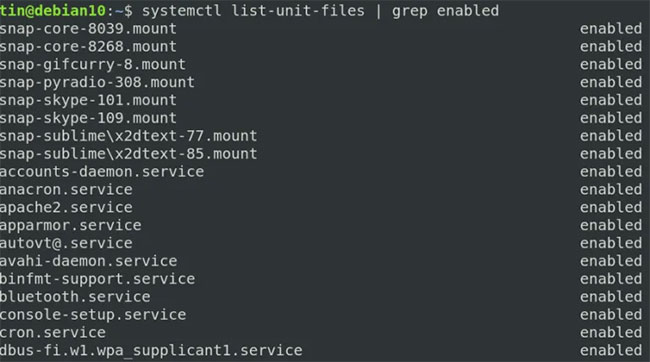
<p style="text-align: justify;">Để liệt kê tất cả các service được kích hoạt trên hệ thống, hãy chạy lệnh sau trong Terminal:</p>

<pre id="pre0">
<code>$ systemctl list-unit-files | grep enabled</code></pre>

<figure>
<div style="text-align: justify;"><img alt="Khởi động lại một service với systemctl" data-i="0" data-src="https://st.quantrimang.com/photos/image/2020/10/01/khoi-dong-lai-service-qua-systemctl-1.jpg" data-was-processed="true" height="362" src="https://st.quantrimang.com/photos/image/2020/10/01/khoi-dong-lai-service-qua-systemctl-1.jpg" width="650" /></div>

<figcaption>
<div style="text-align: justify;">Khởi động lại một service với systemctl</div>
</figcaption>
</figure>

<p style="text-align: justify;">Từ danh sách trên, bạn có thể tìm ra tên chính xác của service bạn muốn khởi động lại bằng lệnh systemctl.</p>

<p style="text-align: justify;">Để khởi động lại một service đang chạy (dừng và sau đó bắt đầu), hãy sử dụng cú pháp lệnh sau trong Terminal:</p>

<pre id="pre1">
<code>$ sudo systemctl restart &#91;service-name&#93;</code></pre>

<p style="text-align: justify;">Ví dụ, để khởi động lại service xrdp, hãy thay thế tham số&nbsp;<strong>&quot;service-name&quot;</strong>&nbsp;bằng tên chính xác của service.</p>

<figure>
<div style="text-align: justify;"><img alt="Thay thế tham số &#039;service-name&#039; bằng tên chính xác của service" data-i="1" data-src="https://st.quantrimang.com/photos/image/2020/10/01/khoi-dong-lai-service-qua-systemctl-2.jpg" data-was-processed="true" height="27" src="https://st.quantrimang.com/photos/image/2020/10/01/khoi-dong-lai-service-qua-systemctl-2.jpg" width="564" /></div>

<figcaption>
<div style="text-align: justify;">Thay thế tham số &quot;service-name&quot; bằng tên chính xác của service</div>
</figcaption>
</figure>

<div style="text-align: justify;">&nbsp;</div>

<h2 style="text-align: justify;">Quản lý service với systemctl</h2>

<p style="text-align: justify;">Cùng với việc khởi động lại service, bạn cũng có thể quản lý chúng bằng lệnh systemctl chẳng hạn như bắt đầu, dừng, bật, tắt và xem trạng thái của service.</p>

<p style="text-align: justify;">Để xem trạng thái hiện tại của service có đang chạy hay không, hãy sử dụng cú pháp lệnh sau trong Terminal:</p>

<pre id="pre2">
<code>$ systemctl status &#91;service-name&#93;</code></pre>

<p style="text-align: justify;">Để bắt đầu một service, hãy sử dụng cú pháp sau:</p>

<pre id="pre3">
<code>$ systemctl start &#91;service-name&#93;</code></pre>

<p style="text-align: justify;">Để dừng một service đang chạy, hãy sử dụng cú pháp sau:</p>

<pre id="pre4">
<code>$ systemctl stop &#91;service-name&#93;</code></pre>

<p style="text-align: justify;">Để cho phép một service tự động bắt đầu khi khởi động, hãy sử dụng cú pháp sau:</p>

<pre id="pre5">
<code>$ systemctl enable &#91;service-name&#93;</code></pre>

<p style="text-align: justify;">Để tắt service, không cho nó tự động khởi động khi boot, hãy sử dụng cú pháp sau:</p>

<pre id="pre6">
<code>$ systemctl disable &#91;service-name&#93;</code></pre>

<p style="text-align: justify;">Để load lại một service, hãy sử dụng cú pháp sau:</p>

<pre id="pre7">
<code>$ systemctl reload &#91;service-name&#93;</code></pre>

<p style="text-align: justify;">Để load hoặc khởi động lại một service (service được load lại và trong trường hợp không diễn ra quá trình load lại thì service sẽ được khởi động lại).</p>

<pre id="pre8">
<code>$ sudo systemctl reload-or-restart &#91;service-name&#93;</code></pre>

<p style="text-align: justify;">Để kiểm tra xem service có đang hoạt động hay không:</p>

<pre id="pre9">
<code>$ sudo systemctl is-active &#91;service-name&#93;</code></pre>

<p style="text-align: justify;">Để kiểm tra xem service có được bật để tự động khởi động khi boot hệ thống hay không:</p>

<pre id="pre10">
<code>$ sudo systemctl is-enabled &#91;service-name&#93;</code></pre>
		</div>
				<div id="author">
						<p>
				<strong>Nguồn tin:</strong>
				Quantrimang.com
			</p>
		</div>
	</div>
	<div id="footer" class="clearfix">
		<div id="url">
			<strong>URL của bản tin này: </strong><a href="https://www.nguoicodonvn2008.info/vi/news/savefile/kien-thuc-may-tinh/cach-khoi-dong-lai-service-thong-qua-systemctl-trong-linux-2854.html" title="Cách khởi động lại service thông qua systemctl trong Linux">https://www.nguoicodonvn2008.info/vi/news/savefile/kien-thuc-may-tinh/cach-khoi-dong-lai-service-thong-qua-systemctl-trong-linux-2854.html</a>

		</div>
		<div class="clear"></div>
		<div class="copyright">
			&copy; .&#x3A; Nguoicodonvn2008.info - Cõi lòng người cô đơn &#x3A;.
		</div>
		<div id="contact">
			<a href="mailto:admin@nguoicodonvn2008.info">admin@nguoicodonvn2008.info</a>
		</div>
	</div>
</div>
        <div id="timeoutsess" class="chromeframe">
            Bạn đã không sử dụng Site, <a onclick="timeoutsesscancel();" href="https://www.nguoicodonvn2008.info/#">Bấm vào đây để duy trì trạng thái đăng nhập</a>. Thời gian chờ: <span id="secField"> 60 </span> giây
        </div>
        <div id="openidResult" class="nv-alert" style="display:none"></div>
        <div id="openidBt" data-result="" data-redirect=""></div>
		</script>
		<div class="car-top">
  <span><img src="https://www.nguoicodonvn2008.info/themes/default/images/car.png" alt=""></span>
</div>
<script src="https://www.nguoicodonvn2008.info/assets/js/jquery/jquery.min.js"></script>
<script>var nv_base_siteurl="/",nv_lang_data="vi",nv_lang_interface="vi",nv_name_variable="nv",nv_fc_variable="op",nv_lang_variable="language",nv_module_name="news",nv_func_name="savefile",nv_is_user=0, nv_my_ofs=-4,nv_my_abbr="EDT",nv_cookie_prefix="nv4c_e856T",nv_check_pass_mstime=1738000,nv_area_admin=0,nv_safemode=0,theme_responsive=0,nv_recaptcha_ver=2,nv_recaptcha_sitekey="",nv_recaptcha_type="image",XSSsanitize=1;</script>
<script src="https://www.nguoicodonvn2008.info/assets/js/language/vi.js"></script>
<script src="https://www.nguoicodonvn2008.info/assets/js/DOMPurify/purify3.js"></script>
<script src="https://www.nguoicodonvn2008.info/assets/js/global.js"></script>
<script src="https://www.nguoicodonvn2008.info/assets/js/site.js"></script>
<script src="https://www.nguoicodonvn2008.info/themes/default/js/news.js"></script>
<script src="https://www.nguoicodonvn2008.info/themes/default/js/main.js"></script>
<script src="https://www.nguoicodonvn2008.info/themes/default/js/custom.js"></script>
<script type="application/ld+json">
        {
            "@context": "https://schema.org",
            "@type": "Organization",
            "url": "https://www.nguoicodonvn2008.info",
            "logo": "https://www.nguoicodonvn2008.info/uploads/angel.gif"
        }
        </script>
<script src="https://www.nguoicodonvn2008.info/themes/default/js/bootstrap.min.js"></script>
<script type="text/javascript">
var $scrolltop = $('.car-top');
$scrolltop.on('click', function () {
    $('html,body').animate({
        scrollTop: 0
    }, 800);
    $(this).addClass("car-run");
    setTimeout(function(){ $scrolltop.removeClass('car-run');}, 1000);
    return false;
});
$(window).on('scroll', function ()
{ 
    if($(window).scrollTop() >= 200)
    {
        $scrolltop.addClass("show");
        $scrolltop.addClass("car-down");
    }
    else
    {
       $scrolltop.removeClass("show");
       setTimeout(function(){ $scrolltop.removeClass('car-down');}, 300);
    }
});
</script>
</body>
</html>