<!DOCTYPE html>
    <html lang="vi" xmlns="http://www.w3.org/1999/xhtml" prefix="og: http://ogp.me/ns#">
    <head>
<title>Cách khắc phục lỗi khiến tính năng &quot;Reset this PC&quot; trên Windows 10 không hoạt động</title>
<meta name="description" content="Cách khắc phục lỗi khiến tính năng &quot;Reset this PC&quot; trên Windows 10 không hoạt động - Savefile - Tin Tức -...">
<meta name="author" content=".: Nguoicodonvn2008.info - Cõi lòng người cô đơn :.">
<meta name="copyright" content=".: Nguoicodonvn2008.info - Cõi lòng người cô đơn :. [admin@nguoicodonvn2008.info]">
<meta name="robots" content="index, archive, follow, noodp">
<meta name="googlebot" content="index,archive,follow,noodp">
<meta name="msnbot" content="all,index,follow">
<meta name="generator" content="NukeViet v4.5">
<meta http-equiv="Content-Type" content="text/html; charset=utf-8">
<meta property="og:title" content="Cách khắc phục lỗi khiến tính năng &quot;Reset this PC&quot; trên Windows 10 không hoạt động">
<meta property="og:type" content="website">
<meta property="og:description" content="Savefile - Tin Tức -...">
<meta property="og:site_name" content=".&#x3A; Nguoicodonvn2008.info - Cõi lòng người cô đơn &#x3A;.">
<meta property="og:url" content="https://www.nguoicodonvn2008.info/vi/news/savefile/kien-thuc-may-tinh/cach-khac-phuc-loi-khien-tinh-nang-reset-this-pc-tren-windows-10-khong-hoat-dong-2941.html">
<link rel="shortcut icon" href="https://www.nguoicodonvn2008.info/favicon.ico">
<link rel="canonical" href="https://www.nguoicodonvn2008.info/vi/news/savefile/kien-thuc-may-tinh/cach-khac-phuc-loi-khien-tinh-nang-reset-this-pc-tren-windows-10-khong-hoat-dong-2941.html">
<link rel="alternate" href="https://www.nguoicodonvn2008.info/vi/news/rss/" title="Tin Tức" type="application/rss+xml">
<link rel="alternate" href="https://www.nguoicodonvn2008.info/vi/news/rss/karaoke-dual/" title="Tin Tức - Karaoke Dual" type="application/rss+xml">
<link rel="alternate" href="https://www.nguoicodonvn2008.info/vi/news/rss/nhac-tre/" title="Tin Tức - Nhạc trẻ" type="application/rss+xml">
<link rel="alternate" href="https://www.nguoicodonvn2008.info/vi/news/rss/tru-tinh/" title="Tin Tức - Trữ tình" type="application/rss+xml">
<link rel="alternate" href="https://www.nguoicodonvn2008.info/vi/news/rss/nuoc-ngoai/" title="Tin Tức - Nước ngoài" type="application/rss+xml">
<link rel="alternate" href="https://www.nguoicodonvn2008.info/vi/news/rss/remix/" title="Tin Tức - Remix" type="application/rss+xml">
<link rel="alternate" href="https://www.nguoicodonvn2008.info/vi/news/rss/tam-su-tinh-yeu/" title="Tin Tức - Tâm sự tình yêu" type="application/rss+xml">
<link rel="alternate" href="https://www.nguoicodonvn2008.info/vi/news/rss/tho-suu-tam/" title="Tin Tức - Thơ sưu tầm" type="application/rss+xml">
<link rel="alternate" href="https://www.nguoicodonvn2008.info/vi/news/rss/cuoc-song/" title="Tin Tức - Cuộc sống" type="application/rss+xml">
<link rel="alternate" href="https://www.nguoicodonvn2008.info/vi/news/rss/phan-mem/" title="Tin Tức - Phần mềm" type="application/rss+xml">
<link rel="alternate" href="https://www.nguoicodonvn2008.info/vi/news/rss/kien-thuc-may-tinh/" title="Tin Tức - Kiến thức máy tính" type="application/rss+xml">
<link rel="alternate" href="https://www.nguoicodonvn2008.info/vi/news/rss/hoc-tap/" title="Tin Tức - Học tập" type="application/rss+xml">
<link rel="alternate" href="https://www.nguoicodonvn2008.info/vi/news/rss/tai-lieu/" title="Tin Tức - Tài liệu" type="application/rss+xml">
<link rel="alternate" href="https://www.nguoicodonvn2008.info/vi/news/rss/de-thi/" title="Tin Tức - Đề thi" type="application/rss+xml">
<link rel="preload" as="style" href="https://www.nguoicodonvn2008.info/assets/css/font-awesome.min.css" type="text/css">
<link rel="preload" as="style" href="https://www.nguoicodonvn2008.info/themes/default/css/bootstrap.non-responsive.css" type="text/css">
<link rel="preload" as="style" href="https://www.nguoicodonvn2008.info/themes/default/css/style.css" type="text/css">
<link rel="preload" as="style" href="https://www.nguoicodonvn2008.info/themes/default/css/style.non-responsive.css" type="text/css">
<link rel="preload" as="style" href="https://www.nguoicodonvn2008.info/themes/default/css/news.css" type="text/css">
<link rel="preload" as="style" href="https://www.nguoicodonvn2008.info/themes/default/css/custom.css" type="text/css">
<link rel="preload" as="script" href="https://www.nguoicodonvn2008.info/assets/js/jquery/jquery.min.js" type="text/javascript">
<link rel="preload" as="script" href="https://www.nguoicodonvn2008.info/assets/js/language/vi.js" type="text/javascript">
<link rel="preload" as="script" href="https://www.nguoicodonvn2008.info/assets/js/DOMPurify/purify3.js" type="text/javascript">
<link rel="preload" as="script" href="https://www.nguoicodonvn2008.info/assets/js/global.js" type="text/javascript">
<link rel="preload" as="script" href="https://www.nguoicodonvn2008.info/assets/js/site.js" type="text/javascript">
<link rel="preload" as="script" href="https://www.nguoicodonvn2008.info/themes/default/js/news.js" type="text/javascript">
<link rel="preload" as="script" href="https://www.nguoicodonvn2008.info/themes/default/js/main.js" type="text/javascript">
<link rel="preload" as="script" href="https://www.nguoicodonvn2008.info/themes/default/js/custom.js" type="text/javascript">
<link rel="preload" as="script" href="https://www.nguoicodonvn2008.info/themes/default/js/bootstrap.min.js" type="text/javascript">
<link rel="stylesheet" href="https://www.nguoicodonvn2008.info/assets/css/font-awesome.min.css">
<link rel="stylesheet" href="https://www.nguoicodonvn2008.info/themes/default/css/bootstrap.non-responsive.css">
<link rel="stylesheet" href="https://www.nguoicodonvn2008.info/themes/default/css/style.css">
<link rel="stylesheet" href="https://www.nguoicodonvn2008.info/themes/default/css/style.non-responsive.css">
<link rel="StyleSheet" href="https://www.nguoicodonvn2008.info/themes/default/css/news.css">
<link rel="stylesheet" href="https://www.nguoicodonvn2008.info/themes/default/css/custom.css">
<style type="text/css">
	body{background: #fff;}
</style>
    </head>
    <body>
<div id="print">
	<div id="hd_print">
		<h2 class="pull-left">.&#x3A; Nguoicodonvn2008.info - Cõi lòng người cô đơn &#x3A;.</h2>
		<p class="pull-right"><a title=".&#x3A; Nguoicodonvn2008.info - Cõi lòng người cô đơn &#x3A;." href="https://www.nguoicodonvn2008.info/">https://www.nguoicodonvn2008.info</a></p>
	</div>
	<div class="clear"></div>
	<hr />
	<div id="content">
		<h1>Cách khắc phục lỗi khiến tính năng &quot;Reset this PC&quot; trên Windows 10 không hoạt động</h1>
		<ul class="list-inline">
			<li>Thứ sáu - 23/10/2020 00:29</li>
			<li class="hidden-print txtrequired"><em class="fa fa-print">&nbsp;</em><a title="In ra" href="javascript:;" onclick="window.print()">In ra</a></li>
			<li class="hidden-print txtrequired"><em class="fa fa-power-off">&nbsp;</em><a title="Đóng cửa sổ này" href="javascript:;" onclick="window.close()">Đóng cửa sổ này</a></li>
		</ul>
		<div class="clear"></div>
		<div id="hometext">
		</div>
				<div class="imghome">
			<img alt="Cách khắc phục lỗi khiến tính năng &quot;Reset this PC&quot; trên Windows 10 không hoạt động" src="https://st.quantrimang.com/photos/image/2020/10/23/cach-khac-phuc-loi-khien-reset-this-pc-tren-windows-10-khong-hoat-dong.jpg" width="460" class="img-thumbnail" />
		</div>
		<div class="clear"></div>
		<div id="bodytext" class="clearfix">
			<p style="text-align: justify;">Sau khi nhận báo cáo từ người dùng, Microsoft đã tiến hành điều tra và chính thức xác nhận một số máy tính Windows 10 gặp lỗi khiến tính năng &quot;Reset this PC&quot; không hoạt động. Bên cạnh đó, Microsoft cũng đưa ra phương án khắc phục tạm thời cho người dùng.</p>

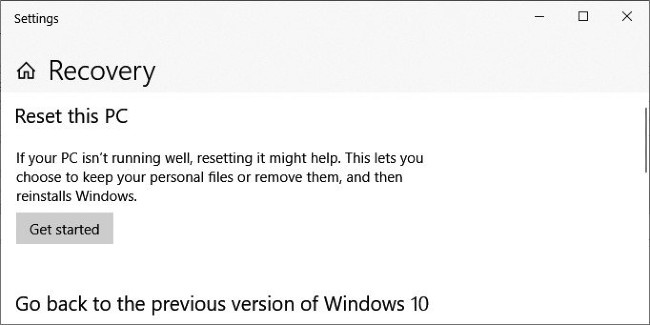
<p style="text-align: justify;">Tính năng &quot;Reset this PC&quot; có mặt trên mọi phiên bản Windows 10. Nó cho phép người dùng cài đặt lại hệ điều hành từ file sao lưu cục bộ hoặc các phiên bản Windows 10 mới nhất trên máy chủ của Microsoft.</p>

<p style="text-align: justify;">Khi cài đặt lại máy tính, người dùng có thể chọn giữ lại các tập tin và ứng dụng hoặc xóa hết tất cả mọi thứ.</p>

<figure>
<div style="text-align: justify;"><img alt="Cách khắc phục lỗi khiến &#039;Reset this PC&#039; trên Windows 10 không hoạt động" data-i="0" data-src="https://st.quantrimang.com/photos/image/2020/10/23/cach-khac-phuc-loi-khien-reset-this-pc-tren-windows-10-khong-hoat-dong.jpg" data-was-processed="true" height="325" src="https://st.quantrimang.com/photos/image/2020/10/23/cach-khac-phuc-loi-khien-reset-this-pc-tren-windows-10-khong-hoat-dong.jpg" width="650" /></div>

<figcaption>
<div style="text-align: justify;">Cách khắc phục lỗi khiến &quot;Reset this PC&quot; trên Windows 10 không hoạt động</div>
</figcaption>
</figure>

<p style="text-align: justify;">Bạn có thể tham khảo cách sử dụng &quot;Reset this PC&quot; tại đây:</p>

<ul>
	<li style="text-align: justify;"><a href="https://quantrimang.com/huong-dan-2-cach-don-gian-reset-windows-10-phan-1-122561" title="Reset Windows 10 về trạng thái ban đầu">Reset Windows 10 về trạng thái ban đầu</a></li>
</ul>

<p style="text-align: justify;">Theo Microsoft, có vẻ như chỉ có các máy tính chạy Windows 10 2004 gặp sự cố này. &quot;Trên một số máy tính chạy Windows 10 2004, khi sử dụng &quot;Reset this PC&quot; người dùng sẽ nhận được báo lỗi: Đã xảy ra sự cố khi cài đặt lại PC của bạn. Không có thay đổi nào được thực hiện&quot;, Microsoft chia sẻ.</p>

<p style="text-align: justify;">Để khắc phục sự cố, Microsoft khuyên người dùng nên sử dụng công cụ dòng lệnh Deployment Image Servicing and Management (DISM). DISM được sử dụng để chuẩn bị tập tin sao lưu trong định dạng Windows image (.wim) hoặc ổ cứng ảo (.vhd hoặc .vhdx) cho Windows PE, Windows Recovery Enviroment (Windows RE) và Windows Setup.</p>

<p style="text-align: justify;">Theo khuyến nghị của Microsoft, người dùng phải sử dụng DISM để sửa Windows image trực tuyến được sử dụng để reset lại PC trước khi thử sử dụng lại tính năng &quot;Reset this PC&quot;.</p>

<p style="text-align: justify;">Dưới đây là quy trình khắc phục đầy đủ mà Microsoft đưa ra:</p>

<ul>
	<li style="text-align: justify;">Mở cửa sổ lệnh nâng cao. Để làm điều này, bạn nhấn&nbsp;<strong>Start</strong>, nhập&nbsp;<strong>Command Prompt</strong>&nbsp;hoặc&nbsp;<strong>cmd</strong>&nbsp;vào ô&nbsp;<strong>Search</strong>. Tiếp theo, nhấp chuột phải vào&nbsp;<strong>Command Prompt</strong>&nbsp;và chọn&nbsp;<strong>Run as administrator</strong>. Nếu được yêu cầu nhập mật khẩu quản trị viên bạn hãy nhập mật khẩu hoặc bấm&nbsp;<strong>Allow</strong>.</li>
	<li style="text-align: justify;">Tại cửa sổ lệnh, bạn nhập lệnh sau rồi nhấn Enter:&nbsp;<strong>dism /online /cleanup-image /restorehealth</strong></li>
	<li style="text-align: justify;">Khởi động lại máy tính và thử lại tính năng &quot;Reset this PC&quot;</li>
</ul>
		</div>
				<div id="author">
						<p>
				<strong>Nguồn tin:</strong>
				Quantrimang.com
			</p>
		</div>
	</div>
	<div id="footer" class="clearfix">
		<div id="url">
			<strong>URL của bản tin này: </strong><a href="https://www.nguoicodonvn2008.info/vi/news/savefile/kien-thuc-may-tinh/cach-khac-phuc-loi-khien-tinh-nang-reset-this-pc-tren-windows-10-khong-hoat-dong-2941.html" title="Cách khắc phục lỗi khiến tính năng &quot;Reset this PC&quot; trên Windows 10 không hoạt động">https://www.nguoicodonvn2008.info/vi/news/savefile/kien-thuc-may-tinh/cach-khac-phuc-loi-khien-tinh-nang-reset-this-pc-tren-windows-10-khong-hoat-dong-2941.html</a>

		</div>
		<div class="clear"></div>
		<div class="copyright">
			&copy; .&#x3A; Nguoicodonvn2008.info - Cõi lòng người cô đơn &#x3A;.
		</div>
		<div id="contact">
			<a href="mailto:admin@nguoicodonvn2008.info">admin@nguoicodonvn2008.info</a>
		</div>
	</div>
</div>
        <div id="timeoutsess" class="chromeframe">
            Bạn đã không sử dụng Site, <a onclick="timeoutsesscancel();" href="https://www.nguoicodonvn2008.info/#">Bấm vào đây để duy trì trạng thái đăng nhập</a>. Thời gian chờ: <span id="secField"> 60 </span> giây
        </div>
        <div id="openidResult" class="nv-alert" style="display:none"></div>
        <div id="openidBt" data-result="" data-redirect=""></div>
		</script>
		<div class="car-top">
  <span><img src="https://www.nguoicodonvn2008.info/themes/default/images/car.png" alt=""></span>
</div>
<script src="https://www.nguoicodonvn2008.info/assets/js/jquery/jquery.min.js"></script>
<script>var nv_base_siteurl="/",nv_lang_data="vi",nv_lang_interface="vi",nv_name_variable="nv",nv_fc_variable="op",nv_lang_variable="language",nv_module_name="news",nv_func_name="savefile",nv_is_user=0, nv_my_ofs=-4,nv_my_abbr="EDT",nv_cookie_prefix="nv4c_e856T",nv_check_pass_mstime=1738000,nv_area_admin=0,nv_safemode=0,theme_responsive=0,nv_recaptcha_ver=2,nv_recaptcha_sitekey="",nv_recaptcha_type="image",XSSsanitize=1;</script>
<script src="https://www.nguoicodonvn2008.info/assets/js/language/vi.js"></script>
<script src="https://www.nguoicodonvn2008.info/assets/js/DOMPurify/purify3.js"></script>
<script src="https://www.nguoicodonvn2008.info/assets/js/global.js"></script>
<script src="https://www.nguoicodonvn2008.info/assets/js/site.js"></script>
<script src="https://www.nguoicodonvn2008.info/themes/default/js/news.js"></script>
<script src="https://www.nguoicodonvn2008.info/themes/default/js/main.js"></script>
<script src="https://www.nguoicodonvn2008.info/themes/default/js/custom.js"></script>
<script type="application/ld+json">
        {
            "@context": "https://schema.org",
            "@type": "Organization",
            "url": "https://www.nguoicodonvn2008.info",
            "logo": "https://www.nguoicodonvn2008.info/uploads/angel.gif"
        }
        </script>
<script src="https://www.nguoicodonvn2008.info/themes/default/js/bootstrap.min.js"></script>
<script type="text/javascript">
var $scrolltop = $('.car-top');
$scrolltop.on('click', function () {
    $('html,body').animate({
        scrollTop: 0
    }, 800);
    $(this).addClass("car-run");
    setTimeout(function(){ $scrolltop.removeClass('car-run');}, 1000);
    return false;
});
$(window).on('scroll', function ()
{ 
    if($(window).scrollTop() >= 200)
    {
        $scrolltop.addClass("show");
        $scrolltop.addClass("car-down");
    }
    else
    {
       $scrolltop.removeClass("show");
       setTimeout(function(){ $scrolltop.removeClass('car-down');}, 300);
    }
});
</script>
</body>
</html>