<!DOCTYPE html>
    <html lang="vi" xmlns="http://www.w3.org/1999/xhtml" prefix="og: http://ogp.me/ns#">
    <head>
<title>Cách khắc phục lỗi biểu tượng file và thư mục Windows 10 biến thành màu đen</title>
<meta name="description" content="Cách khắc phục lỗi biểu tượng file và thư mục Windows 10 biến thành màu đen - Savefile - Tin Tức -...">
<meta name="author" content=".: Nguoicodonvn2008.info - Cõi lòng người cô đơn :.">
<meta name="copyright" content=".: Nguoicodonvn2008.info - Cõi lòng người cô đơn :. [admin@nguoicodonvn2008.info]">
<meta name="robots" content="index, archive, follow, noodp">
<meta name="googlebot" content="index,archive,follow,noodp">
<meta name="msnbot" content="all,index,follow">
<meta name="generator" content="NukeViet v4.5">
<meta http-equiv="Content-Type" content="text/html; charset=utf-8">
<meta property="og:title" content="Cách khắc phục lỗi biểu tượng file và thư mục Windows 10 biến thành màu đen">
<meta property="og:type" content="website">
<meta property="og:description" content="Savefile - Tin Tức -...">
<meta property="og:site_name" content=".&#x3A; Nguoicodonvn2008.info - Cõi lòng người cô đơn &#x3A;.">
<meta property="og:url" content="https://www.nguoicodonvn2008.info/vi/news/savefile/kien-thuc-may-tinh/cach-khac-phuc-loi-bieu-tuong-file-va-thu-muc-windows-10-bien-thanh-mau-den-4170.html">
<link rel="shortcut icon" href="https://www.nguoicodonvn2008.info/favicon.ico">
<link rel="canonical" href="https://www.nguoicodonvn2008.info/vi/news/savefile/kien-thuc-may-tinh/cach-khac-phuc-loi-bieu-tuong-file-va-thu-muc-windows-10-bien-thanh-mau-den-4170.html">
<link rel="alternate" href="https://www.nguoicodonvn2008.info/vi/news/rss/" title="Tin Tức" type="application/rss+xml">
<link rel="alternate" href="https://www.nguoicodonvn2008.info/vi/news/rss/karaoke-dual/" title="Tin Tức - Karaoke Dual" type="application/rss+xml">
<link rel="alternate" href="https://www.nguoicodonvn2008.info/vi/news/rss/nhac-tre/" title="Tin Tức - Nhạc trẻ" type="application/rss+xml">
<link rel="alternate" href="https://www.nguoicodonvn2008.info/vi/news/rss/tru-tinh/" title="Tin Tức - Trữ tình" type="application/rss+xml">
<link rel="alternate" href="https://www.nguoicodonvn2008.info/vi/news/rss/nuoc-ngoai/" title="Tin Tức - Nước ngoài" type="application/rss+xml">
<link rel="alternate" href="https://www.nguoicodonvn2008.info/vi/news/rss/remix/" title="Tin Tức - Remix" type="application/rss+xml">
<link rel="alternate" href="https://www.nguoicodonvn2008.info/vi/news/rss/tam-su-tinh-yeu/" title="Tin Tức - Tâm sự tình yêu" type="application/rss+xml">
<link rel="alternate" href="https://www.nguoicodonvn2008.info/vi/news/rss/tho-suu-tam/" title="Tin Tức - Thơ sưu tầm" type="application/rss+xml">
<link rel="alternate" href="https://www.nguoicodonvn2008.info/vi/news/rss/cuoc-song/" title="Tin Tức - Cuộc sống" type="application/rss+xml">
<link rel="alternate" href="https://www.nguoicodonvn2008.info/vi/news/rss/phan-mem/" title="Tin Tức - Phần mềm" type="application/rss+xml">
<link rel="alternate" href="https://www.nguoicodonvn2008.info/vi/news/rss/kien-thuc-may-tinh/" title="Tin Tức - Kiến thức máy tính" type="application/rss+xml">
<link rel="alternate" href="https://www.nguoicodonvn2008.info/vi/news/rss/hoc-tap/" title="Tin Tức - Học tập" type="application/rss+xml">
<link rel="alternate" href="https://www.nguoicodonvn2008.info/vi/news/rss/tai-lieu/" title="Tin Tức - Tài liệu" type="application/rss+xml">
<link rel="alternate" href="https://www.nguoicodonvn2008.info/vi/news/rss/de-thi/" title="Tin Tức - Đề thi" type="application/rss+xml">
<link rel="preload" as="style" href="https://www.nguoicodonvn2008.info/assets/css/font-awesome.min.css" type="text/css">
<link rel="preload" as="style" href="https://www.nguoicodonvn2008.info/themes/default/css/bootstrap.non-responsive.css" type="text/css">
<link rel="preload" as="style" href="https://www.nguoicodonvn2008.info/themes/default/css/style.css" type="text/css">
<link rel="preload" as="style" href="https://www.nguoicodonvn2008.info/themes/default/css/style.non-responsive.css" type="text/css">
<link rel="preload" as="style" href="https://www.nguoicodonvn2008.info/themes/default/css/news.css" type="text/css">
<link rel="preload" as="style" href="https://www.nguoicodonvn2008.info/themes/default/css/custom.css" type="text/css">
<link rel="preload" as="script" href="https://www.nguoicodonvn2008.info/assets/js/jquery/jquery.min.js" type="text/javascript">
<link rel="preload" as="script" href="https://www.nguoicodonvn2008.info/assets/js/language/vi.js" type="text/javascript">
<link rel="preload" as="script" href="https://www.nguoicodonvn2008.info/assets/js/DOMPurify/purify3.js" type="text/javascript">
<link rel="preload" as="script" href="https://www.nguoicodonvn2008.info/assets/js/global.js" type="text/javascript">
<link rel="preload" as="script" href="https://www.nguoicodonvn2008.info/assets/js/site.js" type="text/javascript">
<link rel="preload" as="script" href="https://www.nguoicodonvn2008.info/themes/default/js/news.js" type="text/javascript">
<link rel="preload" as="script" href="https://www.nguoicodonvn2008.info/themes/default/js/main.js" type="text/javascript">
<link rel="preload" as="script" href="https://www.nguoicodonvn2008.info/themes/default/js/custom.js" type="text/javascript">
<link rel="preload" as="script" href="https://www.nguoicodonvn2008.info/themes/default/js/bootstrap.min.js" type="text/javascript">
<link rel="stylesheet" href="https://www.nguoicodonvn2008.info/assets/css/font-awesome.min.css">
<link rel="stylesheet" href="https://www.nguoicodonvn2008.info/themes/default/css/bootstrap.non-responsive.css">
<link rel="stylesheet" href="https://www.nguoicodonvn2008.info/themes/default/css/style.css">
<link rel="stylesheet" href="https://www.nguoicodonvn2008.info/themes/default/css/style.non-responsive.css">
<link rel="StyleSheet" href="https://www.nguoicodonvn2008.info/themes/default/css/news.css">
<link rel="stylesheet" href="https://www.nguoicodonvn2008.info/themes/default/css/custom.css">
<style type="text/css">
	body{background: #fff;}
</style>
    </head>
    <body>
<div id="print">
	<div id="hd_print">
		<h2 class="pull-left">.&#x3A; Nguoicodonvn2008.info - Cõi lòng người cô đơn &#x3A;.</h2>
		<p class="pull-right"><a title=".&#x3A; Nguoicodonvn2008.info - Cõi lòng người cô đơn &#x3A;." href="https://www.nguoicodonvn2008.info/">https://www.nguoicodonvn2008.info</a></p>
	</div>
	<div class="clear"></div>
	<hr />
	<div id="content">
		<h1>Cách khắc phục lỗi biểu tượng file và thư mục Windows 10 biến thành màu đen</h1>
		<ul class="list-inline">
			<li>Thứ tư - 02/06/2021 00:49</li>
			<li class="hidden-print txtrequired"><em class="fa fa-print">&nbsp;</em><a title="In ra" href="javascript:;" onclick="window.print()">In ra</a></li>
			<li class="hidden-print txtrequired"><em class="fa fa-power-off">&nbsp;</em><a title="Đóng cửa sổ này" href="javascript:;" onclick="window.close()">Đóng cửa sổ này</a></li>
		</ul>
		<div class="clear"></div>
		<div id="hometext">
		</div>
				<div class="imghome">
			<img alt="Cách khắc phục lỗi biểu tượng file và thư mục Windows 10 biến thành màu đen" src="https://st.quantrimang.com/photos/image/2021/06/01/loi-bieu-tuong-file-windows-10-bien-thanh-mau-den-1.jpg" width="460" class="img-thumbnail" />
		</div>
		<div class="clear"></div>
		<div id="bodytext" class="clearfix">
			<p style="text-align: justify;">Mặc dù không gây ra vấn đề gì về mặt chức năng nhưng lỗi biểu tượng file và thư mục Windows 10 biến thành màu đen khiến giao diện máy tính của bạn trở nên xấu xí. Bài viết này sẽ giúp bạn khắc phục vấn đề.</p>

<h2 style="text-align: justify;">Khắc phục lỗi biểu tượng file và thư mục Windows 10 biến thành màu đen</h2>

<div style="text-align: justify;">&nbsp;</div>

<h2 id="mcetoc_1f73g2tnl0" style="text-align: justify;">Cách 1: Thực hiện thay đổi biểu tượng file, thư mục thủ công</h2>

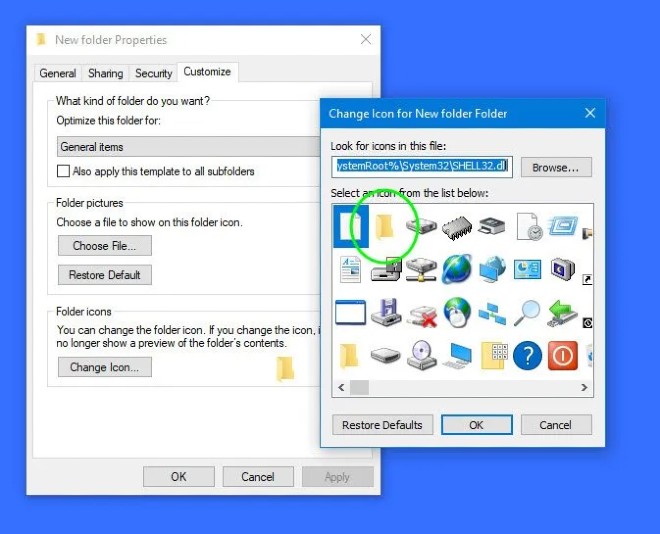
<p style="text-align: justify;">Cách này sẽ hơi lâu vì bạn phải làm với từng thư mục, file. Cách làm như sau:</p>

<ul>
	<li style="text-align: justify;">Nhấp chuột phải vào thư mục có biểu tượng bị đen</li>
	<li style="text-align: justify;">Chọn&nbsp;<strong>Properties</strong></li>
	<li style="text-align: justify;">Mở thẻ&nbsp;<strong>Customize</strong></li>
	<li style="text-align: justify;">Chọn nút&nbsp;<strong>Change icon</strong></li>
	<li style="text-align: justify;">Chọn lại biểu tượng thư mục màu vàng mặc định (hoặc bất cứ thứ gì bạn thích)</li>
	<li style="text-align: justify;">Nhấn&nbsp;<strong>OK</strong>,&nbsp;<strong>Apply</strong>&nbsp;và thoát ra</li>
</ul>

<p style="text-align: justify;">Ngoài việc khắc phục lỗi, đây còn là cách mà bạn có thể tùy biến cho chiếc máy tính của mình. Bạn có thể chọn các biểu tượng khác thay cho những biểu tượng mặc định.</p>

<p style="text-align: justify;"><img alt="" data-i="0" data-src="https://st.quantrimang.com/photos/image/2021/06/01/loi-bieu-tuong-file-windows-10-bien-thanh-mau-den-1.jpg" data-was-processed="true" height="534" src="https://st.quantrimang.com/photos/image/2021/06/01/loi-bieu-tuong-file-windows-10-bien-thanh-mau-den-1.jpg" width="660" /></p>

<h2 id="mcetoc_1f73g2tnl1" style="text-align: justify;">Cách 2: Chạy System Restore</h2>

<p style="text-align: justify;">Nếu bạn vừa thực hiện bất kỳ thay đổi nào với máy tính của mình và thấy phát sinh lỗi này thì bạn có thể thực hiện khôi phục lại về thời điểm trước đó xem có giải quyết được vấn đề hay không. Bạn có thể tham khảo cách thực hiện System Restore trong bài viết dưới đây:</p>

<div style="text-align: justify;">&nbsp;</div>

<h2 id="mcetoc_1f73g2tnl2" style="text-align: justify;">Cách 3: Gỡ cài đặt Windows Update mới nhất</h2>

<p style="text-align: justify;">Nếu bạn vừa thực hiện cập nhật Windows và thấy phát sinh lỗi này thì bạn có thể gỡ bản cập nhật đó xem có giải quyết được vấn đề hay không. Bạn có thể tham khảo cách thực hiện gỡ cập nhật Windows trong bài viết dưới đây:</p>

<div style="text-align: justify;">&nbsp;</div>

<h2 id="mcetoc_1f73g2tnl3" style="text-align: justify;">Cách 4: Sử dụng phần mềm của bên thứ 3</h2>

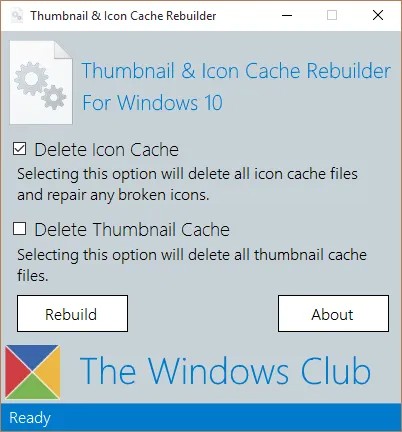
<p style="text-align: justify;">Bạn cũng có thể sử dụng phần mềm nhỏ gọn miễn phí mang tên Thumbnail Cache Rebuilder để thiết lập lại biểu tượng cho các tập tin và thư mục gặp lỗi. Bạn chỉ cần tải phần mềm về, chạy file .exe dưới quyền admin sau đó chọn Delete Icon Cache rồi nhấn Rebuild. Sau khi phần mềm chạy xong bạn cần khởi động lại máy tính.</p>

<ul>
	<li style="text-align: justify;">Tải về&nbsp;Thumbnail Cache Rebuilder:&nbsp;<span style="color:rgb(192, 57, 43);"><strong>https://www.thewindowsclub.com/downloads/TICR.zip</strong></span></li>
</ul>

<p style="text-align: justify;"><img alt="" data-i="1" data-src="https://st.quantrimang.com/photos/image/2021/06/01/loi-bieu-tuong-file-windows-10-bien-thanh-mau-den-2.jpg" data-was-processed="true" height="432" src="https://st.quantrimang.com/photos/image/2021/06/01/loi-bieu-tuong-file-windows-10-bien-thanh-mau-den-2.jpg" width="402" /></p>

<h2 id="mcetoc_1f73g2tnl4" style="text-align: justify;">Cách 5: Kiểm tra driver đồ họa</h2>

<p style="text-align: justify;">Đôi khi driver đồ họa bị cũ hoặc bị lỗi cũng gây ra các vấn đề tương tự. Vì thế, bạn có thể thử cập nhật driver đồ họa để xem có thể giải quyết vấn đề này hay không.</p>

<p style="text-align: justify;">Chúc các bạn thành công!</p>
		</div>
				<div id="author">
						<p>
				<strong>Nguồn tin:</strong>
				Quantrimang.com
			</p>
		</div>
	</div>
	<div id="footer" class="clearfix">
		<div id="url">
			<strong>URL của bản tin này: </strong><a href="https://www.nguoicodonvn2008.info/vi/news/savefile/kien-thuc-may-tinh/cach-khac-phuc-loi-bieu-tuong-file-va-thu-muc-windows-10-bien-thanh-mau-den-4170.html" title="Cách khắc phục lỗi biểu tượng file và thư mục Windows 10 biến thành màu đen">https://www.nguoicodonvn2008.info/vi/news/savefile/kien-thuc-may-tinh/cach-khac-phuc-loi-bieu-tuong-file-va-thu-muc-windows-10-bien-thanh-mau-den-4170.html</a>

		</div>
		<div class="clear"></div>
		<div class="copyright">
			&copy; .&#x3A; Nguoicodonvn2008.info - Cõi lòng người cô đơn &#x3A;.
		</div>
		<div id="contact">
			<a href="mailto:admin@nguoicodonvn2008.info">admin@nguoicodonvn2008.info</a>
		</div>
	</div>
</div>
        <div id="timeoutsess" class="chromeframe">
            Bạn đã không sử dụng Site, <a onclick="timeoutsesscancel();" href="https://www.nguoicodonvn2008.info/#">Bấm vào đây để duy trì trạng thái đăng nhập</a>. Thời gian chờ: <span id="secField"> 60 </span> giây
        </div>
        <div id="openidResult" class="nv-alert" style="display:none"></div>
        <div id="openidBt" data-result="" data-redirect=""></div>
		</script>
		<div class="car-top">
  <span><img src="https://www.nguoicodonvn2008.info/themes/default/images/car.png" alt=""></span>
</div>
<div id="run_cronjobs" style="visibility:hidden;display:none;"><img alt="cron" src="/index.php?second=cronjobs&amp;p=q1u5AXXd" width="1" height="1" /></div>
<script src="https://www.nguoicodonvn2008.info/assets/js/jquery/jquery.min.js"></script>
<script>var nv_base_siteurl="/",nv_lang_data="vi",nv_lang_interface="vi",nv_name_variable="nv",nv_fc_variable="op",nv_lang_variable="language",nv_module_name="news",nv_func_name="savefile",nv_is_user=0, nv_my_ofs=-4,nv_my_abbr="EDT",nv_cookie_prefix="nv4c_e856T",nv_check_pass_mstime=1738000,nv_area_admin=0,nv_safemode=0,theme_responsive=0,nv_recaptcha_ver=2,nv_recaptcha_sitekey="",nv_recaptcha_type="image",XSSsanitize=1;</script>
<script src="https://www.nguoicodonvn2008.info/assets/js/language/vi.js"></script>
<script src="https://www.nguoicodonvn2008.info/assets/js/DOMPurify/purify3.js"></script>
<script src="https://www.nguoicodonvn2008.info/assets/js/global.js"></script>
<script src="https://www.nguoicodonvn2008.info/assets/js/site.js"></script>
<script src="https://www.nguoicodonvn2008.info/themes/default/js/news.js"></script>
<script src="https://www.nguoicodonvn2008.info/themes/default/js/main.js"></script>
<script src="https://www.nguoicodonvn2008.info/themes/default/js/custom.js"></script>
<script type="application/ld+json">
        {
            "@context": "https://schema.org",
            "@type": "Organization",
            "url": "https://www.nguoicodonvn2008.info",
            "logo": "https://www.nguoicodonvn2008.info/uploads/angel.gif"
        }
        </script>
<script src="https://www.nguoicodonvn2008.info/themes/default/js/bootstrap.min.js"></script>
<script type="text/javascript">
var $scrolltop = $('.car-top');
$scrolltop.on('click', function () {
    $('html,body').animate({
        scrollTop: 0
    }, 800);
    $(this).addClass("car-run");
    setTimeout(function(){ $scrolltop.removeClass('car-run');}, 1000);
    return false;
});
$(window).on('scroll', function ()
{ 
    if($(window).scrollTop() >= 200)
    {
        $scrolltop.addClass("show");
        $scrolltop.addClass("car-down");
    }
    else
    {
       $scrolltop.removeClass("show");
       setTimeout(function(){ $scrolltop.removeClass('car-down');}, 300);
    }
});
</script>
</body>
</html>