<!DOCTYPE html>
    <html lang="vi" xmlns="http://www.w3.org/1999/xhtml" prefix="og: http://ogp.me/ns#">
    <head>
<title>Cách khắc phục cảnh báo &quot;Insecure Download Blocked&quot; của Chrome</title>
<meta name="description" content="Cách khắc phục cảnh báo &quot;Insecure Download Blocked&quot; của Chrome - Savefile - Tin Tức -...">
<meta name="author" content=".: Nguoicodonvn2008.info - Cõi lòng người cô đơn :.">
<meta name="copyright" content=".: Nguoicodonvn2008.info - Cõi lòng người cô đơn :. [admin@nguoicodonvn2008.info]">
<meta name="robots" content="index, archive, follow, noodp">
<meta name="googlebot" content="index,archive,follow,noodp">
<meta name="msnbot" content="all,index,follow">
<meta name="generator" content="NukeViet v4.5">
<meta http-equiv="Content-Type" content="text/html; charset=utf-8">
<meta property="og:title" content="Cách khắc phục cảnh báo &quot;Insecure Download Blocked&quot; của Chrome">
<meta property="og:type" content="website">
<meta property="og:description" content="Savefile - Tin Tức - https&#x3A;&#x002F;&#x002F;www.nguoicodonvn2008.info&#x002F;vi&#x002F;news&#x002F;savefile&#x002F;kien-thuc-may-tinh&#x002F;cach-khac-phuc-canh-bao-insecure-download-blocked-cua-chrome-8880.html">
<meta property="og:site_name" content=".&#x3A; Nguoicodonvn2008.info - Cõi lòng người cô đơn &#x3A;.">
<meta property="og:url" content="https://www.nguoicodonvn2008.info/vi/news/savefile/kien-thuc-may-tinh/cach-khac-phuc-canh-bao-insecure-download-blocked-cua-chrome-8880.html">
<link rel="shortcut icon" href="https://www.nguoicodonvn2008.info/favicon.ico">
<link rel="canonical" href="https://www.nguoicodonvn2008.info/vi/news/savefile/kien-thuc-may-tinh/cach-khac-phuc-canh-bao-insecure-download-blocked-cua-chrome-8880.html">
<link rel="alternate" href="https://www.nguoicodonvn2008.info/vi/news/rss/" title="Tin Tức" type="application/rss+xml">
<link rel="alternate" href="https://www.nguoicodonvn2008.info/vi/news/rss/karaoke-dual/" title="Tin Tức - Karaoke Dual" type="application/rss+xml">
<link rel="alternate" href="https://www.nguoicodonvn2008.info/vi/news/rss/nhac-tre/" title="Tin Tức - Nhạc trẻ" type="application/rss+xml">
<link rel="alternate" href="https://www.nguoicodonvn2008.info/vi/news/rss/tru-tinh/" title="Tin Tức - Trữ tình" type="application/rss+xml">
<link rel="alternate" href="https://www.nguoicodonvn2008.info/vi/news/rss/nuoc-ngoai/" title="Tin Tức - Nước ngoài" type="application/rss+xml">
<link rel="alternate" href="https://www.nguoicodonvn2008.info/vi/news/rss/remix/" title="Tin Tức - Remix" type="application/rss+xml">
<link rel="alternate" href="https://www.nguoicodonvn2008.info/vi/news/rss/tam-su-tinh-yeu/" title="Tin Tức - Tâm sự tình yêu" type="application/rss+xml">
<link rel="alternate" href="https://www.nguoicodonvn2008.info/vi/news/rss/tho-suu-tam/" title="Tin Tức - Thơ sưu tầm" type="application/rss+xml">
<link rel="alternate" href="https://www.nguoicodonvn2008.info/vi/news/rss/cuoc-song/" title="Tin Tức - Cuộc sống" type="application/rss+xml">
<link rel="alternate" href="https://www.nguoicodonvn2008.info/vi/news/rss/phan-mem/" title="Tin Tức - Phần mềm" type="application/rss+xml">
<link rel="alternate" href="https://www.nguoicodonvn2008.info/vi/news/rss/kien-thuc-may-tinh/" title="Tin Tức - Kiến thức máy tính" type="application/rss+xml">
<link rel="alternate" href="https://www.nguoicodonvn2008.info/vi/news/rss/hoc-tap/" title="Tin Tức - Học tập" type="application/rss+xml">
<link rel="alternate" href="https://www.nguoicodonvn2008.info/vi/news/rss/tai-lieu/" title="Tin Tức - Tài liệu" type="application/rss+xml">
<link rel="alternate" href="https://www.nguoicodonvn2008.info/vi/news/rss/de-thi/" title="Tin Tức - Đề thi" type="application/rss+xml">
<link rel="preload" as="style" href="https://www.nguoicodonvn2008.info/assets/css/font-awesome.min.css" type="text/css">
<link rel="preload" as="style" href="https://www.nguoicodonvn2008.info/themes/default/css/bootstrap.non-responsive.css" type="text/css">
<link rel="preload" as="style" href="https://www.nguoicodonvn2008.info/themes/default/css/style.css" type="text/css">
<link rel="preload" as="style" href="https://www.nguoicodonvn2008.info/themes/default/css/style.non-responsive.css" type="text/css">
<link rel="preload" as="style" href="https://www.nguoicodonvn2008.info/themes/default/css/news.css" type="text/css">
<link rel="preload" as="style" href="https://www.nguoicodonvn2008.info/themes/default/css/custom.css" type="text/css">
<link rel="preload" as="script" href="https://www.nguoicodonvn2008.info/assets/js/jquery/jquery.min.js" type="text/javascript">
<link rel="preload" as="script" href="https://www.nguoicodonvn2008.info/assets/js/language/vi.js" type="text/javascript">
<link rel="preload" as="script" href="https://www.nguoicodonvn2008.info/assets/js/DOMPurify/purify3.js" type="text/javascript">
<link rel="preload" as="script" href="https://www.nguoicodonvn2008.info/assets/js/global.js" type="text/javascript">
<link rel="preload" as="script" href="https://www.nguoicodonvn2008.info/assets/js/site.js" type="text/javascript">
<link rel="preload" as="script" href="https://www.nguoicodonvn2008.info/themes/default/js/news.js" type="text/javascript">
<link rel="preload" as="script" href="https://www.nguoicodonvn2008.info/themes/default/js/main.js" type="text/javascript">
<link rel="preload" as="script" href="https://www.nguoicodonvn2008.info/themes/default/js/custom.js" type="text/javascript">
<link rel="preload" as="script" href="https://www.nguoicodonvn2008.info/themes/default/js/bootstrap.min.js" type="text/javascript">
<link rel="stylesheet" href="https://www.nguoicodonvn2008.info/assets/css/font-awesome.min.css">
<link rel="stylesheet" href="https://www.nguoicodonvn2008.info/themes/default/css/bootstrap.non-responsive.css">
<link rel="stylesheet" href="https://www.nguoicodonvn2008.info/themes/default/css/style.css">
<link rel="stylesheet" href="https://www.nguoicodonvn2008.info/themes/default/css/style.non-responsive.css">
<link rel="StyleSheet" href="https://www.nguoicodonvn2008.info/themes/default/css/news.css">
<link rel="stylesheet" href="https://www.nguoicodonvn2008.info/themes/default/css/custom.css">
<style type="text/css">
	body{background: #fff;}
</style>
    </head>
    <body>
<div id="print">
	<div id="hd_print">
		<h2 class="pull-left">.&#x3A; Nguoicodonvn2008.info - Cõi lòng người cô đơn &#x3A;.</h2>
		<p class="pull-right"><a title=".&#x3A; Nguoicodonvn2008.info - Cõi lòng người cô đơn &#x3A;." href="https://www.nguoicodonvn2008.info/">https://www.nguoicodonvn2008.info</a></p>
	</div>
	<div class="clear"></div>
	<hr />
	<div id="content">
		<h1>Cách khắc phục cảnh báo &quot;Insecure Download Blocked&quot; của Chrome</h1>
		<ul class="list-inline">
			<li>Thứ ba - 20/08/2024 00:23</li>
			<li class="hidden-print txtrequired"><em class="fa fa-print">&nbsp;</em><a title="In ra" href="javascript:;" onclick="window.print()">In ra</a></li>
			<li class="hidden-print txtrequired"><em class="fa fa-power-off">&nbsp;</em><a title="Đóng cửa sổ này" href="javascript:;" onclick="window.close()">Đóng cửa sổ này</a></li>
		</ul>
		<div class="clear"></div>
		<div id="hometext">
		</div>
				<div class="imghome">
			<img alt="Cách khắc phục cảnh báo &quot;Insecure Download Blocked&quot; của Chrome" src="https://st.quantrimang.com/photos/image/2024/08/19/canh-bao-insecure-download-blocked-cua-chrome-1.jpg" width="460" class="img-thumbnail" />
		</div>
		<div class="clear"></div>
		<div id="bodytext" class="clearfix">
			<p style="text-align: justify;">Cảnh báo &quot;Insecure Download Blocked&quot; của Chrome nhằm bảo vệ bạn, nhưng nó cũng có thể làm gián đoạn các lần tải xuống hợp pháp. Hướng dẫn này sẽ giúp bạn bỏ qua tính năng này một cách an toàn và truy cập các file bạn cần mà không làm ảnh hưởng đến bảo mật trực tuyến.</p>

<h2 style="text-align: justify;">Tạm thời vô hiệu hóa tính năng &quot;Safe Browsing&quot; của Chrome</h2>

<p style="text-align: justify;">Trước khi bỏ qua cảnh báo &quot;Insecure Download Blocked&quot; của Chrome, hãy kiểm tra một số điều trước khi tải xuống file, chẳng hạn như nguồn chính thức, tuổi domain của site, v.v...</p>

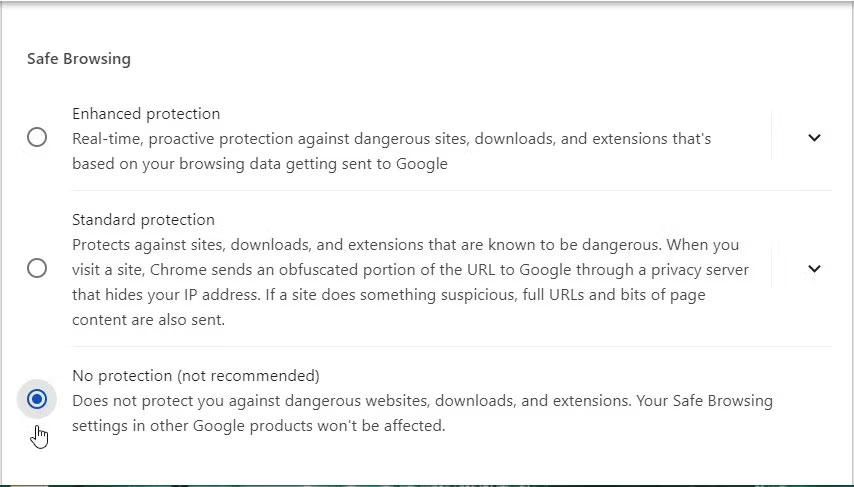
<p style="text-align: justify;">Nếu tin chắc rằng file là hợp pháp, bạn có thể tạm thời vô hiệu hóa tính năng &quot;Safe Browsing&quot; của Chrome để bỏ qua cảnh báo.</p>

<p style="text-align: justify;">Sau đây là các bước để vô hiệu hóa Safe Browsing:</p>

<ol>
	<li style="text-align: justify;">Mở Chrome và nhấp vào biểu tượng menu (ba dấu chấm ở góc trên bên phải).</li>
	<li style="text-align: justify;">Điều hướng đến&nbsp;<strong>Settings &gt; Privacy and security</strong>, sau đó chọn&nbsp;<strong>Security</strong>&nbsp;ở ngăn giữa.</li>
	<li style="text-align: justify;">Chọn&nbsp;<strong>No protection&nbsp;</strong>từ các tùy chọn Safe Browsing và nhấp vào nút&nbsp;<strong>Turn off</strong>&nbsp;trên màn hình pop-up.</li>
</ol>

<figure>
<div style="text-align: justify;"><img alt="Tắt tính năng Safe Browsing của Chrome" data-i="0" data-src="https://st.quantrimang.com/photos/image/2024/08/19/canh-bao-insecure-download-blocked-cua-chrome-1.jpg" data-was-processed="true" height="487" src="https://st.quantrimang.com/photos/image/2024/08/19/canh-bao-insecure-download-blocked-cua-chrome-1.jpg" width="854" /></div>

<figcaption>
<div style="text-align: justify;">Tắt tính năng Safe Browsing của Chrome</div>
</figcaption>
</figure>

<div style="text-align: justify;">&nbsp;</div>

<p style="text-align: justify;">Nhớ bảo vệ trình duyệt của bạn bằng cách bật lại &quot;Safe Browsing&quot; sau khi hoàn tất quá trình tải xuống.</p>

<h2 style="text-align: justify;">Tải xuống qua Chế độ ẩn danh (Tắt Safe Browsing)</h2>

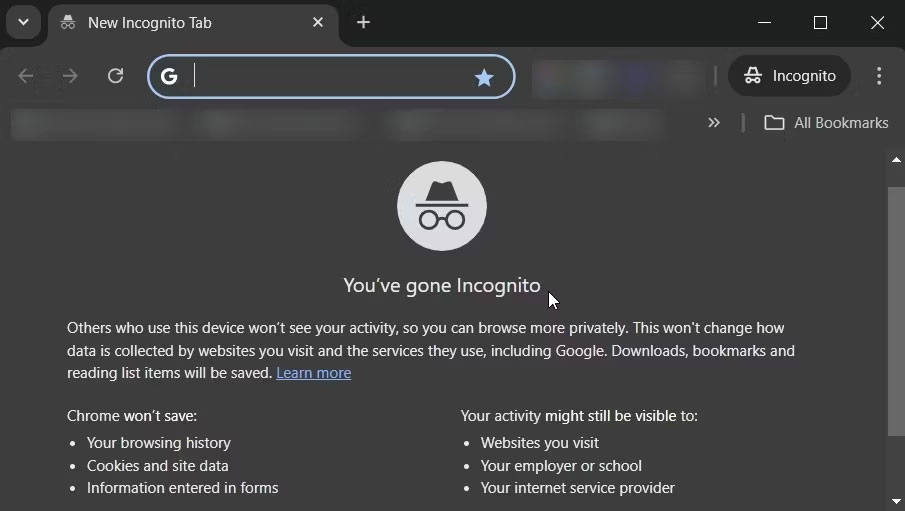
<p style="text-align: justify;">Đôi khi, cảnh báo &quot;Insecure Download Blocked&quot; có thể do tiện ích mở rộng, đặc biệt là plugin bảo mật. Để giải quyết vấn đề này, hãy tải xuống file của bạn ở Chế độ ẩn danh. Đó là vì tiện ích mở rộng bị tắt ở chế độ này, trừ khi được phép rõ ràng.</p>

<p style="text-align: justify;">Sau đây là cách tải xuống file qua Chế độ ẩn danh:</p>

<ol>
	<li style="text-align: justify;">Mở Google Chrome và nhấp vào biểu tượng menu (ba dấu chấm).</li>
	<li style="text-align: justify;">Chọn&nbsp;<strong>New Incognito Window</strong>.</li>
</ol>

<figure>
<div style="text-align: justify;"><img alt="Duyệt web bằng Chế độ ẩn danh trên Chrome" data-adbro-processed="true" data-i="1" data-src="https://st.quantrimang.com/photos/image/2024/08/19/canh-bao-insecure-download-blocked-cua-chrome-2.jpg" data-was-processed="true" height="511" src="https://st.quantrimang.com/photos/image/2024/08/19/canh-bao-insecure-download-blocked-cua-chrome-2.jpg" width="905" /></div>

<figcaption>
<div style="text-align: justify;">Duyệt web bằng Chế độ ẩn danh trên Chrome</div>
</figcaption>
</figure>

<p style="text-align: justify;">Từ đó, điều hướng đến liên kết mục tiêu và thử tải xuống. Khi đang thực hiện, hãy nhớ rằng bạn vẫn cần tắt Safe Browsing khi ở Chế độ ẩn danh.</p>

<p style="text-align: justify;">Bây giờ, bạn có thể tự hỏi tại sao Chrome lại chặn các lượt tải xuống của bạn ngay từ đầu. Trước đây, lý do có phần không rõ ràng. Nhưng theo báo cáo từ The Verge, các bản cập nhật gần đây của Chrome cung cấp những cảnh báo chi tiết hơn về các lượt tải xuống đáng ngờ, có thể giúp bạn đưa ra quyết định sáng suốt.</p>

<p style="text-align: justify;">Khi bạn gặp phải những cảnh báo này, Chrome sẽ đưa ra các giải thích rõ ràng hơn và có thể yêu cầu quét những file được bảo vệ bằng mật khẩu để tìm phần mềm độc hại. Nếu bạn bật Enhanced Protection, các file của bạn sẽ được quét trên đám mây. Điều này làm tăng đáng kể khả năng phát hiện các mối đe dọa.</p>

<p style="text-align: justify;">Để biết thêm thông tin về lý do tại sao các lượt tải xuống của bạn có thể bị chặn, hãy tham khảo&nbsp;bài viết hỗ trợ Chrome này. Nhưng nếu tin chắc rằng file đó an toàn, bạn có thể ngăn chặn việc tải xuống file đó bằng cách sử dụng một trong hai phương pháp trên.</p>
		</div>
				<div id="author">
						<p>
				<strong>Nguồn tin:</strong>
				Quantrimang.com:
			</p>
		</div>
	</div>
	<div id="footer" class="clearfix">
		<div id="url">
			<strong>URL của bản tin này: </strong><a href="https://www.nguoicodonvn2008.info/vi/news/savefile/kien-thuc-may-tinh/cach-khac-phuc-canh-bao-insecure-download-blocked-cua-chrome-8880.html" title="Cách khắc phục cảnh báo &quot;Insecure Download Blocked&quot; của Chrome">https://www.nguoicodonvn2008.info/vi/news/savefile/kien-thuc-may-tinh/cach-khac-phuc-canh-bao-insecure-download-blocked-cua-chrome-8880.html</a>

		</div>
		<div class="clear"></div>
		<div class="copyright">
			&copy; .&#x3A; Nguoicodonvn2008.info - Cõi lòng người cô đơn &#x3A;.
		</div>
		<div id="contact">
			<a href="mailto:admin@nguoicodonvn2008.info">admin@nguoicodonvn2008.info</a>
		</div>
	</div>
</div>
        <div id="timeoutsess" class="chromeframe">
            Bạn đã không sử dụng Site, <a onclick="timeoutsesscancel();" href="https://www.nguoicodonvn2008.info/#">Bấm vào đây để duy trì trạng thái đăng nhập</a>. Thời gian chờ: <span id="secField"> 60 </span> giây
        </div>
        <div id="openidResult" class="nv-alert" style="display:none"></div>
        <div id="openidBt" data-result="" data-redirect=""></div>
		</script>
		<div class="car-top">
  <span><img src="https://www.nguoicodonvn2008.info/themes/default/images/car.png" alt=""></span>
</div>
<div id="run_cronjobs" style="visibility:hidden;display:none;"><img alt="cron" src="/index.php?second=cronjobs&amp;p=z3Tw6Or1" width="1" height="1" /></div>
<script src="https://www.nguoicodonvn2008.info/assets/js/jquery/jquery.min.js"></script>
<script>var nv_base_siteurl="/",nv_lang_data="vi",nv_lang_interface="vi",nv_name_variable="nv",nv_fc_variable="op",nv_lang_variable="language",nv_module_name="news",nv_func_name="savefile",nv_is_user=0, nv_my_ofs=-4,nv_my_abbr="EDT",nv_cookie_prefix="nv4c_e856T",nv_check_pass_mstime=1738000,nv_area_admin=0,nv_safemode=0,theme_responsive=0,nv_recaptcha_ver=2,nv_recaptcha_sitekey="",nv_recaptcha_type="image",XSSsanitize=1;</script>
<script src="https://www.nguoicodonvn2008.info/assets/js/language/vi.js"></script>
<script src="https://www.nguoicodonvn2008.info/assets/js/DOMPurify/purify3.js"></script>
<script src="https://www.nguoicodonvn2008.info/assets/js/global.js"></script>
<script src="https://www.nguoicodonvn2008.info/assets/js/site.js"></script>
<script src="https://www.nguoicodonvn2008.info/themes/default/js/news.js"></script>
<script src="https://www.nguoicodonvn2008.info/themes/default/js/main.js"></script>
<script src="https://www.nguoicodonvn2008.info/themes/default/js/custom.js"></script>
<script type="application/ld+json">
        {
            "@context": "https://schema.org",
            "@type": "Organization",
            "url": "https://www.nguoicodonvn2008.info",
            "logo": "https://www.nguoicodonvn2008.info/uploads/angel.gif"
        }
        </script>
<script src="https://www.nguoicodonvn2008.info/themes/default/js/bootstrap.min.js"></script>
<script type="text/javascript">
var $scrolltop = $('.car-top');
$scrolltop.on('click', function () {
    $('html,body').animate({
        scrollTop: 0
    }, 800);
    $(this).addClass("car-run");
    setTimeout(function(){ $scrolltop.removeClass('car-run');}, 1000);
    return false;
});
$(window).on('scroll', function ()
{ 
    if($(window).scrollTop() >= 200)
    {
        $scrolltop.addClass("show");
        $scrolltop.addClass("car-down");
    }
    else
    {
       $scrolltop.removeClass("show");
       setTimeout(function(){ $scrolltop.removeClass('car-down');}, 300);
    }
});
</script>
</body>
</html>