<!DOCTYPE html>
    <html lang="vi" xmlns="http://www.w3.org/1999/xhtml" prefix="og: http://ogp.me/ns#">
    <head>
<title>Cách kết nối chuột không dây trên Windows 11</title>
<meta name="description" content="Cách kết nối chuột không dây trên Windows 11 - Savefile - Tin Tức -...">
<meta name="author" content=".: Nguoicodonvn2008.info - Cõi lòng người cô đơn :.">
<meta name="copyright" content=".: Nguoicodonvn2008.info - Cõi lòng người cô đơn :. [admin@nguoicodonvn2008.info]">
<meta name="robots" content="index, archive, follow, noodp">
<meta name="googlebot" content="index,archive,follow,noodp">
<meta name="msnbot" content="all,index,follow">
<meta name="generator" content="NukeViet v4.5">
<meta http-equiv="Content-Type" content="text/html; charset=utf-8">
<meta property="og:title" content="Cách kết nối chuột không dây trên Windows 11">
<meta property="og:type" content="website">
<meta property="og:description" content="Savefile - Tin Tức - https&#x3A;&#x002F;&#x002F;www.nguoicodonvn2008.info&#x002F;vi&#x002F;news&#x002F;savefile&#x002F;kien-thuc-may-tinh&#x002F;cach-ket-noi-chuot-khong-day-tren-windows-11-5307.html">
<meta property="og:site_name" content=".&#x3A; Nguoicodonvn2008.info - Cõi lòng người cô đơn &#x3A;.">
<meta property="og:url" content="https://www.nguoicodonvn2008.info/vi/news/savefile/kien-thuc-may-tinh/cach-ket-noi-chuot-khong-day-tren-windows-11-5307.html">
<link rel="shortcut icon" href="https://www.nguoicodonvn2008.info/favicon.ico">
<link rel="canonical" href="https://www.nguoicodonvn2008.info/vi/news/savefile/kien-thuc-may-tinh/cach-ket-noi-chuot-khong-day-tren-windows-11-5307.html">
<link rel="alternate" href="https://www.nguoicodonvn2008.info/vi/news/rss/" title="Tin Tức" type="application/rss+xml">
<link rel="alternate" href="https://www.nguoicodonvn2008.info/vi/news/rss/karaoke-dual/" title="Tin Tức - Karaoke Dual" type="application/rss+xml">
<link rel="alternate" href="https://www.nguoicodonvn2008.info/vi/news/rss/nhac-tre/" title="Tin Tức - Nhạc trẻ" type="application/rss+xml">
<link rel="alternate" href="https://www.nguoicodonvn2008.info/vi/news/rss/tru-tinh/" title="Tin Tức - Trữ tình" type="application/rss+xml">
<link rel="alternate" href="https://www.nguoicodonvn2008.info/vi/news/rss/nuoc-ngoai/" title="Tin Tức - Nước ngoài" type="application/rss+xml">
<link rel="alternate" href="https://www.nguoicodonvn2008.info/vi/news/rss/remix/" title="Tin Tức - Remix" type="application/rss+xml">
<link rel="alternate" href="https://www.nguoicodonvn2008.info/vi/news/rss/tam-su-tinh-yeu/" title="Tin Tức - Tâm sự tình yêu" type="application/rss+xml">
<link rel="alternate" href="https://www.nguoicodonvn2008.info/vi/news/rss/tho-suu-tam/" title="Tin Tức - Thơ sưu tầm" type="application/rss+xml">
<link rel="alternate" href="https://www.nguoicodonvn2008.info/vi/news/rss/cuoc-song/" title="Tin Tức - Cuộc sống" type="application/rss+xml">
<link rel="alternate" href="https://www.nguoicodonvn2008.info/vi/news/rss/phan-mem/" title="Tin Tức - Phần mềm" type="application/rss+xml">
<link rel="alternate" href="https://www.nguoicodonvn2008.info/vi/news/rss/kien-thuc-may-tinh/" title="Tin Tức - Kiến thức máy tính" type="application/rss+xml">
<link rel="alternate" href="https://www.nguoicodonvn2008.info/vi/news/rss/hoc-tap/" title="Tin Tức - Học tập" type="application/rss+xml">
<link rel="alternate" href="https://www.nguoicodonvn2008.info/vi/news/rss/tai-lieu/" title="Tin Tức - Tài liệu" type="application/rss+xml">
<link rel="alternate" href="https://www.nguoicodonvn2008.info/vi/news/rss/de-thi/" title="Tin Tức - Đề thi" type="application/rss+xml">
<link rel="preload" as="style" href="https://www.nguoicodonvn2008.info/assets/css/font-awesome.min.css" type="text/css">
<link rel="preload" as="style" href="https://www.nguoicodonvn2008.info/themes/default/css/bootstrap.non-responsive.css" type="text/css">
<link rel="preload" as="style" href="https://www.nguoicodonvn2008.info/themes/default/css/style.css" type="text/css">
<link rel="preload" as="style" href="https://www.nguoicodonvn2008.info/themes/default/css/style.non-responsive.css" type="text/css">
<link rel="preload" as="style" href="https://www.nguoicodonvn2008.info/themes/default/css/news.css" type="text/css">
<link rel="preload" as="style" href="https://www.nguoicodonvn2008.info/themes/default/css/custom.css" type="text/css">
<link rel="preload" as="script" href="https://www.nguoicodonvn2008.info/assets/js/jquery/jquery.min.js" type="text/javascript">
<link rel="preload" as="script" href="https://www.nguoicodonvn2008.info/assets/js/language/vi.js" type="text/javascript">
<link rel="preload" as="script" href="https://www.nguoicodonvn2008.info/assets/js/DOMPurify/purify3.js" type="text/javascript">
<link rel="preload" as="script" href="https://www.nguoicodonvn2008.info/assets/js/global.js" type="text/javascript">
<link rel="preload" as="script" href="https://www.nguoicodonvn2008.info/assets/js/site.js" type="text/javascript">
<link rel="preload" as="script" href="https://www.nguoicodonvn2008.info/themes/default/js/news.js" type="text/javascript">
<link rel="preload" as="script" href="https://www.nguoicodonvn2008.info/themes/default/js/main.js" type="text/javascript">
<link rel="preload" as="script" href="https://www.nguoicodonvn2008.info/themes/default/js/custom.js" type="text/javascript">
<link rel="preload" as="script" href="https://www.nguoicodonvn2008.info/themes/default/js/bootstrap.min.js" type="text/javascript">
<link rel="stylesheet" href="https://www.nguoicodonvn2008.info/assets/css/font-awesome.min.css">
<link rel="stylesheet" href="https://www.nguoicodonvn2008.info/themes/default/css/bootstrap.non-responsive.css">
<link rel="stylesheet" href="https://www.nguoicodonvn2008.info/themes/default/css/style.css">
<link rel="stylesheet" href="https://www.nguoicodonvn2008.info/themes/default/css/style.non-responsive.css">
<link rel="StyleSheet" href="https://www.nguoicodonvn2008.info/themes/default/css/news.css">
<link rel="stylesheet" href="https://www.nguoicodonvn2008.info/themes/default/css/custom.css">
<style type="text/css">
	body{background: #fff;}
</style>
    </head>
    <body>
<div id="print">
	<div id="hd_print">
		<h2 class="pull-left">.&#x3A; Nguoicodonvn2008.info - Cõi lòng người cô đơn &#x3A;.</h2>
		<p class="pull-right"><a title=".&#x3A; Nguoicodonvn2008.info - Cõi lòng người cô đơn &#x3A;." href="https://www.nguoicodonvn2008.info/">https://www.nguoicodonvn2008.info</a></p>
	</div>
	<div class="clear"></div>
	<hr />
	<div id="content">
		<h1>Cách kết nối chuột không dây trên Windows 11</h1>
		<ul class="list-inline">
			<li>Thứ sáu - 18/03/2022 23:24</li>
			<li class="hidden-print txtrequired"><em class="fa fa-print">&nbsp;</em><a title="In ra" href="javascript:;" onclick="window.print()">In ra</a></li>
			<li class="hidden-print txtrequired"><em class="fa fa-power-off">&nbsp;</em><a title="Đóng cửa sổ này" href="javascript:;" onclick="window.close()">Đóng cửa sổ này</a></li>
		</ul>
		<div class="clear"></div>
		<div id="hometext">
		</div>
				<div class="imghome">
			<img alt="Cách kết nối chuột không dây trên Windows 11" src="https://st.quantrimang.com/photos/image/2022/03/15/ket-noi-chuot-khong-day-windows-11700.jpg" width="460" class="img-thumbnail" />
		</div>
		<div class="clear"></div>
		<div id="bodytext" class="clearfix">
			<p style="text-align: justify;">Với sự tiện lợi không cần bàn cãi, chuột không dây đang ngày càng được sử dụng phổ biến, đặc biệt là đối với người dùng laptop. Trên thị trường có hai loại chuột không dây cơ bản: USB-RF hoặc Bluetooth. Bài viết dưới đây sẽ hướng dẫn bạn cách kết nối cả hai loại chuột không dây này với máy tính Windows 11.</p>

<h2 style="text-align: justify;">Kết nối chuột USB-RF</h2>

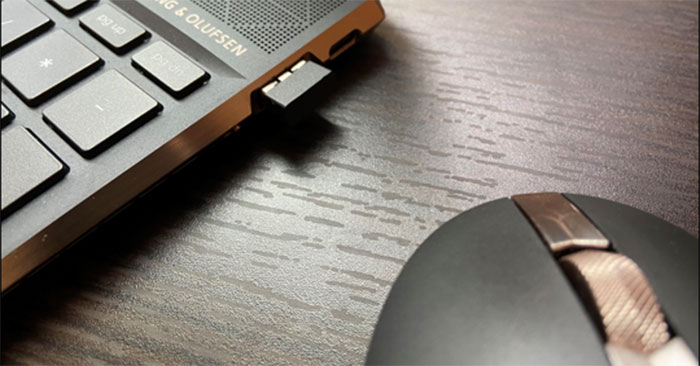
<p style="text-align: justify;">Chuột USB-RF kết nối với PC chạy Windows 11 của bạn thông qua một thiết bị dongle. Để kết nối được với chuột USB-RF, PC của bạn sẽ phải có cổng USB-A khả dụng (nếu không, bạn có thể xem xét sử dụng USB hub). Tin tốt là Windows sẽ tự động xử lý hầu hết quá trình thiết lập mà không cần bạn phải thực hiện quá nhiều thao tác.</p>

<p style="text-align: justify;"><img alt="Dongle" data-i="0" data-src="https://st.quantrimang.com/photos/image/2022/03/15/ket-noi-chuot-khong-day-windows-11700.jpg" data-was-processed="true" height="289" src="https://st.quantrimang.com/photos/image/2022/03/15/ket-noi-chuot-khong-day-windows-11700.jpg" width="553" /></p>

<p style="text-align: justify;">Để bắt đầu, hãy bật công tắc trên chuột. Mỗi sản phẩm đều có những sự khác biệt, nhưng thường sẽ có một nút công tắc nhỏ ở dưới mặt đáy cho phép bạn bật - tắt chuột khi cần. Sau đó, cắm dongle của chuột vào cổng USB-A của PC.</p>

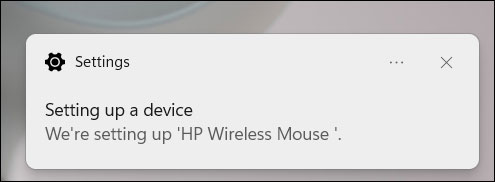
<p style="text-align: justify;">Lập tức bạn sẽ thấy một thông báo nhỏ xuất hiện ở góc dưới bên phải màn hình, cho biết rằng Windows 11 đang thiết lập kết nối với thiết bị.</p>

<p style="text-align: justify;"><img alt="Thông báo kết nối" data-i="1" data-src="https://st.quantrimang.com/photos/image/2022/03/15/ket-noi-chuot-khong-day-windows-111.jpg" data-was-processed="true" height="182" src="https://st.quantrimang.com/photos/image/2022/03/15/ket-noi-chuot-khong-day-windows-111.jpg" width="495" /></p>

<p style="text-align: justify;">Sau vài giây, bạn sẽ nhận được một thông báo khác cho biết quá trình thiết lập đã hoàn tất. Chuột của bạn hiện đã sẵn sàng để sử dụng.</p>

<h2 style="text-align: justify;">Kết nối chuột Bluetooth</h2>

<p style="text-align: justify;">Chuột Bluetooth không đi kèm với dongle. Yêu cầu duy nhất là PC Windows của bạn phải có khả năng kết nối Bluetooth.</p>

<p style="text-align: justify;">Trước tiên, hãy lắp pin vào chuột Bluetooth của bạn và sau đó gạt công tắc sang vị trí&nbsp;<strong>On</strong>. Mỗt sản phẩm đều có những sự khác biệt, vì vậy hãy tham khảo hướng dẫn sử dụng để biết loại pin cần thiết cũng như vị trí công tắc nguồn trên chuột. Tuy nhiên, thông thường, pin sử dụng sẽ là loại AA, và công tắc nguồn thường nằm ở dưới mặt đáy của chuột.</p>

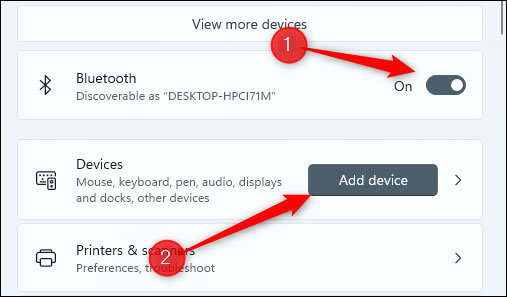
<p style="text-align: justify;">Tiếp theo, bạn cần bật Bluetooth trên PC Windows 11 của mình. Thực hiện việc này bằng cách điều hướng tới&nbsp;<strong>Settings &gt; Bluetooth &amp; Devices</strong>, sau đó nhấn vào thanh trượt bên cạnh mục “<strong>Bluetooth</strong>” để chuyển nó sang vị trí&nbsp;<strong>On</strong>.</p>

<p style="text-align: justify;">Sau khi bật Bluetooth, hãy nhấp vào “<strong>Add Device</strong>”.</p>

<p style="text-align: justify;"><img alt="Nhấp vào “Add Device”" data-i="2" data-src="https://st.quantrimang.com/photos/image/2022/03/15/ket-noi-chuot-khong-day-windows-112.jpg" data-was-processed="true" height="297" src="https://st.quantrimang.com/photos/image/2022/03/15/ket-noi-chuot-khong-day-windows-112.jpg" width="507" /></p>

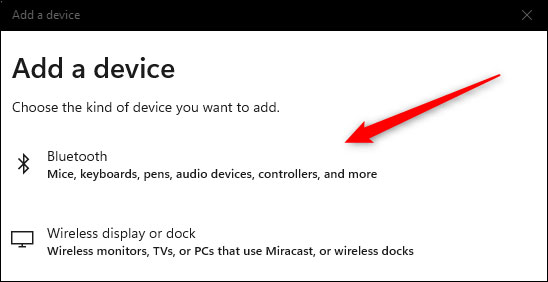
<p style="text-align: justify;">Cửa sổ Add Device sẽ xuất hiện. Nhấp vào “Bluetooth” từ danh sách các tùy chọn.</p>

<p style="text-align: justify;"><img alt="Nhấp vào &#039;Bluetooth&#039;" data-i="3" data-src="https://st.quantrimang.com/photos/image/2022/03/15/ket-noi-chuot-khong-day-windows-113.jpg" data-was-processed="true" height="282" src="https://st.quantrimang.com/photos/image/2022/03/15/ket-noi-chuot-khong-day-windows-113.jpg" width="548" /></p>

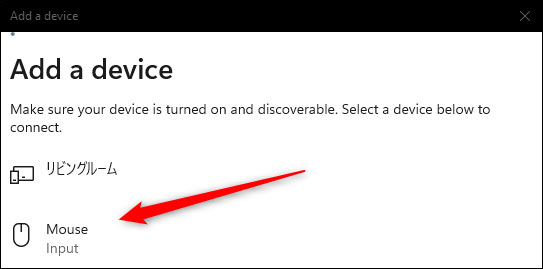
<p style="text-align: justify;">Windows 11 sẽ bắt đầu tìm kiếm thiết bị khả dụng lân cận. Bấm chọn chuột của bạn từ danh sách trả về.</p>

<p style="text-align: justify;"><img alt="Bấm chọn chuột của bạn" data-i="4" data-src="https://st.quantrimang.com/photos/image/2022/03/15/ket-noi-chuot-khong-day-windows-114.jpg" data-was-processed="true" height="269" src="https://st.quantrimang.com/photos/image/2022/03/15/ket-noi-chuot-khong-day-windows-114.jpg" width="543" /></p>

<p style="text-align: justify;">Sẽ mất vài giây để thiết lập kết nối trước khi chuột của bạn sẵn sàng để sử dụng.</p>
		</div>
				<div id="author">
						<p>
				<strong>Nguồn tin:</strong>
				Quantrimang.com
			</p>
		</div>
	</div>
	<div id="footer" class="clearfix">
		<div id="url">
			<strong>URL của bản tin này: </strong><a href="https://www.nguoicodonvn2008.info/vi/news/savefile/kien-thuc-may-tinh/cach-ket-noi-chuot-khong-day-tren-windows-11-5307.html" title="Cách kết nối chuột không dây trên Windows 11">https://www.nguoicodonvn2008.info/vi/news/savefile/kien-thuc-may-tinh/cach-ket-noi-chuot-khong-day-tren-windows-11-5307.html</a>

		</div>
		<div class="clear"></div>
		<div class="copyright">
			&copy; .&#x3A; Nguoicodonvn2008.info - Cõi lòng người cô đơn &#x3A;.
		</div>
		<div id="contact">
			<a href="mailto:admin@nguoicodonvn2008.info">admin@nguoicodonvn2008.info</a>
		</div>
	</div>
</div>
        <div id="timeoutsess" class="chromeframe">
            Bạn đã không sử dụng Site, <a onclick="timeoutsesscancel();" href="https://www.nguoicodonvn2008.info/#">Bấm vào đây để duy trì trạng thái đăng nhập</a>. Thời gian chờ: <span id="secField"> 60 </span> giây
        </div>
        <div id="openidResult" class="nv-alert" style="display:none"></div>
        <div id="openidBt" data-result="" data-redirect=""></div>
		</script>
		<div class="car-top">
  <span><img src="https://www.nguoicodonvn2008.info/themes/default/images/car.png" alt=""></span>
</div>
<script src="https://www.nguoicodonvn2008.info/assets/js/jquery/jquery.min.js"></script>
<script>var nv_base_siteurl="/",nv_lang_data="vi",nv_lang_interface="vi",nv_name_variable="nv",nv_fc_variable="op",nv_lang_variable="language",nv_module_name="news",nv_func_name="savefile",nv_is_user=0, nv_my_ofs=-4,nv_my_abbr="EDT",nv_cookie_prefix="nv4c_e856T",nv_check_pass_mstime=1738000,nv_area_admin=0,nv_safemode=0,theme_responsive=0,nv_recaptcha_ver=2,nv_recaptcha_sitekey="",nv_recaptcha_type="image",XSSsanitize=1;</script>
<script src="https://www.nguoicodonvn2008.info/assets/js/language/vi.js"></script>
<script src="https://www.nguoicodonvn2008.info/assets/js/DOMPurify/purify3.js"></script>
<script src="https://www.nguoicodonvn2008.info/assets/js/global.js"></script>
<script src="https://www.nguoicodonvn2008.info/assets/js/site.js"></script>
<script src="https://www.nguoicodonvn2008.info/themes/default/js/news.js"></script>
<script src="https://www.nguoicodonvn2008.info/themes/default/js/main.js"></script>
<script src="https://www.nguoicodonvn2008.info/themes/default/js/custom.js"></script>
<script type="application/ld+json">
        {
            "@context": "https://schema.org",
            "@type": "Organization",
            "url": "https://www.nguoicodonvn2008.info",
            "logo": "https://www.nguoicodonvn2008.info/uploads/angel.gif"
        }
        </script>
<script src="https://www.nguoicodonvn2008.info/themes/default/js/bootstrap.min.js"></script>
<script type="text/javascript">
var $scrolltop = $('.car-top');
$scrolltop.on('click', function () {
    $('html,body').animate({
        scrollTop: 0
    }, 800);
    $(this).addClass("car-run");
    setTimeout(function(){ $scrolltop.removeClass('car-run');}, 1000);
    return false;
});
$(window).on('scroll', function ()
{ 
    if($(window).scrollTop() >= 200)
    {
        $scrolltop.addClass("show");
        $scrolltop.addClass("car-down");
    }
    else
    {
       $scrolltop.removeClass("show");
       setTimeout(function(){ $scrolltop.removeClass('car-down');}, 300);
    }
});
</script>
</body>
</html>