<!DOCTYPE html>
    <html lang="vi" xmlns="http://www.w3.org/1999/xhtml" prefix="og: http://ogp.me/ns#">
    <head>
<title>Cách hiển thị tốc độ Internet từ Taskbar trên Windows</title>
<meta name="description" content="Cách hiển thị tốc độ Internet từ Taskbar trên Windows - Savefile - Tin Tức -...">
<meta name="author" content=".: Nguoicodonvn2008.info - Cõi lòng người cô đơn :.">
<meta name="copyright" content=".: Nguoicodonvn2008.info - Cõi lòng người cô đơn :. [admin@nguoicodonvn2008.info]">
<meta name="robots" content="index, archive, follow, noodp">
<meta name="googlebot" content="index,archive,follow,noodp">
<meta name="msnbot" content="all,index,follow">
<meta name="generator" content="NukeViet v4.5">
<meta http-equiv="Content-Type" content="text/html; charset=utf-8">
<meta property="og:title" content="Cách hiển thị tốc độ Internet từ Taskbar trên Windows">
<meta property="og:type" content="website">
<meta property="og:description" content="Savefile - Tin Tức - https&#x3A;&#x002F;&#x002F;www.nguoicodonvn2008.info&#x002F;vi&#x002F;news&#x002F;savefile&#x002F;kien-thuc-may-tinh&#x002F;cach-hien-thi-toc-do-internet-tu-taskbar-tren-windows-1048.html">
<meta property="og:site_name" content=".&#x3A; Nguoicodonvn2008.info - Cõi lòng người cô đơn &#x3A;.">
<meta property="og:url" content="https://www.nguoicodonvn2008.info/vi/news/savefile/kien-thuc-may-tinh/cach-hien-thi-toc-do-internet-tu-taskbar-tren-windows-1048.html">
<link rel="shortcut icon" href="https://www.nguoicodonvn2008.info/favicon.ico">
<link rel="canonical" href="https://www.nguoicodonvn2008.info/vi/news/savefile/kien-thuc-may-tinh/cach-hien-thi-toc-do-internet-tu-taskbar-tren-windows-1048.html">
<link rel="alternate" href="https://www.nguoicodonvn2008.info/vi/news/rss/" title="Tin Tức" type="application/rss+xml">
<link rel="alternate" href="https://www.nguoicodonvn2008.info/vi/news/rss/karaoke-dual/" title="Tin Tức - Karaoke Dual" type="application/rss+xml">
<link rel="alternate" href="https://www.nguoicodonvn2008.info/vi/news/rss/nhac-tre/" title="Tin Tức - Nhạc trẻ" type="application/rss+xml">
<link rel="alternate" href="https://www.nguoicodonvn2008.info/vi/news/rss/tru-tinh/" title="Tin Tức - Trữ tình" type="application/rss+xml">
<link rel="alternate" href="https://www.nguoicodonvn2008.info/vi/news/rss/nuoc-ngoai/" title="Tin Tức - Nước ngoài" type="application/rss+xml">
<link rel="alternate" href="https://www.nguoicodonvn2008.info/vi/news/rss/remix/" title="Tin Tức - Remix" type="application/rss+xml">
<link rel="alternate" href="https://www.nguoicodonvn2008.info/vi/news/rss/tam-su-tinh-yeu/" title="Tin Tức - Tâm sự tình yêu" type="application/rss+xml">
<link rel="alternate" href="https://www.nguoicodonvn2008.info/vi/news/rss/tho-suu-tam/" title="Tin Tức - Thơ sưu tầm" type="application/rss+xml">
<link rel="alternate" href="https://www.nguoicodonvn2008.info/vi/news/rss/cuoc-song/" title="Tin Tức - Cuộc sống" type="application/rss+xml">
<link rel="alternate" href="https://www.nguoicodonvn2008.info/vi/news/rss/phan-mem/" title="Tin Tức - Phần mềm" type="application/rss+xml">
<link rel="alternate" href="https://www.nguoicodonvn2008.info/vi/news/rss/kien-thuc-may-tinh/" title="Tin Tức - Kiến thức máy tính" type="application/rss+xml">
<link rel="alternate" href="https://www.nguoicodonvn2008.info/vi/news/rss/hoc-tap/" title="Tin Tức - Học tập" type="application/rss+xml">
<link rel="alternate" href="https://www.nguoicodonvn2008.info/vi/news/rss/tai-lieu/" title="Tin Tức - Tài liệu" type="application/rss+xml">
<link rel="alternate" href="https://www.nguoicodonvn2008.info/vi/news/rss/de-thi/" title="Tin Tức - Đề thi" type="application/rss+xml">
<link rel="preload" as="style" href="https://www.nguoicodonvn2008.info/assets/css/font-awesome.min.css" type="text/css">
<link rel="preload" as="style" href="https://www.nguoicodonvn2008.info/themes/default/css/bootstrap.non-responsive.css" type="text/css">
<link rel="preload" as="style" href="https://www.nguoicodonvn2008.info/themes/default/css/style.css" type="text/css">
<link rel="preload" as="style" href="https://www.nguoicodonvn2008.info/themes/default/css/style.non-responsive.css" type="text/css">
<link rel="preload" as="style" href="https://www.nguoicodonvn2008.info/themes/default/css/news.css" type="text/css">
<link rel="preload" as="style" href="https://www.nguoicodonvn2008.info/themes/default/css/custom.css" type="text/css">
<link rel="preload" as="script" href="https://www.nguoicodonvn2008.info/assets/js/jquery/jquery.min.js" type="text/javascript">
<link rel="preload" as="script" href="https://www.nguoicodonvn2008.info/assets/js/language/vi.js" type="text/javascript">
<link rel="preload" as="script" href="https://www.nguoicodonvn2008.info/assets/js/DOMPurify/purify3.js" type="text/javascript">
<link rel="preload" as="script" href="https://www.nguoicodonvn2008.info/assets/js/global.js" type="text/javascript">
<link rel="preload" as="script" href="https://www.nguoicodonvn2008.info/assets/js/site.js" type="text/javascript">
<link rel="preload" as="script" href="https://www.nguoicodonvn2008.info/themes/default/js/news.js" type="text/javascript">
<link rel="preload" as="script" href="https://www.nguoicodonvn2008.info/themes/default/js/main.js" type="text/javascript">
<link rel="preload" as="script" href="https://www.nguoicodonvn2008.info/themes/default/js/custom.js" type="text/javascript">
<link rel="preload" as="script" href="https://www.nguoicodonvn2008.info/themes/default/js/bootstrap.min.js" type="text/javascript">
<link rel="stylesheet" href="https://www.nguoicodonvn2008.info/assets/css/font-awesome.min.css">
<link rel="stylesheet" href="https://www.nguoicodonvn2008.info/themes/default/css/bootstrap.non-responsive.css">
<link rel="stylesheet" href="https://www.nguoicodonvn2008.info/themes/default/css/style.css">
<link rel="stylesheet" href="https://www.nguoicodonvn2008.info/themes/default/css/style.non-responsive.css">
<link rel="StyleSheet" href="https://www.nguoicodonvn2008.info/themes/default/css/news.css">
<link rel="stylesheet" href="https://www.nguoicodonvn2008.info/themes/default/css/custom.css">
<style type="text/css">
	body{background: #fff;}
</style>
    </head>
    <body>
<div id="print">
	<div id="hd_print">
		<h2 class="pull-left">.&#x3A; Nguoicodonvn2008.info - Cõi lòng người cô đơn &#x3A;.</h2>
		<p class="pull-right"><a title=".&#x3A; Nguoicodonvn2008.info - Cõi lòng người cô đơn &#x3A;." href="https://www.nguoicodonvn2008.info/">https://www.nguoicodonvn2008.info</a></p>
	</div>
	<div class="clear"></div>
	<hr />
	<div id="content">
		<h1>Cách hiển thị tốc độ Internet từ Taskbar trên Windows</h1>
		<ul class="list-inline">
			<li>Thứ sáu - 27/09/2019 07:32</li>
			<li class="hidden-print txtrequired"><em class="fa fa-print">&nbsp;</em><a title="In ra" href="javascript:;" onclick="window.print()">In ra</a></li>
			<li class="hidden-print txtrequired"><em class="fa fa-power-off">&nbsp;</em><a title="Đóng cửa sổ này" href="javascript:;" onclick="window.close()">Đóng cửa sổ này</a></li>
		</ul>
		<div class="clear"></div>
		<div id="hometext">
		</div>
				<div class="imghome">
			<img alt="Cách hiển thị tốc độ Internet từ Taskbar trên Windows" src="https://st.quantrimang.com/photos/image/2019/09/27/theo-doi-toc-do-internet-tren-taskbar-4.png" width="460" class="img-thumbnail" />
		</div>
		<div class="clear"></div>
		<div id="bodytext" class="clearfix">
			<p>Máy tính chạy chậm? Bạn muốn biết đó là sự cố Internet hay vấn đề máy tính? Các chương trình đang chạy nền làm chậm mọi thứ hoặc tốc độ Internet chậm? Bạn muốn kiểm tra tốc độ Internet một cách nhanh chóng nhưng Windows không cung cấp ứng dụng gốc để theo dõi tốc độ. May thay có một giải pháp giúp bạn thực hiện điều này.</p>

<p>Bạn có thể thể theo dõi tốc độ upload và download trên thanh Taskbar bằng cách cài đặt một công cụ nhỏ, đơn giản có tên là NetSpeedMonitor. Đây là một chương trình cũ nhưng vẫn hiệu quả và hoàn toàn miễn phí.</p>

<p><img alt="Kiểm tra tốc độ Internet" data-i="0" data-src="https://st.quantrimang.com/photos/image/2019/09/27/theo-doi-toc-do-internet-tren-taskbar-1.jpg" data-was-processed="true" height="380" src="https://st.quantrimang.com/photos/image/2019/09/27/theo-doi-toc-do-internet-tren-taskbar-1.jpg" width="640" /></p>

<h2>Tính năng của NetSpeedMonitor</h2>

<p>Để sử dụng NetSpeedMonitor, bạn cần chạy Windows XP trở lên. Chương trình được phát triển cho phiên bản Windows trước đó nhưng nếu sử dụng Windows 10, bạn có thể chạy chương trình ở chế độ tương thích nếu không cài đặt.</p>

<p>Bạn phải đảm bảo tải đúng chương trình. Tên file sẽ kết thúc bằng x64_setup. Nếu sử dụng file kết thúc bằng x86_setup, nó sẽ không chạy trên Windows 10 ngay cả khi bạn đã sử dụng chế độ tương thích.</p>

<p>NetSpeedMonitor không có nhiều tính năng bổ sung nên rất dễ sử dụng. Nó cũng không có quảng cáo.</p>
&nbsp;

<h2>Cài đặt NetSpeedMonitor</h2>

<p><strong>Bước 1</strong>. Tải và cài đặt NetSpeedMonitor. Nếu cài đặt chính xác, bạn có thể bỏ qua và chuyển đến Bước 8.</p>

<pre id="pre0">
<code>https://www.filehorse.com/download-netspeedmonitor-64/</code></pre>

<p><strong>Bước 2</strong>. Nếu thấy thông báo&nbsp;<strong>Operating system not supported error</strong>, bạn cần chạy ứng dụng ở chế độ tương thích.</p>

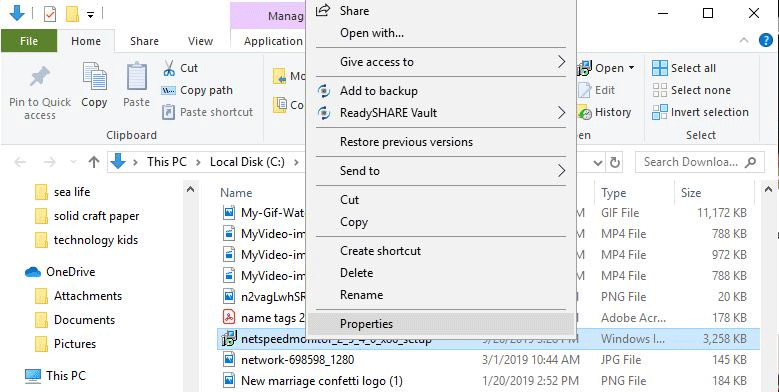
<p><strong>Bước 3</strong>. Để chạy nó ở chế độ tương thích, tìm file tải xuống trong File Explorer và click chuột phải, chọn&nbsp;<strong>Properties</strong>.</p>

<p><img alt="Chọn Properties" data-i="1" data-src="https://st.quantrimang.com/photos/image/2019/09/27/theo-doi-toc-do-internet-tren-taskbar-2.png" data-was-processed="true" height="322" src="https://st.quantrimang.com/photos/image/2019/09/27/theo-doi-toc-do-internet-tren-taskbar-2.png" width="640" /></p>

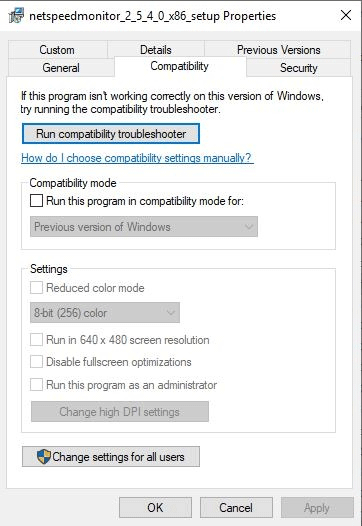
<p><strong>Bước 4</strong>. Click vào tab&nbsp;<strong>Compatibility</strong>.</p>

<p><img alt="Chọn hộp Run this program in compatibility mode for" data-i="2" data-src="https://st.quantrimang.com/photos/image/2019/09/27/theo-doi-toc-do-internet-tren-taskbar-3.png" data-was-processed="true" height="526" src="https://st.quantrimang.com/photos/image/2019/09/27/theo-doi-toc-do-internet-tren-taskbar-3.png" width="362" /></p>

<p><strong>Bước 5.</strong>&nbsp;Chọn hộp&nbsp;<strong>Run this program in compatibility mode for</strong>&nbsp;và đảm bảo tùy chọn bên dưới là&nbsp;<strong>Previous Versions of Windows</strong>.</p>

<p><strong>Bước 6</strong>. Click vào&nbsp;<strong>Apply</strong>&nbsp;và&nbsp;<strong>OK</strong>&nbsp;để lưu thay đổi.</p>

<p><strong>Bước 7</strong>. Cài đặt lại chương trình.</p>

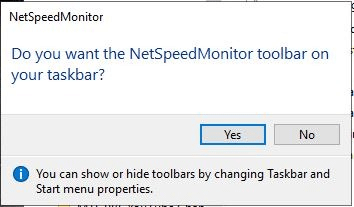
<p><strong>Bước 8.</strong>&nbsp;Khi cài đặt chương trình, một thông báo hiện ra hỏi bạn có muốn thêm thanh công cụ giám sát băng thông vào Taskbar không. Click vào&nbsp;<strong>Yes</strong>.</p>

<p><img alt="Click vào Yes" data-i="3" data-src="https://st.quantrimang.com/photos/image/2019/09/27/theo-doi-toc-do-internet-tren-taskbar-4.png" data-was-processed="true" height="207" src="https://st.quantrimang.com/photos/image/2019/09/27/theo-doi-toc-do-internet-tren-taskbar-4.png" width="354" /></p>

<p><strong>Bước 9</strong>. Cửa sổ cấu hình hiện ra để bạn có thể thay đổi ngôn ngữ, bộ điều hợp mạng. Nếu đã thiết lập đúng, click vào&nbsp;<strong>Save</strong>.</p>

<p><strong>Bước 10</strong>. Khi nhấn nút&nbsp;<strong>Save</strong>, thanh tốc độ upload và download sẽ xuất hiện ở bên phải Taskbar.</p>

<h2>Sử dụng NetSpeedMonitor</h2>

<p>Theo mặc định, NetSpeedMonitor đo tốc độ Internet sử dụng Kbit (Kilobit). Bạn có thể thay đổi nó thành Mbit (Megabit) vì hầu hết các nhà cung cấp dịch vụ Internet đều thông báo tốc độ được tính bằng Megabit/giây. Để thay đổi cài đặt này, click chuột phải vào màn hình tốc độ, chọn&nbsp;<strong>Configuration</strong>, sau đó click vào menu thả xuống cạnh&nbsp;<strong>Bitrate</strong>&nbsp;và chọn&nbsp;<strong>Mbit/s</strong>. Nhấn&nbsp;<strong>Apply</strong>&nbsp;để áp dụng thay đổi.</p>

<p>Khi mở cửa sổ cấu hình, bạn có thể điều chỉnh các thứ khác như font chữ, kích thước và căn chỉnh thanh công cụ.</p>

<p>NetSpeedMonitor rất đơn giản và dễ sử dụng để theo dõi tốc độ upload và download ngay trên thanh Taskbar. Bạn có thể kiểm tra chúng bất cứ khi nào để đảm bảo Internet hoạt động chính xác.</p>

<p>Chúc các bạn thực hiện thành công!</p>
		</div>
				<div id="author">
						<p>
				<strong>Nguồn tin:</strong>
				Quantrimang.com
			</p>
		</div>
	</div>
	<div id="footer" class="clearfix">
		<div id="url">
			<strong>URL của bản tin này: </strong><a href="https://www.nguoicodonvn2008.info/vi/news/savefile/kien-thuc-may-tinh/cach-hien-thi-toc-do-internet-tu-taskbar-tren-windows-1048.html" title="Cách hiển thị tốc độ Internet từ Taskbar trên Windows">https://www.nguoicodonvn2008.info/vi/news/savefile/kien-thuc-may-tinh/cach-hien-thi-toc-do-internet-tu-taskbar-tren-windows-1048.html</a>

		</div>
		<div class="clear"></div>
		<div class="copyright">
			&copy; .&#x3A; Nguoicodonvn2008.info - Cõi lòng người cô đơn &#x3A;.
		</div>
		<div id="contact">
			<a href="mailto:admin@nguoicodonvn2008.info">admin@nguoicodonvn2008.info</a>
		</div>
	</div>
</div>
        <div id="timeoutsess" class="chromeframe">
            Bạn đã không sử dụng Site, <a onclick="timeoutsesscancel();" href="https://www.nguoicodonvn2008.info/#">Bấm vào đây để duy trì trạng thái đăng nhập</a>. Thời gian chờ: <span id="secField"> 60 </span> giây
        </div>
        <div id="openidResult" class="nv-alert" style="display:none"></div>
        <div id="openidBt" data-result="" data-redirect=""></div>
		</script>
		<div class="car-top">
  <span><img src="https://www.nguoicodonvn2008.info/themes/default/images/car.png" alt=""></span>
</div>
<div id="run_cronjobs" style="visibility:hidden;display:none;"><img alt="cron" src="/index.php?second=cronjobs&amp;p=e8cv7zXo" width="1" height="1" /></div>
<script src="https://www.nguoicodonvn2008.info/assets/js/jquery/jquery.min.js"></script>
<script>var nv_base_siteurl="/",nv_lang_data="vi",nv_lang_interface="vi",nv_name_variable="nv",nv_fc_variable="op",nv_lang_variable="language",nv_module_name="news",nv_func_name="savefile",nv_is_user=0, nv_my_ofs=-4,nv_my_abbr="EDT",nv_cookie_prefix="nv4c_e856T",nv_check_pass_mstime=1738000,nv_area_admin=0,nv_safemode=0,theme_responsive=0,nv_recaptcha_ver=2,nv_recaptcha_sitekey="",nv_recaptcha_type="image",XSSsanitize=1;</script>
<script src="https://www.nguoicodonvn2008.info/assets/js/language/vi.js"></script>
<script src="https://www.nguoicodonvn2008.info/assets/js/DOMPurify/purify3.js"></script>
<script src="https://www.nguoicodonvn2008.info/assets/js/global.js"></script>
<script src="https://www.nguoicodonvn2008.info/assets/js/site.js"></script>
<script src="https://www.nguoicodonvn2008.info/themes/default/js/news.js"></script>
<script src="https://www.nguoicodonvn2008.info/themes/default/js/main.js"></script>
<script src="https://www.nguoicodonvn2008.info/themes/default/js/custom.js"></script>
<script type="application/ld+json">
        {
            "@context": "https://schema.org",
            "@type": "Organization",
            "url": "https://www.nguoicodonvn2008.info",
            "logo": "https://www.nguoicodonvn2008.info/uploads/angel.gif"
        }
        </script>
<script src="https://www.nguoicodonvn2008.info/themes/default/js/bootstrap.min.js"></script>
<script type="text/javascript">
var $scrolltop = $('.car-top');
$scrolltop.on('click', function () {
    $('html,body').animate({
        scrollTop: 0
    }, 800);
    $(this).addClass("car-run");
    setTimeout(function(){ $scrolltop.removeClass('car-run');}, 1000);
    return false;
});
$(window).on('scroll', function ()
{ 
    if($(window).scrollTop() >= 200)
    {
        $scrolltop.addClass("show");
        $scrolltop.addClass("car-down");
    }
    else
    {
       $scrolltop.removeClass("show");
       setTimeout(function(){ $scrolltop.removeClass('car-down');}, 300);
    }
});
</script>
</body>
</html>