<!DOCTYPE html>
    <html lang="vi" xmlns="http://www.w3.org/1999/xhtml" prefix="og: http://ogp.me/ns#">
    <head>
<title>Cách hiển thị thanh cuộn &#40;scrollbar&#41; trong ứng dụng trên Windows 10</title>
<meta name="description" content="Cách hiển thị thanh cuộn &#40;scrollbar&#41; trong ứng dụng trên Windows 10 - Savefile - Tin Tức -...">
<meta name="author" content=".: Nguoicodonvn2008.info - Cõi lòng người cô đơn :.">
<meta name="copyright" content=".: Nguoicodonvn2008.info - Cõi lòng người cô đơn :. [admin@nguoicodonvn2008.info]">
<meta name="robots" content="index, archive, follow, noodp">
<meta name="googlebot" content="index,archive,follow,noodp">
<meta name="msnbot" content="all,index,follow">
<meta name="generator" content="NukeViet v4.5">
<meta http-equiv="Content-Type" content="text/html; charset=utf-8">
<meta property="og:title" content="Cách hiển thị thanh cuộn &#40;scrollbar&#41; trong ứng dụng trên Windows 10">
<meta property="og:type" content="website">
<meta property="og:description" content="Savefile - Tin Tức - https&#x3A;&#x002F;&#x002F;www.nguoicodonvn2008.info&#x002F;vi&#x002F;news&#x002F;savefile&#x002F;kien-thuc-may-tinh&#x002F;cach-hien-thi-thanh-cuon-scrollbar-trong-ung-dung-tren-windows-10-2772.html">
<meta property="og:site_name" content=".&#x3A; Nguoicodonvn2008.info - Cõi lòng người cô đơn &#x3A;.">
<meta property="og:url" content="https://www.nguoicodonvn2008.info/vi/news/savefile/kien-thuc-may-tinh/cach-hien-thi-thanh-cuon-scrollbar-trong-ung-dung-tren-windows-10-2772.html">
<link rel="shortcut icon" href="https://www.nguoicodonvn2008.info/favicon.ico">
<link rel="canonical" href="https://www.nguoicodonvn2008.info/vi/news/savefile/kien-thuc-may-tinh/cach-hien-thi-thanh-cuon-scrollbar-trong-ung-dung-tren-windows-10-2772.html">
<link rel="alternate" href="https://www.nguoicodonvn2008.info/vi/news/rss/" title="Tin Tức" type="application/rss+xml">
<link rel="alternate" href="https://www.nguoicodonvn2008.info/vi/news/rss/karaoke-dual/" title="Tin Tức - Karaoke Dual" type="application/rss+xml">
<link rel="alternate" href="https://www.nguoicodonvn2008.info/vi/news/rss/nhac-tre/" title="Tin Tức - Nhạc trẻ" type="application/rss+xml">
<link rel="alternate" href="https://www.nguoicodonvn2008.info/vi/news/rss/tru-tinh/" title="Tin Tức - Trữ tình" type="application/rss+xml">
<link rel="alternate" href="https://www.nguoicodonvn2008.info/vi/news/rss/nuoc-ngoai/" title="Tin Tức - Nước ngoài" type="application/rss+xml">
<link rel="alternate" href="https://www.nguoicodonvn2008.info/vi/news/rss/remix/" title="Tin Tức - Remix" type="application/rss+xml">
<link rel="alternate" href="https://www.nguoicodonvn2008.info/vi/news/rss/tam-su-tinh-yeu/" title="Tin Tức - Tâm sự tình yêu" type="application/rss+xml">
<link rel="alternate" href="https://www.nguoicodonvn2008.info/vi/news/rss/tho-suu-tam/" title="Tin Tức - Thơ sưu tầm" type="application/rss+xml">
<link rel="alternate" href="https://www.nguoicodonvn2008.info/vi/news/rss/cuoc-song/" title="Tin Tức - Cuộc sống" type="application/rss+xml">
<link rel="alternate" href="https://www.nguoicodonvn2008.info/vi/news/rss/phan-mem/" title="Tin Tức - Phần mềm" type="application/rss+xml">
<link rel="alternate" href="https://www.nguoicodonvn2008.info/vi/news/rss/kien-thuc-may-tinh/" title="Tin Tức - Kiến thức máy tính" type="application/rss+xml">
<link rel="alternate" href="https://www.nguoicodonvn2008.info/vi/news/rss/hoc-tap/" title="Tin Tức - Học tập" type="application/rss+xml">
<link rel="alternate" href="https://www.nguoicodonvn2008.info/vi/news/rss/tai-lieu/" title="Tin Tức - Tài liệu" type="application/rss+xml">
<link rel="alternate" href="https://www.nguoicodonvn2008.info/vi/news/rss/de-thi/" title="Tin Tức - Đề thi" type="application/rss+xml">
<link rel="preload" as="style" href="https://www.nguoicodonvn2008.info/assets/css/font-awesome.min.css" type="text/css">
<link rel="preload" as="style" href="https://www.nguoicodonvn2008.info/themes/default/css/bootstrap.non-responsive.css" type="text/css">
<link rel="preload" as="style" href="https://www.nguoicodonvn2008.info/themes/default/css/style.css" type="text/css">
<link rel="preload" as="style" href="https://www.nguoicodonvn2008.info/themes/default/css/style.non-responsive.css" type="text/css">
<link rel="preload" as="style" href="https://www.nguoicodonvn2008.info/themes/default/css/news.css" type="text/css">
<link rel="preload" as="style" href="https://www.nguoicodonvn2008.info/themes/default/css/custom.css" type="text/css">
<link rel="preload" as="script" href="https://www.nguoicodonvn2008.info/assets/js/jquery/jquery.min.js" type="text/javascript">
<link rel="preload" as="script" href="https://www.nguoicodonvn2008.info/assets/js/language/vi.js" type="text/javascript">
<link rel="preload" as="script" href="https://www.nguoicodonvn2008.info/assets/js/DOMPurify/purify3.js" type="text/javascript">
<link rel="preload" as="script" href="https://www.nguoicodonvn2008.info/assets/js/global.js" type="text/javascript">
<link rel="preload" as="script" href="https://www.nguoicodonvn2008.info/assets/js/site.js" type="text/javascript">
<link rel="preload" as="script" href="https://www.nguoicodonvn2008.info/themes/default/js/news.js" type="text/javascript">
<link rel="preload" as="script" href="https://www.nguoicodonvn2008.info/themes/default/js/main.js" type="text/javascript">
<link rel="preload" as="script" href="https://www.nguoicodonvn2008.info/themes/default/js/custom.js" type="text/javascript">
<link rel="preload" as="script" href="https://www.nguoicodonvn2008.info/themes/default/js/bootstrap.min.js" type="text/javascript">
<link rel="stylesheet" href="https://www.nguoicodonvn2008.info/assets/css/font-awesome.min.css">
<link rel="stylesheet" href="https://www.nguoicodonvn2008.info/themes/default/css/bootstrap.non-responsive.css">
<link rel="stylesheet" href="https://www.nguoicodonvn2008.info/themes/default/css/style.css">
<link rel="stylesheet" href="https://www.nguoicodonvn2008.info/themes/default/css/style.non-responsive.css">
<link rel="StyleSheet" href="https://www.nguoicodonvn2008.info/themes/default/css/news.css">
<link rel="stylesheet" href="https://www.nguoicodonvn2008.info/themes/default/css/custom.css">
<style type="text/css">
	body{background: #fff;}
</style>
    </head>
    <body>
<div id="print">
	<div id="hd_print">
		<h2 class="pull-left">.&#x3A; Nguoicodonvn2008.info - Cõi lòng người cô đơn &#x3A;.</h2>
		<p class="pull-right"><a title=".&#x3A; Nguoicodonvn2008.info - Cõi lòng người cô đơn &#x3A;." href="https://www.nguoicodonvn2008.info/">https://www.nguoicodonvn2008.info</a></p>
	</div>
	<div class="clear"></div>
	<hr />
	<div id="content">
		<h1>Cách hiển thị thanh cuộn &#40;scrollbar&#41; trong ứng dụng trên Windows 10</h1>
		<ul class="list-inline">
			<li>Thứ tư - 23/09/2020 00:57</li>
			<li class="hidden-print txtrequired"><em class="fa fa-print">&nbsp;</em><a title="In ra" href="javascript:;" onclick="window.print()">In ra</a></li>
			<li class="hidden-print txtrequired"><em class="fa fa-power-off">&nbsp;</em><a title="Đóng cửa sổ này" href="javascript:;" onclick="window.close()">Đóng cửa sổ này</a></li>
		</ul>
		<div class="clear"></div>
		<div id="hometext">
		</div>
				<div class="imghome">
			<img alt="Cách hiển thị thanh cuộn &#40;scrollbar&#41; trong ứng dụng trên Windows 10" src="https://st.quantrimang.com/photos/image/2020/09/22/hien-thi-scrollbar-trong-ung-dung-1.jpg" width="460" class="img-thumbnail" />
		</div>
		<div class="clear"></div>
		<div id="bodytext" class="clearfix">
			<p style="text-align: justify;">Nếu thanh cuộn (scrollbar) mặc định trong ứng dụng Settings và ứng dụng Store khó thấy hoặc khó sử dụng, bạn có thể hiển thị toàn bộ thanh cuộn trong Windows 10. Đây là cách thực hiện!</p>

<h2 style="text-align: justify;">Ứng dụng Settings đang dần được cải thiện</h2>

<p style="text-align: justify;">Microsoft đang cải thiện ứng dụng Settings với mỗi bản phát hành. Có thể là thêm nhiều tùy chọn hơn từ&nbsp;Control Panel&nbsp;hoặc cập nhật thiết kế của nó. Từ từ nhưng chắc chắn, ứng dụng Settings đang trở nên linh hoạt và mạnh mẽ. Trong nỗ lực dọn dẹp và hợp lý hóa giao diện người dùng của ứng dụng Settings và các ứng dụng Store khác, Microsoft đã chọn ẩn các thanh cuộn theo mặc định.</p>

<p style="text-align: justify;">Mặc dù các thanh cuộn được &quot;ẩn&quot;, bạn vẫn có thể thấy nó dưới dạng một đường mảnh ở phía bên tay phải của ứng dụng. Khi di chuột qua đường này, bạn sẽ thấy thanh cuộn thực sự đầy đủ và có thể sử dụng nó để cuộn lên và xuống.</p>

<p style="text-align: justify;">Ẩn thanh cuộn làm cho các ứng dụng trông đẹp hơn một chút nhưng gây ảnh hưởng đến trải nghiệm người dùng. Vì vậy, nếu không thích các thanh cuộn ẩn, bạn có thể khiến Windows 10 luôn hiển thị các thanh cuộn bằng cách thay đổi một tùy chọn duy nhất trong ứng dụng Settings. Điều này đặc biệt hữu ích nếu bạn chủ yếu sử dụng con trỏ chuột để di chuyển thanh cuộn. Hãy để&nbsp;<strong>Quantrimang.com</strong>&nbsp;chỉ cho bạn cách luôn hiển thị thanh cuộn trong Settings và các ứng dụng Store trên Windows 10.</p>

<div style="text-align: justify;">&nbsp;</div>

<h2 style="text-align: justify;">Cách luôn hiển thị thanh cuộn trong Windows 10</h2>

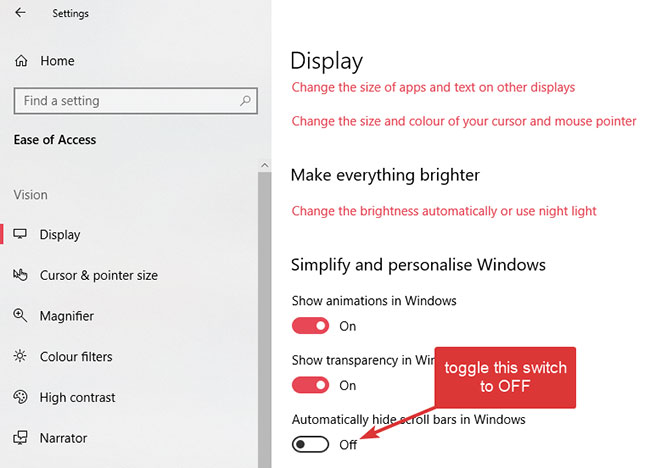
<p style="text-align: justify;">Để tắt thanh cuộn ẩn cho các ứng dụng Store trên Windows 10, bạn cần sửa đổi một tùy chọn trong Settings. Nhưng vì bất cứ lý do gì, tùy chọn không dễ tìm trừ khi bạn biết chính xác vị trí của nó. Tuy nhiên, rất dễ dàng để tắt các thanh cuộn ẩn trong Windows 10.</p>

<p style="text-align: justify;">1.&nbsp;Mở ứng dụng Settings. Bạn có thể làm điều đó bằng cách nhấn phím tắt&nbsp;<strong>Windows + I</strong>&nbsp;hoặc tìm kiếm nó trong menu Start.</p>

<p style="text-align: justify;">2. Sau khi mở ứng dụng Settings, hãy chuyển đến trang&nbsp;<strong>Ease of Access</strong>.</p>

<p style="text-align: justify;">3. Chọn tab&nbsp;<strong>Display</strong>&nbsp;trên bảng điều khiển bên trái.</p>

<p style="text-align: justify;">4. Trên bảng điều khiển bên phải, tìm tùy chọn&nbsp;<strong>Automatically hide scroll bars in Windows</strong>&nbsp;và chuyển công tắc chuyển đổi bên dưới nó sang vị trí&nbsp;<strong>Off.</strong></p>

<figure data-inimage-loaded="true">
<div style="text-align: justify;"><br />
<img alt="Tắt tùy chọn Automatically hide scroll bars in Windows" data-i="1" data-src="https://st.quantrimang.com/photos/image/2020/09/22/hien-thi-scrollbar-trong-ung-dung-1.jpg" data-was-processed="true" height="468" src="https://st.quantrimang.com/photos/image/2020/09/22/hien-thi-scrollbar-trong-ung-dung-1.jpg" width="650" /></div>

<figcaption>
<div style="text-align: justify;">Tắt tùy chọn Automatically hide scroll bars in Windows</div>
</figcaption>
</figure>

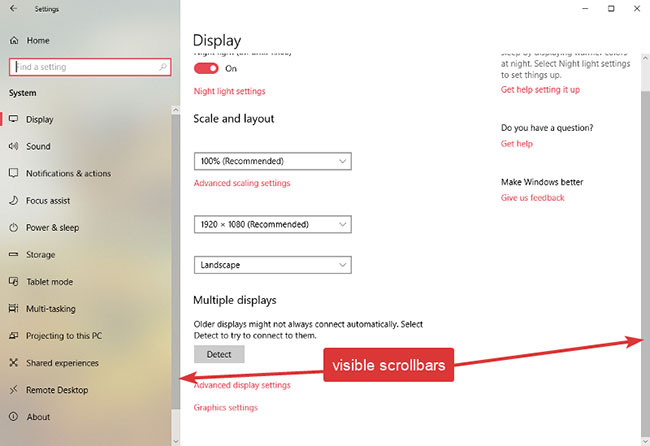
<p style="text-align: justify;">Sự thay đổi sẽ diễn ra tức thời. Ngay sau khi bạn chuyển tùy chọn thành&nbsp;<strong>Off</strong>, bạn sẽ thấy các thanh cuộn xuất hiện trong ứng dụng Settings và tất cả các ứng dụng Store khác, có thể là ứng dụng Microsoft của bên thứ nhất hoặc bên thứ ba.</p>

<figure>
<div style="text-align: justify;"><img alt="Các thanh cuộn xuất hiện trong ứng dụng Settings và tất cả các ứng dụng Store khác" data-i="2" data-src="https://st.quantrimang.com/photos/image/2020/09/22/hien-thi-scrollbar-trong-ung-dung-2.jpg" data-was-processed="true" height="446" src="https://st.quantrimang.com/photos/image/2020/09/22/hien-thi-scrollbar-trong-ung-dung-2.jpg" width="650" /></div>

<figcaption>
<div style="text-align: justify;">Các thanh cuộn xuất hiện trong ứng dụng Settings và tất cả các ứng dụng Store khác</div>
</figcaption>
</figure>
		</div>
				<div id="author">
						<p>
				<strong>Nguồn tin:</strong>
				Quantrimang.com
			</p>
		</div>
	</div>
	<div id="footer" class="clearfix">
		<div id="url">
			<strong>URL của bản tin này: </strong><a href="https://www.nguoicodonvn2008.info/vi/news/savefile/kien-thuc-may-tinh/cach-hien-thi-thanh-cuon-scrollbar-trong-ung-dung-tren-windows-10-2772.html" title="Cách hiển thị thanh cuộn &#40;scrollbar&#41; trong ứng dụng trên Windows 10">https://www.nguoicodonvn2008.info/vi/news/savefile/kien-thuc-may-tinh/cach-hien-thi-thanh-cuon-scrollbar-trong-ung-dung-tren-windows-10-2772.html</a>

		</div>
		<div class="clear"></div>
		<div class="copyright">
			&copy; .&#x3A; Nguoicodonvn2008.info - Cõi lòng người cô đơn &#x3A;.
		</div>
		<div id="contact">
			<a href="mailto:admin@nguoicodonvn2008.info">admin@nguoicodonvn2008.info</a>
		</div>
	</div>
</div>
        <div id="timeoutsess" class="chromeframe">
            Bạn đã không sử dụng Site, <a onclick="timeoutsesscancel();" href="https://www.nguoicodonvn2008.info/#">Bấm vào đây để duy trì trạng thái đăng nhập</a>. Thời gian chờ: <span id="secField"> 60 </span> giây
        </div>
        <div id="openidResult" class="nv-alert" style="display:none"></div>
        <div id="openidBt" data-result="" data-redirect=""></div>
		</script>
		<div class="car-top">
  <span><img src="https://www.nguoicodonvn2008.info/themes/default/images/car.png" alt=""></span>
</div>
<script src="https://www.nguoicodonvn2008.info/assets/js/jquery/jquery.min.js"></script>
<script>var nv_base_siteurl="/",nv_lang_data="vi",nv_lang_interface="vi",nv_name_variable="nv",nv_fc_variable="op",nv_lang_variable="language",nv_module_name="news",nv_func_name="savefile",nv_is_user=0, nv_my_ofs=-4,nv_my_abbr="EDT",nv_cookie_prefix="nv4c_e856T",nv_check_pass_mstime=1738000,nv_area_admin=0,nv_safemode=0,theme_responsive=0,nv_recaptcha_ver=2,nv_recaptcha_sitekey="",nv_recaptcha_type="image",XSSsanitize=1;</script>
<script src="https://www.nguoicodonvn2008.info/assets/js/language/vi.js"></script>
<script src="https://www.nguoicodonvn2008.info/assets/js/DOMPurify/purify3.js"></script>
<script src="https://www.nguoicodonvn2008.info/assets/js/global.js"></script>
<script src="https://www.nguoicodonvn2008.info/assets/js/site.js"></script>
<script src="https://www.nguoicodonvn2008.info/themes/default/js/news.js"></script>
<script src="https://www.nguoicodonvn2008.info/themes/default/js/main.js"></script>
<script src="https://www.nguoicodonvn2008.info/themes/default/js/custom.js"></script>
<script type="application/ld+json">
        {
            "@context": "https://schema.org",
            "@type": "Organization",
            "url": "https://www.nguoicodonvn2008.info",
            "logo": "https://www.nguoicodonvn2008.info/uploads/angel.gif"
        }
        </script>
<script src="https://www.nguoicodonvn2008.info/themes/default/js/bootstrap.min.js"></script>
<script type="text/javascript">
var $scrolltop = $('.car-top');
$scrolltop.on('click', function () {
    $('html,body').animate({
        scrollTop: 0
    }, 800);
    $(this).addClass("car-run");
    setTimeout(function(){ $scrolltop.removeClass('car-run');}, 1000);
    return false;
});
$(window).on('scroll', function ()
{ 
    if($(window).scrollTop() >= 200)
    {
        $scrolltop.addClass("show");
        $scrolltop.addClass("car-down");
    }
    else
    {
       $scrolltop.removeClass("show");
       setTimeout(function(){ $scrolltop.removeClass('car-down');}, 300);
    }
});
</script>
</body>
</html>