<!DOCTYPE html>
    <html lang="vi" xmlns="http://www.w3.org/1999/xhtml" prefix="og: http://ogp.me/ns#">
    <head>
<title>Cách hiển thị phần trăm pin như hình nền trên Linux</title>
<meta name="description" content="Cách hiển thị phần trăm pin như hình nền trên Linux - Savefile - Tin Tức -...">
<meta name="author" content=".: Nguoicodonvn2008.info - Cõi lòng người cô đơn :.">
<meta name="copyright" content=".: Nguoicodonvn2008.info - Cõi lòng người cô đơn :. [admin@nguoicodonvn2008.info]">
<meta name="robots" content="index, archive, follow, noodp">
<meta name="googlebot" content="index,archive,follow,noodp">
<meta name="msnbot" content="all,index,follow">
<meta name="generator" content="NukeViet v4.5">
<meta http-equiv="Content-Type" content="text/html; charset=utf-8">
<meta property="og:title" content="Cách hiển thị phần trăm pin như hình nền trên Linux">
<meta property="og:type" content="website">
<meta property="og:description" content="Savefile - Tin Tức - https&#x3A;&#x002F;&#x002F;www.nguoicodonvn2008.info&#x002F;vi&#x002F;news&#x002F;savefile&#x002F;kien-thuc-may-tinh&#x002F;cach-hien-thi-phan-tram-pin-nhu-hinh-nen-tren-linux-6570.html">
<meta property="og:site_name" content=".&#x3A; Nguoicodonvn2008.info - Cõi lòng người cô đơn &#x3A;.">
<meta property="og:url" content="https://www.nguoicodonvn2008.info/vi/news/savefile/kien-thuc-may-tinh/cach-hien-thi-phan-tram-pin-nhu-hinh-nen-tren-linux-6570.html">
<link rel="shortcut icon" href="https://www.nguoicodonvn2008.info/favicon.ico">
<link rel="canonical" href="https://www.nguoicodonvn2008.info/vi/news/savefile/kien-thuc-may-tinh/cach-hien-thi-phan-tram-pin-nhu-hinh-nen-tren-linux-6570.html">
<link rel="alternate" href="https://www.nguoicodonvn2008.info/vi/news/rss/" title="Tin Tức" type="application/rss+xml">
<link rel="alternate" href="https://www.nguoicodonvn2008.info/vi/news/rss/karaoke-dual/" title="Tin Tức - Karaoke Dual" type="application/rss+xml">
<link rel="alternate" href="https://www.nguoicodonvn2008.info/vi/news/rss/nhac-tre/" title="Tin Tức - Nhạc trẻ" type="application/rss+xml">
<link rel="alternate" href="https://www.nguoicodonvn2008.info/vi/news/rss/tru-tinh/" title="Tin Tức - Trữ tình" type="application/rss+xml">
<link rel="alternate" href="https://www.nguoicodonvn2008.info/vi/news/rss/nuoc-ngoai/" title="Tin Tức - Nước ngoài" type="application/rss+xml">
<link rel="alternate" href="https://www.nguoicodonvn2008.info/vi/news/rss/remix/" title="Tin Tức - Remix" type="application/rss+xml">
<link rel="alternate" href="https://www.nguoicodonvn2008.info/vi/news/rss/tam-su-tinh-yeu/" title="Tin Tức - Tâm sự tình yêu" type="application/rss+xml">
<link rel="alternate" href="https://www.nguoicodonvn2008.info/vi/news/rss/tho-suu-tam/" title="Tin Tức - Thơ sưu tầm" type="application/rss+xml">
<link rel="alternate" href="https://www.nguoicodonvn2008.info/vi/news/rss/cuoc-song/" title="Tin Tức - Cuộc sống" type="application/rss+xml">
<link rel="alternate" href="https://www.nguoicodonvn2008.info/vi/news/rss/phan-mem/" title="Tin Tức - Phần mềm" type="application/rss+xml">
<link rel="alternate" href="https://www.nguoicodonvn2008.info/vi/news/rss/kien-thuc-may-tinh/" title="Tin Tức - Kiến thức máy tính" type="application/rss+xml">
<link rel="alternate" href="https://www.nguoicodonvn2008.info/vi/news/rss/hoc-tap/" title="Tin Tức - Học tập" type="application/rss+xml">
<link rel="alternate" href="https://www.nguoicodonvn2008.info/vi/news/rss/tai-lieu/" title="Tin Tức - Tài liệu" type="application/rss+xml">
<link rel="alternate" href="https://www.nguoicodonvn2008.info/vi/news/rss/de-thi/" title="Tin Tức - Đề thi" type="application/rss+xml">
<link rel="preload" as="style" href="https://www.nguoicodonvn2008.info/assets/css/font-awesome.min.css" type="text/css">
<link rel="preload" as="style" href="https://www.nguoicodonvn2008.info/themes/default/css/bootstrap.non-responsive.css" type="text/css">
<link rel="preload" as="style" href="https://www.nguoicodonvn2008.info/themes/default/css/style.css" type="text/css">
<link rel="preload" as="style" href="https://www.nguoicodonvn2008.info/themes/default/css/style.non-responsive.css" type="text/css">
<link rel="preload" as="style" href="https://www.nguoicodonvn2008.info/themes/default/css/news.css" type="text/css">
<link rel="preload" as="style" href="https://www.nguoicodonvn2008.info/themes/default/css/custom.css" type="text/css">
<link rel="preload" as="script" href="https://www.nguoicodonvn2008.info/assets/js/jquery/jquery.min.js" type="text/javascript">
<link rel="preload" as="script" href="https://www.nguoicodonvn2008.info/assets/js/language/vi.js" type="text/javascript">
<link rel="preload" as="script" href="https://www.nguoicodonvn2008.info/assets/js/DOMPurify/purify3.js" type="text/javascript">
<link rel="preload" as="script" href="https://www.nguoicodonvn2008.info/assets/js/global.js" type="text/javascript">
<link rel="preload" as="script" href="https://www.nguoicodonvn2008.info/assets/js/site.js" type="text/javascript">
<link rel="preload" as="script" href="https://www.nguoicodonvn2008.info/themes/default/js/news.js" type="text/javascript">
<link rel="preload" as="script" href="https://www.nguoicodonvn2008.info/themes/default/js/main.js" type="text/javascript">
<link rel="preload" as="script" href="https://www.nguoicodonvn2008.info/themes/default/js/custom.js" type="text/javascript">
<link rel="preload" as="script" href="https://www.nguoicodonvn2008.info/themes/default/js/bootstrap.min.js" type="text/javascript">
<link rel="stylesheet" href="https://www.nguoicodonvn2008.info/assets/css/font-awesome.min.css">
<link rel="stylesheet" href="https://www.nguoicodonvn2008.info/themes/default/css/bootstrap.non-responsive.css">
<link rel="stylesheet" href="https://www.nguoicodonvn2008.info/themes/default/css/style.css">
<link rel="stylesheet" href="https://www.nguoicodonvn2008.info/themes/default/css/style.non-responsive.css">
<link rel="StyleSheet" href="https://www.nguoicodonvn2008.info/themes/default/css/news.css">
<link rel="stylesheet" href="https://www.nguoicodonvn2008.info/themes/default/css/custom.css">
<style type="text/css">
	body{background: #fff;}
</style>
    </head>
    <body>
<div id="print">
	<div id="hd_print">
		<h2 class="pull-left">.&#x3A; Nguoicodonvn2008.info - Cõi lòng người cô đơn &#x3A;.</h2>
		<p class="pull-right"><a title=".&#x3A; Nguoicodonvn2008.info - Cõi lòng người cô đơn &#x3A;." href="https://www.nguoicodonvn2008.info/">https://www.nguoicodonvn2008.info</a></p>
	</div>
	<div class="clear"></div>
	<hr />
	<div id="content">
		<h1>Cách hiển thị phần trăm pin như hình nền trên Linux</h1>
		<ul class="list-inline">
			<li>Thứ sáu - 06/01/2023 23:19</li>
			<li class="hidden-print txtrequired"><em class="fa fa-print">&nbsp;</em><a title="In ra" href="javascript:;" onclick="window.print()">In ra</a></li>
			<li class="hidden-print txtrequired"><em class="fa fa-power-off">&nbsp;</em><a title="Đóng cửa sổ này" href="javascript:;" onclick="window.close()">Đóng cửa sổ này</a></li>
		</ul>
		<div class="clear"></div>
		<div id="hometext">
		</div>
				<div class="imghome">
			<img alt="Cách hiển thị phần trăm pin như hình nền trên Linux" src="https://st.quantrimang.com/photos/image/2023/01/07/hien-thi-phan-tram-pin-nhu-hinh-nen-tren-linux-1.jpg" width="460" class="img-thumbnail" />
		</div>
		<div class="clear"></div>
		<div id="bodytext" class="clearfix">
			<p style="text-align: justify;">Hết pin có thể làm hỏng ngày làm việc của bạn - đặc biệt nếu bạn đang sử dụng laptop Linux của mình cho các dự án quan trọng hoặc đang thực hiện cuộc gọi video đường dài với bạn bè và người thân ở bên kia bán cầu.</p>

<p style="text-align: justify;">Thật khó để theo dõi thời lượng pin khi bạn đang bận, nhưng với battery-wallpaper, bạn có thể theo dõi mức sạc của mình chỉ bằng cách liếc nhìn hình nền.</p>

<h2 style="text-align: justify;">battery-wallpaper là cách dễ nhất để theo dõi tuổi thọ pin</h2>

<figure>
<div style="text-align: justify;"><img alt="Ubuntu với hình nền hiển thị pin đang sạc" data-i="0" data-src="https://st.quantrimang.com/photos/image/2023/01/07/hien-thi-phan-tram-pin-nhu-hinh-nen-tren-linux-1.jpg" data-was-processed="true" height="405" src="https://st.quantrimang.com/photos/image/2023/01/07/hien-thi-phan-tram-pin-nhu-hinh-nen-tren-linux-1.jpg" width="650" /></div>

<figcaption>
<div style="text-align: justify;">Ubuntu với hình nền hiển thị pin đang sạc</div>
</figcaption>
</figure>

<p style="text-align: justify;">Mặc dù thanh trạng thái hoặc&nbsp;Conky&nbsp;có thể hiển thị mức pin còn lại của laptop, nhưng nó có thể nhỏ, nằm ở vị trí khuất, lẫn giữa hàng tá chỉ báo và thông báo hệ thống khác. Khi bạn mải mê với một tác vụ hoặc lướt qua lại giữa các ứng dụng, bạn sẽ dễ dàng bỏ qua biểu tượng pin khi các con số giảm dần về 0.</p>

<p style="text-align: justify;">Hình nền máy tính hoặc trình quản lý cửa sổ cần phát huy vai trò trong trường hợp này. Đó không chỉ là cách thể hiện cá tính của bạn mà còn giúp bạn thư giãn, truyền cảm hứng và thoát khỏi áp lực công việc kỹ thuật số của mình.</p>

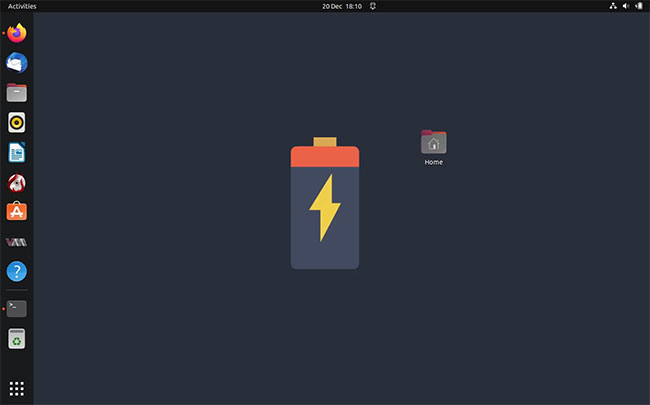
<p style="text-align: justify;">Nó cũng có thể kiêm luôn vai trò như một cách sành điệu để theo dõi mức còn lại của pin nhờ có battery-wallpaper, một script Bash đơn giản thiết lập biểu tượng pin động làm hình nền máy tính. Nó hiển thị hình sạc động thay đổi theo phần trăm pin.</p>

<p style="text-align: justify;">battery-wallpaper hoạt động trên hầu hết các môi trường desktop Linux, bao gồm KDE, Pantheon, GNOME, Deepin, Cinnamon, XFCE, LXDE và MATE, cũng như các trình quản lý cửa sổ bao gồm Openbox, i3wm, bspwm, awesomewm, Fluxbox, FVWM và Sway.</p>

<p style="text-align: justify;">Bạn cũng không bị mắc kẹt với một hình nền duy nhất. battery-wallpaper đi kèm với 21 hình nền pin khác nhau và nếu không có hình nền nào phù hợp với sở thích của bạn, bạn có thể tạo hình nền của riêng mình.</p>

<h2 style="text-align: justify;">Cài đặt battery-wallpaper để theo dõi mức sạc pin trên Linux</h2>

<p style="text-align: justify;">battery-wallpaper có một vài dependency mà bạn sẽ cần cài đặt để đảm bảo nó hoạt động bình thường trên mọi hệ thống. Để cài đặt những thứ này trên Ubuntu và Debian, hãy&nbsp;mở một terminal&nbsp;và nhập:</p>

<pre id="pre0">
<code>sudo apt-get install acpi feh x11-xserver-utils</code></pre>

<p style="text-align: justify;">Hoặc nếu bạn sử dụng Arch hoặc các hệ thống liên quan, hãy nhập:</p>

<pre id="pre1">
<code>sudo pacman -Sy acpi feh xorg-xrandr</code></pre>

<p style="text-align: justify;">Bây giờ, hãy sao chép kho lưu trữ GitHub battery-wallpaper bằng:</p>

<pre id="pre2">
<code>git clone https://github.com/adi1090x/battery-wallpaper.git</code></pre>

<p style="text-align: justify;">Di chuyển vào thư mục mới bằng lệnh cd và sửa đổi quyền cho script:</p>

<pre id="pre3">
<code>cd battery-wallpaper
sudo chmod +x install.sh</code></pre>

<p style="text-align: justify;">Bây giờ, bạn có thể chạy script cài đặt với:</p>

<pre id="pre4">
<code>./install.sh</code></pre>

<p style="text-align: justify;">Trước tiên, script cài đặt sẽ xóa mọi cài đặt battery-wallpaper trước đó, sau đó sao chép hình nền màn hình của nó sang một vị trí mới trên hệ thống file của bạn. Sau đó, nó sẽ làm cho script bwall.sh có thể thực thi được và tạo một liên kết tượng trưng tới script đó trong&nbsp;<strong>/usr/bin/.</strong></p>

<h2 style="text-align: justify;">Sử dụng battery-wallpaper để theo dõi tuổi thọ pin</h2>

<figure>
<div style="text-align: justify;"><img alt="Ubuntu với hình nền hiển thị cây bonsai" data-i="1" data-src="https://st.quantrimang.com/photos/image/2023/01/07/hien-thi-phan-tram-pin-nhu-hinh-nen-tren-linux-2.jpg" data-was-processed="true" height="405" src="https://st.quantrimang.com/photos/image/2023/01/07/hien-thi-phan-tram-pin-nhu-hinh-nen-tren-linux-2.jpg" width="650" /></div>

<figcaption>
<div style="text-align: justify;">Ubuntu với hình nền hiển thị cây bonsai</div>
</figcaption>
</figure>

<p style="text-align: justify;">Bạn có thể mở file trợ giúp battery-wallpaper bằng cách nhập:</p>

<pre id="pre5">
<code>bwall</code></pre>

<p style="text-align: justify;">File trợ giúp sẽ liệt kê tất cả các kiểu có sẵn và đưa ra các ví dụ sử dụng. Bạn có thể đặt hình nền bằng switch&nbsp;<strong>-s.</strong></p>

<pre id="pre6">
<code>bwall -s paper</code></pre>

<p style="text-align: justify;">Lệnh nói trên sẽ đặt hình nền kiểu&nbsp;<em>&quot;paper&quot;</em>&nbsp;và bạn sẽ lưu ý rằng hình nền của bạn hiện có hình ảnh lớn của biểu tượng pin. Khi mức sạc của bạn giảm xuống, hình nền sẽ hiển thị pin với mức sạc giảm dần.</p>

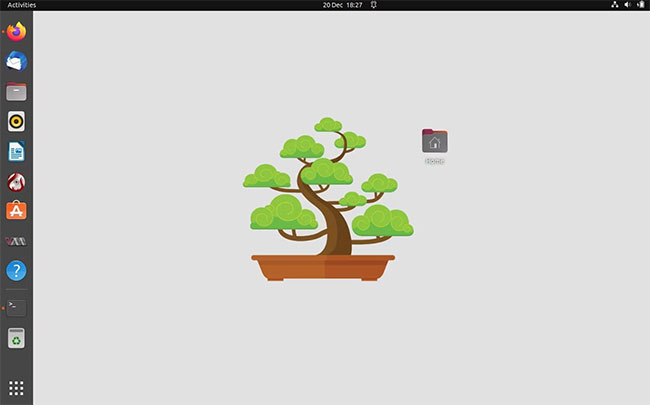
<p style="text-align: justify;">Các chỉ số hình ảnh tuyệt vời khác bao gồm&nbsp;<em>&quot;space&quot;</em>, dùng hình ảnh đại diện của Trái đất trên một dải sao và &quot;bonsai&quot;, thể hiện một cái cây thu nhỏ được vẽ đẹp mắt, rụng lá theo thời gian.</p>

<p style="text-align: justify;">Bạn cũng có thể đặt độ trễ bằng cách sử dụng switch&nbsp;<strong>-d</strong>:</p>

<pre id="pre7">
<code>bwall.sh -d 1 -s bonsai</code></pre>

<p style="text-align: justify;">...sẽ đặt hình nền sạc thành kiểu &quot;bonsai&quot; với độ trễ một giây.</p>

<p style="text-align: justify;">Nếu bạn muốn battery-wallpaper bắt đầu khi bật hệ thống, hãy tạo một file desktop mới với:</p>

<pre id="pre8">
<code>nano ~/.config/autostart/bwall.desktop</code></pre>

<p style="text-align: justify;">Nhập thông tin sau vào file:</p>

<pre id="pre9">
<code>&#91;Desktop Entry&#93;
Name=Battery Wallpaper
Comment=Set desktop background according to battery percentage, with charging animation.
Exec=/usr/bin/bwall -s leaves &amp;
Type=Application
Icon=wallpaper
Categories=Accessories;</code></pre>

<p style="text-align: justify;">Lưu và thoát nano bằng&nbsp;<strong>Ctrl + O</strong>, sau đó&nbsp;<strong>Ctrl + X</strong>.</p>

<p style="text-align: justify;">Nếu bạn lo lắng rằng mức sạc pin đang giảm nhanh hơn bạn mong đợi, thì có thể có vấn đề tiềm ẩn hoặc pin của bạn sắp hỏng. Hãy sử dụng các công cụ theo dõi tình trạng pin chuyên dụng để đảm bảo pin của bạn luôn ở tình trạng tốt nhất.</p>
		</div>
				<div id="author">
						<p>
				<strong>Nguồn tin:</strong>
				Quantrimang.com
			</p>
		</div>
	</div>
	<div id="footer" class="clearfix">
		<div id="url">
			<strong>URL của bản tin này: </strong><a href="https://www.nguoicodonvn2008.info/vi/news/savefile/kien-thuc-may-tinh/cach-hien-thi-phan-tram-pin-nhu-hinh-nen-tren-linux-6570.html" title="Cách hiển thị phần trăm pin như hình nền trên Linux">https://www.nguoicodonvn2008.info/vi/news/savefile/kien-thuc-may-tinh/cach-hien-thi-phan-tram-pin-nhu-hinh-nen-tren-linux-6570.html</a>

		</div>
		<div class="clear"></div>
		<div class="copyright">
			&copy; .&#x3A; Nguoicodonvn2008.info - Cõi lòng người cô đơn &#x3A;.
		</div>
		<div id="contact">
			<a href="mailto:admin@nguoicodonvn2008.info">admin@nguoicodonvn2008.info</a>
		</div>
	</div>
</div>
        <div id="timeoutsess" class="chromeframe">
            Bạn đã không sử dụng Site, <a onclick="timeoutsesscancel();" href="https://www.nguoicodonvn2008.info/#">Bấm vào đây để duy trì trạng thái đăng nhập</a>. Thời gian chờ: <span id="secField"> 60 </span> giây
        </div>
        <div id="openidResult" class="nv-alert" style="display:none"></div>
        <div id="openidBt" data-result="" data-redirect=""></div>
		</script>
		<div class="car-top">
  <span><img src="https://www.nguoicodonvn2008.info/themes/default/images/car.png" alt=""></span>
</div>
<div id="run_cronjobs" style="visibility:hidden;display:none;"><img alt="cron" src="/index.php?second=cronjobs&amp;p=y8OxD8Vz" width="1" height="1" /></div>
<script src="https://www.nguoicodonvn2008.info/assets/js/jquery/jquery.min.js"></script>
<script>var nv_base_siteurl="/",nv_lang_data="vi",nv_lang_interface="vi",nv_name_variable="nv",nv_fc_variable="op",nv_lang_variable="language",nv_module_name="news",nv_func_name="savefile",nv_is_user=0, nv_my_ofs=-4,nv_my_abbr="EDT",nv_cookie_prefix="nv4c_e856T",nv_check_pass_mstime=1738000,nv_area_admin=0,nv_safemode=0,theme_responsive=0,nv_recaptcha_ver=2,nv_recaptcha_sitekey="",nv_recaptcha_type="image",XSSsanitize=1;</script>
<script src="https://www.nguoicodonvn2008.info/assets/js/language/vi.js"></script>
<script src="https://www.nguoicodonvn2008.info/assets/js/DOMPurify/purify3.js"></script>
<script src="https://www.nguoicodonvn2008.info/assets/js/global.js"></script>
<script src="https://www.nguoicodonvn2008.info/assets/js/site.js"></script>
<script src="https://www.nguoicodonvn2008.info/themes/default/js/news.js"></script>
<script src="https://www.nguoicodonvn2008.info/themes/default/js/main.js"></script>
<script src="https://www.nguoicodonvn2008.info/themes/default/js/custom.js"></script>
<script type="application/ld+json">
        {
            "@context": "https://schema.org",
            "@type": "Organization",
            "url": "https://www.nguoicodonvn2008.info",
            "logo": "https://www.nguoicodonvn2008.info/uploads/angel.gif"
        }
        </script>
<script src="https://www.nguoicodonvn2008.info/themes/default/js/bootstrap.min.js"></script>
<script type="text/javascript">
var $scrolltop = $('.car-top');
$scrolltop.on('click', function () {
    $('html,body').animate({
        scrollTop: 0
    }, 800);
    $(this).addClass("car-run");
    setTimeout(function(){ $scrolltop.removeClass('car-run');}, 1000);
    return false;
});
$(window).on('scroll', function ()
{ 
    if($(window).scrollTop() >= 200)
    {
        $scrolltop.addClass("show");
        $scrolltop.addClass("car-down");
    }
    else
    {
       $scrolltop.removeClass("show");
       setTimeout(function(){ $scrolltop.removeClass('car-down');}, 300);
    }
});
</script>
</body>
</html>