<!DOCTYPE html>
    <html lang="vi" xmlns="http://www.w3.org/1999/xhtml" prefix="og: http://ogp.me/ns#">
    <head>
<title>Cách hạn chế đối tượng truy cập và sử dụng Chromebook</title>
<meta name="description" content="Cách hạn chế đối tượng truy cập và sử dụng Chromebook - Savefile - Tin Tức -...">
<meta name="author" content=".: Nguoicodonvn2008.info - Cõi lòng người cô đơn :.">
<meta name="copyright" content=".: Nguoicodonvn2008.info - Cõi lòng người cô đơn :. [admin@nguoicodonvn2008.info]">
<meta name="robots" content="index, archive, follow, noodp">
<meta name="googlebot" content="index,archive,follow,noodp">
<meta name="msnbot" content="all,index,follow">
<meta name="generator" content="NukeViet v4.5">
<meta http-equiv="Content-Type" content="text/html; charset=utf-8">
<meta property="og:title" content="Cách hạn chế đối tượng truy cập và sử dụng Chromebook">
<meta property="og:type" content="website">
<meta property="og:description" content="Savefile - Tin Tức - https&#x3A;&#x002F;&#x002F;www.nguoicodonvn2008.info&#x002F;vi&#x002F;news&#x002F;savefile&#x002F;kien-thuc-may-tinh&#x002F;cach-han-che-doi-tuong-truy-cap-va-su-dung-chromebook-4692.html">
<meta property="og:site_name" content=".&#x3A; Nguoicodonvn2008.info - Cõi lòng người cô đơn &#x3A;.">
<meta property="og:url" content="https://www.nguoicodonvn2008.info/vi/news/savefile/kien-thuc-may-tinh/cach-han-che-doi-tuong-truy-cap-va-su-dung-chromebook-4692.html">
<link rel="shortcut icon" href="https://www.nguoicodonvn2008.info/favicon.ico">
<link rel="canonical" href="https://www.nguoicodonvn2008.info/vi/news/savefile/kien-thuc-may-tinh/cach-han-che-doi-tuong-truy-cap-va-su-dung-chromebook-4692.html">
<link rel="alternate" href="https://www.nguoicodonvn2008.info/vi/news/rss/" title="Tin Tức" type="application/rss+xml">
<link rel="alternate" href="https://www.nguoicodonvn2008.info/vi/news/rss/karaoke-dual/" title="Tin Tức - Karaoke Dual" type="application/rss+xml">
<link rel="alternate" href="https://www.nguoicodonvn2008.info/vi/news/rss/nhac-tre/" title="Tin Tức - Nhạc trẻ" type="application/rss+xml">
<link rel="alternate" href="https://www.nguoicodonvn2008.info/vi/news/rss/tru-tinh/" title="Tin Tức - Trữ tình" type="application/rss+xml">
<link rel="alternate" href="https://www.nguoicodonvn2008.info/vi/news/rss/nuoc-ngoai/" title="Tin Tức - Nước ngoài" type="application/rss+xml">
<link rel="alternate" href="https://www.nguoicodonvn2008.info/vi/news/rss/remix/" title="Tin Tức - Remix" type="application/rss+xml">
<link rel="alternate" href="https://www.nguoicodonvn2008.info/vi/news/rss/tam-su-tinh-yeu/" title="Tin Tức - Tâm sự tình yêu" type="application/rss+xml">
<link rel="alternate" href="https://www.nguoicodonvn2008.info/vi/news/rss/tho-suu-tam/" title="Tin Tức - Thơ sưu tầm" type="application/rss+xml">
<link rel="alternate" href="https://www.nguoicodonvn2008.info/vi/news/rss/cuoc-song/" title="Tin Tức - Cuộc sống" type="application/rss+xml">
<link rel="alternate" href="https://www.nguoicodonvn2008.info/vi/news/rss/phan-mem/" title="Tin Tức - Phần mềm" type="application/rss+xml">
<link rel="alternate" href="https://www.nguoicodonvn2008.info/vi/news/rss/kien-thuc-may-tinh/" title="Tin Tức - Kiến thức máy tính" type="application/rss+xml">
<link rel="alternate" href="https://www.nguoicodonvn2008.info/vi/news/rss/hoc-tap/" title="Tin Tức - Học tập" type="application/rss+xml">
<link rel="alternate" href="https://www.nguoicodonvn2008.info/vi/news/rss/tai-lieu/" title="Tin Tức - Tài liệu" type="application/rss+xml">
<link rel="alternate" href="https://www.nguoicodonvn2008.info/vi/news/rss/de-thi/" title="Tin Tức - Đề thi" type="application/rss+xml">
<link rel="preload" as="style" href="https://www.nguoicodonvn2008.info/assets/css/font-awesome.min.css" type="text/css">
<link rel="preload" as="style" href="https://www.nguoicodonvn2008.info/themes/default/css/bootstrap.non-responsive.css" type="text/css">
<link rel="preload" as="style" href="https://www.nguoicodonvn2008.info/themes/default/css/style.css" type="text/css">
<link rel="preload" as="style" href="https://www.nguoicodonvn2008.info/themes/default/css/style.non-responsive.css" type="text/css">
<link rel="preload" as="style" href="https://www.nguoicodonvn2008.info/themes/default/css/news.css" type="text/css">
<link rel="preload" as="style" href="https://www.nguoicodonvn2008.info/themes/default/css/custom.css" type="text/css">
<link rel="preload" as="script" href="https://www.nguoicodonvn2008.info/assets/js/jquery/jquery.min.js" type="text/javascript">
<link rel="preload" as="script" href="https://www.nguoicodonvn2008.info/assets/js/language/vi.js" type="text/javascript">
<link rel="preload" as="script" href="https://www.nguoicodonvn2008.info/assets/js/DOMPurify/purify3.js" type="text/javascript">
<link rel="preload" as="script" href="https://www.nguoicodonvn2008.info/assets/js/global.js" type="text/javascript">
<link rel="preload" as="script" href="https://www.nguoicodonvn2008.info/assets/js/site.js" type="text/javascript">
<link rel="preload" as="script" href="https://www.nguoicodonvn2008.info/themes/default/js/news.js" type="text/javascript">
<link rel="preload" as="script" href="https://www.nguoicodonvn2008.info/themes/default/js/main.js" type="text/javascript">
<link rel="preload" as="script" href="https://www.nguoicodonvn2008.info/themes/default/js/custom.js" type="text/javascript">
<link rel="preload" as="script" href="https://www.nguoicodonvn2008.info/themes/default/js/bootstrap.min.js" type="text/javascript">
<link rel="stylesheet" href="https://www.nguoicodonvn2008.info/assets/css/font-awesome.min.css">
<link rel="stylesheet" href="https://www.nguoicodonvn2008.info/themes/default/css/bootstrap.non-responsive.css">
<link rel="stylesheet" href="https://www.nguoicodonvn2008.info/themes/default/css/style.css">
<link rel="stylesheet" href="https://www.nguoicodonvn2008.info/themes/default/css/style.non-responsive.css">
<link rel="StyleSheet" href="https://www.nguoicodonvn2008.info/themes/default/css/news.css">
<link rel="stylesheet" href="https://www.nguoicodonvn2008.info/themes/default/css/custom.css">
<style type="text/css">
	body{background: #fff;}
</style>
    </head>
    <body>
<div id="print">
	<div id="hd_print">
		<h2 class="pull-left">.&#x3A; Nguoicodonvn2008.info - Cõi lòng người cô đơn &#x3A;.</h2>
		<p class="pull-right"><a title=".&#x3A; Nguoicodonvn2008.info - Cõi lòng người cô đơn &#x3A;." href="https://www.nguoicodonvn2008.info/">https://www.nguoicodonvn2008.info</a></p>
	</div>
	<div class="clear"></div>
	<hr />
	<div id="content">
		<h1>Cách hạn chế đối tượng truy cập và sử dụng Chromebook</h1>
		<ul class="list-inline">
			<li>Thứ năm - 04/11/2021 00:56</li>
			<li class="hidden-print txtrequired"><em class="fa fa-print">&nbsp;</em><a title="In ra" href="javascript:;" onclick="window.print()">In ra</a></li>
			<li class="hidden-print txtrequired"><em class="fa fa-power-off">&nbsp;</em><a title="Đóng cửa sổ này" href="javascript:;" onclick="window.close()">Đóng cửa sổ này</a></li>
		</ul>
		<div class="clear"></div>
		<div id="hometext">
		</div>
				<div class="imghome">
			<img alt="Cách hạn chế đối tượng truy cập và sử dụng Chromebook" src="https://st.quantrimang.com/photos/image/2021/10/25/han-che-doi-tuong-truy-cap-va-su-dung-chromebook3.jpg" width="460" class="img-thumbnail" />
		</div>
		<div class="clear"></div>
		<div id="bodytext" class="clearfix">
			<p style="text-align: justify;">Theo mặc định, bất kỳ ai có tài khoản Google đều có thể đăng nhập vào chiếc Chromebook của bạn và sử dụng như bình thường. Nếu bạn muốn khóa thiết bị và chỉ cho phép những người cụ thể mà mình tin tưởng có quyền sử dụng thiết bị của mình, có thể dễ dàng định cấu hình trong Settings. Đây là cách thực hiện.</p>

<h2 style="text-align: justify;">Điều kiện cần</h2>

<p style="text-align: justify;">Để hạn chế đối tượng sử dụng Chromebook, trước bạn phải đăng nhập với tư cách là tài khoản chủ sở hữu của thiết bị. Tài khoản chủ sở hữu là tài khoản đầu tiên được đăng ký với Chromebook khi nó được sử dụng lần đầu tiên (hoặc sau khi reset Powerwash). Nếu không có quyền truy cập vào tài khoản chủ sở hữu, bạn chắc chắn sẽ không thể hạn chế hoặc quyết định ai có thể sử dụng Chromebook.</p>

<h2 style="text-align: justify;">Cách hạn chế đối tượng truy cập và sử dụng Chromebook</h2>

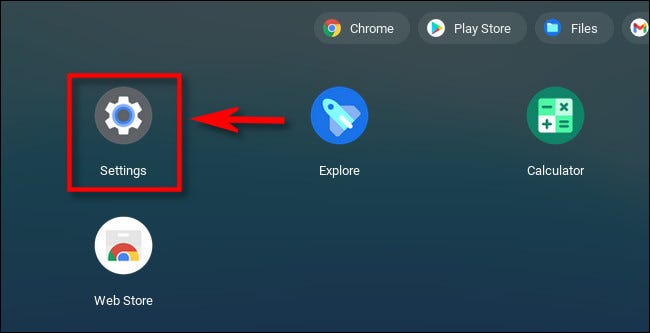
<p style="text-align: justify;">Trước tiên, hãy đăng nhập vào Chromebook của bạn bằng tài khoản chủ sở hữu. Sau khi đăng nhập thành công, hãy khởi chạy launcher và mở rộng menu cho đến khi bạn thấy các biểu tượng ứng dụng. Nhấp vào biểu tượng bánh răng để truy cập ứng dụng Settings.</p>

<p style="text-align: justify;"><img alt="Truy cập ứng dụng Settings" data-i="0" data-inimage-loaded="true" data-src="https://st.quantrimang.com/photos/image/2021/10/25/han-che-doi-tuong-truy-cap-va-su-dung-chromebook1.jpg" data-was-processed="true" height="333" src="https://st.quantrimang.com/photos/image/2021/10/25/han-che-doi-tuong-truy-cap-va-su-dung-chromebook1.jpg" width="650" /></p>

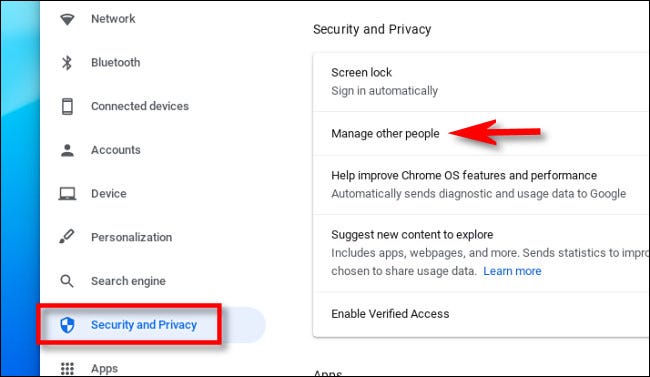
<p style="text-align: justify;">Trong Settings, bạn bấm chọn “<strong>Security And Privacy</strong>” trong danh sách bên trái, sau đó nhấp vào “<strong>Manage Other People</strong>”.</p>

<p style="text-align: justify;"><img alt="Nhấp vào “Manage Other People”" data-i="1" data-src="https://st.quantrimang.com/photos/image/2021/10/25/han-che-doi-tuong-truy-cap-va-su-dung-chromebook2.jpg" data-was-processed="true" height="377" src="https://st.quantrimang.com/photos/image/2021/10/25/han-che-doi-tuong-truy-cap-va-su-dung-chromebook2.jpg" width="650" /></p>

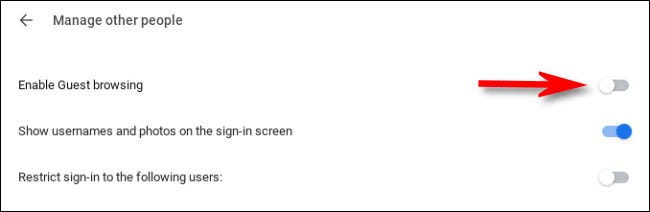
<p style="text-align: justify;">Trên trang “<strong>Manage Other People</strong>”, nếu bạn muốn ngăn những người không có tài khoản Google sử dụng Chromebook của mình, hãy tắt công tắc bên cạnh tùy chọn &quot;<strong>Enable Guest Browsing</strong>”.</p>

<p style="text-align: justify;"><img alt="tắt công tắc bên cạnh tùy chọn &#039;Enable Guest Browsing”" data-i="2" data-src="https://st.quantrimang.com/photos/image/2021/10/25/han-che-doi-tuong-truy-cap-va-su-dung-chromebook3.jpg" data-was-processed="true" height="212" src="https://st.quantrimang.com/photos/image/2021/10/25/han-che-doi-tuong-truy-cap-va-su-dung-chromebook3.jpg" width="650" /></p>

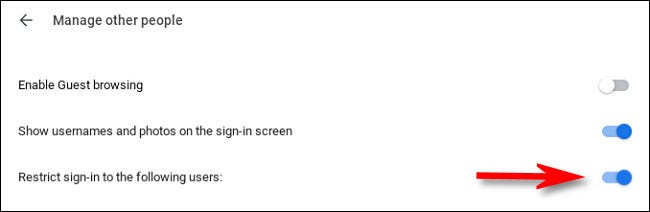
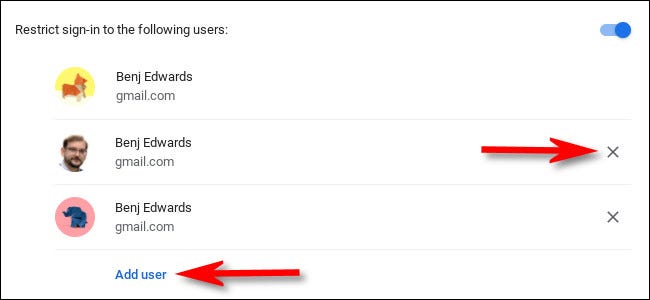
<p style="text-align: justify;">Ngay bên dưới, bạn sẽ thấy tùy chọn “<strong>Restrict Sign-in to The Following Users</strong>”. Bật tùy chọn này sẽ hiển thị cho bạn danh sách chi tiết những tài khoản người dùng đã đăng ký trên thiết bị.</p>

<p style="text-align: justify;"><img alt="Bật “Restrict Sign-in to The Following Users”" data-i="3" data-src="https://st.quantrimang.com/photos/image/2021/10/25/han-che-doi-tuong-truy-cap-va-su-dung-chromebook4.jpg" data-was-processed="true" height="212" src="https://st.quantrimang.com/photos/image/2021/10/25/han-che-doi-tuong-truy-cap-va-su-dung-chromebook4.jpg" width="650" /></p>

<p style="text-align: justify;">Để xóa một người dùng cụ thể khỏi danh sách, hãy nhấp vào nút “<strong>X</strong>” bên cạnh tên của họ. Ngược lại, để thêm người dùng khác, hãy nhấp vào nút “<strong>Add User</strong>” bên dưới danh sách và làm theo lời nhắc trên menu.</p>

<p style="text-align: justify;"><img alt="Thêm hoặc xóa người dùng" data-i="4" data-src="https://st.quantrimang.com/photos/image/2021/10/25/han-che-doi-tuong-truy-cap-va-su-dung-chromebook5.jpg" data-was-processed="true" height="300" src="https://st.quantrimang.com/photos/image/2021/10/25/han-che-doi-tuong-truy-cap-va-su-dung-chromebook5.jpg" width="650" /></p>

<p style="text-align: justify;">Khi bạn hoàn tất, hãy đóng Settings.</p>

<p style="text-align: justify;">Lần tiếp theo khi ở màn hình đăng nhập, bạn sẽ nhận thấy rằng nút “<strong>Add a Person</strong>” chuyển sang màu xám - không còn hoạt động. Chiếc Chromebook của bạn giờ đây đã an toàn và riêng tư hơn nhiều!</p>
		</div>
				<div id="author">
						<p>
				<strong>Nguồn tin:</strong>
				Quantrimang.com
			</p>
		</div>
	</div>
	<div id="footer" class="clearfix">
		<div id="url">
			<strong>URL của bản tin này: </strong><a href="https://www.nguoicodonvn2008.info/vi/news/savefile/kien-thuc-may-tinh/cach-han-che-doi-tuong-truy-cap-va-su-dung-chromebook-4692.html" title="Cách hạn chế đối tượng truy cập và sử dụng Chromebook">https://www.nguoicodonvn2008.info/vi/news/savefile/kien-thuc-may-tinh/cach-han-che-doi-tuong-truy-cap-va-su-dung-chromebook-4692.html</a>

		</div>
		<div class="clear"></div>
		<div class="copyright">
			&copy; .&#x3A; Nguoicodonvn2008.info - Cõi lòng người cô đơn &#x3A;.
		</div>
		<div id="contact">
			<a href="mailto:admin@nguoicodonvn2008.info">admin@nguoicodonvn2008.info</a>
		</div>
	</div>
</div>
        <div id="timeoutsess" class="chromeframe">
            Bạn đã không sử dụng Site, <a onclick="timeoutsesscancel();" href="https://www.nguoicodonvn2008.info/#">Bấm vào đây để duy trì trạng thái đăng nhập</a>. Thời gian chờ: <span id="secField"> 60 </span> giây
        </div>
        <div id="openidResult" class="nv-alert" style="display:none"></div>
        <div id="openidBt" data-result="" data-redirect=""></div>
		</script>
		<div class="car-top">
  <span><img src="https://www.nguoicodonvn2008.info/themes/default/images/car.png" alt=""></span>
</div>
<script src="https://www.nguoicodonvn2008.info/assets/js/jquery/jquery.min.js"></script>
<script>var nv_base_siteurl="/",nv_lang_data="vi",nv_lang_interface="vi",nv_name_variable="nv",nv_fc_variable="op",nv_lang_variable="language",nv_module_name="news",nv_func_name="savefile",nv_is_user=0, nv_my_ofs=-4,nv_my_abbr="EDT",nv_cookie_prefix="nv4c_e856T",nv_check_pass_mstime=1738000,nv_area_admin=0,nv_safemode=0,theme_responsive=0,nv_recaptcha_ver=2,nv_recaptcha_sitekey="",nv_recaptcha_type="image",XSSsanitize=1;</script>
<script src="https://www.nguoicodonvn2008.info/assets/js/language/vi.js"></script>
<script src="https://www.nguoicodonvn2008.info/assets/js/DOMPurify/purify3.js"></script>
<script src="https://www.nguoicodonvn2008.info/assets/js/global.js"></script>
<script src="https://www.nguoicodonvn2008.info/assets/js/site.js"></script>
<script src="https://www.nguoicodonvn2008.info/themes/default/js/news.js"></script>
<script src="https://www.nguoicodonvn2008.info/themes/default/js/main.js"></script>
<script src="https://www.nguoicodonvn2008.info/themes/default/js/custom.js"></script>
<script type="application/ld+json">
        {
            "@context": "https://schema.org",
            "@type": "Organization",
            "url": "https://www.nguoicodonvn2008.info",
            "logo": "https://www.nguoicodonvn2008.info/uploads/angel.gif"
        }
        </script>
<script src="https://www.nguoicodonvn2008.info/themes/default/js/bootstrap.min.js"></script>
<script type="text/javascript">
var $scrolltop = $('.car-top');
$scrolltop.on('click', function () {
    $('html,body').animate({
        scrollTop: 0
    }, 800);
    $(this).addClass("car-run");
    setTimeout(function(){ $scrolltop.removeClass('car-run');}, 1000);
    return false;
});
$(window).on('scroll', function ()
{ 
    if($(window).scrollTop() >= 200)
    {
        $scrolltop.addClass("show");
        $scrolltop.addClass("car-down");
    }
    else
    {
       $scrolltop.removeClass("show");
       setTimeout(function(){ $scrolltop.removeClass('car-down');}, 300);
    }
});
</script>
</body>
</html>