<!DOCTYPE html>
    <html lang="vi" xmlns="http://www.w3.org/1999/xhtml" prefix="og: http://ogp.me/ns#">
    <head>
<title>Cách gửi email video trên Gmail</title>
<meta name="description" content="Cách gửi email video trên Gmail - Savefile - Tin Tức - https&#x3A;&#x002F;&#x002F;www.nguoicodonvn2008.info&#x002F;vi&#x002F;news&#x002F;savefile&#x002F;kien-thuc-may-tinh&#x002F;cach-gui-email-video-tren-gmail-107.html">
<meta name="author" content=".: Nguoicodonvn2008.info - Cõi lòng người cô đơn :.">
<meta name="copyright" content=".: Nguoicodonvn2008.info - Cõi lòng người cô đơn :. [admin@nguoicodonvn2008.info]">
<meta name="robots" content="index, archive, follow, noodp">
<meta name="googlebot" content="index,archive,follow,noodp">
<meta name="msnbot" content="all,index,follow">
<meta name="generator" content="NukeViet v4.5">
<meta http-equiv="Content-Type" content="text/html; charset=utf-8">
<meta property="og:title" content="Cách gửi email video trên Gmail">
<meta property="og:type" content="website">
<meta property="og:description" content="Savefile - Tin Tức - https&#x3A;&#x002F;&#x002F;www.nguoicodonvn2008.info&#x002F;vi&#x002F;news&#x002F;savefile&#x002F;kien-thuc-may-tinh&#x002F;cach-gui-email-video-tren-gmail-107.html">
<meta property="og:site_name" content=".&#x3A; Nguoicodonvn2008.info - Cõi lòng người cô đơn &#x3A;.">
<meta property="og:url" content="https://www.nguoicodonvn2008.info/vi/news/savefile/kien-thuc-may-tinh/cach-gui-email-video-tren-gmail-107.html">
<link rel="shortcut icon" href="https://www.nguoicodonvn2008.info/favicon.ico">
<link rel="canonical" href="https://www.nguoicodonvn2008.info/vi/news/savefile/kien-thuc-may-tinh/cach-gui-email-video-tren-gmail-107.html">
<link rel="alternate" href="https://www.nguoicodonvn2008.info/vi/news/rss/" title="Tin Tức" type="application/rss+xml">
<link rel="alternate" href="https://www.nguoicodonvn2008.info/vi/news/rss/karaoke-dual/" title="Tin Tức - Karaoke Dual" type="application/rss+xml">
<link rel="alternate" href="https://www.nguoicodonvn2008.info/vi/news/rss/nhac-tre/" title="Tin Tức - Nhạc trẻ" type="application/rss+xml">
<link rel="alternate" href="https://www.nguoicodonvn2008.info/vi/news/rss/tru-tinh/" title="Tin Tức - Trữ tình" type="application/rss+xml">
<link rel="alternate" href="https://www.nguoicodonvn2008.info/vi/news/rss/nuoc-ngoai/" title="Tin Tức - Nước ngoài" type="application/rss+xml">
<link rel="alternate" href="https://www.nguoicodonvn2008.info/vi/news/rss/remix/" title="Tin Tức - Remix" type="application/rss+xml">
<link rel="alternate" href="https://www.nguoicodonvn2008.info/vi/news/rss/tam-su-tinh-yeu/" title="Tin Tức - Tâm sự tình yêu" type="application/rss+xml">
<link rel="alternate" href="https://www.nguoicodonvn2008.info/vi/news/rss/tho-suu-tam/" title="Tin Tức - Thơ sưu tầm" type="application/rss+xml">
<link rel="alternate" href="https://www.nguoicodonvn2008.info/vi/news/rss/cuoc-song/" title="Tin Tức - Cuộc sống" type="application/rss+xml">
<link rel="alternate" href="https://www.nguoicodonvn2008.info/vi/news/rss/phan-mem/" title="Tin Tức - Phần mềm" type="application/rss+xml">
<link rel="alternate" href="https://www.nguoicodonvn2008.info/vi/news/rss/kien-thuc-may-tinh/" title="Tin Tức - Kiến thức máy tính" type="application/rss+xml">
<link rel="alternate" href="https://www.nguoicodonvn2008.info/vi/news/rss/hoc-tap/" title="Tin Tức - Học tập" type="application/rss+xml">
<link rel="alternate" href="https://www.nguoicodonvn2008.info/vi/news/rss/tai-lieu/" title="Tin Tức - Tài liệu" type="application/rss+xml">
<link rel="alternate" href="https://www.nguoicodonvn2008.info/vi/news/rss/de-thi/" title="Tin Tức - Đề thi" type="application/rss+xml">
<link rel="preload" as="style" href="https://www.nguoicodonvn2008.info/assets/css/font-awesome.min.css" type="text/css">
<link rel="preload" as="style" href="https://www.nguoicodonvn2008.info/themes/default/css/bootstrap.non-responsive.css" type="text/css">
<link rel="preload" as="style" href="https://www.nguoicodonvn2008.info/themes/default/css/style.css" type="text/css">
<link rel="preload" as="style" href="https://www.nguoicodonvn2008.info/themes/default/css/style.non-responsive.css" type="text/css">
<link rel="preload" as="style" href="https://www.nguoicodonvn2008.info/themes/default/css/news.css" type="text/css">
<link rel="preload" as="style" href="https://www.nguoicodonvn2008.info/themes/default/css/custom.css" type="text/css">
<link rel="preload" as="script" href="https://www.nguoicodonvn2008.info/assets/js/jquery/jquery.min.js" type="text/javascript">
<link rel="preload" as="script" href="https://www.nguoicodonvn2008.info/assets/js/language/vi.js" type="text/javascript">
<link rel="preload" as="script" href="https://www.nguoicodonvn2008.info/assets/js/DOMPurify/purify3.js" type="text/javascript">
<link rel="preload" as="script" href="https://www.nguoicodonvn2008.info/assets/js/global.js" type="text/javascript">
<link rel="preload" as="script" href="https://www.nguoicodonvn2008.info/assets/js/site.js" type="text/javascript">
<link rel="preload" as="script" href="https://www.nguoicodonvn2008.info/themes/default/js/news.js" type="text/javascript">
<link rel="preload" as="script" href="https://www.nguoicodonvn2008.info/themes/default/js/main.js" type="text/javascript">
<link rel="preload" as="script" href="https://www.nguoicodonvn2008.info/themes/default/js/custom.js" type="text/javascript">
<link rel="preload" as="script" href="https://www.nguoicodonvn2008.info/themes/default/js/bootstrap.min.js" type="text/javascript">
<link rel="stylesheet" href="https://www.nguoicodonvn2008.info/assets/css/font-awesome.min.css">
<link rel="stylesheet" href="https://www.nguoicodonvn2008.info/themes/default/css/bootstrap.non-responsive.css">
<link rel="stylesheet" href="https://www.nguoicodonvn2008.info/themes/default/css/style.css">
<link rel="stylesheet" href="https://www.nguoicodonvn2008.info/themes/default/css/style.non-responsive.css">
<link rel="StyleSheet" href="https://www.nguoicodonvn2008.info/themes/default/css/news.css">
<link rel="stylesheet" href="https://www.nguoicodonvn2008.info/themes/default/css/custom.css">
<style type="text/css">
	body{background: #fff;}
</style>
    </head>
    <body>
<div id="print">
	<div id="hd_print">
		<h2 class="pull-left">.&#x3A; Nguoicodonvn2008.info - Cõi lòng người cô đơn &#x3A;.</h2>
		<p class="pull-right"><a title=".&#x3A; Nguoicodonvn2008.info - Cõi lòng người cô đơn &#x3A;." href="https://www.nguoicodonvn2008.info/">https://www.nguoicodonvn2008.info</a></p>
	</div>
	<div class="clear"></div>
	<hr />
	<div id="content">
		<h1>Cách gửi email video trên Gmail</h1>
		<ul class="list-inline">
			<li>Thứ hai - 17/06/2019 01:23</li>
			<li class="hidden-print txtrequired"><em class="fa fa-print">&nbsp;</em><a title="In ra" href="javascript:;" onclick="window.print()">In ra</a></li>
			<li class="hidden-print txtrequired"><em class="fa fa-power-off">&nbsp;</em><a title="Đóng cửa sổ này" href="javascript:;" onclick="window.close()">Đóng cửa sổ này</a></li>
		</ul>
		<div class="clear"></div>
		<div id="hometext">
		</div>
				<div class="imghome">
			<img alt="Cách gửi email video trên Gmail" src="https://st.quantrimang.com/photos/image/2019/05/30/Vlipsy-for-Gmail-gui-video-gmail-1.jpg" width="460" class="img-thumbnail" />
		</div>
		<div class="clear"></div>
		<div id="bodytext" class="clearfix">
			<p>Các ứng dụng tin nhắn hiện nay đều có tùy chọn gửi ảnh động để cuộc trò chuyện thêm hấp dẫn hơn. Và nếu thích thì người dùng có thể gửi video với nhiều chủ đề khác nhau trong Gmail, dưới dạng video ngắn từ kho Vlipsy khi cài tiện ích Vlipsy for Gmail.</p>

<p>Bên cạnh đó dịch vụ còn có thêm tùy chọn tự tạo video cá nhân, khi người dùng truy cập vào Vlipsy để tạo video. Video tạo xong có thể lấy luôn mã nhúng hoặc tải xuống để sử dụng. Bài viết dưới đây sẽ hướng dẫn bạn đọc cách gửi video trong Gmail.<br  />
Hướng dẫn chia sẻ video ngắn trong Gmail</p>

<p><strong>Bước 1:</strong></p>

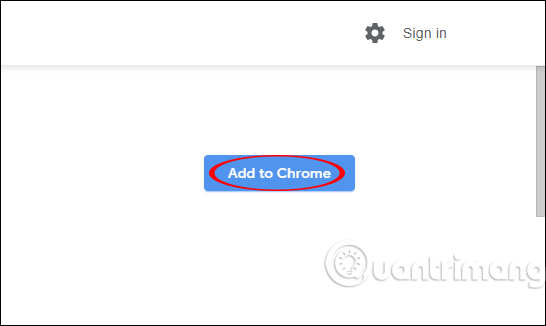
<p>Người dùng cài đặt tiện ích Vlipsy for Gmail theo link dưới đây để cài đặt trên Chrome.</p>

<ul>
	<li><a href="https://quantrimang.com/url?q=aHR0cHM6Ly9jaHJvbWUuZ29vZ2xlLmNvbS93ZWJzdG9yZS9kZXRhaWwvdmxpcHN5LWZvci1nbWFpbC9lcG1raWpoZGpla2lrY2ZhY2FmaGxraGZvb21hY2xrcA%3D%3D" rel="nofollow noopener" target="_blank" title="Tải tiện ích Vlipsy for Gmail Chrome">Tải tiện ích Vlipsy for Gmail Chrome</a></li>
</ul>

<p><img alt="Cài tiện ích" data-i="0" data-src="https://st.quantrimang.com/photos/image/2019/05/30/Vlipsy-for-Gmail-gui-video-gmail-1.jpg" height="326" src="https://st.quantrimang.com/photos/image/2019/05/30/Vlipsy-for-Gmail-gui-video-gmail-1.jpg" width="546" /></p>

<p><strong>Bước 2:</strong></p>

<p>Tiếp đến chúng ta mở email cá nhân rồi nhấn vào nút Soạn thư như bình thường. Trong giao diện soạn thư bạn sẽ nhìn thấy<strong>&nbsp;biểu tượng con voi</strong>&nbsp;của tiện ích Vlipsy for Gmail.</p>

<p><img alt="Biểu tượng tiện ích" data-i="1" data-src="https://st.quantrimang.com/photos/image/2019/05/30/Vlipsy-for-Gmail-gui-video-gmail-2.jpg" height="468" src="https://st.quantrimang.com/photos/image/2019/05/30/Vlipsy-for-Gmail-gui-video-gmail-2.jpg" width="506" /></p>

<p>Khi chúng ta nhấn vào biểu tượng con voi sẽ hiển thị danh sách các video ngắn mà tiện ích Vlipsy for Gmail hỗ trợ. Các video mới luôn hiển thị ở trên cùng danh sách. Bạn có thể&nbsp;<strong>nhập từ khóa chủ đề video</strong>&nbsp;muốn tìm.</p>

<p><img alt="Nhập chủ đề video" data-i="2" data-src="https://st.quantrimang.com/photos/image/2019/05/30/Vlipsy-for-Gmail-gui-video-gmail-3.jpg" height="588" src="https://st.quantrimang.com/photos/image/2019/05/30/Vlipsy-for-Gmail-gui-video-gmail-3.jpg" width="503" /></p>

<p><strong>Bước 3:</strong></p>

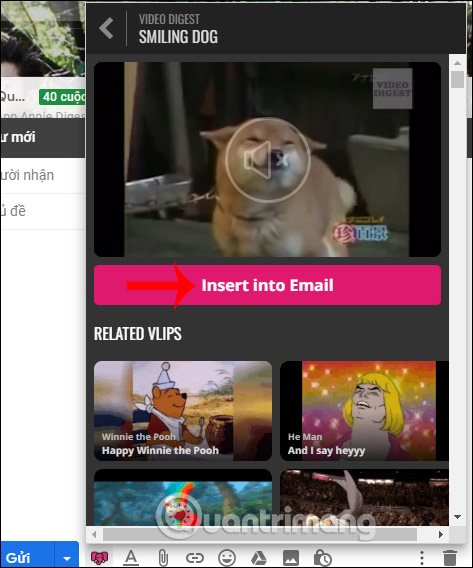
<p>Hiển thị giao diện video, bạn nhấn vào&nbsp;<strong>Insert into Email</strong>&nbsp;để chèn video vào trong nội dung email.</p>

<p><img alt="Chèn video" data-i="3" data-src="https://st.quantrimang.com/photos/image/2019/05/30/Vlipsy-for-Gmail-gui-video-gmail-4.jpg" height="568" src="https://st.quantrimang.com/photos/image/holder.png" width="473" /></p>

<p>Video khi được chèn vào Gmail sẽ hiển thị dưới dạng ảnh động và không có âm thanh.</p>

<p><img alt="Hiển thị video" data-i="4" data-src="https://st.quantrimang.com/photos/image/2019/05/30/Vlipsy-for-Gmail-gui-video-gmail-5.jpg" height="508" src="https://st.quantrimang.com/photos/image/2019/05/30/Vlipsy-for-Gmail-gui-video-gmail-5.jpg" width="505" /></p>

<p>Khi người nhận xem email thì họ click vào ảnh động để truy cập vào trang web Vlipsy mới có thể xem và nghe âm thanh video nếu có âm thanh.</p>

<p><img alt="Mở xem video" data-i="5" data-src="https://st.quantrimang.com/photos/image/2019/05/30/Vlipsy-for-Gmail-gui-video-gmail-6.jpg" height="409" src="https://st.quantrimang.com/photos/image/2019/05/30/Vlipsy-for-Gmail-gui-video-gmail-6.jpg" width="529" /></p>

<p><strong>Bước 4:</strong></p>

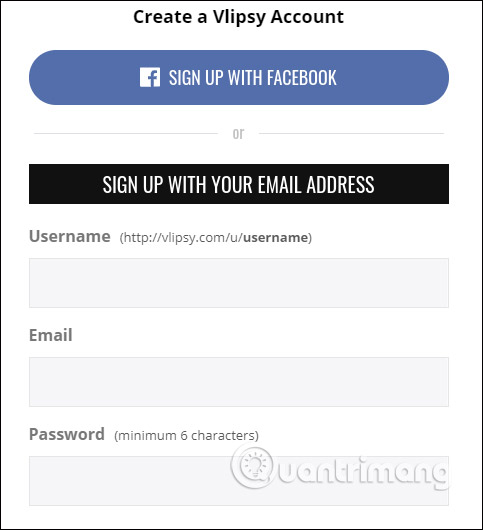
<p>Để<strong>&nbsp;tự tạo video của mình</strong>&nbsp;người dùng truy cập vào trang chủ Vlipsy rồi&nbsp;<strong>nhấn Sign up</strong>&nbsp;để tạo tài khoản cá nhân. Người đăng ký cần xác nhận tài khoản qua email. Hoặc chúng ta có thể đăng ký qua tài khoản Facebook.</p>

<pre id="pre0">
<code>https://vlipsy.com/</code></pre>

<p><img alt="Tạo tài khoản" data-i="6" data-src="https://st.quantrimang.com/photos/image/2019/05/30/Vlipsy-for-Gmail-gui-video-gmail-7.jpg" height="530" src="https://st.quantrimang.com/photos/image/2019/05/30/Vlipsy-for-Gmail-gui-video-gmail-7.jpg" width="483" /></p>

<p>Tại giao diện video chúng ta nhấn chọn vào&nbsp;<strong>Create Your Own</strong>&nbsp;để tiến hành tạo video cá nhân.</p>

<p><img alt="Tạo video cá nhân" data-i="7" data-src="https://st.quantrimang.com/photos/image/2019/05/30/Vlipsy-for-Gmail-gui-video-gmail-8.jpg" height="326" src="https://st.quantrimang.com/photos/image/2019/05/30/Vlipsy-for-Gmail-gui-video-gmail-8.jpg" width="546" /></p>

<p><strong>Bước 5:</strong></p>

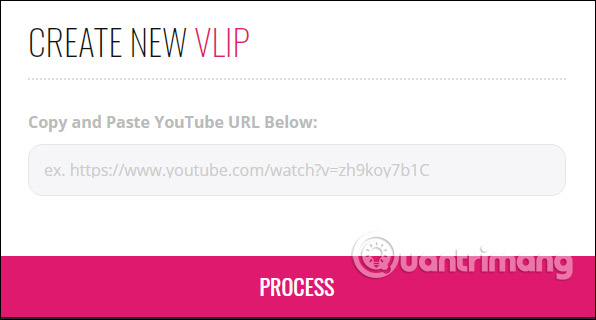
<p>Tiếp đến bạn&nbsp;<strong>nhập URL video YouTube</strong>&nbsp;rồi&nbsp;<strong>nhấn Process</strong>&nbsp;để tiến hành chọn video.&nbsp;</p>

<p><img alt="Video YouTube" data-i="8" data-src="https://st.quantrimang.com/photos/image/2019/05/30/Vlipsy-for-Gmail-gui-video-gmail-9.jpg" height="320" src="https://st.quantrimang.com/photos/image/2019/05/30/Vlipsy-for-Gmail-gui-video-gmail-9.jpg" width="596" /></p>

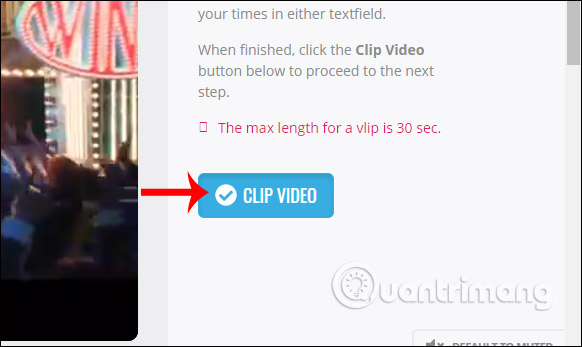
<p>Hiển thị giao diện mới, bạn chọn thời lượng tối đa 30 giây cho video rồi nhấn&nbsp;<strong>Clip Video</strong>.</p>

<p><img alt="Nhấn Clip video" data-i="9" data-src="https://st.quantrimang.com/photos/image/2019/05/30/Vlipsy-for-Gmail-gui-video-gmail-10.jpg" height="347" src="https://st.quantrimang.com/photos/image/2019/05/30/Vlipsy-for-Gmail-gui-video-gmail-10.jpg" width="582" /></p>

<p>Chúng ta lựa chọn ảnh thu nhỏ cho video thông qua thanh thời gian chọn đoạn bên dưới. Chọn xong nhấn&nbsp;<strong>Set Thumbnail</strong>&nbsp;như hình.</p>

<p><img alt="Xuất video" data-i="10" data-src="https://st.quantrimang.com/photos/image/2019/05/30/Vlipsy-for-Gmail-gui-video-gmail-11.jpg" height="341" src="https://st.quantrimang.com/photos/image/2019/05/30/Vlipsy-for-Gmail-gui-video-gmail-11.jpg" width="600" /></p>

<p>Cuối cùng người dùng thêm thông tin về video rồi&nbsp;<strong>nhấn Save Info &amp; Publish</strong>&nbsp;để tiến hành xuất video.</p>

<p><img alt="Xuất video" data-i="11" data-src="https://st.quantrimang.com/photos/image/2019/05/30/Vlipsy-for-Gmail-gui-video-gmail-12.jpg" height="493" src="https://st.quantrimang.com/photos/image/2019/05/30/Vlipsy-for-Gmail-gui-video-gmail-12.jpg" width="387" /></p>

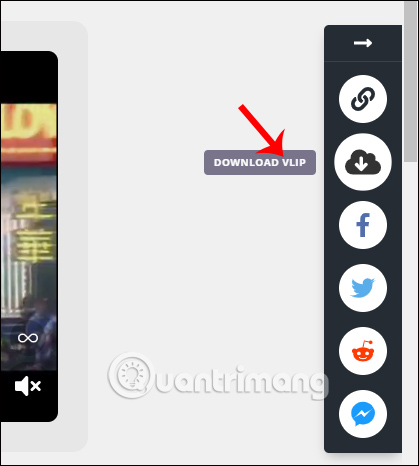
<p>Trong giao diện phát video chúng ta nhấn vào&nbsp;<strong>biểu tượng share</strong>&nbsp;rồi chọn&nbsp;<strong>Download vlip</strong>&nbsp;nếu muốn tải video xuống.</p>

<p><img alt="Tải video" data-i="12" data-src="https://st.quantrimang.com/photos/image/2019/05/30/Vlipsy-for-Gmail-gui-video-gmail-13.jpg" height="466" src="https://st.quantrimang.com/photos/image/2019/05/30/Vlipsy-for-Gmail-gui-video-gmail-13.jpg" width="419" /></p>

<p>Tiện ích Vlipsy for Gmail tạo thêm tùy chọn nội dung gửi email cho người dùng. Các video hiển thị trong email được mặc định là ảnh động và khi nhấn vào video bạn sẽ được nghe âm thanh đầy đủ.</p>

<p>Chúc các bạn thực hiện thành công!</p>
		</div>
				<div id="author">
						<p>
				<strong>Nguồn tin:</strong>
				Quantrimang.com
			</p>
		</div>
	</div>
	<div id="footer" class="clearfix">
		<div id="url">
			<strong>URL của bản tin này: </strong><a href="https://www.nguoicodonvn2008.info/vi/news/savefile/kien-thuc-may-tinh/cach-gui-email-video-tren-gmail-107.html" title="Cách gửi email video trên Gmail">https://www.nguoicodonvn2008.info/vi/news/savefile/kien-thuc-may-tinh/cach-gui-email-video-tren-gmail-107.html</a>

		</div>
		<div class="clear"></div>
		<div class="copyright">
			&copy; .&#x3A; Nguoicodonvn2008.info - Cõi lòng người cô đơn &#x3A;.
		</div>
		<div id="contact">
			<a href="mailto:admin@nguoicodonvn2008.info">admin@nguoicodonvn2008.info</a>
		</div>
	</div>
</div>
        <div id="timeoutsess" class="chromeframe">
            Bạn đã không sử dụng Site, <a onclick="timeoutsesscancel();" href="https://www.nguoicodonvn2008.info/#">Bấm vào đây để duy trì trạng thái đăng nhập</a>. Thời gian chờ: <span id="secField"> 60 </span> giây
        </div>
        <div id="openidResult" class="nv-alert" style="display:none"></div>
        <div id="openidBt" data-result="" data-redirect=""></div>
		</script>
		<div class="car-top">
  <span><img src="https://www.nguoicodonvn2008.info/themes/default/images/car.png" alt=""></span>
</div>
<script src="https://www.nguoicodonvn2008.info/assets/js/jquery/jquery.min.js"></script>
<script>var nv_base_siteurl="/",nv_lang_data="vi",nv_lang_interface="vi",nv_name_variable="nv",nv_fc_variable="op",nv_lang_variable="language",nv_module_name="news",nv_func_name="savefile",nv_is_user=0, nv_my_ofs=-4,nv_my_abbr="EDT",nv_cookie_prefix="nv4c_e856T",nv_check_pass_mstime=1738000,nv_area_admin=0,nv_safemode=0,theme_responsive=0,nv_recaptcha_ver=2,nv_recaptcha_sitekey="",nv_recaptcha_type="image",XSSsanitize=1;</script>
<script src="https://www.nguoicodonvn2008.info/assets/js/language/vi.js"></script>
<script src="https://www.nguoicodonvn2008.info/assets/js/DOMPurify/purify3.js"></script>
<script src="https://www.nguoicodonvn2008.info/assets/js/global.js"></script>
<script src="https://www.nguoicodonvn2008.info/assets/js/site.js"></script>
<script src="https://www.nguoicodonvn2008.info/themes/default/js/news.js"></script>
<script src="https://www.nguoicodonvn2008.info/themes/default/js/main.js"></script>
<script src="https://www.nguoicodonvn2008.info/themes/default/js/custom.js"></script>
<script type="application/ld+json">
        {
            "@context": "https://schema.org",
            "@type": "Organization",
            "url": "https://www.nguoicodonvn2008.info",
            "logo": "https://www.nguoicodonvn2008.info/uploads/angel.gif"
        }
        </script>
<script src="https://www.nguoicodonvn2008.info/themes/default/js/bootstrap.min.js"></script>
<script type="text/javascript">
var $scrolltop = $('.car-top');
$scrolltop.on('click', function () {
    $('html,body').animate({
        scrollTop: 0
    }, 800);
    $(this).addClass("car-run");
    setTimeout(function(){ $scrolltop.removeClass('car-run');}, 1000);
    return false;
});
$(window).on('scroll', function ()
{ 
    if($(window).scrollTop() >= 200)
    {
        $scrolltop.addClass("show");
        $scrolltop.addClass("car-down");
    }
    else
    {
       $scrolltop.removeClass("show");
       setTimeout(function(){ $scrolltop.removeClass('car-down');}, 300);
    }
});
</script>
</body>
</html>