<!DOCTYPE html>
    <html lang="vi" xmlns="http://www.w3.org/1999/xhtml" prefix="og: http://ogp.me/ns#">
    <head>
<title>Cách gõ trọng âm trong Word</title>
<meta name="description" content="Cách gõ trọng âm trong Word - Savefile - Tin Tức - https&#x3A;&#x002F;&#x002F;www.nguoicodonvn2008.info&#x002F;vi&#x002F;news&#x002F;savefile&#x002F;kien-thuc-may-tinh&#x002F;cach-go-trong-am-trong-word-5215.html">
<meta name="author" content=".: Nguoicodonvn2008.info - Cõi lòng người cô đơn :.">
<meta name="copyright" content=".: Nguoicodonvn2008.info - Cõi lòng người cô đơn :. [admin@nguoicodonvn2008.info]">
<meta name="robots" content="index, archive, follow, noodp">
<meta name="googlebot" content="index,archive,follow,noodp">
<meta name="msnbot" content="all,index,follow">
<meta name="generator" content="NukeViet v4.5">
<meta http-equiv="Content-Type" content="text/html; charset=utf-8">
<meta property="og:title" content="Cách gõ trọng âm trong Word">
<meta property="og:type" content="website">
<meta property="og:description" content="Savefile - Tin Tức - https&#x3A;&#x002F;&#x002F;www.nguoicodonvn2008.info&#x002F;vi&#x002F;news&#x002F;savefile&#x002F;kien-thuc-may-tinh&#x002F;cach-go-trong-am-trong-word-5215.html">
<meta property="og:site_name" content=".&#x3A; Nguoicodonvn2008.info - Cõi lòng người cô đơn &#x3A;.">
<meta property="og:url" content="https://www.nguoicodonvn2008.info/vi/news/savefile/kien-thuc-may-tinh/cach-go-trong-am-trong-word-5215.html">
<link rel="shortcut icon" href="https://www.nguoicodonvn2008.info/favicon.ico">
<link rel="canonical" href="https://www.nguoicodonvn2008.info/vi/news/savefile/kien-thuc-may-tinh/cach-go-trong-am-trong-word-5215.html">
<link rel="alternate" href="https://www.nguoicodonvn2008.info/vi/news/rss/" title="Tin Tức" type="application/rss+xml">
<link rel="alternate" href="https://www.nguoicodonvn2008.info/vi/news/rss/karaoke-dual/" title="Tin Tức - Karaoke Dual" type="application/rss+xml">
<link rel="alternate" href="https://www.nguoicodonvn2008.info/vi/news/rss/nhac-tre/" title="Tin Tức - Nhạc trẻ" type="application/rss+xml">
<link rel="alternate" href="https://www.nguoicodonvn2008.info/vi/news/rss/tru-tinh/" title="Tin Tức - Trữ tình" type="application/rss+xml">
<link rel="alternate" href="https://www.nguoicodonvn2008.info/vi/news/rss/nuoc-ngoai/" title="Tin Tức - Nước ngoài" type="application/rss+xml">
<link rel="alternate" href="https://www.nguoicodonvn2008.info/vi/news/rss/remix/" title="Tin Tức - Remix" type="application/rss+xml">
<link rel="alternate" href="https://www.nguoicodonvn2008.info/vi/news/rss/tam-su-tinh-yeu/" title="Tin Tức - Tâm sự tình yêu" type="application/rss+xml">
<link rel="alternate" href="https://www.nguoicodonvn2008.info/vi/news/rss/tho-suu-tam/" title="Tin Tức - Thơ sưu tầm" type="application/rss+xml">
<link rel="alternate" href="https://www.nguoicodonvn2008.info/vi/news/rss/cuoc-song/" title="Tin Tức - Cuộc sống" type="application/rss+xml">
<link rel="alternate" href="https://www.nguoicodonvn2008.info/vi/news/rss/phan-mem/" title="Tin Tức - Phần mềm" type="application/rss+xml">
<link rel="alternate" href="https://www.nguoicodonvn2008.info/vi/news/rss/kien-thuc-may-tinh/" title="Tin Tức - Kiến thức máy tính" type="application/rss+xml">
<link rel="alternate" href="https://www.nguoicodonvn2008.info/vi/news/rss/hoc-tap/" title="Tin Tức - Học tập" type="application/rss+xml">
<link rel="alternate" href="https://www.nguoicodonvn2008.info/vi/news/rss/tai-lieu/" title="Tin Tức - Tài liệu" type="application/rss+xml">
<link rel="alternate" href="https://www.nguoicodonvn2008.info/vi/news/rss/de-thi/" title="Tin Tức - Đề thi" type="application/rss+xml">
<link rel="preload" as="style" href="https://www.nguoicodonvn2008.info/assets/css/font-awesome.min.css" type="text/css">
<link rel="preload" as="style" href="https://www.nguoicodonvn2008.info/themes/default/css/bootstrap.non-responsive.css" type="text/css">
<link rel="preload" as="style" href="https://www.nguoicodonvn2008.info/themes/default/css/style.css" type="text/css">
<link rel="preload" as="style" href="https://www.nguoicodonvn2008.info/themes/default/css/style.non-responsive.css" type="text/css">
<link rel="preload" as="style" href="https://www.nguoicodonvn2008.info/themes/default/css/news.css" type="text/css">
<link rel="preload" as="style" href="https://www.nguoicodonvn2008.info/themes/default/css/custom.css" type="text/css">
<link rel="preload" as="script" href="https://www.nguoicodonvn2008.info/assets/js/jquery/jquery.min.js" type="text/javascript">
<link rel="preload" as="script" href="https://www.nguoicodonvn2008.info/assets/js/language/vi.js" type="text/javascript">
<link rel="preload" as="script" href="https://www.nguoicodonvn2008.info/assets/js/DOMPurify/purify3.js" type="text/javascript">
<link rel="preload" as="script" href="https://www.nguoicodonvn2008.info/assets/js/global.js" type="text/javascript">
<link rel="preload" as="script" href="https://www.nguoicodonvn2008.info/assets/js/site.js" type="text/javascript">
<link rel="preload" as="script" href="https://www.nguoicodonvn2008.info/themes/default/js/news.js" type="text/javascript">
<link rel="preload" as="script" href="https://www.nguoicodonvn2008.info/themes/default/js/main.js" type="text/javascript">
<link rel="preload" as="script" href="https://www.nguoicodonvn2008.info/themes/default/js/custom.js" type="text/javascript">
<link rel="preload" as="script" href="https://www.nguoicodonvn2008.info/themes/default/js/bootstrap.min.js" type="text/javascript">
<link rel="stylesheet" href="https://www.nguoicodonvn2008.info/assets/css/font-awesome.min.css">
<link rel="stylesheet" href="https://www.nguoicodonvn2008.info/themes/default/css/bootstrap.non-responsive.css">
<link rel="stylesheet" href="https://www.nguoicodonvn2008.info/themes/default/css/style.css">
<link rel="stylesheet" href="https://www.nguoicodonvn2008.info/themes/default/css/style.non-responsive.css">
<link rel="StyleSheet" href="https://www.nguoicodonvn2008.info/themes/default/css/news.css">
<link rel="stylesheet" href="https://www.nguoicodonvn2008.info/themes/default/css/custom.css">
<style type="text/css">
	body{background: #fff;}
</style>
    </head>
    <body>
<div id="print">
	<div id="hd_print">
		<h2 class="pull-left">.&#x3A; Nguoicodonvn2008.info - Cõi lòng người cô đơn &#x3A;.</h2>
		<p class="pull-right"><a title=".&#x3A; Nguoicodonvn2008.info - Cõi lòng người cô đơn &#x3A;." href="https://www.nguoicodonvn2008.info/">https://www.nguoicodonvn2008.info</a></p>
	</div>
	<div class="clear"></div>
	<hr />
	<div id="content">
		<h1>Cách gõ trọng âm trong Word</h1>
		<ul class="list-inline">
			<li>Thứ tư - 02/03/2022 23:50</li>
			<li class="hidden-print txtrequired"><em class="fa fa-print">&nbsp;</em><a title="In ra" href="javascript:;" onclick="window.print()">In ra</a></li>
			<li class="hidden-print txtrequired"><em class="fa fa-power-off">&nbsp;</em><a title="Đóng cửa sổ này" href="javascript:;" onclick="window.close()">Đóng cửa sổ này</a></li>
		</ul>
		<div class="clear"></div>
		<div id="hometext">
		</div>
				<div class="imghome">
			<img alt="Cách gõ trọng âm trong Word" src="https://st.quantrimang.com/photos/image/2022/03/01/Word-go-dau-trong-am-1.jpg" width="460" class="img-thumbnail" />
		</div>
		<div class="clear"></div>
		<div id="bodytext" class="clearfix">
			<p style="text-align: justify;">Gõ trọng âm trong Word sẽ hỗ trợ cho các thầy cô giáo dạy tiếng Anh có thể soạn bài giảng, hay hỗ trợ trong quá trình giảng dạy cho các em học sinh. Trên Word thì bạn có thể sử dụng công cụ chèn ký tự đặc biệt có sẵn như khi&nbsp;chèn biểu tượng hình ảnh quyển sách trong Word&nbsp;hoặc dùng thêm một số công cụ hỗ trợ khác. Bài viết dưới đây sẽ hướng dẫn bạn gõ trọng âm trong Word.</p>

<h2 style="text-align: justify;">Gõ trọng âm trong Word bằng Symbol</h2>

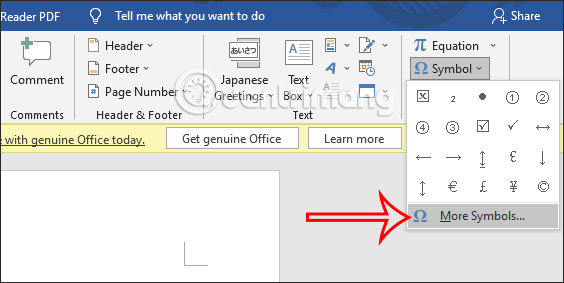
<p style="text-align: justify;"><strong>Bước 1:</strong></p>

<p style="text-align: justify;">Tại giao diện trong Word bạn nhấn vào mục&nbsp;<strong>Insert &gt; Symbol</strong>&nbsp;rồi chọn&nbsp;<strong>More Symbols</strong>&nbsp;để mở rộng bảng biểu tượng trên Word.</p>

<p style="text-align: justify;"><img alt="Biểu tượng trong Word" data-i="0" data-src="https://st.quantrimang.com/photos/image/2022/03/01/Word-go-dau-trong-am-1.jpg" data-was-processed="true" height="283" src="https://st.quantrimang.com/photos/image/2022/03/01/Word-go-dau-trong-am-1.jpg" width="564" /></p>

<p style="text-align: justify;"><strong>Bước 2:</strong></p>

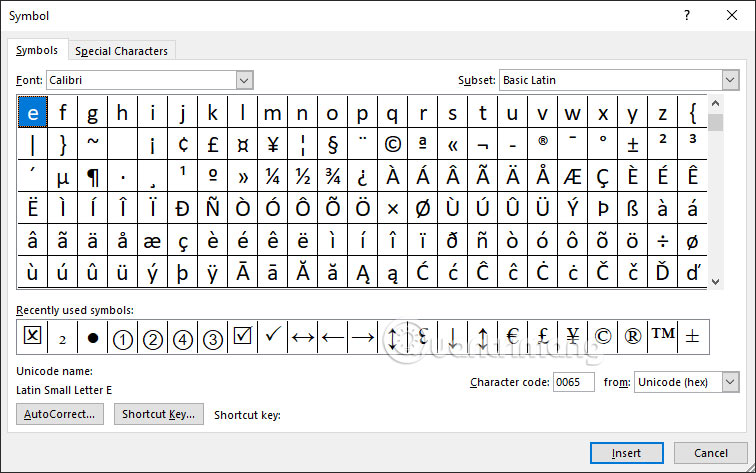
<p style="text-align: justify;">Trong giao diện này người dùng sẽ chọn kiểu Font Calibri rồi nhìn xuống bên dưới sẽ thấy các ký tự đặc biệt, trong đó có chữ cái dấu trọng âm để chúng ta sử dụng.</p>

<p style="text-align: justify;">Bạn&nbsp;<strong>nhấn vào chữ cái dấu trọng âm</strong>&nbsp;mình muốn dùng rồi&nbsp;<strong>nhấn Insert&nbsp;</strong>để chèn vào tài liệu.</p>

<p style="text-align: justify;"><img alt="Chọn biểu tượng trọng âm trong Word" data-i="1" data-src="https://st.quantrimang.com/photos/image/2022/03/01/Word-go-dau-trong-am-2.jpg" data-was-processed="true" height="375" src="https://st.quantrimang.com/photos/image/2022/03/01/Word-go-dau-trong-am-2.jpg" width="600" /></p>

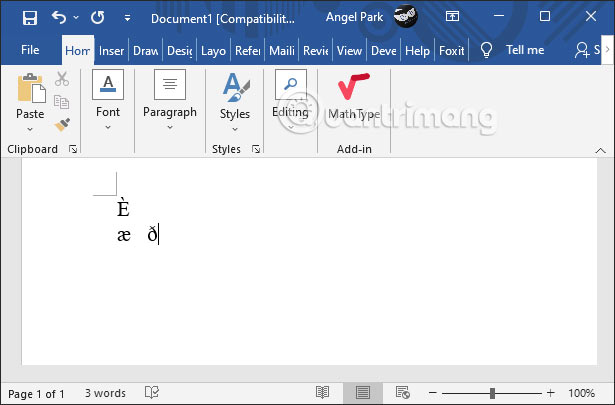
<p style="text-align: justify;">Kết quả biểu tượng dấu trọng âm đã được chèn vào trong Word.</p>

<p style="text-align: justify;"><img alt="Chèn biểu tượng trọng âm trong Word" data-i="2" data-src="https://st.quantrimang.com/photos/image/2022/03/01/Word-go-dau-trong-am-4.jpg" data-was-processed="true" height="382" src="https://st.quantrimang.com/photos/image/2022/03/01/Word-go-dau-trong-am-4.jpg" width="580" /></p>

<h2 style="text-align: justify;">Gõ dấu trọng âm trong Word bằng phím tắt</h2>

<p style="text-align: justify;">Nếu quen dùng phím tắt trong Word thì bạn cũng có thể sử dụng tổ hợp phím tắt dưới đây để gõ dấu trọng âm cho các chữ cái theo bảng dưới đây.</p>

<p style="text-align: justify;">Trong Windows bạn sẽ sử dụng bàn phím số trong máy tính còn với Mac, bạn nhấn và giữ tổ hợp phím đầu tiên rồi thả tay, sau đó nhấn và giữ tổ hợp phím thứ 2 và thả tay.</p>

<table border="1">
	<tbody>
		<tr>
			<td style="text-align: justify;"><strong>Chữ cái</strong></td>
			<td style="text-align: justify;"><strong>Gõ trong Windows</strong></td>
			<td style="text-align: justify;"><strong>Gõ trong Mac</strong></td>
		</tr>
		<tr>
			<td style="text-align: justify;">Á</td>
			<td style="text-align: justify;">Alt+0193</td>
			<td style="text-align: justify;">Option+E và Shift+A</td>
		</tr>
		<tr>
			<td style="text-align: justify;">á</td>
			<td style="text-align: justify;">Alt+0225</td>
			<td style="text-align: justify;">Option+E và A</td>
		</tr>
		<tr>
			<td style="text-align: justify;">É</td>
			<td style="text-align: justify;">Alt+0201</td>
			<td style="text-align: justify;">Option+E và Shift+E</td>
		</tr>
		<tr>
			<td style="text-align: justify;">é</td>
			<td style="text-align: justify;">Alt+0233</td>
			<td style="text-align: justify;">Option+E và E</td>
		</tr>
		<tr>
			<td style="text-align: justify;">Í</td>
			<td style="text-align: justify;">Alt+0205</td>
			<td style="text-align: justify;">Option+E và Shift+l</td>
		</tr>
		<tr>
			<td style="text-align: justify;">í</td>
			<td style="text-align: justify;">Alt+0237</td>
			<td style="text-align: justify;">Option+E và I</td>
		</tr>
		<tr>
			<td style="text-align: justify;">Ó</td>
			<td style="text-align: justify;">Alt+0211</td>
			<td style="text-align: justify;">Option+E và Shift+O</td>
		</tr>
		<tr>
			<td style="text-align: justify;">ó</td>
			<td style="text-align: justify;">Alt+0243</td>
			<td style="text-align: justify;">Option+E và O</td>
		</tr>
		<tr>
			<td style="text-align: justify;">Ú</td>
			<td style="text-align: justify;">Alt+0218</td>
			<td style="text-align: justify;">Option+E và Shift+U</td>
		</tr>
		<tr>
			<td style="text-align: justify;">ú</td>
			<td style="text-align: justify;">Alt+0250</td>
			<td style="text-align: justify;">Option+E và U</td>
		</tr>
		<tr>
			<td style="text-align: justify;">Ü</td>
			<td style="text-align: justify;">Alt+0220</td>
			<td style="text-align: justify;">Option+U và Shift+U</td>
		</tr>
		<tr>
			<td style="text-align: justify;">ü</td>
			<td style="text-align: justify;">Alt+0252</td>
			<td style="text-align: justify;">Option+U và U</td>
		</tr>
		<tr>
			<td style="text-align: justify;">Ñ</td>
			<td style="text-align: justify;">Alt+0209</td>
			<td style="text-align: justify;">Option+N và Shift+N</td>
		</tr>
		<tr>
			<td style="text-align: justify;">ñ</td>
			<td style="text-align: justify;">Alt+0241</td>
			<td style="text-align: justify;">Option+N và N</td>
		</tr>
		<tr>
			<td style="text-align: justify;">¿</td>
			<td style="text-align: justify;">Alt+0191</td>
			<td style="text-align: justify;">Shift+Option+?</td>
		</tr>
	</tbody>
</table>

<p style="text-align: justify;">Ngoài ra thì bạn cũng có thể sử dụng một số phím tắt khác cũng cho ra dấu trọng âm trong Word.</p>

<table border="1" role="presentation">
	<tbody>
		<tr>
			<td style="text-align: justify;"><strong>Biểu tượng</strong></td>
			<td style="text-align: justify;"><strong>Phím tắt</strong></td>
		</tr>
		<tr>
			<td style="text-align: justify;" width="285">à, è, ì, ò, ù</td>
			<td rowspan="2" style="text-align: justify;" width="376">Ctrl + `, chữ cái</td>
		</tr>
		<tr>
			<td style="text-align: justify;" width="285">À, È, Ì, Ò, Ù</td>
		</tr>
		<tr>
			<td style="text-align: justify;" width="285">á, é, í, ó, ú</td>
			<td rowspan="2" style="text-align: justify;" width="376">Ctrl + ‘, chữ cái</td>
		</tr>
		<tr>
			<td style="text-align: justify;" width="285">Á, É, Í, Ó, Ú</td>
		</tr>
		<tr>
			<td style="text-align: justify;" width="285">â, ê, î, ô, û</td>
			<td rowspan="2" style="text-align: justify;" width="376">Ctrl + Shift + ^, chữ cái</td>
		</tr>
		<tr>
			<td style="text-align: justify;" width="285">Â, Ê, Î, Ô, Û</td>
		</tr>
		<tr>
			<td style="text-align: justify;" width="285">ã, ñ, õ</td>
			<td rowspan="2" style="text-align: justify;" width="376">Ctrl + Shift + ~, chữ cái</td>
		</tr>
		<tr>
			<td style="text-align: justify;" width="285">Ã, Ñ, Õ</td>
		</tr>
		<tr>
			<td style="text-align: justify;" width="285">ä, ë, ï, ö, ü</td>
			<td style="text-align: justify;" width="376">Ctrl + Shift +:, chữ cái</td>
		</tr>
	</tbody>
</table>

<h2 style="text-align: justify;">Dùng Character Map gõ dấu trọng âm Word</h2>

<p style="text-align: justify;">Công cụ Character Map trong Word giúp bạn tìm kiếm và sử dụng những ký tự đặc biệt mà bạn không tìm được trong Word. Hoặc khi bạn gõ ký tự ở các giao diện nhập nội dung khác.</p>

<ul>
	<li style="text-align: justify;"><a href="https://quantrimang.com/su-dung-character-map-173348" title="Cách mở và sử dụng Character Map trong Windows">Cách mở và sử dụng Character Map trong Windows</a></li>
</ul>

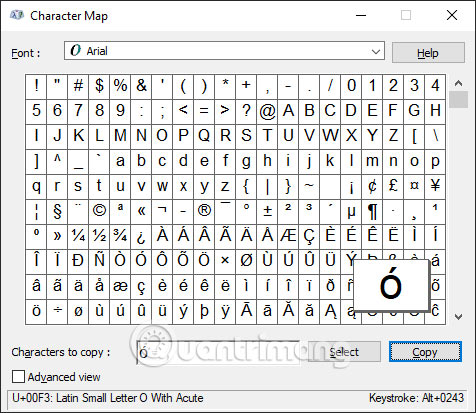
<p style="text-align: justify;">Tại Character Map bạn tìm tới font Arial rồi tìm tới ký tự mà bạn muốn sử dụng để gõ chữ cái trọng âm trong Word.</p>

<p style="text-align: justify;"><img alt="Character Map" data-i="3" data-src="https://st.quantrimang.com/photos/image/2022/03/01/Word-go-dau-trong-am-3.jpg" data-was-processed="true" height="413" src="https://st.quantrimang.com/photos/image/2022/03/01/Word-go-dau-trong-am-3.jpg" width="476" /></p>
		</div>
				<div id="author">
						<p>
				<strong>Nguồn tin:</strong>
				Quantrimang.com
			</p>
		</div>
	</div>
	<div id="footer" class="clearfix">
		<div id="url">
			<strong>URL của bản tin này: </strong><a href="https://www.nguoicodonvn2008.info/vi/news/savefile/kien-thuc-may-tinh/cach-go-trong-am-trong-word-5215.html" title="Cách gõ trọng âm trong Word">https://www.nguoicodonvn2008.info/vi/news/savefile/kien-thuc-may-tinh/cach-go-trong-am-trong-word-5215.html</a>

		</div>
		<div class="clear"></div>
		<div class="copyright">
			&copy; .&#x3A; Nguoicodonvn2008.info - Cõi lòng người cô đơn &#x3A;.
		</div>
		<div id="contact">
			<a href="mailto:admin@nguoicodonvn2008.info">admin@nguoicodonvn2008.info</a>
		</div>
	</div>
</div>
        <div id="timeoutsess" class="chromeframe">
            Bạn đã không sử dụng Site, <a onclick="timeoutsesscancel();" href="https://www.nguoicodonvn2008.info/#">Bấm vào đây để duy trì trạng thái đăng nhập</a>. Thời gian chờ: <span id="secField"> 60 </span> giây
        </div>
        <div id="openidResult" class="nv-alert" style="display:none"></div>
        <div id="openidBt" data-result="" data-redirect=""></div>
		</script>
		<div class="car-top">
  <span><img src="https://www.nguoicodonvn2008.info/themes/default/images/car.png" alt=""></span>
</div>
<script src="https://www.nguoicodonvn2008.info/assets/js/jquery/jquery.min.js"></script>
<script>var nv_base_siteurl="/",nv_lang_data="vi",nv_lang_interface="vi",nv_name_variable="nv",nv_fc_variable="op",nv_lang_variable="language",nv_module_name="news",nv_func_name="savefile",nv_is_user=0, nv_my_ofs=-4,nv_my_abbr="EDT",nv_cookie_prefix="nv4c_e856T",nv_check_pass_mstime=1738000,nv_area_admin=0,nv_safemode=0,theme_responsive=0,nv_recaptcha_ver=2,nv_recaptcha_sitekey="",nv_recaptcha_type="image",XSSsanitize=1;</script>
<script src="https://www.nguoicodonvn2008.info/assets/js/language/vi.js"></script>
<script src="https://www.nguoicodonvn2008.info/assets/js/DOMPurify/purify3.js"></script>
<script src="https://www.nguoicodonvn2008.info/assets/js/global.js"></script>
<script src="https://www.nguoicodonvn2008.info/assets/js/site.js"></script>
<script src="https://www.nguoicodonvn2008.info/themes/default/js/news.js"></script>
<script src="https://www.nguoicodonvn2008.info/themes/default/js/main.js"></script>
<script src="https://www.nguoicodonvn2008.info/themes/default/js/custom.js"></script>
<script type="application/ld+json">
        {
            "@context": "https://schema.org",
            "@type": "Organization",
            "url": "https://www.nguoicodonvn2008.info",
            "logo": "https://www.nguoicodonvn2008.info/uploads/angel.gif"
        }
        </script>
<script src="https://www.nguoicodonvn2008.info/themes/default/js/bootstrap.min.js"></script>
<script type="text/javascript">
var $scrolltop = $('.car-top');
$scrolltop.on('click', function () {
    $('html,body').animate({
        scrollTop: 0
    }, 800);
    $(this).addClass("car-run");
    setTimeout(function(){ $scrolltop.removeClass('car-run');}, 1000);
    return false;
});
$(window).on('scroll', function ()
{ 
    if($(window).scrollTop() >= 200)
    {
        $scrolltop.addClass("show");
        $scrolltop.addClass("car-down");
    }
    else
    {
       $scrolltop.removeClass("show");
       setTimeout(function(){ $scrolltop.removeClass('car-down');}, 300);
    }
});
</script>
</body>
</html>