<!DOCTYPE html>
    <html lang="vi" xmlns="http://www.w3.org/1999/xhtml" prefix="og: http://ogp.me/ns#">
    <head>
<title>Cách giải nén file đĩa ảo VMDK trên Windows</title>
<meta name="description" content="Cách giải nén file đĩa ảo VMDK trên Windows - Savefile - Tin Tức -...">
<meta name="author" content=".: Nguoicodonvn2008.info - Cõi lòng người cô đơn :.">
<meta name="copyright" content=".: Nguoicodonvn2008.info - Cõi lòng người cô đơn :. [admin@nguoicodonvn2008.info]">
<meta name="robots" content="index, archive, follow, noodp">
<meta name="googlebot" content="index,archive,follow,noodp">
<meta name="msnbot" content="all,index,follow">
<meta name="generator" content="NukeViet v4.5">
<meta http-equiv="Content-Type" content="text/html; charset=utf-8">
<meta property="og:title" content="Cách giải nén file đĩa ảo VMDK trên Windows">
<meta property="og:type" content="website">
<meta property="og:description" content="Savefile - Tin Tức - https&#x3A;&#x002F;&#x002F;www.nguoicodonvn2008.info&#x002F;vi&#x002F;news&#x002F;savefile&#x002F;kien-thuc-may-tinh&#x002F;cach-giai-nen-file-dia-ao-vmdk-tren-windows-4342.html">
<meta property="og:site_name" content=".&#x3A; Nguoicodonvn2008.info - Cõi lòng người cô đơn &#x3A;.">
<meta property="og:url" content="https://www.nguoicodonvn2008.info/vi/news/savefile/kien-thuc-may-tinh/cach-giai-nen-file-dia-ao-vmdk-tren-windows-4342.html">
<link rel="shortcut icon" href="https://www.nguoicodonvn2008.info/favicon.ico">
<link rel="canonical" href="https://www.nguoicodonvn2008.info/vi/news/savefile/kien-thuc-may-tinh/cach-giai-nen-file-dia-ao-vmdk-tren-windows-4342.html">
<link rel="alternate" href="https://www.nguoicodonvn2008.info/vi/news/rss/" title="Tin Tức" type="application/rss+xml">
<link rel="alternate" href="https://www.nguoicodonvn2008.info/vi/news/rss/karaoke-dual/" title="Tin Tức - Karaoke Dual" type="application/rss+xml">
<link rel="alternate" href="https://www.nguoicodonvn2008.info/vi/news/rss/nhac-tre/" title="Tin Tức - Nhạc trẻ" type="application/rss+xml">
<link rel="alternate" href="https://www.nguoicodonvn2008.info/vi/news/rss/tru-tinh/" title="Tin Tức - Trữ tình" type="application/rss+xml">
<link rel="alternate" href="https://www.nguoicodonvn2008.info/vi/news/rss/nuoc-ngoai/" title="Tin Tức - Nước ngoài" type="application/rss+xml">
<link rel="alternate" href="https://www.nguoicodonvn2008.info/vi/news/rss/remix/" title="Tin Tức - Remix" type="application/rss+xml">
<link rel="alternate" href="https://www.nguoicodonvn2008.info/vi/news/rss/tam-su-tinh-yeu/" title="Tin Tức - Tâm sự tình yêu" type="application/rss+xml">
<link rel="alternate" href="https://www.nguoicodonvn2008.info/vi/news/rss/tho-suu-tam/" title="Tin Tức - Thơ sưu tầm" type="application/rss+xml">
<link rel="alternate" href="https://www.nguoicodonvn2008.info/vi/news/rss/cuoc-song/" title="Tin Tức - Cuộc sống" type="application/rss+xml">
<link rel="alternate" href="https://www.nguoicodonvn2008.info/vi/news/rss/phan-mem/" title="Tin Tức - Phần mềm" type="application/rss+xml">
<link rel="alternate" href="https://www.nguoicodonvn2008.info/vi/news/rss/kien-thuc-may-tinh/" title="Tin Tức - Kiến thức máy tính" type="application/rss+xml">
<link rel="alternate" href="https://www.nguoicodonvn2008.info/vi/news/rss/hoc-tap/" title="Tin Tức - Học tập" type="application/rss+xml">
<link rel="alternate" href="https://www.nguoicodonvn2008.info/vi/news/rss/tai-lieu/" title="Tin Tức - Tài liệu" type="application/rss+xml">
<link rel="alternate" href="https://www.nguoicodonvn2008.info/vi/news/rss/de-thi/" title="Tin Tức - Đề thi" type="application/rss+xml">
<link rel="preload" as="style" href="https://www.nguoicodonvn2008.info/assets/css/font-awesome.min.css" type="text/css">
<link rel="preload" as="style" href="https://www.nguoicodonvn2008.info/themes/default/css/bootstrap.non-responsive.css" type="text/css">
<link rel="preload" as="style" href="https://www.nguoicodonvn2008.info/themes/default/css/style.css" type="text/css">
<link rel="preload" as="style" href="https://www.nguoicodonvn2008.info/themes/default/css/style.non-responsive.css" type="text/css">
<link rel="preload" as="style" href="https://www.nguoicodonvn2008.info/themes/default/css/news.css" type="text/css">
<link rel="preload" as="style" href="https://www.nguoicodonvn2008.info/themes/default/css/custom.css" type="text/css">
<link rel="preload" as="script" href="https://www.nguoicodonvn2008.info/assets/js/jquery/jquery.min.js" type="text/javascript">
<link rel="preload" as="script" href="https://www.nguoicodonvn2008.info/assets/js/language/vi.js" type="text/javascript">
<link rel="preload" as="script" href="https://www.nguoicodonvn2008.info/assets/js/DOMPurify/purify3.js" type="text/javascript">
<link rel="preload" as="script" href="https://www.nguoicodonvn2008.info/assets/js/global.js" type="text/javascript">
<link rel="preload" as="script" href="https://www.nguoicodonvn2008.info/assets/js/site.js" type="text/javascript">
<link rel="preload" as="script" href="https://www.nguoicodonvn2008.info/themes/default/js/news.js" type="text/javascript">
<link rel="preload" as="script" href="https://www.nguoicodonvn2008.info/themes/default/js/main.js" type="text/javascript">
<link rel="preload" as="script" href="https://www.nguoicodonvn2008.info/themes/default/js/custom.js" type="text/javascript">
<link rel="preload" as="script" href="https://www.nguoicodonvn2008.info/themes/default/js/bootstrap.min.js" type="text/javascript">
<link rel="stylesheet" href="https://www.nguoicodonvn2008.info/assets/css/font-awesome.min.css">
<link rel="stylesheet" href="https://www.nguoicodonvn2008.info/themes/default/css/bootstrap.non-responsive.css">
<link rel="stylesheet" href="https://www.nguoicodonvn2008.info/themes/default/css/style.css">
<link rel="stylesheet" href="https://www.nguoicodonvn2008.info/themes/default/css/style.non-responsive.css">
<link rel="StyleSheet" href="https://www.nguoicodonvn2008.info/themes/default/css/news.css">
<link rel="stylesheet" href="https://www.nguoicodonvn2008.info/themes/default/css/custom.css">
<style type="text/css">
	body{background: #fff;}
</style>
    </head>
    <body>
<div id="print">
	<div id="hd_print">
		<h2 class="pull-left">.&#x3A; Nguoicodonvn2008.info - Cõi lòng người cô đơn &#x3A;.</h2>
		<p class="pull-right"><a title=".&#x3A; Nguoicodonvn2008.info - Cõi lòng người cô đơn &#x3A;." href="https://www.nguoicodonvn2008.info/">https://www.nguoicodonvn2008.info</a></p>
	</div>
	<div class="clear"></div>
	<hr />
	<div id="content">
		<h1>Cách giải nén file đĩa ảo VMDK trên Windows</h1>
		<ul class="list-inline">
			<li>Thứ tư - 30/06/2021 07:39</li>
			<li class="hidden-print txtrequired"><em class="fa fa-print">&nbsp;</em><a title="In ra" href="javascript:;" onclick="window.print()">In ra</a></li>
			<li class="hidden-print txtrequired"><em class="fa fa-power-off">&nbsp;</em><a title="Đóng cửa sổ này" href="javascript:;" onclick="window.close()">Đóng cửa sổ này</a></li>
		</ul>
		<div class="clear"></div>
		<div id="hometext">
		</div>
				<div class="imghome">
			<img alt="Cách giải nén file đĩa ảo VMDK trên Windows" src="https://st.quantrimang.com/photos/image/2021/06/22/giai-nen-file-dia-ao-vmdk-tren-windows1.jpg" width="460" class="img-thumbnail" />
		</div>
		<div class="clear"></div>
		<div id="bodytext" class="clearfix">
			<p style="text-align: justify;">Nếu bạn cần giải nén dữ liệu từ tệp ảnh đĩa máy ảo VMware - VMware virtual machine disk image (ở định dạng VMDK), có một cách nhanh chóng và miễn phí để thực hiện việc này mà không cần phải mua hoặc cài đặt VMware Workstation. Đây là cách thực hiện.</p>

<h2 style="text-align: justify;">Trước tiên, cài đặt 7-Zip</h2>

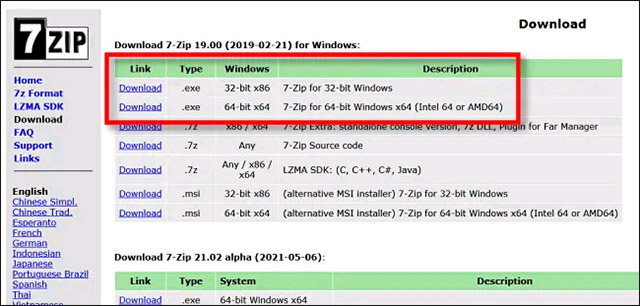
<p style="text-align: justify;">Để trích xuất (giải nén) dữ liệu từ tệp VMDK mà không có VMWare Workstation, bạn cần tải xuống và cài đặt công cụ trích xuất tệp nổi tiếng 7-Zip. Đây là một phần mềm mã nguồn mở được đánh giá cao, dễ sử dụng, hỗ trợ nhiều định dạng tệp nén khác nhau, và đặt biệt là hoàn toàn miễn phí. Bạn có thể download 7-Zip tại&nbsp;đây:&nbsp;<span style="color:rgb(192, 57, 43);"><strong>https://www.7-zip.org/download.html</strong></span></p>

<p style="text-align: justify;">Trên trang download 7-Zip, hãy chọn phiên bản phù hợp với nền tảng Windows của bạn từ danh sách có sẵn. Chúng tôi khuyên bạn nên download phiên bản 32 bit hoặc 64 bit (tùy thuộc vào hệ điều hành Windows bạn đang sử dụng) dưới dạng tệp EXE từ danh mục bản phát hành ổn định mới nhất được liệt kê ở đầu trang.</p>

<div style="text-align: justify;">&nbsp;</div>

<p style="text-align: justify;">&nbsp;</p>

<div style="text-align: justify;"><br />
<img alt="Chọn phiên bản phù hợp" data-i="0" data-inimage-loaded="true" data-src="https://st.quantrimang.com/photos/image/2021/06/22/giai-nen-file-dia-ao-vmdk-tren-windows1.jpg" data-was-processed="true" height="306" src="https://st.quantrimang.com/photos/image/2021/06/22/giai-nen-file-dia-ao-vmdk-tren-windows1.jpg" width="640" /></div>

<p style="text-align: justify;">Sau khi download thành công, hãy chạy tệp EXE cài đặt 7-Zip. Trên Windows 10, bạn có thể thấy một cửa sổ bật lên với nội dung “Windows Protected Your PC”. Hãy nhấp vào “More Info”, rồi sau đó bấm chọn “Run Anyway” để bỏ qua cảnh báo. Sau đó, làm theo các bước cài đặt 7-Zip được liệt kê trên màn hình.</p>

<h2 style="text-align: justify;">Tiếp theo, mở và giải nén tệp VMDK</h2>

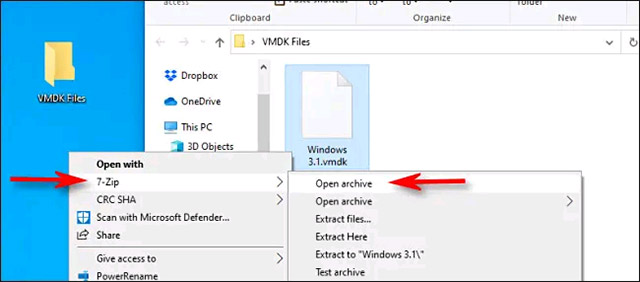
<p style="text-align: justify;">7-Zip đã được cài đặt thành công, bây giờ, hãy điều hướng đến vị trí tệp VMDK mà bạn muốn giải nén. Khi bạn tìm thấy nó, hãy nhấp chuột phải vào biểu tượng của tệp và chọn “7-Zip”, sau đó bấm vào “Open Archive” từ menu hiện ra.</p>

<div style="text-align: justify;">&nbsp;</div>

<p style="text-align: justify;"><img alt="Bấm vào “Open Archive”" data-i="1" data-src="https://st.quantrimang.com/photos/image/2021/06/22/giai-nen-file-dia-ao-vmdk-tren-windows2.jpg" data-was-processed="true" height="282" src="https://st.quantrimang.com/photos/image/2021/06/22/giai-nen-file-dia-ao-vmdk-tren-windows2.jpg" width="640" /></p>

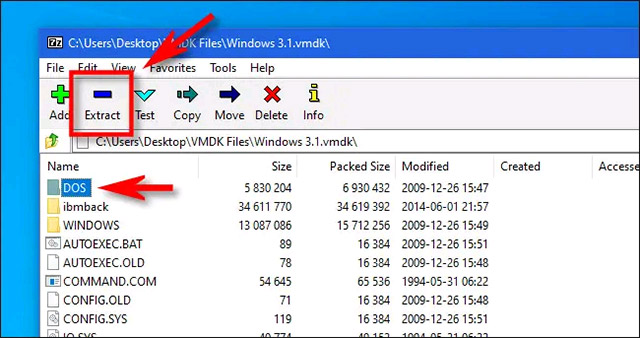
<p style="text-align: justify;">Cửa sổ ứng dụng 7-Zip sẽ mở ra. Nếu được yêu cầu, hãy chọn một phân vùng và nhấp vào “OK”. Sau đó, ngay bên dưới thanh công cụ, bạn sẽ thấy danh sách các tệp được lưu trữ bên trong hình ảnh đĩa. Nếu bạn cần tìm kiếm một tệp hoặc thư mục cụ thể, có thể từ từ điều hướng qua các thư mục giống như vẫn thường làm trong File Explorer.</p>

<p style="text-align: justify;">Khi đã tìm thấy các mục mà mình muốn trích xuất từ tệp VMDK, hãy nhấp chọn chúng và bấm vào nút “Extract” trên thanh công cụ.</p>

<p style="text-align: justify;"><img alt="Nhấn vào “Extract”" data-i="2" data-src="https://st.quantrimang.com/photos/image/2021/06/22/giai-nen-file-dia-ao-vmdk-tren-windows3.jpg" data-was-processed="true" height="338" src="https://st.quantrimang.com/photos/image/2021/06/22/giai-nen-file-dia-ao-vmdk-tren-windows3.jpg" width="640" /></p>

<div style="text-align: justify;">&nbsp;</div>

<p style="text-align: justify;">7-Zip sẽ mở một cửa sổ hộp thoại có tiêu đề “Copy”, cho phép bạn duyệt đến một vị trí cụ thể trên PC nơ lưu các tệp đã giải nén. Sau khi hoàn tất, hãy nhấp vào “OK” và 7-Zip sẽ trích xuất các tệp vào vị trí đó, và công việc của bạn đã hoàn tất!</p>
		</div>
				<div id="author">
						<p>
				<strong>Nguồn tin:</strong>
				Quantrimang.com
			</p>
		</div>
	</div>
	<div id="footer" class="clearfix">
		<div id="url">
			<strong>URL của bản tin này: </strong><a href="https://www.nguoicodonvn2008.info/vi/news/savefile/kien-thuc-may-tinh/cach-giai-nen-file-dia-ao-vmdk-tren-windows-4342.html" title="Cách giải nén file đĩa ảo VMDK trên Windows">https://www.nguoicodonvn2008.info/vi/news/savefile/kien-thuc-may-tinh/cach-giai-nen-file-dia-ao-vmdk-tren-windows-4342.html</a>

		</div>
		<div class="clear"></div>
		<div class="copyright">
			&copy; .&#x3A; Nguoicodonvn2008.info - Cõi lòng người cô đơn &#x3A;.
		</div>
		<div id="contact">
			<a href="mailto:admin@nguoicodonvn2008.info">admin@nguoicodonvn2008.info</a>
		</div>
	</div>
</div>
        <div id="timeoutsess" class="chromeframe">
            Bạn đã không sử dụng Site, <a onclick="timeoutsesscancel();" href="https://www.nguoicodonvn2008.info/#">Bấm vào đây để duy trì trạng thái đăng nhập</a>. Thời gian chờ: <span id="secField"> 60 </span> giây
        </div>
        <div id="openidResult" class="nv-alert" style="display:none"></div>
        <div id="openidBt" data-result="" data-redirect=""></div>
		</script>
		<div class="car-top">
  <span><img src="https://www.nguoicodonvn2008.info/themes/default/images/car.png" alt=""></span>
</div>
<script src="https://www.nguoicodonvn2008.info/assets/js/jquery/jquery.min.js"></script>
<script>var nv_base_siteurl="/",nv_lang_data="vi",nv_lang_interface="vi",nv_name_variable="nv",nv_fc_variable="op",nv_lang_variable="language",nv_module_name="news",nv_func_name="savefile",nv_is_user=0, nv_my_ofs=-4,nv_my_abbr="EDT",nv_cookie_prefix="nv4c_e856T",nv_check_pass_mstime=1738000,nv_area_admin=0,nv_safemode=0,theme_responsive=0,nv_recaptcha_ver=2,nv_recaptcha_sitekey="",nv_recaptcha_type="image",XSSsanitize=1;</script>
<script src="https://www.nguoicodonvn2008.info/assets/js/language/vi.js"></script>
<script src="https://www.nguoicodonvn2008.info/assets/js/DOMPurify/purify3.js"></script>
<script src="https://www.nguoicodonvn2008.info/assets/js/global.js"></script>
<script src="https://www.nguoicodonvn2008.info/assets/js/site.js"></script>
<script src="https://www.nguoicodonvn2008.info/themes/default/js/news.js"></script>
<script src="https://www.nguoicodonvn2008.info/themes/default/js/main.js"></script>
<script src="https://www.nguoicodonvn2008.info/themes/default/js/custom.js"></script>
<script type="application/ld+json">
        {
            "@context": "https://schema.org",
            "@type": "Organization",
            "url": "https://www.nguoicodonvn2008.info",
            "logo": "https://www.nguoicodonvn2008.info/uploads/angel.gif"
        }
        </script>
<script src="https://www.nguoicodonvn2008.info/themes/default/js/bootstrap.min.js"></script>
<script type="text/javascript">
var $scrolltop = $('.car-top');
$scrolltop.on('click', function () {
    $('html,body').animate({
        scrollTop: 0
    }, 800);
    $(this).addClass("car-run");
    setTimeout(function(){ $scrolltop.removeClass('car-run');}, 1000);
    return false;
});
$(window).on('scroll', function ()
{ 
    if($(window).scrollTop() >= 200)
    {
        $scrolltop.addClass("show");
        $scrolltop.addClass("car-down");
    }
    else
    {
       $scrolltop.removeClass("show");
       setTimeout(function(){ $scrolltop.removeClass('car-down');}, 300);
    }
});
</script>
</body>
</html>