<!DOCTYPE html>
    <html lang="vi" xmlns="http://www.w3.org/1999/xhtml" prefix="og: http://ogp.me/ns#">
    <head>
<title>Cách ghi chú trong Linux Terminal với tnote</title>
<meta name="description" content="Cách ghi chú trong Linux Terminal với tnote - Savefile - Tin Tức -...">
<meta name="author" content=".: Nguoicodonvn2008.info - Cõi lòng người cô đơn :.">
<meta name="copyright" content=".: Nguoicodonvn2008.info - Cõi lòng người cô đơn :. [admin@nguoicodonvn2008.info]">
<meta name="robots" content="index, archive, follow, noodp">
<meta name="googlebot" content="index,archive,follow,noodp">
<meta name="msnbot" content="all,index,follow">
<meta name="generator" content="NukeViet v4.5">
<meta http-equiv="Content-Type" content="text/html; charset=utf-8">
<meta property="og:title" content="Cách ghi chú trong Linux Terminal với tnote">
<meta property="og:type" content="website">
<meta property="og:description" content="Savefile - Tin Tức - https&#x3A;&#x002F;&#x002F;www.nguoicodonvn2008.info&#x002F;vi&#x002F;news&#x002F;savefile&#x002F;kien-thuc-may-tinh&#x002F;cach-ghi-chu-trong-linux-terminal-voi-tnote-6140.html">
<meta property="og:site_name" content=".&#x3A; Nguoicodonvn2008.info - Cõi lòng người cô đơn &#x3A;.">
<meta property="og:url" content="https://www.nguoicodonvn2008.info/vi/news/savefile/kien-thuc-may-tinh/cach-ghi-chu-trong-linux-terminal-voi-tnote-6140.html">
<link rel="shortcut icon" href="https://www.nguoicodonvn2008.info/favicon.ico">
<link rel="canonical" href="https://www.nguoicodonvn2008.info/vi/news/savefile/kien-thuc-may-tinh/cach-ghi-chu-trong-linux-terminal-voi-tnote-6140.html">
<link rel="alternate" href="https://www.nguoicodonvn2008.info/vi/news/rss/" title="Tin Tức" type="application/rss+xml">
<link rel="alternate" href="https://www.nguoicodonvn2008.info/vi/news/rss/karaoke-dual/" title="Tin Tức - Karaoke Dual" type="application/rss+xml">
<link rel="alternate" href="https://www.nguoicodonvn2008.info/vi/news/rss/nhac-tre/" title="Tin Tức - Nhạc trẻ" type="application/rss+xml">
<link rel="alternate" href="https://www.nguoicodonvn2008.info/vi/news/rss/tru-tinh/" title="Tin Tức - Trữ tình" type="application/rss+xml">
<link rel="alternate" href="https://www.nguoicodonvn2008.info/vi/news/rss/nuoc-ngoai/" title="Tin Tức - Nước ngoài" type="application/rss+xml">
<link rel="alternate" href="https://www.nguoicodonvn2008.info/vi/news/rss/remix/" title="Tin Tức - Remix" type="application/rss+xml">
<link rel="alternate" href="https://www.nguoicodonvn2008.info/vi/news/rss/tam-su-tinh-yeu/" title="Tin Tức - Tâm sự tình yêu" type="application/rss+xml">
<link rel="alternate" href="https://www.nguoicodonvn2008.info/vi/news/rss/tho-suu-tam/" title="Tin Tức - Thơ sưu tầm" type="application/rss+xml">
<link rel="alternate" href="https://www.nguoicodonvn2008.info/vi/news/rss/cuoc-song/" title="Tin Tức - Cuộc sống" type="application/rss+xml">
<link rel="alternate" href="https://www.nguoicodonvn2008.info/vi/news/rss/phan-mem/" title="Tin Tức - Phần mềm" type="application/rss+xml">
<link rel="alternate" href="https://www.nguoicodonvn2008.info/vi/news/rss/kien-thuc-may-tinh/" title="Tin Tức - Kiến thức máy tính" type="application/rss+xml">
<link rel="alternate" href="https://www.nguoicodonvn2008.info/vi/news/rss/hoc-tap/" title="Tin Tức - Học tập" type="application/rss+xml">
<link rel="alternate" href="https://www.nguoicodonvn2008.info/vi/news/rss/tai-lieu/" title="Tin Tức - Tài liệu" type="application/rss+xml">
<link rel="alternate" href="https://www.nguoicodonvn2008.info/vi/news/rss/de-thi/" title="Tin Tức - Đề thi" type="application/rss+xml">
<link rel="preload" as="style" href="https://www.nguoicodonvn2008.info/assets/css/font-awesome.min.css" type="text/css">
<link rel="preload" as="style" href="https://www.nguoicodonvn2008.info/themes/default/css/bootstrap.non-responsive.css" type="text/css">
<link rel="preload" as="style" href="https://www.nguoicodonvn2008.info/themes/default/css/style.css" type="text/css">
<link rel="preload" as="style" href="https://www.nguoicodonvn2008.info/themes/default/css/style.non-responsive.css" type="text/css">
<link rel="preload" as="style" href="https://www.nguoicodonvn2008.info/themes/default/css/news.css" type="text/css">
<link rel="preload" as="style" href="https://www.nguoicodonvn2008.info/themes/default/css/custom.css" type="text/css">
<link rel="preload" as="script" href="https://www.nguoicodonvn2008.info/assets/js/jquery/jquery.min.js" type="text/javascript">
<link rel="preload" as="script" href="https://www.nguoicodonvn2008.info/assets/js/language/vi.js" type="text/javascript">
<link rel="preload" as="script" href="https://www.nguoicodonvn2008.info/assets/js/DOMPurify/purify3.js" type="text/javascript">
<link rel="preload" as="script" href="https://www.nguoicodonvn2008.info/assets/js/global.js" type="text/javascript">
<link rel="preload" as="script" href="https://www.nguoicodonvn2008.info/assets/js/site.js" type="text/javascript">
<link rel="preload" as="script" href="https://www.nguoicodonvn2008.info/themes/default/js/news.js" type="text/javascript">
<link rel="preload" as="script" href="https://www.nguoicodonvn2008.info/themes/default/js/main.js" type="text/javascript">
<link rel="preload" as="script" href="https://www.nguoicodonvn2008.info/themes/default/js/custom.js" type="text/javascript">
<link rel="preload" as="script" href="https://www.nguoicodonvn2008.info/themes/default/js/bootstrap.min.js" type="text/javascript">
<link rel="stylesheet" href="https://www.nguoicodonvn2008.info/assets/css/font-awesome.min.css">
<link rel="stylesheet" href="https://www.nguoicodonvn2008.info/themes/default/css/bootstrap.non-responsive.css">
<link rel="stylesheet" href="https://www.nguoicodonvn2008.info/themes/default/css/style.css">
<link rel="stylesheet" href="https://www.nguoicodonvn2008.info/themes/default/css/style.non-responsive.css">
<link rel="StyleSheet" href="https://www.nguoicodonvn2008.info/themes/default/css/news.css">
<link rel="stylesheet" href="https://www.nguoicodonvn2008.info/themes/default/css/custom.css">
<style type="text/css">
	body{background: #fff;}
</style>
    </head>
    <body>
<div id="print">
	<div id="hd_print">
		<h2 class="pull-left">.&#x3A; Nguoicodonvn2008.info - Cõi lòng người cô đơn &#x3A;.</h2>
		<p class="pull-right"><a title=".&#x3A; Nguoicodonvn2008.info - Cõi lòng người cô đơn &#x3A;." href="https://www.nguoicodonvn2008.info/">https://www.nguoicodonvn2008.info</a></p>
	</div>
	<div class="clear"></div>
	<hr />
	<div id="content">
		<h1>Cách ghi chú trong Linux Terminal với tnote</h1>
		<ul class="list-inline">
			<li>Thứ năm - 29/09/2022 00:48</li>
			<li class="hidden-print txtrequired"><em class="fa fa-print">&nbsp;</em><a title="In ra" href="javascript:;" onclick="window.print()">In ra</a></li>
			<li class="hidden-print txtrequired"><em class="fa fa-power-off">&nbsp;</em><a title="Đóng cửa sổ này" href="javascript:;" onclick="window.close()">Đóng cửa sổ này</a></li>
		</ul>
		<div class="clear"></div>
		<div id="hometext">
		</div>
				<div class="imghome">
			<img alt="Cách ghi chú trong Linux Terminal với tnote" src="https://st.quantrimang.com/photos/image/2022/09/26/ghi-chu-trong-linux-terminal-voi-tnote-2.jpg" width="460" class="img-thumbnail" />
		</div>
		<div class="clear"></div>
		<div id="bodytext" class="clearfix">
			<p style="text-align: justify;">Bạn có thể kích hoạt trình soạn thảo văn bản mỗi khi bạn cần lưu ý tưởng, code snippet hoặc&nbsp;URL. Nhưng không phải lúc nào bạn cũng cần sử dụng trình soạn thảo văn bản để lưu trữ các mẩu tin nhỏ.</p>

<p style="text-align: justify;">Nếu yêu thích Linux Terminal, bạn nên xem xét việc tích hợp một ứng dụng ghi chú dựa trên terminal vào quy trình làm việc của mình. Hãy tìm hiểu cách bạn có thể ghi chú trong Linux Terminal.</p>

<h2 style="text-align: justify;">Ghi chú trong Linux Terminal bằng tnote</h2>

<p style="text-align: justify;">tnote là một ứng dụng ghi chú dựa trên terminal đa nền tảng, miễn phí và mã nguồn mở mà bạn có thể gọi trong terminal bất cứ khi nào bạn cần lưu trữ dữ liệu nhanh chóng. Nó nhẹ nhưng có các tính năng như mã hóa, theme, highlight văn bản, gắn thẻ, v.v...</p>

<p style="text-align: justify;">Kiểm tra kho lưu trữ tnote chính thức để tìm hiểu thêm về phần mềm và các tính năng của nó.</p>

<h2 style="text-align: justify;">Cài đặt và thiết lập tnote trên Linux</h2>

<p style="text-align: justify;">tnote phụ thuộc vào gói libsqlcipher-dev. Bước đầu tiên, bạn cần cài đặt nó trước khi cài đặt tnote. Dưới đây là cách cài đặt dependency vào hệ thống Linux của bạn:</p>

<p style="text-align: justify;">Trên&nbsp;Ubuntu/các dẫn xuất Debian:</p>

<pre id="pre0">
<code>sudo apt install libsqlcipher-dev</code></pre>

<p style="text-align: justify;">Trên&nbsp;các bản phân phối Linux dựa trên Arch:</p>

<pre id="pre1">
<code>sudo pacman -S libsqlcipher-dev</code></pre>

<p style="text-align: justify;">Trên Fedora, RHEL, CentOS và các bản phân phối dựa trên RPM khác:</p>

<pre id="pre2">
<code>sudo dnf install libsqlcipher-dev</code></pre>

<p style="text-align: justify;">Bây giờ, bạn đã cài đặt dependency, đã đến lúc cài đặt tnote. Bắt đầu bằng cách sao chép kho lưu trữ chính thức vào máy cục bộ của bạn. Sau đó, di chuyển vào thư mục nhân bản bằng lệnh cd và cài đặt các yêu cầu bằng pip:</p>

<pre id="pre3">
<code>git clone https://github.com/tasdikrahman/tnote.git
cd tnote
pip install -r requirement.txt</code></pre>

<p style="text-align: justify;">Sau khi các yêu cầu được cài đặt, hãy sử dụng lệnh chmod với flag&nbsp;<strong>+x</strong>&nbsp;để thực thi script tnote. Sau đó, di chuyển vào thư mục&nbsp;<strong>~/bin</strong>&nbsp;và thêm một liên kết tượng trưng vào script bằng lệnh&nbsp;<strong>ln</strong>:</p>

<pre id="pre4">
<code>ln -s /path/to/tnote</code></pre>

<p style="text-align: justify;">Bây giờ, hãy thử ghi chú với ứng dụng trong terminal.</p>

<h2 style="text-align: justify;">Cách ghi chú trong Terminal với tnote</h2>

<figure>
<div style="text-align: justify;"><img alt="Ghi chú trong Terminal với tnote" data-i="0" data-src="https://st.quantrimang.com/photos/image/2022/09/26/ghi-chu-trong-linux-terminal-voi-tnote-1.jpg" data-was-processed="true" height="82" src="https://st.quantrimang.com/photos/image/2022/09/26/ghi-chu-trong-linux-terminal-voi-tnote-1.jpg" width="650" /></div>

<figcaption>
<div style="text-align: justify;">Ghi chú trong Terminal với tnote</div>
</figcaption>
</figure>

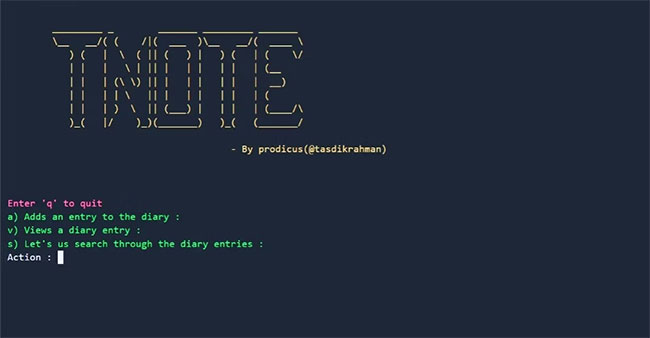
<p style="text-align: justify;">Bây giờ, bạn có thể ghi chú khi đang di chuyển! Gọi tnote bằng cách nhập tnote trong Linux Terminal và bắt đầu ghi nhanh các ghi chú của bạn. Khi khởi động ban đầu, nó sẽ yêu cầu một khóa và cụm mật khẩu. Hãy nhớ ghi nhớ chúng vì bạn sẽ cần chúng để truy cập cơ sở dữ liệu ghi chú của mình sau này.</p>

<figure>
<div style="text-align: justify;"><img alt="Hãy ghi nhớ khóa và cụm mật khẩu" data-i="1" data-src="https://st.quantrimang.com/photos/image/2022/09/26/ghi-chu-trong-linux-terminal-voi-tnote-2.jpg" data-was-processed="true" height="338" src="https://st.quantrimang.com/photos/image/2022/09/26/ghi-chu-trong-linux-terminal-voi-tnote-2.jpg" width="650" /></div>

<figcaption>
<div style="text-align: justify;">Hãy ghi nhớ khóa và cụm mật khẩu</div>
</figcaption>
</figure>

<p style="text-align: justify;">Sau khi bạn đã nhập cụm mật khẩu và khóa, tnote sẽ chào đón bạn bằng một lời nhắc tương tự như ảnh chụp màn hình ở trên. Tại đây, bạn có thể nhập ghi chú của mình. Khi bạn đã hoàn tất, hãy thoát khỏi chú thích bằng cách nhấn&nbsp;<strong>Ctrl + D</strong>.</p>

<h2 style="text-align: justify;">tnote: Ứng dụng ghi chú tốt nhất cho Linux</h2>

<p style="text-align: justify;">Ghi chú là điều quan trọng để duy trì tổ chức với tư cách là một nhà phát triển hoặc sinh viên. Điều này thậm chí còn quan trọng hơn nếu bạn là người mới bắt đầu tham gia vào thế giới lập trình và cố gắng theo dõi các bài học của mình. Kỹ năng ghi chú tốt có thể giúp bạn lập kế hoạch tốt hơn, ngăn nắp và đạt được mục tiêu nhanh hơn.</p>

<p style="text-align: justify;">Mặc dù các ứng dụng ghi chú terminal rất tốt, nhưng bạn có thể đang tìm kiếm một giải pháp toàn diện hơn. Nếu muốn tạo ghi chú của mình một cách nghiêm túc, bạn sẽ vui mừng khi biết rằng có một danh sách vô tận&nbsp;những ứng dụng ghi chú tốt nhất cho các lập trình viên.</p>
		</div>
				<div id="author">
						<p>
				<strong>Nguồn tin:</strong>
				Quantrimang.com
			</p>
		</div>
	</div>
	<div id="footer" class="clearfix">
		<div id="url">
			<strong>URL của bản tin này: </strong><a href="https://www.nguoicodonvn2008.info/vi/news/savefile/kien-thuc-may-tinh/cach-ghi-chu-trong-linux-terminal-voi-tnote-6140.html" title="Cách ghi chú trong Linux Terminal với tnote">https://www.nguoicodonvn2008.info/vi/news/savefile/kien-thuc-may-tinh/cach-ghi-chu-trong-linux-terminal-voi-tnote-6140.html</a>

		</div>
		<div class="clear"></div>
		<div class="copyright">
			&copy; .&#x3A; Nguoicodonvn2008.info - Cõi lòng người cô đơn &#x3A;.
		</div>
		<div id="contact">
			<a href="mailto:admin@nguoicodonvn2008.info">admin@nguoicodonvn2008.info</a>
		</div>
	</div>
</div>
        <div id="timeoutsess" class="chromeframe">
            Bạn đã không sử dụng Site, <a onclick="timeoutsesscancel();" href="https://www.nguoicodonvn2008.info/#">Bấm vào đây để duy trì trạng thái đăng nhập</a>. Thời gian chờ: <span id="secField"> 60 </span> giây
        </div>
        <div id="openidResult" class="nv-alert" style="display:none"></div>
        <div id="openidBt" data-result="" data-redirect=""></div>
		</script>
		<div class="car-top">
  <span><img src="https://www.nguoicodonvn2008.info/themes/default/images/car.png" alt=""></span>
</div>
<script src="https://www.nguoicodonvn2008.info/assets/js/jquery/jquery.min.js"></script>
<script>var nv_base_siteurl="/",nv_lang_data="vi",nv_lang_interface="vi",nv_name_variable="nv",nv_fc_variable="op",nv_lang_variable="language",nv_module_name="news",nv_func_name="savefile",nv_is_user=0, nv_my_ofs=-4,nv_my_abbr="EDT",nv_cookie_prefix="nv4c_e856T",nv_check_pass_mstime=1738000,nv_area_admin=0,nv_safemode=0,theme_responsive=0,nv_recaptcha_ver=2,nv_recaptcha_sitekey="",nv_recaptcha_type="image",XSSsanitize=1;</script>
<script src="https://www.nguoicodonvn2008.info/assets/js/language/vi.js"></script>
<script src="https://www.nguoicodonvn2008.info/assets/js/DOMPurify/purify3.js"></script>
<script src="https://www.nguoicodonvn2008.info/assets/js/global.js"></script>
<script src="https://www.nguoicodonvn2008.info/assets/js/site.js"></script>
<script src="https://www.nguoicodonvn2008.info/themes/default/js/news.js"></script>
<script src="https://www.nguoicodonvn2008.info/themes/default/js/main.js"></script>
<script src="https://www.nguoicodonvn2008.info/themes/default/js/custom.js"></script>
<script type="application/ld+json">
        {
            "@context": "https://schema.org",
            "@type": "Organization",
            "url": "https://www.nguoicodonvn2008.info",
            "logo": "https://www.nguoicodonvn2008.info/uploads/angel.gif"
        }
        </script>
<script src="https://www.nguoicodonvn2008.info/themes/default/js/bootstrap.min.js"></script>
<script type="text/javascript">
var $scrolltop = $('.car-top');
$scrolltop.on('click', function () {
    $('html,body').animate({
        scrollTop: 0
    }, 800);
    $(this).addClass("car-run");
    setTimeout(function(){ $scrolltop.removeClass('car-run');}, 1000);
    return false;
});
$(window).on('scroll', function ()
{ 
    if($(window).scrollTop() >= 200)
    {
        $scrolltop.addClass("show");
        $scrolltop.addClass("car-down");
    }
    else
    {
       $scrolltop.removeClass("show");
       setTimeout(function(){ $scrolltop.removeClass('car-down');}, 300);
    }
});
</script>
</body>
</html>