<!DOCTYPE html>
    <html lang="vi" xmlns="http://www.w3.org/1999/xhtml" prefix="og: http://ogp.me/ns#">
    <head>
<title>Cách Format nhanh thẻ SD trên máy Mac</title>
<meta name="description" content="Cách Format nhanh thẻ SD trên máy Mac - Savefile - Tin Tức -...">
<meta name="author" content=".: Nguoicodonvn2008.info - Cõi lòng người cô đơn :.">
<meta name="copyright" content=".: Nguoicodonvn2008.info - Cõi lòng người cô đơn :. [admin@nguoicodonvn2008.info]">
<meta name="robots" content="index, archive, follow, noodp">
<meta name="googlebot" content="index,archive,follow,noodp">
<meta name="msnbot" content="all,index,follow">
<meta name="generator" content="NukeViet v4.5">
<meta http-equiv="Content-Type" content="text/html; charset=utf-8">
<meta property="og:title" content="Cách Format nhanh thẻ SD trên máy Mac">
<meta property="og:type" content="website">
<meta property="og:description" content="Savefile - Tin Tức - https&#x3A;&#x002F;&#x002F;www.nguoicodonvn2008.info&#x002F;vi&#x002F;news&#x002F;savefile&#x002F;kien-thuc-may-tinh&#x002F;cach-format-nhanh-the-sd-tren-may-mac-3750.html">
<meta property="og:site_name" content=".&#x3A; Nguoicodonvn2008.info - Cõi lòng người cô đơn &#x3A;.">
<meta property="og:url" content="https://www.nguoicodonvn2008.info/vi/news/savefile/kien-thuc-may-tinh/cach-format-nhanh-the-sd-tren-may-mac-3750.html">
<link rel="shortcut icon" href="https://www.nguoicodonvn2008.info/favicon.ico">
<link rel="canonical" href="https://www.nguoicodonvn2008.info/vi/news/savefile/kien-thuc-may-tinh/cach-format-nhanh-the-sd-tren-may-mac-3750.html">
<link rel="alternate" href="https://www.nguoicodonvn2008.info/vi/news/rss/" title="Tin Tức" type="application/rss+xml">
<link rel="alternate" href="https://www.nguoicodonvn2008.info/vi/news/rss/karaoke-dual/" title="Tin Tức - Karaoke Dual" type="application/rss+xml">
<link rel="alternate" href="https://www.nguoicodonvn2008.info/vi/news/rss/nhac-tre/" title="Tin Tức - Nhạc trẻ" type="application/rss+xml">
<link rel="alternate" href="https://www.nguoicodonvn2008.info/vi/news/rss/tru-tinh/" title="Tin Tức - Trữ tình" type="application/rss+xml">
<link rel="alternate" href="https://www.nguoicodonvn2008.info/vi/news/rss/nuoc-ngoai/" title="Tin Tức - Nước ngoài" type="application/rss+xml">
<link rel="alternate" href="https://www.nguoicodonvn2008.info/vi/news/rss/remix/" title="Tin Tức - Remix" type="application/rss+xml">
<link rel="alternate" href="https://www.nguoicodonvn2008.info/vi/news/rss/tam-su-tinh-yeu/" title="Tin Tức - Tâm sự tình yêu" type="application/rss+xml">
<link rel="alternate" href="https://www.nguoicodonvn2008.info/vi/news/rss/tho-suu-tam/" title="Tin Tức - Thơ sưu tầm" type="application/rss+xml">
<link rel="alternate" href="https://www.nguoicodonvn2008.info/vi/news/rss/cuoc-song/" title="Tin Tức - Cuộc sống" type="application/rss+xml">
<link rel="alternate" href="https://www.nguoicodonvn2008.info/vi/news/rss/phan-mem/" title="Tin Tức - Phần mềm" type="application/rss+xml">
<link rel="alternate" href="https://www.nguoicodonvn2008.info/vi/news/rss/kien-thuc-may-tinh/" title="Tin Tức - Kiến thức máy tính" type="application/rss+xml">
<link rel="alternate" href="https://www.nguoicodonvn2008.info/vi/news/rss/hoc-tap/" title="Tin Tức - Học tập" type="application/rss+xml">
<link rel="alternate" href="https://www.nguoicodonvn2008.info/vi/news/rss/tai-lieu/" title="Tin Tức - Tài liệu" type="application/rss+xml">
<link rel="alternate" href="https://www.nguoicodonvn2008.info/vi/news/rss/de-thi/" title="Tin Tức - Đề thi" type="application/rss+xml">
<link rel="preload" as="style" href="https://www.nguoicodonvn2008.info/assets/css/font-awesome.min.css" type="text/css">
<link rel="preload" as="style" href="https://www.nguoicodonvn2008.info/themes/default/css/bootstrap.non-responsive.css" type="text/css">
<link rel="preload" as="style" href="https://www.nguoicodonvn2008.info/themes/default/css/style.css" type="text/css">
<link rel="preload" as="style" href="https://www.nguoicodonvn2008.info/themes/default/css/style.non-responsive.css" type="text/css">
<link rel="preload" as="style" href="https://www.nguoicodonvn2008.info/themes/default/css/news.css" type="text/css">
<link rel="preload" as="style" href="https://www.nguoicodonvn2008.info/themes/default/css/custom.css" type="text/css">
<link rel="preload" as="script" href="https://www.nguoicodonvn2008.info/assets/js/jquery/jquery.min.js" type="text/javascript">
<link rel="preload" as="script" href="https://www.nguoicodonvn2008.info/assets/js/language/vi.js" type="text/javascript">
<link rel="preload" as="script" href="https://www.nguoicodonvn2008.info/assets/js/DOMPurify/purify3.js" type="text/javascript">
<link rel="preload" as="script" href="https://www.nguoicodonvn2008.info/assets/js/global.js" type="text/javascript">
<link rel="preload" as="script" href="https://www.nguoicodonvn2008.info/assets/js/site.js" type="text/javascript">
<link rel="preload" as="script" href="https://www.nguoicodonvn2008.info/themes/default/js/news.js" type="text/javascript">
<link rel="preload" as="script" href="https://www.nguoicodonvn2008.info/themes/default/js/main.js" type="text/javascript">
<link rel="preload" as="script" href="https://www.nguoicodonvn2008.info/themes/default/js/custom.js" type="text/javascript">
<link rel="preload" as="script" href="https://www.nguoicodonvn2008.info/themes/default/js/bootstrap.min.js" type="text/javascript">
<link rel="stylesheet" href="https://www.nguoicodonvn2008.info/assets/css/font-awesome.min.css">
<link rel="stylesheet" href="https://www.nguoicodonvn2008.info/themes/default/css/bootstrap.non-responsive.css">
<link rel="stylesheet" href="https://www.nguoicodonvn2008.info/themes/default/css/style.css">
<link rel="stylesheet" href="https://www.nguoicodonvn2008.info/themes/default/css/style.non-responsive.css">
<link rel="StyleSheet" href="https://www.nguoicodonvn2008.info/themes/default/css/news.css">
<link rel="stylesheet" href="https://www.nguoicodonvn2008.info/themes/default/css/custom.css">
<style type="text/css">
	body{background: #fff;}
</style>
    </head>
    <body>
<div id="print">
	<div id="hd_print">
		<h2 class="pull-left">.&#x3A; Nguoicodonvn2008.info - Cõi lòng người cô đơn &#x3A;.</h2>
		<p class="pull-right"><a title=".&#x3A; Nguoicodonvn2008.info - Cõi lòng người cô đơn &#x3A;." href="https://www.nguoicodonvn2008.info/">https://www.nguoicodonvn2008.info</a></p>
	</div>
	<div class="clear"></div>
	<hr />
	<div id="content">
		<h1>Cách Format nhanh thẻ SD trên máy Mac</h1>
		<ul class="list-inline">
			<li>Thứ năm - 11/03/2021 23:53</li>
			<li class="hidden-print txtrequired"><em class="fa fa-print">&nbsp;</em><a title="In ra" href="javascript:;" onclick="window.print()">In ra</a></li>
			<li class="hidden-print txtrequired"><em class="fa fa-power-off">&nbsp;</em><a title="Đóng cửa sổ này" href="javascript:;" onclick="window.close()">Đóng cửa sổ này</a></li>
		</ul>
		<div class="clear"></div>
		<div id="hometext">
		</div>
				<div class="imghome">
			<img alt="Cách Format nhanh thẻ SD trên máy Mac" src="https://st.quantrimang.com/photos/image/2021/03/06/cach-quick-format-the-sd-tren-may-mac3-1.png" width="460" class="img-thumbnail" />
		</div>
		<div class="clear"></div>
		<div id="bodytext" class="clearfix">
			<p style="text-align: justify;">Nếu là người dùng Mac lâu năm, có lẽ bạn đã không còn xa lạ gì với Disk Utility. Đây là ứng dụng cho phép bạn quản lý và định dạng bộ nhớ trong của hệ thống cũng như thiết bị lưu trữ gắn ngoài. Vấn đề nằm ở chỗ mặc dù Disk Utility hoạt động tốt cho SSD và ổ cứng, nhưng hơi “kỳ lạ” khi bạn muốn format thẻ SD.</p>

<p style="text-align: justify;">Rất may, có một cách nhanh và dễ dàng hơn để bạn format thẻ SD trên máy Mac. Ứng dụng SD Card Formatter do chính Hiệp hội SD Toàn cầu (SD Association) phát triển sẽ cho phép bạn dễ dàng format các loại thẻ SD phổ biến trên macOS chỉ với vài cú nhấp chuột. Ứng dụng hỗ trợ các loại thẻ SD/SDHC/SDXC.</p>

<div style="text-align: justify;">&nbsp;</div>

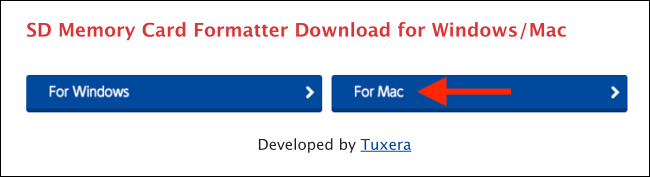
<p style="text-align: justify;">Để bắt đầu, hãy truy cập trang&nbsp;download ứng dụng SD Card Formatter&nbsp;của SD Association. Tại đây, bạn nhấp vào nút “<strong>For Mac</strong>”.</p>

<p style="text-align: justify;"><img alt="Nhấp vào nút “For Mac”" data-i="0" data-src="https://st.quantrimang.com/photos/image/2021/03/06/cach-quick-format-the-sd-tren-may-mac1-1.png" data-was-processed="true" height="177" src="https://st.quantrimang.com/photos/image/2021/03/06/cach-quick-format-the-sd-tren-may-mac1-1.png" width="650" /></p>

<p style="text-align: justify;">Tiếp theo, bạn cuộn xuống và nhấp vào “Accept” để chấp nhận các điều khoản và điều kiện đi kèm. Bây giờ, ứng dụng sẽ được tải xuống thư mục Downloads trên máy Mac của bạn.</p>

<p style="text-align: justify;"><img alt="Nhấp vào “Accept”" data-i="1" data-src="https://st.quantrimang.com/photos/image/2021/03/06/cach-quick-format-the-sd-tren-may-mac1-2.png" data-was-processed="true" height="420" src="https://st.quantrimang.com/photos/image/2021/03/06/cach-quick-format-the-sd-tren-may-mac1-2.png" width="418" /></p>

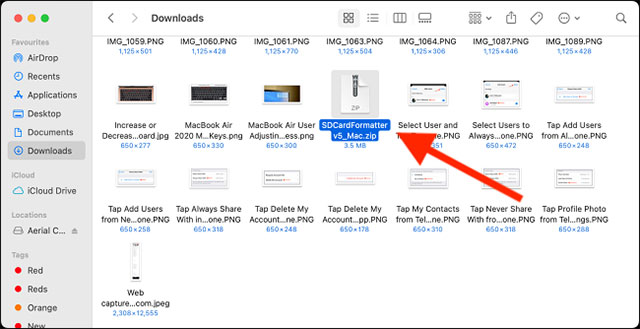
<p style="text-align: justify;">Đi tới thư mục Downloads và nhấp đúp vào tệp zip “SDCardFormatterv5_Mac”.</p>

<p style="text-align: justify;"><img alt="Nhấp đúp vào tệp zip" data-i="2" data-src="https://st.quantrimang.com/photos/image/2021/03/06/cach-quick-format-the-sd-tren-may-mac3-1.png" data-was-processed="true" height="329" src="https://st.quantrimang.com/photos/image/2021/03/06/cach-quick-format-the-sd-tren-may-mac3-1.png" width="640" /></p>

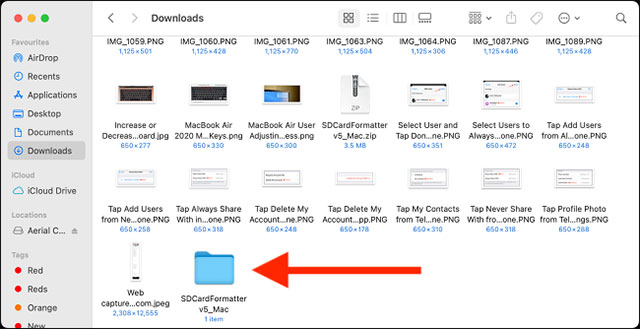
<p style="text-align: justify;">Theo tác này sẽ đưa bạn một thư mục mở rộng có cùng tên. Bấm đúp vào thư mục để mở nó.</p>

<p style="text-align: justify;"><img alt="Bấm đúp vào thư mục" data-i="3" data-src="https://st.quantrimang.com/photos/image/2021/03/06/cach-quick-format-the-sd-tren-may-mac4-1.png" data-was-processed="true" height="329" src="https://st.quantrimang.com/photos/image/2021/03/06/cach-quick-format-the-sd-tren-may-mac4-1.png" width="640" /></p>

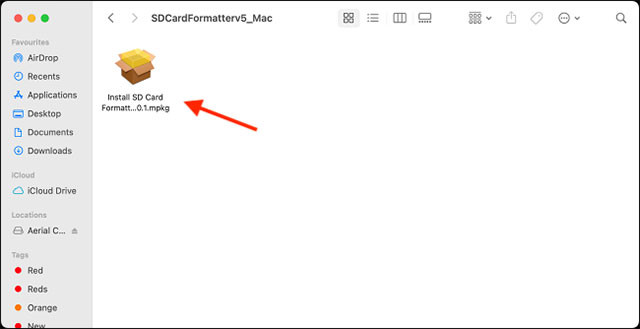
<p style="text-align: justify;">Bây giờ, hãy nhấp đúp vào trình cài đặt ứng dụng.</p>

<p style="text-align: justify;"><img alt="Nhấp đúp vào trình cài đặt ứng dụng" data-i="4" data-src="https://st.quantrimang.com/photos/image/2021/03/06/cach-quick-format-the-sd-tren-may-mac5-1.png" data-was-processed="true" height="329" src="https://st.quantrimang.com/photos/image/2021/03/06/cach-quick-format-the-sd-tren-may-mac5-1.png" width="640" /></p>

<p style="text-align: justify;">hãy làm theo quy trình hướng dẫn trên màn hình để cài đặt ứng dụng SD Card Formatter.</p>

<p style="text-align: justify;">Sau khi ứng dụng được cài đặt, bạn có thể mở nó trong thư mục Applications hoặc bằng cách sử dụng Spotlight search.</p>

<div style="text-align: justify;">&nbsp;</div>

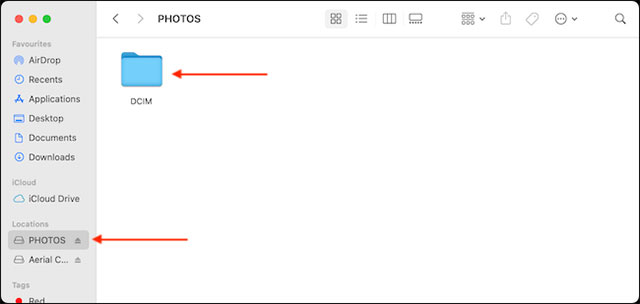
<p style="text-align: justify;">Bây giờ, hãy kết nối thẻ SD mà bạn muốn format với máy Mac (sử dụng đầu đọc thẻ hoặc khe cắm SD, nếu máy Mac của bạn hỗ trợ cổng này), và truy cập Finder để đảm bảo rằng bạn đã kết nối đúng thẻ SD.</p>

<p style="text-align: justify;"><img alt="" data-i="5" data-src="https://st.quantrimang.com/photos/image/2021/03/06/cach-quick-format-the-sd-tren-may-mac6-1.png" data-was-processed="true" height="304" src="https://st.quantrimang.com/photos/image/2021/03/06/cach-quick-format-the-sd-tren-may-mac6-1.png" width="640" /></p>

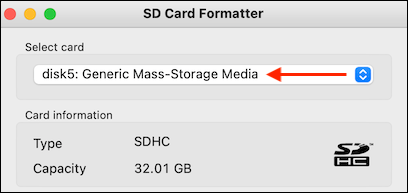
<p style="text-align: justify;">Quay lại ứng dụng SD Card Formatter, thẻ SD mà bạn vừa kết nối sẽ hiển thị trong phần “Selected Card”. Bạn cũng sẽ thấy thông tin chi tiết của thẻ, chẳng hạn như loại thẻ và dung lượng.</p>

<p style="text-align: justify;"><img alt="Thẻ SD mà bạn vừa kết nối" data-i="6" data-src="https://st.quantrimang.com/photos/image/2021/03/06/cach-quick-format-the-sd-tren-may-mac7-1.png" data-was-processed="true" height="193" src="https://st.quantrimang.com/photos/image/2021/03/06/cach-quick-format-the-sd-tren-may-mac7-1.png" width="408" /></p>

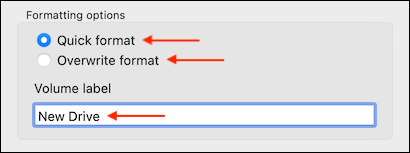
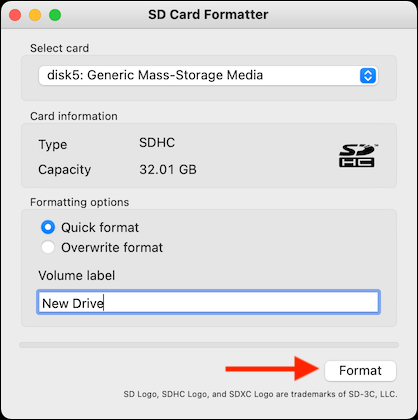
<p style="text-align: justify;">Bây giờ, nếu bạn muốn format thẻ SD một cách nhanh chóng, hãy chọn tùy chọn “Quick Format” trong phần “Formating Options”. Nếu bạn muốn ghi đè toàn bộ, hãy chọn tùy chọn “Overwrite Format”. Tùy chọn thứ hai này sẽ mất nhiều thời gian hơn.</p>

<p style="text-align: justify;">Sau đó, từ phần “Volume Label”, bạn có thể chọn đổi tên thẻ SD nếu muốn.</p>

<p style="text-align: justify;"><img alt="Đổi tên thẻ SD nếu muốn" data-i="7" data-src="https://st.quantrimang.com/photos/image/2021/03/06/cach-quick-format-the-sd-tren-may-mac8-1.png" data-was-processed="true" height="153" src="https://st.quantrimang.com/photos/image/2021/03/06/cach-quick-format-the-sd-tren-may-mac8-1.png" width="410" /></p>

<p style="text-align: justify;">Khi đã hoàn tất, hãy nhấp vào nút &quot;Format&quot;.</p>

<p style="text-align: justify;"><img alt="Nhấp vào nút &#039;Format&#039;" data-i="8" data-src="https://st.quantrimang.com/photos/image/2021/03/06/cach-quick-format-the-sd-tren-may-mac9-1.png" data-was-processed="true" height="420" src="https://st.quantrimang.com/photos/image/2021/03/06/cach-quick-format-the-sd-tren-may-mac9-1.png" width="418" /></p>

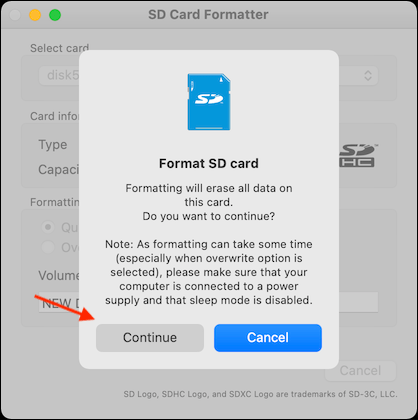
<p style="text-align: justify;">Từ thông báo bật lên, nhấp vào tùy chọn “Continue”.</p>

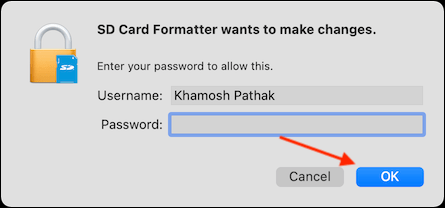
<p style="text-align: justify;">Nhập mật khẩu cho tài khoản người dùng của bạn và nhấp vào nút “OK” để cho phép ứng dụng format thẻ SD.</p>

<p style="text-align: justify;"><img alt="Nhập mật khẩu cho tài khoản người dùng" data-i="9" data-src="https://st.quantrimang.com/photos/image/2021/03/06/cach-quick-format-the-sd-tren-may-mac11.png" data-was-processed="true" height="208" src="https://st.quantrimang.com/photos/image/2021/03/06/cach-quick-format-the-sd-tren-may-mac11.png" width="445" /></p>

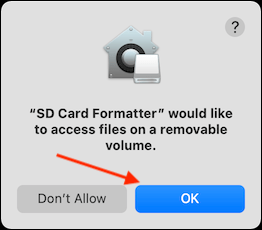
<p style="text-align: justify;">Bây giờ, ứng dụng sẽ yêu cầu quyền truy cập vào ổ đĩa di động (thẻ SD). Tại đây, nhấp vào nút “<strong>OK</strong>”.</p>

<p style="text-align: justify;"><img alt="Nhấp vào nút “OK”" data-i="10" data-src="https://st.quantrimang.com/photos/image/2021/03/06/cach-quick-format-the-sd-tren-may-mac12.png" data-was-processed="true" height="230" src="https://st.quantrimang.com/photos/image/2021/03/06/cach-quick-format-the-sd-tren-may-mac12.png" width="262" /></p>

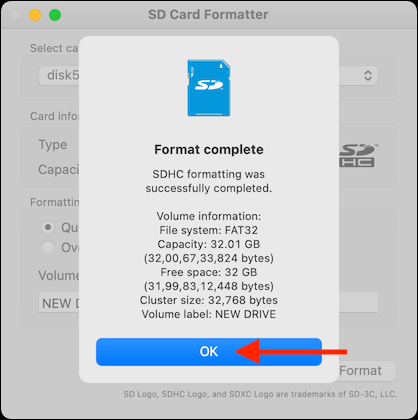
<p style="text-align: justify;">Tất cả những gì bạn phải làm bây giờ là chờ đợi. Nếu bạn đã chọn tùy chọn “Quick Format”, quá trình sẽ được thực hiện sau vài giây và bạn sẽ thấy thông báo “Format Complete” bật lên.</p>

<p style="text-align: justify;">Cửa sổ bật lên này sẽ hiển thị thông tin chi tiết về ổ đĩa mới được định dạng. Nhấp vào nút “OK” để thoát.</p>

<p style="text-align: justify;"><img alt="Nhấp vào nút “OK”" data-i="11" data-src="https://st.quantrimang.com/photos/image/2021/03/06/cach-quick-format-the-sd-tren-may-mac13.png" data-was-processed="true" height="420" src="https://st.quantrimang.com/photos/image/2021/03/06/cach-quick-format-the-sd-tren-may-mac13.png" width="418" /></p>

<p style="text-align: justify;">Tất cả chỉ có vậy, thẻ SD của bạn bây giờ đã được format.</p>
		</div>
				<div id="author">
						<p>
				<strong>Nguồn tin:</strong>
				Quantrimang.com
			</p>
		</div>
	</div>
	<div id="footer" class="clearfix">
		<div id="url">
			<strong>URL của bản tin này: </strong><a href="https://www.nguoicodonvn2008.info/vi/news/savefile/kien-thuc-may-tinh/cach-format-nhanh-the-sd-tren-may-mac-3750.html" title="Cách Format nhanh thẻ SD trên máy Mac">https://www.nguoicodonvn2008.info/vi/news/savefile/kien-thuc-may-tinh/cach-format-nhanh-the-sd-tren-may-mac-3750.html</a>

		</div>
		<div class="clear"></div>
		<div class="copyright">
			&copy; .&#x3A; Nguoicodonvn2008.info - Cõi lòng người cô đơn &#x3A;.
		</div>
		<div id="contact">
			<a href="mailto:admin@nguoicodonvn2008.info">admin@nguoicodonvn2008.info</a>
		</div>
	</div>
</div>
        <div id="timeoutsess" class="chromeframe">
            Bạn đã không sử dụng Site, <a onclick="timeoutsesscancel();" href="https://www.nguoicodonvn2008.info/#">Bấm vào đây để duy trì trạng thái đăng nhập</a>. Thời gian chờ: <span id="secField"> 60 </span> giây
        </div>
        <div id="openidResult" class="nv-alert" style="display:none"></div>
        <div id="openidBt" data-result="" data-redirect=""></div>
		</script>
		<div class="car-top">
  <span><img src="https://www.nguoicodonvn2008.info/themes/default/images/car.png" alt=""></span>
</div>
<script src="https://www.nguoicodonvn2008.info/assets/js/jquery/jquery.min.js"></script>
<script>var nv_base_siteurl="/",nv_lang_data="vi",nv_lang_interface="vi",nv_name_variable="nv",nv_fc_variable="op",nv_lang_variable="language",nv_module_name="news",nv_func_name="savefile",nv_is_user=0, nv_my_ofs=-4,nv_my_abbr="EDT",nv_cookie_prefix="nv4c_e856T",nv_check_pass_mstime=1738000,nv_area_admin=0,nv_safemode=0,theme_responsive=0,nv_recaptcha_ver=2,nv_recaptcha_sitekey="",nv_recaptcha_type="image",XSSsanitize=1;</script>
<script src="https://www.nguoicodonvn2008.info/assets/js/language/vi.js"></script>
<script src="https://www.nguoicodonvn2008.info/assets/js/DOMPurify/purify3.js"></script>
<script src="https://www.nguoicodonvn2008.info/assets/js/global.js"></script>
<script src="https://www.nguoicodonvn2008.info/assets/js/site.js"></script>
<script src="https://www.nguoicodonvn2008.info/themes/default/js/news.js"></script>
<script src="https://www.nguoicodonvn2008.info/themes/default/js/main.js"></script>
<script src="https://www.nguoicodonvn2008.info/themes/default/js/custom.js"></script>
<script type="application/ld+json">
        {
            "@context": "https://schema.org",
            "@type": "Organization",
            "url": "https://www.nguoicodonvn2008.info",
            "logo": "https://www.nguoicodonvn2008.info/uploads/angel.gif"
        }
        </script>
<script src="https://www.nguoicodonvn2008.info/themes/default/js/bootstrap.min.js"></script>
<script type="text/javascript">
var $scrolltop = $('.car-top');
$scrolltop.on('click', function () {
    $('html,body').animate({
        scrollTop: 0
    }, 800);
    $(this).addClass("car-run");
    setTimeout(function(){ $scrolltop.removeClass('car-run');}, 1000);
    return false;
});
$(window).on('scroll', function ()
{ 
    if($(window).scrollTop() >= 200)
    {
        $scrolltop.addClass("show");
        $scrolltop.addClass("car-down");
    }
    else
    {
       $scrolltop.removeClass("show");
       setTimeout(function(){ $scrolltop.removeClass('car-down');}, 300);
    }
});
</script>
</body>
</html>