<!DOCTYPE html>
    <html lang="vi" xmlns="http://www.w3.org/1999/xhtml" prefix="og: http://ogp.me/ns#">
    <head>
<title>Cách fix lỗi 0xc000007b trên Windows</title>
<meta name="description" content="Cách fix lỗi 0xc000007b trên Windows - Savefile - Tin Tức -...">
<meta name="author" content=".: Nguoicodonvn2008.info - Cõi lòng người cô đơn :.">
<meta name="copyright" content=".: Nguoicodonvn2008.info - Cõi lòng người cô đơn :. [admin@nguoicodonvn2008.info]">
<meta name="robots" content="index, archive, follow, noodp">
<meta name="googlebot" content="index,archive,follow,noodp">
<meta name="msnbot" content="all,index,follow">
<meta name="generator" content="NukeViet v4.5">
<meta http-equiv="Content-Type" content="text/html; charset=utf-8">
<meta property="og:title" content="Cách fix lỗi 0xc000007b trên Windows">
<meta property="og:type" content="website">
<meta property="og:description" content="Savefile - Tin Tức - https&#x3A;&#x002F;&#x002F;www.nguoicodonvn2008.info&#x002F;vi&#x002F;news&#x002F;savefile&#x002F;kien-thuc-may-tinh&#x002F;cach-fix-loi-0xc000007b-tren-windows-1014.html">
<meta property="og:site_name" content=".&#x3A; Nguoicodonvn2008.info - Cõi lòng người cô đơn &#x3A;.">
<meta property="og:url" content="https://www.nguoicodonvn2008.info/vi/news/savefile/kien-thuc-may-tinh/cach-fix-loi-0xc000007b-tren-windows-1014.html">
<link rel="shortcut icon" href="https://www.nguoicodonvn2008.info/favicon.ico">
<link rel="canonical" href="https://www.nguoicodonvn2008.info/vi/news/savefile/kien-thuc-may-tinh/cach-fix-loi-0xc000007b-tren-windows-1014.html">
<link rel="alternate" href="https://www.nguoicodonvn2008.info/vi/news/rss/" title="Tin Tức" type="application/rss+xml">
<link rel="alternate" href="https://www.nguoicodonvn2008.info/vi/news/rss/karaoke-dual/" title="Tin Tức - Karaoke Dual" type="application/rss+xml">
<link rel="alternate" href="https://www.nguoicodonvn2008.info/vi/news/rss/nhac-tre/" title="Tin Tức - Nhạc trẻ" type="application/rss+xml">
<link rel="alternate" href="https://www.nguoicodonvn2008.info/vi/news/rss/tru-tinh/" title="Tin Tức - Trữ tình" type="application/rss+xml">
<link rel="alternate" href="https://www.nguoicodonvn2008.info/vi/news/rss/nuoc-ngoai/" title="Tin Tức - Nước ngoài" type="application/rss+xml">
<link rel="alternate" href="https://www.nguoicodonvn2008.info/vi/news/rss/remix/" title="Tin Tức - Remix" type="application/rss+xml">
<link rel="alternate" href="https://www.nguoicodonvn2008.info/vi/news/rss/tam-su-tinh-yeu/" title="Tin Tức - Tâm sự tình yêu" type="application/rss+xml">
<link rel="alternate" href="https://www.nguoicodonvn2008.info/vi/news/rss/tho-suu-tam/" title="Tin Tức - Thơ sưu tầm" type="application/rss+xml">
<link rel="alternate" href="https://www.nguoicodonvn2008.info/vi/news/rss/cuoc-song/" title="Tin Tức - Cuộc sống" type="application/rss+xml">
<link rel="alternate" href="https://www.nguoicodonvn2008.info/vi/news/rss/phan-mem/" title="Tin Tức - Phần mềm" type="application/rss+xml">
<link rel="alternate" href="https://www.nguoicodonvn2008.info/vi/news/rss/kien-thuc-may-tinh/" title="Tin Tức - Kiến thức máy tính" type="application/rss+xml">
<link rel="alternate" href="https://www.nguoicodonvn2008.info/vi/news/rss/hoc-tap/" title="Tin Tức - Học tập" type="application/rss+xml">
<link rel="alternate" href="https://www.nguoicodonvn2008.info/vi/news/rss/tai-lieu/" title="Tin Tức - Tài liệu" type="application/rss+xml">
<link rel="alternate" href="https://www.nguoicodonvn2008.info/vi/news/rss/de-thi/" title="Tin Tức - Đề thi" type="application/rss+xml">
<link rel="preload" as="style" href="https://www.nguoicodonvn2008.info/assets/css/font-awesome.min.css" type="text/css">
<link rel="preload" as="style" href="https://www.nguoicodonvn2008.info/themes/default/css/bootstrap.non-responsive.css" type="text/css">
<link rel="preload" as="style" href="https://www.nguoicodonvn2008.info/themes/default/css/style.css" type="text/css">
<link rel="preload" as="style" href="https://www.nguoicodonvn2008.info/themes/default/css/style.non-responsive.css" type="text/css">
<link rel="preload" as="style" href="https://www.nguoicodonvn2008.info/themes/default/css/news.css" type="text/css">
<link rel="preload" as="style" href="https://www.nguoicodonvn2008.info/themes/default/css/custom.css" type="text/css">
<link rel="preload" as="script" href="https://www.nguoicodonvn2008.info/assets/js/jquery/jquery.min.js" type="text/javascript">
<link rel="preload" as="script" href="https://www.nguoicodonvn2008.info/assets/js/language/vi.js" type="text/javascript">
<link rel="preload" as="script" href="https://www.nguoicodonvn2008.info/assets/js/DOMPurify/purify3.js" type="text/javascript">
<link rel="preload" as="script" href="https://www.nguoicodonvn2008.info/assets/js/global.js" type="text/javascript">
<link rel="preload" as="script" href="https://www.nguoicodonvn2008.info/assets/js/site.js" type="text/javascript">
<link rel="preload" as="script" href="https://www.nguoicodonvn2008.info/themes/default/js/news.js" type="text/javascript">
<link rel="preload" as="script" href="https://www.nguoicodonvn2008.info/themes/default/js/main.js" type="text/javascript">
<link rel="preload" as="script" href="https://www.nguoicodonvn2008.info/themes/default/js/custom.js" type="text/javascript">
<link rel="preload" as="script" href="https://www.nguoicodonvn2008.info/themes/default/js/bootstrap.min.js" type="text/javascript">
<link rel="stylesheet" href="https://www.nguoicodonvn2008.info/assets/css/font-awesome.min.css">
<link rel="stylesheet" href="https://www.nguoicodonvn2008.info/themes/default/css/bootstrap.non-responsive.css">
<link rel="stylesheet" href="https://www.nguoicodonvn2008.info/themes/default/css/style.css">
<link rel="stylesheet" href="https://www.nguoicodonvn2008.info/themes/default/css/style.non-responsive.css">
<link rel="StyleSheet" href="https://www.nguoicodonvn2008.info/themes/default/css/news.css">
<link rel="stylesheet" href="https://www.nguoicodonvn2008.info/themes/default/css/custom.css">
<style type="text/css">
	body{background: #fff;}
</style>
    </head>
    <body>
<div id="print">
	<div id="hd_print">
		<h2 class="pull-left">.&#x3A; Nguoicodonvn2008.info - Cõi lòng người cô đơn &#x3A;.</h2>
		<p class="pull-right"><a title=".&#x3A; Nguoicodonvn2008.info - Cõi lòng người cô đơn &#x3A;." href="https://www.nguoicodonvn2008.info/">https://www.nguoicodonvn2008.info</a></p>
	</div>
	<div class="clear"></div>
	<hr />
	<div id="content">
		<h1>Cách fix lỗi 0xc000007b trên Windows</h1>
		<ul class="list-inline">
			<li>Chủ nhật - 22/09/2019 02:12</li>
			<li class="hidden-print txtrequired"><em class="fa fa-print">&nbsp;</em><a title="In ra" href="javascript:;" onclick="window.print()">In ra</a></li>
			<li class="hidden-print txtrequired"><em class="fa fa-power-off">&nbsp;</em><a title="Đóng cửa sổ này" href="javascript:;" onclick="window.close()">Đóng cửa sổ này</a></li>
		</ul>
		<div class="clear"></div>
		<div id="hometext">
		</div>
				<div class="imghome">
			<img alt="Cách fix lỗi 0xc000007b trên Windows" src="https://st.quantrimang.com/photos/image/2019/06/06/fix-loi-0xc000007b-mo-ung-dung-4.jpg" width="460" class="img-thumbnail" />
		</div>
		<div class="clear"></div>
		<div id="bodytext" class="clearfix">
			<p style="text-align: justify;">Lỗi mở ứng dụng, game 0xc000007b không thường xuyên xuất hiện trên máy tính, nhưng ảnh hưởng tới người dùng khi chúng ta không thể mở được chương trình. Khi đó giao diện ứng dụng hiển thị thông báo lỗi The application was unable to start correctly. Lỗi này có thể do các tập tin hệ thống thiếu file nào đó hoặc do hỏng phần mềm điều khiển lỗi. Bài viết dưới đây sẽ hướng dẫn bạn đọc cách sửa lỗi 0xc000007b khi mở ứng dụng trên Windows.</p>

<div style="text-align: justify;">&nbsp;</div>

<h2 style="text-align: justify;">Hướng dẫn sửa lỗi 0xc000007b trên Windows</h2>

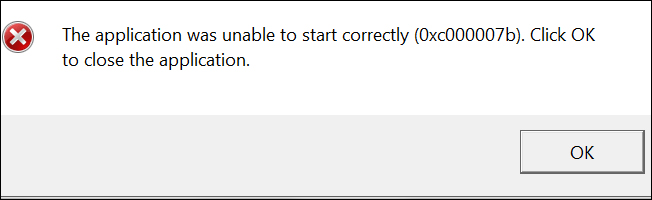
<p style="text-align: justify;">Lỗi 0xc000007b có thông báo đầy đủ The application was unable to start correctly (0xc000007b). Click OK to close the application như hình dưới đây.</p>

<p style="text-align: justify;"><img alt="Báo lỗi ứng dụng" data-i="0" data-src="https://st.quantrimang.com/photos/image/2019/06/06/fix-loi-0xc000007b-mo-ung-dung-1.jpg" data-was-processed="true" height="196" src="https://st.quantrimang.com/photos/image/2019/06/06/fix-loi-0xc000007b-mo-ung-dung-1.jpg" width="640" /></p>

<div style="text-align: justify;">&nbsp;</div>

<h3 style="text-align: justify;">1. Chạy ứng dụng dưới quyền Administrator</h3>

<p style="text-align: justify;">Một số game hay ứng dụng khi chạy theo cách thông thường sẽ bị lỗi 0xc000007b. Nếu vậy bạn hãy thử chạy ứng dụng, game dưới quyền Admin .</p>

<p style="text-align: justify;"><strong>Bước 1:</strong></p>

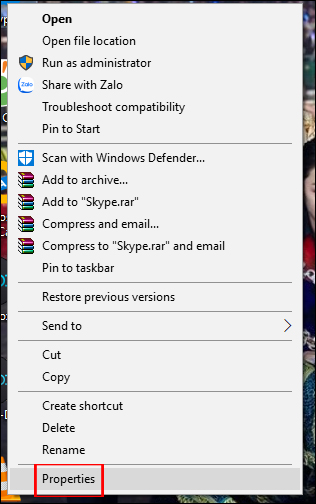
<p style="text-align: justify;">Đầu tiên bạn&nbsp;<strong>nhấn chuột phải</strong>&nbsp;vào ứng dụng bị lỗi khi khởi động rồi&nbsp;<strong>chọn Properties</strong>.</p>

<p style="text-align: justify;"><img alt="Nhấn Properties ứng dụng" data-i="1" data-src="https://st.quantrimang.com/photos/image/2019/06/06/fix-loi-0xc000007b-mo-ung-dung-2.jpg" data-was-processed="true" height="504" src="https://st.quantrimang.com/photos/image/2019/06/06/fix-loi-0xc000007b-mo-ung-dung-2.jpg" width="316" /></p>

<p style="text-align: justify;"><strong>Bước 2:</strong></p>

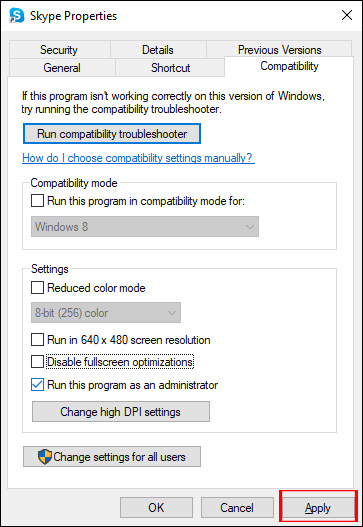
<p style="text-align: justify;">Hiển thị giao diện mới chúng ta nhấn chọn vào&nbsp;<strong>tab Compatibilty</strong>. Tiếp tục tích chọn dòng&nbsp;<strong>Run this program as an administrator</strong>&nbsp;sau đó&nbsp;<strong>nhấn Apply</strong>&nbsp;để lưu thay đổi.</p>

<p style="text-align: justify;"><img alt="Chạy bằng quyền Admin" data-i="2" data-src="https://st.quantrimang.com/photos/image/2019/06/06/fix-loi-0xc000007b-mo-ung-dung-3.jpg" data-was-processed="true" height="527" src="https://st.quantrimang.com/photos/image/2019/06/06/fix-loi-0xc000007b-mo-ung-dung-3.jpg" width="363" /></p>

<h3 style="text-align: justify;">2. Fix lỗi 0xc000007b bằng All in one Runtimes</h3>

<p style="text-align: justify;">Phần mềm All in one Runtimes sẽ sửa lỗi hệ thống thiếu các tập tin như dll, file config,.. hoặc hỏng phần mềm điều khiển lỗi như Visual C++, thiếu Net Framework hoặc DirecX.</p>

<p style="text-align: justify;"><strong>Bước 1:</strong></p>

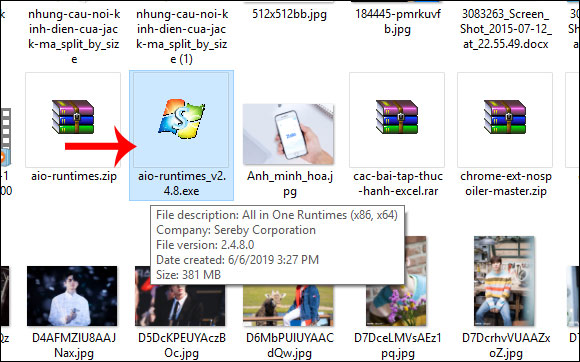
<p style="text-align: justify;">Bạn tải phần mềm All in one Runtimes theo link dưới đây rồi tiến hành cài đặt như thông thường.</p>

<pre id="pre0">
<code>https://www.computerbase.de/downloads/systemtools/all-in-one-runtimes/</code></pre>

<p style="text-align: justify;"><img alt="Cài phần mềm All in one Runtimes" data-i="3" data-src="https://st.quantrimang.com/photos/image/2019/06/06/fix-loi-0xc000007b-mo-ung-dung-4.jpg" data-was-processed="true" height="362" src="https://st.quantrimang.com/photos/image/2019/06/06/fix-loi-0xc000007b-mo-ung-dung-4.jpg" width="580" /></p>

<p style="text-align: justify;"><strong>Bước 2:</strong></p>

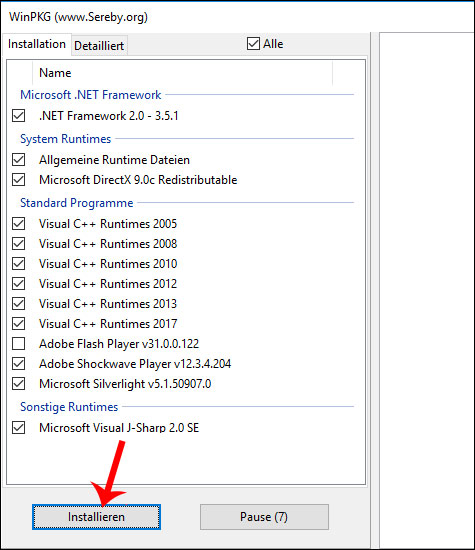
<p style="text-align: justify;">Sau khi cài đặt xong công cụ, tại giao diện chúng ta nhấn chọn vào&nbsp;<strong>tab Installation</strong>. Hiển thị danh sách các gói ứng dụng còn thiếu trên máy tính,&nbsp;<strong>tích chọn vào toàn bộ các gói</strong>đó. Nhấn vào&nbsp;<strong>nút Installieren</strong>&nbsp;để cài đặt các gói đó.</p>

<p style="text-align: justify;"><img alt="Chạy các gói còn thiếu" data-i="4" data-src="https://st.quantrimang.com/photos/image/2019/06/06/fix-loi-0xc000007b-mo-ung-dung-5.jpg" data-was-processed="true" height="550" src="https://st.quantrimang.com/photos/image/2019/06/06/fix-loi-0xc000007b-mo-ung-dung-5.jpg" width="475" /></p>

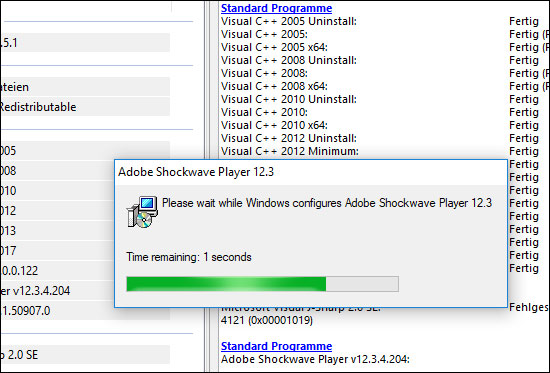
<p style="text-align: justify;">Chúng ta chờ quá trình cài đặt diễn ra hoàn thành rồi khởi động lại máy tính để áp dụng các thay đổi.</p>

<p style="text-align: justify;"><img alt="Quá trình cài đặt" data-i="5" data-src="https://st.quantrimang.com/photos/image/2019/06/06/fix-loi-0xc000007b-mo-ung-dung-6.jpg" data-was-processed="true" height="373" src="https://st.quantrimang.com/photos/image/2019/06/06/fix-loi-0xc000007b-mo-ung-dung-6.jpg" width="550" /></p>

<p style="text-align: justify;">Như vậy bạn có 2 cách khác nhau để sửa lỗi 0xc000007b khi khởi chạy ứng dụng trên Windows. Một cách sửa lỗi khác đó là chúng ta&nbsp;cập nhật .NET framework&nbsp;hoặc&nbsp;cài đặt lại DirectX&nbsp;theo cách thủ công.</p>

<p style="text-align: justify;">Hy vọng bài viết này hữu ích với bạn!</p>
		</div>
				<div id="author">
						<p>
				<strong>Nguồn tin:</strong>
				Quantrimang.com
			</p>
		</div>
	</div>
	<div id="footer" class="clearfix">
		<div id="url">
			<strong>URL của bản tin này: </strong><a href="https://www.nguoicodonvn2008.info/vi/news/savefile/kien-thuc-may-tinh/cach-fix-loi-0xc000007b-tren-windows-1014.html" title="Cách fix lỗi 0xc000007b trên Windows">https://www.nguoicodonvn2008.info/vi/news/savefile/kien-thuc-may-tinh/cach-fix-loi-0xc000007b-tren-windows-1014.html</a>

		</div>
		<div class="clear"></div>
		<div class="copyright">
			&copy; .&#x3A; Nguoicodonvn2008.info - Cõi lòng người cô đơn &#x3A;.
		</div>
		<div id="contact">
			<a href="mailto:admin@nguoicodonvn2008.info">admin@nguoicodonvn2008.info</a>
		</div>
	</div>
</div>
        <div id="timeoutsess" class="chromeframe">
            Bạn đã không sử dụng Site, <a onclick="timeoutsesscancel();" href="https://www.nguoicodonvn2008.info/#">Bấm vào đây để duy trì trạng thái đăng nhập</a>. Thời gian chờ: <span id="secField"> 60 </span> giây
        </div>
        <div id="openidResult" class="nv-alert" style="display:none"></div>
        <div id="openidBt" data-result="" data-redirect=""></div>
		</script>
		<div class="car-top">
  <span><img src="https://www.nguoicodonvn2008.info/themes/default/images/car.png" alt=""></span>
</div>
<script src="https://www.nguoicodonvn2008.info/assets/js/jquery/jquery.min.js"></script>
<script>var nv_base_siteurl="/",nv_lang_data="vi",nv_lang_interface="vi",nv_name_variable="nv",nv_fc_variable="op",nv_lang_variable="language",nv_module_name="news",nv_func_name="savefile",nv_is_user=0, nv_my_ofs=-4,nv_my_abbr="EDT",nv_cookie_prefix="nv4c_e856T",nv_check_pass_mstime=1738000,nv_area_admin=0,nv_safemode=0,theme_responsive=0,nv_recaptcha_ver=2,nv_recaptcha_sitekey="",nv_recaptcha_type="image",XSSsanitize=1;</script>
<script src="https://www.nguoicodonvn2008.info/assets/js/language/vi.js"></script>
<script src="https://www.nguoicodonvn2008.info/assets/js/DOMPurify/purify3.js"></script>
<script src="https://www.nguoicodonvn2008.info/assets/js/global.js"></script>
<script src="https://www.nguoicodonvn2008.info/assets/js/site.js"></script>
<script src="https://www.nguoicodonvn2008.info/themes/default/js/news.js"></script>
<script src="https://www.nguoicodonvn2008.info/themes/default/js/main.js"></script>
<script src="https://www.nguoicodonvn2008.info/themes/default/js/custom.js"></script>
<script type="application/ld+json">
        {
            "@context": "https://schema.org",
            "@type": "Organization",
            "url": "https://www.nguoicodonvn2008.info",
            "logo": "https://www.nguoicodonvn2008.info/uploads/angel.gif"
        }
        </script>
<script src="https://www.nguoicodonvn2008.info/themes/default/js/bootstrap.min.js"></script>
<script type="text/javascript">
var $scrolltop = $('.car-top');
$scrolltop.on('click', function () {
    $('html,body').animate({
        scrollTop: 0
    }, 800);
    $(this).addClass("car-run");
    setTimeout(function(){ $scrolltop.removeClass('car-run');}, 1000);
    return false;
});
$(window).on('scroll', function ()
{ 
    if($(window).scrollTop() >= 200)
    {
        $scrolltop.addClass("show");
        $scrolltop.addClass("car-down");
    }
    else
    {
       $scrolltop.removeClass("show");
       setTimeout(function(){ $scrolltop.removeClass('car-down');}, 300);
    }
});
</script>
</body>
</html>