<!DOCTYPE html>
    <html lang="vi" xmlns="http://www.w3.org/1999/xhtml" prefix="og: http://ogp.me/ns#">
    <head>
<title>Cách escape &#40;thoát&#41; khoảng trắng trong đường dẫn file trên dòng lệnh Windows</title>
<meta name="description" content="Cách escape &#40;thoát&#41; khoảng trắng trong đường dẫn file trên dòng lệnh Windows - Savefile - Tin Tức -...">
<meta name="author" content=".: Nguoicodonvn2008.info - Cõi lòng người cô đơn :.">
<meta name="copyright" content=".: Nguoicodonvn2008.info - Cõi lòng người cô đơn :. [admin@nguoicodonvn2008.info]">
<meta name="robots" content="index, archive, follow, noodp">
<meta name="googlebot" content="index,archive,follow,noodp">
<meta name="msnbot" content="all,index,follow">
<meta name="generator" content="NukeViet v4.5">
<meta http-equiv="Content-Type" content="text/html; charset=utf-8">
<meta property="og:title" content="Cách escape &#40;thoát&#41; khoảng trắng trong đường dẫn file trên dòng lệnh Windows">
<meta property="og:type" content="website">
<meta property="og:description" content="Savefile - Tin Tức -...">
<meta property="og:site_name" content=".&#x3A; Nguoicodonvn2008.info - Cõi lòng người cô đơn &#x3A;.">
<meta property="og:url" content="https://www.nguoicodonvn2008.info/vi/news/savefile/kien-thuc-may-tinh/cach-escape-thoat-khoang-trang-trong-duong-dan-file-tren-dong-lenh-windows-2943.html">
<link rel="shortcut icon" href="https://www.nguoicodonvn2008.info/favicon.ico">
<link rel="canonical" href="https://www.nguoicodonvn2008.info/vi/news/savefile/kien-thuc-may-tinh/cach-escape-thoat-khoang-trang-trong-duong-dan-file-tren-dong-lenh-windows-2943.html">
<link rel="alternate" href="https://www.nguoicodonvn2008.info/vi/news/rss/" title="Tin Tức" type="application/rss+xml">
<link rel="alternate" href="https://www.nguoicodonvn2008.info/vi/news/rss/karaoke-dual/" title="Tin Tức - Karaoke Dual" type="application/rss+xml">
<link rel="alternate" href="https://www.nguoicodonvn2008.info/vi/news/rss/nhac-tre/" title="Tin Tức - Nhạc trẻ" type="application/rss+xml">
<link rel="alternate" href="https://www.nguoicodonvn2008.info/vi/news/rss/tru-tinh/" title="Tin Tức - Trữ tình" type="application/rss+xml">
<link rel="alternate" href="https://www.nguoicodonvn2008.info/vi/news/rss/nuoc-ngoai/" title="Tin Tức - Nước ngoài" type="application/rss+xml">
<link rel="alternate" href="https://www.nguoicodonvn2008.info/vi/news/rss/remix/" title="Tin Tức - Remix" type="application/rss+xml">
<link rel="alternate" href="https://www.nguoicodonvn2008.info/vi/news/rss/tam-su-tinh-yeu/" title="Tin Tức - Tâm sự tình yêu" type="application/rss+xml">
<link rel="alternate" href="https://www.nguoicodonvn2008.info/vi/news/rss/tho-suu-tam/" title="Tin Tức - Thơ sưu tầm" type="application/rss+xml">
<link rel="alternate" href="https://www.nguoicodonvn2008.info/vi/news/rss/cuoc-song/" title="Tin Tức - Cuộc sống" type="application/rss+xml">
<link rel="alternate" href="https://www.nguoicodonvn2008.info/vi/news/rss/phan-mem/" title="Tin Tức - Phần mềm" type="application/rss+xml">
<link rel="alternate" href="https://www.nguoicodonvn2008.info/vi/news/rss/kien-thuc-may-tinh/" title="Tin Tức - Kiến thức máy tính" type="application/rss+xml">
<link rel="alternate" href="https://www.nguoicodonvn2008.info/vi/news/rss/hoc-tap/" title="Tin Tức - Học tập" type="application/rss+xml">
<link rel="alternate" href="https://www.nguoicodonvn2008.info/vi/news/rss/tai-lieu/" title="Tin Tức - Tài liệu" type="application/rss+xml">
<link rel="alternate" href="https://www.nguoicodonvn2008.info/vi/news/rss/de-thi/" title="Tin Tức - Đề thi" type="application/rss+xml">
<link rel="preload" as="style" href="https://www.nguoicodonvn2008.info/assets/css/font-awesome.min.css" type="text/css">
<link rel="preload" as="style" href="https://www.nguoicodonvn2008.info/themes/default/css/bootstrap.non-responsive.css" type="text/css">
<link rel="preload" as="style" href="https://www.nguoicodonvn2008.info/themes/default/css/style.css" type="text/css">
<link rel="preload" as="style" href="https://www.nguoicodonvn2008.info/themes/default/css/style.non-responsive.css" type="text/css">
<link rel="preload" as="style" href="https://www.nguoicodonvn2008.info/themes/default/css/news.css" type="text/css">
<link rel="preload" as="style" href="https://www.nguoicodonvn2008.info/themes/default/css/custom.css" type="text/css">
<link rel="preload" as="script" href="https://www.nguoicodonvn2008.info/assets/js/jquery/jquery.min.js" type="text/javascript">
<link rel="preload" as="script" href="https://www.nguoicodonvn2008.info/assets/js/language/vi.js" type="text/javascript">
<link rel="preload" as="script" href="https://www.nguoicodonvn2008.info/assets/js/DOMPurify/purify3.js" type="text/javascript">
<link rel="preload" as="script" href="https://www.nguoicodonvn2008.info/assets/js/global.js" type="text/javascript">
<link rel="preload" as="script" href="https://www.nguoicodonvn2008.info/assets/js/site.js" type="text/javascript">
<link rel="preload" as="script" href="https://www.nguoicodonvn2008.info/themes/default/js/news.js" type="text/javascript">
<link rel="preload" as="script" href="https://www.nguoicodonvn2008.info/themes/default/js/main.js" type="text/javascript">
<link rel="preload" as="script" href="https://www.nguoicodonvn2008.info/themes/default/js/custom.js" type="text/javascript">
<link rel="preload" as="script" href="https://www.nguoicodonvn2008.info/themes/default/js/bootstrap.min.js" type="text/javascript">
<link rel="stylesheet" href="https://www.nguoicodonvn2008.info/assets/css/font-awesome.min.css">
<link rel="stylesheet" href="https://www.nguoicodonvn2008.info/themes/default/css/bootstrap.non-responsive.css">
<link rel="stylesheet" href="https://www.nguoicodonvn2008.info/themes/default/css/style.css">
<link rel="stylesheet" href="https://www.nguoicodonvn2008.info/themes/default/css/style.non-responsive.css">
<link rel="StyleSheet" href="https://www.nguoicodonvn2008.info/themes/default/css/news.css">
<link rel="stylesheet" href="https://www.nguoicodonvn2008.info/themes/default/css/custom.css">
<style type="text/css">
	body{background: #fff;}
</style>
    </head>
    <body>
<div id="print">
	<div id="hd_print">
		<h2 class="pull-left">.&#x3A; Nguoicodonvn2008.info - Cõi lòng người cô đơn &#x3A;.</h2>
		<p class="pull-right"><a title=".&#x3A; Nguoicodonvn2008.info - Cõi lòng người cô đơn &#x3A;." href="https://www.nguoicodonvn2008.info/">https://www.nguoicodonvn2008.info</a></p>
	</div>
	<div class="clear"></div>
	<hr />
	<div id="content">
		<h1>Cách escape &#40;thoát&#41; khoảng trắng trong đường dẫn file trên dòng lệnh Windows</h1>
		<ul class="list-inline">
			<li>Thứ sáu - 23/10/2020 00:52</li>
			<li class="hidden-print txtrequired"><em class="fa fa-print">&nbsp;</em><a title="In ra" href="javascript:;" onclick="window.print()">In ra</a></li>
			<li class="hidden-print txtrequired"><em class="fa fa-power-off">&nbsp;</em><a title="Đóng cửa sổ này" href="javascript:;" onclick="window.close()">Đóng cửa sổ này</a></li>
		</ul>
		<div class="clear"></div>
		<div id="hometext">
		</div>
				<div class="imghome">
			<img alt="Cách escape &#40;thoát&#41; khoảng trắng trong đường dẫn file trên dòng lệnh Windows" src="https://st.quantrimang.com/photos/image/2020/10/20/escape-khoang-trang-trong-duong-dan-file-5.png" width="460" class="img-thumbnail" />
		</div>
		<div class="clear"></div>
		<div id="bodytext" class="clearfix">
			<p style="text-align: justify;">Môi trường dòng lệnh như&nbsp;Windows Command Prompt&nbsp;và&nbsp;<a href="https://quantrimang.com/gioi-thieu-ve-powershell-37928" title="PowerShell và mọi điều bạn cần biết về tiện ích này">PowerShell</a>&nbsp;sử dụng khoảng trắng để phân tách các lệnh và đối số - nhưng tên file và thư mục cũng có thể chứa khoảng trắng. Để chỉ định một đường dẫn file có một khoảng trống bên trong nó, bạn cần phải &quot;escape&quot; nó.</p>

<h2 style="text-align: justify;">Tại sao phải escape khoảng trống?</h2>

<p style="text-align: justify;">“Escape” hay thoát một ký tự thay đổi ý nghĩa của nó. Ví dụ, escape một khoảng trắng sẽ khiến shell coi nó như một ký tự khoảng trắng thay vì một ký tự đặc biệt ngăn cách các đối số dòng lệnh.</p>

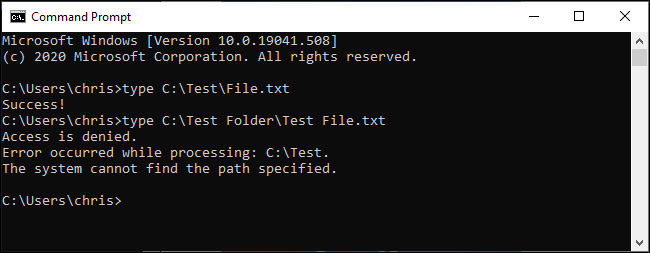
<p style="text-align: justify;">Giả sử bạn có một file văn bản muốn xem nội dung. Bạn có thể làm điều đó với lệnh type. Giả sử file văn bản nằm ở&nbsp;<strong>C:\Test\File.txt</strong>, lệnh sau trong Command Prompt sẽ hiển thị nội dung của nó:</p>

<pre id="pre0">
<code>type C:\Test\File.txt</code></pre>

<p style="text-align: justify;">Bây giờ, nếu bạn có cùng một file tại&nbsp;<strong>C:\Test Folder\Test File.txt</strong>&nbsp;thì sao? Nếu bạn thử chạy lệnh dưới đây, nó sẽ không hoạt động - những khoảng trắng trong đường dẫn file đang cản trở.</p>

<pre id="pre1">
<code>type C:\Test Folder\Test File.txt</code></pre>

<p style="text-align: justify;">Dòng lệnh cho rằng bạn đang cố gắng tìm kiếm một file có tên&nbsp;<strong>C:\Test</strong>&nbsp;và cho biết nó “<em>cannot find the path specified</em>” (không thể tìm thấy đường dẫn đã chỉ định).</p>

<figure>
<div style="text-align: justify;"><img alt="Dòng lệnh không thể tìm thấy đường dẫn đã chỉ định" data-i="0" data-src="https://st.quantrimang.com/photos/image/2020/10/20/escape-khoang-trang-trong-duong-dan-file-1.png" data-was-processed="true" height="253" src="https://st.quantrimang.com/photos/image/2020/10/20/escape-khoang-trang-trong-duong-dan-file-1.png" width="650" /></div>

<figcaption>
<div style="text-align: justify;">Dòng lệnh không thể tìm thấy đường dẫn đã chỉ định</div>
</figcaption>
</figure>

<div style="text-align: justify;">&nbsp;</div>

<h2 style="text-align: justify;">3 cách escape khoảng trắng trên Windows</h2>

<p style="text-align: justify;">Có 3 cách khác nhau để bạn có thể escape đường dẫn file trên Windows:</p>

<ol>
	<li style="text-align: justify;">Bằng cách đặt đường dẫn (hoặc các phần của nó) trong dấu ngoặc kép (”).</li>
	<li style="text-align: justify;">Bằng cách thêm một ký tự dấu mũ (^) trước mỗi dấu cách. (Điều này chỉ hoạt động trong Command Prompt/CMD và nó dường như không hoạt động với mọi lệnh).</li>
	<li style="text-align: justify;">Bằng cách thêm một ký tự trọng âm (`) trước mỗi khoảng trắng. (Điều này chỉ hoạt động trong PowerShell, nhưng nó luôn hoạt động).</li>
</ol>

<p style="text-align: justify;">Bài viết sẽ hướng dẫn bạn cách sử dụng từng phương pháp.</p>

<h3 style="text-align: justify;">Đặt đường dẫn trong dấu ngoặc kép</h3>

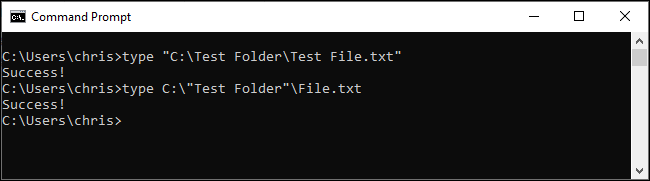
<p style="text-align: justify;">Cách tiêu chuẩn để đảm bảo Windows xử lý đường dẫn file đúng cách là đặt nó trong các ký tự dấu ngoặc kép (”). Ví dụ, với lệnh mẫu ở trên, lệnh sẽ được chạy như sau:</p>

<pre id="pre2">
<code>type &quot;C:\Test Folder\Test File.txt&quot;</code></pre>

<p style="text-align: justify;">Bạn thực sự có thể đặt các phần của đường dẫn trong dấu ngoặc kép nếu muốn. Ví dụ, giả sử bạn có một file có tên&nbsp;<strong>File.txt</strong>&nbsp;trong thư mục đó. Bạn có thể chạy như sau:</p>

<pre id="pre3">
<code>type C:\&quot;Test Folder&quot;\File.txt</code></pre>

<p style="text-align: justify;">Tuy nhiên, điều đó là không cần thiết. Trong hầu hết các trường hợp, bạn chỉ cần sử dụng dấu ngoặc kép xung quanh toàn bộ đường dẫn.</p>

<p style="text-align: justify;">Giải pháp này hoạt động cả trong môi trường Command Prompt (CMD) truyền thống và trong Windows PowerShell.</p>

<figure>
<div style="text-align: justify;"><img alt="Đặt đường dẫn trong dấu ngoặc kép" data-i="1" data-src="https://st.quantrimang.com/photos/image/2020/10/20/escape-khoang-trang-trong-duong-dan-file-2.png" data-was-processed="true" height="181" src="https://st.quantrimang.com/photos/image/2020/10/20/escape-khoang-trang-trong-duong-dan-file-2.png" width="650" /></div>

<figcaption>
<div style="text-align: justify;">Đặt đường dẫn trong dấu ngoặc kép</div>
</figcaption>
</figure>

<div style="text-align: justify;">&nbsp;</div>

<h3 style="text-align: justify;">Sử dụng ký tự dấu mũ (^) trước dấu cách</h3>

<p style="text-align: justify;">Trong Command Prompt, ký tự dấu mũ (^) sẽ cho phép bạn escape các dấu cách về lý thuyết. Chỉ cần thêm nó vào trước mỗi khoảng trắng trong tên file. (Bạn sẽ tìm thấy ký tự này trong hàng số trên bàn phím của mình. Để nhập ký tự dấu mũ, hãy nhấn&nbsp;<strong>Shift + 6</strong>).</p>

<p style="text-align: justify;">Vấn đề là mặc dù cách này có hiệu quả và nhưng không phải lúc nào nó cũng hoạt động. Cách xử lý của Command Prompt đối với ký tự này thật kỳ lạ.</p>

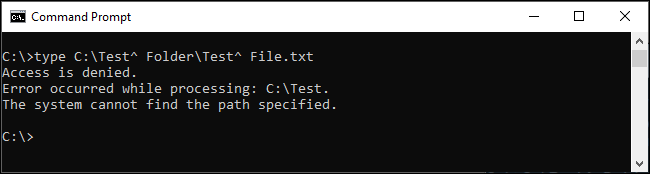
<p style="text-align: justify;">Ví dụ, với lệnh mẫu, nếu bạn chạy như sau, lệnh sẽ không hoạt động:</p>

<pre id="pre4">
<code>type C:\Test^ Folder\Test^ File.txt</code></pre>

<figure>
<div style="text-align: justify;"><img alt="Lệnh trên sẽ không hoạt động" data-i="2" data-src="https://st.quantrimang.com/photos/image/2020/10/20/escape-khoang-trang-trong-duong-dan-file-3.png" data-was-processed="true" height="174" src="https://st.quantrimang.com/photos/image/2020/10/20/escape-khoang-trang-trong-duong-dan-file-3.png" width="650" /></div>

<figcaption>
<div style="text-align: justify;">Lệnh trên sẽ không hoạt động</div>
</figcaption>
</figure>

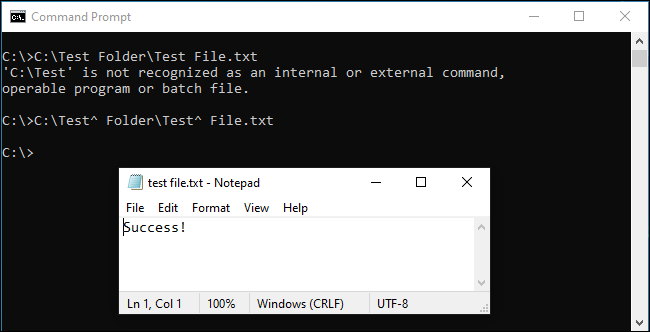
<p style="text-align: justify;">Mặt khác, nếu thử mở file của mình trực tiếp bằng cách nhập đường dẫn của nó vào Command Prompt, bạn có thể thấy rằng ký tự dấu mũ sẽ escape khoảng trắng đúng cách:</p>

<pre id="pre5">
<code>C:\Test^ Folder\Test^ File.txt</code></pre>

<figure>
<div style="text-align: justify;"><img alt="Ký tự dấu mũ escape khoảng trắng đúng cách" data-i="3" data-src="https://st.quantrimang.com/photos/image/2020/10/20/escape-khoang-trang-trong-duong-dan-file-4.png" data-was-processed="true" height="332" src="https://st.quantrimang.com/photos/image/2020/10/20/escape-khoang-trang-trong-duong-dan-file-4.png" width="650" /></div>

<figcaption>
<div style="text-align: justify;">Ký tự dấu mũ escape khoảng trắng đúng cách</div>
</figcaption>
</figure>

<p style="text-align: justify;">Vậy nó hoạt động khi nào? Dựa trên nghiên cứu, nó dường như chỉ hoạt động với một số ứng dụng. Mọi thứ có thể thay đổi tùy thuộc vào lệnh bạn đang sử dụng. Cách xử lý của Command Prompt đối với ký tự này thật kỳ lạ. Hãy thử với bất kỳ lệnh nào bạn đang sử dụng, nó có thể hoạt động hoặc có thể không hoạt động.</p>

<p style="text-align: justify;">Để nhất quán, bài viết khuyên bạn nên sử dụng dấu ngoặc kép trong Command Prompt hoặc chuyển sang PowerShell và sử dụng phương pháp bên dưới.</p>

<h3 style="text-align: justify;">Sử dụng ký tự dấu trọng âm (`)</h3>

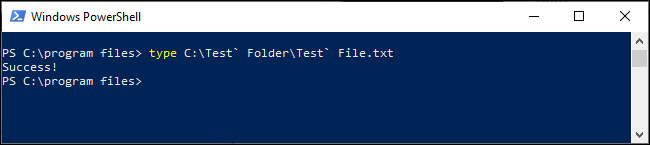
<p style="text-align: justify;">PowerShell sử dụng ký tự trọng âm (`) làm ký tự escape. Chỉ cần thêm nó vào trước mỗi khoảng trắng trong tên file. (Bạn sẽ tìm thấy ký tự này phía trên phím&nbsp;<strong>Tab</strong>&nbsp;và bên dưới phím&nbsp;<strong>Esc</strong>&nbsp;trên bàn phím của mình).</p>

<pre id="pre6">
<code>type C:\Test` Folder\Test` File.txt</code></pre>

<p style="text-align: justify;">Mỗi ký tự trọng âm yêu cầu PowerShell escape ký tự sau đó.</p>

<p style="text-align: justify;">Lưu ý rằng điều này chỉ hoạt động trong môi trường PowerShell. Bạn sẽ phải sử dụng ký tự dấu mũ trong Command Prompt.</p>

<figure>
<div style="text-align: justify;"><img alt="Sử dụng ký tự dấu trọng âm (`)" data-i="4" data-src="https://st.quantrimang.com/photos/image/2020/10/20/escape-khoang-trang-trong-duong-dan-file-5.png" data-was-processed="true" height="145" src="https://st.quantrimang.com/photos/image/2020/10/20/escape-khoang-trang-trong-duong-dan-file-5.png" width="650" /></div>

<figcaption>
<div style="text-align: justify;">Sử dụng ký tự dấu trọng âm (`)</div>
</figcaption>
</figure>

<p style="text-align: justify;">Nếu đã quen với các hệ điều hành giống UNIX như Linux và macOS, bạn có thể quen với việc sử dụng ký tự dấu gạch chéo ngược (\) trước một khoảng trắng để escape nó. Windows sử dụng ký tự này cho các đường dẫn file thông thường, vì vậy nó không hoạt động. Các ký tự dấu mũ (^) và dấu trọng âm (`) là phiên bản Windows của dấu gạch chéo ngược, tùy thuộc vào shell dòng lệnh bạn đang sử dụng.</p>
		</div>
				<div id="author">
						<p>
				<strong>Nguồn tin:</strong>
				Quantrimang.com
			</p>
		</div>
	</div>
	<div id="footer" class="clearfix">
		<div id="url">
			<strong>URL của bản tin này: </strong><a href="https://www.nguoicodonvn2008.info/vi/news/savefile/kien-thuc-may-tinh/cach-escape-thoat-khoang-trang-trong-duong-dan-file-tren-dong-lenh-windows-2943.html" title="Cách escape &#40;thoát&#41; khoảng trắng trong đường dẫn file trên dòng lệnh Windows">https://www.nguoicodonvn2008.info/vi/news/savefile/kien-thuc-may-tinh/cach-escape-thoat-khoang-trang-trong-duong-dan-file-tren-dong-lenh-windows-2943.html</a>

		</div>
		<div class="clear"></div>
		<div class="copyright">
			&copy; .&#x3A; Nguoicodonvn2008.info - Cõi lòng người cô đơn &#x3A;.
		</div>
		<div id="contact">
			<a href="mailto:admin@nguoicodonvn2008.info">admin@nguoicodonvn2008.info</a>
		</div>
	</div>
</div>
        <div id="timeoutsess" class="chromeframe">
            Bạn đã không sử dụng Site, <a onclick="timeoutsesscancel();" href="https://www.nguoicodonvn2008.info/#">Bấm vào đây để duy trì trạng thái đăng nhập</a>. Thời gian chờ: <span id="secField"> 60 </span> giây
        </div>
        <div id="openidResult" class="nv-alert" style="display:none"></div>
        <div id="openidBt" data-result="" data-redirect=""></div>
		</script>
		<div class="car-top">
  <span><img src="https://www.nguoicodonvn2008.info/themes/default/images/car.png" alt=""></span>
</div>
<script src="https://www.nguoicodonvn2008.info/assets/js/jquery/jquery.min.js"></script>
<script>var nv_base_siteurl="/",nv_lang_data="vi",nv_lang_interface="vi",nv_name_variable="nv",nv_fc_variable="op",nv_lang_variable="language",nv_module_name="news",nv_func_name="savefile",nv_is_user=0, nv_my_ofs=-4,nv_my_abbr="EDT",nv_cookie_prefix="nv4c_e856T",nv_check_pass_mstime=1738000,nv_area_admin=0,nv_safemode=0,theme_responsive=0,nv_recaptcha_ver=2,nv_recaptcha_sitekey="",nv_recaptcha_type="image",XSSsanitize=1;</script>
<script src="https://www.nguoicodonvn2008.info/assets/js/language/vi.js"></script>
<script src="https://www.nguoicodonvn2008.info/assets/js/DOMPurify/purify3.js"></script>
<script src="https://www.nguoicodonvn2008.info/assets/js/global.js"></script>
<script src="https://www.nguoicodonvn2008.info/assets/js/site.js"></script>
<script src="https://www.nguoicodonvn2008.info/themes/default/js/news.js"></script>
<script src="https://www.nguoicodonvn2008.info/themes/default/js/main.js"></script>
<script src="https://www.nguoicodonvn2008.info/themes/default/js/custom.js"></script>
<script type="application/ld+json">
        {
            "@context": "https://schema.org",
            "@type": "Organization",
            "url": "https://www.nguoicodonvn2008.info",
            "logo": "https://www.nguoicodonvn2008.info/uploads/angel.gif"
        }
        </script>
<script src="https://www.nguoicodonvn2008.info/themes/default/js/bootstrap.min.js"></script>
<script type="text/javascript">
var $scrolltop = $('.car-top');
$scrolltop.on('click', function () {
    $('html,body').animate({
        scrollTop: 0
    }, 800);
    $(this).addClass("car-run");
    setTimeout(function(){ $scrolltop.removeClass('car-run');}, 1000);
    return false;
});
$(window).on('scroll', function ()
{ 
    if($(window).scrollTop() >= 200)
    {
        $scrolltop.addClass("show");
        $scrolltop.addClass("car-down");
    }
    else
    {
       $scrolltop.removeClass("show");
       setTimeout(function(){ $scrolltop.removeClass('car-down');}, 300);
    }
});
</script>
</body>
</html>