<!DOCTYPE html>
    <html lang="vi" xmlns="http://www.w3.org/1999/xhtml" prefix="og: http://ogp.me/ns#">
    <head>
<title>Cách dùng WizTree dọn sạch 200GB file rác ẩn</title>
<meta name="description" content="Cách dùng WizTree dọn sạch 200GB file rác ẩn - Savefile - Tin Tức -...">
<meta name="author" content=".: Nguoicodonvn2008.info - Cõi lòng người cô đơn :.">
<meta name="copyright" content=".: Nguoicodonvn2008.info - Cõi lòng người cô đơn :. [admin@nguoicodonvn2008.info]">
<meta name="robots" content="index, archive, follow, noodp">
<meta name="googlebot" content="index,archive,follow,noodp">
<meta name="msnbot" content="all,index,follow">
<meta name="generator" content="NukeViet v4.5">
<meta http-equiv="Content-Type" content="text/html; charset=utf-8">
<meta property="og:title" content="Cách dùng WizTree dọn sạch 200GB file rác ẩn">
<meta property="og:type" content="website">
<meta property="og:description" content="Savefile - Tin Tức - https&#x3A;&#x002F;&#x002F;www.nguoicodonvn2008.info&#x002F;vi&#x002F;news&#x002F;savefile&#x002F;kien-thuc-may-tinh&#x002F;cach-dung-wiztree-don-sach-200gb-file-rac-an-11798.html">
<meta property="og:site_name" content=".&#x3A; Nguoicodonvn2008.info - Cõi lòng người cô đơn &#x3A;.">
<meta property="og:url" content="https://www.nguoicodonvn2008.info/vi/news/savefile/kien-thuc-may-tinh/cach-dung-wiztree-don-sach-200gb-file-rac-an-11798.html">
<link rel="shortcut icon" href="https://www.nguoicodonvn2008.info/favicon.ico">
<link rel="canonical" href="https://www.nguoicodonvn2008.info/vi/news/savefile/kien-thuc-may-tinh/cach-dung-wiztree-don-sach-200gb-file-rac-an-11798.html">
<link rel="alternate" href="https://www.nguoicodonvn2008.info/vi/news/rss/" title="Tin Tức" type="application/rss+xml">
<link rel="alternate" href="https://www.nguoicodonvn2008.info/vi/news/rss/karaoke-dual/" title="Tin Tức - Karaoke Dual" type="application/rss+xml">
<link rel="alternate" href="https://www.nguoicodonvn2008.info/vi/news/rss/nhac-tre/" title="Tin Tức - Nhạc trẻ" type="application/rss+xml">
<link rel="alternate" href="https://www.nguoicodonvn2008.info/vi/news/rss/tru-tinh/" title="Tin Tức - Trữ tình" type="application/rss+xml">
<link rel="alternate" href="https://www.nguoicodonvn2008.info/vi/news/rss/nuoc-ngoai/" title="Tin Tức - Nước ngoài" type="application/rss+xml">
<link rel="alternate" href="https://www.nguoicodonvn2008.info/vi/news/rss/remix/" title="Tin Tức - Remix" type="application/rss+xml">
<link rel="alternate" href="https://www.nguoicodonvn2008.info/vi/news/rss/tam-su-tinh-yeu/" title="Tin Tức - Tâm sự tình yêu" type="application/rss+xml">
<link rel="alternate" href="https://www.nguoicodonvn2008.info/vi/news/rss/tho-suu-tam/" title="Tin Tức - Thơ sưu tầm" type="application/rss+xml">
<link rel="alternate" href="https://www.nguoicodonvn2008.info/vi/news/rss/cuoc-song/" title="Tin Tức - Cuộc sống" type="application/rss+xml">
<link rel="alternate" href="https://www.nguoicodonvn2008.info/vi/news/rss/phan-mem/" title="Tin Tức - Phần mềm" type="application/rss+xml">
<link rel="alternate" href="https://www.nguoicodonvn2008.info/vi/news/rss/kien-thuc-may-tinh/" title="Tin Tức - Kiến thức máy tính" type="application/rss+xml">
<link rel="alternate" href="https://www.nguoicodonvn2008.info/vi/news/rss/hoc-tap/" title="Tin Tức - Học tập" type="application/rss+xml">
<link rel="alternate" href="https://www.nguoicodonvn2008.info/vi/news/rss/tai-lieu/" title="Tin Tức - Tài liệu" type="application/rss+xml">
<link rel="alternate" href="https://www.nguoicodonvn2008.info/vi/news/rss/de-thi/" title="Tin Tức - Đề thi" type="application/rss+xml">
<link rel="preload" as="style" href="https://www.nguoicodonvn2008.info/assets/css/font-awesome.min.css" type="text/css">
<link rel="preload" as="style" href="https://www.nguoicodonvn2008.info/themes/default/css/bootstrap.non-responsive.css" type="text/css">
<link rel="preload" as="style" href="https://www.nguoicodonvn2008.info/themes/default/css/style.css" type="text/css">
<link rel="preload" as="style" href="https://www.nguoicodonvn2008.info/themes/default/css/style.non-responsive.css" type="text/css">
<link rel="preload" as="style" href="https://www.nguoicodonvn2008.info/themes/default/css/news.css" type="text/css">
<link rel="preload" as="style" href="https://www.nguoicodonvn2008.info/themes/default/css/custom.css" type="text/css">
<link rel="preload" as="script" href="https://www.nguoicodonvn2008.info/assets/js/jquery/jquery.min.js" type="text/javascript">
<link rel="preload" as="script" href="https://www.nguoicodonvn2008.info/assets/js/language/vi.js" type="text/javascript">
<link rel="preload" as="script" href="https://www.nguoicodonvn2008.info/assets/js/DOMPurify/purify3.js" type="text/javascript">
<link rel="preload" as="script" href="https://www.nguoicodonvn2008.info/assets/js/global.js" type="text/javascript">
<link rel="preload" as="script" href="https://www.nguoicodonvn2008.info/assets/js/site.js" type="text/javascript">
<link rel="preload" as="script" href="https://www.nguoicodonvn2008.info/themes/default/js/news.js" type="text/javascript">
<link rel="preload" as="script" href="https://www.nguoicodonvn2008.info/themes/default/js/main.js" type="text/javascript">
<link rel="preload" as="script" href="https://www.nguoicodonvn2008.info/themes/default/js/custom.js" type="text/javascript">
<link rel="preload" as="script" href="https://www.nguoicodonvn2008.info/themes/default/js/bootstrap.min.js" type="text/javascript">
<link rel="stylesheet" href="https://www.nguoicodonvn2008.info/assets/css/font-awesome.min.css">
<link rel="stylesheet" href="https://www.nguoicodonvn2008.info/themes/default/css/bootstrap.non-responsive.css">
<link rel="stylesheet" href="https://www.nguoicodonvn2008.info/themes/default/css/style.css">
<link rel="stylesheet" href="https://www.nguoicodonvn2008.info/themes/default/css/style.non-responsive.css">
<link rel="StyleSheet" href="https://www.nguoicodonvn2008.info/themes/default/css/news.css">
<link rel="stylesheet" href="https://www.nguoicodonvn2008.info/themes/default/css/custom.css">
<style type="text/css">
	body{background: #fff;}
</style>
    </head>
    <body>
<div id="print">
	<div id="hd_print">
		<h2 class="pull-left">.&#x3A; Nguoicodonvn2008.info - Cõi lòng người cô đơn &#x3A;.</h2>
		<p class="pull-right"><a title=".&#x3A; Nguoicodonvn2008.info - Cõi lòng người cô đơn &#x3A;." href="https://www.nguoicodonvn2008.info/">https://www.nguoicodonvn2008.info</a></p>
	</div>
	<div class="clear"></div>
	<hr />
	<div id="content">
		<h1>Cách dùng WizTree dọn sạch 200GB file rác ẩn</h1>
		<ul class="list-inline">
			<li>Thứ sáu - 05/12/2025 22:55</li>
			<li class="hidden-print txtrequired"><em class="fa fa-print">&nbsp;</em><a title="In ra" href="javascript:;" onclick="window.print()">In ra</a></li>
			<li class="hidden-print txtrequired"><em class="fa fa-power-off">&nbsp;</em><a title="Đóng cửa sổ này" href="javascript:;" onclick="window.close()">Đóng cửa sổ này</a></li>
		</ul>
		<div class="clear"></div>
		<div id="hometext">
		</div>
				<div class="imghome">
			<img alt="Cách dùng WizTree dọn sạch 200GB file rác ẩn" src="https://st.quantrimang.com/photos/image/2025/12/05/dung-wiztree-don-sach-file-rac-an-windows-8.jpg" width="460" class="img-thumbnail" />
		</div>
		<div class="clear"></div>
		<div id="bodytext" class="clearfix">
			<p style="text-align: justify;">Nhiều người không nhận ra các file rác có thể gây ra vấn đề lớn đến mức nào cho đến khi trình duyệt web bắt đầu thông báo sắp hết dung lượng lưu trữ. Nhiều người có tổng cộng 2TB dung lượng lưu trữ SSD (cả NVMe và SATA), vậy thì dung lượng đó đã đi đâu?</p>

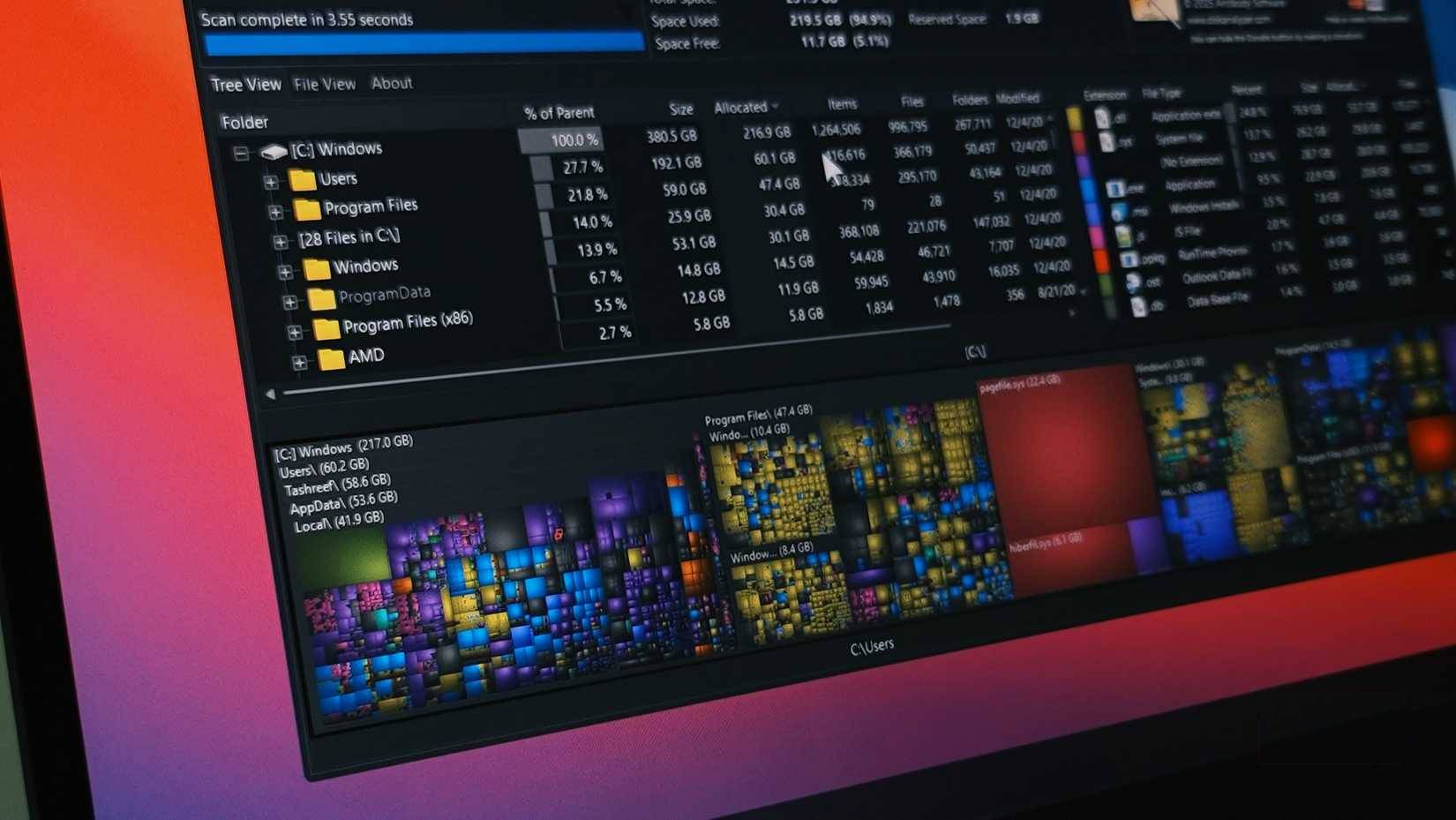
<p style="text-align: justify;">Những người cài đặt hàng tá ứng dụng, từ siêu ứng dụng Windows 4MB đến chạy các&nbsp;mô hình ngôn ngữ lớn&nbsp;bằng Ollama, cần nhiều dung lượng hơn hầu hết mọi người. Thay vì gỡ cài đặt một ứng dụng lẻ tẻ hoặc dọn dẹp thư mục cập nhật Windows, nhiều người đã khởi động&nbsp;WizTree, một công cụ phân tích dung lượng ổ đĩa miễn phí, để xem những gì đang chiếm dụng ổ cứng của mình. Sau một giờ dọn dẹp tập trung, có tới 200GB dung lượng được giải phóng mà các công cụ dọn dẹp tích hợp của Windows hoàn toàn bỏ sót.</p>

<h2 style="text-align: justify;">Tại sao các công cụ dọn dẹp tích hợp lại không đủ?</h2>

<h3 style="text-align: justify;">Chúng chậm kinh khủng và kém chi tiết.</h3>

<figure>
<div style="text-align: justify;"><img alt="" data-adbro-processed="true" data-i="0" data-src="https://st.quantrimang.com/photos/image/2025/12/05/dung-wiztree-don-sach-file-rac-an-windows-1.jpg" data-was-processed="true" height="929" src="https://st.quantrimang.com/photos/image/2025/12/05/dung-wiztree-don-sach-file-rac-an-windows-1.jpg" width="1650" /></div>
</figure>

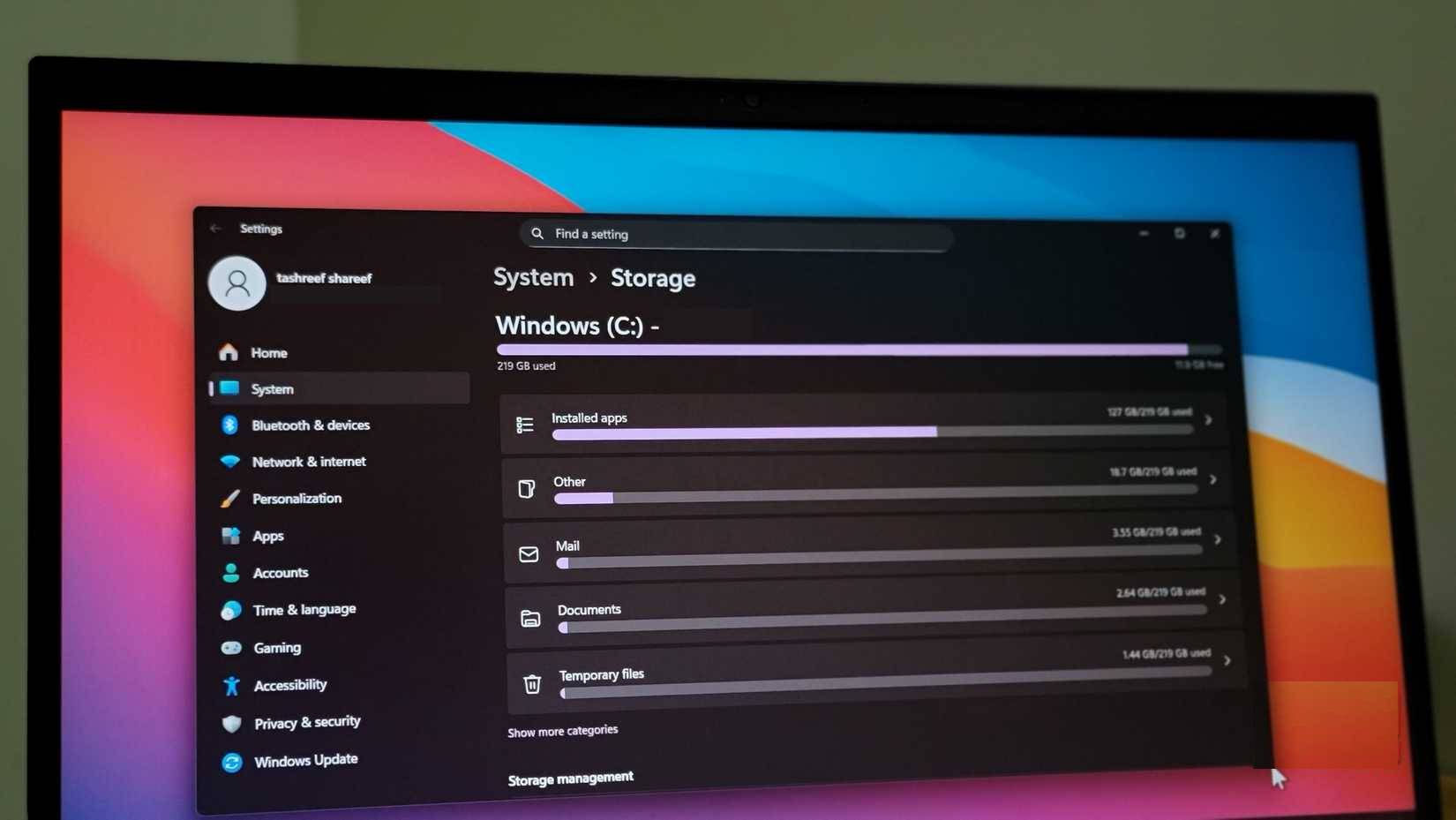
<p style="text-align: justify;">Các công cụ dọn dẹp bộ nhớ tích hợp của Windows khá cơ bản.&nbsp;Disk Cleanup&nbsp;chỉ liệt kê các thư mục phổ biến như Recycle Bin, các file tạm thời và file Windows Update có thể xóa an toàn mà không ảnh hưởng đến dữ liệu cá nhân. Tuy nhiên, thường thì các ứng dụng đã cài đặt, file cũ hoặc file trùng lặp mới là những thứ chiếm hết dung lượng trên PC.</p>

<p style="text-align: justify;">Windows cũng cung cấp&nbsp;Storage Sense&nbsp;trong ứng dụng Settings, có thể hiển thị file và thư mục nào đang chiếm nhiều dung lượng nhất. Tuy nhiên, tính năng này rất chậm và phải quét lại mỗi khi bạn chuyển qua lại giữa các thư mục. Nhiều người sử dụng tính năng này để xem chi tiết các thư mục người dùng của mình, nhưng đã bỏ cuộc sau khi chờ nửa phút để mỗi thư mục con load xong.</p>

<h2 style="text-align: justify;">Sử dụng WizTree để tìm dung lượng bị mất</h2>

<h3 style="text-align: justify;">Phân tích bộ nhớ nhanh chóng và chi tiết</h3>

<figure>
<div style="text-align: justify;"><img alt="" data-i="1" data-src="https://st.quantrimang.com/photos/image/2025/12/05/dung-wiztree-don-sach-file-rac-an-windows-2.jpg" data-was-processed="true" height="1082" src="https://st.quantrimang.com/photos/image/2025/12/05/dung-wiztree-don-sach-file-rac-an-windows-2.jpg" width="1922" /></div>
</figure>

<figure>
<div style="text-align: justify;"><img alt="" data-i="2" data-src="https://st.quantrimang.com/photos/image/2025/12/05/dung-wiztree-don-sach-file-rac-an-windows-3.jpg" data-was-processed="true" height="1082" src="https://st.quantrimang.com/photos/image/2025/12/05/dung-wiztree-don-sach-file-rac-an-windows-3.jpg" width="1922" /></div>
</figure>

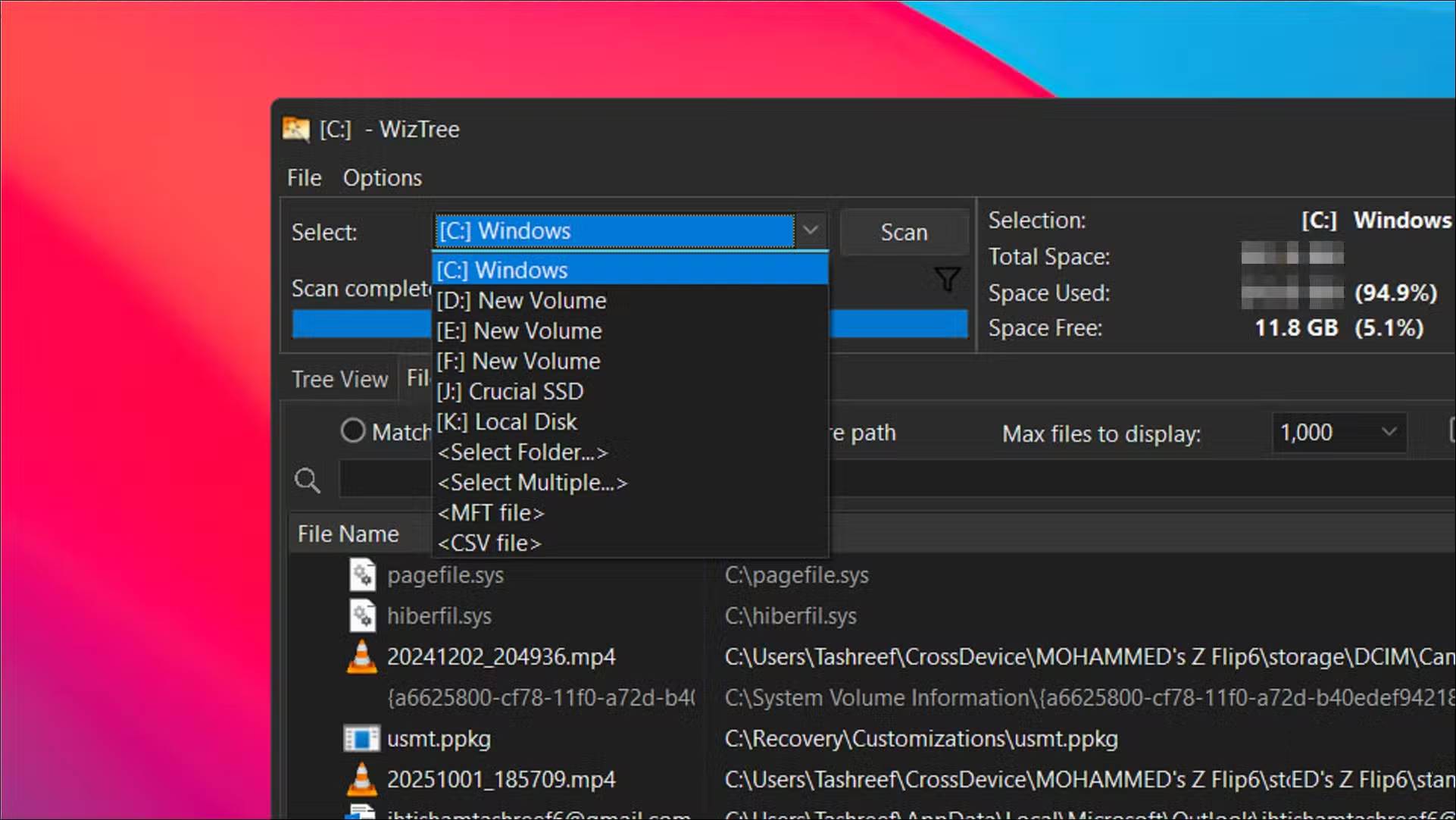
<p style="text-align: justify;">Nhiều người đã sử dụng WizTree được vài năm và nó hoạt động hoàn hảo, xét đến việc nó hoàn toàn miễn phí cho mục đích sử dụng cá nhân. Đúng là có một nút&nbsp;<strong>Donate</strong>&nbsp;hoạt hình khá khó chịu, nhưng đó không phải là vấn đề lớn. Bạn cần cấp quyền admin mỗi khi chạy công cụ để nó có thể quét ổ của bạn. Sau đó, chọn ổ bạn muốn phân tích và nhấp vào&nbsp;<strong>Scan</strong>.</p>

<p style="text-align: justify;">Đối với những người đã từng sử dụng&nbsp;WinDirStat, WizTree sẽ mang lại cảm giác quen thuộc đến kinh ngạc, ngoại trừ việc nó nhanh hơn và đi kèm với nhiều tùy chọn tùy chỉnh hơn. Trong thử nghiệm, WizTree đã hoàn thành việc quét ổ SSD NVMe 256GB trong khoảng 5 giây. Khi thử nghiệm WinDirStat trên cùng một ổ đĩa vì tò mò, nó mất khoảng 17 giây, vì vậy WizTree thực sự nhanh.</p>

<p style="text-align: justify;">Sự khác biệt về tốc độ đến từ cách WizTree đọc ổ của bạn. Thay vì sử dụng tính năng liệt kê file Windows thông thường như hầu hết các trình phân tích ổ đĩa, WizTree đọc Master File Table trực tiếp trên các ổ NTFS. Tính năng này hoàn toàn bỏ qua Windows và tăng tốc đáng kể quá trình quét.</p>

<figure>
<div style="text-align: justify;"><img alt="Chế độ xem dạng cây của WizTree hiển thị số liệu thống kê ổ đĩa trên Windows 11" data-i="6" data-src="https://st.quantrimang.com/photos/image/2025/12/05/dung-wiztree-don-sach-file-rac-an-windows-7.jpg" data-was-processed="true" height="929" src="https://st.quantrimang.com/photos/image/2025/12/05/dung-wiztree-don-sach-file-rac-an-windows-7.jpg" width="1650" /></div>

<figcaption>
<div style="text-align: justify;">Chế độ xem dạng cây của WizTree hiển thị số liệu thống kê ổ đĩa trên Windows 11</div>
</figcaption>
</figure>

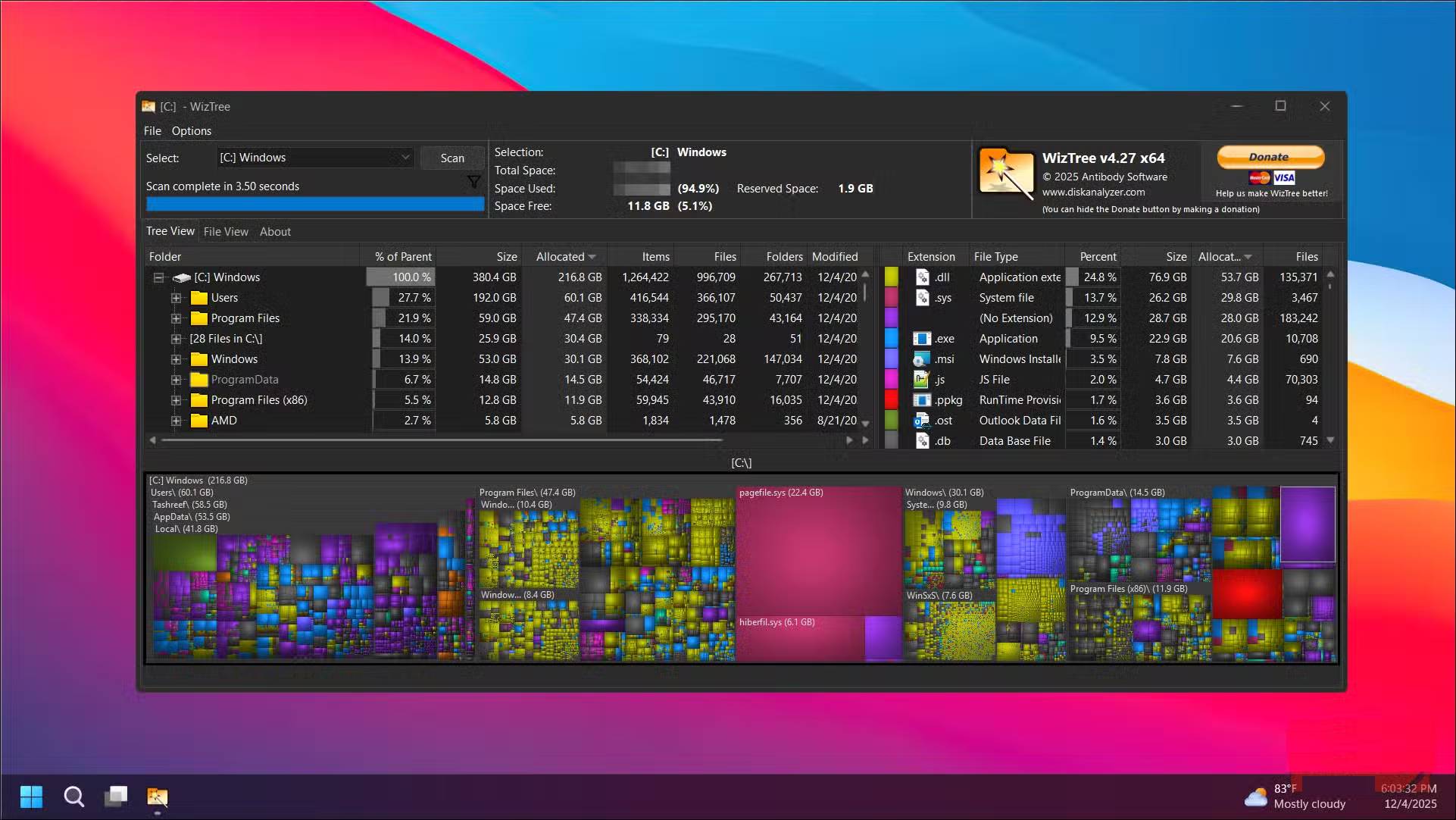
<p style="text-align: justify;">Sau khi quá trình quét hoàn tất, WizTree hiển thị bảng phân tích chi tiết về dung lượng lưu trữ của bạn. Tab&nbsp;<strong>Tree View</strong>&nbsp;hiển thị các thư mục được sắp xếp theo kích thước, giúp bạn dễ dàng nhận biết những thư mục đang chiếm nhiều dung lượng nhất. Tab&nbsp;<strong>File View</strong>&nbsp;liệt kê từng file theo kích thước, giúp bạn nhanh chóng phát hiện các file media lớn, file tải xuống cũ hoặc phim trùng lặp ẩn trong những thư mục lồng nhau.</p>

<p style="text-align: justify;">Từ danh sách file, bạn có thể nhấp chuột phải vào bất kỳ mục nào để mở trực tiếp trong File Explorer thông qua menu ngữ cảnh tiêu chuẩn của Windows. Điều này giúp bạn dễ dàng định vị và xóa các file lớn mà không cần sao chép thủ công đường dẫn và mở nó trong File Explorer.</p>

<h2 style="text-align: justify;">Các tính năng nâng cao hơn</h2>

<h3 style="text-align: justify;">Tinh chỉnh cách WizTree hoạt động</h3>

<figure>
<div style="text-align: justify;"><img alt="Menu tùy chọn nâng cao của WizTree trên Windows 11" data-i="7" data-src="https://st.quantrimang.com/photos/image/2025/12/05/dung-wiztree-don-sach-file-rac-an-windows-8.jpg" data-was-processed="true" height="929" src="https://st.quantrimang.com/photos/image/2025/12/05/dung-wiztree-don-sach-file-rac-an-windows-8.jpg" width="1650" /></div>

<figcaption>
<div style="text-align: justify;">Menu tùy chọn nâng cao của WizTree trên Windows 11</div>
</figcaption>
</figure>

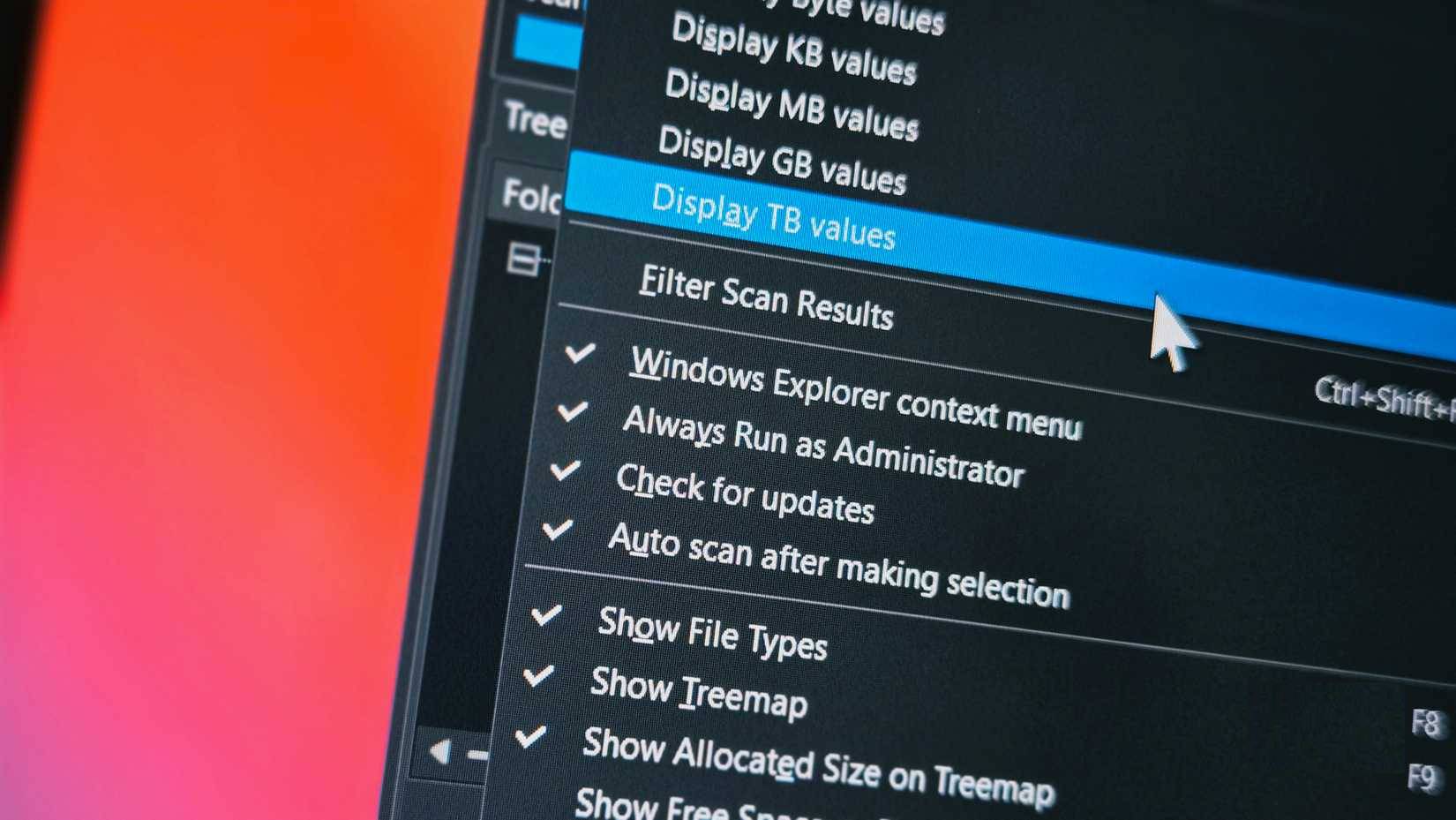
<p style="text-align: justify;">WizTree có một vài cài đặt ẩn mà bạn có thể điều chỉnh, nhưng hữu ích nhất là tùy chọn luôn chạy dưới quyền admin. Bật tùy chọn này giúp bạn không phải chạy ứng dụng thủ công với quyền admin mỗi khi khởi động.</p>

<p style="text-align: justify;">Bạn cũng có thể cấu hình WizTree để tự động quét ổ khi khởi động, loại trừ các thư mục cụ thể khỏi quá trình quét và tùy chỉnh màu sắc của sơ đồ cây theo ý muốn. Tính năng xuất cho phép bạn lưu kết quả quét vào&nbsp;file CSV, rất tiện lợi nếu bạn cần ghi lại mức sử dụng dung lượng lưu trữ theo thời gian hoặc chia sẻ báo cáo với người khác.</p>

<p style="text-align: justify;">Một tính năng khác được đánh giá cao là khả năng quét nhiều ổ cùng lúc. Nếu có cả&nbsp;ổ SSD&nbsp;và ổ lưu trữ thứ cấp, bạn có thể phân tích tất cả chúng cùng một lúc thay vì chạy các lần quét riêng biệt.</p>

<div style="text-align: justify;">&nbsp;</div>
		</div>
				<div id="author">
						<p>
				<strong>Nguồn tin:</strong>
				Quantrimang.com:
			</p>
		</div>
	</div>
	<div id="footer" class="clearfix">
		<div id="url">
			<strong>URL của bản tin này: </strong><a href="https://www.nguoicodonvn2008.info/vi/news/savefile/kien-thuc-may-tinh/cach-dung-wiztree-don-sach-200gb-file-rac-an-11798.html" title="Cách dùng WizTree dọn sạch 200GB file rác ẩn">https://www.nguoicodonvn2008.info/vi/news/savefile/kien-thuc-may-tinh/cach-dung-wiztree-don-sach-200gb-file-rac-an-11798.html</a>

		</div>
		<div class="clear"></div>
		<div class="copyright">
			&copy; .&#x3A; Nguoicodonvn2008.info - Cõi lòng người cô đơn &#x3A;.
		</div>
		<div id="contact">
			<a href="mailto:admin@nguoicodonvn2008.info">admin@nguoicodonvn2008.info</a>
		</div>
	</div>
</div>
        <div id="timeoutsess" class="chromeframe">
            Bạn đã không sử dụng Site, <a onclick="timeoutsesscancel();" href="https://www.nguoicodonvn2008.info/#">Bấm vào đây để duy trì trạng thái đăng nhập</a>. Thời gian chờ: <span id="secField"> 60 </span> giây
        </div>
        <div id="openidResult" class="nv-alert" style="display:none"></div>
        <div id="openidBt" data-result="" data-redirect=""></div>
		</script>
		<div class="car-top">
  <span><img src="https://www.nguoicodonvn2008.info/themes/default/images/car.png" alt=""></span>
</div>
<script src="https://www.nguoicodonvn2008.info/assets/js/jquery/jquery.min.js"></script>
<script>var nv_base_siteurl="/",nv_lang_data="vi",nv_lang_interface="vi",nv_name_variable="nv",nv_fc_variable="op",nv_lang_variable="language",nv_module_name="news",nv_func_name="savefile",nv_is_user=0, nv_my_ofs=-4,nv_my_abbr="EDT",nv_cookie_prefix="nv4c_e856T",nv_check_pass_mstime=1738000,nv_area_admin=0,nv_safemode=0,theme_responsive=0,nv_recaptcha_ver=2,nv_recaptcha_sitekey="",nv_recaptcha_type="image",XSSsanitize=1;</script>
<script src="https://www.nguoicodonvn2008.info/assets/js/language/vi.js"></script>
<script src="https://www.nguoicodonvn2008.info/assets/js/DOMPurify/purify3.js"></script>
<script src="https://www.nguoicodonvn2008.info/assets/js/global.js"></script>
<script src="https://www.nguoicodonvn2008.info/assets/js/site.js"></script>
<script src="https://www.nguoicodonvn2008.info/themes/default/js/news.js"></script>
<script src="https://www.nguoicodonvn2008.info/themes/default/js/main.js"></script>
<script src="https://www.nguoicodonvn2008.info/themes/default/js/custom.js"></script>
<script type="application/ld+json">
        {
            "@context": "https://schema.org",
            "@type": "Organization",
            "url": "https://www.nguoicodonvn2008.info",
            "logo": "https://www.nguoicodonvn2008.info/uploads/angel.gif"
        }
        </script>
<script src="https://www.nguoicodonvn2008.info/themes/default/js/bootstrap.min.js"></script>
<script type="text/javascript">
var $scrolltop = $('.car-top');
$scrolltop.on('click', function () {
    $('html,body').animate({
        scrollTop: 0
    }, 800);
    $(this).addClass("car-run");
    setTimeout(function(){ $scrolltop.removeClass('car-run');}, 1000);
    return false;
});
$(window).on('scroll', function ()
{ 
    if($(window).scrollTop() >= 200)
    {
        $scrolltop.addClass("show");
        $scrolltop.addClass("car-down");
    }
    else
    {
       $scrolltop.removeClass("show");
       setTimeout(function(){ $scrolltop.removeClass('car-down');}, 300);
    }
});
</script>
</body>
</html>