<!DOCTYPE html>
    <html lang="vi" xmlns="http://www.w3.org/1999/xhtml" prefix="og: http://ogp.me/ns#">
    <head>
<title>Cách dùng hàm WRAPCOLS trong Excel</title>
<meta name="description" content="Cách dùng hàm WRAPCOLS trong Excel - Savefile - Tin Tức -...">
<meta name="author" content=".: Nguoicodonvn2008.info - Cõi lòng người cô đơn :.">
<meta name="copyright" content=".: Nguoicodonvn2008.info - Cõi lòng người cô đơn :. [admin@nguoicodonvn2008.info]">
<meta name="robots" content="index, archive, follow, noodp">
<meta name="googlebot" content="index,archive,follow,noodp">
<meta name="msnbot" content="all,index,follow">
<meta name="generator" content="NukeViet v4.5">
<meta http-equiv="Content-Type" content="text/html; charset=utf-8">
<meta property="og:title" content="Cách dùng hàm WRAPCOLS trong Excel">
<meta property="og:type" content="website">
<meta property="og:description" content="Savefile - Tin Tức - https&#x3A;&#x002F;&#x002F;www.nguoicodonvn2008.info&#x002F;vi&#x002F;news&#x002F;savefile&#x002F;kien-thuc-may-tinh&#x002F;cach-dung-ham-wrapcols-trong-excel-7272.html">
<meta property="og:site_name" content=".&#x3A; Nguoicodonvn2008.info - Cõi lòng người cô đơn &#x3A;.">
<meta property="og:url" content="https://www.nguoicodonvn2008.info/vi/news/savefile/kien-thuc-may-tinh/cach-dung-ham-wrapcols-trong-excel-7272.html">
<link rel="shortcut icon" href="https://www.nguoicodonvn2008.info/favicon.ico">
<link rel="canonical" href="https://www.nguoicodonvn2008.info/vi/news/savefile/kien-thuc-may-tinh/cach-dung-ham-wrapcols-trong-excel-7272.html">
<link rel="alternate" href="https://www.nguoicodonvn2008.info/vi/news/rss/" title="Tin Tức" type="application/rss+xml">
<link rel="alternate" href="https://www.nguoicodonvn2008.info/vi/news/rss/karaoke-dual/" title="Tin Tức - Karaoke Dual" type="application/rss+xml">
<link rel="alternate" href="https://www.nguoicodonvn2008.info/vi/news/rss/nhac-tre/" title="Tin Tức - Nhạc trẻ" type="application/rss+xml">
<link rel="alternate" href="https://www.nguoicodonvn2008.info/vi/news/rss/tru-tinh/" title="Tin Tức - Trữ tình" type="application/rss+xml">
<link rel="alternate" href="https://www.nguoicodonvn2008.info/vi/news/rss/nuoc-ngoai/" title="Tin Tức - Nước ngoài" type="application/rss+xml">
<link rel="alternate" href="https://www.nguoicodonvn2008.info/vi/news/rss/remix/" title="Tin Tức - Remix" type="application/rss+xml">
<link rel="alternate" href="https://www.nguoicodonvn2008.info/vi/news/rss/tam-su-tinh-yeu/" title="Tin Tức - Tâm sự tình yêu" type="application/rss+xml">
<link rel="alternate" href="https://www.nguoicodonvn2008.info/vi/news/rss/tho-suu-tam/" title="Tin Tức - Thơ sưu tầm" type="application/rss+xml">
<link rel="alternate" href="https://www.nguoicodonvn2008.info/vi/news/rss/cuoc-song/" title="Tin Tức - Cuộc sống" type="application/rss+xml">
<link rel="alternate" href="https://www.nguoicodonvn2008.info/vi/news/rss/phan-mem/" title="Tin Tức - Phần mềm" type="application/rss+xml">
<link rel="alternate" href="https://www.nguoicodonvn2008.info/vi/news/rss/kien-thuc-may-tinh/" title="Tin Tức - Kiến thức máy tính" type="application/rss+xml">
<link rel="alternate" href="https://www.nguoicodonvn2008.info/vi/news/rss/hoc-tap/" title="Tin Tức - Học tập" type="application/rss+xml">
<link rel="alternate" href="https://www.nguoicodonvn2008.info/vi/news/rss/tai-lieu/" title="Tin Tức - Tài liệu" type="application/rss+xml">
<link rel="alternate" href="https://www.nguoicodonvn2008.info/vi/news/rss/de-thi/" title="Tin Tức - Đề thi" type="application/rss+xml">
<link rel="preload" as="style" href="https://www.nguoicodonvn2008.info/assets/css/font-awesome.min.css" type="text/css">
<link rel="preload" as="style" href="https://www.nguoicodonvn2008.info/themes/default/css/bootstrap.non-responsive.css" type="text/css">
<link rel="preload" as="style" href="https://www.nguoicodonvn2008.info/themes/default/css/style.css" type="text/css">
<link rel="preload" as="style" href="https://www.nguoicodonvn2008.info/themes/default/css/style.non-responsive.css" type="text/css">
<link rel="preload" as="style" href="https://www.nguoicodonvn2008.info/themes/default/css/news.css" type="text/css">
<link rel="preload" as="style" href="https://www.nguoicodonvn2008.info/themes/default/css/custom.css" type="text/css">
<link rel="preload" as="script" href="https://www.nguoicodonvn2008.info/assets/js/jquery/jquery.min.js" type="text/javascript">
<link rel="preload" as="script" href="https://www.nguoicodonvn2008.info/assets/js/language/vi.js" type="text/javascript">
<link rel="preload" as="script" href="https://www.nguoicodonvn2008.info/assets/js/DOMPurify/purify3.js" type="text/javascript">
<link rel="preload" as="script" href="https://www.nguoicodonvn2008.info/assets/js/global.js" type="text/javascript">
<link rel="preload" as="script" href="https://www.nguoicodonvn2008.info/assets/js/site.js" type="text/javascript">
<link rel="preload" as="script" href="https://www.nguoicodonvn2008.info/themes/default/js/news.js" type="text/javascript">
<link rel="preload" as="script" href="https://www.nguoicodonvn2008.info/themes/default/js/main.js" type="text/javascript">
<link rel="preload" as="script" href="https://www.nguoicodonvn2008.info/themes/default/js/custom.js" type="text/javascript">
<link rel="preload" as="script" href="https://www.nguoicodonvn2008.info/themes/default/js/bootstrap.min.js" type="text/javascript">
<link rel="stylesheet" href="https://www.nguoicodonvn2008.info/assets/css/font-awesome.min.css">
<link rel="stylesheet" href="https://www.nguoicodonvn2008.info/themes/default/css/bootstrap.non-responsive.css">
<link rel="stylesheet" href="https://www.nguoicodonvn2008.info/themes/default/css/style.css">
<link rel="stylesheet" href="https://www.nguoicodonvn2008.info/themes/default/css/style.non-responsive.css">
<link rel="StyleSheet" href="https://www.nguoicodonvn2008.info/themes/default/css/news.css">
<link rel="stylesheet" href="https://www.nguoicodonvn2008.info/themes/default/css/custom.css">
<style type="text/css">
	body{background: #fff;}
</style>
    </head>
    <body>
<div id="print">
	<div id="hd_print">
		<h2 class="pull-left">.&#x3A; Nguoicodonvn2008.info - Cõi lòng người cô đơn &#x3A;.</h2>
		<p class="pull-right"><a title=".&#x3A; Nguoicodonvn2008.info - Cõi lòng người cô đơn &#x3A;." href="https://www.nguoicodonvn2008.info/">https://www.nguoicodonvn2008.info</a></p>
	</div>
	<div class="clear"></div>
	<hr />
	<div id="content">
		<h1>Cách dùng hàm WRAPCOLS trong Excel</h1>
		<ul class="list-inline">
			<li>Thứ ba - 11/07/2023 09:30</li>
			<li class="hidden-print txtrequired"><em class="fa fa-print">&nbsp;</em><a title="In ra" href="javascript:;" onclick="window.print()">In ra</a></li>
			<li class="hidden-print txtrequired"><em class="fa fa-power-off">&nbsp;</em><a title="Đóng cửa sổ này" href="javascript:;" onclick="window.close()">Đóng cửa sổ này</a></li>
		</ul>
		<div class="clear"></div>
		<div id="hometext">
		</div>
				<div class="imghome">
			<img alt="Cách dùng hàm WRAPCOLS trong Excel" src="https://st.quantrimang.com/photos/image/2023/07/11/ham-WRAPCOLS-excel-5.jpg" width="460" class="img-thumbnail" />
		</div>
		<div class="clear"></div>
		<div id="bodytext" class="clearfix">
			<p style="text-align: justify;">Bạn muốn tách một danh sách dài thành nhiều cột? Vậy thì hãy cùng nhau học&nbsp;<strong>cách dùng hàm WRAPCOLS trong Microsoft Excel</strong>.</p>

<p style="text-align: justify;"><img alt="Hàm Excel" data-i="0" data-src="https://st.quantrimang.com/photos/image/2023/07/11/Excel-WRAPCOLS-7.jpg" data-was-processed="true" height="340" src="https://st.quantrimang.com/photos/image/2023/07/11/Excel-WRAPCOLS-7.jpg" width="650" /></p>

<p style="text-align: justify;">Hiện có nhiều hàm trong Microsoft Excel có thể giúp sắp xếp những con số và dữ liệu. Một trong số những hàm này là WRAPCOLS. Hàm này cung cấp cho người dùng Excel một cách thú vị mới để nhanh chóng chuyển đổi cột của họ thành một mảng 2D, nhờ đó, cải thiện khả năng đọc cùng cách hiện dữ liệu.</p>

<h2 style="text-align: justify;">Hàm WRAPCOLS trong Excel là gì?</h2>

<p style="text-align: justify;">Hàm WRAPCOLS hoạt động bằng cách gộp những giá trị của hàng và cột thành một mảng cột hai chiều. Bạn sẽ chỉ định độ dài của mỗi cột trong công thức.</p>

<p style="text-align: justify;">Đây là một hàm mảng năng động mới trong Excel. Nó có sẵn cho tất cả người dùng đăng ký&nbsp;<a data-type="internal" href="https://quantrimang.com/download/tai-microsoft-365-194075" rel="noopener" target="_blank" title="Microsoft 365">Microsoft 365</a>, bao gồm cả gói cơ bản.</p>

<h2 style="text-align: justify;">Cú pháp hàm WRAPCOLS trong Excel</h2>

<p style="text-align: justify;">Cú pháp của hàm WRAPCOLS có đối số sau:</p>

<pre id="pre0">
<code>=WRAPCOLS(vector, wrap_count, &#91;pad_with&#93;)</code></pre>

<p style="text-align: justify;">Cụ thể:</p>

<ul>
	<li style="text-align: justify;"><strong>Vector</strong>&nbsp;đại diện cho tham chiếu hoặc phạm vi ô bạn muốn bao gồm.</li>
	<li style="text-align: justify;"><strong>Wrap_count&nbsp;</strong>là số giá trị tối đa cho từng cột.</li>
	<li style="text-align: justify;"><strong>Pad_with</strong>&nbsp;là giá trị bạn muốn thêm cho hàng. Trong Excel, mặc định là #N/A nếu không có dữ liệu được chỉ định.</li>
</ul>

<h2 style="text-align: justify;">Cách dùng hàm WRAPCOLS trong Excel</h2>

<p style="text-align: justify;">Để bắt đầu, bạn cần dữ liệu mẫu. Bạn có thể dùng một trong số nhiều cách để đánh số hàng trong Excel khi muốn lấy danh sách số từ 1 tới 20. Để bao gồm những số này vào một mảng 2D, bạn có thể dùng hàm WRAPCOLS.</p>

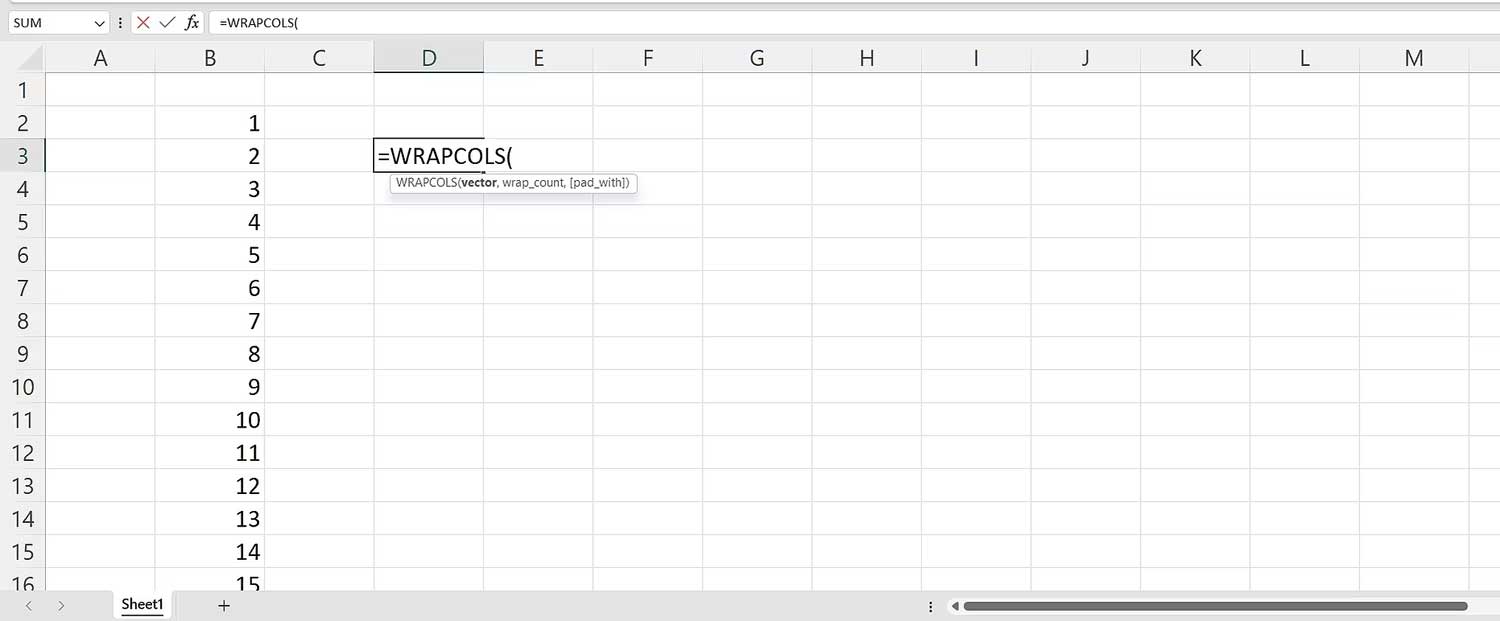
<p style="text-align: justify;">1. Viết công thức trong một ô hoặc qua thanh công thức&nbsp;<strong>=WRAPCOLS(</strong>.</p>

<p style="text-align: justify;"><img alt="Nhập hàm WRAPCOLS vào bảng tính Excel" data-i="1" data-src="https://st.quantrimang.com/photos/image/2023/07/11/ham-WRAPCOLS-excel-1.jpg" data-was-processed="true" height="269" src="https://st.quantrimang.com/photos/image/2023/07/11/ham-WRAPCOLS-excel-1.jpg" width="650" /></p>

<p style="text-align: justify;">2. Chọn mảng số và viết dấu phẩy.</p>

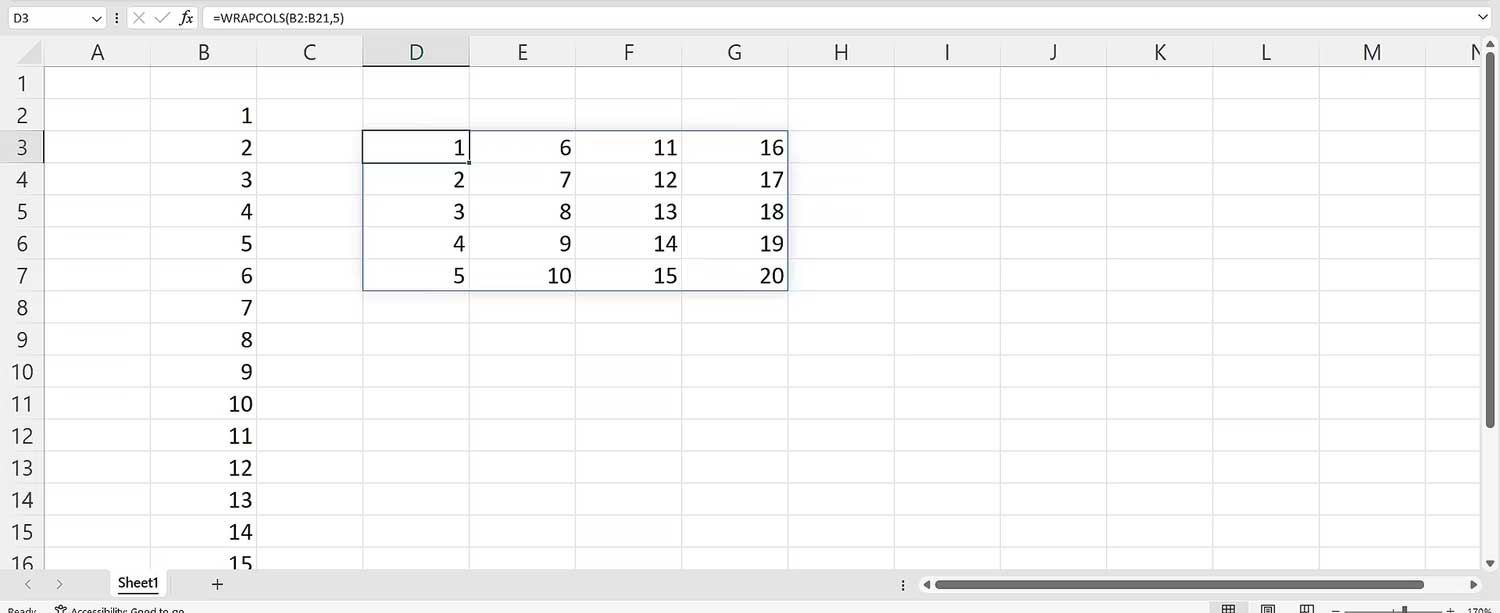
<p style="text-align: justify;">3. Đối với đối số&nbsp;<strong>wrap_count</strong>, viết 5. Điều này sẽ tách con số này thành các cột, trong đó mỗi cột chứa 5 giá trị.</p>

<p style="text-align: justify;">4. Đóng dấu ngoặc.</p>

<p style="text-align: justify;">5. Nhấn<strong>&nbsp;Enter</strong>&nbsp;trên bàn phím.</p>

<p style="text-align: justify;">Cú pháp cuối cùng là:</p>

<pre id="pre1">
<code>=WRAPCOLS(B2:B21,5)</code></pre>

<p style="text-align: justify;"><img alt="Bảng tính hàm WRAPCOLS trong Excel" data-i="2" data-src="https://st.quantrimang.com/photos/image/2023/07/11/ham-WRAPCOLS-excel-2.jpg" data-was-processed="true" height="266" src="https://st.quantrimang.com/photos/image/2023/07/11/ham-WRAPCOLS-excel-2.jpg" width="650" /></p>

<h2 style="text-align: justify;">Cách dùng đối số pad_with trong hàm WRAPCOLS</h2>

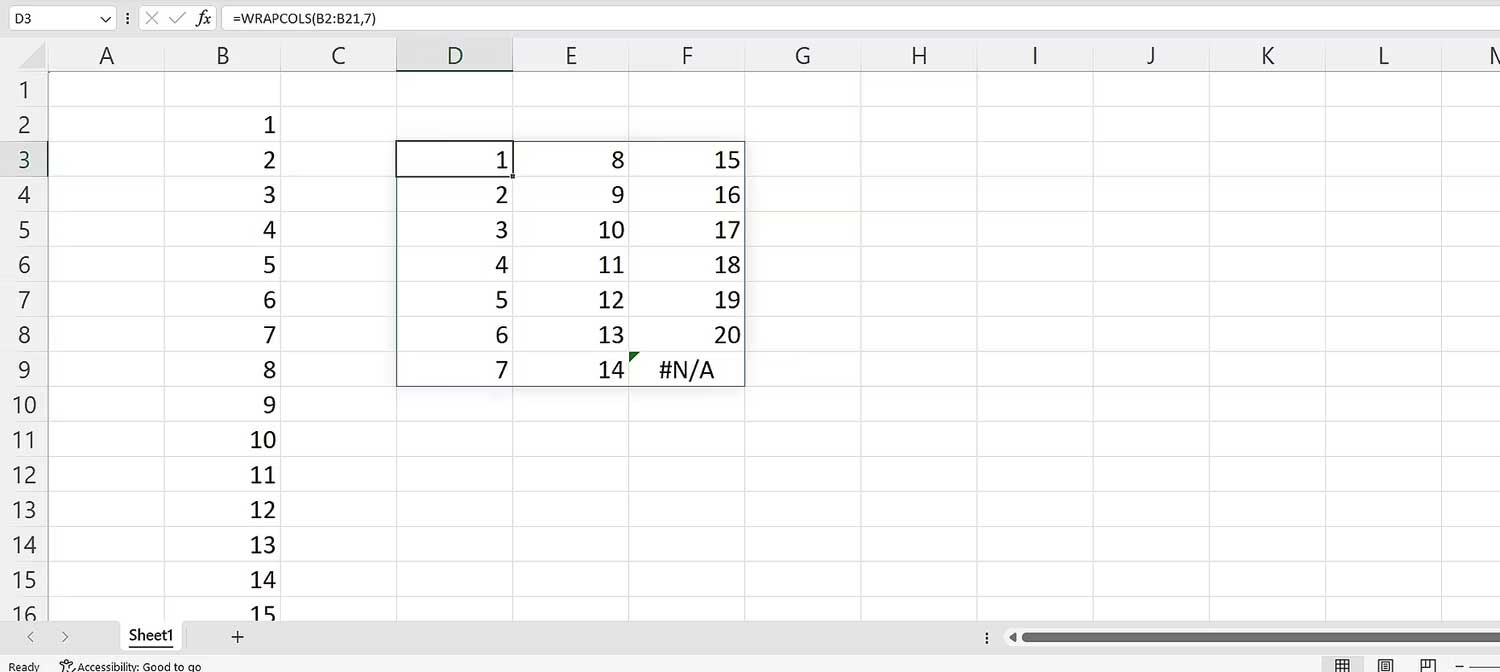
<p style="text-align: justify;">Mặc định, Excel hiện một lỗi #N/A nếu số lượng giá trị đã hết và không bằng số lượng bạn đã chỉ định trong wrap_count.</p>

<p style="text-align: justify;">Điều đó có nghĩa là gì? Thay 4 bằng 7 trong công thức ban đầu. Cú pháp sẽ như sau:</p>

<pre id="pre2">
<code>=WRAPCOLS(B2:B21,7)</code></pre>

<p style="text-align: justify;"><img alt="Cách dùng đối số trogn hàm WRAPCOLS" data-i="3" data-src="https://st.quantrimang.com/photos/image/2023/07/11/ham-WRAPCOLS-excel-3.jpg" data-was-processed="true" height="291" src="https://st.quantrimang.com/photos/image/2023/07/11/ham-WRAPCOLS-excel-3.jpg" width="650" /></p>

<p style="text-align: justify;">Lỗi #N/A xuất hiện có nghĩa toàn bộ giá trị từ nguồn đã được tính đến. Để đảm bảo lỗi đó không xuất hiện nữa, chỉ định một giá trị cho đối số pad_with. Để làm việc này:</p>

<ol>
	<li style="text-align: justify;">Viết&nbsp;<strong>WRAPROWS(</strong>.</li>
	<li style="text-align: justify;">Chọn phạm vi của các con số, rồi thêm dấu phẩy.</li>
	<li style="text-align: justify;">Viết 7 cho đối số&nbsp;<strong>wrap_count</strong>.</li>
	<li style="text-align: justify;">Thêm dấu phẩy.</li>
	<li style="text-align: justify;">Với đối số&nbsp;<strong>pad_with</strong>, viết dấu&nbsp;<strong>&quot; &quot;</strong>, đại diện cho khoảng cách.</li>
	<li style="text-align: justify;">Nhấn<strong>&nbsp;Enter</strong>&nbsp;trên bàn phím.</li>
</ol>

<p style="text-align: justify;">Cú pháp cuối cùng sẽ là:</p>

<pre id="pre3">
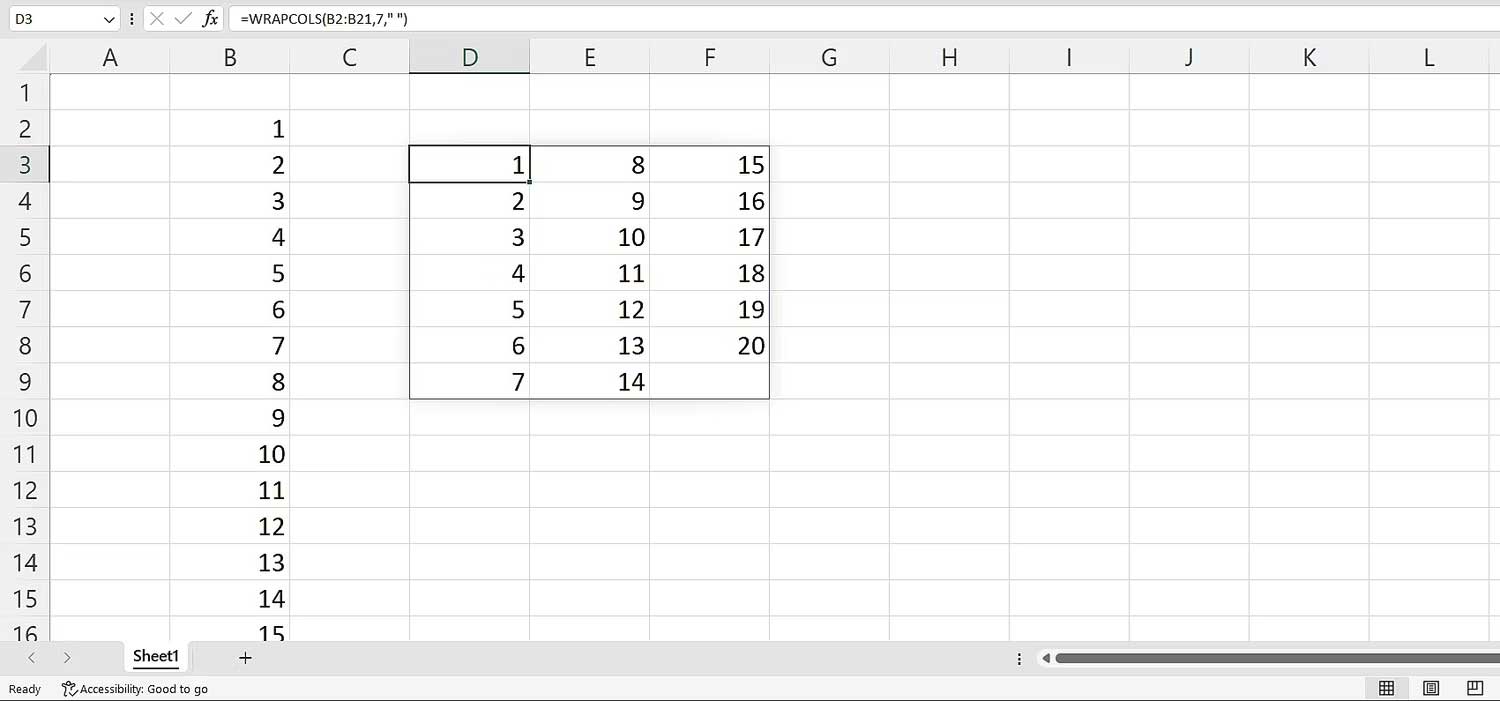
<code>=WRAPCOLS(B2:B21,7,&quot; &quot;)</code></pre>

<p style="text-align: justify;"><img alt="Cách dùng hàm WRAPCOLS" data-i="4" data-src="https://st.quantrimang.com/photos/image/2023/07/11/ham-WRAPCOLS-excel-5.jpg" data-was-processed="true" height="304" src="https://st.quantrimang.com/photos/image/2023/07/11/ham-WRAPCOLS-excel-5.jpg" width="650" /></p>

<h2 style="text-align: justify;">Ví dụ trường hợp dùng hàm WRAPCOLS</h2>

<p style="text-align: justify;">Giờ hãy cùng nhau xem xét tình huống giả sử bạn có một danh sách ngày tháng muốn tách thành 4 phần. Bạn có thể dùng hàm WRAPCOLS. Cách thực hiện như sau:</p>

<ol>
	<li style="text-align: justify;">Viết hàm này.</li>
	<li style="text-align: justify;">Chọn phạm vi. Chúng sẽ là ngày tháng.</li>
	<li style="text-align: justify;">Chọn&nbsp;<strong>3</strong>&nbsp;làm đối số&nbsp;<strong>wrap_count</strong>.</li>
	<li style="text-align: justify;">Bạn có thể thêm khoảng cách, thậm chí là dấu gạch ngang làm đối số<strong>&nbsp;pad_with</strong>.</li>
	<li style="text-align: justify;">Cuối cùng, nhấn&nbsp;<strong>Enter</strong>&nbsp;trên bàn phím.</li>
</ol>

<p style="text-align: justify;">Cú pháp cuối cùng sẽ là:</p>

<pre id="pre4">
<code>=WRAPCOLS(C2:N2,3)</code></pre>

<p style="text-align: justify;">Dù dữ liệu của bạn không nhất quán trong Excel, bạn vẫn có thể bao gồm và sắp xếp chúng thành cột. Chỉ cần chọn số giá trị mong muốn trong từng cột, rồi nhấn Enter.</p>

<p style="text-align: justify;">Ngoài&nbsp;Hàm Excel&nbsp;WRAPCOLS, bạn cũng có thể dùng&nbsp;WRAPROWS&nbsp;để ngắt dữ liệu thành các hàng.</p>

<p style="text-align: justify;">Hi vọng bài viết hữu ích với các bạn!</p>
		</div>
				<div id="author">
						<p>
				<strong>Nguồn tin:</strong>
				Quantrimang.com
			</p>
		</div>
	</div>
	<div id="footer" class="clearfix">
		<div id="url">
			<strong>URL của bản tin này: </strong><a href="https://www.nguoicodonvn2008.info/vi/news/savefile/kien-thuc-may-tinh/cach-dung-ham-wrapcols-trong-excel-7272.html" title="Cách dùng hàm WRAPCOLS trong Excel">https://www.nguoicodonvn2008.info/vi/news/savefile/kien-thuc-may-tinh/cach-dung-ham-wrapcols-trong-excel-7272.html</a>

		</div>
		<div class="clear"></div>
		<div class="copyright">
			&copy; .&#x3A; Nguoicodonvn2008.info - Cõi lòng người cô đơn &#x3A;.
		</div>
		<div id="contact">
			<a href="mailto:admin@nguoicodonvn2008.info">admin@nguoicodonvn2008.info</a>
		</div>
	</div>
</div>
        <div id="timeoutsess" class="chromeframe">
            Bạn đã không sử dụng Site, <a onclick="timeoutsesscancel();" href="https://www.nguoicodonvn2008.info/#">Bấm vào đây để duy trì trạng thái đăng nhập</a>. Thời gian chờ: <span id="secField"> 60 </span> giây
        </div>
        <div id="openidResult" class="nv-alert" style="display:none"></div>
        <div id="openidBt" data-result="" data-redirect=""></div>
		</script>
		<div class="car-top">
  <span><img src="https://www.nguoicodonvn2008.info/themes/default/images/car.png" alt=""></span>
</div>
<script src="https://www.nguoicodonvn2008.info/assets/js/jquery/jquery.min.js"></script>
<script>var nv_base_siteurl="/",nv_lang_data="vi",nv_lang_interface="vi",nv_name_variable="nv",nv_fc_variable="op",nv_lang_variable="language",nv_module_name="news",nv_func_name="savefile",nv_is_user=0, nv_my_ofs=-4,nv_my_abbr="EDT",nv_cookie_prefix="nv4c_e856T",nv_check_pass_mstime=1738000,nv_area_admin=0,nv_safemode=0,theme_responsive=0,nv_recaptcha_ver=2,nv_recaptcha_sitekey="",nv_recaptcha_type="image",XSSsanitize=1;</script>
<script src="https://www.nguoicodonvn2008.info/assets/js/language/vi.js"></script>
<script src="https://www.nguoicodonvn2008.info/assets/js/DOMPurify/purify3.js"></script>
<script src="https://www.nguoicodonvn2008.info/assets/js/global.js"></script>
<script src="https://www.nguoicodonvn2008.info/assets/js/site.js"></script>
<script src="https://www.nguoicodonvn2008.info/themes/default/js/news.js"></script>
<script src="https://www.nguoicodonvn2008.info/themes/default/js/main.js"></script>
<script src="https://www.nguoicodonvn2008.info/themes/default/js/custom.js"></script>
<script type="application/ld+json">
        {
            "@context": "https://schema.org",
            "@type": "Organization",
            "url": "https://www.nguoicodonvn2008.info",
            "logo": "https://www.nguoicodonvn2008.info/uploads/angel.gif"
        }
        </script>
<script src="https://www.nguoicodonvn2008.info/themes/default/js/bootstrap.min.js"></script>
<script type="text/javascript">
var $scrolltop = $('.car-top');
$scrolltop.on('click', function () {
    $('html,body').animate({
        scrollTop: 0
    }, 800);
    $(this).addClass("car-run");
    setTimeout(function(){ $scrolltop.removeClass('car-run');}, 1000);
    return false;
});
$(window).on('scroll', function ()
{ 
    if($(window).scrollTop() >= 200)
    {
        $scrolltop.addClass("show");
        $scrolltop.addClass("car-down");
    }
    else
    {
       $scrolltop.removeClass("show");
       setTimeout(function(){ $scrolltop.removeClass('car-down');}, 300);
    }
});
</script>
</body>
</html>