<!DOCTYPE html>
    <html lang="vi" xmlns="http://www.w3.org/1999/xhtml" prefix="og: http://ogp.me/ns#">
    <head>
<title>Cách dùng hàm TREND trong Excel</title>
<meta name="description" content="Cách dùng hàm TREND trong Excel - Savefile - Tin Tức - https&#x3A;&#x002F;&#x002F;www.nguoicodonvn2008.info&#x002F;vi&#x002F;news&#x002F;savefile&#x002F;kien-thuc-may-tinh&#x002F;cach-dung-ham-trend-trong-excel-8981.html">
<meta name="author" content=".: Nguoicodonvn2008.info - Cõi lòng người cô đơn :.">
<meta name="copyright" content=".: Nguoicodonvn2008.info - Cõi lòng người cô đơn :. [admin@nguoicodonvn2008.info]">
<meta name="robots" content="index, archive, follow, noodp">
<meta name="googlebot" content="index,archive,follow,noodp">
<meta name="msnbot" content="all,index,follow">
<meta name="generator" content="NukeViet v4.5">
<meta http-equiv="Content-Type" content="text/html; charset=utf-8">
<meta property="og:title" content="Cách dùng hàm TREND trong Excel">
<meta property="og:type" content="website">
<meta property="og:description" content="Savefile - Tin Tức - https&#x3A;&#x002F;&#x002F;www.nguoicodonvn2008.info&#x002F;vi&#x002F;news&#x002F;savefile&#x002F;kien-thuc-may-tinh&#x002F;cach-dung-ham-trend-trong-excel-8981.html">
<meta property="og:site_name" content=".&#x3A; Nguoicodonvn2008.info - Cõi lòng người cô đơn &#x3A;.">
<meta property="og:url" content="https://www.nguoicodonvn2008.info/vi/news/savefile/kien-thuc-may-tinh/cach-dung-ham-trend-trong-excel-8981.html">
<link rel="shortcut icon" href="https://www.nguoicodonvn2008.info/favicon.ico">
<link rel="canonical" href="https://www.nguoicodonvn2008.info/vi/news/savefile/kien-thuc-may-tinh/cach-dung-ham-trend-trong-excel-8981.html">
<link rel="alternate" href="https://www.nguoicodonvn2008.info/vi/news/rss/" title="Tin Tức" type="application/rss+xml">
<link rel="alternate" href="https://www.nguoicodonvn2008.info/vi/news/rss/karaoke-dual/" title="Tin Tức - Karaoke Dual" type="application/rss+xml">
<link rel="alternate" href="https://www.nguoicodonvn2008.info/vi/news/rss/nhac-tre/" title="Tin Tức - Nhạc trẻ" type="application/rss+xml">
<link rel="alternate" href="https://www.nguoicodonvn2008.info/vi/news/rss/tru-tinh/" title="Tin Tức - Trữ tình" type="application/rss+xml">
<link rel="alternate" href="https://www.nguoicodonvn2008.info/vi/news/rss/nuoc-ngoai/" title="Tin Tức - Nước ngoài" type="application/rss+xml">
<link rel="alternate" href="https://www.nguoicodonvn2008.info/vi/news/rss/remix/" title="Tin Tức - Remix" type="application/rss+xml">
<link rel="alternate" href="https://www.nguoicodonvn2008.info/vi/news/rss/tam-su-tinh-yeu/" title="Tin Tức - Tâm sự tình yêu" type="application/rss+xml">
<link rel="alternate" href="https://www.nguoicodonvn2008.info/vi/news/rss/tho-suu-tam/" title="Tin Tức - Thơ sưu tầm" type="application/rss+xml">
<link rel="alternate" href="https://www.nguoicodonvn2008.info/vi/news/rss/cuoc-song/" title="Tin Tức - Cuộc sống" type="application/rss+xml">
<link rel="alternate" href="https://www.nguoicodonvn2008.info/vi/news/rss/phan-mem/" title="Tin Tức - Phần mềm" type="application/rss+xml">
<link rel="alternate" href="https://www.nguoicodonvn2008.info/vi/news/rss/kien-thuc-may-tinh/" title="Tin Tức - Kiến thức máy tính" type="application/rss+xml">
<link rel="alternate" href="https://www.nguoicodonvn2008.info/vi/news/rss/hoc-tap/" title="Tin Tức - Học tập" type="application/rss+xml">
<link rel="alternate" href="https://www.nguoicodonvn2008.info/vi/news/rss/tai-lieu/" title="Tin Tức - Tài liệu" type="application/rss+xml">
<link rel="alternate" href="https://www.nguoicodonvn2008.info/vi/news/rss/de-thi/" title="Tin Tức - Đề thi" type="application/rss+xml">
<link rel="preload" as="style" href="https://www.nguoicodonvn2008.info/assets/css/font-awesome.min.css" type="text/css">
<link rel="preload" as="style" href="https://www.nguoicodonvn2008.info/themes/default/css/bootstrap.non-responsive.css" type="text/css">
<link rel="preload" as="style" href="https://www.nguoicodonvn2008.info/themes/default/css/style.css" type="text/css">
<link rel="preload" as="style" href="https://www.nguoicodonvn2008.info/themes/default/css/style.non-responsive.css" type="text/css">
<link rel="preload" as="style" href="https://www.nguoicodonvn2008.info/themes/default/css/news.css" type="text/css">
<link rel="preload" as="style" href="https://www.nguoicodonvn2008.info/themes/default/css/custom.css" type="text/css">
<link rel="preload" as="script" href="https://www.nguoicodonvn2008.info/assets/js/jquery/jquery.min.js" type="text/javascript">
<link rel="preload" as="script" href="https://www.nguoicodonvn2008.info/assets/js/language/vi.js" type="text/javascript">
<link rel="preload" as="script" href="https://www.nguoicodonvn2008.info/assets/js/DOMPurify/purify3.js" type="text/javascript">
<link rel="preload" as="script" href="https://www.nguoicodonvn2008.info/assets/js/global.js" type="text/javascript">
<link rel="preload" as="script" href="https://www.nguoicodonvn2008.info/assets/js/site.js" type="text/javascript">
<link rel="preload" as="script" href="https://www.nguoicodonvn2008.info/themes/default/js/news.js" type="text/javascript">
<link rel="preload" as="script" href="https://www.nguoicodonvn2008.info/themes/default/js/main.js" type="text/javascript">
<link rel="preload" as="script" href="https://www.nguoicodonvn2008.info/themes/default/js/custom.js" type="text/javascript">
<link rel="preload" as="script" href="https://www.nguoicodonvn2008.info/themes/default/js/bootstrap.min.js" type="text/javascript">
<link rel="stylesheet" href="https://www.nguoicodonvn2008.info/assets/css/font-awesome.min.css">
<link rel="stylesheet" href="https://www.nguoicodonvn2008.info/themes/default/css/bootstrap.non-responsive.css">
<link rel="stylesheet" href="https://www.nguoicodonvn2008.info/themes/default/css/style.css">
<link rel="stylesheet" href="https://www.nguoicodonvn2008.info/themes/default/css/style.non-responsive.css">
<link rel="StyleSheet" href="https://www.nguoicodonvn2008.info/themes/default/css/news.css">
<link rel="stylesheet" href="https://www.nguoicodonvn2008.info/themes/default/css/custom.css">
<style type="text/css">
	body{background: #fff;}
</style>
    </head>
    <body>
<div id="print">
	<div id="hd_print">
		<h2 class="pull-left">.&#x3A; Nguoicodonvn2008.info - Cõi lòng người cô đơn &#x3A;.</h2>
		<p class="pull-right"><a title=".&#x3A; Nguoicodonvn2008.info - Cõi lòng người cô đơn &#x3A;." href="https://www.nguoicodonvn2008.info/">https://www.nguoicodonvn2008.info</a></p>
	</div>
	<div class="clear"></div>
	<hr />
	<div id="content">
		<h1>Cách dùng hàm TREND trong Excel</h1>
		<ul class="list-inline">
			<li>Thứ tư - 11/09/2024 02:07</li>
			<li class="hidden-print txtrequired"><em class="fa fa-print">&nbsp;</em><a title="In ra" href="javascript:;" onclick="window.print()">In ra</a></li>
			<li class="hidden-print txtrequired"><em class="fa fa-power-off">&nbsp;</em><a title="Đóng cửa sổ này" href="javascript:;" onclick="window.close()">Đóng cửa sổ này</a></li>
		</ul>
		<div class="clear"></div>
		<div id="hometext">
		</div>
				<div class="imghome">
			<img alt="Cách dùng hàm TREND trong Excel" src="https://st.quantrimang.com/photos/image/2024/09/11/vi-du-ham-trend-excel1.jpg" width="460" class="img-thumbnail" />
		</div>
		<div class="clear"></div>
		<div id="bodytext" class="clearfix">
			<p style="text-align: justify;">Bạn có thể tính toán và hình dung xu hướng trong Excel bằng&nbsp;<strong>hàm TREND</strong>. Làm như vậy sẽ cung cấp cho bạn thông tin chi tiết về dữ liệu của mình và dễ dàng đưa ra dự báo. Dưới đây là&nbsp;<strong>cách dùng hàm TREND trong&nbsp;Microsoft Excel</strong>.</p>

<p style="text-align: justify;"><img alt="Hàm TREND trong Microsoft Excel" data-i="0" data-src="https://st.quantrimang.com/photos/image/2024/09/11/excel-ham-trend-7.jpg" data-was-processed="true" height="340" src="https://st.quantrimang.com/photos/image/2024/09/11/excel-ham-trend-7.jpg" width="650" /></p>

<h2 style="text-align: justify;">Trend Line là gì?</h2>

<p style="text-align: justify;">Trend Line hay đường xu hướng&nbsp;là một đường thẳng biểu thị dữ liệu tăng hay giảm theo thời gian. Nó thường được áp dụng cho chuỗi thời gian, nơi bạn có thể theo dõi giá trị trong các khoảng thời gian cụ thể.</p>

<p style="text-align: justify;">Đường xu hướng đóng vai trò là biểu diễn trực quan của xu hướng, cho thấy hướng chung của dữ liệu của bạn. Nó hiếm khi phù hợp hoàn hảo với tất cả các giá trị trong một chuỗi trừ khi chúng đã được căn chỉnh theo một đường thẳng. Thay vào đó, nó là phép tính gần đúng tốt nhất có thể, giúp bạn có cảm nhận rõ ràng về chuyển động tổng thể.</p>

<p style="text-align: justify;">Một trong những ứng dụng thực tế nhất của đường xu hướng là dự đoán. Bằng cách mở rộng xu hướng, bạn có thể dự đoán các giá trị trong tương lai. Đây là nơi độ dốc của đường trở nên thiết yếu—nó cho thấy tốc độ và hướng của xu hướng. Tuy nhiên, tính toán xu hướng theo cách thủ công rất tẻ nhạt và tất nhiên là dễ xảy ra lỗi. Đó là lý do tại sao hàm TREND của Excel lại vô cùng hữu ích.</p>

<div style="text-align: justify;">&nbsp;</div>

<h2 style="text-align: justify;">Hàm TREND trong Excel là gì?</h2>

<p style="text-align: justify;">TREND là một hàm thống kê sử dụng dữ liệu đã biết của bạn (X và Y) để tạo đường xu hướng và dự đoán các giá trị trong tương lai. Cú pháp của nó rất đơn giản:</p>

<p style="text-align: justify;"><code>=TREND(&#91;known_Ys&#93;, &#91;known_Xs&#93;, &#91;new_Xs&#93;, &#91;const&#93;)</code></p>

<p style="text-align: justify;">Hai đối số đầu tiên, known_Ys và known_Xs, là dữ liệu bạn đã có. new_Xs là dữ liệu bạn muốn dự đoán và tính toán xu hướng. Đối số const xác định có nên đưa giá trị bị chắn (b) vào phương trình đường xu hướng (y = ax + b) hay không. Nếu đặt thành TRUE hoặc bỏ qua, Excel sẽ tính toán giá trị cắt; nếu đặt thành FALSE, Excel sẽ giả định không có giá trị cắt.</p>

<h2 style="text-align: justify;">Cách dùng hàm TREND trong Excel</h2>

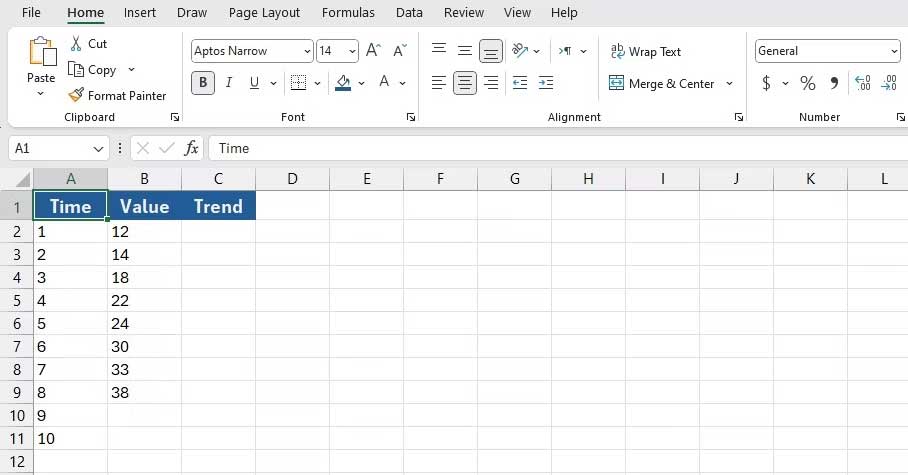
<p style="text-align: justify;">Để hiểu rõ hơn về TREND, hãy xem qua một ví dụ. Giả sử bạn có tám giá trị Y đã biết (1 đến 8) và các giá trị X tương ứng (cũng từ 1 đến 8). Bạn đang thiếu các giá trị cho lần 9 và 10 và bạn muốn Excel chiếu chúng.</p>

<p style="text-align: justify;"><img alt="Ví dụ về cách dùng hàm TREND trong Excel" data-i="1" data-src="https://st.quantrimang.com/photos/image/2024/09/11/vi-du-ham-trend-excel1.jpg" data-was-processed="true" height="340" src="https://st.quantrimang.com/photos/image/2024/09/11/vi-du-ham-trend-excel1.jpg" width="650" /></p>

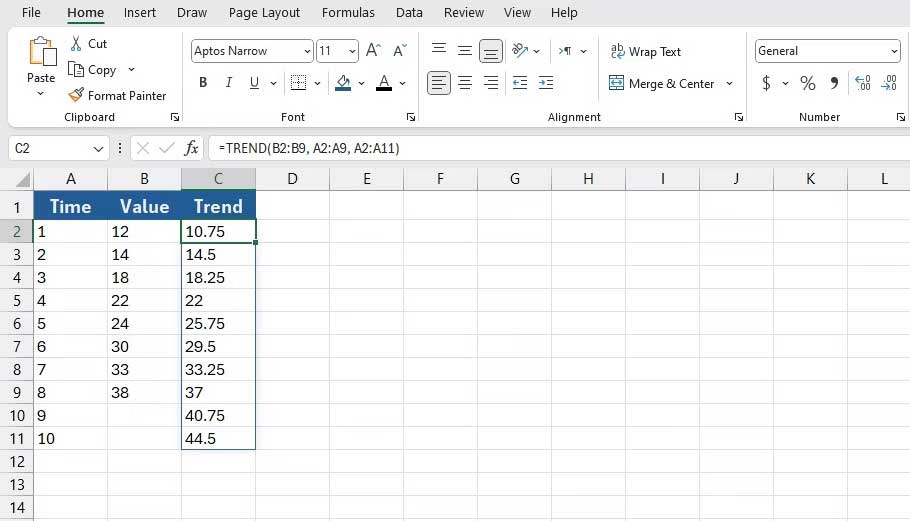
<p style="text-align: justify;">Đầu tiên, nhấp vào ô mà bạn muốn hiển thị Ys mới (C2 trong ví dụ này). Sau đó, nhập công thức bên dưới vào thanh công thức:</p>

<p style="text-align: justify;"><code>=TREND(B2:B9, A2:A9, A2:A11)</code></p>

<p style="text-align: justify;">Công thức này triệu hồi hàm TREND và đưa vào các ô<strong>&nbsp;B2:B9</strong>&nbsp;là các<strong>&nbsp;Y&nbsp;</strong>đã biết. Sau đó, nó đưa vào<strong>&nbsp;A2:A9</strong>&nbsp;là các<strong>&nbsp;X</strong>&nbsp;đã biết. Cuối cùng, công thức cho&nbsp;<strong>TREND</strong>&nbsp;biết rằng&nbsp;<strong>A2:A11</strong>&nbsp;sẽ là những Y mới. Các&nbsp;<strong>Y</strong>&nbsp;mới này được tính toán ngoài đường xu hướng.</p>

<p style="text-align: justify;">Khi bạn nhấn&nbsp;<strong>Enter</strong>, Excel sẽ điền các ô bằng các giá trị xu hướng. Quan sát cách các Y được dự đoán trong xu hướng, mặc dù là tuyến tính, nhưng lại gần với những Y đã biết.</p>

<p style="text-align: justify;"><img alt="Kết quả dùng hàm TREND trong Excel" data-i="2" data-src="https://st.quantrimang.com/photos/image/2024/09/11/vi-du-ham-trend-excel2.jpg" data-was-processed="true" height="372" src="https://st.quantrimang.com/photos/image/2024/09/11/vi-du-ham-trend-excel2.jpg" width="650" /></p>

<p style="text-align: justify;">Trên đây là&nbsp;<strong>cách dùng hàm TREND trong Microsoft Excel</strong>. Hi vọng bài viết hữu ích với các bạn.</p>

<div style="text-align: justify;">&nbsp;</div>
		</div>
				<div id="author">
						<p>
				<strong>Nguồn tin:</strong>
				Quantrimang.com:
			</p>
		</div>
	</div>
	<div id="footer" class="clearfix">
		<div id="url">
			<strong>URL của bản tin này: </strong><a href="https://www.nguoicodonvn2008.info/vi/news/savefile/kien-thuc-may-tinh/cach-dung-ham-trend-trong-excel-8981.html" title="Cách dùng hàm TREND trong Excel">https://www.nguoicodonvn2008.info/vi/news/savefile/kien-thuc-may-tinh/cach-dung-ham-trend-trong-excel-8981.html</a>

		</div>
		<div class="clear"></div>
		<div class="copyright">
			&copy; .&#x3A; Nguoicodonvn2008.info - Cõi lòng người cô đơn &#x3A;.
		</div>
		<div id="contact">
			<a href="mailto:admin@nguoicodonvn2008.info">admin@nguoicodonvn2008.info</a>
		</div>
	</div>
</div>
        <div id="timeoutsess" class="chromeframe">
            Bạn đã không sử dụng Site, <a onclick="timeoutsesscancel();" href="https://www.nguoicodonvn2008.info/#">Bấm vào đây để duy trì trạng thái đăng nhập</a>. Thời gian chờ: <span id="secField"> 60 </span> giây
        </div>
        <div id="openidResult" class="nv-alert" style="display:none"></div>
        <div id="openidBt" data-result="" data-redirect=""></div>
		</script>
		<div class="car-top">
  <span><img src="https://www.nguoicodonvn2008.info/themes/default/images/car.png" alt=""></span>
</div>
<script src="https://www.nguoicodonvn2008.info/assets/js/jquery/jquery.min.js"></script>
<script>var nv_base_siteurl="/",nv_lang_data="vi",nv_lang_interface="vi",nv_name_variable="nv",nv_fc_variable="op",nv_lang_variable="language",nv_module_name="news",nv_func_name="savefile",nv_is_user=0, nv_my_ofs=-4,nv_my_abbr="EDT",nv_cookie_prefix="nv4c_e856T",nv_check_pass_mstime=1738000,nv_area_admin=0,nv_safemode=0,theme_responsive=0,nv_recaptcha_ver=2,nv_recaptcha_sitekey="",nv_recaptcha_type="image",XSSsanitize=1;</script>
<script src="https://www.nguoicodonvn2008.info/assets/js/language/vi.js"></script>
<script src="https://www.nguoicodonvn2008.info/assets/js/DOMPurify/purify3.js"></script>
<script src="https://www.nguoicodonvn2008.info/assets/js/global.js"></script>
<script src="https://www.nguoicodonvn2008.info/assets/js/site.js"></script>
<script src="https://www.nguoicodonvn2008.info/themes/default/js/news.js"></script>
<script src="https://www.nguoicodonvn2008.info/themes/default/js/main.js"></script>
<script src="https://www.nguoicodonvn2008.info/themes/default/js/custom.js"></script>
<script type="application/ld+json">
        {
            "@context": "https://schema.org",
            "@type": "Organization",
            "url": "https://www.nguoicodonvn2008.info",
            "logo": "https://www.nguoicodonvn2008.info/uploads/angel.gif"
        }
        </script>
<script src="https://www.nguoicodonvn2008.info/themes/default/js/bootstrap.min.js"></script>
<script type="text/javascript">
var $scrolltop = $('.car-top');
$scrolltop.on('click', function () {
    $('html,body').animate({
        scrollTop: 0
    }, 800);
    $(this).addClass("car-run");
    setTimeout(function(){ $scrolltop.removeClass('car-run');}, 1000);
    return false;
});
$(window).on('scroll', function ()
{ 
    if($(window).scrollTop() >= 200)
    {
        $scrolltop.addClass("show");
        $scrolltop.addClass("car-down");
    }
    else
    {
       $scrolltop.removeClass("show");
       setTimeout(function(){ $scrolltop.removeClass('car-down');}, 300);
    }
});
</script>
</body>
</html>