<!DOCTYPE html>
    <html lang="vi" xmlns="http://www.w3.org/1999/xhtml" prefix="og: http://ogp.me/ns#">
    <head>
<title>Cách dùng Fresh Start trên Windows 10 May 2020 Update</title>
<meta name="description" content="Cách dùng Fresh Start trên Windows 10 May 2020 Update - Savefile - Tin Tức -...">
<meta name="author" content=".: Nguoicodonvn2008.info - Cõi lòng người cô đơn :.">
<meta name="copyright" content=".: Nguoicodonvn2008.info - Cõi lòng người cô đơn :. [admin@nguoicodonvn2008.info]">
<meta name="robots" content="index, archive, follow, noodp">
<meta name="googlebot" content="index,archive,follow,noodp">
<meta name="msnbot" content="all,index,follow">
<meta name="generator" content="NukeViet v4.5">
<meta http-equiv="Content-Type" content="text/html; charset=utf-8">
<meta property="og:title" content="Cách dùng Fresh Start trên Windows 10 May 2020 Update">
<meta property="og:type" content="website">
<meta property="og:description" content="Savefile - Tin Tức - https&#x3A;&#x002F;&#x002F;www.nguoicodonvn2008.info&#x002F;vi&#x002F;news&#x002F;savefile&#x002F;kien-thuc-may-tinh&#x002F;cach-dung-fresh-start-tren-windows-10-may-2020-update-2278.html">
<meta property="og:site_name" content=".&#x3A; Nguoicodonvn2008.info - Cõi lòng người cô đơn &#x3A;.">
<meta property="og:url" content="https://www.nguoicodonvn2008.info/vi/news/savefile/kien-thuc-may-tinh/cach-dung-fresh-start-tren-windows-10-may-2020-update-2278.html">
<link rel="shortcut icon" href="https://www.nguoicodonvn2008.info/favicon.ico">
<link rel="canonical" href="https://www.nguoicodonvn2008.info/vi/news/savefile/kien-thuc-may-tinh/cach-dung-fresh-start-tren-windows-10-may-2020-update-2278.html">
<link rel="alternate" href="https://www.nguoicodonvn2008.info/vi/news/rss/" title="Tin Tức" type="application/rss+xml">
<link rel="alternate" href="https://www.nguoicodonvn2008.info/vi/news/rss/karaoke-dual/" title="Tin Tức - Karaoke Dual" type="application/rss+xml">
<link rel="alternate" href="https://www.nguoicodonvn2008.info/vi/news/rss/nhac-tre/" title="Tin Tức - Nhạc trẻ" type="application/rss+xml">
<link rel="alternate" href="https://www.nguoicodonvn2008.info/vi/news/rss/tru-tinh/" title="Tin Tức - Trữ tình" type="application/rss+xml">
<link rel="alternate" href="https://www.nguoicodonvn2008.info/vi/news/rss/nuoc-ngoai/" title="Tin Tức - Nước ngoài" type="application/rss+xml">
<link rel="alternate" href="https://www.nguoicodonvn2008.info/vi/news/rss/remix/" title="Tin Tức - Remix" type="application/rss+xml">
<link rel="alternate" href="https://www.nguoicodonvn2008.info/vi/news/rss/tam-su-tinh-yeu/" title="Tin Tức - Tâm sự tình yêu" type="application/rss+xml">
<link rel="alternate" href="https://www.nguoicodonvn2008.info/vi/news/rss/tho-suu-tam/" title="Tin Tức - Thơ sưu tầm" type="application/rss+xml">
<link rel="alternate" href="https://www.nguoicodonvn2008.info/vi/news/rss/cuoc-song/" title="Tin Tức - Cuộc sống" type="application/rss+xml">
<link rel="alternate" href="https://www.nguoicodonvn2008.info/vi/news/rss/phan-mem/" title="Tin Tức - Phần mềm" type="application/rss+xml">
<link rel="alternate" href="https://www.nguoicodonvn2008.info/vi/news/rss/kien-thuc-may-tinh/" title="Tin Tức - Kiến thức máy tính" type="application/rss+xml">
<link rel="alternate" href="https://www.nguoicodonvn2008.info/vi/news/rss/hoc-tap/" title="Tin Tức - Học tập" type="application/rss+xml">
<link rel="alternate" href="https://www.nguoicodonvn2008.info/vi/news/rss/tai-lieu/" title="Tin Tức - Tài liệu" type="application/rss+xml">
<link rel="alternate" href="https://www.nguoicodonvn2008.info/vi/news/rss/de-thi/" title="Tin Tức - Đề thi" type="application/rss+xml">
<link rel="preload" as="style" href="https://www.nguoicodonvn2008.info/assets/css/font-awesome.min.css" type="text/css">
<link rel="preload" as="style" href="https://www.nguoicodonvn2008.info/themes/default/css/bootstrap.non-responsive.css" type="text/css">
<link rel="preload" as="style" href="https://www.nguoicodonvn2008.info/themes/default/css/style.css" type="text/css">
<link rel="preload" as="style" href="https://www.nguoicodonvn2008.info/themes/default/css/style.non-responsive.css" type="text/css">
<link rel="preload" as="style" href="https://www.nguoicodonvn2008.info/themes/default/css/news.css" type="text/css">
<link rel="preload" as="style" href="https://www.nguoicodonvn2008.info/themes/default/css/custom.css" type="text/css">
<link rel="preload" as="script" href="https://www.nguoicodonvn2008.info/assets/js/jquery/jquery.min.js" type="text/javascript">
<link rel="preload" as="script" href="https://www.nguoicodonvn2008.info/assets/js/language/vi.js" type="text/javascript">
<link rel="preload" as="script" href="https://www.nguoicodonvn2008.info/assets/js/DOMPurify/purify3.js" type="text/javascript">
<link rel="preload" as="script" href="https://www.nguoicodonvn2008.info/assets/js/global.js" type="text/javascript">
<link rel="preload" as="script" href="https://www.nguoicodonvn2008.info/assets/js/site.js" type="text/javascript">
<link rel="preload" as="script" href="https://www.nguoicodonvn2008.info/themes/default/js/news.js" type="text/javascript">
<link rel="preload" as="script" href="https://www.nguoicodonvn2008.info/themes/default/js/main.js" type="text/javascript">
<link rel="preload" as="script" href="https://www.nguoicodonvn2008.info/themes/default/js/custom.js" type="text/javascript">
<link rel="preload" as="script" href="https://www.nguoicodonvn2008.info/themes/default/js/bootstrap.min.js" type="text/javascript">
<link rel="stylesheet" href="https://www.nguoicodonvn2008.info/assets/css/font-awesome.min.css">
<link rel="stylesheet" href="https://www.nguoicodonvn2008.info/themes/default/css/bootstrap.non-responsive.css">
<link rel="stylesheet" href="https://www.nguoicodonvn2008.info/themes/default/css/style.css">
<link rel="stylesheet" href="https://www.nguoicodonvn2008.info/themes/default/css/style.non-responsive.css">
<link rel="StyleSheet" href="https://www.nguoicodonvn2008.info/themes/default/css/news.css">
<link rel="stylesheet" href="https://www.nguoicodonvn2008.info/themes/default/css/custom.css">
<style type="text/css">
	body{background: #fff;}
</style>
    </head>
    <body>
<div id="print">
	<div id="hd_print">
		<h2 class="pull-left">.&#x3A; Nguoicodonvn2008.info - Cõi lòng người cô đơn &#x3A;.</h2>
		<p class="pull-right"><a title=".&#x3A; Nguoicodonvn2008.info - Cõi lòng người cô đơn &#x3A;." href="https://www.nguoicodonvn2008.info/">https://www.nguoicodonvn2008.info</a></p>
	</div>
	<div class="clear"></div>
	<hr />
	<div id="content">
		<h1>Cách dùng Fresh Start trên Windows 10 May 2020 Update</h1>
		<ul class="list-inline">
			<li>Thứ bảy - 27/06/2020 01:01</li>
			<li class="hidden-print txtrequired"><em class="fa fa-print">&nbsp;</em><a title="In ra" href="javascript:;" onclick="window.print()">In ra</a></li>
			<li class="hidden-print txtrequired"><em class="fa fa-power-off">&nbsp;</em><a title="Đóng cửa sổ này" href="javascript:;" onclick="window.close()">Đóng cửa sổ này</a></li>
		</ul>
		<div class="clear"></div>
		<div id="hometext">
		</div>
				<div class="imghome">
			<img alt="Cách dùng Fresh Start trên Windows 10 May 2020 Update" src="https://st.quantrimang.com/photos/image/2020/06/27/fresh-start-6.png" width="460" class="img-thumbnail" />
		</div>
		<div class="clear"></div>
		<div id="bodytext" class="clearfix">
			<p style="text-align: justify;">Bản cập nhật May 2020 Update cho Windows 10 đã di chuyển tính năng Fresh Start, cho phép bạn cài đặt lại Windows trong khi gỡ bỏ mọi phần mềm&nbsp;bloatware&nbsp;do nhà sản xuất cài đặt trên laptop hoặc máy tính để bàn của bạn. Nó không còn là một phần của ứng dụng&nbsp;<strong>Windows Security</strong>&nbsp;nữa.</p>

<p style="text-align: justify;">Bạn có thể tìm thấy Fresh Start được tích hợp trong tính năng&nbsp;<strong>Reset Your PC</strong>&nbsp;của Windows 10. Nó không còn được gọi là Fresh Start nữa và bạn phải bật một tùy chọn đặc biệt để gỡ cài đặt bloatware trong khi&nbsp;reset lại PC về trạng thái mặc định của nhà sản xuất.</p>

<div style="text-align: justify;">&nbsp;</div>

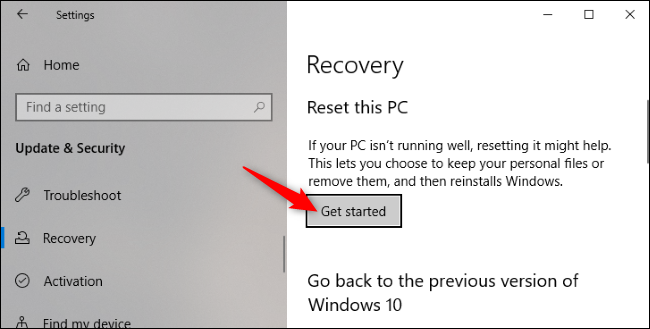
<p style="text-align: justify;">Để bắt đầu, hãy đi tới&nbsp;<strong>Settings &gt; Update &amp; Security &gt; Recovery</strong>. Nhấp vào&nbsp;<strong>Get started</strong>&nbsp;trong&nbsp;<strong>Reset This PC</strong>.</p>

<figure>
<div style="text-align: justify;"><img alt="Nhấp vào Get started trong Reset This PC" data-i="0" data-src="https://st.quantrimang.com/photos/image/2020/06/27/fresh-start-1.png" data-was-processed="true" height="329" src="https://st.quantrimang.com/photos/image/2020/06/27/fresh-start-1.png" width="650" /></div>

<figcaption>
<div style="text-align: justify;">Nhấp vào Get started trong Reset This PC</div>
</figcaption>
</figure>

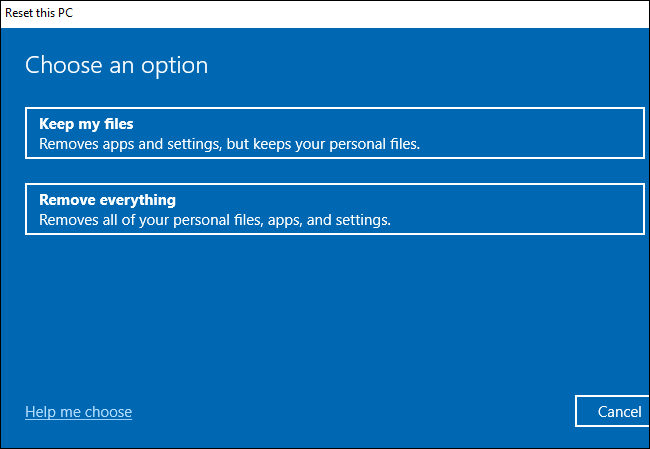
<p style="text-align: justify;">Chọn&nbsp;<strong>Keep my files</strong>&nbsp;để giữ các file cá nhân trên PC hoặc&nbsp;<strong>Remove everything</strong>&nbsp;để loại bỏ chúng. Dù bằng cách nào, Windows sẽ xóa các ứng dụng và cài đặt đã thực hiện của bạn.</p>

<p style="text-align: justify;"><strong>Cảnh báo</strong>: Hãy chắc chắn rằng bạn đã sao lưu các file quan trọng của mình trước khi nhấp vào&nbsp;<strong>Remove everything.</strong></p>

<figure>
<div style="text-align: justify;"><img alt="Chọn Keep my files để giữ các file cá nhân trên PC hoặc Remove everything để loại bỏ chúng" data-i="1" data-src="https://st.quantrimang.com/photos/image/2020/06/27/fresh-start-2.png" data-was-processed="true" height="449" src="https://st.quantrimang.com/photos/image/2020/06/27/fresh-start-2.png" width="650" /></div>

<figcaption>
<div style="text-align: justify;">Chọn Keep my files để giữ các file cá nhân trên PC hoặc Remove everything để loại bỏ chúng</div>
</figcaption>
</figure>

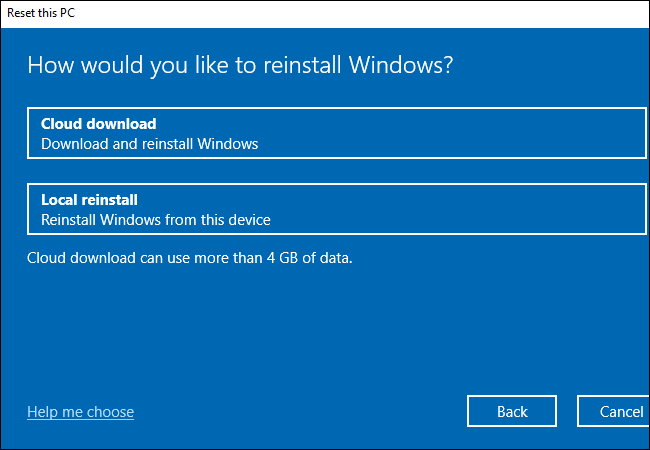
<p style="text-align: justify;">Tiếp theo, hãy chọn&nbsp;<strong>Cloud download</strong>&nbsp;để tải xuống các file cài đặt Windows 10 từ Microsoft hoặc&nbsp;<strong>Local reinstall</strong>&nbsp;để sử dụng các file cài đặt Windows trên PC.</p>

<ul>
	<li style="text-align: justify;"><strong>Cloud Download</strong>&nbsp;phù hợp hơn nếu bạn có kết nối Internet nhanh, nhưng PC sẽ phải tải xuống vài gigabyte dữ liệu.</li>
	<li style="text-align: justify;"><strong>Local Reinstall</strong>&nbsp;không yêu cầu tải xuống, nhưng nó có thể thất bại nếu cài đặt Windows bị hỏng.</li>
</ul>

<figure>
<div style="text-align: justify;"><img alt="Chọn Cloud download hoặc Local reinstall" data-i="2" data-src="https://st.quantrimang.com/photos/image/2020/06/27/fresh-start-3.png" data-was-processed="true" height="450" src="https://st.quantrimang.com/photos/image/2020/06/27/fresh-start-3.png" width="650" /></div>

<figcaption>
<div style="text-align: justify;">Chọn Cloud download hoặc Local reinstall</div>
</figcaption>
</figure>

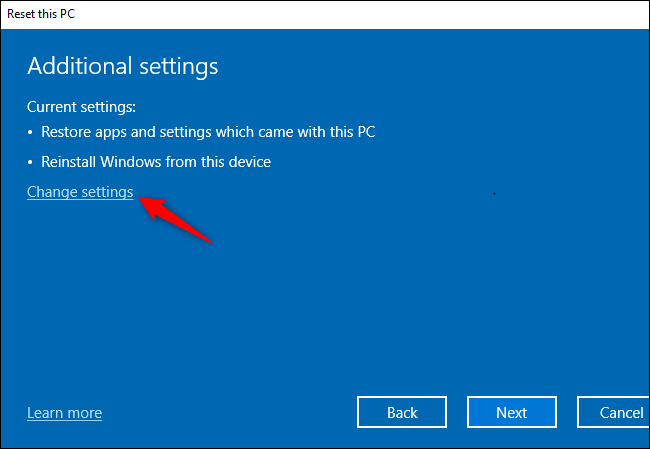
<p style="text-align: justify;">Trên màn hình&nbsp;<strong>Additional settings</strong>, nhấp vào&nbsp;<strong>Change settings.</strong></p>

<figure>
<div style="text-align: justify;"><img alt="Nhấp vào Change settings" data-i="3" data-src="https://st.quantrimang.com/photos/image/2020/06/27/fresh-start-4.png" data-was-processed="true" height="449" src="https://st.quantrimang.com/photos/image/2020/06/27/fresh-start-4.png" width="650" /></div>

<figcaption>
<div style="text-align: justify;">Nhấp vào Change settings</div>
</figcaption>
</figure>

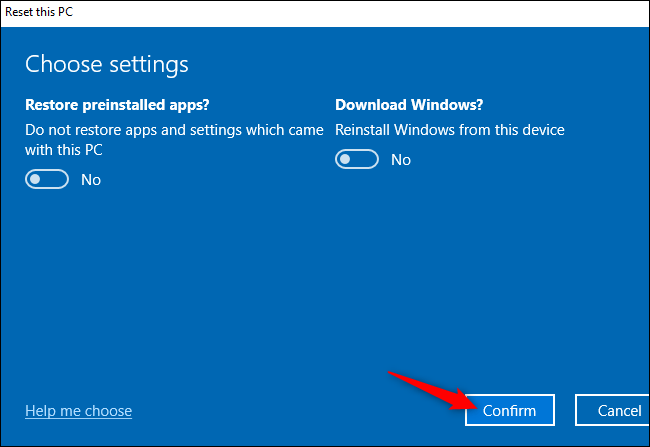
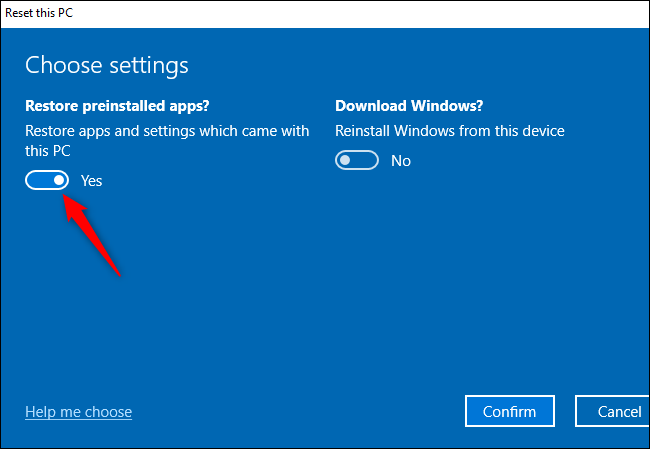
<p style="text-align: justify;">Đặt tùy chọn&nbsp;<strong>Restore preinstalled apps?</strong>&nbsp;thành&nbsp;<strong>No.</strong>&nbsp;Khi tùy chọn này bị vô hiệu hóa, Windows sẽ không tự động cài đặt lại các ứng dụng mà nhà sản xuất vào PC.</p>

<p style="text-align: justify;"><strong>Lưu ý:</strong>&nbsp;Nếu tùy chọn&nbsp;<strong>Restore preinstalled apps?</strong>&nbsp;không xuất hiện ở đây, PC của bạn không có bất kỳ ứng dụng nào được cài đặt sẵn. Điều này có thể xảy ra nếu bạn tự cài đặt Windows trên PC hoặc nếu trước đó bạn đã gỡ bỏ các ứng dụng được cài đặt sẵn khỏi PC.</p>

<figure>
<div style="text-align: justify;"><img alt="Đặt tùy chọn Restore preinstalled apps? thành No" data-i="4" data-src="https://st.quantrimang.com/photos/image/2020/06/27/fresh-start-5.png" data-was-processed="true" height="449" src="https://st.quantrimang.com/photos/image/2020/06/27/fresh-start-5.png" width="650" /></div>

<figcaption>
<div style="text-align: justify;">Đặt tùy chọn Restore preinstalled apps? thành No</div>
</figcaption>
</figure>

<p style="text-align: justify;">Nhấp vào&nbsp;<strong>Confirm</strong>&nbsp;và tiếp tục quá trình&nbsp;<strong>Reset This PC</strong>.</p>

<figure>
<div style="text-align: justify;"><img alt="Nhấp vào Confirm" data-i="5" data-src="https://st.quantrimang.com/photos/image/2020/06/27/fresh-start-6.png" data-was-processed="true" height="447" src="https://st.quantrimang.com/photos/image/2020/06/27/fresh-start-6.png" width="650" /></div>

<figcaption>
<div style="text-align: justify;">Nhấp vào Confirm</div>
</figcaption>
</figure>

<p style="text-align: justify;">Bạn sẽ nhận được bản cài đặt Windows “sạch” mà không có bất kỳ ứng dụng nào do nhà sản xuất cài đặt làm lộn xộn hệ thống.</p>

<p style="text-align: justify;">Chúc các bạn thực hiện thành công!</p>
		</div>
				<div id="author">
						<p>
				<strong>Nguồn tin:</strong>
				Quantrimang.com
			</p>
		</div>
	</div>
	<div id="footer" class="clearfix">
		<div id="url">
			<strong>URL của bản tin này: </strong><a href="https://www.nguoicodonvn2008.info/vi/news/savefile/kien-thuc-may-tinh/cach-dung-fresh-start-tren-windows-10-may-2020-update-2278.html" title="Cách dùng Fresh Start trên Windows 10 May 2020 Update">https://www.nguoicodonvn2008.info/vi/news/savefile/kien-thuc-may-tinh/cach-dung-fresh-start-tren-windows-10-may-2020-update-2278.html</a>

		</div>
		<div class="clear"></div>
		<div class="copyright">
			&copy; .&#x3A; Nguoicodonvn2008.info - Cõi lòng người cô đơn &#x3A;.
		</div>
		<div id="contact">
			<a href="mailto:admin@nguoicodonvn2008.info">admin@nguoicodonvn2008.info</a>
		</div>
	</div>
</div>
        <div id="timeoutsess" class="chromeframe">
            Bạn đã không sử dụng Site, <a onclick="timeoutsesscancel();" href="https://www.nguoicodonvn2008.info/#">Bấm vào đây để duy trì trạng thái đăng nhập</a>. Thời gian chờ: <span id="secField"> 60 </span> giây
        </div>
        <div id="openidResult" class="nv-alert" style="display:none"></div>
        <div id="openidBt" data-result="" data-redirect=""></div>
		</script>
		<div class="car-top">
  <span><img src="https://www.nguoicodonvn2008.info/themes/default/images/car.png" alt=""></span>
</div>
<div id="run_cronjobs" style="visibility:hidden;display:none;"><img alt="cron" src="/index.php?second=cronjobs&amp;p=z6uptyDf" width="1" height="1" /></div>
<script src="https://www.nguoicodonvn2008.info/assets/js/jquery/jquery.min.js"></script>
<script>var nv_base_siteurl="/",nv_lang_data="vi",nv_lang_interface="vi",nv_name_variable="nv",nv_fc_variable="op",nv_lang_variable="language",nv_module_name="news",nv_func_name="savefile",nv_is_user=0, nv_my_ofs=-4,nv_my_abbr="EDT",nv_cookie_prefix="nv4c_e856T",nv_check_pass_mstime=1738000,nv_area_admin=0,nv_safemode=0,theme_responsive=0,nv_recaptcha_ver=2,nv_recaptcha_sitekey="",nv_recaptcha_type="image",XSSsanitize=1;</script>
<script src="https://www.nguoicodonvn2008.info/assets/js/language/vi.js"></script>
<script src="https://www.nguoicodonvn2008.info/assets/js/DOMPurify/purify3.js"></script>
<script src="https://www.nguoicodonvn2008.info/assets/js/global.js"></script>
<script src="https://www.nguoicodonvn2008.info/assets/js/site.js"></script>
<script src="https://www.nguoicodonvn2008.info/themes/default/js/news.js"></script>
<script src="https://www.nguoicodonvn2008.info/themes/default/js/main.js"></script>
<script src="https://www.nguoicodonvn2008.info/themes/default/js/custom.js"></script>
<script type="application/ld+json">
        {
            "@context": "https://schema.org",
            "@type": "Organization",
            "url": "https://www.nguoicodonvn2008.info",
            "logo": "https://www.nguoicodonvn2008.info/uploads/angel.gif"
        }
        </script>
<script src="https://www.nguoicodonvn2008.info/themes/default/js/bootstrap.min.js"></script>
<script type="text/javascript">
var $scrolltop = $('.car-top');
$scrolltop.on('click', function () {
    $('html,body').animate({
        scrollTop: 0
    }, 800);
    $(this).addClass("car-run");
    setTimeout(function(){ $scrolltop.removeClass('car-run');}, 1000);
    return false;
});
$(window).on('scroll', function ()
{ 
    if($(window).scrollTop() >= 200)
    {
        $scrolltop.addClass("show");
        $scrolltop.addClass("car-down");
    }
    else
    {
       $scrolltop.removeClass("show");
       setTimeout(function(){ $scrolltop.removeClass('car-down');}, 300);
    }
});
</script>
</body>
</html>