<!DOCTYPE html>
    <html lang="vi" xmlns="http://www.w3.org/1999/xhtml" prefix="og: http://ogp.me/ns#">
    <head>
<title>Cách dễ nhất để tìm và xóa các file trùng lặp trên Windows</title>
<meta name="description" content="Cách dễ nhất để tìm và xóa các file trùng lặp trên Windows - Savefile - Tin Tức -...">
<meta name="author" content=".: Nguoicodonvn2008.info - Cõi lòng người cô đơn :.">
<meta name="copyright" content=".: Nguoicodonvn2008.info - Cõi lòng người cô đơn :. [admin@nguoicodonvn2008.info]">
<meta name="robots" content="index, archive, follow, noodp">
<meta name="googlebot" content="index,archive,follow,noodp">
<meta name="msnbot" content="all,index,follow">
<meta name="generator" content="NukeViet v4.5">
<meta http-equiv="Content-Type" content="text/html; charset=utf-8">
<meta property="og:title" content="Cách dễ nhất để tìm và xóa các file trùng lặp trên Windows">
<meta property="og:type" content="website">
<meta property="og:description" content="Savefile - Tin Tức - https&#x3A;&#x002F;&#x002F;www.nguoicodonvn2008.info&#x002F;vi&#x002F;news&#x002F;savefile&#x002F;kien-thuc-may-tinh&#x002F;cach-de-nhat-de-tim-va-xoa-cac-file-trung-lap-tren-windows-10083.html">
<meta property="og:site_name" content=".&#x3A; Nguoicodonvn2008.info - Cõi lòng người cô đơn &#x3A;.">
<meta property="og:url" content="https://www.nguoicodonvn2008.info/vi/news/savefile/kien-thuc-may-tinh/cach-de-nhat-de-tim-va-xoa-cac-file-trung-lap-tren-windows-10083.html">
<link rel="shortcut icon" href="https://www.nguoicodonvn2008.info/favicon.ico">
<link rel="canonical" href="https://www.nguoicodonvn2008.info/vi/news/savefile/kien-thuc-may-tinh/cach-de-nhat-de-tim-va-xoa-cac-file-trung-lap-tren-windows-10083.html">
<link rel="alternate" href="https://www.nguoicodonvn2008.info/vi/news/rss/" title="Tin Tức" type="application/rss+xml">
<link rel="alternate" href="https://www.nguoicodonvn2008.info/vi/news/rss/karaoke-dual/" title="Tin Tức - Karaoke Dual" type="application/rss+xml">
<link rel="alternate" href="https://www.nguoicodonvn2008.info/vi/news/rss/nhac-tre/" title="Tin Tức - Nhạc trẻ" type="application/rss+xml">
<link rel="alternate" href="https://www.nguoicodonvn2008.info/vi/news/rss/tru-tinh/" title="Tin Tức - Trữ tình" type="application/rss+xml">
<link rel="alternate" href="https://www.nguoicodonvn2008.info/vi/news/rss/nuoc-ngoai/" title="Tin Tức - Nước ngoài" type="application/rss+xml">
<link rel="alternate" href="https://www.nguoicodonvn2008.info/vi/news/rss/remix/" title="Tin Tức - Remix" type="application/rss+xml">
<link rel="alternate" href="https://www.nguoicodonvn2008.info/vi/news/rss/tam-su-tinh-yeu/" title="Tin Tức - Tâm sự tình yêu" type="application/rss+xml">
<link rel="alternate" href="https://www.nguoicodonvn2008.info/vi/news/rss/tho-suu-tam/" title="Tin Tức - Thơ sưu tầm" type="application/rss+xml">
<link rel="alternate" href="https://www.nguoicodonvn2008.info/vi/news/rss/cuoc-song/" title="Tin Tức - Cuộc sống" type="application/rss+xml">
<link rel="alternate" href="https://www.nguoicodonvn2008.info/vi/news/rss/phan-mem/" title="Tin Tức - Phần mềm" type="application/rss+xml">
<link rel="alternate" href="https://www.nguoicodonvn2008.info/vi/news/rss/kien-thuc-may-tinh/" title="Tin Tức - Kiến thức máy tính" type="application/rss+xml">
<link rel="alternate" href="https://www.nguoicodonvn2008.info/vi/news/rss/hoc-tap/" title="Tin Tức - Học tập" type="application/rss+xml">
<link rel="alternate" href="https://www.nguoicodonvn2008.info/vi/news/rss/tai-lieu/" title="Tin Tức - Tài liệu" type="application/rss+xml">
<link rel="alternate" href="https://www.nguoicodonvn2008.info/vi/news/rss/de-thi/" title="Tin Tức - Đề thi" type="application/rss+xml">
<link rel="preload" as="style" href="https://www.nguoicodonvn2008.info/assets/css/font-awesome.min.css" type="text/css">
<link rel="preload" as="style" href="https://www.nguoicodonvn2008.info/themes/default/css/bootstrap.non-responsive.css" type="text/css">
<link rel="preload" as="style" href="https://www.nguoicodonvn2008.info/themes/default/css/style.css" type="text/css">
<link rel="preload" as="style" href="https://www.nguoicodonvn2008.info/themes/default/css/style.non-responsive.css" type="text/css">
<link rel="preload" as="style" href="https://www.nguoicodonvn2008.info/themes/default/css/news.css" type="text/css">
<link rel="preload" as="style" href="https://www.nguoicodonvn2008.info/themes/default/css/custom.css" type="text/css">
<link rel="preload" as="script" href="https://www.nguoicodonvn2008.info/assets/js/jquery/jquery.min.js" type="text/javascript">
<link rel="preload" as="script" href="https://www.nguoicodonvn2008.info/assets/js/language/vi.js" type="text/javascript">
<link rel="preload" as="script" href="https://www.nguoicodonvn2008.info/assets/js/DOMPurify/purify3.js" type="text/javascript">
<link rel="preload" as="script" href="https://www.nguoicodonvn2008.info/assets/js/global.js" type="text/javascript">
<link rel="preload" as="script" href="https://www.nguoicodonvn2008.info/assets/js/site.js" type="text/javascript">
<link rel="preload" as="script" href="https://www.nguoicodonvn2008.info/themes/default/js/news.js" type="text/javascript">
<link rel="preload" as="script" href="https://www.nguoicodonvn2008.info/themes/default/js/main.js" type="text/javascript">
<link rel="preload" as="script" href="https://www.nguoicodonvn2008.info/themes/default/js/custom.js" type="text/javascript">
<link rel="preload" as="script" href="https://www.nguoicodonvn2008.info/themes/default/js/bootstrap.min.js" type="text/javascript">
<link rel="stylesheet" href="https://www.nguoicodonvn2008.info/assets/css/font-awesome.min.css">
<link rel="stylesheet" href="https://www.nguoicodonvn2008.info/themes/default/css/bootstrap.non-responsive.css">
<link rel="stylesheet" href="https://www.nguoicodonvn2008.info/themes/default/css/style.css">
<link rel="stylesheet" href="https://www.nguoicodonvn2008.info/themes/default/css/style.non-responsive.css">
<link rel="StyleSheet" href="https://www.nguoicodonvn2008.info/themes/default/css/news.css">
<link rel="stylesheet" href="https://www.nguoicodonvn2008.info/themes/default/css/custom.css">
<style type="text/css">
	body{background: #fff;}
</style>
    </head>
    <body>
<div id="print">
	<div id="hd_print">
		<h2 class="pull-left">.&#x3A; Nguoicodonvn2008.info - Cõi lòng người cô đơn &#x3A;.</h2>
		<p class="pull-right"><a title=".&#x3A; Nguoicodonvn2008.info - Cõi lòng người cô đơn &#x3A;." href="https://www.nguoicodonvn2008.info/">https://www.nguoicodonvn2008.info</a></p>
	</div>
	<div class="clear"></div>
	<hr />
	<div id="content">
		<h1>Cách dễ nhất để tìm và xóa các file trùng lặp trên Windows</h1>
		<ul class="list-inline">
			<li>Thứ năm - 27/03/2025 23:51</li>
			<li class="hidden-print txtrequired"><em class="fa fa-print">&nbsp;</em><a title="In ra" href="javascript:;" onclick="window.print()">In ra</a></li>
			<li class="hidden-print txtrequired"><em class="fa fa-power-off">&nbsp;</em><a title="Đóng cửa sổ này" href="javascript:;" onclick="window.close()">Đóng cửa sổ này</a></li>
		</ul>
		<div class="clear"></div>
		<div id="hometext">
		</div>
				<div class="imghome">
			<img alt="Cách dễ nhất để tìm và xóa các file trùng lặp trên Windows" src="https://st.quantrimang.com/photos/image/2025/03/27/tim-va-xoa-cac-file-trung-lap-tren-windows-2.jpg" width="460" class="img-thumbnail" />
		</div>
		<div class="clear"></div>
		<div id="bodytext" class="clearfix">
			<p style="text-align: justify;">Việc tìm và xóa các file trùng lặp trên&nbsp;&nbsp;PC&nbsp;chạy&nbsp;&nbsp;Windows&nbsp;của bạn có thể rất tẻ nhạt. May mắn thay, ứng dụng PC Manager của Microsoft cung cấp một giải pháp đơn giản.</p>

<p style="text-align: justify;">Tải PC Manager (Miễn phí)<br />
<span style="color:rgb(192, 57, 43);"><strong>https://apps.microsoft.com/detail/9pm860492szd?hl=vi-VN&amp;gl=VN</strong></span></p>

<div style="text-align: justify;">&nbsp;</div>

<h2 style="text-align: justify;">Cách sử dụng PC Manager để tìm và xóa các file trùng lặp</h2>

<p style="text-align: justify;">Mặc dù một số ứng dụng và công cụ của bên thứ ba có thể giúp bạn tìm các file trùng lặp trên PC chạy Windows 10 hoặc 11, nhưng PC Manager là lựa chọn tốt nhất của bạn vì một số lý do. Thứ nhất, nó hoàn toàn miễn phí và được chính Microsoft phát triển. Thứ hai, nó cung cấp một số công cụ hữu ích khác để duy trì tình trạng sức khỏe của PC và tăng hiệu suất.</p>

<p style="text-align: justify;">Để bắt đầu, trước tiên bạn cần tải xuống ứng dụng PC Manager từ Microsoft Store nếu bạn chưa có. Sau khi cài đặt, hãy làm theo các bước sau để tìm và xóa các file trùng lặp:</p>

<ol>
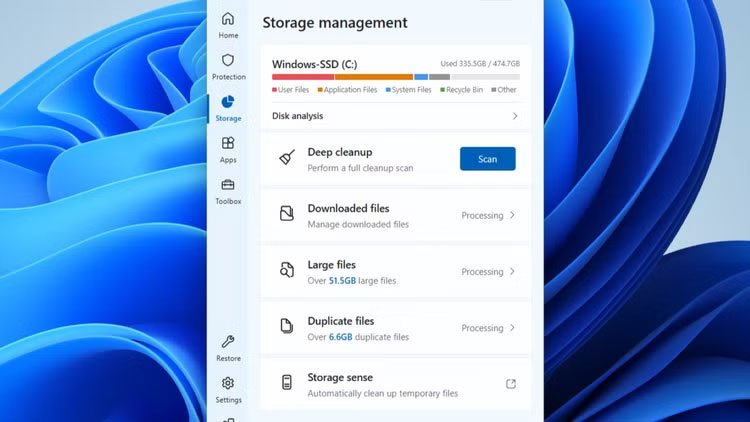
	<li style="text-align: justify;">Mở ứng dụng&nbsp;<strong>PC Manager</strong>&nbsp;trên máy tính chạy Windows.</li>
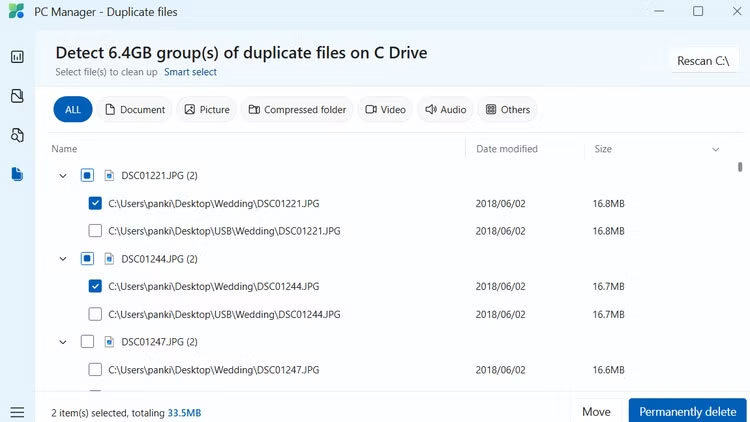
	<li style="text-align: justify;">Đi tới tab&nbsp;<strong>Storage</strong>&nbsp;ở bên trái và nhấp vào&nbsp;<strong>Duplicate files</strong>. Thao tác này sẽ mở cửa sổ file trùng lặp.</li>
	<li style="text-align: justify;">Đợi ứng dụng PC Manager quét hệ thống của bạn để tìm các file trùng lặp và ứng dụng sẽ liệt kê tất cả những file trùng lặp, cùng với tổng dung lượng lưu trữ mà chúng chiếm dụng ở trên cùng.</li>
	<li style="text-align: justify;">Sử dụng các bộ lọc ở trên cùng nếu bạn chỉ muốn tìm các loại file trùng lặp cụ thể, chẳng hạn như hình ảnh, video hoặc tài liệu. Bạn cũng có thể nhấp vào tiêu đề&nbsp;<strong>Size</strong>&nbsp;để sắp xếp các file theo kích thước của chúng.</li>
	<li style="text-align: justify;">Sử dụng hộp kiểm để chọn các phiên bản trùng lặp của file bạn muốn xóa. Nếu bạn muốn chọn tất cả mọi file, hãy nhấp vào tùy chọn&nbsp;<strong>Smart select</strong>&nbsp;ở trên cùng.</li>
	<li style="text-align: justify;">Nhấp vào nút&nbsp;<strong>Permanently delete</strong>&nbsp;ở góc dưới bên phải.</li>
	<li style="text-align: justify;">Nhấp vào&nbsp;<strong>Permanently delete</strong>&nbsp;một lần nữa để xác nhận.</li>
</ol>

<figure>
<div style="text-align: justify;"><img alt="" data-i="0" data-src="https://st.quantrimang.com/photos/image/2025/03/27/tim-va-xoa-cac-file-trung-lap-tren-windows-1.jpg" data-was-processed="true" height="422" src="https://st.quantrimang.com/photos/image/2025/03/27/tim-va-xoa-cac-file-trung-lap-tren-windows-1.jpg" width="750" /></div>
</figure>

<figure>
<div style="text-align: justify;"><img alt="" data-i="1" data-src="https://st.quantrimang.com/photos/image/2025/03/27/tim-va-xoa-cac-file-trung-lap-tren-windows-2.jpg" data-was-processed="true" height="422" src="https://st.quantrimang.com/photos/image/2025/03/27/tim-va-xoa-cac-file-trung-lap-tren-windows-2.jpg" width="750" /></div>
</figure>

<p style="text-align: justify;">PC Manager sẽ xóa các file trùng lặp đã chọn. Vì các file này đã bị xóa vĩnh viễn nên không cần phải&nbsp;làm trống Recycle Bin&nbsp;sau đó. Sau đó, bạn có thể tận dụng tối đa không gian lưu trữ mới được giải phóng của mình.</p>

<p style="text-align: justify;">Cho dù bạn cẩn thận đến đâu, PC của bạn vẫn có khả năng tích lũy các file trùng lặp theo thời gian. May mắn thay, PC Manager giúp bạn dễ dàng xóa các file không cần thiết này và giải phóng không gian lưu trữ có giá trị trên Windows chỉ bằng một vài cú nhấp chuột.</p>

<div style="text-align: justify;">&nbsp;</div>
		</div>
				<div id="author">
						<p>
				<strong>Nguồn tin:</strong>
				Quantrimang.com:
			</p>
		</div>
	</div>
	<div id="footer" class="clearfix">
		<div id="url">
			<strong>URL của bản tin này: </strong><a href="https://www.nguoicodonvn2008.info/vi/news/savefile/kien-thuc-may-tinh/cach-de-nhat-de-tim-va-xoa-cac-file-trung-lap-tren-windows-10083.html" title="Cách dễ nhất để tìm và xóa các file trùng lặp trên Windows">https://www.nguoicodonvn2008.info/vi/news/savefile/kien-thuc-may-tinh/cach-de-nhat-de-tim-va-xoa-cac-file-trung-lap-tren-windows-10083.html</a>

		</div>
		<div class="clear"></div>
		<div class="copyright">
			&copy; .&#x3A; Nguoicodonvn2008.info - Cõi lòng người cô đơn &#x3A;.
		</div>
		<div id="contact">
			<a href="mailto:admin@nguoicodonvn2008.info">admin@nguoicodonvn2008.info</a>
		</div>
	</div>
</div>
        <div id="timeoutsess" class="chromeframe">
            Bạn đã không sử dụng Site, <a onclick="timeoutsesscancel();" href="https://www.nguoicodonvn2008.info/#">Bấm vào đây để duy trì trạng thái đăng nhập</a>. Thời gian chờ: <span id="secField"> 60 </span> giây
        </div>
        <div id="openidResult" class="nv-alert" style="display:none"></div>
        <div id="openidBt" data-result="" data-redirect=""></div>
		</script>
		<div class="car-top">
  <span><img src="https://www.nguoicodonvn2008.info/themes/default/images/car.png" alt=""></span>
</div>
<script src="https://www.nguoicodonvn2008.info/assets/js/jquery/jquery.min.js"></script>
<script>var nv_base_siteurl="/",nv_lang_data="vi",nv_lang_interface="vi",nv_name_variable="nv",nv_fc_variable="op",nv_lang_variable="language",nv_module_name="news",nv_func_name="savefile",nv_is_user=0, nv_my_ofs=-4,nv_my_abbr="EDT",nv_cookie_prefix="nv4c_e856T",nv_check_pass_mstime=1738000,nv_area_admin=0,nv_safemode=0,theme_responsive=0,nv_recaptcha_ver=2,nv_recaptcha_sitekey="",nv_recaptcha_type="image",XSSsanitize=1;</script>
<script src="https://www.nguoicodonvn2008.info/assets/js/language/vi.js"></script>
<script src="https://www.nguoicodonvn2008.info/assets/js/DOMPurify/purify3.js"></script>
<script src="https://www.nguoicodonvn2008.info/assets/js/global.js"></script>
<script src="https://www.nguoicodonvn2008.info/assets/js/site.js"></script>
<script src="https://www.nguoicodonvn2008.info/themes/default/js/news.js"></script>
<script src="https://www.nguoicodonvn2008.info/themes/default/js/main.js"></script>
<script src="https://www.nguoicodonvn2008.info/themes/default/js/custom.js"></script>
<script type="application/ld+json">
        {
            "@context": "https://schema.org",
            "@type": "Organization",
            "url": "https://www.nguoicodonvn2008.info",
            "logo": "https://www.nguoicodonvn2008.info/uploads/angel.gif"
        }
        </script>
<script src="https://www.nguoicodonvn2008.info/themes/default/js/bootstrap.min.js"></script>
<script type="text/javascript">
var $scrolltop = $('.car-top');
$scrolltop.on('click', function () {
    $('html,body').animate({
        scrollTop: 0
    }, 800);
    $(this).addClass("car-run");
    setTimeout(function(){ $scrolltop.removeClass('car-run');}, 1000);
    return false;
});
$(window).on('scroll', function ()
{ 
    if($(window).scrollTop() >= 200)
    {
        $scrolltop.addClass("show");
        $scrolltop.addClass("car-down");
    }
    else
    {
       $scrolltop.removeClass("show");
       setTimeout(function(){ $scrolltop.removeClass('car-down');}, 300);
    }
});
</script>
</body>
</html>