<!DOCTYPE html>
    <html lang="vi" xmlns="http://www.w3.org/1999/xhtml" prefix="og: http://ogp.me/ns#">
    <head>
<title>Cách dễ dàng tạo video time-lapse từ ảnh trên Windows</title>
<meta name="description" content="Cách dễ dàng tạo video time-lapse từ ảnh trên Windows - Savefile - Tin Tức -...">
<meta name="author" content=".: Nguoicodonvn2008.info - Cõi lòng người cô đơn :.">
<meta name="copyright" content=".: Nguoicodonvn2008.info - Cõi lòng người cô đơn :. [admin@nguoicodonvn2008.info]">
<meta name="robots" content="index, archive, follow, noodp">
<meta name="googlebot" content="index,archive,follow,noodp">
<meta name="msnbot" content="all,index,follow">
<meta name="generator" content="NukeViet v4.5">
<meta http-equiv="Content-Type" content="text/html; charset=utf-8">
<meta property="og:title" content="Cách dễ dàng tạo video time-lapse từ ảnh trên Windows">
<meta property="og:type" content="website">
<meta property="og:description" content="Savefile - Tin Tức - https&#x3A;&#x002F;&#x002F;www.nguoicodonvn2008.info&#x002F;vi&#x002F;news&#x002F;savefile&#x002F;kien-thuc-may-tinh&#x002F;cach-de-dang-tao-video-time-lapse-tu-anh-tren-windows-10846.html">
<meta property="og:site_name" content=".&#x3A; Nguoicodonvn2008.info - Cõi lòng người cô đơn &#x3A;.">
<meta property="og:url" content="https://www.nguoicodonvn2008.info/vi/news/savefile/kien-thuc-may-tinh/cach-de-dang-tao-video-time-lapse-tu-anh-tren-windows-10846.html">
<link rel="shortcut icon" href="https://www.nguoicodonvn2008.info/favicon.ico">
<link rel="canonical" href="https://www.nguoicodonvn2008.info/vi/news/savefile/kien-thuc-may-tinh/cach-de-dang-tao-video-time-lapse-tu-anh-tren-windows-10846.html">
<link rel="alternate" href="https://www.nguoicodonvn2008.info/vi/news/rss/" title="Tin Tức" type="application/rss+xml">
<link rel="alternate" href="https://www.nguoicodonvn2008.info/vi/news/rss/karaoke-dual/" title="Tin Tức - Karaoke Dual" type="application/rss+xml">
<link rel="alternate" href="https://www.nguoicodonvn2008.info/vi/news/rss/nhac-tre/" title="Tin Tức - Nhạc trẻ" type="application/rss+xml">
<link rel="alternate" href="https://www.nguoicodonvn2008.info/vi/news/rss/tru-tinh/" title="Tin Tức - Trữ tình" type="application/rss+xml">
<link rel="alternate" href="https://www.nguoicodonvn2008.info/vi/news/rss/nuoc-ngoai/" title="Tin Tức - Nước ngoài" type="application/rss+xml">
<link rel="alternate" href="https://www.nguoicodonvn2008.info/vi/news/rss/remix/" title="Tin Tức - Remix" type="application/rss+xml">
<link rel="alternate" href="https://www.nguoicodonvn2008.info/vi/news/rss/tam-su-tinh-yeu/" title="Tin Tức - Tâm sự tình yêu" type="application/rss+xml">
<link rel="alternate" href="https://www.nguoicodonvn2008.info/vi/news/rss/tho-suu-tam/" title="Tin Tức - Thơ sưu tầm" type="application/rss+xml">
<link rel="alternate" href="https://www.nguoicodonvn2008.info/vi/news/rss/cuoc-song/" title="Tin Tức - Cuộc sống" type="application/rss+xml">
<link rel="alternate" href="https://www.nguoicodonvn2008.info/vi/news/rss/phan-mem/" title="Tin Tức - Phần mềm" type="application/rss+xml">
<link rel="alternate" href="https://www.nguoicodonvn2008.info/vi/news/rss/kien-thuc-may-tinh/" title="Tin Tức - Kiến thức máy tính" type="application/rss+xml">
<link rel="alternate" href="https://www.nguoicodonvn2008.info/vi/news/rss/hoc-tap/" title="Tin Tức - Học tập" type="application/rss+xml">
<link rel="alternate" href="https://www.nguoicodonvn2008.info/vi/news/rss/tai-lieu/" title="Tin Tức - Tài liệu" type="application/rss+xml">
<link rel="alternate" href="https://www.nguoicodonvn2008.info/vi/news/rss/de-thi/" title="Tin Tức - Đề thi" type="application/rss+xml">
<link rel="preload" as="style" href="https://www.nguoicodonvn2008.info/assets/css/font-awesome.min.css" type="text/css">
<link rel="preload" as="style" href="https://www.nguoicodonvn2008.info/themes/default/css/bootstrap.non-responsive.css" type="text/css">
<link rel="preload" as="style" href="https://www.nguoicodonvn2008.info/themes/default/css/style.css" type="text/css">
<link rel="preload" as="style" href="https://www.nguoicodonvn2008.info/themes/default/css/style.non-responsive.css" type="text/css">
<link rel="preload" as="style" href="https://www.nguoicodonvn2008.info/themes/default/css/news.css" type="text/css">
<link rel="preload" as="style" href="https://www.nguoicodonvn2008.info/themes/default/css/custom.css" type="text/css">
<link rel="preload" as="script" href="https://www.nguoicodonvn2008.info/assets/js/jquery/jquery.min.js" type="text/javascript">
<link rel="preload" as="script" href="https://www.nguoicodonvn2008.info/assets/js/language/vi.js" type="text/javascript">
<link rel="preload" as="script" href="https://www.nguoicodonvn2008.info/assets/js/DOMPurify/purify3.js" type="text/javascript">
<link rel="preload" as="script" href="https://www.nguoicodonvn2008.info/assets/js/global.js" type="text/javascript">
<link rel="preload" as="script" href="https://www.nguoicodonvn2008.info/assets/js/site.js" type="text/javascript">
<link rel="preload" as="script" href="https://www.nguoicodonvn2008.info/themes/default/js/news.js" type="text/javascript">
<link rel="preload" as="script" href="https://www.nguoicodonvn2008.info/themes/default/js/main.js" type="text/javascript">
<link rel="preload" as="script" href="https://www.nguoicodonvn2008.info/themes/default/js/custom.js" type="text/javascript">
<link rel="preload" as="script" href="https://www.nguoicodonvn2008.info/themes/default/js/bootstrap.min.js" type="text/javascript">
<link rel="stylesheet" href="https://www.nguoicodonvn2008.info/assets/css/font-awesome.min.css">
<link rel="stylesheet" href="https://www.nguoicodonvn2008.info/themes/default/css/bootstrap.non-responsive.css">
<link rel="stylesheet" href="https://www.nguoicodonvn2008.info/themes/default/css/style.css">
<link rel="stylesheet" href="https://www.nguoicodonvn2008.info/themes/default/css/style.non-responsive.css">
<link rel="StyleSheet" href="https://www.nguoicodonvn2008.info/themes/default/css/news.css">
<link rel="stylesheet" href="https://www.nguoicodonvn2008.info/themes/default/css/custom.css">
<style type="text/css">
	body{background: #fff;}
</style>
    </head>
    <body>
<div id="print">
	<div id="hd_print">
		<h2 class="pull-left">.&#x3A; Nguoicodonvn2008.info - Cõi lòng người cô đơn &#x3A;.</h2>
		<p class="pull-right"><a title=".&#x3A; Nguoicodonvn2008.info - Cõi lòng người cô đơn &#x3A;." href="https://www.nguoicodonvn2008.info/">https://www.nguoicodonvn2008.info</a></p>
	</div>
	<div class="clear"></div>
	<hr />
	<div id="content">
		<h1>Cách dễ dàng tạo video time-lapse từ ảnh trên Windows</h1>
		<ul class="list-inline">
			<li>Thứ sáu - 25/07/2025 22:56</li>
			<li class="hidden-print txtrequired"><em class="fa fa-print">&nbsp;</em><a title="In ra" href="javascript:;" onclick="window.print()">In ra</a></li>
			<li class="hidden-print txtrequired"><em class="fa fa-power-off">&nbsp;</em><a title="Đóng cửa sổ này" href="javascript:;" onclick="window.close()">Đóng cửa sổ này</a></li>
		</ul>
		<div class="clear"></div>
		<div id="hometext">
		</div>
				<div class="imghome">
			<img alt="Cách dễ dàng tạo video time-lapse từ ảnh trên Windows" src="https://st.quantrimang.com/photos/image/2025/07/25/tao-video-time-lapse-tu-anh-tren-windows-1.jpg" width="460" class="img-thumbnail" />
		</div>
		<div class="clear"></div>
		<div id="bodytext" class="clearfix">
			<p style="text-align: justify;">Dù bạn định chụp những bông hoa đang nở rộ, những con phố nhộn nhịp hay bầu trời đang chuyển động, việc biến ảnh tĩnh thành chuỗi ảnh động sẽ giúp ký ức của bạn thêm sống động. Bạn có thể dễ dàng tạo video time-lapse ấn tượng từ bộ sưu tập ảnh của mình trên&nbsp;&nbsp;Windows&nbsp;mà không cần bất kỳ phần mềm chỉnh sửa video đắt tiền hay phức tạp nào. Hướng dẫn này sẽ chỉ cho bạn cách tạo video time-lapse trên Windows.</p>

<div style="text-align: justify;">&nbsp;</div>

<h2 style="text-align: justify;">Tạo video Time-Lapse</h2>

<p style="text-align: justify;">Để tạo video time-lapse, bạn cần có sẵn chuỗi ảnh trong Windows. Bạn nên đặt tất cả chúng vào một thư mục duy nhất để dễ dàng nhập dữ liệu. Bạn cũng có thể điều chỉnh tên nếu muốn thay đổi chuỗi ảnh time-lapse cuối cùng. Với hầu hết mọi người, tùy chọn sắp xếp theo ngày chụp sẽ phù hợp, nhưng để tùy chỉnh, việc thêm số vào cuối tên sẽ giúp điều chỉnh chuỗi ảnh.</p>

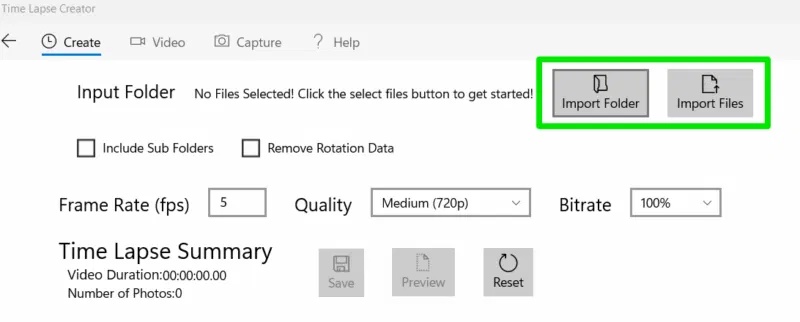
<p style="text-align: justify;">Bài viết sẽ sử dụng ứng dụng&nbsp;Time-Lapse Creator&nbsp;vì nó hoàn toàn miễn phí và rất dễ sử dụng. Để tạo video time-lapse, hãy nhấp vào&nbsp;<strong>Import Folder</strong>&nbsp;và chọn thư mục chứa tất cả ảnh. Nếu bạn chỉ muốn nhập một số ảnh cụ thể, hãy nhấp vào&nbsp;<strong>Import Files</strong>.&nbsp;<span style="color:rgb(192, 57, 43);"><strong>https://apps.microsoft.com/detail/9p7tv6jcl1s3?hl=vi-VN&amp;gl=VN</strong></span></p>

<figure>
<div style="text-align: justify;"><img alt="Các tùy chọn chọn ảnh trong Time-Lapse Creator" data-i="0" data-src="https://st.quantrimang.com/photos/image/2025/07/25/tao-video-time-lapse-tu-anh-tren-windows-1.jpg" data-was-processed="true" height="322" src="https://st.quantrimang.com/photos/image/2025/07/25/tao-video-time-lapse-tu-anh-tren-windows-1.jpg" width="800" /></div>

<figcaption>
<div style="text-align: justify;">Các tùy chọn chọn ảnh trong Time-Lapse Creator</div>
</figcaption>
</figure>

<div style="text-align: justify;">&nbsp;</div>

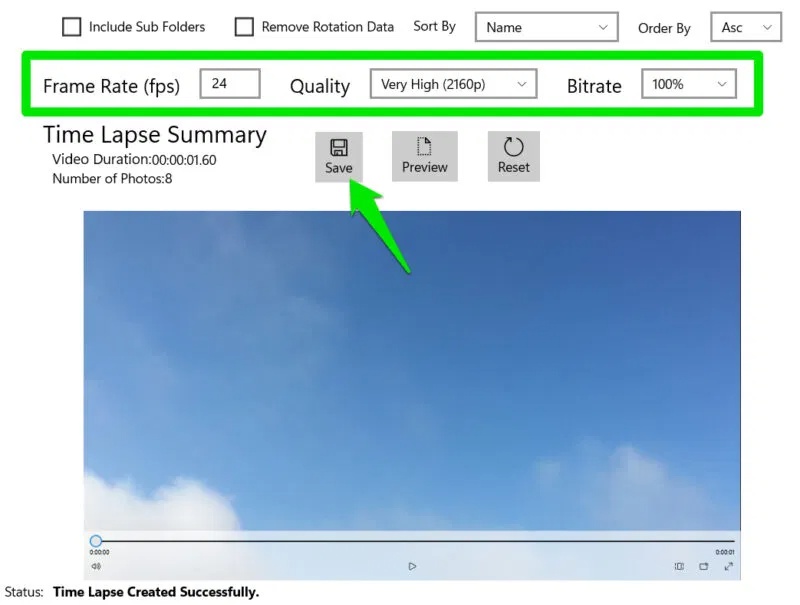
<p style="text-align: justify;">Công cụ này có một loạt các cài đặt để điều chỉnh, sẽ được áp dụng khi bạn nhấp vào nút&nbsp;<strong>Preview</strong>. Tốc độ khung hình (FPS) là thông số quan trọng nhất, vì nó quyết định số lượng ảnh được hiển thị mỗi giây. FPS phụ thuộc vào tổng số ảnh bạn có và thời lượng video bạn muốn. Nhìn chung, hãy cố gắng chụp đủ ảnh để tạo video 24-30FPS với thời lượng mong muốn, chẳng hạn như 600 ảnh cho video time-lapse 30 FPS trong 20 giây.</p>

<p style="text-align: justify;"><strong>Quality</strong>&nbsp;và&nbsp;<strong>Bitrate</strong>&nbsp;quyết định trực tiếp đến kích thước của video cuối cùng và chất lượng hình ảnh. Trong thử nghiệm, nếu cả hai đều ở mức tối đa, kích thước video cuối cùng sẽ nhỏ hơn một chút so với kích thước ban đầu của ảnh được cung cấp. Hãy cẩn thận với việc giảm chất lượng và tốc độ bit, vì chúng rất mạnh và bạn sẽ nhận thấy chất lượng giảm ngay cả ở cài đặt trung bình (kèm theo đó là dung lượng file cũng giảm đáng kể).</p>

<figure>
<div style="text-align: justify;"><img alt="Các thiết lập chính của Time Lapse Creator với video time-lapse về bầu trời" data-i="1" data-src="https://st.quantrimang.com/photos/image/2025/07/25/tao-video-time-lapse-tu-anh-tren-windows-2.jpg" data-was-processed="true" height="605" src="https://st.quantrimang.com/photos/image/2025/07/25/tao-video-time-lapse-tu-anh-tren-windows-2.jpg" width="800" /></div>

<figcaption>
<div style="text-align: justify;">Các thiết lập chính của Time Lapse Creator với video time-lapse về bầu trời</div>
</figcaption>
</figure>

<p style="text-align: justify;">Khi hoàn tất, hãy nhấp vào&nbsp;<strong>Save</strong>&nbsp;và bạn có thể lưu video ở định dạng&nbsp;MP4. Time Lapse Creator cũng có các tùy chọn để tạo time-lapse từ video và chụp ảnh từ webcam, nhưng chúng không mạnh mẽ bằng các công cụ chuyên dụng cho mục đích này.</p>

<div style="text-align: justify;">&nbsp;</div>

<h2 style="text-align: justify;">Các ứng dụng time-lapse thay thế cho Windows</h2>

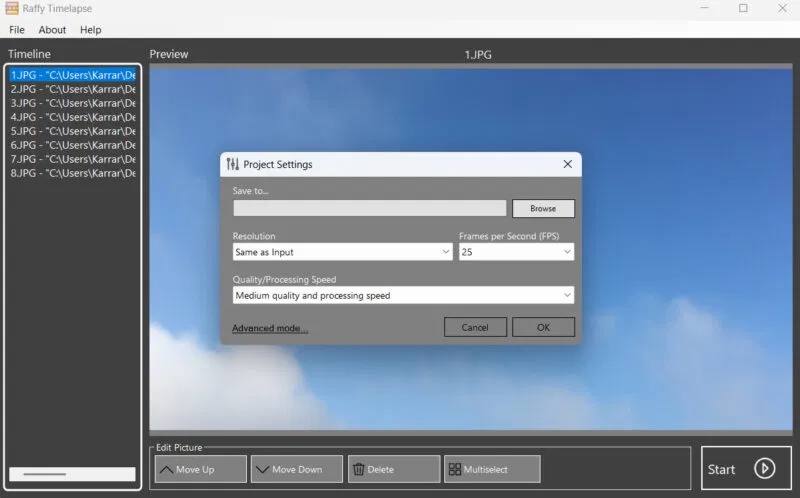
<p style="text-align: justify;">Ngoài Time Lapse Creator, còn có một số công cụ tạo time-lapse tiện dụng khác dành cho Windows với các tính năng độc đáo riêng.</p>

<figure>
<div style="text-align: justify;"><img alt="Giao diện time-lapse Raffy với cài đặt lưu mở" data-adbro-processed="true" data-i="2" data-src="https://st.quantrimang.com/photos/image/2025/07/25/tao-video-time-lapse-tu-anh-tren-windows-3.jpg" data-was-processed="true" height="498" src="https://st.quantrimang.com/photos/image/2025/07/25/tao-video-time-lapse-tu-anh-tren-windows-3.jpg" width="800" /></div>

<figcaption>
<div style="text-align: justify;">Giao diện time-lapse Raffy với cài đặt lưu mở</div>
</figcaption>
</figure>

<p style="text-align: justify;">Dưới đây là một số ứng dụng time-lapse Windows đáng tin cậy nhất và miễn phí:</p>

<ul>
	<li style="text-align: justify;">MakeAVI: Một trình tạo time-lapse đơn giản nhưng mạnh mẽ cho phép bạn cắt khung hình, điều chỉnh chuỗi ảnh và lưu chúng ở định dạng&nbsp;AVI, không nén để có chất lượng cao nhất.&nbsp;<span style="color:rgb(192, 57, 43);"><strong>https://makeavi.sourceforge.net/</strong></span></li>
	<li style="text-align: justify;">Time Lapse Live: Một ứng dụng cơ bản chỉ có tùy chọn chọn ảnh và cài đặt FPS. Tuyệt vời nếu bạn muốn một giải pháp đơn giản.&nbsp;<span style="color:rgb(192, 57, 43);"><strong>https://apps.microsoft.com/detail/9n6l3c37x1x8</strong></span></li>
	<li style="text-align: justify;">Raffy Timelapse: Cho phép bạn quản lý nhiều dự án cùng lúc và có hệ thống cài đặt tự động áp dụng các cài đặt tốt nhất dựa trên hình ảnh được cung cấp.&nbsp;<span style="color:rgb(231, 76, 60);"><strong>https://github.com/limosoft-de/raffytimelapse</strong></span></li>
</ul>

<p style="text-align: justify;">Để có kết quả tốt nhất, hãy đảm bảo ảnh có tiêu điểm và bối cảnh nhất quán; nếu không, nó sẽ trông giống như một slideshow ảnh rất nhanh. Ngoài ra, hãy đảm bảo bạn sử dụng phương pháp chia sẻ file phù hợp khi di chuyển ảnh từ điện thoại sang&nbsp;&nbsp;PC&nbsp;để tránh làm giảm chất lượng.</p>

<div style="text-align: justify;">&nbsp;</div>
		</div>
				<div id="author">
						<p>
				<strong>Nguồn tin:</strong>
				Quantrimang.com:
			</p>
		</div>
	</div>
	<div id="footer" class="clearfix">
		<div id="url">
			<strong>URL của bản tin này: </strong><a href="https://www.nguoicodonvn2008.info/vi/news/savefile/kien-thuc-may-tinh/cach-de-dang-tao-video-time-lapse-tu-anh-tren-windows-10846.html" title="Cách dễ dàng tạo video time-lapse từ ảnh trên Windows">https://www.nguoicodonvn2008.info/vi/news/savefile/kien-thuc-may-tinh/cach-de-dang-tao-video-time-lapse-tu-anh-tren-windows-10846.html</a>

		</div>
		<div class="clear"></div>
		<div class="copyright">
			&copy; .&#x3A; Nguoicodonvn2008.info - Cõi lòng người cô đơn &#x3A;.
		</div>
		<div id="contact">
			<a href="mailto:admin@nguoicodonvn2008.info">admin@nguoicodonvn2008.info</a>
		</div>
	</div>
</div>
        <div id="timeoutsess" class="chromeframe">
            Bạn đã không sử dụng Site, <a onclick="timeoutsesscancel();" href="https://www.nguoicodonvn2008.info/#">Bấm vào đây để duy trì trạng thái đăng nhập</a>. Thời gian chờ: <span id="secField"> 60 </span> giây
        </div>
        <div id="openidResult" class="nv-alert" style="display:none"></div>
        <div id="openidBt" data-result="" data-redirect=""></div>
		</script>
		<div class="car-top">
  <span><img src="https://www.nguoicodonvn2008.info/themes/default/images/car.png" alt=""></span>
</div>
<script src="https://www.nguoicodonvn2008.info/assets/js/jquery/jquery.min.js"></script>
<script>var nv_base_siteurl="/",nv_lang_data="vi",nv_lang_interface="vi",nv_name_variable="nv",nv_fc_variable="op",nv_lang_variable="language",nv_module_name="news",nv_func_name="savefile",nv_is_user=0, nv_my_ofs=-4,nv_my_abbr="EDT",nv_cookie_prefix="nv4c_e856T",nv_check_pass_mstime=1738000,nv_area_admin=0,nv_safemode=0,theme_responsive=0,nv_recaptcha_ver=2,nv_recaptcha_sitekey="",nv_recaptcha_type="image",XSSsanitize=1;</script>
<script src="https://www.nguoicodonvn2008.info/assets/js/language/vi.js"></script>
<script src="https://www.nguoicodonvn2008.info/assets/js/DOMPurify/purify3.js"></script>
<script src="https://www.nguoicodonvn2008.info/assets/js/global.js"></script>
<script src="https://www.nguoicodonvn2008.info/assets/js/site.js"></script>
<script src="https://www.nguoicodonvn2008.info/themes/default/js/news.js"></script>
<script src="https://www.nguoicodonvn2008.info/themes/default/js/main.js"></script>
<script src="https://www.nguoicodonvn2008.info/themes/default/js/custom.js"></script>
<script type="application/ld+json">
        {
            "@context": "https://schema.org",
            "@type": "Organization",
            "url": "https://www.nguoicodonvn2008.info",
            "logo": "https://www.nguoicodonvn2008.info/uploads/angel.gif"
        }
        </script>
<script src="https://www.nguoicodonvn2008.info/themes/default/js/bootstrap.min.js"></script>
<script type="text/javascript">
var $scrolltop = $('.car-top');
$scrolltop.on('click', function () {
    $('html,body').animate({
        scrollTop: 0
    }, 800);
    $(this).addClass("car-run");
    setTimeout(function(){ $scrolltop.removeClass('car-run');}, 1000);
    return false;
});
$(window).on('scroll', function ()
{ 
    if($(window).scrollTop() >= 200)
    {
        $scrolltop.addClass("show");
        $scrolltop.addClass("car-down");
    }
    else
    {
       $scrolltop.removeClass("show");
       setTimeout(function(){ $scrolltop.removeClass('car-down');}, 300);
    }
});
</script>
</body>
</html>