<!DOCTYPE html>
    <html lang="vi" xmlns="http://www.w3.org/1999/xhtml" prefix="og: http://ogp.me/ns#">
    <head>
<title>Cách copy trong Excel không chứa cột và dòng ẩn</title>
<meta name="description" content="Cách copy trong Excel không chứa cột và dòng ẩn - Savefile - Tin Tức -...">
<meta name="author" content=".: Nguoicodonvn2008.info - Cõi lòng người cô đơn :.">
<meta name="copyright" content=".: Nguoicodonvn2008.info - Cõi lòng người cô đơn :. [admin@nguoicodonvn2008.info]">
<meta name="robots" content="index, archive, follow, noodp">
<meta name="googlebot" content="index,archive,follow,noodp">
<meta name="msnbot" content="all,index,follow">
<meta name="generator" content="NukeViet v4.5">
<meta http-equiv="Content-Type" content="text/html; charset=utf-8">
<meta property="og:title" content="Cách copy trong Excel không chứa cột và dòng ẩn">
<meta property="og:type" content="website">
<meta property="og:description" content="Savefile - Tin Tức - https&#x3A;&#x002F;&#x002F;www.nguoicodonvn2008.info&#x002F;vi&#x002F;news&#x002F;savefile&#x002F;kien-thuc-may-tinh&#x002F;cach-copy-trong-excel-khong-chua-cot-va-dong-an-6701.html">
<meta property="og:site_name" content=".&#x3A; Nguoicodonvn2008.info - Cõi lòng người cô đơn &#x3A;.">
<meta property="og:url" content="https://www.nguoicodonvn2008.info/vi/news/savefile/kien-thuc-may-tinh/cach-copy-trong-excel-khong-chua-cot-va-dong-an-6701.html">
<link rel="shortcut icon" href="https://www.nguoicodonvn2008.info/favicon.ico">
<link rel="canonical" href="https://www.nguoicodonvn2008.info/vi/news/savefile/kien-thuc-may-tinh/cach-copy-trong-excel-khong-chua-cot-va-dong-an-6701.html">
<link rel="alternate" href="https://www.nguoicodonvn2008.info/vi/news/rss/" title="Tin Tức" type="application/rss+xml">
<link rel="alternate" href="https://www.nguoicodonvn2008.info/vi/news/rss/karaoke-dual/" title="Tin Tức - Karaoke Dual" type="application/rss+xml">
<link rel="alternate" href="https://www.nguoicodonvn2008.info/vi/news/rss/nhac-tre/" title="Tin Tức - Nhạc trẻ" type="application/rss+xml">
<link rel="alternate" href="https://www.nguoicodonvn2008.info/vi/news/rss/tru-tinh/" title="Tin Tức - Trữ tình" type="application/rss+xml">
<link rel="alternate" href="https://www.nguoicodonvn2008.info/vi/news/rss/nuoc-ngoai/" title="Tin Tức - Nước ngoài" type="application/rss+xml">
<link rel="alternate" href="https://www.nguoicodonvn2008.info/vi/news/rss/remix/" title="Tin Tức - Remix" type="application/rss+xml">
<link rel="alternate" href="https://www.nguoicodonvn2008.info/vi/news/rss/tam-su-tinh-yeu/" title="Tin Tức - Tâm sự tình yêu" type="application/rss+xml">
<link rel="alternate" href="https://www.nguoicodonvn2008.info/vi/news/rss/tho-suu-tam/" title="Tin Tức - Thơ sưu tầm" type="application/rss+xml">
<link rel="alternate" href="https://www.nguoicodonvn2008.info/vi/news/rss/cuoc-song/" title="Tin Tức - Cuộc sống" type="application/rss+xml">
<link rel="alternate" href="https://www.nguoicodonvn2008.info/vi/news/rss/phan-mem/" title="Tin Tức - Phần mềm" type="application/rss+xml">
<link rel="alternate" href="https://www.nguoicodonvn2008.info/vi/news/rss/kien-thuc-may-tinh/" title="Tin Tức - Kiến thức máy tính" type="application/rss+xml">
<link rel="alternate" href="https://www.nguoicodonvn2008.info/vi/news/rss/hoc-tap/" title="Tin Tức - Học tập" type="application/rss+xml">
<link rel="alternate" href="https://www.nguoicodonvn2008.info/vi/news/rss/tai-lieu/" title="Tin Tức - Tài liệu" type="application/rss+xml">
<link rel="alternate" href="https://www.nguoicodonvn2008.info/vi/news/rss/de-thi/" title="Tin Tức - Đề thi" type="application/rss+xml">
<link rel="preload" as="style" href="https://www.nguoicodonvn2008.info/assets/css/font-awesome.min.css" type="text/css">
<link rel="preload" as="style" href="https://www.nguoicodonvn2008.info/themes/default/css/bootstrap.non-responsive.css" type="text/css">
<link rel="preload" as="style" href="https://www.nguoicodonvn2008.info/themes/default/css/style.css" type="text/css">
<link rel="preload" as="style" href="https://www.nguoicodonvn2008.info/themes/default/css/style.non-responsive.css" type="text/css">
<link rel="preload" as="style" href="https://www.nguoicodonvn2008.info/themes/default/css/news.css" type="text/css">
<link rel="preload" as="style" href="https://www.nguoicodonvn2008.info/themes/default/css/custom.css" type="text/css">
<link rel="preload" as="script" href="https://www.nguoicodonvn2008.info/assets/js/jquery/jquery.min.js" type="text/javascript">
<link rel="preload" as="script" href="https://www.nguoicodonvn2008.info/assets/js/language/vi.js" type="text/javascript">
<link rel="preload" as="script" href="https://www.nguoicodonvn2008.info/assets/js/DOMPurify/purify3.js" type="text/javascript">
<link rel="preload" as="script" href="https://www.nguoicodonvn2008.info/assets/js/global.js" type="text/javascript">
<link rel="preload" as="script" href="https://www.nguoicodonvn2008.info/assets/js/site.js" type="text/javascript">
<link rel="preload" as="script" href="https://www.nguoicodonvn2008.info/themes/default/js/news.js" type="text/javascript">
<link rel="preload" as="script" href="https://www.nguoicodonvn2008.info/themes/default/js/main.js" type="text/javascript">
<link rel="preload" as="script" href="https://www.nguoicodonvn2008.info/themes/default/js/custom.js" type="text/javascript">
<link rel="preload" as="script" href="https://www.nguoicodonvn2008.info/themes/default/js/bootstrap.min.js" type="text/javascript">
<link rel="stylesheet" href="https://www.nguoicodonvn2008.info/assets/css/font-awesome.min.css">
<link rel="stylesheet" href="https://www.nguoicodonvn2008.info/themes/default/css/bootstrap.non-responsive.css">
<link rel="stylesheet" href="https://www.nguoicodonvn2008.info/themes/default/css/style.css">
<link rel="stylesheet" href="https://www.nguoicodonvn2008.info/themes/default/css/style.non-responsive.css">
<link rel="StyleSheet" href="https://www.nguoicodonvn2008.info/themes/default/css/news.css">
<link rel="stylesheet" href="https://www.nguoicodonvn2008.info/themes/default/css/custom.css">
<style type="text/css">
	body{background: #fff;}
</style>
    </head>
    <body>
<div id="print">
	<div id="hd_print">
		<h2 class="pull-left">.&#x3A; Nguoicodonvn2008.info - Cõi lòng người cô đơn &#x3A;.</h2>
		<p class="pull-right"><a title=".&#x3A; Nguoicodonvn2008.info - Cõi lòng người cô đơn &#x3A;." href="https://www.nguoicodonvn2008.info/">https://www.nguoicodonvn2008.info</a></p>
	</div>
	<div class="clear"></div>
	<hr />
	<div id="content">
		<h1>Cách copy trong Excel không chứa cột và dòng ẩn</h1>
		<ul class="list-inline">
			<li>Thứ năm - 09/02/2023 23:42</li>
			<li class="hidden-print txtrequired"><em class="fa fa-print">&nbsp;</em><a title="In ra" href="javascript:;" onclick="window.print()">In ra</a></li>
			<li class="hidden-print txtrequired"><em class="fa fa-power-off">&nbsp;</em><a title="Đóng cửa sổ này" href="javascript:;" onclick="window.close()">Đóng cửa sổ này</a></li>
		</ul>
		<div class="clear"></div>
		<div id="hometext">
		</div>
				<div class="imghome">
			<img alt="Cách copy trong Excel không chứa cột và dòng ẩn" src="https://st.quantrimang.com/photos/image/2023/02/08/Excel-copy-bo-dong-an-1.jpg" width="460" class="img-thumbnail" />
		</div>
		<div class="clear"></div>
		<div id="bodytext" class="clearfix">
			<p style="text-align: justify;">Thao tác&nbsp;ẩn cột trong Excel&nbsp;hay ẩn dòng trong Excel là thao tác cơ bản và rất dễ thực hiện để ẩn đi nội dung nào đó bạn không muốn hiển thị trong bảng Excel. Tuy nhiên khi sao chép bảng dữ liệu nếu có cột và dòng ẩn thì những nội dung đó cũng được sao chép theo. Vì vậy khi copy bảng dữ liệu Excel có dòng cột ẩn thì bạn cần phải thực hiện thêm một số thao tác hay một số mẹo để loại nội dung đã ẩn đó. Bài viết dưới đây sẽ hướng dẫn bạn copy trong Excel không chứa cột vào dòng ẩn.</p>

<h2 style="text-align: justify;">Cách copy dữ liệu Excel không gồm dòng ẩn bằng phím tắt</h2>

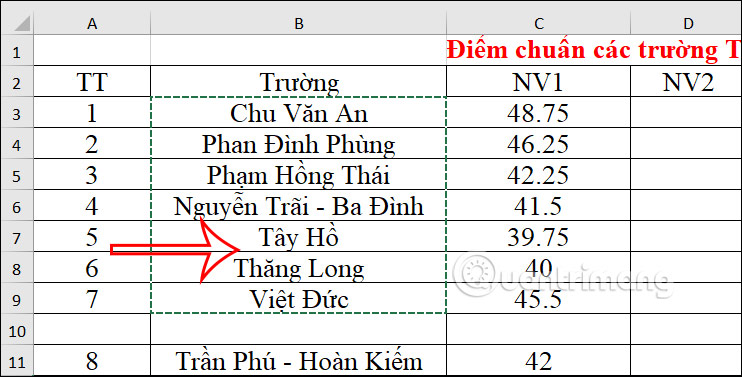
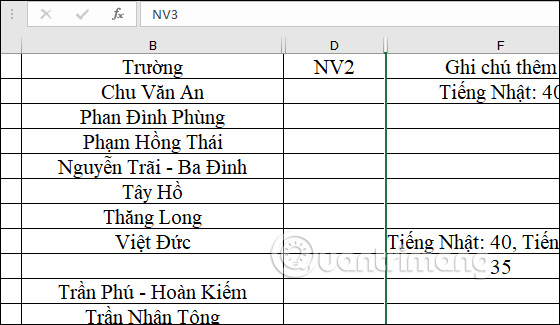
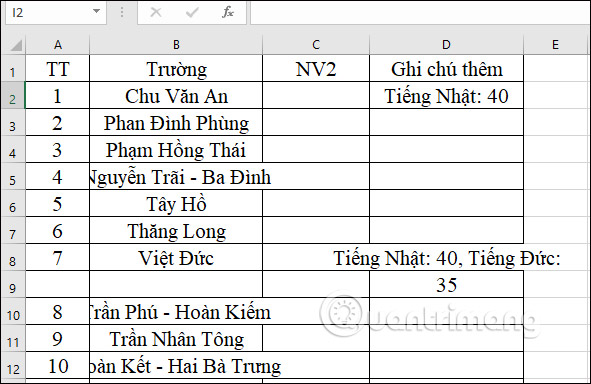
<p style="text-align: justify;">Chẳng hạn với vùng dữ liệu này sẽ tiến hành ẩn dòng Tây Hồ và Thăng Long.</p>

<p style="text-align: justify;"><img alt="Dòng ẩn trong Excel" data-i="0" data-src="https://st.quantrimang.com/photos/image/2023/02/08/Excel-copy-bo-dong-an-1.jpg" data-was-processed="true" height="325" src="https://st.quantrimang.com/photos/image/2023/02/08/Excel-copy-bo-dong-an-1.jpg" width="640" /></p>

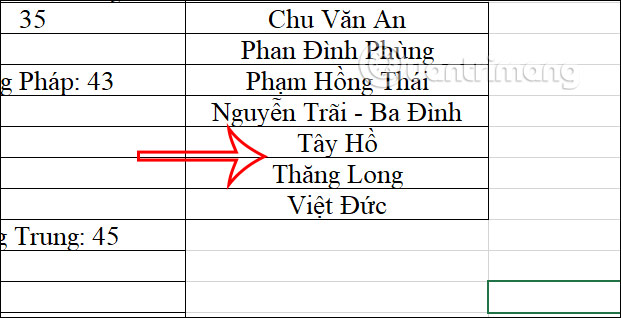
<p style="text-align: justify;">Khi chúng ta sao chép vùng dữ liệu có dòng ẩn này thì nội dung ẩn vẫn hiển thị đầy đủ.</p>

<p style="text-align: justify;"><img alt="Copy gồm dòng đã ẩn trong Excel" data-i="1" data-src="https://st.quantrimang.com/photos/image/2023/02/08/Excel-copy-bo-dong-an-2.jpg" data-was-processed="true" height="318" src="https://st.quantrimang.com/photos/image/2023/02/08/Excel-copy-bo-dong-an-2.jpg" width="621" /></p>

<p style="text-align: justify;"><strong>Bước 1:</strong></p>

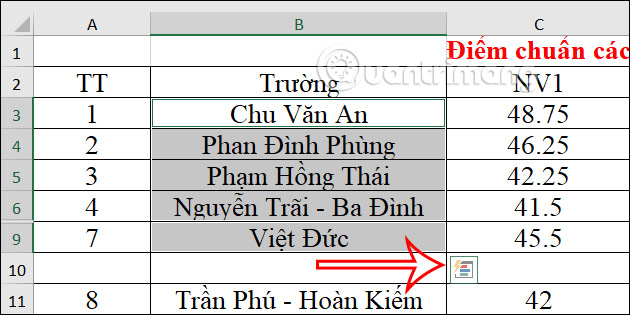
<p style="text-align: justify;">Đầu tiên bạn<strong>&nbsp;sao chép toàn bộ vùng dữ liệu Excel có dòng ẩn</strong>&nbsp;mà bạn muốn copy. Tiếp đến&nbsp;<strong>nhấn tổ hợp phím Alt + ; .</strong>&nbsp;để lựa chọn nội dung.</p>

<p style="text-align: justify;"><img alt="Sao chép vùng dữ liệu trong Excel" data-i="2" data-src="https://st.quantrimang.com/photos/image/2023/02/08/Excel-copy-bo-dong-an-3.jpg" data-was-processed="true" height="315" src="https://st.quantrimang.com/photos/image/2023/02/08/Excel-copy-bo-dong-an-3.jpg" width="630" /></p>

<p style="text-align: justify;"><strong>Bước 2:</strong></p>

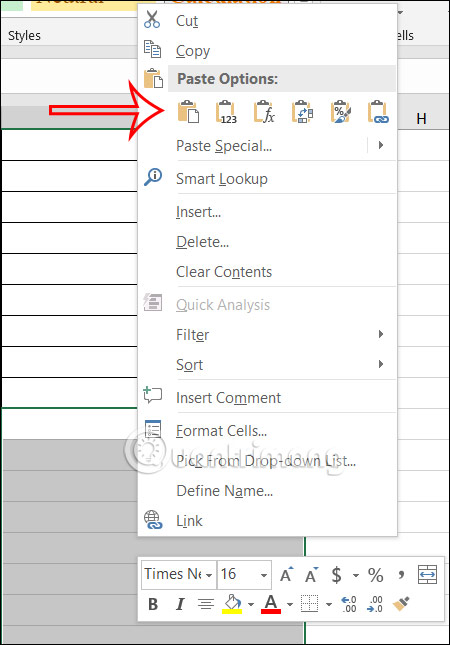
<p style="text-align: justify;">Sau đó<strong>&nbsp;nhấn tổ hợp phím Ctrl + C để chọn thao tác sao chép</strong>&nbsp;rồi nhấn&nbsp;<strong>Ctrl + V để paste nội dung</strong>&nbsp;dữ liệu mình đã chọn, với việc không có dòng ẩn được sao chép.</p>

<p style="text-align: justify;"><img alt="Copy vùng dữ liệu trong Excel không có dòng ẩn" data-i="3" data-src="https://st.quantrimang.com/photos/image/2023/02/08/Excel-copy-bo-dong-an-4.jpg" data-was-processed="true" height="573" src="https://st.quantrimang.com/photos/image/2023/02/08/Excel-copy-bo-dong-an-4.jpg" width="400" /></p>

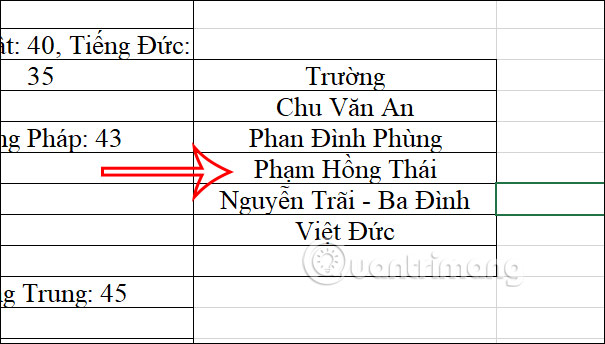
<p style="text-align: justify;">Kết quả bạn sẽ nhìn thấy nội dung được paste không có dòng đã ẩn trong Excel.</p>

<p style="text-align: justify;"><img alt="Vùng dữ liệu trong Excel không có dòng ẩn" data-i="4" data-src="https://st.quantrimang.com/photos/image/2023/02/08/Excel-copy-bo-dong-an-5.jpg" data-was-processed="true" height="313" src="https://st.quantrimang.com/photos/image/2023/02/08/Excel-copy-bo-dong-an-5.jpg" width="550" /></p>

<h2 style="text-align: justify;">Các copy trong Excel trừ cột và dòng ẩn bằng Go to</h2>

<p style="text-align: justify;">Như trong ảnh dưới đây thì&nbsp;<strong>cột C và cột E đã được ẩn</strong>&nbsp;khỏi bảng Excel. Nhưng khi copy bảng sang file Excel khác thì 2 cột này vẫn hiện đầy đủ.</p>

<p style="text-align: justify;"><img alt="Cột đã ẩn" data-i="5" data-src="https://st.quantrimang.com/photos/image/2021/05/19/Excel-copy-bo-cot-hang-an-1.jpg" data-was-processed="true" height="325" src="https://st.quantrimang.com/photos/image/2021/05/19/Excel-copy-bo-cot-hang-an-1.jpg" width="560" /></p>

<p style="text-align: justify;"><strong>Bước 1:</strong></p>

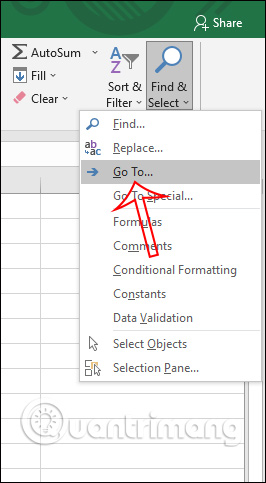
<p style="text-align: justify;">Trước hết bạn bôi đen toàn bộ bảng dữ liệu Excel, sau đó nhìn lên&nbsp;<strong>nhóm Editing</strong>&nbsp;bạn nhấn vào&nbsp;<strong>Find &amp; Select</strong>&nbsp;rồi chọn&nbsp;<strong>Go To…</strong>&nbsp;trong danh sách hiển thị bên dưới.</p>

<p style="text-align: justify;"><img alt="Chọn Go To" data-i="6" data-src="https://st.quantrimang.com/photos/image/2021/05/19/Excel-copy-bo-cot-hang-an-2.jpg" data-was-processed="true" height="483" src="https://st.quantrimang.com/photos/image/2021/05/19/Excel-copy-bo-cot-hang-an-2.jpg" width="266" /></p>

<p style="text-align: justify;"><strong>Bước 2:</strong></p>

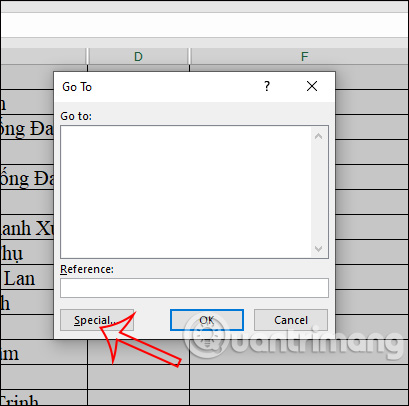
<p style="text-align: justify;">Lúc này hiển thị hộp thoại Go To, chúng ta nhấn chọn tiếp vào<strong>&nbsp;nút Special</strong>&nbsp;ở bên dưới.</p>

<p style="text-align: justify;"><img alt="Tùy chọn đặc biệt " data-i="7" data-src="https://st.quantrimang.com/photos/image/2021/05/19/Excel-copy-bo-cot-hang-an-3.jpg" data-was-processed="true" height="406" src="https://st.quantrimang.com/photos/image/2021/05/19/Excel-copy-bo-cot-hang-an-3.jpg" width="409" /></p>

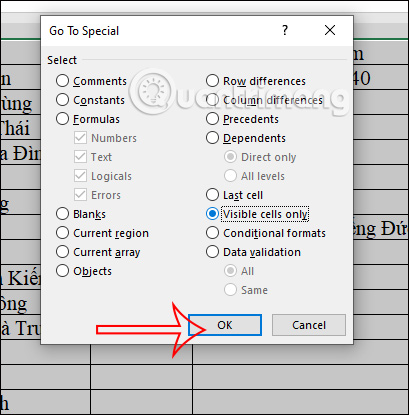
<p style="text-align: justify;">Tiếp đến bạn<strong>&nbsp;tích chọn vào Visible cell onlys</strong>&nbsp;rồi nhấn Ok bên dưới để lưu lại thay đổi.</p>

<p style="text-align: justify;"><img alt="Chỉ áp dụng cho dữ liệu hiển thị" data-i="8" data-src="https://st.quantrimang.com/photos/image/2021/05/19/Excel-copy-bo-cot-hang-an-4.jpg" data-was-processed="true" height="415" src="https://st.quantrimang.com/photos/image/2021/05/19/Excel-copy-bo-cot-hang-an-4.jpg" width="409" /></p>

<p style="text-align: justify;"><strong>Bước 3:</strong></p>

<p style="text-align: justify;">Sau đó bạn tiến hành bôi đen lại toàn bộ bảng dữ liệu mà mình muốn sao chép và tiến hành copy rồi paste bảng dữ liệu này ở file Excel khác như bình thường. Kết quả cột đã ẩn đi sẽ không xuất hiện nữa và Excel cũng tự động sắp xếp lại thứ tự cho các cột ở file Excel mới.</p>

<p style="text-align: justify;"><img alt="Bảng dữ liệu mới" data-i="9" data-src="https://st.quantrimang.com/photos/image/2021/05/19/Excel-copy-bo-cot-hang-an-5.jpg" data-was-processed="true" height="384" src="https://st.quantrimang.com/photos/image/2021/05/19/Excel-copy-bo-cot-hang-an-5.jpg" width="591" /></p>

<h2 style="text-align: justify;">Video hướng dẫn copy trong Excel bỏ qua hàng, cột ẩn</h2>

<p style="text-align: center;">
<video autoplay="autoplay" height="480" loop="loop" muted="muted" preload="metadata" src="https://e.xem.video/data/media/2021/05/20/Cach-copy-trong-Excel-bo-qua-cot-hang-an-480p.mp4" width="854">&nbsp;</video>
</p>

<div style="text-align: justify;">&nbsp;</div>
		</div>
				<div id="author">
						<p>
				<strong>Nguồn tin:</strong>
				Quantrimang.com
			</p>
		</div>
	</div>
	<div id="footer" class="clearfix">
		<div id="url">
			<strong>URL của bản tin này: </strong><a href="https://www.nguoicodonvn2008.info/vi/news/savefile/kien-thuc-may-tinh/cach-copy-trong-excel-khong-chua-cot-va-dong-an-6701.html" title="Cách copy trong Excel không chứa cột và dòng ẩn">https://www.nguoicodonvn2008.info/vi/news/savefile/kien-thuc-may-tinh/cach-copy-trong-excel-khong-chua-cot-va-dong-an-6701.html</a>

		</div>
		<div class="clear"></div>
		<div class="copyright">
			&copy; .&#x3A; Nguoicodonvn2008.info - Cõi lòng người cô đơn &#x3A;.
		</div>
		<div id="contact">
			<a href="mailto:admin@nguoicodonvn2008.info">admin@nguoicodonvn2008.info</a>
		</div>
	</div>
</div>
        <div id="timeoutsess" class="chromeframe">
            Bạn đã không sử dụng Site, <a onclick="timeoutsesscancel();" href="https://www.nguoicodonvn2008.info/#">Bấm vào đây để duy trì trạng thái đăng nhập</a>. Thời gian chờ: <span id="secField"> 60 </span> giây
        </div>
        <div id="openidResult" class="nv-alert" style="display:none"></div>
        <div id="openidBt" data-result="" data-redirect=""></div>
		</script>
		<div class="car-top">
  <span><img src="https://www.nguoicodonvn2008.info/themes/default/images/car.png" alt=""></span>
</div>
<script src="https://www.nguoicodonvn2008.info/assets/js/jquery/jquery.min.js"></script>
<script>var nv_base_siteurl="/",nv_lang_data="vi",nv_lang_interface="vi",nv_name_variable="nv",nv_fc_variable="op",nv_lang_variable="language",nv_module_name="news",nv_func_name="savefile",nv_is_user=0, nv_my_ofs=-4,nv_my_abbr="EDT",nv_cookie_prefix="nv4c_e856T",nv_check_pass_mstime=1738000,nv_area_admin=0,nv_safemode=0,theme_responsive=0,nv_recaptcha_ver=2,nv_recaptcha_sitekey="",nv_recaptcha_type="image",XSSsanitize=1;</script>
<script src="https://www.nguoicodonvn2008.info/assets/js/language/vi.js"></script>
<script src="https://www.nguoicodonvn2008.info/assets/js/DOMPurify/purify3.js"></script>
<script src="https://www.nguoicodonvn2008.info/assets/js/global.js"></script>
<script src="https://www.nguoicodonvn2008.info/assets/js/site.js"></script>
<script src="https://www.nguoicodonvn2008.info/themes/default/js/news.js"></script>
<script src="https://www.nguoicodonvn2008.info/themes/default/js/main.js"></script>
<script src="https://www.nguoicodonvn2008.info/themes/default/js/custom.js"></script>
<script type="application/ld+json">
        {
            "@context": "https://schema.org",
            "@type": "Organization",
            "url": "https://www.nguoicodonvn2008.info",
            "logo": "https://www.nguoicodonvn2008.info/uploads/angel.gif"
        }
        </script>
<script src="https://www.nguoicodonvn2008.info/themes/default/js/bootstrap.min.js"></script>
<script type="text/javascript">
var $scrolltop = $('.car-top');
$scrolltop.on('click', function () {
    $('html,body').animate({
        scrollTop: 0
    }, 800);
    $(this).addClass("car-run");
    setTimeout(function(){ $scrolltop.removeClass('car-run');}, 1000);
    return false;
});
$(window).on('scroll', function ()
{ 
    if($(window).scrollTop() >= 200)
    {
        $scrolltop.addClass("show");
        $scrolltop.addClass("car-down");
    }
    else
    {
       $scrolltop.removeClass("show");
       setTimeout(function(){ $scrolltop.removeClass('car-down');}, 300);
    }
});
</script>
</body>
</html>