<!DOCTYPE html>
    <html lang="vi" xmlns="http://www.w3.org/1999/xhtml" prefix="og: http://ogp.me/ns#">
    <head>
<title>Cách Copilot trong PowerPoint giúp bạn hoàn thành mọi bài thuyết trình</title>
<meta name="description" content="Cách Copilot trong PowerPoint giúp bạn hoàn thành mọi bài thuyết trình - Savefile - Tin Tức -...">
<meta name="author" content=".: Nguoicodonvn2008.info - Cõi lòng người cô đơn :.">
<meta name="copyright" content=".: Nguoicodonvn2008.info - Cõi lòng người cô đơn :. [admin@nguoicodonvn2008.info]">
<meta name="robots" content="index, archive, follow, noodp">
<meta name="googlebot" content="index,archive,follow,noodp">
<meta name="msnbot" content="all,index,follow">
<meta name="generator" content="NukeViet v4.5">
<meta http-equiv="Content-Type" content="text/html; charset=utf-8">
<meta property="og:title" content="Cách Copilot trong PowerPoint giúp bạn hoàn thành mọi bài thuyết trình">
<meta property="og:type" content="website">
<meta property="og:description" content="Savefile - Tin Tức -...">
<meta property="og:site_name" content=".&#x3A; Nguoicodonvn2008.info - Cõi lòng người cô đơn &#x3A;.">
<meta property="og:url" content="https://www.nguoicodonvn2008.info/vi/news/savefile/kien-thuc-may-tinh/cach-copilot-trong-powerpoint-giup-ban-hoan-thanh-moi-bai-thuyet-trinh-9969.html">
<link rel="shortcut icon" href="https://www.nguoicodonvn2008.info/favicon.ico">
<link rel="canonical" href="https://www.nguoicodonvn2008.info/vi/news/savefile/kien-thuc-may-tinh/cach-copilot-trong-powerpoint-giup-ban-hoan-thanh-moi-bai-thuyet-trinh-9969.html">
<link rel="alternate" href="https://www.nguoicodonvn2008.info/vi/news/rss/" title="Tin Tức" type="application/rss+xml">
<link rel="alternate" href="https://www.nguoicodonvn2008.info/vi/news/rss/karaoke-dual/" title="Tin Tức - Karaoke Dual" type="application/rss+xml">
<link rel="alternate" href="https://www.nguoicodonvn2008.info/vi/news/rss/nhac-tre/" title="Tin Tức - Nhạc trẻ" type="application/rss+xml">
<link rel="alternate" href="https://www.nguoicodonvn2008.info/vi/news/rss/tru-tinh/" title="Tin Tức - Trữ tình" type="application/rss+xml">
<link rel="alternate" href="https://www.nguoicodonvn2008.info/vi/news/rss/nuoc-ngoai/" title="Tin Tức - Nước ngoài" type="application/rss+xml">
<link rel="alternate" href="https://www.nguoicodonvn2008.info/vi/news/rss/remix/" title="Tin Tức - Remix" type="application/rss+xml">
<link rel="alternate" href="https://www.nguoicodonvn2008.info/vi/news/rss/tam-su-tinh-yeu/" title="Tin Tức - Tâm sự tình yêu" type="application/rss+xml">
<link rel="alternate" href="https://www.nguoicodonvn2008.info/vi/news/rss/tho-suu-tam/" title="Tin Tức - Thơ sưu tầm" type="application/rss+xml">
<link rel="alternate" href="https://www.nguoicodonvn2008.info/vi/news/rss/cuoc-song/" title="Tin Tức - Cuộc sống" type="application/rss+xml">
<link rel="alternate" href="https://www.nguoicodonvn2008.info/vi/news/rss/phan-mem/" title="Tin Tức - Phần mềm" type="application/rss+xml">
<link rel="alternate" href="https://www.nguoicodonvn2008.info/vi/news/rss/kien-thuc-may-tinh/" title="Tin Tức - Kiến thức máy tính" type="application/rss+xml">
<link rel="alternate" href="https://www.nguoicodonvn2008.info/vi/news/rss/hoc-tap/" title="Tin Tức - Học tập" type="application/rss+xml">
<link rel="alternate" href="https://www.nguoicodonvn2008.info/vi/news/rss/tai-lieu/" title="Tin Tức - Tài liệu" type="application/rss+xml">
<link rel="alternate" href="https://www.nguoicodonvn2008.info/vi/news/rss/de-thi/" title="Tin Tức - Đề thi" type="application/rss+xml">
<link rel="preload" as="style" href="https://www.nguoicodonvn2008.info/assets/css/font-awesome.min.css" type="text/css">
<link rel="preload" as="style" href="https://www.nguoicodonvn2008.info/themes/default/css/bootstrap.non-responsive.css" type="text/css">
<link rel="preload" as="style" href="https://www.nguoicodonvn2008.info/themes/default/css/style.css" type="text/css">
<link rel="preload" as="style" href="https://www.nguoicodonvn2008.info/themes/default/css/style.non-responsive.css" type="text/css">
<link rel="preload" as="style" href="https://www.nguoicodonvn2008.info/themes/default/css/news.css" type="text/css">
<link rel="preload" as="style" href="https://www.nguoicodonvn2008.info/themes/default/css/custom.css" type="text/css">
<link rel="preload" as="script" href="https://www.nguoicodonvn2008.info/assets/js/jquery/jquery.min.js" type="text/javascript">
<link rel="preload" as="script" href="https://www.nguoicodonvn2008.info/assets/js/language/vi.js" type="text/javascript">
<link rel="preload" as="script" href="https://www.nguoicodonvn2008.info/assets/js/DOMPurify/purify3.js" type="text/javascript">
<link rel="preload" as="script" href="https://www.nguoicodonvn2008.info/assets/js/global.js" type="text/javascript">
<link rel="preload" as="script" href="https://www.nguoicodonvn2008.info/assets/js/site.js" type="text/javascript">
<link rel="preload" as="script" href="https://www.nguoicodonvn2008.info/themes/default/js/news.js" type="text/javascript">
<link rel="preload" as="script" href="https://www.nguoicodonvn2008.info/themes/default/js/main.js" type="text/javascript">
<link rel="preload" as="script" href="https://www.nguoicodonvn2008.info/themes/default/js/custom.js" type="text/javascript">
<link rel="preload" as="script" href="https://www.nguoicodonvn2008.info/themes/default/js/bootstrap.min.js" type="text/javascript">
<link rel="stylesheet" href="https://www.nguoicodonvn2008.info/assets/css/font-awesome.min.css">
<link rel="stylesheet" href="https://www.nguoicodonvn2008.info/themes/default/css/bootstrap.non-responsive.css">
<link rel="stylesheet" href="https://www.nguoicodonvn2008.info/themes/default/css/style.css">
<link rel="stylesheet" href="https://www.nguoicodonvn2008.info/themes/default/css/style.non-responsive.css">
<link rel="StyleSheet" href="https://www.nguoicodonvn2008.info/themes/default/css/news.css">
<link rel="stylesheet" href="https://www.nguoicodonvn2008.info/themes/default/css/custom.css">
<style type="text/css">
	body{background: #fff;}
</style>
    </head>
    <body>
<div id="print">
	<div id="hd_print">
		<h2 class="pull-left">.&#x3A; Nguoicodonvn2008.info - Cõi lòng người cô đơn &#x3A;.</h2>
		<p class="pull-right"><a title=".&#x3A; Nguoicodonvn2008.info - Cõi lòng người cô đơn &#x3A;." href="https://www.nguoicodonvn2008.info/">https://www.nguoicodonvn2008.info</a></p>
	</div>
	<div class="clear"></div>
	<hr />
	<div id="content">
		<h1>Cách Copilot trong PowerPoint giúp bạn hoàn thành mọi bài thuyết trình</h1>
		<ul class="list-inline">
			<li>Thứ tư - 12/03/2025 00:19</li>
			<li class="hidden-print txtrequired"><em class="fa fa-print">&nbsp;</em><a title="In ra" href="javascript:;" onclick="window.print()">In ra</a></li>
			<li class="hidden-print txtrequired"><em class="fa fa-power-off">&nbsp;</em><a title="Đóng cửa sổ này" href="javascript:;" onclick="window.close()">Đóng cửa sổ này</a></li>
		</ul>
		<div class="clear"></div>
		<div id="hometext">
		</div>
				<div class="imghome">
			<img alt="Cách Copilot trong PowerPoint giúp bạn hoàn thành mọi bài thuyết trình" src="https://st.quantrimang.com/photos/image/2025/03/11/copilot-trong-powerpoint-giup-hoan-thanh-bai-thuyet-trinh-6.jpg" width="460" class="img-thumbnail" />
		</div>
		<div class="clear"></div>
		<div id="bodytext" class="clearfix">
			<p style="text-align: justify;">Việc xây dựng một bài thuyết trình tuyệt vời cần có thời gian - trừ khi bạn có trợ lý AI.&nbsp;&nbsp;Copilot&nbsp;của PowerPoint giúp bạn thực hiện công việc thủ công để có thể tập trung vào việc truyền tải nội dung. Sau đây là cách tận dụng công cụ này sao cho hiệu quả!</p>

<h2 style="text-align: justify;">3. Tạo bài thuyết trình mới từ đầu</h2>

<p style="text-align: justify;">Ngay cả khi có ý tưởng tuyệt vời cho bài thuyết trình, việc bắt đầu với một slide trống vẫn khiến bạn thấy nản lòng. Đây chính là lúc&nbsp;Copilot trong PowerPoint&nbsp;có thể giúp ích.</p>

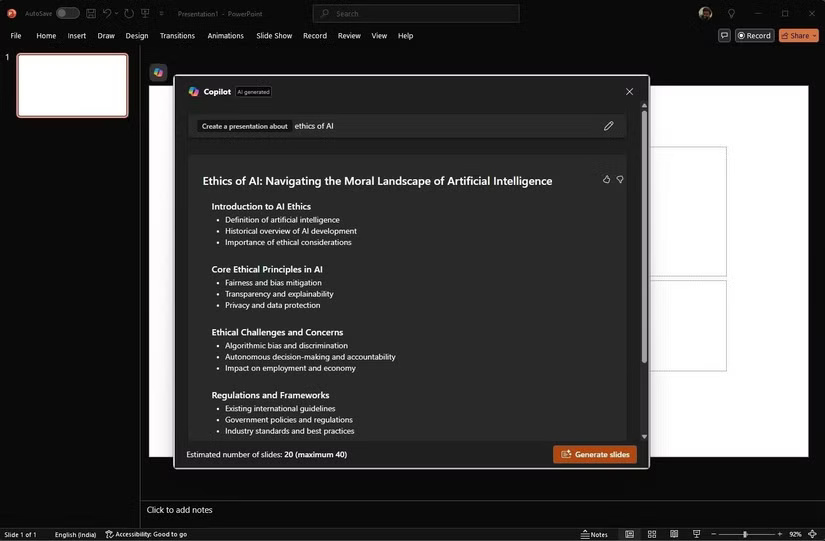
<p style="text-align: justify;">Copilot&nbsp;giúp vượt qua rào cản ban đầu này bằng cách tạo toàn bộ bài thuyết trình dựa trên một lời nhắc đơn giản. Bạn có thể cho nó biết chủ đề và nó sẽ tạo ra một cấu trúc cơ bản với các slide có liên quan.</p>

<figure>
<div style="text-align: justify;"><img alt="Tạo bài thuyết trình mới bằng Copilot trong Microsoft" data-i="0" data-src="https://st.quantrimang.com/photos/image/2025/03/11/copilot-trong-powerpoint-giup-hoan-thanh-bai-thuyet-trinh-1.jpg" data-was-processed="true" height="541" src="https://st.quantrimang.com/photos/image/2025/03/11/copilot-trong-powerpoint-giup-hoan-thanh-bai-thuyet-trinh-1.jpg" width="825" /></div>

<figcaption>
<div style="text-align: justify;">Tạo bài thuyết trình mới bằng Copilot trong Microsoft</div>
</figcaption>
</figure>

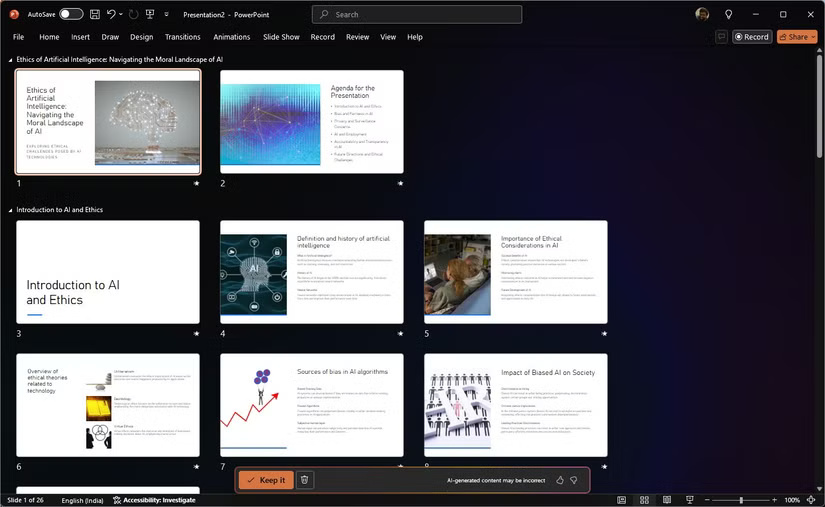
<p style="text-align: justify;">Ví dụ, nếu bạn cần thuyết trình về đạo đức của AI, chỉ cần nhập nội dung đó vào Copilot và nó sẽ tạo ra một dàn ý bài thuyết trình với các slide bao gồm những chủ đề như nguyên tắc đạo đức, thách thức và mối quan tâm cũng như khuôn khổ pháp lý. Tuy nhiên, đây không chỉ là việc tạo một template.</p>

<p style="text-align: justify;">Copilot không chỉ dừng lại ở các dàn ý cơ bản. Nó còn có thể điền nội dung có liên quan vào các slide, bao gồm văn bản, hình ảnh và thậm chí cả bố cục được đề xuất, giống như có một trợ lý nghiên cứu đã làm công việc chuẩn bị cho bạn. Tất nhiên, bạn cần tùy chỉnh nội dung đã tạo để phù hợp với nhu cầu cụ thể của mình, thêm thông tin chi tiết và dữ liệu riêng cần thiết.</p>

<figure>
<div style="text-align: justify;"><img alt="Tạo slide bằng Copilot trong PowerPoint" data-adbro-processed="true" data-i="1" data-src="https://st.quantrimang.com/photos/image/2025/03/11/copilot-trong-powerpoint-giup-hoan-thanh-bai-thuyet-trinh-2.jpg" data-was-processed="true" height="507" src="https://st.quantrimang.com/photos/image/2025/03/11/copilot-trong-powerpoint-giup-hoan-thanh-bai-thuyet-trinh-2.jpg" width="825" /></div>

<figcaption>
<div style="text-align: justify;">Tạo slide bằng Copilot trong PowerPoint</div>
</figcaption>
</figure>

<p style="text-align: justify;">Ngoài ra, Copilot cũng có thể giúp động não ý tưởng và tạo nội dung dựa trên các điểm chính mà bạn chia sẻ. Điều này cực kỳ hữu ích để vượt qua những rào cản sáng tạo và đảm bảo rằng các bài thuyết trình được hoàn thiện và cung cấp nhiều thông tin.</p>

<p style="text-align: justify;">Về cơ bản, Copilot cung cấp cho bạn một điểm khởi đầu vững chắc, sau đó bạn có thể tinh chỉnh và mở rộng thêm. Nó giúp bạn tiết kiệm nhiều giờ nghiên cứu ban đầu và tạo slide, cho phép tập trung vào các khía cạnh quan trọng hơn của bài thuyết trình.</p>

<h2 style="text-align: justify;">2. Biến đổi và sắp xếp slide deck</h2>

<p style="text-align: justify;">Chúng ta đều đã từng trải qua việc có một slide deck quá tải chứa đầy các điểm bullet vô tận và một mớ thông tin hỗn loạn.</p>

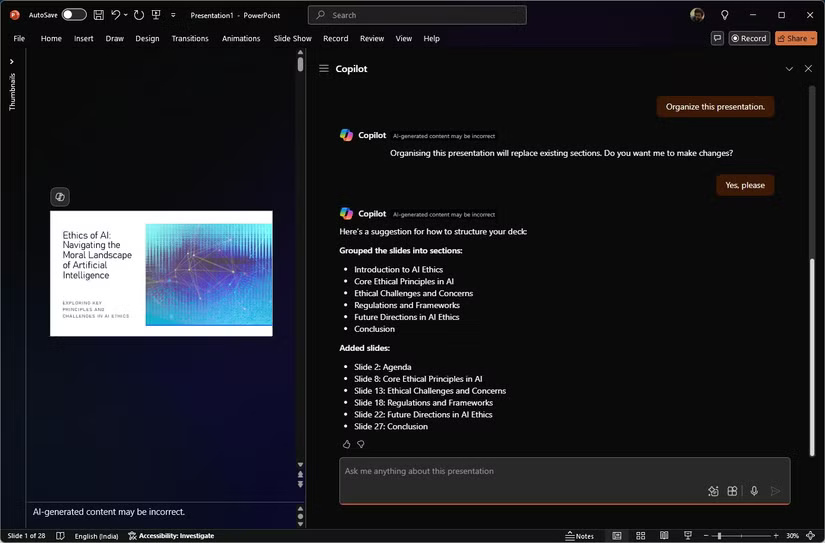
<p style="text-align: justify;">Copilot có thể giúp biến sự lộn xộn này thành một bài thuyết trình mạch lạc, hấp dẫn. Bạn cũng có thể sử dụng nó để làm mới các bài thuyết trình hiện tại của mình. Có thể nội dung đã lỗi thời hoặc các slide quá dày đặc và khó hiểu. Copilot có thể giúp bạn sắp xếp những nội dung này và tạo ra một bài thuyết trình mới mẻ và hấp dẫn.</p>

<figure>
<div style="text-align: justify;"><img alt="Sắp xếp slide bằng Copilot trong Microsoft" data-i="2" data-src="https://st.quantrimang.com/photos/image/2025/03/11/copilot-trong-powerpoint-giup-hoan-thanh-bai-thuyet-trinh-3.jpg" data-was-processed="true" height="543" src="https://st.quantrimang.com/photos/image/2025/03/11/copilot-trong-powerpoint-giup-hoan-thanh-bai-thuyet-trinh-3.jpg" width="825" /></div>

<figcaption>
<div style="text-align: justify;">Sắp xếp slide bằng&nbsp;<a data-google-interstitial="false" data-google-vignette="false" href="https://quantrimang.com/cong-nghe/copilot-trong-powerpoint-giup-hoan-thanh-bai-thuyet-trinh-207922#">&nbsp;Copilot</a>&nbsp;trong Microsoft</div>
</figcaption>
</figure>

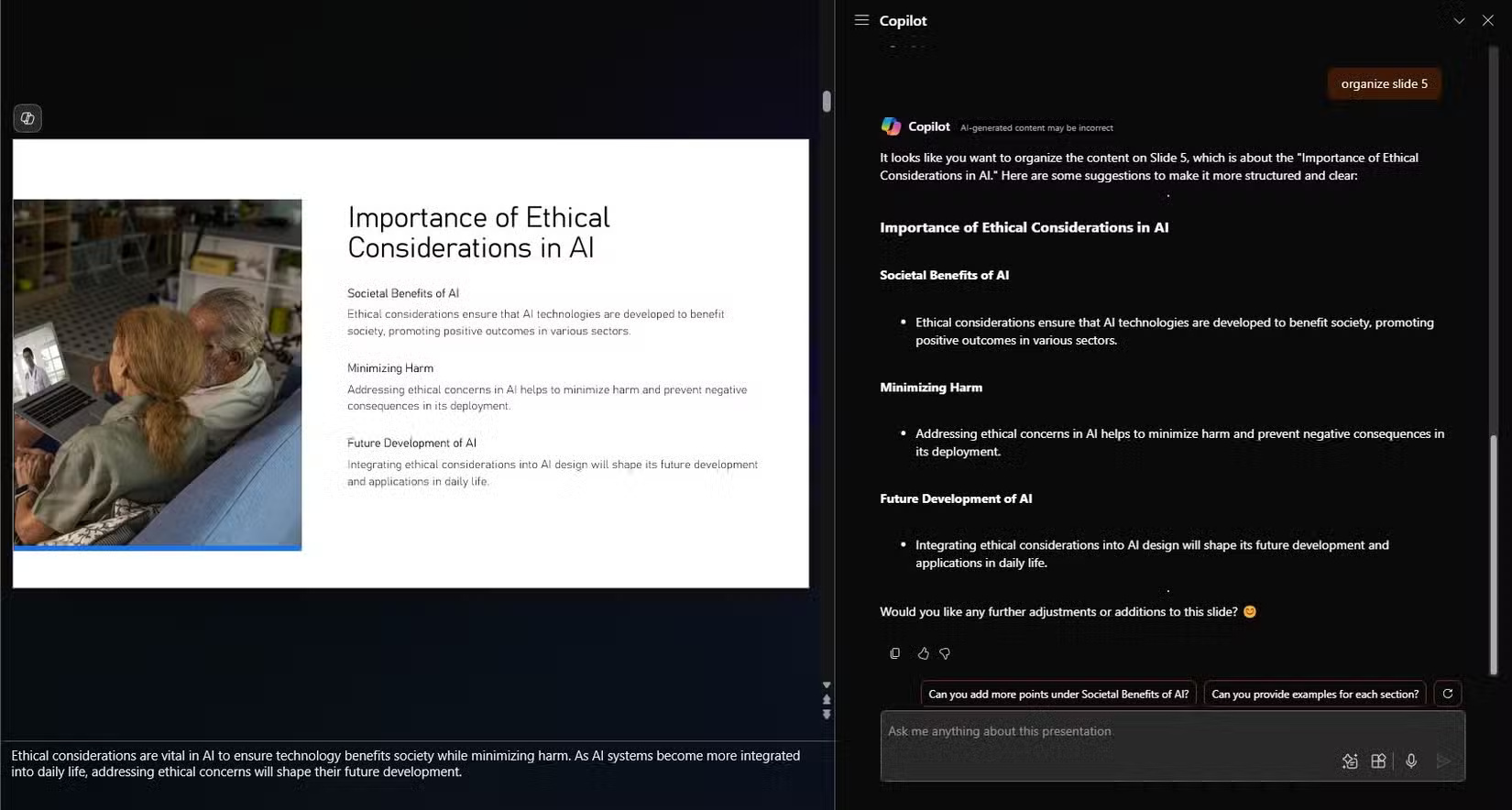
<p style="text-align: justify;">Copilot phân tích slide deck hiện tại của bạn và đưa ra các đề xuất để cải thiện cấu trúc và luồng. Nó có thể nhóm các slide liên quan lại với nhau, tạo tiêu đề phần và đề xuất một trình tự hợp lý giúp bài thuyết trình của bạn dễ theo dõi hơn. Việc đại tu cấu trúc này đảm bảo rằng khán giả của bạn có thể nắm bắt các điểm chính mà không bị lạc trong biển thông tin.</p>

<figure>
<div style="text-align: justify;"><img alt="Sắp xếp slide bằng Copilot trong PowerPoint" data-i="3" data-src="https://st.quantrimang.com/photos/image/2025/03/11/copilot-trong-powerpoint-giup-hoan-thanh-bai-thuyet-trinh-4.jpg" data-was-processed="true" height="884" src="https://st.quantrimang.com/photos/image/2025/03/11/copilot-trong-powerpoint-giup-hoan-thanh-bai-thuyet-trinh-4.jpg" width="1650" /></div>

<figcaption>
<div style="text-align: justify;">Sắp xếp slide bằng Copilot trong PowerPoint</div>
</figcaption>
</figure>

<p style="text-align: justify;">Khi nói đến nội dung, Copilot giúp bạn cô đọng và làm rõ các slide của mình. Ví dụ, nếu bạn có một slide chứa đầy văn bản, công cụ này sẽ gợi ý cách chia nhỏ nội dung thành các phần dễ hiểu. Công cụ này có thể đề xuất sử dụng dấu đầu dòng, thêm hình ảnh hoặc chia nội dung thành nhiều slide.</p>

<p style="text-align: justify;">Về mặt thiết kế, công cụ này gợi ý hình ảnh, biểu tượng và biểu đồ bổ sung cho nội dung của bạn. Nếu slide của bạn trông đơn điệu, công cụ này sẽ cung cấp các yếu tố thiết kế và hoạt ảnh để làm cho chúng hấp dẫn hơn về mặt thị giác.</p>

<p style="text-align: justify;">Copilot cũng giúp bạn duy trì tính nhất quán với thương hiệu của mình. Công cụ này đảm bảo rằng phông chữ, màu sắc và kiểu dáng của bài thuyết trình là đồng nhất.</p>

<h2 style="text-align: justify;">1. Tóm tắt các bài thuyết trình hiện có và rút ra thông tin chi tiết</h2>

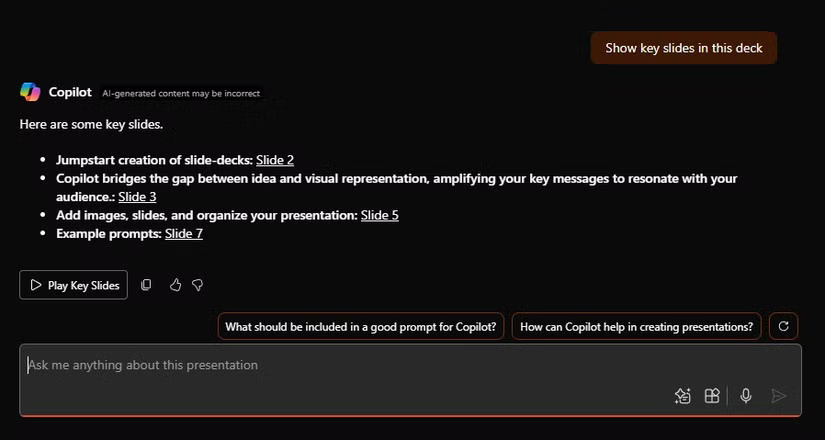
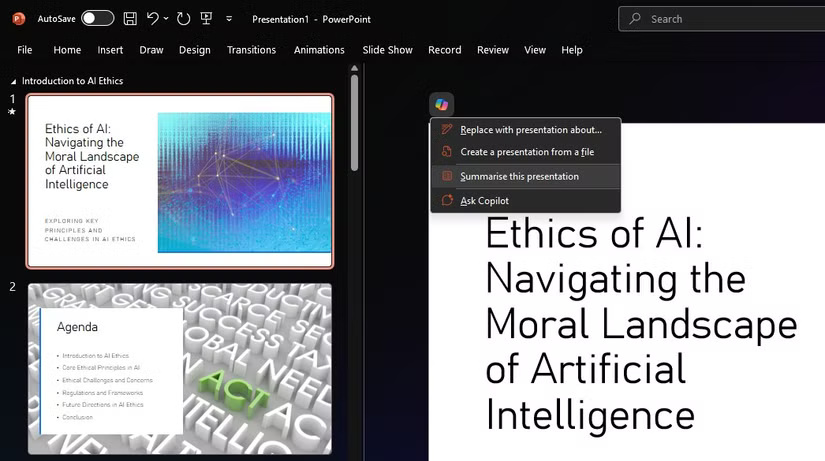
<p style="text-align: justify;">​Copilot đơn giản hóa nhiệm vụ tóm tắt một bài thuyết trình dài hoặc trích xuất thông tin chi tiết quan trọng từ một bộ slide phức tạp.</p>

<p style="text-align: justify;">Thông thường, bạn cần nhanh chóng nắm bắt những nội dung chính từ một bài thuyết trình dài và phức tạp. Copilot có thể giúp bạn thực hiện việc này bằng cách tạo bản tóm tắt của bài thuyết trình. Các bản tóm tắt do Copilot tạo ra rất ngắn gọn và nhiều thông tin, làm nổi bật các điểm chính của từng slide hoặc những slide chính trong một bộ slide.</p>

<figure>
<div style="text-align: justify;"><img alt="Tóm tắt bài thuyết trình với Copilot trong PowerPoint" data-i="4" data-src="https://st.quantrimang.com/photos/image/2025/03/11/copilot-trong-powerpoint-giup-hoan-thanh-bai-thuyet-trinh-5.jpg" data-was-processed="true" height="461" src="https://st.quantrimang.com/photos/image/2025/03/11/copilot-trong-powerpoint-giup-hoan-thanh-bai-thuyet-trinh-5.jpg" width="825" /></div>

<figcaption>
<div style="text-align: justify;">Tóm tắt bài thuyết trình với Copilot trong PowerPoint</div>
</figcaption>
</figure>

<p style="text-align: justify;">Điều này cực kỳ hữu ích khi bạn xem lại bài thuyết trình của đồng nghiệp hoặc khi cần làm mới trí nhớ của mình về một chủ đề nào đó một cách nhanh chóng.</p>

<p style="text-align: justify;">Ngoài việc tóm tắt, Copilot còn có thể giúp bạn rút ra những hiểu biết quan trọng từ các bài thuyết trình. Công cụ này có thể phân tích dữ liệu, diễn giải biểu đồ và đồ thị, đồng thời xác định các xu hướng và mô hình có thể không dễ nhận thấy ngay lập tức. Những hiểu biết này không chỉ hữu ích mà còn có thể được sử dụng để làm phong phú thêm bài thuyết trình của bạn.</p>

<figure>
<div style="text-align: justify;"><img alt="Hiểu bài thuyết trình với Copilot trong PowerPoint" data-i="5" data-src="https://st.quantrimang.com/photos/image/2025/03/11/copilot-trong-powerpoint-giup-hoan-thanh-bai-thuyet-trinh-6.jpg" data-was-processed="true" height="440" src="https://st.quantrimang.com/photos/image/2025/03/11/copilot-trong-powerpoint-giup-hoan-thanh-bai-thuyet-trinh-6.jpg" width="825" /></div>

<figcaption>
<div style="text-align: justify;">Hiểu bài thuyết trình với Copilot trong PowerPoint</div>
</figcaption>
</figure>

<p style="text-align: justify;">Copilot trong PowerPoint cung cấp sự hỗ trợ vô giá với các đề xuất thiết kế trực quan, khả năng tạo nội dung và hiểu biết do AI thúc đẩy. Trợ lý ảo này không chỉ là một công cụ; nó giống như một cộng tác viên giúp bạn trong từng bước thực hiện.</p>

<p style="text-align: justify;">Tuy nhiên, bạn vẫn chỉ nên coi AI là người bạn đồng hành sáng tạo - trí tuệ và sự khéo léo của con người sẽ mang lại giá trị không thể thay thế.</p>

<div style="text-align: justify;">&nbsp;</div>
		</div>
				<div id="author">
						<p>
				<strong>Nguồn tin:</strong>
				Quantrimang.com:
			</p>
		</div>
	</div>
	<div id="footer" class="clearfix">
		<div id="url">
			<strong>URL của bản tin này: </strong><a href="https://www.nguoicodonvn2008.info/vi/news/savefile/kien-thuc-may-tinh/cach-copilot-trong-powerpoint-giup-ban-hoan-thanh-moi-bai-thuyet-trinh-9969.html" title="Cách Copilot trong PowerPoint giúp bạn hoàn thành mọi bài thuyết trình">https://www.nguoicodonvn2008.info/vi/news/savefile/kien-thuc-may-tinh/cach-copilot-trong-powerpoint-giup-ban-hoan-thanh-moi-bai-thuyet-trinh-9969.html</a>

		</div>
		<div class="clear"></div>
		<div class="copyright">
			&copy; .&#x3A; Nguoicodonvn2008.info - Cõi lòng người cô đơn &#x3A;.
		</div>
		<div id="contact">
			<a href="mailto:admin@nguoicodonvn2008.info">admin@nguoicodonvn2008.info</a>
		</div>
	</div>
</div>
        <div id="timeoutsess" class="chromeframe">
            Bạn đã không sử dụng Site, <a onclick="timeoutsesscancel();" href="https://www.nguoicodonvn2008.info/#">Bấm vào đây để duy trì trạng thái đăng nhập</a>. Thời gian chờ: <span id="secField"> 60 </span> giây
        </div>
        <div id="openidResult" class="nv-alert" style="display:none"></div>
        <div id="openidBt" data-result="" data-redirect=""></div>
		</script>
		<div class="car-top">
  <span><img src="https://www.nguoicodonvn2008.info/themes/default/images/car.png" alt=""></span>
</div>
<script src="https://www.nguoicodonvn2008.info/assets/js/jquery/jquery.min.js"></script>
<script>var nv_base_siteurl="/",nv_lang_data="vi",nv_lang_interface="vi",nv_name_variable="nv",nv_fc_variable="op",nv_lang_variable="language",nv_module_name="news",nv_func_name="savefile",nv_is_user=0, nv_my_ofs=-4,nv_my_abbr="EDT",nv_cookie_prefix="nv4c_e856T",nv_check_pass_mstime=1738000,nv_area_admin=0,nv_safemode=0,theme_responsive=0,nv_recaptcha_ver=2,nv_recaptcha_sitekey="",nv_recaptcha_type="image",XSSsanitize=1;</script>
<script src="https://www.nguoicodonvn2008.info/assets/js/language/vi.js"></script>
<script src="https://www.nguoicodonvn2008.info/assets/js/DOMPurify/purify3.js"></script>
<script src="https://www.nguoicodonvn2008.info/assets/js/global.js"></script>
<script src="https://www.nguoicodonvn2008.info/assets/js/site.js"></script>
<script src="https://www.nguoicodonvn2008.info/themes/default/js/news.js"></script>
<script src="https://www.nguoicodonvn2008.info/themes/default/js/main.js"></script>
<script src="https://www.nguoicodonvn2008.info/themes/default/js/custom.js"></script>
<script type="application/ld+json">
        {
            "@context": "https://schema.org",
            "@type": "Organization",
            "url": "https://www.nguoicodonvn2008.info",
            "logo": "https://www.nguoicodonvn2008.info/uploads/angel.gif"
        }
        </script>
<script src="https://www.nguoicodonvn2008.info/themes/default/js/bootstrap.min.js"></script>
<script type="text/javascript">
var $scrolltop = $('.car-top');
$scrolltop.on('click', function () {
    $('html,body').animate({
        scrollTop: 0
    }, 800);
    $(this).addClass("car-run");
    setTimeout(function(){ $scrolltop.removeClass('car-run');}, 1000);
    return false;
});
$(window).on('scroll', function ()
{ 
    if($(window).scrollTop() >= 200)
    {
        $scrolltop.addClass("show");
        $scrolltop.addClass("car-down");
    }
    else
    {
       $scrolltop.removeClass("show");
       setTimeout(function(){ $scrolltop.removeClass('car-down');}, 300);
    }
});
</script>
</body>
</html>