<!DOCTYPE html>
    <html lang="vi" xmlns="http://www.w3.org/1999/xhtml" prefix="og: http://ogp.me/ns#">
    <head>
<title>Cách chuyển Google Docs sang Word</title>
<meta name="description" content="Cách chuyển Google Docs sang Word - Savefile - Tin Tức - https&#x3A;&#x002F;&#x002F;www.nguoicodonvn2008.info&#x002F;vi&#x002F;news&#x002F;savefile&#x002F;kien-thuc-may-tinh&#x002F;cach-chuyen-google-docs-sang-word-58.html">
<meta name="author" content=".: Nguoicodonvn2008.info - Cõi lòng người cô đơn :.">
<meta name="copyright" content=".: Nguoicodonvn2008.info - Cõi lòng người cô đơn :. [admin@nguoicodonvn2008.info]">
<meta name="robots" content="index, archive, follow, noodp">
<meta name="googlebot" content="index,archive,follow,noodp">
<meta name="msnbot" content="all,index,follow">
<meta name="generator" content="NukeViet v4.5">
<meta http-equiv="Content-Type" content="text/html; charset=utf-8">
<meta property="og:title" content="Cách chuyển Google Docs sang Word">
<meta property="og:type" content="website">
<meta property="og:description" content="Savefile - Tin Tức - https&#x3A;&#x002F;&#x002F;www.nguoicodonvn2008.info&#x002F;vi&#x002F;news&#x002F;savefile&#x002F;kien-thuc-may-tinh&#x002F;cach-chuyen-google-docs-sang-word-58.html">
<meta property="og:site_name" content=".&#x3A; Nguoicodonvn2008.info - Cõi lòng người cô đơn &#x3A;.">
<meta property="og:url" content="https://www.nguoicodonvn2008.info/vi/news/savefile/kien-thuc-may-tinh/cach-chuyen-google-docs-sang-word-58.html">
<link rel="shortcut icon" href="https://www.nguoicodonvn2008.info/favicon.ico">
<link rel="canonical" href="https://www.nguoicodonvn2008.info/vi/news/savefile/kien-thuc-may-tinh/cach-chuyen-google-docs-sang-word-58.html">
<link rel="alternate" href="https://www.nguoicodonvn2008.info/vi/news/rss/" title="Tin Tức" type="application/rss+xml">
<link rel="alternate" href="https://www.nguoicodonvn2008.info/vi/news/rss/karaoke-dual/" title="Tin Tức - Karaoke Dual" type="application/rss+xml">
<link rel="alternate" href="https://www.nguoicodonvn2008.info/vi/news/rss/nhac-tre/" title="Tin Tức - Nhạc trẻ" type="application/rss+xml">
<link rel="alternate" href="https://www.nguoicodonvn2008.info/vi/news/rss/tru-tinh/" title="Tin Tức - Trữ tình" type="application/rss+xml">
<link rel="alternate" href="https://www.nguoicodonvn2008.info/vi/news/rss/nuoc-ngoai/" title="Tin Tức - Nước ngoài" type="application/rss+xml">
<link rel="alternate" href="https://www.nguoicodonvn2008.info/vi/news/rss/remix/" title="Tin Tức - Remix" type="application/rss+xml">
<link rel="alternate" href="https://www.nguoicodonvn2008.info/vi/news/rss/tam-su-tinh-yeu/" title="Tin Tức - Tâm sự tình yêu" type="application/rss+xml">
<link rel="alternate" href="https://www.nguoicodonvn2008.info/vi/news/rss/tho-suu-tam/" title="Tin Tức - Thơ sưu tầm" type="application/rss+xml">
<link rel="alternate" href="https://www.nguoicodonvn2008.info/vi/news/rss/cuoc-song/" title="Tin Tức - Cuộc sống" type="application/rss+xml">
<link rel="alternate" href="https://www.nguoicodonvn2008.info/vi/news/rss/phan-mem/" title="Tin Tức - Phần mềm" type="application/rss+xml">
<link rel="alternate" href="https://www.nguoicodonvn2008.info/vi/news/rss/kien-thuc-may-tinh/" title="Tin Tức - Kiến thức máy tính" type="application/rss+xml">
<link rel="alternate" href="https://www.nguoicodonvn2008.info/vi/news/rss/hoc-tap/" title="Tin Tức - Học tập" type="application/rss+xml">
<link rel="alternate" href="https://www.nguoicodonvn2008.info/vi/news/rss/tai-lieu/" title="Tin Tức - Tài liệu" type="application/rss+xml">
<link rel="alternate" href="https://www.nguoicodonvn2008.info/vi/news/rss/de-thi/" title="Tin Tức - Đề thi" type="application/rss+xml">
<link rel="preload" as="style" href="https://www.nguoicodonvn2008.info/assets/css/font-awesome.min.css" type="text/css">
<link rel="preload" as="style" href="https://www.nguoicodonvn2008.info/themes/default/css/bootstrap.non-responsive.css" type="text/css">
<link rel="preload" as="style" href="https://www.nguoicodonvn2008.info/themes/default/css/style.css" type="text/css">
<link rel="preload" as="style" href="https://www.nguoicodonvn2008.info/themes/default/css/style.non-responsive.css" type="text/css">
<link rel="preload" as="style" href="https://www.nguoicodonvn2008.info/themes/default/css/news.css" type="text/css">
<link rel="preload" as="style" href="https://www.nguoicodonvn2008.info/themes/default/css/custom.css" type="text/css">
<link rel="preload" as="script" href="https://www.nguoicodonvn2008.info/assets/js/jquery/jquery.min.js" type="text/javascript">
<link rel="preload" as="script" href="https://www.nguoicodonvn2008.info/assets/js/language/vi.js" type="text/javascript">
<link rel="preload" as="script" href="https://www.nguoicodonvn2008.info/assets/js/DOMPurify/purify3.js" type="text/javascript">
<link rel="preload" as="script" href="https://www.nguoicodonvn2008.info/assets/js/global.js" type="text/javascript">
<link rel="preload" as="script" href="https://www.nguoicodonvn2008.info/assets/js/site.js" type="text/javascript">
<link rel="preload" as="script" href="https://www.nguoicodonvn2008.info/themes/default/js/news.js" type="text/javascript">
<link rel="preload" as="script" href="https://www.nguoicodonvn2008.info/themes/default/js/main.js" type="text/javascript">
<link rel="preload" as="script" href="https://www.nguoicodonvn2008.info/themes/default/js/custom.js" type="text/javascript">
<link rel="preload" as="script" href="https://www.nguoicodonvn2008.info/themes/default/js/bootstrap.min.js" type="text/javascript">
<link rel="stylesheet" href="https://www.nguoicodonvn2008.info/assets/css/font-awesome.min.css">
<link rel="stylesheet" href="https://www.nguoicodonvn2008.info/themes/default/css/bootstrap.non-responsive.css">
<link rel="stylesheet" href="https://www.nguoicodonvn2008.info/themes/default/css/style.css">
<link rel="stylesheet" href="https://www.nguoicodonvn2008.info/themes/default/css/style.non-responsive.css">
<link rel="StyleSheet" href="https://www.nguoicodonvn2008.info/themes/default/css/news.css">
<link rel="stylesheet" href="https://www.nguoicodonvn2008.info/themes/default/css/custom.css">
<style type="text/css">
	body{background: #fff;}
</style>
    </head>
    <body>
<div id="print">
	<div id="hd_print">
		<h2 class="pull-left">.&#x3A; Nguoicodonvn2008.info - Cõi lòng người cô đơn &#x3A;.</h2>
		<p class="pull-right"><a title=".&#x3A; Nguoicodonvn2008.info - Cõi lòng người cô đơn &#x3A;." href="https://www.nguoicodonvn2008.info/">https://www.nguoicodonvn2008.info</a></p>
	</div>
	<div class="clear"></div>
	<hr />
	<div id="content">
		<h1>Cách chuyển Google Docs sang Word</h1>
		<ul class="list-inline">
			<li>Thứ tư - 12/06/2019 01:19</li>
			<li class="hidden-print txtrequired"><em class="fa fa-print">&nbsp;</em><a title="In ra" href="javascript:;" onclick="window.print()">In ra</a></li>
			<li class="hidden-print txtrequired"><em class="fa fa-power-off">&nbsp;</em><a title="Đóng cửa sổ này" href="javascript:;" onclick="window.close()">Đóng cửa sổ này</a></li>
		</ul>
		<div class="clear"></div>
		<div id="hometext">
		</div>
				<div class="imghome">
			<img alt="Cách chuyển Google Docs sang Word" src="https://st.quantrimang.com/photos/image/2019/06/12/chuyen-google-docs-sang-word-6.png" width="460" class="img-thumbnail" />
		</div>
		<div class="clear"></div>
		<div id="bodytext" class="clearfix">
			<p>Google cung cấp cho người dùng một bộ phần mềm văn phòng miễn phí có tên&nbsp;<a href="https://quantrimang.com/mot-so-dac-tinh-co-ban-cua-google-docs-82034" title="Một số đặc tính cơ bản của Google Docs">Google Docs</a>. Nó cung cấp các ứng dụng tạo tài liệu cơ bản có thể so sánh với Microsoft Office. Tuy nhiên nó không mạnh bằng và không có tất cả các công cụ, khả năng của bộ phần mềm Microsoft. Vì vậy, có thể đôi khi bạn cần xuất các tài liệu đó sang định dạng Microsoft Office tương ứng trên PC hoặc Mac.</p>

<p><strong>Lưu ý</strong>: Bộ công cụ bao gồm Google Docs, Sheets, Slides và Forms và lưu các file theo định dạng độc quyền&nbsp;<strong>gdoc</strong>của nó. Bài viết này sẽ hướng dẫn các bạn cách xuất Google Docs sang Microsoft Word trên Windows 10. Nhưng quy trình này giống nhau đối với Sheets sang Excel hoặc Slides sang PowerPoint.Cách xuất tài liệu Google Docs sang Microsoft Word</p>

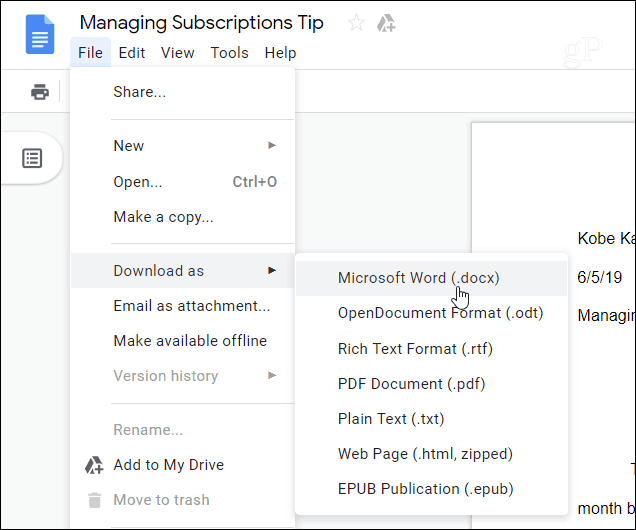
<p>Mở tài liệu Google Docs cần chuyển và truy cập vào&nbsp;<strong>File &gt; Download as &gt; Microsoft Word (.docx)</strong>&nbsp;từ thanh công cụ.</p>

<p><img alt="Chọn Microsoft Word (.docx)" data-i="0" data-src="https://st.quantrimang.com/photos/image/2019/06/12/chuyen-google-docs-sang-word-1.png" height="530" src="https://st.quantrimang.com/photos/image/2019/06/12/chuyen-google-docs-sang-word-1.png" width="636" /></p>

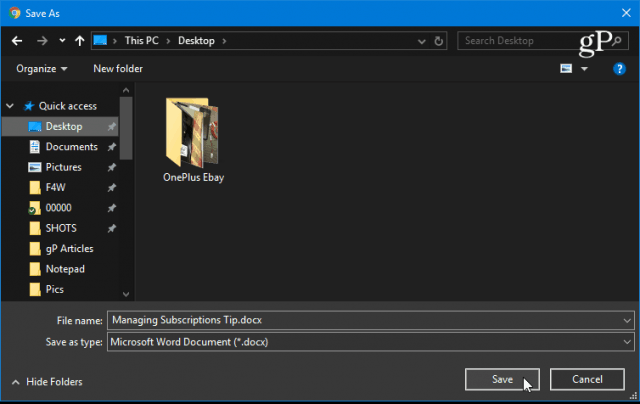
<p>Tiếp theo, duyệt đến vị trí muốn lưu trên máy tính của bạn, đặt tên và click vào nút&nbsp;<strong>Save</strong>.</p>

<p><img alt="Click vào nút Save" data-i="1" data-src="https://st.quantrimang.com/photos/image/2019/06/12/chuyen-google-docs-sang-word-2.png" height="404" src="https://st.quantrimang.com/photos/image/2019/06/12/chuyen-google-docs-sang-word-2.png" width="640" /></p>

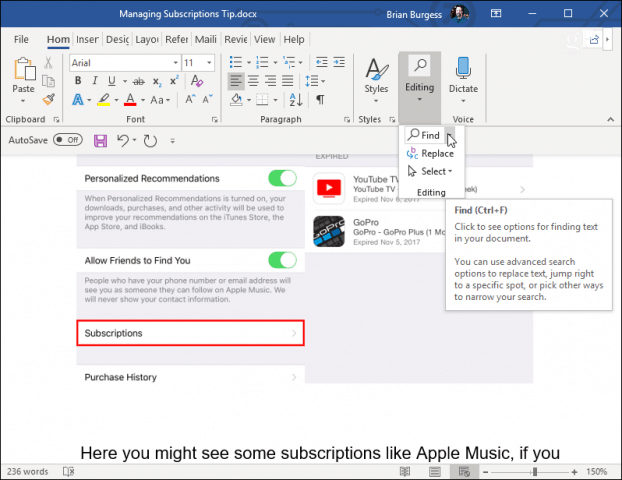
<p>Bây giờ bạn có thể điều hướng đến vị trí bạn đã lưu tài liệu và bạn sẽ thấy nó được lưu ở định dạng file Microsoft Office thích hợp. Bạn có thể mở nó trong Word hoặc các ứng dụng Office khác.</p>

<p><img alt="Mở file vừa tải về " data-i="2" data-src="https://st.quantrimang.com/photos/image/2019/06/12/chuyen-google-docs-sang-word-3.png" height="480" src="https://st.quantrimang.com/photos/image/2019/06/12/chuyen-google-docs-sang-word-3.png" width="622" /></p>
&nbsp;

<h2>Xuất nhiều tài liệu Google Docs sang định dạng Microsoft Office</h2>

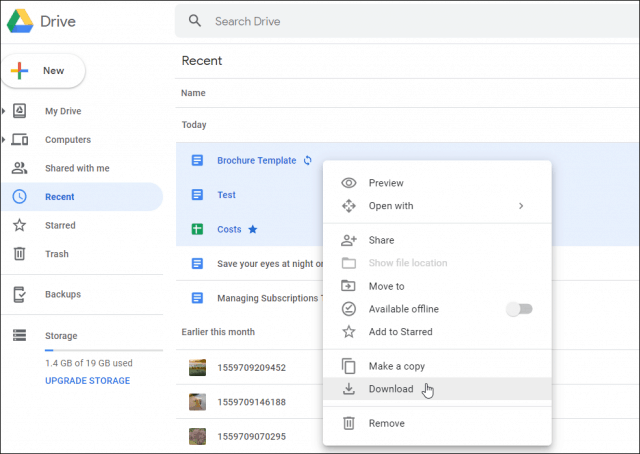
<p>Tất nhiên, bạn có thể xuất nhiều tài liệu cùng một lúc. Để thực hiện điều này, đăng nhập vào Google Drive và mở bộ sưu tập tài liệu của bạn, giữ phím&nbsp;<code>Ctrl</code>&nbsp;(<code>cmd</code>&nbsp;trên macOS) và chọn tài liệu cần xuất. Sau đó click chuột phải vào đó và chọn&nbsp;<strong>Download</strong>&nbsp;từ menu.</p>

<p><img alt="Chọn Download" data-i="3" data-src="https://st.quantrimang.com/photos/image/2019/06/12/chuyen-google-docs-sang-word-4.png" height="454" src="https://st.quantrimang.com/photos/image/2019/06/12/chuyen-google-docs-sang-word-4.png" width="640" /></p>

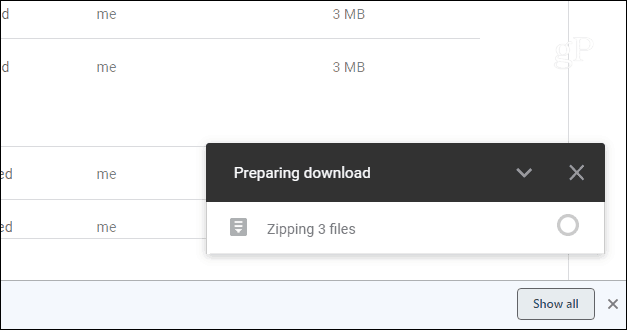
<p>Google Docs sẽ chuyển tất cả tài liệu của bạn vào thư mục Zip để tải xuống. Lưu ý, thời gian tải phụ thuộc vào kích thước file và kết nối Internet.</p>

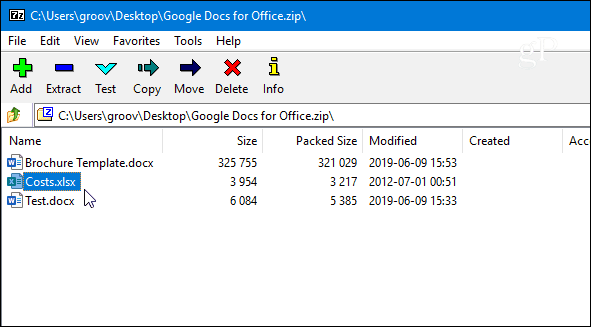
<p><img alt="Chuyển tài liệu vào thư mục Zip" data-i="4" data-src="https://st.quantrimang.com/photos/image/2019/06/12/chuyen-google-docs-sang-word-5.png" height="330" src="https://st.quantrimang.com/photos/image/2019/06/12/chuyen-google-docs-sang-word-5.png" width="627" /></p>

<p>File Zip của tài liệu sẽ tải xuống máy tính của bạn ở định dạng file Microsoft Office thích hợp.</p>

<p><img alt="Tài liệu được lưu ở định dạng thích hợp" data-i="5" data-src="https://st.quantrimang.com/photos/image/2019/06/12/chuyen-google-docs-sang-word-6.png" height="327" src="https://st.quantrimang.com/photos/image/2019/06/12/chuyen-google-docs-sang-word-6.png" width="591" /></p>

<p>Chúc các bạn thực hiện thành công!&nbsp;</p>
		</div>
	</div>
	<div id="footer" class="clearfix">
		<div id="url">
			<strong>URL của bản tin này: </strong><a href="https://www.nguoicodonvn2008.info/vi/news/savefile/kien-thuc-may-tinh/cach-chuyen-google-docs-sang-word-58.html" title="Cách chuyển Google Docs sang Word">https://www.nguoicodonvn2008.info/vi/news/savefile/kien-thuc-may-tinh/cach-chuyen-google-docs-sang-word-58.html</a>

		</div>
		<div class="clear"></div>
		<div class="copyright">
			&copy; .&#x3A; Nguoicodonvn2008.info - Cõi lòng người cô đơn &#x3A;.
		</div>
		<div id="contact">
			<a href="mailto:admin@nguoicodonvn2008.info">admin@nguoicodonvn2008.info</a>
		</div>
	</div>
</div>
        <div id="timeoutsess" class="chromeframe">
            Bạn đã không sử dụng Site, <a onclick="timeoutsesscancel();" href="https://www.nguoicodonvn2008.info/#">Bấm vào đây để duy trì trạng thái đăng nhập</a>. Thời gian chờ: <span id="secField"> 60 </span> giây
        </div>
        <div id="openidResult" class="nv-alert" style="display:none"></div>
        <div id="openidBt" data-result="" data-redirect=""></div>
		</script>
		<div class="car-top">
  <span><img src="https://www.nguoicodonvn2008.info/themes/default/images/car.png" alt=""></span>
</div>
<script src="https://www.nguoicodonvn2008.info/assets/js/jquery/jquery.min.js"></script>
<script>var nv_base_siteurl="/",nv_lang_data="vi",nv_lang_interface="vi",nv_name_variable="nv",nv_fc_variable="op",nv_lang_variable="language",nv_module_name="news",nv_func_name="savefile",nv_is_user=0, nv_my_ofs=-4,nv_my_abbr="EDT",nv_cookie_prefix="nv4c_e856T",nv_check_pass_mstime=1738000,nv_area_admin=0,nv_safemode=0,theme_responsive=0,nv_recaptcha_ver=2,nv_recaptcha_sitekey="",nv_recaptcha_type="image",XSSsanitize=1;</script>
<script src="https://www.nguoicodonvn2008.info/assets/js/language/vi.js"></script>
<script src="https://www.nguoicodonvn2008.info/assets/js/DOMPurify/purify3.js"></script>
<script src="https://www.nguoicodonvn2008.info/assets/js/global.js"></script>
<script src="https://www.nguoicodonvn2008.info/assets/js/site.js"></script>
<script src="https://www.nguoicodonvn2008.info/themes/default/js/news.js"></script>
<script src="https://www.nguoicodonvn2008.info/themes/default/js/main.js"></script>
<script src="https://www.nguoicodonvn2008.info/themes/default/js/custom.js"></script>
<script type="application/ld+json">
        {
            "@context": "https://schema.org",
            "@type": "Organization",
            "url": "https://www.nguoicodonvn2008.info",
            "logo": "https://www.nguoicodonvn2008.info/uploads/angel.gif"
        }
        </script>
<script src="https://www.nguoicodonvn2008.info/themes/default/js/bootstrap.min.js"></script>
<script type="text/javascript">
var $scrolltop = $('.car-top');
$scrolltop.on('click', function () {
    $('html,body').animate({
        scrollTop: 0
    }, 800);
    $(this).addClass("car-run");
    setTimeout(function(){ $scrolltop.removeClass('car-run');}, 1000);
    return false;
});
$(window).on('scroll', function ()
{ 
    if($(window).scrollTop() >= 200)
    {
        $scrolltop.addClass("show");
        $scrolltop.addClass("car-down");
    }
    else
    {
       $scrolltop.removeClass("show");
       setTimeout(function(){ $scrolltop.removeClass('car-down');}, 300);
    }
});
</script>
</body>
</html>