<!DOCTYPE html>
    <html lang="vi" xmlns="http://www.w3.org/1999/xhtml" prefix="og: http://ogp.me/ns#">
    <head>
<title>Cách chuyển đổi file MP4 sang MP3</title>
<meta name="description" content="Cách chuyển đổi file MP4 sang MP3 - Savefile - Tin Tức - https&#x3A;&#x002F;&#x002F;www.nguoicodonvn2008.info&#x002F;vi&#x002F;news&#x002F;savefile&#x002F;kien-thuc-may-tinh&#x002F;cach-chuyen-doi-file-mp4-sang-mp3-3967.html">
<meta name="author" content=".: Nguoicodonvn2008.info - Cõi lòng người cô đơn :.">
<meta name="copyright" content=".: Nguoicodonvn2008.info - Cõi lòng người cô đơn :. [admin@nguoicodonvn2008.info]">
<meta name="robots" content="index, archive, follow, noodp">
<meta name="googlebot" content="index,archive,follow,noodp">
<meta name="msnbot" content="all,index,follow">
<meta name="generator" content="NukeViet v4.5">
<meta http-equiv="Content-Type" content="text/html; charset=utf-8">
<meta property="og:title" content="Cách chuyển đổi file MP4 sang MP3">
<meta property="og:type" content="website">
<meta property="og:description" content="Savefile - Tin Tức - https&#x3A;&#x002F;&#x002F;www.nguoicodonvn2008.info&#x002F;vi&#x002F;news&#x002F;savefile&#x002F;kien-thuc-may-tinh&#x002F;cach-chuyen-doi-file-mp4-sang-mp3-3967.html">
<meta property="og:site_name" content=".&#x3A; Nguoicodonvn2008.info - Cõi lòng người cô đơn &#x3A;.">
<meta property="og:url" content="https://www.nguoicodonvn2008.info/vi/news/savefile/kien-thuc-may-tinh/cach-chuyen-doi-file-mp4-sang-mp3-3967.html">
<link rel="shortcut icon" href="https://www.nguoicodonvn2008.info/favicon.ico">
<link rel="canonical" href="https://www.nguoicodonvn2008.info/vi/news/savefile/kien-thuc-may-tinh/cach-chuyen-doi-file-mp4-sang-mp3-3967.html">
<link rel="alternate" href="https://www.nguoicodonvn2008.info/vi/news/rss/" title="Tin Tức" type="application/rss+xml">
<link rel="alternate" href="https://www.nguoicodonvn2008.info/vi/news/rss/karaoke-dual/" title="Tin Tức - Karaoke Dual" type="application/rss+xml">
<link rel="alternate" href="https://www.nguoicodonvn2008.info/vi/news/rss/nhac-tre/" title="Tin Tức - Nhạc trẻ" type="application/rss+xml">
<link rel="alternate" href="https://www.nguoicodonvn2008.info/vi/news/rss/tru-tinh/" title="Tin Tức - Trữ tình" type="application/rss+xml">
<link rel="alternate" href="https://www.nguoicodonvn2008.info/vi/news/rss/nuoc-ngoai/" title="Tin Tức - Nước ngoài" type="application/rss+xml">
<link rel="alternate" href="https://www.nguoicodonvn2008.info/vi/news/rss/remix/" title="Tin Tức - Remix" type="application/rss+xml">
<link rel="alternate" href="https://www.nguoicodonvn2008.info/vi/news/rss/tam-su-tinh-yeu/" title="Tin Tức - Tâm sự tình yêu" type="application/rss+xml">
<link rel="alternate" href="https://www.nguoicodonvn2008.info/vi/news/rss/tho-suu-tam/" title="Tin Tức - Thơ sưu tầm" type="application/rss+xml">
<link rel="alternate" href="https://www.nguoicodonvn2008.info/vi/news/rss/cuoc-song/" title="Tin Tức - Cuộc sống" type="application/rss+xml">
<link rel="alternate" href="https://www.nguoicodonvn2008.info/vi/news/rss/phan-mem/" title="Tin Tức - Phần mềm" type="application/rss+xml">
<link rel="alternate" href="https://www.nguoicodonvn2008.info/vi/news/rss/kien-thuc-may-tinh/" title="Tin Tức - Kiến thức máy tính" type="application/rss+xml">
<link rel="alternate" href="https://www.nguoicodonvn2008.info/vi/news/rss/hoc-tap/" title="Tin Tức - Học tập" type="application/rss+xml">
<link rel="alternate" href="https://www.nguoicodonvn2008.info/vi/news/rss/tai-lieu/" title="Tin Tức - Tài liệu" type="application/rss+xml">
<link rel="alternate" href="https://www.nguoicodonvn2008.info/vi/news/rss/de-thi/" title="Tin Tức - Đề thi" type="application/rss+xml">
<link rel="preload" as="style" href="https://www.nguoicodonvn2008.info/assets/css/font-awesome.min.css" type="text/css">
<link rel="preload" as="style" href="https://www.nguoicodonvn2008.info/themes/default/css/bootstrap.non-responsive.css" type="text/css">
<link rel="preload" as="style" href="https://www.nguoicodonvn2008.info/themes/default/css/style.css" type="text/css">
<link rel="preload" as="style" href="https://www.nguoicodonvn2008.info/themes/default/css/style.non-responsive.css" type="text/css">
<link rel="preload" as="style" href="https://www.nguoicodonvn2008.info/themes/default/css/news.css" type="text/css">
<link rel="preload" as="style" href="https://www.nguoicodonvn2008.info/themes/default/css/custom.css" type="text/css">
<link rel="preload" as="script" href="https://www.nguoicodonvn2008.info/assets/js/jquery/jquery.min.js" type="text/javascript">
<link rel="preload" as="script" href="https://www.nguoicodonvn2008.info/assets/js/language/vi.js" type="text/javascript">
<link rel="preload" as="script" href="https://www.nguoicodonvn2008.info/assets/js/DOMPurify/purify3.js" type="text/javascript">
<link rel="preload" as="script" href="https://www.nguoicodonvn2008.info/assets/js/global.js" type="text/javascript">
<link rel="preload" as="script" href="https://www.nguoicodonvn2008.info/assets/js/site.js" type="text/javascript">
<link rel="preload" as="script" href="https://www.nguoicodonvn2008.info/themes/default/js/news.js" type="text/javascript">
<link rel="preload" as="script" href="https://www.nguoicodonvn2008.info/themes/default/js/main.js" type="text/javascript">
<link rel="preload" as="script" href="https://www.nguoicodonvn2008.info/themes/default/js/custom.js" type="text/javascript">
<link rel="preload" as="script" href="https://www.nguoicodonvn2008.info/themes/default/js/bootstrap.min.js" type="text/javascript">
<link rel="stylesheet" href="https://www.nguoicodonvn2008.info/assets/css/font-awesome.min.css">
<link rel="stylesheet" href="https://www.nguoicodonvn2008.info/themes/default/css/bootstrap.non-responsive.css">
<link rel="stylesheet" href="https://www.nguoicodonvn2008.info/themes/default/css/style.css">
<link rel="stylesheet" href="https://www.nguoicodonvn2008.info/themes/default/css/style.non-responsive.css">
<link rel="StyleSheet" href="https://www.nguoicodonvn2008.info/themes/default/css/news.css">
<link rel="stylesheet" href="https://www.nguoicodonvn2008.info/themes/default/css/custom.css">
<style type="text/css">
	body{background: #fff;}
</style>
    </head>
    <body>
<div id="print">
	<div id="hd_print">
		<h2 class="pull-left">.&#x3A; Nguoicodonvn2008.info - Cõi lòng người cô đơn &#x3A;.</h2>
		<p class="pull-right"><a title=".&#x3A; Nguoicodonvn2008.info - Cõi lòng người cô đơn &#x3A;." href="https://www.nguoicodonvn2008.info/">https://www.nguoicodonvn2008.info</a></p>
	</div>
	<div class="clear"></div>
	<hr />
	<div id="content">
		<h1>Cách chuyển đổi file MP4 sang MP3</h1>
		<ul class="list-inline">
			<li>Thứ hai - 19/04/2021 00:53</li>
			<li class="hidden-print txtrequired"><em class="fa fa-print">&nbsp;</em><a title="In ra" href="javascript:;" onclick="window.print()">In ra</a></li>
			<li class="hidden-print txtrequired"><em class="fa fa-power-off">&nbsp;</em><a title="Đóng cửa sổ này" href="javascript:;" onclick="window.close()">Đóng cửa sổ này</a></li>
		</ul>
		<div class="clear"></div>
		<div id="hometext">
		</div>
				<div class="imghome">
			<img alt="Cách chuyển đổi file MP4 sang MP3" src="https://st.quantrimang.com/photos/image/2021/04/19/chuyen-doi-mp4-sang-mp3-1.jpg" width="460" class="img-thumbnail" />
		</div>
		<div class="clear"></div>
		<div id="bodytext" class="clearfix">
			<p style="text-align: justify;">Bài viết này hướng dẫn bạn cách sử dụng 3 công cụ chuyển đổi file trực tuyến miễn phí, dễ sử dụng để có thể chuyển đổi&nbsp;file MP4&nbsp;sang MP3 chỉ trong vài phút.</p>

<h2 style="text-align: justify;">Cách sử dụng Zamzar để chuyển đổi file MP4 sang MP3</h2>

<p style="text-align: justify;">Zamzar là một trang web có thể chuyển đổi tất cả các loại file. Chuyển đổi file MP4 sang&nbsp;file MP3&nbsp;trên Zamzar như sau:</p>

<div style="text-align: justify;">&nbsp;</div>

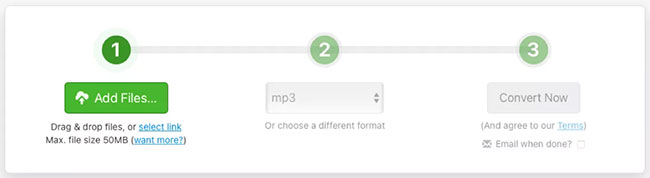
<p style="text-align: justify;">1. Sau khi truy cập&nbsp;trình chuyển đổi MP4 sang MP3 trên Zamzar:<span style="color:rgb(192, 57, 43);"><strong> https://www.zamzar.com/convert/mp4-to-mp3/</strong></span>, bạn có thể kéo file của mình lên màn hình hoặc nhấp vào&nbsp;<strong>Add Files</strong>&nbsp;để duyệt tìm file đó trên máy tính. Lưu ý dung lượng file tối đa là 50MB.</p>

<figure>
<div style="text-align: justify;"><img alt="Nhấp vào Add Files" data-i="0" data-src="https://st.quantrimang.com/photos/image/2021/04/19/chuyen-doi-mp4-sang-mp3-1.jpg" data-was-processed="true" height="178" src="https://st.quantrimang.com/photos/image/2021/04/19/chuyen-doi-mp4-sang-mp3-1.jpg" width="650" /></div>

<figcaption>
<div style="text-align: justify;">Nhấp vào Add Files</div>
</figcaption>
</figure>

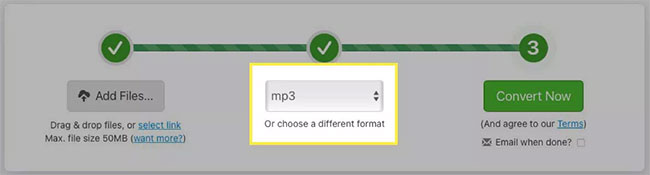
<p style="text-align: justify;">2. Bước 2 trên trình chuyển đổi sẽ hiển thị&nbsp;<strong>MP3</strong>&nbsp;trong hộp drop-down. Nếu không, hãy nhấp và chọn loại file này.</p>

<figure>
<div style="text-align: justify;"><img alt="Chọn MP3 trong hộp drop-down" data-i="1" data-src="https://st.quantrimang.com/photos/image/2021/04/19/chuyen-doi-mp4-sang-mp3-2.jpg" data-was-processed="true" height="175" src="https://st.quantrimang.com/photos/image/2021/04/19/chuyen-doi-mp4-sang-mp3-2.jpg" width="650" /></div>

<figcaption>
<div style="text-align: justify;">Chọn MP3 trong hộp drop-down</div>
</figcaption>
</figure>

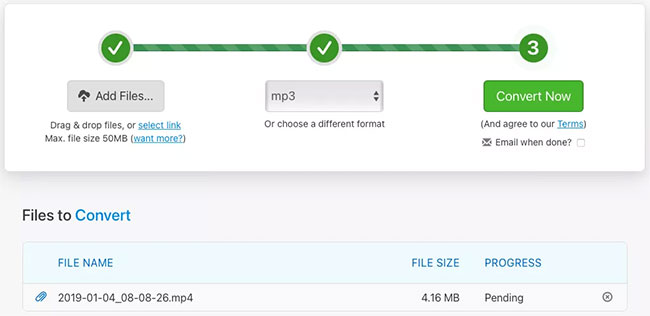
<p style="text-align: justify;">3. Nhấp vào&nbsp;<strong>Convert Now.</strong></p>

<figure>
<div style="text-align: justify;"><img alt="Nhấp vào Convert Now" data-i="2" data-src="https://st.quantrimang.com/photos/image/2021/04/19/chuyen-doi-mp4-sang-mp3-3.jpg" data-was-processed="true" height="316" src="https://st.quantrimang.com/photos/image/2021/04/19/chuyen-doi-mp4-sang-mp3-3.jpg" width="650" /></div>

<figcaption>
<div style="text-align: justify;">Nhấp vào Convert Now</div>
</figcaption>
</figure>

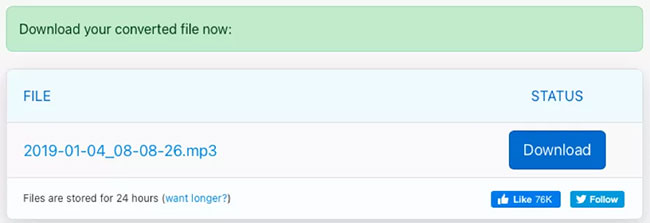
<p style="text-align: justify;">4. Sau khi file được chuyển đổi, hãy nhấp vào&nbsp;<strong>Download</strong>&nbsp;và đi đến vị trí tải xuống mặc định của bạn để lấy file.</p>

<figure>
<div style="text-align: justify;"><img alt="Nhấp vào Download" data-i="3" data-src="https://st.quantrimang.com/photos/image/2021/04/19/chuyen-doi-mp4-sang-mp3-4.jpg" data-was-processed="true" height="223" src="https://st.quantrimang.com/photos/image/2021/04/19/chuyen-doi-mp4-sang-mp3-4.jpg" width="650" /></div>

<figcaption>
<div style="text-align: justify;">Nhấp vào Download</div>
</figcaption>
</figure>

<h2 style="text-align: justify;">Cách sử dụng Convertio để chuyển đổi file MP4 sang MP3</h2>

<p style="text-align: justify;">Convertio&nbsp;là một trang web chuyển đổi file tốt khác. Giống như Zamzar, bạn có thể chuyển đổi một số file khác như tài liệu, hình ảnh và sách điện tử.</p>

<div style="text-align: justify;">&nbsp;</div>

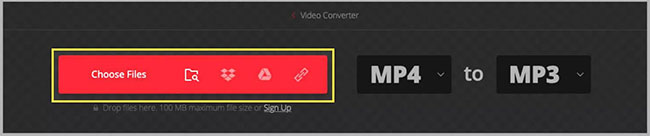
<p style="text-align: justify;">1. Truy cập&nbsp;trình chuyển đổi file MP4 sang MP3 trên Convertio:&nbsp;<span style="color:rgb(192, 57, 43);"><strong>https://convertio.co/vn/mp4-mp3/</strong></span>&nbsp;và kéo file của bạn lên màn hình hoặc nhấp vào&nbsp;<strong>Choose Files</strong>&nbsp;để duyệt file trên máy tính. Lưu ý dung lượng file tối đa là 100MB.</p>

<figure>
<div style="text-align: justify;"><img alt="Nhấp vào Choose Files" data-i="4" data-src="https://st.quantrimang.com/photos/image/2021/04/19/chuyen-doi-mp4-sang-mp3-5.jpg" data-was-processed="true" height="136" src="https://st.quantrimang.com/photos/image/2021/04/19/chuyen-doi-mp4-sang-mp3-5.jpg" width="650" /></div>

<figcaption>
<div style="text-align: justify;">Nhấp vào Choose Files</div>
</figcaption>
</figure>

<p style="text-align: justify;">2. Xác nhận loại file bạn đang chuyển đổi sang là&nbsp;<strong>MP3</strong>&nbsp;ở trên cùng. Nếu cần, hãy nhấp vào hộp drop-down để chọn nó.</p>

<figure>
<div style="text-align: justify;"><img alt="Xác nhận loại file đang chuyển đổi sang là MP3" data-i="5" data-src="https://st.quantrimang.com/photos/image/2021/04/19/chuyen-doi-mp4-sang-mp3-6.jpg" data-was-processed="true" height="125" src="https://st.quantrimang.com/photos/image/2021/04/19/chuyen-doi-mp4-sang-mp3-6.jpg" width="650" /></div>

<figcaption>
<div style="text-align: justify;">Xác nhận loại file đang chuyển đổi sang là MP3</div>
</figcaption>
</figure>

<p style="text-align: justify;">3. Nhấp vào&nbsp;<strong>Convert.</strong></p>

<figure>
<div style="text-align: justify;"><img alt="Nhấp vào Convert" data-i="6" data-src="https://st.quantrimang.com/photos/image/2021/04/19/chuyen-doi-mp4-sang-mp3-7.jpg" data-was-processed="true" height="125" src="https://st.quantrimang.com/photos/image/2021/04/19/chuyen-doi-mp4-sang-mp3-7.jpg" width="650" /></div>

<figcaption>
<div style="text-align: justify;">Nhấp vào Convert</div>
</figcaption>
</figure>

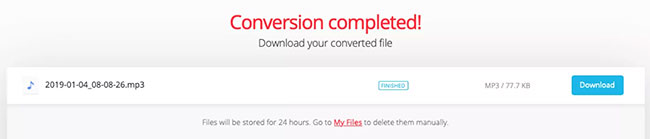
<p style="text-align: justify;">4. Khi quá trình hoàn tất, bạn sẽ thấy thông báo&nbsp;<strong>Conversion Completed</strong>. Nhấp vào&nbsp;<strong>Download</strong>&nbsp;và bạn sẽ thấy file trong thư mục tải xuống mặc định của mình.</p>

<figure>
<div style="text-align: justify;"><img alt="Thông báo Conversion Completed" data-i="7" data-src="https://st.quantrimang.com/photos/image/2021/04/19/chuyen-doi-mp4-sang-mp3-8.jpg" data-was-processed="true" height="139" src="https://st.quantrimang.com/photos/image/2021/04/19/chuyen-doi-mp4-sang-mp3-8.jpg" width="650" /></div>

<figcaption>
<div style="text-align: justify;">Thông báo Conversion Completed</div>
</figcaption>
</figure>

<h2 style="text-align: justify;">Cách sử dụng CloudConvert để chuyển đổi file MP4 sang MP3</h2>

<p style="text-align: justify;">Nếu bạn muốn thực hiện một vài điều chỉnh đối với file của mình trước khi chuyển đổi, hãy truy cập CloudConvert. Và hãy nhớ rằng trang web này cũng cung cấp các chuyển đổi file khác như hai trang trước đó trong danh sách này. Bạn có thể chuyển đổi phông chữ, bảng tính, bài thuyết trình, v.v...</p>

<div style="text-align: justify;">&nbsp;</div>

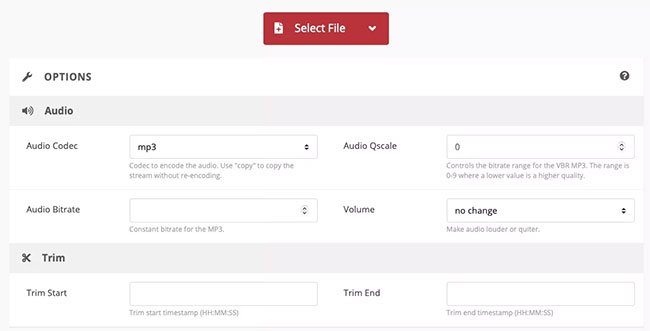
<p style="text-align: justify;">1. Bạn có thể truy cập thẳng vào&nbsp;trình chuyển đổi MP4 sang MP3 trên CloudConvert&nbsp;và nhấp vào&nbsp;<strong>Select File</strong>&nbsp;để bắt đầu hoặc kéo file lên màn hình. Trước khi upload file lên, bạn có thể chọn&nbsp;<strong>Options</strong>&nbsp;ở dưới cùng để điều chỉnh âm thanh và cắt. Bạn cũng có thể thực hiện việc này sau khi upload file của mình lên (bài viết sẽ chỉ cho bạn cách thực hiện ở bước 4 bên dưới).</p>

<figure>
<div style="text-align: justify;"><img alt="Nhấp vào Select File" data-i="8" data-src="https://st.quantrimang.com/photos/image/2021/04/19/chuyen-doi-mp4-sang-mp3-9.jpg" data-was-processed="true" height="331" src="https://st.quantrimang.com/photos/image/2021/04/19/chuyen-doi-mp4-sang-mp3-9.jpg" width="650" /></div>

<figcaption>
<div style="text-align: justify;">Nhấp vào Select File</div>
</figcaption>
</figure>

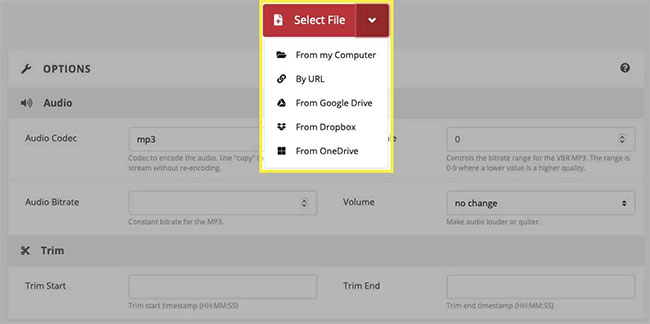
<p style="text-align: justify;">2. Chọn vị trí file từ hộp drop-down và làm theo lời nhắc tiếp theo để duyệt và chọn file, tùy thuộc vào vị trí bạn chọn.</p>

<figure>
<div style="text-align: justify;"><img alt="Chọn vị trí file từ hộp drop-down" data-i="9" data-src="https://st.quantrimang.com/photos/image/2021/04/19/chuyen-doi-mp4-sang-mp3-10.jpg" data-was-processed="true" height="324" src="https://st.quantrimang.com/photos/image/2021/04/19/chuyen-doi-mp4-sang-mp3-10.jpg" width="650" /></div>

<figcaption>
<div style="text-align: justify;">Chọn vị trí file từ hộp drop-down</div>
</figcaption>
</figure>

<p style="text-align: justify;">3. Xác nhận rằng&nbsp;<strong>MP3</strong>&nbsp;hiển thị trong menu drop-down&nbsp;<strong>Convert To</strong>&nbsp;hoặc chọn nó nếu cần.</p>

<figure>
<div style="text-align: justify;"><img alt="Chọn MP3 trong menu drop-down Convert To" data-i="10" data-src="https://st.quantrimang.com/photos/image/2021/04/19/chuyen-doi-mp4-sang-mp3-11.jpg" data-was-processed="true" height="88" src="https://st.quantrimang.com/photos/image/2021/04/19/chuyen-doi-mp4-sang-mp3-11.jpg" width="650" /></div>

<figcaption>
<div style="text-align: justify;">Chọn MP3 trong menu drop-down Convert To</div>
</figcaption>
</figure>

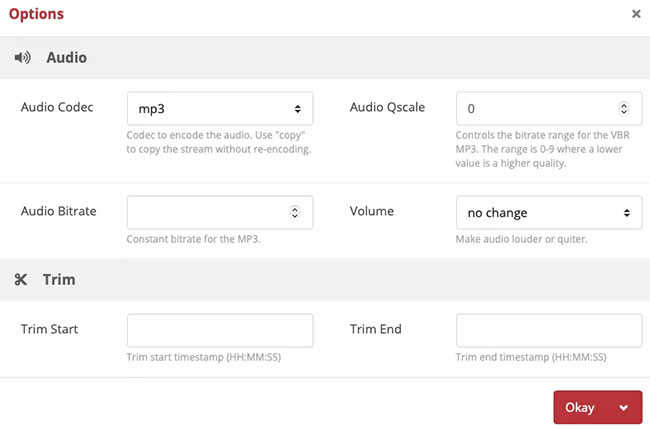
<p style="text-align: justify;">4. Nếu bạn không thực hiện điều chỉnh trước khi upload file lên, bạn có thể làm như vậy trong bước tiếp theo. Nhấp vào biểu tượng cờ lê. Bạn có thể thực hiện những việc như chọn tốc độ bit âm thanh, điều chỉnh âm lượng và cắt file nếu muốn. Nếu bạn thực hiện thay đổi ở đây, hãy nhấp vào&nbsp;<strong>Okay</strong>&nbsp;khi bạn hoàn tất.</p>

<figure>
<div style="text-align: justify;"><img alt="Nhấp vào Okay khi hoàn tất" data-i="11" data-src="https://st.quantrimang.com/photos/image/2021/04/19/chuyen-doi-mp4-sang-mp3-12.jpg" data-was-processed="true" height="430" src="https://st.quantrimang.com/photos/image/2021/04/19/chuyen-doi-mp4-sang-mp3-12.jpg" width="650" /></div>

<figcaption>
<div style="text-align: justify;">Nhấp vào Okay khi hoàn tất</div>
</figcaption>
</figure>

<p style="text-align: justify;">5. Khi bạn đã sẵn sàng, hãy nhấp vào&nbsp;<strong>Convert.</strong></p>

<figure>
<div style="text-align: justify;"><img alt="Nhấp vào Convert" data-i="12" data-src="https://st.quantrimang.com/photos/image/2021/04/19/chuyen-doi-mp4-sang-mp3-13.jpg" data-was-processed="true" height="88" src="https://st.quantrimang.com/photos/image/2021/04/19/chuyen-doi-mp4-sang-mp3-13.jpg" width="650" /></div>

<figcaption>
<div style="text-align: justify;">Nhấp vào Convert</div>
</figcaption>
</figure>

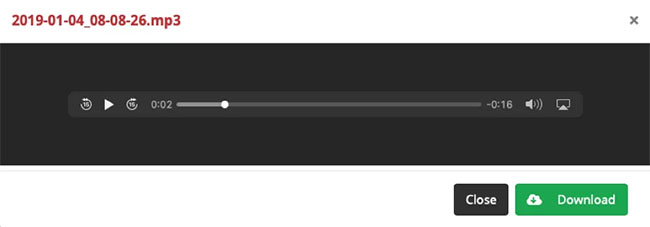
<p style="text-align: justify;">6. Sau khi trang web chuyển đổi file, bạn sẽ thấy một cửa sổ xuất hiện, nơi bạn có thể nhấp vào&nbsp;<strong>Play</strong>&nbsp;hoặc&nbsp;<strong>Download.</strong></p>

<figure>
<div style="text-align: justify;"><img alt="Nhấp vào Play hoặc Download" data-i="13" data-src="https://st.quantrimang.com/photos/image/2021/04/19/chuyen-doi-mp4-sang-mp3-14.jpg" data-was-processed="true" height="227" src="https://st.quantrimang.com/photos/image/2021/04/19/chuyen-doi-mp4-sang-mp3-14.jpg" width="650" /></div>

<figcaption>
<div style="text-align: justify;">Nhấp vào Play hoặc Download</div>
</figcaption>
</figure>

<p style="text-align: justify;">Chúc bạn thực hiện thành công!</p>
		</div>
				<div id="author">
						<p>
				<strong>Nguồn tin:</strong>
				Quantrimang.com
			</p>
		</div>
	</div>
	<div id="footer" class="clearfix">
		<div id="url">
			<strong>URL của bản tin này: </strong><a href="https://www.nguoicodonvn2008.info/vi/news/savefile/kien-thuc-may-tinh/cach-chuyen-doi-file-mp4-sang-mp3-3967.html" title="Cách chuyển đổi file MP4 sang MP3">https://www.nguoicodonvn2008.info/vi/news/savefile/kien-thuc-may-tinh/cach-chuyen-doi-file-mp4-sang-mp3-3967.html</a>

		</div>
		<div class="clear"></div>
		<div class="copyright">
			&copy; .&#x3A; Nguoicodonvn2008.info - Cõi lòng người cô đơn &#x3A;.
		</div>
		<div id="contact">
			<a href="mailto:admin@nguoicodonvn2008.info">admin@nguoicodonvn2008.info</a>
		</div>
	</div>
</div>
        <div id="timeoutsess" class="chromeframe">
            Bạn đã không sử dụng Site, <a onclick="timeoutsesscancel();" href="https://www.nguoicodonvn2008.info/#">Bấm vào đây để duy trì trạng thái đăng nhập</a>. Thời gian chờ: <span id="secField"> 60 </span> giây
        </div>
        <div id="openidResult" class="nv-alert" style="display:none"></div>
        <div id="openidBt" data-result="" data-redirect=""></div>
		</script>
		<div class="car-top">
  <span><img src="https://www.nguoicodonvn2008.info/themes/default/images/car.png" alt=""></span>
</div>
<script src="https://www.nguoicodonvn2008.info/assets/js/jquery/jquery.min.js"></script>
<script>var nv_base_siteurl="/",nv_lang_data="vi",nv_lang_interface="vi",nv_name_variable="nv",nv_fc_variable="op",nv_lang_variable="language",nv_module_name="news",nv_func_name="savefile",nv_is_user=0, nv_my_ofs=-4,nv_my_abbr="EDT",nv_cookie_prefix="nv4c_e856T",nv_check_pass_mstime=1738000,nv_area_admin=0,nv_safemode=0,theme_responsive=0,nv_recaptcha_ver=2,nv_recaptcha_sitekey="",nv_recaptcha_type="image",XSSsanitize=1;</script>
<script src="https://www.nguoicodonvn2008.info/assets/js/language/vi.js"></script>
<script src="https://www.nguoicodonvn2008.info/assets/js/DOMPurify/purify3.js"></script>
<script src="https://www.nguoicodonvn2008.info/assets/js/global.js"></script>
<script src="https://www.nguoicodonvn2008.info/assets/js/site.js"></script>
<script src="https://www.nguoicodonvn2008.info/themes/default/js/news.js"></script>
<script src="https://www.nguoicodonvn2008.info/themes/default/js/main.js"></script>
<script src="https://www.nguoicodonvn2008.info/themes/default/js/custom.js"></script>
<script type="application/ld+json">
        {
            "@context": "https://schema.org",
            "@type": "Organization",
            "url": "https://www.nguoicodonvn2008.info",
            "logo": "https://www.nguoicodonvn2008.info/uploads/angel.gif"
        }
        </script>
<script src="https://www.nguoicodonvn2008.info/themes/default/js/bootstrap.min.js"></script>
<script type="text/javascript">
var $scrolltop = $('.car-top');
$scrolltop.on('click', function () {
    $('html,body').animate({
        scrollTop: 0
    }, 800);
    $(this).addClass("car-run");
    setTimeout(function(){ $scrolltop.removeClass('car-run');}, 1000);
    return false;
});
$(window).on('scroll', function ()
{ 
    if($(window).scrollTop() >= 200)
    {
        $scrolltop.addClass("show");
        $scrolltop.addClass("car-down");
    }
    else
    {
       $scrolltop.removeClass("show");
       setTimeout(function(){ $scrolltop.removeClass('car-down');}, 300);
    }
});
</script>
</body>
</html>