<!DOCTYPE html>
    <html lang="vi" xmlns="http://www.w3.org/1999/xhtml" prefix="og: http://ogp.me/ns#">
    <head>
<title>Cách chuyển ảnh thành tranh vẽ bằng Python</title>
<meta name="description" content="Cách chuyển ảnh thành tranh vẽ bằng Python - Savefile - Tin Tức -...">
<meta name="author" content=".: Nguoicodonvn2008.info - Cõi lòng người cô đơn :.">
<meta name="copyright" content=".: Nguoicodonvn2008.info - Cõi lòng người cô đơn :. [admin@nguoicodonvn2008.info]">
<meta name="robots" content="index, archive, follow, noodp">
<meta name="googlebot" content="index,archive,follow,noodp">
<meta name="msnbot" content="all,index,follow">
<meta name="generator" content="NukeViet v4.5">
<meta http-equiv="Content-Type" content="text/html; charset=utf-8">
<meta property="og:title" content="Cách chuyển ảnh thành tranh vẽ bằng Python">
<meta property="og:type" content="website">
<meta property="og:description" content="Savefile - Tin Tức - https&#x3A;&#x002F;&#x002F;www.nguoicodonvn2008.info&#x002F;vi&#x002F;news&#x002F;savefile&#x002F;kien-thuc-may-tinh&#x002F;cach-chuyen-anh-thanh-tranh-ve-bang-python-6649.html">
<meta property="og:site_name" content=".&#x3A; Nguoicodonvn2008.info - Cõi lòng người cô đơn &#x3A;.">
<meta property="og:url" content="https://www.nguoicodonvn2008.info/vi/news/savefile/kien-thuc-may-tinh/cach-chuyen-anh-thanh-tranh-ve-bang-python-6649.html">
<link rel="shortcut icon" href="https://www.nguoicodonvn2008.info/favicon.ico">
<link rel="canonical" href="https://www.nguoicodonvn2008.info/vi/news/savefile/kien-thuc-may-tinh/cach-chuyen-anh-thanh-tranh-ve-bang-python-6649.html">
<link rel="alternate" href="https://www.nguoicodonvn2008.info/vi/news/rss/" title="Tin Tức" type="application/rss+xml">
<link rel="alternate" href="https://www.nguoicodonvn2008.info/vi/news/rss/karaoke-dual/" title="Tin Tức - Karaoke Dual" type="application/rss+xml">
<link rel="alternate" href="https://www.nguoicodonvn2008.info/vi/news/rss/nhac-tre/" title="Tin Tức - Nhạc trẻ" type="application/rss+xml">
<link rel="alternate" href="https://www.nguoicodonvn2008.info/vi/news/rss/tru-tinh/" title="Tin Tức - Trữ tình" type="application/rss+xml">
<link rel="alternate" href="https://www.nguoicodonvn2008.info/vi/news/rss/nuoc-ngoai/" title="Tin Tức - Nước ngoài" type="application/rss+xml">
<link rel="alternate" href="https://www.nguoicodonvn2008.info/vi/news/rss/remix/" title="Tin Tức - Remix" type="application/rss+xml">
<link rel="alternate" href="https://www.nguoicodonvn2008.info/vi/news/rss/tam-su-tinh-yeu/" title="Tin Tức - Tâm sự tình yêu" type="application/rss+xml">
<link rel="alternate" href="https://www.nguoicodonvn2008.info/vi/news/rss/tho-suu-tam/" title="Tin Tức - Thơ sưu tầm" type="application/rss+xml">
<link rel="alternate" href="https://www.nguoicodonvn2008.info/vi/news/rss/cuoc-song/" title="Tin Tức - Cuộc sống" type="application/rss+xml">
<link rel="alternate" href="https://www.nguoicodonvn2008.info/vi/news/rss/phan-mem/" title="Tin Tức - Phần mềm" type="application/rss+xml">
<link rel="alternate" href="https://www.nguoicodonvn2008.info/vi/news/rss/kien-thuc-may-tinh/" title="Tin Tức - Kiến thức máy tính" type="application/rss+xml">
<link rel="alternate" href="https://www.nguoicodonvn2008.info/vi/news/rss/hoc-tap/" title="Tin Tức - Học tập" type="application/rss+xml">
<link rel="alternate" href="https://www.nguoicodonvn2008.info/vi/news/rss/tai-lieu/" title="Tin Tức - Tài liệu" type="application/rss+xml">
<link rel="alternate" href="https://www.nguoicodonvn2008.info/vi/news/rss/de-thi/" title="Tin Tức - Đề thi" type="application/rss+xml">
<link rel="preload" as="style" href="https://www.nguoicodonvn2008.info/assets/css/font-awesome.min.css" type="text/css">
<link rel="preload" as="style" href="https://www.nguoicodonvn2008.info/themes/default/css/bootstrap.non-responsive.css" type="text/css">
<link rel="preload" as="style" href="https://www.nguoicodonvn2008.info/themes/default/css/style.css" type="text/css">
<link rel="preload" as="style" href="https://www.nguoicodonvn2008.info/themes/default/css/style.non-responsive.css" type="text/css">
<link rel="preload" as="style" href="https://www.nguoicodonvn2008.info/themes/default/css/news.css" type="text/css">
<link rel="preload" as="style" href="https://www.nguoicodonvn2008.info/themes/default/css/custom.css" type="text/css">
<link rel="preload" as="script" href="https://www.nguoicodonvn2008.info/assets/js/jquery/jquery.min.js" type="text/javascript">
<link rel="preload" as="script" href="https://www.nguoicodonvn2008.info/assets/js/language/vi.js" type="text/javascript">
<link rel="preload" as="script" href="https://www.nguoicodonvn2008.info/assets/js/DOMPurify/purify3.js" type="text/javascript">
<link rel="preload" as="script" href="https://www.nguoicodonvn2008.info/assets/js/global.js" type="text/javascript">
<link rel="preload" as="script" href="https://www.nguoicodonvn2008.info/assets/js/site.js" type="text/javascript">
<link rel="preload" as="script" href="https://www.nguoicodonvn2008.info/themes/default/js/news.js" type="text/javascript">
<link rel="preload" as="script" href="https://www.nguoicodonvn2008.info/themes/default/js/main.js" type="text/javascript">
<link rel="preload" as="script" href="https://www.nguoicodonvn2008.info/themes/default/js/custom.js" type="text/javascript">
<link rel="preload" as="script" href="https://www.nguoicodonvn2008.info/themes/default/js/bootstrap.min.js" type="text/javascript">
<link rel="stylesheet" href="https://www.nguoicodonvn2008.info/assets/css/font-awesome.min.css">
<link rel="stylesheet" href="https://www.nguoicodonvn2008.info/themes/default/css/bootstrap.non-responsive.css">
<link rel="stylesheet" href="https://www.nguoicodonvn2008.info/themes/default/css/style.css">
<link rel="stylesheet" href="https://www.nguoicodonvn2008.info/themes/default/css/style.non-responsive.css">
<link rel="StyleSheet" href="https://www.nguoicodonvn2008.info/themes/default/css/news.css">
<link rel="stylesheet" href="https://www.nguoicodonvn2008.info/themes/default/css/custom.css">
<style type="text/css">
	body{background: #fff;}
</style>
    </head>
    <body>
<div id="print">
	<div id="hd_print">
		<h2 class="pull-left">.&#x3A; Nguoicodonvn2008.info - Cõi lòng người cô đơn &#x3A;.</h2>
		<p class="pull-right"><a title=".&#x3A; Nguoicodonvn2008.info - Cõi lòng người cô đơn &#x3A;." href="https://www.nguoicodonvn2008.info/">https://www.nguoicodonvn2008.info</a></p>
	</div>
	<div class="clear"></div>
	<hr />
	<div id="content">
		<h1>Cách chuyển ảnh thành tranh vẽ bằng Python</h1>
		<ul class="list-inline">
			<li>Thứ ba - 31/01/2023 23:54</li>
			<li class="hidden-print txtrequired"><em class="fa fa-print">&nbsp;</em><a title="In ra" href="javascript:;" onclick="window.print()">In ra</a></li>
			<li class="hidden-print txtrequired"><em class="fa fa-power-off">&nbsp;</em><a title="Đóng cửa sổ này" href="javascript:;" onclick="window.close()">Đóng cửa sổ này</a></li>
		</ul>
		<div class="clear"></div>
		<div id="hometext">
		</div>
				<div class="imghome">
			<img alt="Cách chuyển ảnh thành tranh vẽ bằng Python" src="https://st.quantrimang.com/photos/image/2023/01/31/python-anh-tranh-ve.jpg" width="460" class="img-thumbnail" />
		</div>
		<div class="clear"></div>
		<div id="bodytext" class="clearfix">
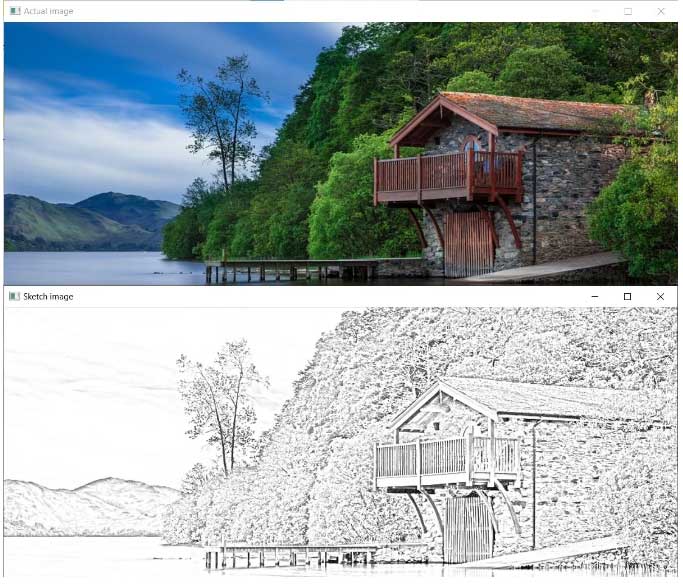
			<p style="text-align: justify;"><strong>Python&nbsp;</strong>có thể giúp bạn chuyển ảnh thành tranh vẽ dễ dàng. Dưới đây là chi tiết từng bước cách lập trình một app qua mô đun OpenCV bằng Python để chuyển ảnh thành tranh vẽ.</p>

<h2 style="text-align: justify;">Mô đun OpenCV</h2>

<p style="text-align: justify;">OpenCV là một thư viện mã nguồn mở về các phương pháp thị giác máy tính do Intel phát triển. Nó được dùng để xử lý ảnh và các vấn đề liên quan tới thị giác máy tính. Nó giúp người dùng tối ưu hóa ứng dụng, tạo tương tác ảnh/video tại thời gian thật đơn giản và chọn thuật ngữ lý tưởng cho nhu cầu của họ.</p>

<p style="text-align: justify;">Một vài trong số ứng dụng phổ biến của OpenCV bao gồm nhận diện khuôn mặt, theo dõi khuôn mặt tự động trong quay phim, lọc mạng xã hội, nhận diện biển số xe, giám sát CCTV. Để dùng mô đun OpenCV trong Python, mở terminal và nhập lệnh sau:</p>

<pre id="pre0" style="text-align: justify;">
pip install opencv-python</pre>

<h2 style="text-align: justify;">Cách chuyển đổi ảnh thành tranh phác thảo bằng Python</h2>

<p style="text-align: justify;">Bắt đầu bằng cách đặt nó trong cùng một thư mục dưới dạng chương trình Python mới để dễ dàng tham chiếu. Sau đó, bắt đầu xây dựng chương trình theo các bước sau:</p>

<p style="text-align: justify;">Đầu tiên là nhập mô đun OpenCV vào môi trường của bạn. Khi OpenCV có sẵn, bạn có thể dùng chức năng của nó để thực hiện các nhiệm vụ khác nhau. Chuyển đường dẫn của file ảnh vào hàm&nbsp;<code>imread()</code>&nbsp;để tải nó. Lưu ảnh trong biến image1 để tham chiếu trong tương lai.</p>

<p style="text-align: justify;">Lưu tiêu đề của cửa sổ trong biến&nbsp;<code>window_name</code>. Điều này hữu ích khi bạn chọn hiện ảnh bằng hàm&nbsp;<code>imshow()</code>. Hàm này cần hai tham số: tên và ảnh bạn muốn hiển thị.</p>

<pre id="pre1" style="text-align: justify;">
import cv2

image1 = cv2.imread(&#039;image.jpg&#039;)
window_name = &#039;Actual image&#039;
cv2.imshow(window_name, image1)</pre>

<p style="text-align: justify;">Khi đã có ảnh mong muốn, bạn cần thực hiện 5 thao tác để biến nó thành một bản phác thảo. Đầu tiên, chuyển đổi ảnh màu sang thang xám. Bạn có thể làm việc này bằng&nbsp;<strong>cvtColor()</strong>. Hàm này lấy hình ảnh có màu mà bạn muốn thay đổi và một code chuyển đổi như&nbsp;<strong>COLOR_BGR2GRAY</strong>.</p>

<pre id="pre2" style="text-align: justify;">
grey_img = cv2.cvtColor(image1, cv2.COLOR_BGR2GRAY)</pre>

<p style="text-align: justify;">Khi có một ảnh ở thang độ xám, hãy đảo ngược màu sắc của nó. Lúc này, bạn cần hieru cách máy tính định hình một ảnh.</p>

<p style="text-align: justify;">Một ảnh chứa nhiều điểm ảnh nhỏ với mật độ khác nhau. Với ảnh màu, mỗi pixel chứa màu đỏ, xanh lá và xanh dương với mật độ từ 0 tới 255.</p>

<p style="text-align: justify;">Ảnh ở thang độ xám chỉ có sắc màu xám. Do đó, mật độ điểm ảnh thay đổi giữa 0 và 1. Để đảo ngược mật độ pixel của ảnh này, chuyển ảnh thang xám tới hàm&nbsp;<strong>bitwise_not()</strong>.</p>

<p style="text-align: justify;">Đúng như tên gợi ý, hàm này đảo ngược giá trị của từng pixel tới thành phần tương đương bổ sung của nó. Tất cả pixel lớn hơn 0 đều được thiết lập bằng 0. Toàn bộ pixel bằng 0 được đặt thành 255.</p>

<pre id="pre3" style="text-align: justify;">
invert = cv2.bitwise_not(grey_img)</pre>

<p style="text-align: justify;">Sau khi đảo ngược mật độ pixel, bạn có thể làm mượt ảnh với sự trợ giúp của Gaussian Blur. Nó dùng bộ lọc Gaussian để chỉ cho phép các tần số thấp đi qua.</p>

<p style="text-align: justify;">Hàm&nbsp;<strong>GaussianBlur()</strong>&nbsp;chấp nhận 4 tham số. Chúng là một đối tượng ma trậm hoạt động như ảnh nguồn, kích thước của kernel (ksize) và sigmaX.</p>

<p style="text-align: justify;">Giả sử bạn có ảnh vật lý trong tay. Nếu muốn làm mờ nó, bạn có thể áp dụng miến sáp hoặc giấy nhám phủ lên trên. Bạn có thể hình dung kernel như một mẩu giấy trong suốt. Về mặt kỹ thuật số, quá trình hơi khác một chút Để làm mờ, sắc nét và áp dụng các hiệu ứng khác trên một ảnh kỹ thuật số, bạn nhân một ma trận với mật độ pixel của ảnh.</p>

<p style="text-align: justify;">Kzize luôn là một số lẻ dương. Khi bạn tăng kích thước kernel, độ mờ cũng tăng. Giá trị sigmaX xác định sự khác biệt giữa độ trung bình và giá trị khác của pixel trong một ảnh.</p>

<p style="text-align: justify;">Chuyển ảnh được đảo ngược, kích thước kernel là (21,21) và độ lệch chuẩn 0 cho hàm Gaussian Blur:</p>

<pre id="pre4" style="text-align: justify;">
blur = cv2.GaussianBlur(invert, (21, 21), 0)</pre>

<p style="text-align: justify;">Chuyển ảnh bị mờ sang hàm&nbsp;<strong>bitwise_not()</strong>&nbsp;lần nữa để chuyển đổi nó:</p>

<pre id="pre5" style="text-align: justify;">
invertedblur = cv2.bitwise_not(blur)</pre>

<p style="text-align: justify;">Cuối cùng, dùng hàm&nbsp;<strong>divide()</strong>&nbsp;để thực hiện phân chia từng thành phần của mảng ảnh ở thang độ xám và mảng ảnh mờ được đảo ngược với thang độ 256.</p>

<pre id="pre6" style="text-align: justify;">
sketch = cv2.divide(grey_img, invertedblur, scale=256.0)</pre>

<p style="text-align: justify;">Về cơ bản, hàm này thực hiện các lệnh sau:</p>

<pre id="pre7" style="text-align: justify;">
def divide(grey_img, b, invertedblur=256.0):
    return (grey_img * scale) / invertedblur</pre>

<p style="text-align: justify;">Lưu kết quả trong file phác thảo được đặt tên có thể tùy biến. Để lưu ảnh cuối cùng, bỏ qua tên cho tệp đầu ra và ảnh phác thảo sang hàm&nbsp;<strong>imwrite()</strong>. Để xác thực nó, bạn có thể dùng hàm imread() để tải ảnh phác thảo đã lưu, đặt tên cửa sổ và hiện nó bằng hàm&nbsp;<strong>imshow()</strong>.</p>

<p style="text-align: justify;">Dùng hàm waitkey() bằng cách chuyển 0 để hiện cửa sổ ảnh gốc và cửa sổ phác thảo được tạo cho tới khi bạn nhấn vào phím bất kỳ.</p>

<pre id="pre8" style="text-align: justify;">
cv2.imwrite(&quot;sketch.jpeg&quot;, sketch)
image = cv2.imread(&quot;sketch.jpeg&quot;)
window_name =&#039;Sketch image&#039;
cv2.imshow(window_name, image)
cv2.waitKey(0)</pre>

<p style="text-align: justify;">Kết hợp tất cả code với nhau và bạn có một chương trình chuyển đổi ảnh sẵn sàng hoạt động.</p>

<p style="text-align: justify;"><img alt="Chuyển ảnh thành tranh vẽ" data-i="0" data-src="https://st.quantrimang.com/photos/image/2023/01/31/python-anh-tranh-ve.jpg" data-was-processed="true" height="556" src="https://st.quantrimang.com/photos/image/2023/01/31/python-anh-tranh-ve.jpg" width="650" /></p>

<div style="text-align: justify;">&nbsp;</div>
		</div>
				<div id="author">
						<p>
				<strong>Nguồn tin:</strong>
				Quantrimang.com
			</p>
		</div>
	</div>
	<div id="footer" class="clearfix">
		<div id="url">
			<strong>URL của bản tin này: </strong><a href="https://www.nguoicodonvn2008.info/vi/news/savefile/kien-thuc-may-tinh/cach-chuyen-anh-thanh-tranh-ve-bang-python-6649.html" title="Cách chuyển ảnh thành tranh vẽ bằng Python">https://www.nguoicodonvn2008.info/vi/news/savefile/kien-thuc-may-tinh/cach-chuyen-anh-thanh-tranh-ve-bang-python-6649.html</a>

		</div>
		<div class="clear"></div>
		<div class="copyright">
			&copy; .&#x3A; Nguoicodonvn2008.info - Cõi lòng người cô đơn &#x3A;.
		</div>
		<div id="contact">
			<a href="mailto:admin@nguoicodonvn2008.info">admin@nguoicodonvn2008.info</a>
		</div>
	</div>
</div>
        <div id="timeoutsess" class="chromeframe">
            Bạn đã không sử dụng Site, <a onclick="timeoutsesscancel();" href="https://www.nguoicodonvn2008.info/#">Bấm vào đây để duy trì trạng thái đăng nhập</a>. Thời gian chờ: <span id="secField"> 60 </span> giây
        </div>
        <div id="openidResult" class="nv-alert" style="display:none"></div>
        <div id="openidBt" data-result="" data-redirect=""></div>
		</script>
		<div class="car-top">
  <span><img src="https://www.nguoicodonvn2008.info/themes/default/images/car.png" alt=""></span>
</div>
<div id="run_cronjobs" style="visibility:hidden;display:none;"><img alt="cron" src="/index.php?second=cronjobs&amp;p=h6AhYczc" width="1" height="1" /></div>
<script src="https://www.nguoicodonvn2008.info/assets/js/jquery/jquery.min.js"></script>
<script>var nv_base_siteurl="/",nv_lang_data="vi",nv_lang_interface="vi",nv_name_variable="nv",nv_fc_variable="op",nv_lang_variable="language",nv_module_name="news",nv_func_name="savefile",nv_is_user=0, nv_my_ofs=-4,nv_my_abbr="EDT",nv_cookie_prefix="nv4c_e856T",nv_check_pass_mstime=1738000,nv_area_admin=0,nv_safemode=0,theme_responsive=0,nv_recaptcha_ver=2,nv_recaptcha_sitekey="",nv_recaptcha_type="image",XSSsanitize=1;</script>
<script src="https://www.nguoicodonvn2008.info/assets/js/language/vi.js"></script>
<script src="https://www.nguoicodonvn2008.info/assets/js/DOMPurify/purify3.js"></script>
<script src="https://www.nguoicodonvn2008.info/assets/js/global.js"></script>
<script src="https://www.nguoicodonvn2008.info/assets/js/site.js"></script>
<script src="https://www.nguoicodonvn2008.info/themes/default/js/news.js"></script>
<script src="https://www.nguoicodonvn2008.info/themes/default/js/main.js"></script>
<script src="https://www.nguoicodonvn2008.info/themes/default/js/custom.js"></script>
<script type="application/ld+json">
        {
            "@context": "https://schema.org",
            "@type": "Organization",
            "url": "https://www.nguoicodonvn2008.info",
            "logo": "https://www.nguoicodonvn2008.info/uploads/angel.gif"
        }
        </script>
<script src="https://www.nguoicodonvn2008.info/themes/default/js/bootstrap.min.js"></script>
<script type="text/javascript">
var $scrolltop = $('.car-top');
$scrolltop.on('click', function () {
    $('html,body').animate({
        scrollTop: 0
    }, 800);
    $(this).addClass("car-run");
    setTimeout(function(){ $scrolltop.removeClass('car-run');}, 1000);
    return false;
});
$(window).on('scroll', function ()
{ 
    if($(window).scrollTop() >= 200)
    {
        $scrolltop.addClass("show");
        $scrolltop.addClass("car-down");
    }
    else
    {
       $scrolltop.removeClass("show");
       setTimeout(function(){ $scrolltop.removeClass('car-down');}, 300);
    }
});
</script>
</body>
</html>