<!DOCTYPE html>
    <html lang="vi" xmlns="http://www.w3.org/1999/xhtml" prefix="og: http://ogp.me/ns#">
    <head>
<title>Cách chạy các ứng dụng dựa trên GUI trong Docker</title>
<meta name="description" content="Cách chạy các ứng dụng dựa trên GUI trong Docker - Savefile - Tin Tức -...">
<meta name="author" content=".: Nguoicodonvn2008.info - Cõi lòng người cô đơn :.">
<meta name="copyright" content=".: Nguoicodonvn2008.info - Cõi lòng người cô đơn :. [admin@nguoicodonvn2008.info]">
<meta name="robots" content="index, archive, follow, noodp">
<meta name="googlebot" content="index,archive,follow,noodp">
<meta name="msnbot" content="all,index,follow">
<meta name="generator" content="NukeViet v4.5">
<meta http-equiv="Content-Type" content="text/html; charset=utf-8">
<meta property="og:title" content="Cách chạy các ứng dụng dựa trên GUI trong Docker">
<meta property="og:type" content="website">
<meta property="og:description" content="Savefile - Tin Tức - https&#x3A;&#x002F;&#x002F;www.nguoicodonvn2008.info&#x002F;vi&#x002F;news&#x002F;savefile&#x002F;kien-thuc-may-tinh&#x002F;cach-chay-cac-ung-dung-dua-tren-gui-trong-docker-10598.html">
<meta property="og:site_name" content=".&#x3A; Nguoicodonvn2008.info - Cõi lòng người cô đơn &#x3A;.">
<meta property="og:url" content="https://www.nguoicodonvn2008.info/vi/news/savefile/kien-thuc-may-tinh/cach-chay-cac-ung-dung-dua-tren-gui-trong-docker-10598.html">
<link rel="shortcut icon" href="https://www.nguoicodonvn2008.info/favicon.ico">
<link rel="canonical" href="https://www.nguoicodonvn2008.info/vi/news/savefile/kien-thuc-may-tinh/cach-chay-cac-ung-dung-dua-tren-gui-trong-docker-10598.html">
<link rel="alternate" href="https://www.nguoicodonvn2008.info/vi/news/rss/" title="Tin Tức" type="application/rss+xml">
<link rel="alternate" href="https://www.nguoicodonvn2008.info/vi/news/rss/karaoke-dual/" title="Tin Tức - Karaoke Dual" type="application/rss+xml">
<link rel="alternate" href="https://www.nguoicodonvn2008.info/vi/news/rss/nhac-tre/" title="Tin Tức - Nhạc trẻ" type="application/rss+xml">
<link rel="alternate" href="https://www.nguoicodonvn2008.info/vi/news/rss/tru-tinh/" title="Tin Tức - Trữ tình" type="application/rss+xml">
<link rel="alternate" href="https://www.nguoicodonvn2008.info/vi/news/rss/nuoc-ngoai/" title="Tin Tức - Nước ngoài" type="application/rss+xml">
<link rel="alternate" href="https://www.nguoicodonvn2008.info/vi/news/rss/remix/" title="Tin Tức - Remix" type="application/rss+xml">
<link rel="alternate" href="https://www.nguoicodonvn2008.info/vi/news/rss/tam-su-tinh-yeu/" title="Tin Tức - Tâm sự tình yêu" type="application/rss+xml">
<link rel="alternate" href="https://www.nguoicodonvn2008.info/vi/news/rss/tho-suu-tam/" title="Tin Tức - Thơ sưu tầm" type="application/rss+xml">
<link rel="alternate" href="https://www.nguoicodonvn2008.info/vi/news/rss/cuoc-song/" title="Tin Tức - Cuộc sống" type="application/rss+xml">
<link rel="alternate" href="https://www.nguoicodonvn2008.info/vi/news/rss/phan-mem/" title="Tin Tức - Phần mềm" type="application/rss+xml">
<link rel="alternate" href="https://www.nguoicodonvn2008.info/vi/news/rss/kien-thuc-may-tinh/" title="Tin Tức - Kiến thức máy tính" type="application/rss+xml">
<link rel="alternate" href="https://www.nguoicodonvn2008.info/vi/news/rss/hoc-tap/" title="Tin Tức - Học tập" type="application/rss+xml">
<link rel="alternate" href="https://www.nguoicodonvn2008.info/vi/news/rss/tai-lieu/" title="Tin Tức - Tài liệu" type="application/rss+xml">
<link rel="alternate" href="https://www.nguoicodonvn2008.info/vi/news/rss/de-thi/" title="Tin Tức - Đề thi" type="application/rss+xml">
<link rel="preload" as="style" href="https://www.nguoicodonvn2008.info/assets/css/font-awesome.min.css" type="text/css">
<link rel="preload" as="style" href="https://www.nguoicodonvn2008.info/themes/default/css/bootstrap.non-responsive.css" type="text/css">
<link rel="preload" as="style" href="https://www.nguoicodonvn2008.info/themes/default/css/style.css" type="text/css">
<link rel="preload" as="style" href="https://www.nguoicodonvn2008.info/themes/default/css/style.non-responsive.css" type="text/css">
<link rel="preload" as="style" href="https://www.nguoicodonvn2008.info/themes/default/css/news.css" type="text/css">
<link rel="preload" as="style" href="https://www.nguoicodonvn2008.info/themes/default/css/custom.css" type="text/css">
<link rel="preload" as="script" href="https://www.nguoicodonvn2008.info/assets/js/jquery/jquery.min.js" type="text/javascript">
<link rel="preload" as="script" href="https://www.nguoicodonvn2008.info/assets/js/language/vi.js" type="text/javascript">
<link rel="preload" as="script" href="https://www.nguoicodonvn2008.info/assets/js/DOMPurify/purify3.js" type="text/javascript">
<link rel="preload" as="script" href="https://www.nguoicodonvn2008.info/assets/js/global.js" type="text/javascript">
<link rel="preload" as="script" href="https://www.nguoicodonvn2008.info/assets/js/site.js" type="text/javascript">
<link rel="preload" as="script" href="https://www.nguoicodonvn2008.info/themes/default/js/news.js" type="text/javascript">
<link rel="preload" as="script" href="https://www.nguoicodonvn2008.info/themes/default/js/main.js" type="text/javascript">
<link rel="preload" as="script" href="https://www.nguoicodonvn2008.info/themes/default/js/custom.js" type="text/javascript">
<link rel="preload" as="script" href="https://www.nguoicodonvn2008.info/themes/default/js/bootstrap.min.js" type="text/javascript">
<link rel="stylesheet" href="https://www.nguoicodonvn2008.info/assets/css/font-awesome.min.css">
<link rel="stylesheet" href="https://www.nguoicodonvn2008.info/themes/default/css/bootstrap.non-responsive.css">
<link rel="stylesheet" href="https://www.nguoicodonvn2008.info/themes/default/css/style.css">
<link rel="stylesheet" href="https://www.nguoicodonvn2008.info/themes/default/css/style.non-responsive.css">
<link rel="StyleSheet" href="https://www.nguoicodonvn2008.info/themes/default/css/news.css">
<link rel="stylesheet" href="https://www.nguoicodonvn2008.info/themes/default/css/custom.css">
<style type="text/css">
	body{background: #fff;}
</style>
    </head>
    <body>
<div id="print">
	<div id="hd_print">
		<h2 class="pull-left">.&#x3A; Nguoicodonvn2008.info - Cõi lòng người cô đơn &#x3A;.</h2>
		<p class="pull-right"><a title=".&#x3A; Nguoicodonvn2008.info - Cõi lòng người cô đơn &#x3A;." href="https://www.nguoicodonvn2008.info/">https://www.nguoicodonvn2008.info</a></p>
	</div>
	<div class="clear"></div>
	<hr />
	<div id="content">
		<h1>Cách chạy các ứng dụng dựa trên GUI trong Docker</h1>
		<ul class="list-inline">
			<li>Thứ năm - 19/06/2025 01:10</li>
			<li class="hidden-print txtrequired"><em class="fa fa-print">&nbsp;</em><a title="In ra" href="javascript:;" onclick="window.print()">In ra</a></li>
			<li class="hidden-print txtrequired"><em class="fa fa-power-off">&nbsp;</em><a title="Đóng cửa sổ này" href="javascript:;" onclick="window.close()">Đóng cửa sổ này</a></li>
		</ul>
		<div class="clear"></div>
		<div id="hometext">
		</div>
				<div class="imghome">
			<img alt="Cách chạy các ứng dụng dựa trên GUI trong Docker" src="https://st.quantrimang.com/photos/image/2025/06/18/chay-ung-dung-dua-tren-gui-trong-docker-5.jpg" width="460" class="img-thumbnail" />
		</div>
		<div class="clear"></div>
		<div id="bodytext" class="clearfix">
			<p style="text-align: justify;">Docker thường được sử dụng cho các ứng dụng phía server và dòng lệnh. Tuy nhiên, với thiết lập phù hợp, bạn cũng có thể chạy các ứng dụng dựa trên GUI bên trong những container. Các container này có thể bao gồm những thư viện GUI và công cụ hiển thị, cho phép các ứng dụng chạy trong môi trường an toàn và biệt lập. Phương pháp này giúp đơn giản hóa việc phát triển, thử nghiệm và triển khai các ứng dụng GUI trên nhiều máy hoặc môi trường hệ điều hành khác nhau. Bài viết này sẽ hướng dẫn bạn cách chạy các ứng dụng GUI bên trong những container Docker với thiết lập tối thiểu.</p>

<h2 style="text-align: justify;">Tại sao nên chạy ứng dụng GUI trong Docker?</h2>

<p style="text-align: justify;">Sau đây là những lý do chính tại sao chạy ứng dụng GUI trong Docker có thể có lợi:</p>

<ul>
	<li style="text-align: justify;">Khi bạn chạy ứng dụng GUI trong Docker, mọi thứ ứng dụng cần, như thư viện và cài đặt, đều được đóng gói bên trong container. Điều này giúp hệ thống chính của bạn không bị lộn xộn hoặc xung đột.</li>
	<li style="text-align: justify;">Sử dụng Docker có nghĩa là ứng dụng của bạn sẽ hoạt động giống nhau trên mọi máy. Cho dù bạn đang phát triển, thử nghiệm hay chia sẻ với người khác, môi trường vẫn nhất quán.</li>
	<li style="text-align: justify;">Các container giúp bạn dễ dàng thử nghiệm ứng dụng mới hoặc gỡ lỗi thứ gì đó. Bạn có thể chạy, tạm dừng hoặc xóa chúng mà không ảnh hưởng đến máy host của mình.</li>
	<li style="text-align: justify;">Docker cho phép bạn chạy các ứng dụng GUI Linux trên những hệ thống không phải Linux. Docker thực hiện điều này bằng cách sử dụng các công cụ chia sẻ hiển thị như XQuartz hoặc VcXsrv, do đó không cần&nbsp;<a data-type="internal" href="https://quantrimang.com/cong-nghe/tim-hieu-ve-may-ao-88905" title="Tìm hiểu về máy ảo">máy ảo</a>.</li>
	<li style="text-align: justify;">Không giống như VM truyền thống, Docker container sử dụng ít tài nguyên hệ thống hơn. Chúng khởi động nhanh hơn và chạy mượt mà hơn, ngay cả đối với các ứng dụng dựa trên GUI.</li>
</ul>

<h2 style="text-align: justify;">Chạy ứng dụng GUI trong Docker</h2>

<p style="text-align: justify;">Để chạy ứng dụng GUI trong Docker, trước tiên bạn phải đảm bảo rằng Docker đã được cài đặt trên hệ thống Linux của mình. Bạn có thể kiểm tra điều này bằng cách chạy lệnh sau:</p>

<pre id="pre0">
<code>docker --version</code></pre>

<figure>
<div style="text-align: justify;"><img alt="Xác minh cài đặt Docker" data-i="0" data-src="https://st.quantrimang.com/photos/image/2025/06/18/chay-ung-dung-dua-tren-gui-trong-docker-1.jpg" data-was-processed="true" height="70" src="https://st.quantrimang.com/photos/image/2025/06/18/chay-ung-dung-dua-tren-gui-trong-docker-1.jpg" width="800" /></div>

<figcaption>
<div style="text-align: justify;">Xác minh cài đặt Docker</div>
</figcaption>
</figure>

<p style="text-align: justify;">Nếu lệnh này trả về số phiên bản, điều đó có nghĩa là Docker đã được cài đặt và đang hoạt động. Nếu không, bạn có thể sẽ thấy lỗi &quot;command not found&quot;.</p>

<p style="text-align: justify;">Sau khi Docker được thiết lập đúng cách, bạn có thể chuyển sang các bước tiếp theo.</p>

<h3 style="text-align: justify;">Kích hoạt Docker Service</h3>

<p style="text-align: justify;">Bây giờ, hãy khởi động service Docker bằng lệnh sau:</p>

<pre id="pre1">
<code>sudo systemctl start docker</code></pre>

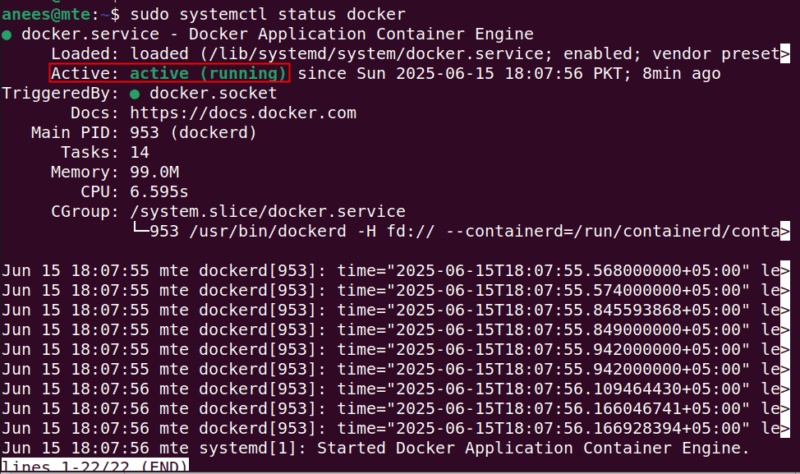
<p style="text-align: justify;">Để kiểm tra xem service Docker có đang chạy đúng không, hãy chạy:</p>

<pre id="pre2">
<code>sudo systemctl status docker</code></pre>

<p style="text-align: justify;">Đầu ra xác nhận rằng service Docker đang hoạt động và chạy mà không có bất kỳ sự cố nào:</p>

<figure>
<div style="text-align: justify;"><img alt="Kiểm tra trạng thái Docker" data-i="1" data-src="https://st.quantrimang.com/photos/image/2025/06/18/chay-ung-dung-dua-tren-gui-trong-docker-2.jpg" data-was-processed="true" height="474" src="https://st.quantrimang.com/photos/image/2025/06/18/chay-ung-dung-dua-tren-gui-trong-docker-2.jpg" width="800" /></div>

<figcaption>
<div style="text-align: justify;">Kiểm tra trạng thái Docker</div>
</figcaption>
</figure>

<h3 style="text-align: justify;">Thiết lập thư mục dự án và Dockerfile</h3>

<p style="text-align: justify;">Hãy tạo một thư mục có tên là &quot;dockerGUI&quot;, nơi chúng ta sẽ lưu trữ tất cả các file liên quan đến Docker để chạy các ứng dụng GUI:</p>

<pre id="pre3">
<code>mkdir dockerGUI</code></pre>

<p style="text-align: justify;">Bây giờ, hãy điều hướng đến thư mục này để đảm bảo rằng tất cả các file tiếp theo mà chúng ta tạo hoặc sửa đổi sẽ được lưu trong thư mục dockerGUI:</p>

<pre id="pre4">
<code>cd dockerGUI</code></pre>

<p style="text-align: justify;">Tạo một file mới có tên là dockerGUIFile để xác định cấu hình image Docker:</p>

<pre id="pre5">
<code>nano dockerGUIFile</code></pre>

<p style="text-align: justify;">Bây giờ, hãy dán các dòng code sau vào dockerGUIFile:</p>

<pre id="pre6">
<code>FROM jess/firefox
ENV DISPLAY=:0
CMD &#91;&quot;firefox&quot;&#93;</code></pre>

<p style="text-align: justify;">Đoạn code trên yêu cầu Docker sử dụng image dựng sẵn của Firefox và thiết lập môi trường hiển thị để GUI có thể xuất hiện trên hệ thống host. Hơn nữa, nó đảm bảo Firefox tự động khởi chạy khi container chạy.</p>

<p style="text-align: justify;"><strong>Lưu ý</strong>: Để thử một ứng dụng khác, chỉ cần thay đổi image và lệnh trong Dockerfile. Ví dụ, để chạy Gedit, bạn có thể sử dụng image Ubuntu chính thức và cài đặt ứng dụng trong quá trình build như sau:</p>

<pre id="pre7">
<code>FROM ubuntu
RUN apt-get update &amp;&amp; apt-get install -y gedit
ENV DISPLAY=:0
CMD &#91;&quot;gedit&quot;&#93;</code></pre>

<h3 style="text-align: justify;">Build image Docker</h3>

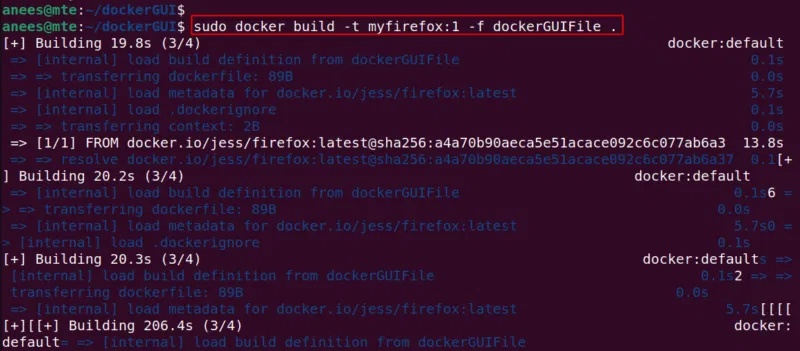
<p style="text-align: justify;">Bây giờ, cấu hình Docker đã được thiết lập trong dockerGUIFile, hãy build image Docker bằng lệnh sau:</p>

<pre id="pre8">
<code>sudo docker build -t myfirefox:1 -f dockerGUIFile .</code></pre>

<p style="text-align: justify;">Lệnh này build một image Docker từ dockerGUIFile, đặt tên là myfirefox với tag 1 và sử dụng thư mục hiện tại làm ngữ cảnh:</p>

<figure>
<div style="text-align: justify;"><img alt="Build image Docker" data-i="2" data-src="https://st.quantrimang.com/photos/image/2025/06/18/chay-ung-dung-dua-tren-gui-trong-docker-3.jpg" data-was-processed="true" height="351" src="https://st.quantrimang.com/photos/image/2025/06/18/chay-ung-dung-dua-tren-gui-trong-docker-3.jpg" width="800" /></div>

<figcaption>
<div style="text-align: justify;">Build image Docker</div>
</figcaption>
</figure>

<h3 style="text-align: justify;">Khởi chạy Docker Container với hỗ trợ GUI được bật</h3>

<p style="text-align: justify;">Bây giờ, hãy bật hỗ trợ GUI cho các container Docker bằng cách chạy lệnh sau:</p>

<pre id="pre9">
<code>xhost +local:docker</code></pre>

<p style="text-align: justify;">Đầu ra xác nhận rằng các client cục bộ (như Docker container) đang chạy trên hệ thống hiện được phép kết nối với máy chủ X:</p>

<figure>
<div style="text-align: justify;"><img alt="Cho phép kết nối đến máy chủ X" data-i="3" data-src="https://st.quantrimang.com/photos/image/2025/06/18/chay-ung-dung-dua-tren-gui-trong-docker-4.jpg" data-was-processed="true" height="58" src="https://st.quantrimang.com/photos/image/2025/06/18/chay-ung-dung-dua-tren-gui-trong-docker-4.jpg" width="800" /></div>

<figcaption>
<div style="text-align: justify;">Cho phép kết nối đến máy chủ X</div>
</figcaption>
</figure>

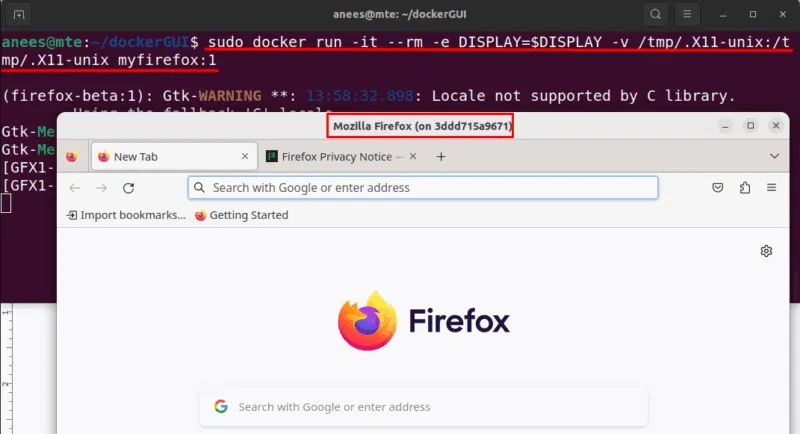
<p style="text-align: justify;">Bây giờ, hãy chạy container bằng lệnh sau để khởi chạy Firefox với hỗ trợ GUI trên hệ thống host của bạn:</p>

<pre id="pre10">
<code>docker run -it --rm -e DISPLAY=$DISPLAY -v /tmp/.X11-unix:/tmp/.X11-unix myfirefox:1</code></pre>

<p style="text-align: justify;">Kết quả là, lệnh này kết nối container với màn hình, cho phép Firefox mở trên màn hình của bạn giống như một ứng dụng gốc:</p>

<figure>
<div style="text-align: justify;"><img alt="Chạy ứng dụng GUI từ Docker" data-i="4" data-src="https://st.quantrimang.com/photos/image/2025/06/18/chay-ung-dung-dua-tren-gui-trong-docker-5.jpg" data-was-processed="true" height="434" src="https://st.quantrimang.com/photos/image/2025/06/18/chay-ung-dung-dua-tren-gui-trong-docker-5.jpg" width="800" /></div>

<figcaption>
<div style="text-align: justify;">Chạy ứng dụng GUI từ Docker</div>
</figcaption>
</figure>

<p style="text-align: justify;"><strong>Lưu ý</strong>: Sử dụng tùy chọn --rm khiến Docker tự động xóa container sau khi ứng dụng đóng, giúp hệ thống của bạn sạch sẽ và ngăn không cho nó hiển thị trong docker ps -s.</p>

<h3 style="text-align: justify;">Ngắt kết nối Docker khỏi server X</h3>

<p style="text-align: justify;">Sau khi sử dụng xong ứng dụng GUI, bạn nên đóng quyền truy cập server X vì lý do bảo mật:</p>

<pre id="pre11">
<code>xhost -local:docker</code></pre>

<figure>
<div style="text-align: justify;"><img alt="Xóa kết nối khỏi server X" data-i="5" data-src="https://st.quantrimang.com/photos/image/2025/06/18/chay-ung-dung-dua-tren-gui-trong-docker-6.jpg" data-was-processed="true" height="82" src="https://st.quantrimang.com/photos/image/2025/06/18/chay-ung-dung-dua-tren-gui-trong-docker-6.jpg" width="800" /></div>

<figcaption>
<div style="text-align: justify;">Xóa kết nối khỏi server X</div>
</figcaption>
</figure>

<div style="text-align: justify;">&nbsp;</div>
		</div>
				<div id="author">
						<p>
				<strong>Nguồn tin:</strong>
				Quantrimang.com:
			</p>
		</div>
	</div>
	<div id="footer" class="clearfix">
		<div id="url">
			<strong>URL của bản tin này: </strong><a href="https://www.nguoicodonvn2008.info/vi/news/savefile/kien-thuc-may-tinh/cach-chay-cac-ung-dung-dua-tren-gui-trong-docker-10598.html" title="Cách chạy các ứng dụng dựa trên GUI trong Docker">https://www.nguoicodonvn2008.info/vi/news/savefile/kien-thuc-may-tinh/cach-chay-cac-ung-dung-dua-tren-gui-trong-docker-10598.html</a>

		</div>
		<div class="clear"></div>
		<div class="copyright">
			&copy; .&#x3A; Nguoicodonvn2008.info - Cõi lòng người cô đơn &#x3A;.
		</div>
		<div id="contact">
			<a href="mailto:admin@nguoicodonvn2008.info">admin@nguoicodonvn2008.info</a>
		</div>
	</div>
</div>
        <div id="timeoutsess" class="chromeframe">
            Bạn đã không sử dụng Site, <a onclick="timeoutsesscancel();" href="https://www.nguoicodonvn2008.info/#">Bấm vào đây để duy trì trạng thái đăng nhập</a>. Thời gian chờ: <span id="secField"> 60 </span> giây
        </div>
        <div id="openidResult" class="nv-alert" style="display:none"></div>
        <div id="openidBt" data-result="" data-redirect=""></div>
		</script>
		<div class="car-top">
  <span><img src="https://www.nguoicodonvn2008.info/themes/default/images/car.png" alt=""></span>
</div>
<div id="run_cronjobs" style="visibility:hidden;display:none;"><img alt="cron" src="/index.php?second=cronjobs&amp;p=k3i4T77N" width="1" height="1" /></div>
<script src="https://www.nguoicodonvn2008.info/assets/js/jquery/jquery.min.js"></script>
<script>var nv_base_siteurl="/",nv_lang_data="vi",nv_lang_interface="vi",nv_name_variable="nv",nv_fc_variable="op",nv_lang_variable="language",nv_module_name="news",nv_func_name="savefile",nv_is_user=0, nv_my_ofs=-4,nv_my_abbr="EDT",nv_cookie_prefix="nv4c_e856T",nv_check_pass_mstime=1738000,nv_area_admin=0,nv_safemode=0,theme_responsive=0,nv_recaptcha_ver=2,nv_recaptcha_sitekey="",nv_recaptcha_type="image",XSSsanitize=1;</script>
<script src="https://www.nguoicodonvn2008.info/assets/js/language/vi.js"></script>
<script src="https://www.nguoicodonvn2008.info/assets/js/DOMPurify/purify3.js"></script>
<script src="https://www.nguoicodonvn2008.info/assets/js/global.js"></script>
<script src="https://www.nguoicodonvn2008.info/assets/js/site.js"></script>
<script src="https://www.nguoicodonvn2008.info/themes/default/js/news.js"></script>
<script src="https://www.nguoicodonvn2008.info/themes/default/js/main.js"></script>
<script src="https://www.nguoicodonvn2008.info/themes/default/js/custom.js"></script>
<script type="application/ld+json">
        {
            "@context": "https://schema.org",
            "@type": "Organization",
            "url": "https://www.nguoicodonvn2008.info",
            "logo": "https://www.nguoicodonvn2008.info/uploads/angel.gif"
        }
        </script>
<script src="https://www.nguoicodonvn2008.info/themes/default/js/bootstrap.min.js"></script>
<script type="text/javascript">
var $scrolltop = $('.car-top');
$scrolltop.on('click', function () {
    $('html,body').animate({
        scrollTop: 0
    }, 800);
    $(this).addClass("car-run");
    setTimeout(function(){ $scrolltop.removeClass('car-run');}, 1000);
    return false;
});
$(window).on('scroll', function ()
{ 
    if($(window).scrollTop() >= 200)
    {
        $scrolltop.addClass("show");
        $scrolltop.addClass("car-down");
    }
    else
    {
       $scrolltop.removeClass("show");
       setTimeout(function(){ $scrolltop.removeClass('car-down');}, 300);
    }
});
</script>
</body>
</html>