<!DOCTYPE html>
    <html lang="vi" xmlns="http://www.w3.org/1999/xhtml" prefix="og: http://ogp.me/ns#">
    <head>
<title>Cách cập nhật Safari trên Mac</title>
<meta name="description" content="Cách cập nhật Safari trên Mac - Savefile - Tin Tức - https&#x3A;&#x002F;&#x002F;www.nguoicodonvn2008.info&#x002F;vi&#x002F;news&#x002F;savefile&#x002F;kien-thuc-may-tinh&#x002F;cach-cap-nhat-safari-tren-mac-4198.html">
<meta name="author" content=".: Nguoicodonvn2008.info - Cõi lòng người cô đơn :.">
<meta name="copyright" content=".: Nguoicodonvn2008.info - Cõi lòng người cô đơn :. [admin@nguoicodonvn2008.info]">
<meta name="robots" content="index, archive, follow, noodp">
<meta name="googlebot" content="index,archive,follow,noodp">
<meta name="msnbot" content="all,index,follow">
<meta name="generator" content="NukeViet v4.5">
<meta http-equiv="Content-Type" content="text/html; charset=utf-8">
<meta property="og:title" content="Cách cập nhật Safari trên Mac">
<meta property="og:type" content="website">
<meta property="og:description" content="Savefile - Tin Tức - https&#x3A;&#x002F;&#x002F;www.nguoicodonvn2008.info&#x002F;vi&#x002F;news&#x002F;savefile&#x002F;kien-thuc-may-tinh&#x002F;cach-cap-nhat-safari-tren-mac-4198.html">
<meta property="og:site_name" content=".&#x3A; Nguoicodonvn2008.info - Cõi lòng người cô đơn &#x3A;.">
<meta property="og:url" content="https://www.nguoicodonvn2008.info/vi/news/savefile/kien-thuc-may-tinh/cach-cap-nhat-safari-tren-mac-4198.html">
<link rel="shortcut icon" href="https://www.nguoicodonvn2008.info/favicon.ico">
<link rel="canonical" href="https://www.nguoicodonvn2008.info/vi/news/savefile/kien-thuc-may-tinh/cach-cap-nhat-safari-tren-mac-4198.html">
<link rel="alternate" href="https://www.nguoicodonvn2008.info/vi/news/rss/" title="Tin Tức" type="application/rss+xml">
<link rel="alternate" href="https://www.nguoicodonvn2008.info/vi/news/rss/karaoke-dual/" title="Tin Tức - Karaoke Dual" type="application/rss+xml">
<link rel="alternate" href="https://www.nguoicodonvn2008.info/vi/news/rss/nhac-tre/" title="Tin Tức - Nhạc trẻ" type="application/rss+xml">
<link rel="alternate" href="https://www.nguoicodonvn2008.info/vi/news/rss/tru-tinh/" title="Tin Tức - Trữ tình" type="application/rss+xml">
<link rel="alternate" href="https://www.nguoicodonvn2008.info/vi/news/rss/nuoc-ngoai/" title="Tin Tức - Nước ngoài" type="application/rss+xml">
<link rel="alternate" href="https://www.nguoicodonvn2008.info/vi/news/rss/remix/" title="Tin Tức - Remix" type="application/rss+xml">
<link rel="alternate" href="https://www.nguoicodonvn2008.info/vi/news/rss/tam-su-tinh-yeu/" title="Tin Tức - Tâm sự tình yêu" type="application/rss+xml">
<link rel="alternate" href="https://www.nguoicodonvn2008.info/vi/news/rss/tho-suu-tam/" title="Tin Tức - Thơ sưu tầm" type="application/rss+xml">
<link rel="alternate" href="https://www.nguoicodonvn2008.info/vi/news/rss/cuoc-song/" title="Tin Tức - Cuộc sống" type="application/rss+xml">
<link rel="alternate" href="https://www.nguoicodonvn2008.info/vi/news/rss/phan-mem/" title="Tin Tức - Phần mềm" type="application/rss+xml">
<link rel="alternate" href="https://www.nguoicodonvn2008.info/vi/news/rss/kien-thuc-may-tinh/" title="Tin Tức - Kiến thức máy tính" type="application/rss+xml">
<link rel="alternate" href="https://www.nguoicodonvn2008.info/vi/news/rss/hoc-tap/" title="Tin Tức - Học tập" type="application/rss+xml">
<link rel="alternate" href="https://www.nguoicodonvn2008.info/vi/news/rss/tai-lieu/" title="Tin Tức - Tài liệu" type="application/rss+xml">
<link rel="alternate" href="https://www.nguoicodonvn2008.info/vi/news/rss/de-thi/" title="Tin Tức - Đề thi" type="application/rss+xml">
<link rel="preload" as="style" href="https://www.nguoicodonvn2008.info/assets/css/font-awesome.min.css" type="text/css">
<link rel="preload" as="style" href="https://www.nguoicodonvn2008.info/themes/default/css/bootstrap.non-responsive.css" type="text/css">
<link rel="preload" as="style" href="https://www.nguoicodonvn2008.info/themes/default/css/style.css" type="text/css">
<link rel="preload" as="style" href="https://www.nguoicodonvn2008.info/themes/default/css/style.non-responsive.css" type="text/css">
<link rel="preload" as="style" href="https://www.nguoicodonvn2008.info/themes/default/css/news.css" type="text/css">
<link rel="preload" as="style" href="https://www.nguoicodonvn2008.info/themes/default/css/custom.css" type="text/css">
<link rel="preload" as="script" href="https://www.nguoicodonvn2008.info/assets/js/jquery/jquery.min.js" type="text/javascript">
<link rel="preload" as="script" href="https://www.nguoicodonvn2008.info/assets/js/language/vi.js" type="text/javascript">
<link rel="preload" as="script" href="https://www.nguoicodonvn2008.info/assets/js/DOMPurify/purify3.js" type="text/javascript">
<link rel="preload" as="script" href="https://www.nguoicodonvn2008.info/assets/js/global.js" type="text/javascript">
<link rel="preload" as="script" href="https://www.nguoicodonvn2008.info/assets/js/site.js" type="text/javascript">
<link rel="preload" as="script" href="https://www.nguoicodonvn2008.info/themes/default/js/news.js" type="text/javascript">
<link rel="preload" as="script" href="https://www.nguoicodonvn2008.info/themes/default/js/main.js" type="text/javascript">
<link rel="preload" as="script" href="https://www.nguoicodonvn2008.info/themes/default/js/custom.js" type="text/javascript">
<link rel="preload" as="script" href="https://www.nguoicodonvn2008.info/themes/default/js/bootstrap.min.js" type="text/javascript">
<link rel="stylesheet" href="https://www.nguoicodonvn2008.info/assets/css/font-awesome.min.css">
<link rel="stylesheet" href="https://www.nguoicodonvn2008.info/themes/default/css/bootstrap.non-responsive.css">
<link rel="stylesheet" href="https://www.nguoicodonvn2008.info/themes/default/css/style.css">
<link rel="stylesheet" href="https://www.nguoicodonvn2008.info/themes/default/css/style.non-responsive.css">
<link rel="StyleSheet" href="https://www.nguoicodonvn2008.info/themes/default/css/news.css">
<link rel="stylesheet" href="https://www.nguoicodonvn2008.info/themes/default/css/custom.css">
<style type="text/css">
	body{background: #fff;}
</style>
    </head>
    <body>
<div id="print">
	<div id="hd_print">
		<h2 class="pull-left">.&#x3A; Nguoicodonvn2008.info - Cõi lòng người cô đơn &#x3A;.</h2>
		<p class="pull-right"><a title=".&#x3A; Nguoicodonvn2008.info - Cõi lòng người cô đơn &#x3A;." href="https://www.nguoicodonvn2008.info/">https://www.nguoicodonvn2008.info</a></p>
	</div>
	<div class="clear"></div>
	<hr />
	<div id="content">
		<h1>Cách cập nhật Safari trên Mac</h1>
		<ul class="list-inline">
			<li>Thứ hai - 07/06/2021 00:53</li>
			<li class="hidden-print txtrequired"><em class="fa fa-print">&nbsp;</em><a title="In ra" href="javascript:;" onclick="window.print()">In ra</a></li>
			<li class="hidden-print txtrequired"><em class="fa fa-power-off">&nbsp;</em><a title="Đóng cửa sổ này" href="javascript:;" onclick="window.close()">Đóng cửa sổ này</a></li>
		</ul>
		<div class="clear"></div>
		<div id="hometext">
		</div>
				<div class="imghome">
			<img alt="Cách cập nhật Safari trên Mac" src="https://st.quantrimang.com/photos/image/2021/05/24/cap-nhat-safari-tren-mac1.jpg" width="460" class="img-thumbnail" />
		</div>
		<div class="clear"></div>
		<div id="bodytext" class="clearfix">
			<p style="text-align: justify;">Trình duyệt web là một trong những ứng dụng được chúng ta sử dụng thường xuyên nhất trên PC. Do đó, việc giữ cho trình duyệt web luôn ở phiên bản mới nhất không chỉ cho phép bạn có được các tính năng, trải nghiệm mới mẻ hơn, mà còn giúp duy trì trạng thái bảo mật tốt hơn.</p>

<p style="text-align: justify;">Trong bài viết này, chúng ta sẽ cùng tìm hiểu cách để giữ cho trình duyệt Safari trên máy Mac của bạn luôn ở trạng thái cập nhật tốt nhất.</p>

<h2 style="text-align: justify;">Cập nhật Safari trong System Preferences</h2>

<p style="text-align: justify;">Không giống như Chrome, Firefox hay Edge, bản thân Safari không được tích hợp sẵn tính năng cập nhật phiên bản mới trong trình duyệt. Do đó để cập nhật Safari lên phiên bản mới, bạn sẽ phải sử dụng tính năng Software Update nằm trong mục System Preferences của macOS.</p>

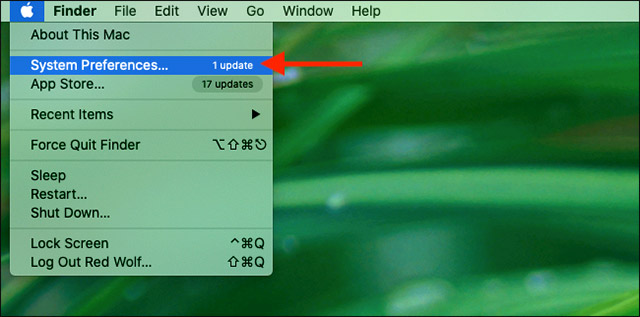
<p style="text-align: justify;">Để truy cập mục này, trước tiên bạn nhấp vào biểu tượng Apple ở góc trên cùng bên trái của màn hình.</p>

<div style="text-align: justify;">&nbsp;</div>

<p style="text-align: justify;">Trong menu hiện ra, hãy chọn tùy chọn “<strong>System Preferences</strong>”.</p>

<p style="text-align: justify;"><img alt="Chọn tùy chọn “System Preferences”." data-i="0" data-src="https://st.quantrimang.com/photos/image/2021/05/24/cap-nhat-safari-tren-mac1.jpg" data-was-processed="true" height="317" src="https://st.quantrimang.com/photos/image/2021/05/24/cap-nhat-safari-tren-mac1.jpg" width="640" /></p>

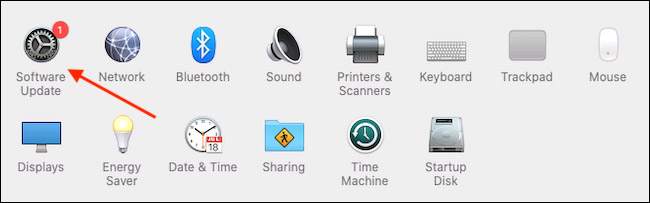
<p style="text-align: justify;">Trong cửa sổ System Preferences, bạn nhấp vào “<strong>Software Update</strong>”.</p>

<p style="text-align: justify;"><img alt="Nhấp vào “Software Update”" data-i="1" data-src="https://st.quantrimang.com/photos/image/2021/05/24/cap-nhat-safari-tren-mac2.jpg" data-was-processed="true" height="203" src="https://st.quantrimang.com/photos/image/2021/05/24/cap-nhat-safari-tren-mac2.jpg" width="650" /></p>

<p style="text-align: justify;">Lập tức bảng Software Update sẽ hiển thị trên màn hình, cho bạn biết liệu đang có bất kỳ bản cập nhật phần mềm mới nào khả dụng cho máy Mac của mình hay không. Nếu có, bạn có hai sự lựa chọn.</p>

<p style="text-align: justify;">Nếu bạn muốn cài đặt bản cập nhật hệ điều hành mới nhất cùng với phiên bản Safari mới nhất, chỉ cần nhấp vào nút “<strong>Update Now</strong>” và làm theo quy trình.</p>

<div style="text-align: justify;">&nbsp;</div>

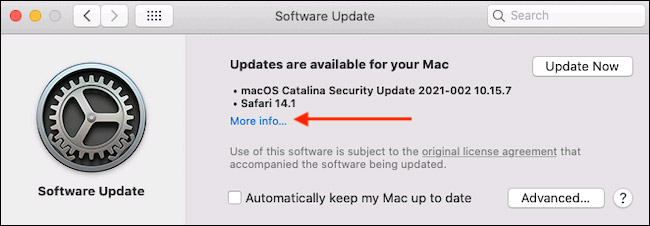
<p style="text-align: justify;">Trong trường hợp bạn chỉ muốn cài đặt bản cập nhật mới cho Safari, hãy nhấp vào “<strong>More Info</strong>” trong danh sách các bản cập nhật có sẵn để xem thông tin chi tiết của tất cả các bản cập nhật khả dụng hiện có.</p>

<p style="text-align: justify;"><img alt="Nhấp vào “More Info”" data-i="2" data-src="https://st.quantrimang.com/photos/image/2021/05/24/cap-nhat-safari-tren-mac3.jpg" data-was-processed="true" height="226" src="https://st.quantrimang.com/photos/image/2021/05/24/cap-nhat-safari-tren-mac3.jpg" width="650" /></p>

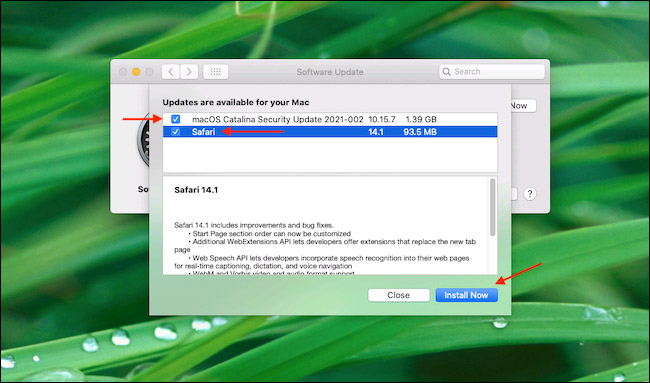
<p style="text-align: justify;">Sau khi bạn nhấp vào “<strong>More info</strong>”, sẽ một bảng thông tin xuất hiện, trong đó liệt kê chi tiết các bản cập nhật có sẵn cho máy Mac của bạn. Hãy tích vào bản cập nhật “Safari” và đồng thời bỏ tích bản cập nhật “<strong>macOS</strong>” nếu bạn không muốn cài đặt bản cập nhật hệ thống cho hệ điều hành ngay bây giờ. Khi bạn đã sẵn sàng, hãy nhấp vào “<strong>Install Now</strong>”.</p>

<p style="text-align: justify;"><img alt="Nhấp vào “Install Now”" data-i="3" data-src="https://st.quantrimang.com/photos/image/2021/05/24/cap-nhat-safari-tren-mac4.jpg" data-was-processed="true" height="383" src="https://st.quantrimang.com/photos/image/2021/05/24/cap-nhat-safari-tren-mac4.jpg" width="650" /></p>

<p style="text-align: justify;">Chờ trong giây lát, bản cập nhật Safari mới sẽ được tự động cài đặt trên máy Mac của bạn.</p>

<p style="text-align: justify;">Sau khi quá trình cập nhật kết thúc, bạn có thể thoát khỏi mục System Preferences bằng cách nhấn vào nút Close màu đỏ ở góc trên cùng bên trái cửa sổ.</p>
		</div>
				<div id="author">
						<p>
				<strong>Nguồn tin:</strong>
				Quantrimang.com
			</p>
		</div>
	</div>
	<div id="footer" class="clearfix">
		<div id="url">
			<strong>URL của bản tin này: </strong><a href="https://www.nguoicodonvn2008.info/vi/news/savefile/kien-thuc-may-tinh/cach-cap-nhat-safari-tren-mac-4198.html" title="Cách cập nhật Safari trên Mac">https://www.nguoicodonvn2008.info/vi/news/savefile/kien-thuc-may-tinh/cach-cap-nhat-safari-tren-mac-4198.html</a>

		</div>
		<div class="clear"></div>
		<div class="copyright">
			&copy; .&#x3A; Nguoicodonvn2008.info - Cõi lòng người cô đơn &#x3A;.
		</div>
		<div id="contact">
			<a href="mailto:admin@nguoicodonvn2008.info">admin@nguoicodonvn2008.info</a>
		</div>
	</div>
</div>
        <div id="timeoutsess" class="chromeframe">
            Bạn đã không sử dụng Site, <a onclick="timeoutsesscancel();" href="https://www.nguoicodonvn2008.info/#">Bấm vào đây để duy trì trạng thái đăng nhập</a>. Thời gian chờ: <span id="secField"> 60 </span> giây
        </div>
        <div id="openidResult" class="nv-alert" style="display:none"></div>
        <div id="openidBt" data-result="" data-redirect=""></div>
		</script>
		<div class="car-top">
  <span><img src="https://www.nguoicodonvn2008.info/themes/default/images/car.png" alt=""></span>
</div>
<script src="https://www.nguoicodonvn2008.info/assets/js/jquery/jquery.min.js"></script>
<script>var nv_base_siteurl="/",nv_lang_data="vi",nv_lang_interface="vi",nv_name_variable="nv",nv_fc_variable="op",nv_lang_variable="language",nv_module_name="news",nv_func_name="savefile",nv_is_user=0, nv_my_ofs=-4,nv_my_abbr="EDT",nv_cookie_prefix="nv4c_e856T",nv_check_pass_mstime=1738000,nv_area_admin=0,nv_safemode=0,theme_responsive=0,nv_recaptcha_ver=2,nv_recaptcha_sitekey="",nv_recaptcha_type="image",XSSsanitize=1;</script>
<script src="https://www.nguoicodonvn2008.info/assets/js/language/vi.js"></script>
<script src="https://www.nguoicodonvn2008.info/assets/js/DOMPurify/purify3.js"></script>
<script src="https://www.nguoicodonvn2008.info/assets/js/global.js"></script>
<script src="https://www.nguoicodonvn2008.info/assets/js/site.js"></script>
<script src="https://www.nguoicodonvn2008.info/themes/default/js/news.js"></script>
<script src="https://www.nguoicodonvn2008.info/themes/default/js/main.js"></script>
<script src="https://www.nguoicodonvn2008.info/themes/default/js/custom.js"></script>
<script type="application/ld+json">
        {
            "@context": "https://schema.org",
            "@type": "Organization",
            "url": "https://www.nguoicodonvn2008.info",
            "logo": "https://www.nguoicodonvn2008.info/uploads/angel.gif"
        }
        </script>
<script src="https://www.nguoicodonvn2008.info/themes/default/js/bootstrap.min.js"></script>
<script type="text/javascript">
var $scrolltop = $('.car-top');
$scrolltop.on('click', function () {
    $('html,body').animate({
        scrollTop: 0
    }, 800);
    $(this).addClass("car-run");
    setTimeout(function(){ $scrolltop.removeClass('car-run');}, 1000);
    return false;
});
$(window).on('scroll', function ()
{ 
    if($(window).scrollTop() >= 200)
    {
        $scrolltop.addClass("show");
        $scrolltop.addClass("car-down");
    }
    else
    {
       $scrolltop.removeClass("show");
       setTimeout(function(){ $scrolltop.removeClass('car-down');}, 300);
    }
});
</script>
</body>
</html>