<!DOCTYPE html>
    <html lang="vi" xmlns="http://www.w3.org/1999/xhtml" prefix="og: http://ogp.me/ns#">
    <head>
<title>Cách cập nhật phần mềm cho tay cầm Xbox thông qua PC</title>
<meta name="description" content="Cách cập nhật phần mềm cho tay cầm Xbox thông qua PC - Savefile - Tin Tức -...">
<meta name="author" content=".: Nguoicodonvn2008.info - Cõi lòng người cô đơn :.">
<meta name="copyright" content=".: Nguoicodonvn2008.info - Cõi lòng người cô đơn :. [admin@nguoicodonvn2008.info]">
<meta name="robots" content="index, archive, follow, noodp">
<meta name="googlebot" content="index,archive,follow,noodp">
<meta name="msnbot" content="all,index,follow">
<meta name="generator" content="NukeViet v4.5">
<meta http-equiv="Content-Type" content="text/html; charset=utf-8">
<meta property="og:title" content="Cách cập nhật phần mềm cho tay cầm Xbox thông qua PC">
<meta property="og:type" content="website">
<meta property="og:description" content="Savefile - Tin Tức - https&#x3A;&#x002F;&#x002F;www.nguoicodonvn2008.info&#x002F;vi&#x002F;news&#x002F;savefile&#x002F;kien-thuc-may-tinh&#x002F;cach-cap-nhat-phan-mem-cho-tay-cam-xbox-thong-qua-pc-4256.html">
<meta property="og:site_name" content=".&#x3A; Nguoicodonvn2008.info - Cõi lòng người cô đơn &#x3A;.">
<meta property="og:url" content="https://www.nguoicodonvn2008.info/vi/news/savefile/kien-thuc-may-tinh/cach-cap-nhat-phan-mem-cho-tay-cam-xbox-thong-qua-pc-4256.html">
<link rel="shortcut icon" href="https://www.nguoicodonvn2008.info/favicon.ico">
<link rel="canonical" href="https://www.nguoicodonvn2008.info/vi/news/savefile/kien-thuc-may-tinh/cach-cap-nhat-phan-mem-cho-tay-cam-xbox-thong-qua-pc-4256.html">
<link rel="alternate" href="https://www.nguoicodonvn2008.info/vi/news/rss/" title="Tin Tức" type="application/rss+xml">
<link rel="alternate" href="https://www.nguoicodonvn2008.info/vi/news/rss/karaoke-dual/" title="Tin Tức - Karaoke Dual" type="application/rss+xml">
<link rel="alternate" href="https://www.nguoicodonvn2008.info/vi/news/rss/nhac-tre/" title="Tin Tức - Nhạc trẻ" type="application/rss+xml">
<link rel="alternate" href="https://www.nguoicodonvn2008.info/vi/news/rss/tru-tinh/" title="Tin Tức - Trữ tình" type="application/rss+xml">
<link rel="alternate" href="https://www.nguoicodonvn2008.info/vi/news/rss/nuoc-ngoai/" title="Tin Tức - Nước ngoài" type="application/rss+xml">
<link rel="alternate" href="https://www.nguoicodonvn2008.info/vi/news/rss/remix/" title="Tin Tức - Remix" type="application/rss+xml">
<link rel="alternate" href="https://www.nguoicodonvn2008.info/vi/news/rss/tam-su-tinh-yeu/" title="Tin Tức - Tâm sự tình yêu" type="application/rss+xml">
<link rel="alternate" href="https://www.nguoicodonvn2008.info/vi/news/rss/tho-suu-tam/" title="Tin Tức - Thơ sưu tầm" type="application/rss+xml">
<link rel="alternate" href="https://www.nguoicodonvn2008.info/vi/news/rss/cuoc-song/" title="Tin Tức - Cuộc sống" type="application/rss+xml">
<link rel="alternate" href="https://www.nguoicodonvn2008.info/vi/news/rss/phan-mem/" title="Tin Tức - Phần mềm" type="application/rss+xml">
<link rel="alternate" href="https://www.nguoicodonvn2008.info/vi/news/rss/kien-thuc-may-tinh/" title="Tin Tức - Kiến thức máy tính" type="application/rss+xml">
<link rel="alternate" href="https://www.nguoicodonvn2008.info/vi/news/rss/hoc-tap/" title="Tin Tức - Học tập" type="application/rss+xml">
<link rel="alternate" href="https://www.nguoicodonvn2008.info/vi/news/rss/tai-lieu/" title="Tin Tức - Tài liệu" type="application/rss+xml">
<link rel="alternate" href="https://www.nguoicodonvn2008.info/vi/news/rss/de-thi/" title="Tin Tức - Đề thi" type="application/rss+xml">
<link rel="preload" as="style" href="https://www.nguoicodonvn2008.info/assets/css/font-awesome.min.css" type="text/css">
<link rel="preload" as="style" href="https://www.nguoicodonvn2008.info/themes/default/css/bootstrap.non-responsive.css" type="text/css">
<link rel="preload" as="style" href="https://www.nguoicodonvn2008.info/themes/default/css/style.css" type="text/css">
<link rel="preload" as="style" href="https://www.nguoicodonvn2008.info/themes/default/css/style.non-responsive.css" type="text/css">
<link rel="preload" as="style" href="https://www.nguoicodonvn2008.info/themes/default/css/news.css" type="text/css">
<link rel="preload" as="style" href="https://www.nguoicodonvn2008.info/themes/default/css/custom.css" type="text/css">
<link rel="preload" as="script" href="https://www.nguoicodonvn2008.info/assets/js/jquery/jquery.min.js" type="text/javascript">
<link rel="preload" as="script" href="https://www.nguoicodonvn2008.info/assets/js/language/vi.js" type="text/javascript">
<link rel="preload" as="script" href="https://www.nguoicodonvn2008.info/assets/js/DOMPurify/purify3.js" type="text/javascript">
<link rel="preload" as="script" href="https://www.nguoicodonvn2008.info/assets/js/global.js" type="text/javascript">
<link rel="preload" as="script" href="https://www.nguoicodonvn2008.info/assets/js/site.js" type="text/javascript">
<link rel="preload" as="script" href="https://www.nguoicodonvn2008.info/themes/default/js/news.js" type="text/javascript">
<link rel="preload" as="script" href="https://www.nguoicodonvn2008.info/themes/default/js/main.js" type="text/javascript">
<link rel="preload" as="script" href="https://www.nguoicodonvn2008.info/themes/default/js/custom.js" type="text/javascript">
<link rel="preload" as="script" href="https://www.nguoicodonvn2008.info/themes/default/js/bootstrap.min.js" type="text/javascript">
<link rel="stylesheet" href="https://www.nguoicodonvn2008.info/assets/css/font-awesome.min.css">
<link rel="stylesheet" href="https://www.nguoicodonvn2008.info/themes/default/css/bootstrap.non-responsive.css">
<link rel="stylesheet" href="https://www.nguoicodonvn2008.info/themes/default/css/style.css">
<link rel="stylesheet" href="https://www.nguoicodonvn2008.info/themes/default/css/style.non-responsive.css">
<link rel="StyleSheet" href="https://www.nguoicodonvn2008.info/themes/default/css/news.css">
<link rel="stylesheet" href="https://www.nguoicodonvn2008.info/themes/default/css/custom.css">
<style type="text/css">
	body{background: #fff;}
</style>
    </head>
    <body>
<div id="print">
	<div id="hd_print">
		<h2 class="pull-left">.&#x3A; Nguoicodonvn2008.info - Cõi lòng người cô đơn &#x3A;.</h2>
		<p class="pull-right"><a title=".&#x3A; Nguoicodonvn2008.info - Cõi lòng người cô đơn &#x3A;." href="https://www.nguoicodonvn2008.info/">https://www.nguoicodonvn2008.info</a></p>
	</div>
	<div class="clear"></div>
	<hr />
	<div id="content">
		<h1>Cách cập nhật phần mềm cho tay cầm Xbox thông qua PC</h1>
		<ul class="list-inline">
			<li>Thứ năm - 17/06/2021 00:08</li>
			<li class="hidden-print txtrequired"><em class="fa fa-print">&nbsp;</em><a title="In ra" href="javascript:;" onclick="window.print()">In ra</a></li>
			<li class="hidden-print txtrequired"><em class="fa fa-power-off">&nbsp;</em><a title="Đóng cửa sổ này" href="javascript:;" onclick="window.close()">Đóng cửa sổ này</a></li>
		</ul>
		<div class="clear"></div>
		<div id="hometext">
		</div>
				<div class="imghome">
			<img alt="Cách cập nhật phần mềm cho tay cầm Xbox thông qua PC" src="https://st.quantrimang.com/photos/image/2021/06/07/cap-nhat-phan-mem-tay-cam-xbox-thong-qua-pc6.jpg" width="460" class="img-thumbnail" />
		</div>
		<div class="clear"></div>
		<div id="bodytext" class="clearfix">
			<p style="text-align: justify;">Tương tự như các thiết bị công nghệ khác, tay cầm chơi game Xbox cũng cần được cập nhật phần mềm thường xuyên để cho khả năng hoạt động hiệu quả nhất. Nhìn chung, việc cập nhật phần mềm cho tay cầm không dây Xbox Microsoft Wireless Controller (dành cho Xbox Series X|S) trên PC Windows 10 tương đối đơn giản. Bạn chỉ cần download ứng dụng tương thích của Microsoft, kết nối tay cầm với PC và làm theo hướng dẫn trên màn hình. Cách thực hiện cụ thể như sau.</p>

<h2 style="text-align: justify;">Tại sao cần cập nhật phần mềm cho tay cầm Xbox?</h2>

<p style="text-align: justify;">Về lý thuyết, tay cầm không dây Xbox là bộ điều khiển đi kèm với các thiết bị game console Xbox Series X và Series S. Nhưng trên thực tế, nó cũng hoạt động với PC Windows, thiết bị Apple, v.v. Microsoft thường xuyên phát hành các bản cập nhật chương trình cơ sở (firmware) nằm cải thiện hiệu suất của tay cầm hoặc khắc phục sự cố tương thích với Steam, điện thoại Android, Apple TV cũng như iPhone. Vì vậy, nếu bạn đang gặp sự cố với chiếc tay cầm Xbox của mình, cập nhật phần mềm có thể là phương án khắc phục hiệu quả.</p>

<h2 style="text-align: justify;">Cách cập nhật tay cầm không dây Xbox thông qua PC</h2>

<p style="text-align: justify;">Như đã nói, tay cầm không dây Xbox có thể tương thích tốt với PC, do đó, bạn cũng hoàn toàn có thể sử dụng PC Windows 10 của mình để cập nhật phần mềm cho nó.</p>

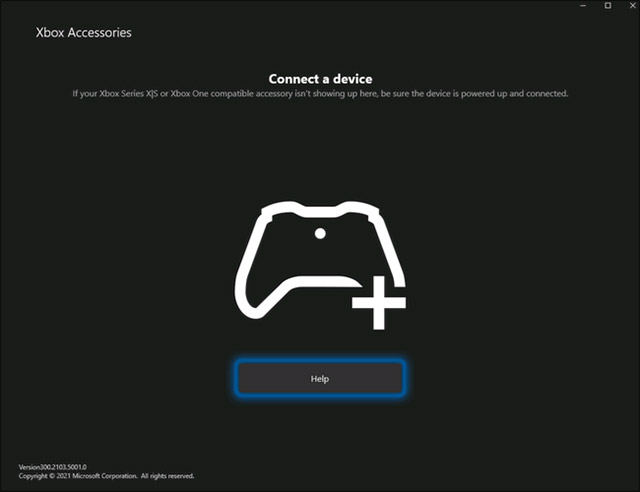
<p style="text-align: justify;">Trước tiên, hãy khởi động máy tính Windows của bạn và download ứng dụng Xbox Accessories từ Microsoft Store.</p>

<p style="text-align: justify;"><img alt="Ứng dụng Xbox Accessories" data-i="0" data-src="https://st.quantrimang.com/photos/image/2021/06/07/cap-nhat-phan-mem-tay-cam-xbox-thong-qua-pc1.jpg" data-was-processed="true" height="492" src="https://st.quantrimang.com/photos/image/2021/06/07/cap-nhat-phan-mem-tay-cam-xbox-thong-qua-pc1.jpg" width="640" /></p>

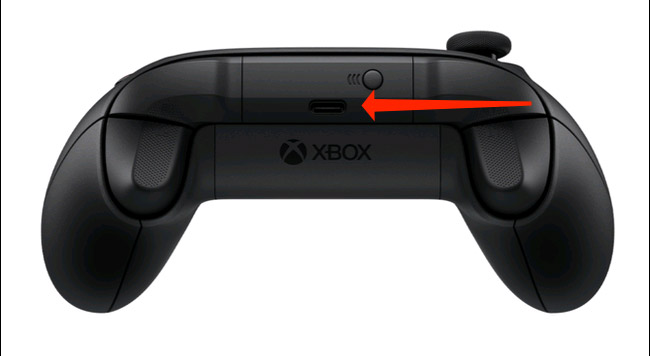
<p style="text-align: justify;">Sau khi quá trình tải xuống hoàn tất, hãy khởi chạy ứng dụng và cắm tay cầm không dây Xbox vào máy tính của bạn thông qua cổng USB nằm giữa nút LB và RB. Bạn sẽ cần cáp USB Type-C để thực hiện việc này.</p>

<p style="text-align: justify;"><img alt="Cắm tay cầm không dây Xbox vào máy tính thông qua cổng USB" data-i="1" data-src="https://st.quantrimang.com/photos/image/2021/06/07/cap-nhat-phan-mem-tay-cam-xbox-thong-qua-pc2.jpg" data-was-processed="true" height="356" src="https://st.quantrimang.com/photos/image/2021/06/07/cap-nhat-phan-mem-tay-cam-xbox-thong-qua-pc2.jpg" width="650" /></p>

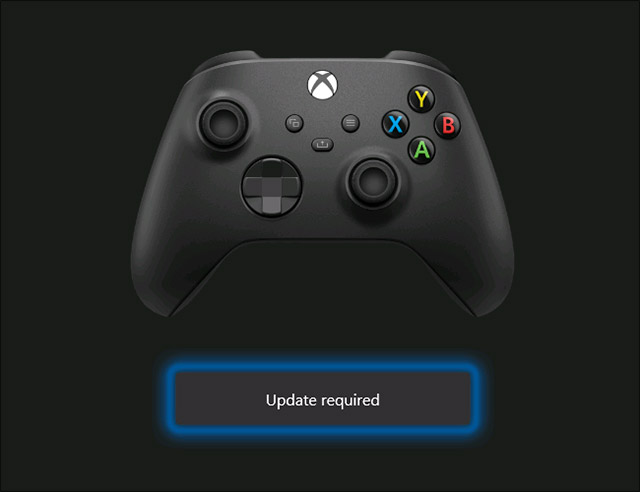
<p style="text-align: justify;">Sau khi bạn cắm tay cầm vào PC, ứng dụng Xbox Accessories sẽ tự động phát hiện tay cầm. Nếu phiên bản firmware hiện tại của tay cầm không phải là phiên bản mới nhất, bạn sẽ thấy nút &quot;Update required&quot; xuất hiện bên dưới hình ảnh của tay cầm trên màn hình của bạn. Nhấp vào đó.</p>

<p style="text-align: justify;"><img alt="Nhấp vào &#039;Update required&#039;" data-i="2" data-src="https://st.quantrimang.com/photos/image/2021/06/07/cap-nhat-phan-mem-tay-cam-xbox-thong-qua-pc3.jpg" data-was-processed="true" height="492" src="https://st.quantrimang.com/photos/image/2021/06/07/cap-nhat-phan-mem-tay-cam-xbox-thong-qua-pc3.jpg" width="640" /></p>

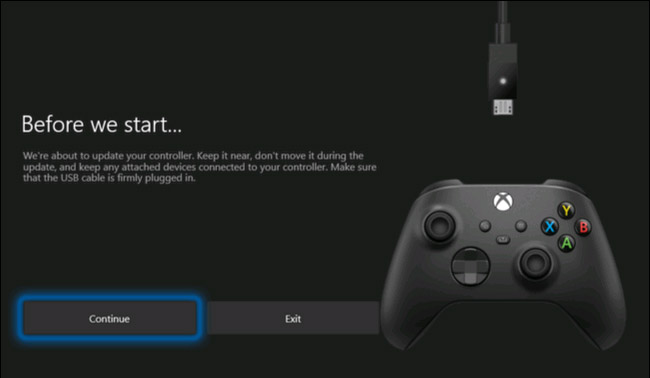
<p style="text-align: justify;">Tiếp theo, bạn sẽ thấy một cảnh báo yêu cầu bạn đảm bảo rằng tay cầm đã được kết nối đúng cách và không di chuyển thiết bị trong quá trình cập nhật. Nhấp vào “Continue”.</p>

<p style="text-align: justify;"><img alt="Nhấp vào “Continue”" data-i="3" data-src="https://st.quantrimang.com/photos/image/2021/06/07/cap-nhat-phan-mem-tay-cam-xbox-thong-qua-pc4.jpg" data-was-processed="true" height="378" src="https://st.quantrimang.com/photos/image/2021/06/07/cap-nhat-phan-mem-tay-cam-xbox-thong-qua-pc4.jpg" width="650" /></p>

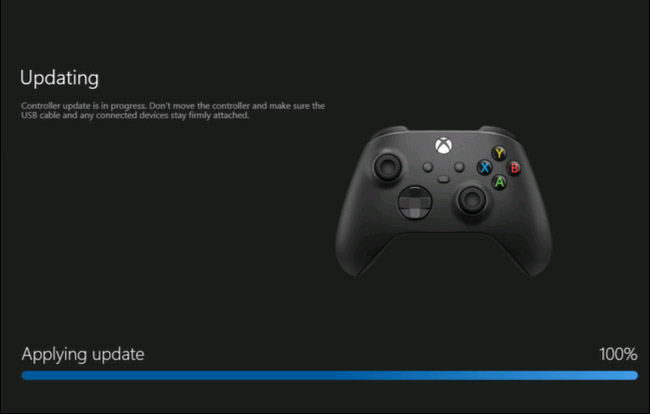
<p style="text-align: justify;">Ứng dụng Xbox Accessories sẽ bắt đầu tải xuống và cài đặt bản cập nhật.</p>

<p style="text-align: justify;"><img alt="Tải xuống và cài đặt bản cập nhật." data-i="4" data-src="https://st.quantrimang.com/photos/image/2021/06/07/cap-nhat-phan-mem-tay-cam-xbox-thong-qua-pc5.jpg" data-was-processed="true" height="414" src="https://st.quantrimang.com/photos/image/2021/06/07/cap-nhat-phan-mem-tay-cam-xbox-thong-qua-pc5.jpg" width="650" /></p>

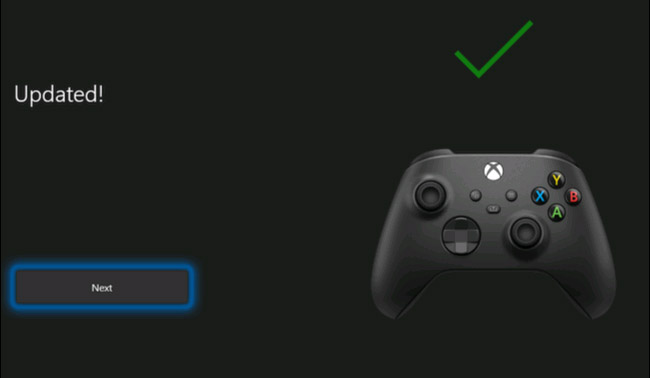
<p style="text-align: justify;">Sau khi quá trình hoàn tất, bạn sẽ thấy một dấu tích màu xanh lục phía trên hình ảnh của tay cầm trên màn hình. Nhấn vào “Next”.</p>

<p style="text-align: justify;"><img alt="Cập nhật hoàn tất" data-i="5" data-src="https://st.quantrimang.com/photos/image/2021/06/07/cap-nhat-phan-mem-tay-cam-xbox-thong-qua-pc6.jpg" data-was-processed="true" height="378" src="https://st.quantrimang.com/photos/image/2021/06/07/cap-nhat-phan-mem-tay-cam-xbox-thong-qua-pc6.jpg" width="650" /></p>

<p style="text-align: justify;">Tất cả chỉ có vậy, tay cầm Xbox của bạn hiện đã được cập nhật lên phiên bản phần mềm mới nhất.</p>
		</div>
				<div id="author">
						<p>
				<strong>Nguồn tin:</strong>
				Quantrimang.com
			</p>
		</div>
	</div>
	<div id="footer" class="clearfix">
		<div id="url">
			<strong>URL của bản tin này: </strong><a href="https://www.nguoicodonvn2008.info/vi/news/savefile/kien-thuc-may-tinh/cach-cap-nhat-phan-mem-cho-tay-cam-xbox-thong-qua-pc-4256.html" title="Cách cập nhật phần mềm cho tay cầm Xbox thông qua PC">https://www.nguoicodonvn2008.info/vi/news/savefile/kien-thuc-may-tinh/cach-cap-nhat-phan-mem-cho-tay-cam-xbox-thong-qua-pc-4256.html</a>

		</div>
		<div class="clear"></div>
		<div class="copyright">
			&copy; .&#x3A; Nguoicodonvn2008.info - Cõi lòng người cô đơn &#x3A;.
		</div>
		<div id="contact">
			<a href="mailto:admin@nguoicodonvn2008.info">admin@nguoicodonvn2008.info</a>
		</div>
	</div>
</div>
        <div id="timeoutsess" class="chromeframe">
            Bạn đã không sử dụng Site, <a onclick="timeoutsesscancel();" href="https://www.nguoicodonvn2008.info/#">Bấm vào đây để duy trì trạng thái đăng nhập</a>. Thời gian chờ: <span id="secField"> 60 </span> giây
        </div>
        <div id="openidResult" class="nv-alert" style="display:none"></div>
        <div id="openidBt" data-result="" data-redirect=""></div>
		</script>
		<div class="car-top">
  <span><img src="https://www.nguoicodonvn2008.info/themes/default/images/car.png" alt=""></span>
</div>
<div id="run_cronjobs" style="visibility:hidden;display:none;"><img alt="cron" src="/index.php?second=cronjobs&amp;p=c6LzF8I2" width="1" height="1" /></div>
<script src="https://www.nguoicodonvn2008.info/assets/js/jquery/jquery.min.js"></script>
<script>var nv_base_siteurl="/",nv_lang_data="vi",nv_lang_interface="vi",nv_name_variable="nv",nv_fc_variable="op",nv_lang_variable="language",nv_module_name="news",nv_func_name="savefile",nv_is_user=0, nv_my_ofs=-4,nv_my_abbr="EDT",nv_cookie_prefix="nv4c_e856T",nv_check_pass_mstime=1738000,nv_area_admin=0,nv_safemode=0,theme_responsive=0,nv_recaptcha_ver=2,nv_recaptcha_sitekey="",nv_recaptcha_type="image",XSSsanitize=1;</script>
<script src="https://www.nguoicodonvn2008.info/assets/js/language/vi.js"></script>
<script src="https://www.nguoicodonvn2008.info/assets/js/DOMPurify/purify3.js"></script>
<script src="https://www.nguoicodonvn2008.info/assets/js/global.js"></script>
<script src="https://www.nguoicodonvn2008.info/assets/js/site.js"></script>
<script src="https://www.nguoicodonvn2008.info/themes/default/js/news.js"></script>
<script src="https://www.nguoicodonvn2008.info/themes/default/js/main.js"></script>
<script src="https://www.nguoicodonvn2008.info/themes/default/js/custom.js"></script>
<script type="application/ld+json">
        {
            "@context": "https://schema.org",
            "@type": "Organization",
            "url": "https://www.nguoicodonvn2008.info",
            "logo": "https://www.nguoicodonvn2008.info/uploads/angel.gif"
        }
        </script>
<script src="https://www.nguoicodonvn2008.info/themes/default/js/bootstrap.min.js"></script>
<script type="text/javascript">
var $scrolltop = $('.car-top');
$scrolltop.on('click', function () {
    $('html,body').animate({
        scrollTop: 0
    }, 800);
    $(this).addClass("car-run");
    setTimeout(function(){ $scrolltop.removeClass('car-run');}, 1000);
    return false;
});
$(window).on('scroll', function ()
{ 
    if($(window).scrollTop() >= 200)
    {
        $scrolltop.addClass("show");
        $scrolltop.addClass("car-down");
    }
    else
    {
       $scrolltop.removeClass("show");
       setTimeout(function(){ $scrolltop.removeClass('car-down');}, 300);
    }
});
</script>
</body>
</html>