<!DOCTYPE html>
    <html lang="vi" xmlns="http://www.w3.org/1999/xhtml" prefix="og: http://ogp.me/ns#">
    <head>
<title>Cách cài MSWLogo phần mềm lập trình trên máy tính</title>
<meta name="description" content="Cách cài MSWLogo phần mềm lập trình trên máy tính - Savefile - Tin Tức -...">
<meta name="author" content=".: Nguoicodonvn2008.info - Cõi lòng người cô đơn :.">
<meta name="copyright" content=".: Nguoicodonvn2008.info - Cõi lòng người cô đơn :. [admin@nguoicodonvn2008.info]">
<meta name="robots" content="index, archive, follow, noodp">
<meta name="googlebot" content="index,archive,follow,noodp">
<meta name="msnbot" content="all,index,follow">
<meta name="generator" content="NukeViet v4.5">
<meta http-equiv="Content-Type" content="text/html; charset=utf-8">
<meta property="og:title" content="Cách cài MSWLogo phần mềm lập trình trên máy tính">
<meta property="og:type" content="website">
<meta property="og:description" content="Savefile - Tin Tức - https&#x3A;&#x002F;&#x002F;www.nguoicodonvn2008.info&#x002F;vi&#x002F;news&#x002F;savefile&#x002F;kien-thuc-may-tinh&#x002F;cach-cai-mswlogo-phan-mem-lap-trinh-tren-may-tinh-3023.html">
<meta property="og:site_name" content=".&#x3A; Nguoicodonvn2008.info - Cõi lòng người cô đơn &#x3A;.">
<meta property="og:url" content="https://www.nguoicodonvn2008.info/vi/news/savefile/kien-thuc-may-tinh/cach-cai-mswlogo-phan-mem-lap-trinh-tren-may-tinh-3023.html">
<link rel="shortcut icon" href="https://www.nguoicodonvn2008.info/favicon.ico">
<link rel="canonical" href="https://www.nguoicodonvn2008.info/vi/news/savefile/kien-thuc-may-tinh/cach-cai-mswlogo-phan-mem-lap-trinh-tren-may-tinh-3023.html">
<link rel="alternate" href="https://www.nguoicodonvn2008.info/vi/news/rss/" title="Tin Tức" type="application/rss+xml">
<link rel="alternate" href="https://www.nguoicodonvn2008.info/vi/news/rss/karaoke-dual/" title="Tin Tức - Karaoke Dual" type="application/rss+xml">
<link rel="alternate" href="https://www.nguoicodonvn2008.info/vi/news/rss/nhac-tre/" title="Tin Tức - Nhạc trẻ" type="application/rss+xml">
<link rel="alternate" href="https://www.nguoicodonvn2008.info/vi/news/rss/tru-tinh/" title="Tin Tức - Trữ tình" type="application/rss+xml">
<link rel="alternate" href="https://www.nguoicodonvn2008.info/vi/news/rss/nuoc-ngoai/" title="Tin Tức - Nước ngoài" type="application/rss+xml">
<link rel="alternate" href="https://www.nguoicodonvn2008.info/vi/news/rss/remix/" title="Tin Tức - Remix" type="application/rss+xml">
<link rel="alternate" href="https://www.nguoicodonvn2008.info/vi/news/rss/tam-su-tinh-yeu/" title="Tin Tức - Tâm sự tình yêu" type="application/rss+xml">
<link rel="alternate" href="https://www.nguoicodonvn2008.info/vi/news/rss/tho-suu-tam/" title="Tin Tức - Thơ sưu tầm" type="application/rss+xml">
<link rel="alternate" href="https://www.nguoicodonvn2008.info/vi/news/rss/cuoc-song/" title="Tin Tức - Cuộc sống" type="application/rss+xml">
<link rel="alternate" href="https://www.nguoicodonvn2008.info/vi/news/rss/phan-mem/" title="Tin Tức - Phần mềm" type="application/rss+xml">
<link rel="alternate" href="https://www.nguoicodonvn2008.info/vi/news/rss/kien-thuc-may-tinh/" title="Tin Tức - Kiến thức máy tính" type="application/rss+xml">
<link rel="alternate" href="https://www.nguoicodonvn2008.info/vi/news/rss/hoc-tap/" title="Tin Tức - Học tập" type="application/rss+xml">
<link rel="alternate" href="https://www.nguoicodonvn2008.info/vi/news/rss/tai-lieu/" title="Tin Tức - Tài liệu" type="application/rss+xml">
<link rel="alternate" href="https://www.nguoicodonvn2008.info/vi/news/rss/de-thi/" title="Tin Tức - Đề thi" type="application/rss+xml">
<link rel="preload" as="style" href="https://www.nguoicodonvn2008.info/assets/css/font-awesome.min.css" type="text/css">
<link rel="preload" as="style" href="https://www.nguoicodonvn2008.info/themes/default/css/bootstrap.non-responsive.css" type="text/css">
<link rel="preload" as="style" href="https://www.nguoicodonvn2008.info/themes/default/css/style.css" type="text/css">
<link rel="preload" as="style" href="https://www.nguoicodonvn2008.info/themes/default/css/style.non-responsive.css" type="text/css">
<link rel="preload" as="style" href="https://www.nguoicodonvn2008.info/themes/default/css/news.css" type="text/css">
<link rel="preload" as="style" href="https://www.nguoicodonvn2008.info/themes/default/css/custom.css" type="text/css">
<link rel="preload" as="script" href="https://www.nguoicodonvn2008.info/assets/js/jquery/jquery.min.js" type="text/javascript">
<link rel="preload" as="script" href="https://www.nguoicodonvn2008.info/assets/js/language/vi.js" type="text/javascript">
<link rel="preload" as="script" href="https://www.nguoicodonvn2008.info/assets/js/DOMPurify/purify3.js" type="text/javascript">
<link rel="preload" as="script" href="https://www.nguoicodonvn2008.info/assets/js/global.js" type="text/javascript">
<link rel="preload" as="script" href="https://www.nguoicodonvn2008.info/assets/js/site.js" type="text/javascript">
<link rel="preload" as="script" href="https://www.nguoicodonvn2008.info/themes/default/js/news.js" type="text/javascript">
<link rel="preload" as="script" href="https://www.nguoicodonvn2008.info/themes/default/js/main.js" type="text/javascript">
<link rel="preload" as="script" href="https://www.nguoicodonvn2008.info/themes/default/js/custom.js" type="text/javascript">
<link rel="preload" as="script" href="https://www.nguoicodonvn2008.info/themes/default/js/bootstrap.min.js" type="text/javascript">
<link rel="stylesheet" href="https://www.nguoicodonvn2008.info/assets/css/font-awesome.min.css">
<link rel="stylesheet" href="https://www.nguoicodonvn2008.info/themes/default/css/bootstrap.non-responsive.css">
<link rel="stylesheet" href="https://www.nguoicodonvn2008.info/themes/default/css/style.css">
<link rel="stylesheet" href="https://www.nguoicodonvn2008.info/themes/default/css/style.non-responsive.css">
<link rel="StyleSheet" href="https://www.nguoicodonvn2008.info/themes/default/css/news.css">
<link rel="stylesheet" href="https://www.nguoicodonvn2008.info/themes/default/css/custom.css">
<style type="text/css">
	body{background: #fff;}
</style>
    </head>
    <body>
<div id="print">
	<div id="hd_print">
		<h2 class="pull-left">.&#x3A; Nguoicodonvn2008.info - Cõi lòng người cô đơn &#x3A;.</h2>
		<p class="pull-right"><a title=".&#x3A; Nguoicodonvn2008.info - Cõi lòng người cô đơn &#x3A;." href="https://www.nguoicodonvn2008.info/">https://www.nguoicodonvn2008.info</a></p>
	</div>
	<div class="clear"></div>
	<hr />
	<div id="content">
		<h1>Cách cài MSWLogo phần mềm lập trình trên máy tính</h1>
		<ul class="list-inline">
			<li>Thứ tư - 04/11/2020 23:30</li>
			<li class="hidden-print txtrequired"><em class="fa fa-print">&nbsp;</em><a title="In ra" href="javascript:;" onclick="window.print()">In ra</a></li>
			<li class="hidden-print txtrequired"><em class="fa fa-power-off">&nbsp;</em><a title="Đóng cửa sổ này" href="javascript:;" onclick="window.close()">Đóng cửa sổ này</a></li>
		</ul>
		<div class="clear"></div>
		<div id="hometext">
		</div>
				<div class="imghome">
			<img alt="Cách cài MSWLogo phần mềm lập trình trên máy tính" src="https://st.quantrimang.com/photos/image/2020/11/05/MSWLogo-phan-mem-lap-trinh-1.jpg" width="460" class="img-thumbnail" />
		</div>
		<div class="clear"></div>
		<div id="bodytext" class="clearfix">
			<p style="text-align: justify;">Phần mềm MSWLogo (Microsoft Windows Logo) hiện nay đã được triển khai rất nhiều trong chương trình học lập trình để các em học sinh làm quen dần. Trước đây ngôn ngữ lập trình Pascal được đưa vào chương trình giảng dạy, nhưng sau này để giúp các em học sinh tiếp cận dễ hơn với bộ môn này mà Pascal đã được thay thế và MSWLogo là một trong phần mềm lập trình đang được sử dụng trong các trường học. Vậy MSWLogo là phần mềm như thế nào, có những đặc biệt gì, cách cài trên máy tính như nào. Bài viết dưới đây của Quantrimang sẽ giới thiệu bạn phần mềm MSWLogo.</p>

<h2 style="text-align: justify;">1. MSWLogo là gì?</h2>

<p style="text-align: justify;"><strong>MSWLogo là một ngôn ngữ lập trình</strong>&nbsp;được thiết kế và phát triển với nhiều mục đích khác nhau như thiết kế biểu đồ, mẫu thống kê hoặc đồ thị. Hiện tại MSWLogo đã được đưa vào chương trình dạy Tin học ở các nhà trường để giảng dạy học sinh cách lập trình một chương trình máy tính ra sao, thiết kế trò chơi hay các ứng dụng như thế nào.</p>

<p style="text-align: justify;">MSWLogo có đặc điểm đơn giản, dễ hiểu, từ đó giúp các học sinh có thể tiếp cận với bộ môn lập trình. Giao diện của MSWLogo rất cơ bản, hỗ trợ định dạng LGO và BMP.</p>

<p style="text-align: justify;">Người học sẽ điều khiển hình tam giác gọi là rùa để di chuyển trong giao diện thông qua các lệnh như nhóm lệnh đường tròn - cung tròn - hình elip; nhóm lệnh in kết quả, thông báo…</p>

<div style="text-align: justify;">&nbsp;</div>

<h2 style="text-align: justify;">2. Cách tải và cài đặt MSWLogo</h2>

<p style="text-align: justify;"><strong>Bước 1:</strong></p>

<p style="text-align: justify;">Để cài đặt phần mềm MSWLogo, chúng ta nhấn vào link dưới đây để tải MSWLogo xuống máy tính.</p>

<ul>
	<li style="text-align: justify;">Tải phần mềm MSWLogo cho PC:<strong><span style="color:rgb(192, 57, 43);">&nbsp;https://download.com.vn/mswlogo-139196</span></strong></li>
</ul>

<p style="text-align: justify;"><strong>Bước 2:</strong></p>

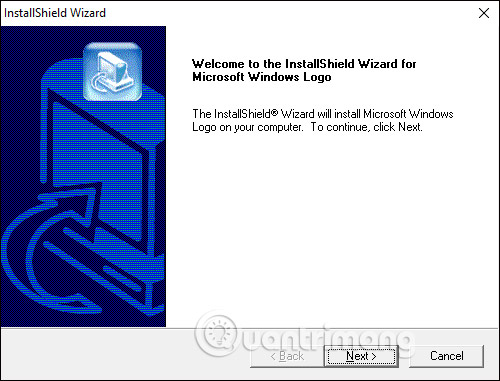
<p style="text-align: justify;">Bạn click vào file phần mềm đã tải xuống để tiến hành cài đặt như bình thường.</p>

<p style="text-align: justify;"><img alt="Cài đặt phần mềm " data-i="0" data-src="https://st.quantrimang.com/photos/image/2020/11/05/MSWLogo-phan-mem-lap-trinh-1.jpg" data-was-processed="true" height="381" src="https://st.quantrimang.com/photos/image/2020/11/05/MSWLogo-phan-mem-lap-trinh-1.jpg" width="500" /></p>

<p style="text-align: justify;"><strong>Bước 3:</strong></p>

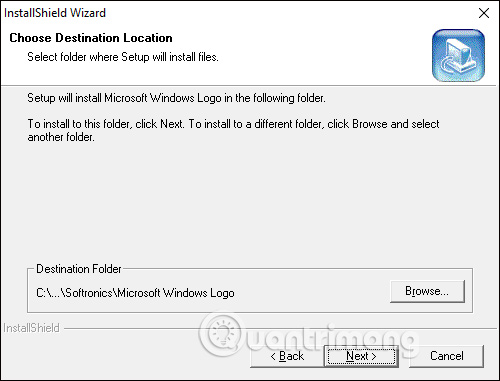
<p style="text-align: justify;">Trong giao diện cửa sổ&nbsp;<strong>Choose Destination Location</strong>, bạn có thể thay đổi lại thư mục lưu trữ file cài đặt của mình phần mềm, mặc định là ổ C. Để thay đổi nhấn nút Browse…</p>

<p style="text-align: justify;"><img alt="Chọn nơi cài đặt" data-i="1" data-src="https://st.quantrimang.com/photos/image/2020/11/05/MSWLogo-phan-mem-lap-trinh-2.jpg" data-was-processed="true" height="381" src="https://st.quantrimang.com/photos/image/2020/11/05/MSWLogo-phan-mem-lap-trinh-2.jpg" width="500" /></p>

<p style="text-align: justify;"><strong>Bước 4:</strong></p>

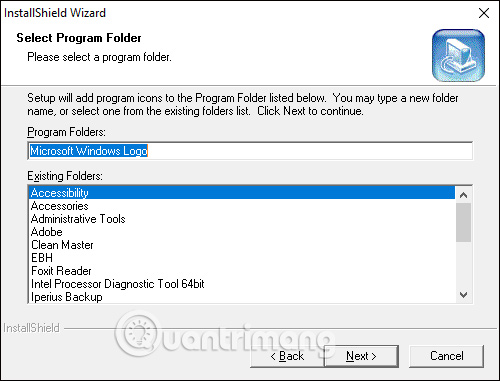
<p style="text-align: justify;">Chuyển sang hộp thoại&nbsp;<strong>Select Program Folder</strong>, bạn có thể đặt tên cho thư mục cài đặt phần mềm, hoặc để như thiết lập rồi nhấn Next để tiếp tục.</p>

<p style="text-align: justify;">Cuối cùng chờ quá trình cài đặt hoàn thành là xong.</p>

<p style="text-align: justify;"><img alt="Cài đặt thư mục " data-i="2" data-src="https://st.quantrimang.com/photos/image/2020/11/05/MSWLogo-phan-mem-lap-trinh-3.jpg" data-was-processed="true" height="381" src="https://st.quantrimang.com/photos/image/2020/11/05/MSWLogo-phan-mem-lap-trinh-3.jpg" width="500" /></p>

<p style="text-align: justify;"><strong>Bước 5:</strong></p>

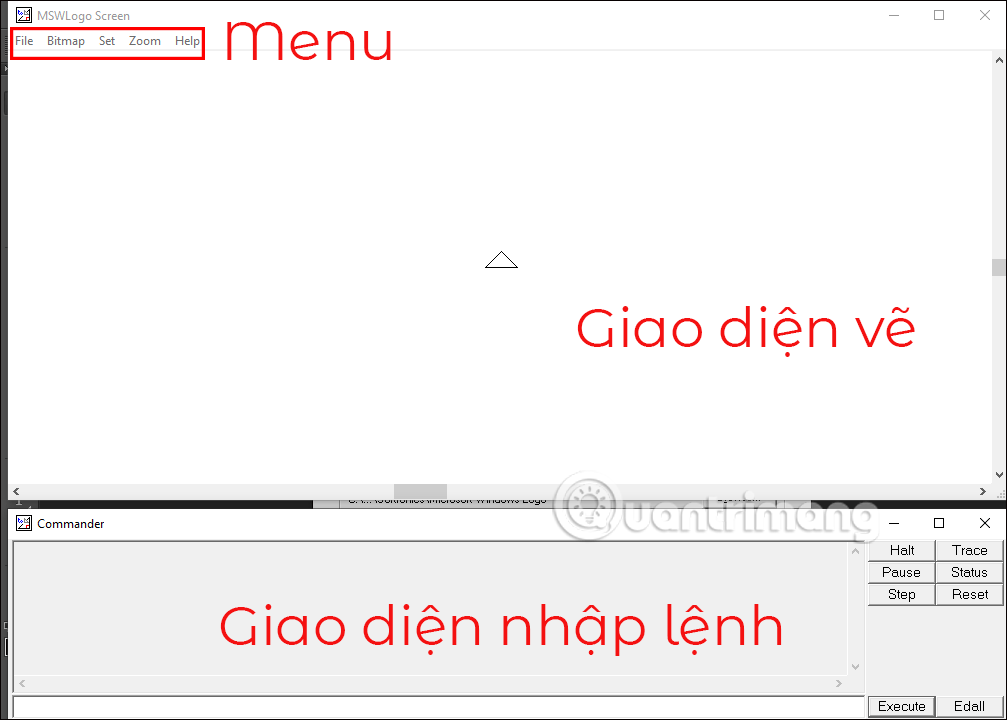
<p style="text-align: justify;">Dưới đây là giao diện chính của phần mềm MSWLogo sau khi đã cài đặt xong. Tại đây bạn sẽ thấy màn hình có 2 phần. Trên cùng là cửa sổ vẽ với rùa, bên dưới là cửa sổ dòng lệnh.</p>

<p style="text-align: justify;">Người học sẽ nhập lệnh ở khung trắng trong giao diện bên dưới rồi nhấn Enter hoặc Execute để thực thi lệnh.</p>

<p style="text-align: justify;"><img alt="Giao diện phần mềm" data-i="3" data-src="https://st.quantrimang.com/photos/image/2020/11/05/MSWLogo-phan-mem-lap-trinh-4.png" data-was-processed="true" height="458" src="https://st.quantrimang.com/photos/image/2020/11/05/MSWLogo-phan-mem-lap-trinh-4.png" width="640" /></p>
		</div>
				<div id="author">
						<p>
				<strong>Nguồn tin:</strong>
				Quantrimang.com
			</p>
		</div>
	</div>
	<div id="footer" class="clearfix">
		<div id="url">
			<strong>URL của bản tin này: </strong><a href="https://www.nguoicodonvn2008.info/vi/news/savefile/kien-thuc-may-tinh/cach-cai-mswlogo-phan-mem-lap-trinh-tren-may-tinh-3023.html" title="Cách cài MSWLogo phần mềm lập trình trên máy tính">https://www.nguoicodonvn2008.info/vi/news/savefile/kien-thuc-may-tinh/cach-cai-mswlogo-phan-mem-lap-trinh-tren-may-tinh-3023.html</a>

		</div>
		<div class="clear"></div>
		<div class="copyright">
			&copy; .&#x3A; Nguoicodonvn2008.info - Cõi lòng người cô đơn &#x3A;.
		</div>
		<div id="contact">
			<a href="mailto:admin@nguoicodonvn2008.info">admin@nguoicodonvn2008.info</a>
		</div>
	</div>
</div>
        <div id="timeoutsess" class="chromeframe">
            Bạn đã không sử dụng Site, <a onclick="timeoutsesscancel();" href="https://www.nguoicodonvn2008.info/#">Bấm vào đây để duy trì trạng thái đăng nhập</a>. Thời gian chờ: <span id="secField"> 60 </span> giây
        </div>
        <div id="openidResult" class="nv-alert" style="display:none"></div>
        <div id="openidBt" data-result="" data-redirect=""></div>
		</script>
		<div class="car-top">
  <span><img src="https://www.nguoicodonvn2008.info/themes/default/images/car.png" alt=""></span>
</div>
<div id="run_cronjobs" style="visibility:hidden;display:none;"><img alt="cron" src="/index.php?second=cronjobs&amp;p=z7jM2BX1" width="1" height="1" /></div>
<script src="https://www.nguoicodonvn2008.info/assets/js/jquery/jquery.min.js"></script>
<script>var nv_base_siteurl="/",nv_lang_data="vi",nv_lang_interface="vi",nv_name_variable="nv",nv_fc_variable="op",nv_lang_variable="language",nv_module_name="news",nv_func_name="savefile",nv_is_user=0, nv_my_ofs=-4,nv_my_abbr="EDT",nv_cookie_prefix="nv4c_e856T",nv_check_pass_mstime=1738000,nv_area_admin=0,nv_safemode=0,theme_responsive=0,nv_recaptcha_ver=2,nv_recaptcha_sitekey="",nv_recaptcha_type="image",XSSsanitize=1;</script>
<script src="https://www.nguoicodonvn2008.info/assets/js/language/vi.js"></script>
<script src="https://www.nguoicodonvn2008.info/assets/js/DOMPurify/purify3.js"></script>
<script src="https://www.nguoicodonvn2008.info/assets/js/global.js"></script>
<script src="https://www.nguoicodonvn2008.info/assets/js/site.js"></script>
<script src="https://www.nguoicodonvn2008.info/themes/default/js/news.js"></script>
<script src="https://www.nguoicodonvn2008.info/themes/default/js/main.js"></script>
<script src="https://www.nguoicodonvn2008.info/themes/default/js/custom.js"></script>
<script type="application/ld+json">
        {
            "@context": "https://schema.org",
            "@type": "Organization",
            "url": "https://www.nguoicodonvn2008.info",
            "logo": "https://www.nguoicodonvn2008.info/uploads/angel.gif"
        }
        </script>
<script src="https://www.nguoicodonvn2008.info/themes/default/js/bootstrap.min.js"></script>
<script type="text/javascript">
var $scrolltop = $('.car-top');
$scrolltop.on('click', function () {
    $('html,body').animate({
        scrollTop: 0
    }, 800);
    $(this).addClass("car-run");
    setTimeout(function(){ $scrolltop.removeClass('car-run');}, 1000);
    return false;
});
$(window).on('scroll', function ()
{ 
    if($(window).scrollTop() >= 200)
    {
        $scrolltop.addClass("show");
        $scrolltop.addClass("car-down");
    }
    else
    {
       $scrolltop.removeClass("show");
       setTimeout(function(){ $scrolltop.removeClass('car-down');}, 300);
    }
});
</script>
</body>
</html>