<!DOCTYPE html>
    <html lang="vi" xmlns="http://www.w3.org/1999/xhtml" prefix="og: http://ogp.me/ns#">
    <head>
<title>Cách cài đặt Umami trên Linux</title>
<meta name="description" content="Cách cài đặt Umami trên Linux - Savefile - Tin Tức - https&#x3A;&#x002F;&#x002F;www.nguoicodonvn2008.info&#x002F;vi&#x002F;news&#x002F;savefile&#x002F;kien-thuc-may-tinh&#x002F;cach-cai-dat-umami-tren-linux-8682.html">
<meta name="author" content=".: Nguoicodonvn2008.info - Cõi lòng người cô đơn :.">
<meta name="copyright" content=".: Nguoicodonvn2008.info - Cõi lòng người cô đơn :. [admin@nguoicodonvn2008.info]">
<meta name="robots" content="index, archive, follow, noodp">
<meta name="googlebot" content="index,archive,follow,noodp">
<meta name="msnbot" content="all,index,follow">
<meta name="generator" content="NukeViet v4.5">
<meta http-equiv="Content-Type" content="text/html; charset=utf-8">
<meta property="og:title" content="Cách cài đặt Umami trên Linux">
<meta property="og:type" content="website">
<meta property="og:description" content="Savefile - Tin Tức - https&#x3A;&#x002F;&#x002F;www.nguoicodonvn2008.info&#x002F;vi&#x002F;news&#x002F;savefile&#x002F;kien-thuc-may-tinh&#x002F;cach-cai-dat-umami-tren-linux-8682.html">
<meta property="og:site_name" content=".&#x3A; Nguoicodonvn2008.info - Cõi lòng người cô đơn &#x3A;.">
<meta property="og:url" content="https://www.nguoicodonvn2008.info/vi/news/savefile/kien-thuc-may-tinh/cach-cai-dat-umami-tren-linux-8682.html">
<link rel="shortcut icon" href="https://www.nguoicodonvn2008.info/favicon.ico">
<link rel="canonical" href="https://www.nguoicodonvn2008.info/vi/news/savefile/kien-thuc-may-tinh/cach-cai-dat-umami-tren-linux-8682.html">
<link rel="alternate" href="https://www.nguoicodonvn2008.info/vi/news/rss/" title="Tin Tức" type="application/rss+xml">
<link rel="alternate" href="https://www.nguoicodonvn2008.info/vi/news/rss/karaoke-dual/" title="Tin Tức - Karaoke Dual" type="application/rss+xml">
<link rel="alternate" href="https://www.nguoicodonvn2008.info/vi/news/rss/nhac-tre/" title="Tin Tức - Nhạc trẻ" type="application/rss+xml">
<link rel="alternate" href="https://www.nguoicodonvn2008.info/vi/news/rss/tru-tinh/" title="Tin Tức - Trữ tình" type="application/rss+xml">
<link rel="alternate" href="https://www.nguoicodonvn2008.info/vi/news/rss/nuoc-ngoai/" title="Tin Tức - Nước ngoài" type="application/rss+xml">
<link rel="alternate" href="https://www.nguoicodonvn2008.info/vi/news/rss/remix/" title="Tin Tức - Remix" type="application/rss+xml">
<link rel="alternate" href="https://www.nguoicodonvn2008.info/vi/news/rss/tam-su-tinh-yeu/" title="Tin Tức - Tâm sự tình yêu" type="application/rss+xml">
<link rel="alternate" href="https://www.nguoicodonvn2008.info/vi/news/rss/tho-suu-tam/" title="Tin Tức - Thơ sưu tầm" type="application/rss+xml">
<link rel="alternate" href="https://www.nguoicodonvn2008.info/vi/news/rss/cuoc-song/" title="Tin Tức - Cuộc sống" type="application/rss+xml">
<link rel="alternate" href="https://www.nguoicodonvn2008.info/vi/news/rss/phan-mem/" title="Tin Tức - Phần mềm" type="application/rss+xml">
<link rel="alternate" href="https://www.nguoicodonvn2008.info/vi/news/rss/kien-thuc-may-tinh/" title="Tin Tức - Kiến thức máy tính" type="application/rss+xml">
<link rel="alternate" href="https://www.nguoicodonvn2008.info/vi/news/rss/hoc-tap/" title="Tin Tức - Học tập" type="application/rss+xml">
<link rel="alternate" href="https://www.nguoicodonvn2008.info/vi/news/rss/tai-lieu/" title="Tin Tức - Tài liệu" type="application/rss+xml">
<link rel="alternate" href="https://www.nguoicodonvn2008.info/vi/news/rss/de-thi/" title="Tin Tức - Đề thi" type="application/rss+xml">
<link rel="preload" as="style" href="https://www.nguoicodonvn2008.info/assets/css/font-awesome.min.css" type="text/css">
<link rel="preload" as="style" href="https://www.nguoicodonvn2008.info/themes/default/css/bootstrap.non-responsive.css" type="text/css">
<link rel="preload" as="style" href="https://www.nguoicodonvn2008.info/themes/default/css/style.css" type="text/css">
<link rel="preload" as="style" href="https://www.nguoicodonvn2008.info/themes/default/css/style.non-responsive.css" type="text/css">
<link rel="preload" as="style" href="https://www.nguoicodonvn2008.info/themes/default/css/news.css" type="text/css">
<link rel="preload" as="style" href="https://www.nguoicodonvn2008.info/themes/default/css/custom.css" type="text/css">
<link rel="preload" as="script" href="https://www.nguoicodonvn2008.info/assets/js/jquery/jquery.min.js" type="text/javascript">
<link rel="preload" as="script" href="https://www.nguoicodonvn2008.info/assets/js/language/vi.js" type="text/javascript">
<link rel="preload" as="script" href="https://www.nguoicodonvn2008.info/assets/js/DOMPurify/purify3.js" type="text/javascript">
<link rel="preload" as="script" href="https://www.nguoicodonvn2008.info/assets/js/global.js" type="text/javascript">
<link rel="preload" as="script" href="https://www.nguoicodonvn2008.info/assets/js/site.js" type="text/javascript">
<link rel="preload" as="script" href="https://www.nguoicodonvn2008.info/themes/default/js/news.js" type="text/javascript">
<link rel="preload" as="script" href="https://www.nguoicodonvn2008.info/themes/default/js/main.js" type="text/javascript">
<link rel="preload" as="script" href="https://www.nguoicodonvn2008.info/themes/default/js/custom.js" type="text/javascript">
<link rel="preload" as="script" href="https://www.nguoicodonvn2008.info/themes/default/js/bootstrap.min.js" type="text/javascript">
<link rel="stylesheet" href="https://www.nguoicodonvn2008.info/assets/css/font-awesome.min.css">
<link rel="stylesheet" href="https://www.nguoicodonvn2008.info/themes/default/css/bootstrap.non-responsive.css">
<link rel="stylesheet" href="https://www.nguoicodonvn2008.info/themes/default/css/style.css">
<link rel="stylesheet" href="https://www.nguoicodonvn2008.info/themes/default/css/style.non-responsive.css">
<link rel="StyleSheet" href="https://www.nguoicodonvn2008.info/themes/default/css/news.css">
<link rel="stylesheet" href="https://www.nguoicodonvn2008.info/themes/default/css/custom.css">
<style type="text/css">
	body{background: #fff;}
</style>
    </head>
    <body>
<div id="print">
	<div id="hd_print">
		<h2 class="pull-left">.&#x3A; Nguoicodonvn2008.info - Cõi lòng người cô đơn &#x3A;.</h2>
		<p class="pull-right"><a title=".&#x3A; Nguoicodonvn2008.info - Cõi lòng người cô đơn &#x3A;." href="https://www.nguoicodonvn2008.info/">https://www.nguoicodonvn2008.info</a></p>
	</div>
	<div class="clear"></div>
	<hr />
	<div id="content">
		<h1>Cách cài đặt Umami trên Linux</h1>
		<ul class="list-inline">
			<li>Thứ ba - 16/07/2024 23:36</li>
			<li class="hidden-print txtrequired"><em class="fa fa-print">&nbsp;</em><a title="In ra" href="javascript:;" onclick="window.print()">In ra</a></li>
			<li class="hidden-print txtrequired"><em class="fa fa-power-off">&nbsp;</em><a title="Đóng cửa sổ này" href="javascript:;" onclick="window.close()">Đóng cửa sổ này</a></li>
		</ul>
		<div class="clear"></div>
		<div id="hometext">
		</div>
				<div class="imghome">
			<img alt="Cách cài đặt Umami trên Linux" src="https://st.quantrimang.com/photos/image/2024/07/16/cai-umami-tren-linux-5.jpg" width="460" class="img-thumbnail" />
		</div>
		<div class="clear"></div>
		<div id="bodytext" class="clearfix">
			<p style="text-align: justify;">Umami là phần mềm phân tích gọn nhẹ và tập trung vào quyền riêng tư dành cho các website và ứng dụng web. Đây là một trong&nbsp;những lựa chọn thay thế miễn phí tốt nhất cho Google Analytics&nbsp;và nó cung cấp giao diện dễ sử dụng có thể xem và phân tích lưu lượng truy cập web đến tương tự như&nbsp;Google Analytics. Bài viết hôm nay sẽ hướng dẫn cách cài đặt Umami trên Ubuntu Linux.</p>

<h2 style="text-align: justify;">Tải Docker và Docker Compose cho Umami</h2>

<p style="text-align: justify;">Bước đầu tiên trong việc tự host các phân tích của riêng bạn với Umami là tải cả Docker và Docker Compose cho máy tính Linux. Để làm điều đó, hãy lấy signing key từ trang web của dự án Docker:</p>

<pre id="pre0">
<code>curl -fsSL https://download.docker.com/linux/ubuntu/gpg | sudo gpg --dearmor -o /etc/apt/keyrings/docker.gpg
sudo chmod a+r /etc/apt/keyrings/docker.gpg</code></pre>

<p style="text-align: justify;"><strong>Lưu ý</strong>: Phần này tập trung vào việc cài đặt Docker cho Ubuntu. Nếu bạn đang sử dụng một bản phân phối khác, hãy xem hướng dẫn chung để&nbsp;cài đặt Docker trên Linux.</p>

<p style="text-align: justify;">Tạo một file kho lưu trữ mới trong&nbsp;<strong>“/etc/apt/sources.list.d/”</strong>&nbsp;bằng trình soạn thảo văn bản yêu thích:</p>

<pre id="pre1">
<code>sudo nano /etc/apt/sources.list.d/docker.list</code></pre>

<p style="text-align: justify;">Dán dòng code sau vào file kho lưu trữ mới:</p>

<pre id="pre2">
<code>deb &#91;arch=amd64 signed-by=/etc/apt/keyrings/docker.gpg&#93; https://download.docker.com/linux/ubuntu noble stable</code></pre>

<p style="text-align: justify;">Đảm bảo rằng hệ thống được cập nhật hoàn toàn và hoạt động chính xác:</p>

<pre id="pre3">
<code>sudo apt update &amp;&amp; sudo apt upgrade</code></pre>

<p style="text-align: justify;">Cài đặt Docker, Docker Compose và các dependency bổ sung cho Umami:</p>

<pre id="pre4">
<code>sudo apt install docker-ce docker-ce-cli containerd.io docker-compose-plugin docker-buildx-plugin nginx git</code></pre>

<h2 style="text-align: justify;">Cài đặt Umami</h2>

<div style="text-align: justify;"><iframe allow="autoplay" allowtransparency="true" aria-label="Advertisement" data-google-container-id="a!2" data-google-query-id="CJn9utySrYcDFSCK6QUdwFICuQ" data-load-complete="true" frameborder="0" height="0" hspace="0" id="aswift_1" marginheight="0" marginwidth="0" name="aswift_1" sandbox="allow-scripts allow-same-origin allow-forms allow-presentation" scrolling="no" tabindex="0" title="Advertisement" vspace="0" width="694"></iframe></div>

<p style="text-align: justify;">Điều hướng đến thư mục chính của tài khoản người dùng, sau đó lấy kho lưu trữ Umami Git từ trang Github của nhà phát triển:</p>

<pre id="pre5">
<code>cd ~ &amp;&amp; git clone https://github.com/umami-software/umami.git</code></pre>

<p style="text-align: justify;">Đi vào bên trong kho lưu trữ Umami Git, sau đó mở file Docker Compose dựng sẵn bằng trình soạn thảo văn bản yêu thích:</p>

<pre id="pre6">
<code>cd ~/umami
nano ./docker-compose.yml</code></pre>

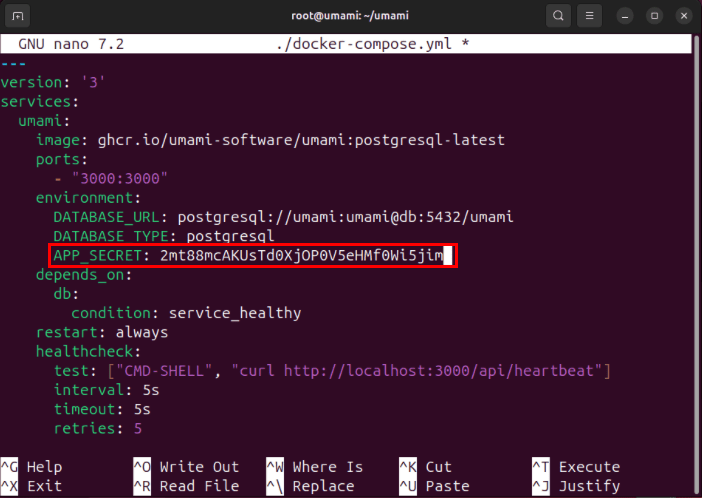
<p style="text-align: justify;">Cuộn xuống danh mục “environment:”, sau đó thay thế giá trị của biến&nbsp;<strong>APP_SECRET</strong>&nbsp;bằng một chuỗi ký tự ngẫu nhiên.</p>

<figure>
<div style="text-align: justify;"><img alt="" data-i="0" data-src="https://st.quantrimang.com/photos/image/2024/07/16/cai-umami-tren-linux-1.jpg" data-was-processed="true" height="498" src="https://st.quantrimang.com/photos/image/2024/07/16/cai-umami-tren-linux-1.jpg" width="702" /></div>
</figure>

<p style="text-align: justify;"><strong>Lưu ý</strong>: Bạn có thể tạo chuỗi chữ cái và số ngẫu nhiên của riêng mình bằng cách chạy: cat /dev/urandom | tr -dc &#039;A-Za-z0-9&#039; | fold -w 32 | head -n 1.</p>

<p style="text-align: justify;">Lưu file Docker Compose, sau đó chạy lệnh sau để build và cài đặt container Umami:</p>

<pre id="pre7">
<code>sudo docker compose up -d</code></pre>

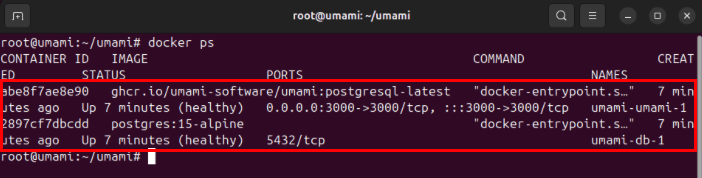
<p style="text-align: justify;">Xác nhận rằng phiên bản Umami của bạn đang chạy bằng cách liệt kê các Docker Container có sẵn trong hệ thống:</p>

<pre id="pre8">
<code>docker ps</code></pre>

<figure>
<div style="text-align: justify;"><img alt="2 Docker container đang chạy trên máy chủ Ubuntu." data-i="1" data-src="https://st.quantrimang.com/photos/image/2024/07/16/cai-umami-tren-linux-2.jpg" data-was-processed="true" height="178" src="https://st.quantrimang.com/photos/image/2024/07/16/cai-umami-tren-linux-2.jpg" width="702" /></div>

<figcaption>
<div style="text-align: justify;">2 Docker container đang chạy trên máy chủ Ubuntu.</div>
</figcaption>
</figure>

<h2 style="text-align: justify;">Bảo vệ Umami bằng SSL Reverse Proxy</h2>

<p style="text-align: justify;">Tại thời điểm này, bạn hiện đã có phiên bản phân tích Umami tự host chạy trên cổng 3000 trong hệ thống Linux. Tuy nhiên, để truy cập service này qua Internet, trước tiên bạn cần chuyển service này thông qua SSL Reverse Proxy.</p>

<div style="text-align: justify;"><iframe allow="autoplay" allowtransparency="true" aria-label="Advertisement" data-google-container-id="a!3" data-google-query-id="CIK5vNySrYcDFdSI6QUdT6Ys8g" data-load-complete="true" frameborder="0" height="0" hspace="0" id="aswift_2" marginheight="0" marginwidth="0" name="aswift_2" sandbox="allow-scripts allow-same-origin allow-forms allow-presentation" scrolling="no" tabindex="0" title="Advertisement" vspace="0" width="694"></iframe></div>

<p style="text-align: justify;">Bắt đầu bằng cách thêm bản ghi DNS “A” mới vào domain registrar trỏ đến địa chỉ IPv4 của máy chủ Umami. Trong trường hợp ví dụ, bản ghi “A” sẽ được đặt thành “umami.myreallygreatserver.xyz.”</p>

<figure>
<div style="text-align: justify;"><img alt="Địa chỉ IPv4 được liên kết với subdomain Umami" data-i="2" data-src="https://st.quantrimang.com/photos/image/2024/07/16/cai-umami-tren-linux-3.jpg" data-was-processed="true" height="119" src="https://st.quantrimang.com/photos/image/2024/07/16/cai-umami-tren-linux-3.jpg" width="800" /></div>

<figcaption>
<div style="text-align: justify;">Địa chỉ IPv4 được liên kết với subdomain Umami</div>
</figcaption>
</figure>

<p style="text-align: justify;">Kiểm tra xem gói snap “core” đã có trong máy chủ chưa:</p>

<pre id="pre9">
<code>sudo snap install core</code></pre>

<p style="text-align: justify;">Cài đặt gói snap Certbot từ Electronic Frontier Foundation (EFF):</p>

<pre id="pre10">
<code>sudo snap install certbot --classic</code></pre>

<p style="text-align: justify;">Tạo file cấu hình trang web mới cho SSL Reverse Proxy:</p>

<pre id="pre11">
<code>sudo nano /etc/nginx/sites-available/umami</code></pre>

<p style="text-align: justify;">Dán block code sau vào file cấu hình trang web mới:</p>

<pre id="pre12">
<code>server {
        server_name SUBDOMAIN.YOUR-ROOT.DOMAIN;
        location / {
                proxy_pass http://127.0.0.1:3000;
                proxy_http_version 1.1;
                proxy_redirect off;
                proxy_set_header Upgrade $http_upgrade;
                proxy_set_header Connection &quot;upgrade&quot;;
                proxy_set_header X-Forwarded-Proto https;
                proxy_set_header X-Forwarded-For $proxy_add_x_forwarded_for;
                proxy_set_header Host $host;
        }
}
</code></pre>

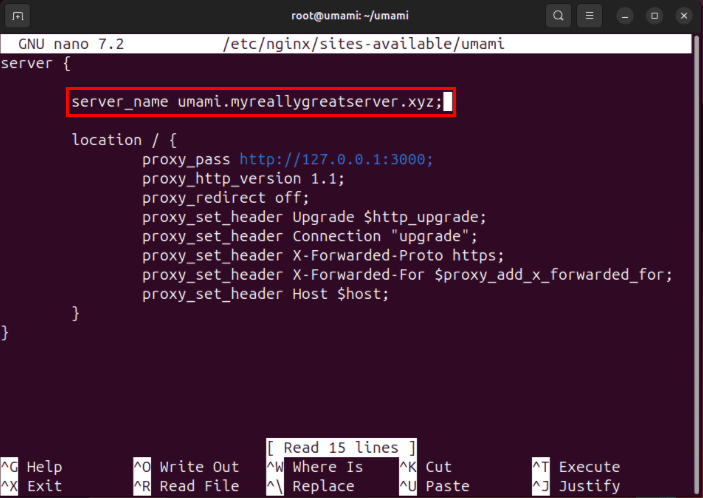
<p style="text-align: justify;">Thay thế giá trị của biến “server_name” bằng tên miền của bạn.</p>

<figure>
<div style="text-align: justify;"><img alt="Subdomain tùy chỉnh bên trong cấu hình reverse proxy Nginx." data-adbro-processed="true" data-i="3" data-src="https://st.quantrimang.com/photos/image/2024/07/16/cai-umami-tren-linux-4.jpg" data-was-processed="true" height="498" src="https://st.quantrimang.com/photos/image/2024/07/16/cai-umami-tren-linux-4.jpg" width="703" /></div>

<figcaption>
<div style="text-align: justify;">Subdomain tùy chỉnh bên trong cấu hình reverse proxy Nginx.</div>
</figcaption>
</figure>

<p style="text-align: justify;">Lưu file cấu hình trang web mới, sau đó tạo symbol link đến&nbsp;<strong>“/etc/nginx/sites-enabled:”</strong>.</p>

<pre id="pre13">
<code>sudo ln -s /etc/nginx/sites-available/umami /etc/nginx/sites-enabled/</code></pre>

<p style="text-align: justify;">Kiểm tra lỗi file cấu hình Nginx, sau đó chạy systemctl để khởi động reverse proxy:</p>

<pre id="pre14">
<code>nginx -t&lt;br&gt;sudo systemctl reload nginx.service</code></pre>

<p style="text-align: justify;">Đăng ký máy chủ Umami của bạn với EFF:</p>

<pre id="pre15">
<code>sudo certbot register --agree-tos -m YOUR@EMAIL.ADDRESS</code></pre>

<p style="text-align: justify;">Chạy lệnh sau để tạo chứng chỉ SSL cho trang web:</p>
<iframe allow="autoplay" allowtransparency="true" aria-label="Advertisement" data-google-container-id="a!4" data-google-query-id="CNG_sOWSrYcDFeqH6QUd1hAEbA" data-load-complete="true" frameborder="0" height="0" hspace="0" id="aswift_3" marginheight="0" marginwidth="0" name="aswift_3" sandbox="allow-scripts allow-same-origin allow-forms allow-presentation" scrolling="no" tabindex="0" title="Advertisement" vspace="0" width="694"></iframe>

<pre id="pre16">
<code>sudo certbot --nginx -d SUBDOMAIN.YOUR-ROOT.DOMAIN</code></pre>

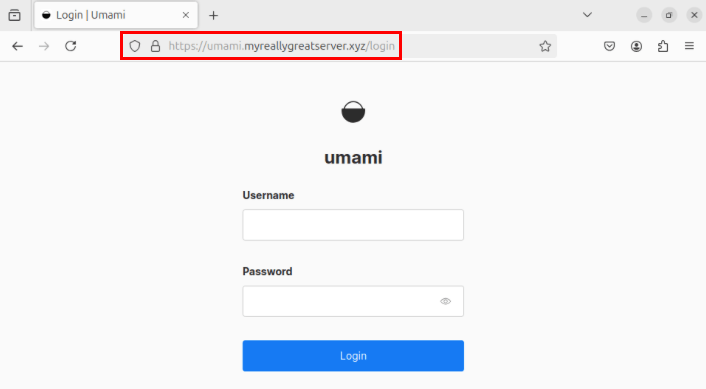
<p style="text-align: justify;">Xác nhận rằng phiên bản Umami đang hoạt động bình thường bằng cách mở trình duyệt web và điều hướng đến subdomain của bạn.</p>

<figure>
<div style="text-align: justify;"><img alt="Thanh địa chỉ của phiên bản Umami." data-i="4" data-src="https://st.quantrimang.com/photos/image/2024/07/16/cai-umami-tren-linux-5.jpg" data-was-processed="true" height="389" src="https://st.quantrimang.com/photos/image/2024/07/16/cai-umami-tren-linux-5.jpg" width="706" /></div>

<figcaption>
<div style="text-align: justify;">Thanh địa chỉ của phiên bản Umami.</div>
</figcaption>
</figure>

<div style="text-align: justify;">&nbsp;</div>
		</div>
				<div id="author">
						<p>
				<strong>Nguồn tin:</strong>
				Quantrimang.com:
			</p>
		</div>
	</div>
	<div id="footer" class="clearfix">
		<div id="url">
			<strong>URL của bản tin này: </strong><a href="https://www.nguoicodonvn2008.info/vi/news/savefile/kien-thuc-may-tinh/cach-cai-dat-umami-tren-linux-8682.html" title="Cách cài đặt Umami trên Linux">https://www.nguoicodonvn2008.info/vi/news/savefile/kien-thuc-may-tinh/cach-cai-dat-umami-tren-linux-8682.html</a>

		</div>
		<div class="clear"></div>
		<div class="copyright">
			&copy; .&#x3A; Nguoicodonvn2008.info - Cõi lòng người cô đơn &#x3A;.
		</div>
		<div id="contact">
			<a href="mailto:admin@nguoicodonvn2008.info">admin@nguoicodonvn2008.info</a>
		</div>
	</div>
</div>
        <div id="timeoutsess" class="chromeframe">
            Bạn đã không sử dụng Site, <a onclick="timeoutsesscancel();" href="https://www.nguoicodonvn2008.info/#">Bấm vào đây để duy trì trạng thái đăng nhập</a>. Thời gian chờ: <span id="secField"> 60 </span> giây
        </div>
        <div id="openidResult" class="nv-alert" style="display:none"></div>
        <div id="openidBt" data-result="" data-redirect=""></div>
		</script>
		<div class="car-top">
  <span><img src="https://www.nguoicodonvn2008.info/themes/default/images/car.png" alt=""></span>
</div>
<script src="https://www.nguoicodonvn2008.info/assets/js/jquery/jquery.min.js"></script>
<script>var nv_base_siteurl="/",nv_lang_data="vi",nv_lang_interface="vi",nv_name_variable="nv",nv_fc_variable="op",nv_lang_variable="language",nv_module_name="news",nv_func_name="savefile",nv_is_user=0, nv_my_ofs=-4,nv_my_abbr="EDT",nv_cookie_prefix="nv4c_e856T",nv_check_pass_mstime=1738000,nv_area_admin=0,nv_safemode=0,theme_responsive=0,nv_recaptcha_ver=2,nv_recaptcha_sitekey="",nv_recaptcha_type="image",XSSsanitize=1;</script>
<script src="https://www.nguoicodonvn2008.info/assets/js/language/vi.js"></script>
<script src="https://www.nguoicodonvn2008.info/assets/js/DOMPurify/purify3.js"></script>
<script src="https://www.nguoicodonvn2008.info/assets/js/global.js"></script>
<script src="https://www.nguoicodonvn2008.info/assets/js/site.js"></script>
<script src="https://www.nguoicodonvn2008.info/themes/default/js/news.js"></script>
<script src="https://www.nguoicodonvn2008.info/themes/default/js/main.js"></script>
<script src="https://www.nguoicodonvn2008.info/themes/default/js/custom.js"></script>
<script type="application/ld+json">
        {
            "@context": "https://schema.org",
            "@type": "Organization",
            "url": "https://www.nguoicodonvn2008.info",
            "logo": "https://www.nguoicodonvn2008.info/uploads/angel.gif"
        }
        </script>
<script src="https://www.nguoicodonvn2008.info/themes/default/js/bootstrap.min.js"></script>
<script type="text/javascript">
var $scrolltop = $('.car-top');
$scrolltop.on('click', function () {
    $('html,body').animate({
        scrollTop: 0
    }, 800);
    $(this).addClass("car-run");
    setTimeout(function(){ $scrolltop.removeClass('car-run');}, 1000);
    return false;
});
$(window).on('scroll', function ()
{ 
    if($(window).scrollTop() >= 200)
    {
        $scrolltop.addClass("show");
        $scrolltop.addClass("car-down");
    }
    else
    {
       $scrolltop.removeClass("show");
       setTimeout(function(){ $scrolltop.removeClass('car-down');}, 300);
    }
});
</script>
</body>
</html>