<!DOCTYPE html>
    <html lang="vi" xmlns="http://www.w3.org/1999/xhtml" prefix="og: http://ogp.me/ns#">
    <head>
<title>Cách cài đặt Microsoft Edge trên Chromebook</title>
<meta name="description" content="Cách cài đặt Microsoft Edge trên Chromebook - Savefile - Tin Tức -...">
<meta name="author" content=".: Nguoicodonvn2008.info - Cõi lòng người cô đơn :.">
<meta name="copyright" content=".: Nguoicodonvn2008.info - Cõi lòng người cô đơn :. [admin@nguoicodonvn2008.info]">
<meta name="robots" content="index, archive, follow, noodp">
<meta name="googlebot" content="index,archive,follow,noodp">
<meta name="msnbot" content="all,index,follow">
<meta name="generator" content="NukeViet v4.5">
<meta http-equiv="Content-Type" content="text/html; charset=utf-8">
<meta property="og:title" content="Cách cài đặt Microsoft Edge trên Chromebook">
<meta property="og:type" content="website">
<meta property="og:description" content="Savefile - Tin Tức - https&#x3A;&#x002F;&#x002F;www.nguoicodonvn2008.info&#x002F;vi&#x002F;news&#x002F;savefile&#x002F;kien-thuc-may-tinh&#x002F;cach-cai-dat-microsoft-edge-tren-chromebook-4133.html">
<meta property="og:site_name" content=".&#x3A; Nguoicodonvn2008.info - Cõi lòng người cô đơn &#x3A;.">
<meta property="og:url" content="https://www.nguoicodonvn2008.info/vi/news/savefile/kien-thuc-may-tinh/cach-cai-dat-microsoft-edge-tren-chromebook-4133.html">
<link rel="shortcut icon" href="https://www.nguoicodonvn2008.info/favicon.ico">
<link rel="canonical" href="https://www.nguoicodonvn2008.info/vi/news/savefile/kien-thuc-may-tinh/cach-cai-dat-microsoft-edge-tren-chromebook-4133.html">
<link rel="alternate" href="https://www.nguoicodonvn2008.info/vi/news/rss/" title="Tin Tức" type="application/rss+xml">
<link rel="alternate" href="https://www.nguoicodonvn2008.info/vi/news/rss/karaoke-dual/" title="Tin Tức - Karaoke Dual" type="application/rss+xml">
<link rel="alternate" href="https://www.nguoicodonvn2008.info/vi/news/rss/nhac-tre/" title="Tin Tức - Nhạc trẻ" type="application/rss+xml">
<link rel="alternate" href="https://www.nguoicodonvn2008.info/vi/news/rss/tru-tinh/" title="Tin Tức - Trữ tình" type="application/rss+xml">
<link rel="alternate" href="https://www.nguoicodonvn2008.info/vi/news/rss/nuoc-ngoai/" title="Tin Tức - Nước ngoài" type="application/rss+xml">
<link rel="alternate" href="https://www.nguoicodonvn2008.info/vi/news/rss/remix/" title="Tin Tức - Remix" type="application/rss+xml">
<link rel="alternate" href="https://www.nguoicodonvn2008.info/vi/news/rss/tam-su-tinh-yeu/" title="Tin Tức - Tâm sự tình yêu" type="application/rss+xml">
<link rel="alternate" href="https://www.nguoicodonvn2008.info/vi/news/rss/tho-suu-tam/" title="Tin Tức - Thơ sưu tầm" type="application/rss+xml">
<link rel="alternate" href="https://www.nguoicodonvn2008.info/vi/news/rss/cuoc-song/" title="Tin Tức - Cuộc sống" type="application/rss+xml">
<link rel="alternate" href="https://www.nguoicodonvn2008.info/vi/news/rss/phan-mem/" title="Tin Tức - Phần mềm" type="application/rss+xml">
<link rel="alternate" href="https://www.nguoicodonvn2008.info/vi/news/rss/kien-thuc-may-tinh/" title="Tin Tức - Kiến thức máy tính" type="application/rss+xml">
<link rel="alternate" href="https://www.nguoicodonvn2008.info/vi/news/rss/hoc-tap/" title="Tin Tức - Học tập" type="application/rss+xml">
<link rel="alternate" href="https://www.nguoicodonvn2008.info/vi/news/rss/tai-lieu/" title="Tin Tức - Tài liệu" type="application/rss+xml">
<link rel="alternate" href="https://www.nguoicodonvn2008.info/vi/news/rss/de-thi/" title="Tin Tức - Đề thi" type="application/rss+xml">
<link rel="preload" as="style" href="https://www.nguoicodonvn2008.info/assets/css/font-awesome.min.css" type="text/css">
<link rel="preload" as="style" href="https://www.nguoicodonvn2008.info/themes/default/css/bootstrap.non-responsive.css" type="text/css">
<link rel="preload" as="style" href="https://www.nguoicodonvn2008.info/themes/default/css/style.css" type="text/css">
<link rel="preload" as="style" href="https://www.nguoicodonvn2008.info/themes/default/css/style.non-responsive.css" type="text/css">
<link rel="preload" as="style" href="https://www.nguoicodonvn2008.info/themes/default/css/news.css" type="text/css">
<link rel="preload" as="style" href="https://www.nguoicodonvn2008.info/themes/default/css/custom.css" type="text/css">
<link rel="preload" as="script" href="https://www.nguoicodonvn2008.info/assets/js/jquery/jquery.min.js" type="text/javascript">
<link rel="preload" as="script" href="https://www.nguoicodonvn2008.info/assets/js/language/vi.js" type="text/javascript">
<link rel="preload" as="script" href="https://www.nguoicodonvn2008.info/assets/js/DOMPurify/purify3.js" type="text/javascript">
<link rel="preload" as="script" href="https://www.nguoicodonvn2008.info/assets/js/global.js" type="text/javascript">
<link rel="preload" as="script" href="https://www.nguoicodonvn2008.info/assets/js/site.js" type="text/javascript">
<link rel="preload" as="script" href="https://www.nguoicodonvn2008.info/themes/default/js/news.js" type="text/javascript">
<link rel="preload" as="script" href="https://www.nguoicodonvn2008.info/themes/default/js/main.js" type="text/javascript">
<link rel="preload" as="script" href="https://www.nguoicodonvn2008.info/themes/default/js/custom.js" type="text/javascript">
<link rel="preload" as="script" href="https://www.nguoicodonvn2008.info/themes/default/js/bootstrap.min.js" type="text/javascript">
<link rel="stylesheet" href="https://www.nguoicodonvn2008.info/assets/css/font-awesome.min.css">
<link rel="stylesheet" href="https://www.nguoicodonvn2008.info/themes/default/css/bootstrap.non-responsive.css">
<link rel="stylesheet" href="https://www.nguoicodonvn2008.info/themes/default/css/style.css">
<link rel="stylesheet" href="https://www.nguoicodonvn2008.info/themes/default/css/style.non-responsive.css">
<link rel="StyleSheet" href="https://www.nguoicodonvn2008.info/themes/default/css/news.css">
<link rel="stylesheet" href="https://www.nguoicodonvn2008.info/themes/default/css/custom.css">
<style type="text/css">
	body{background: #fff;}
</style>
    </head>
    <body>
<div id="print">
	<div id="hd_print">
		<h2 class="pull-left">.&#x3A; Nguoicodonvn2008.info - Cõi lòng người cô đơn &#x3A;.</h2>
		<p class="pull-right"><a title=".&#x3A; Nguoicodonvn2008.info - Cõi lòng người cô đơn &#x3A;." href="https://www.nguoicodonvn2008.info/">https://www.nguoicodonvn2008.info</a></p>
	</div>
	<div class="clear"></div>
	<hr />
	<div id="content">
		<h1>Cách cài đặt Microsoft Edge trên Chromebook</h1>
		<ul class="list-inline">
			<li>Thứ tư - 26/05/2021 00:50</li>
			<li class="hidden-print txtrequired"><em class="fa fa-print">&nbsp;</em><a title="In ra" href="javascript:;" onclick="window.print()">In ra</a></li>
			<li class="hidden-print txtrequired"><em class="fa fa-power-off">&nbsp;</em><a title="Đóng cửa sổ này" href="javascript:;" onclick="window.close()">Đóng cửa sổ này</a></li>
		</ul>
		<div class="clear"></div>
		<div id="hometext">
		</div>
				<div class="imghome">
			<img alt="Cách cài đặt Microsoft Edge trên Chromebook" src="https://st.quantrimang.com/photos/image/2021/05/07/cai-dat-microsoft-edge-tren-chromebook1.jpg" width="460" class="img-thumbnail" />
		</div>
		<div class="clear"></div>
		<div id="bodytext" class="clearfix">
			<p style="text-align: justify;">Chrome OS là hệ điều hành “chính chủ” do Google phát triển, do đó, nó sẽ được tích hợp gần như đầy đủ các sản phẩm dịch vụ, phần mềm của Google theo mặc định, trong đó bao gồm cả trình duyệt Chrome.</p>

<p style="text-align: justify;">Có thể nói người dùng Chromebook là các “fan hâm mộ” đích thực của Google, do đó việc sử dụng Chrome làm trình duyệt mặc định trên hệ thống là lẽ dĩ nhiên. Tuy vậy, nếu muốn thử “đổi gió” chuyển sang sử dụng Microsoft Edge, bạn cũng hoàn toàn có thể cài đặt trình duyệt này trên chiếc Chromebook của mình.</p>

<p style="text-align: justify;">Trên thực tế, phiên bản Edge chính thức hiện tại vẫn chưa được hỗ trợ trên Chrome OS, nhưng bạn hoàn toàn có thể cài đặt phiên bản Edge Linux (đã được phát hành gần đây ở dạng thử nghiệm) trên Chromebook của mình.</p>

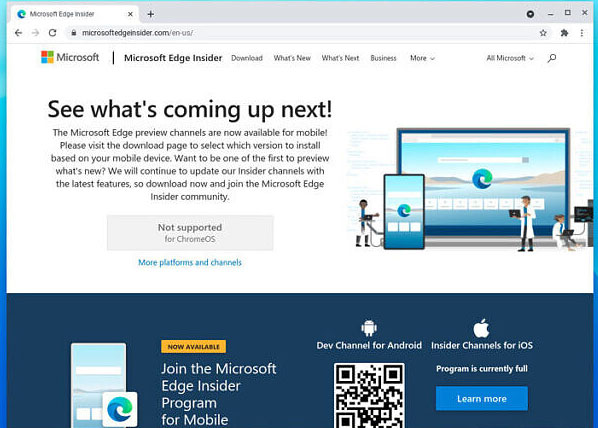
<p style="text-align: justify;"><strong>Bước 1</strong>: Mở Chrome và truy cập trang web&nbsp;Microsoft Edge Insider. Website này sẽ tự động phát hiện ra hệ điều hành mà bạn đang sử dụng là Chrome OS và đưa ra thông báo rằng bạn hiện không được hỗ trợ.</p>

<p style="text-align: justify;"><img alt="Truy cập trang web Microsoft Edge Insider." data-i="0" data-src="https://st.quantrimang.com/photos/image/2021/05/07/cai-dat-microsoft-edge-tren-chromebook1.jpg" data-was-processed="true" height="428" src="https://st.quantrimang.com/photos/image/2021/05/07/cai-dat-microsoft-edge-tren-chromebook1.jpg" width="598" /></p>

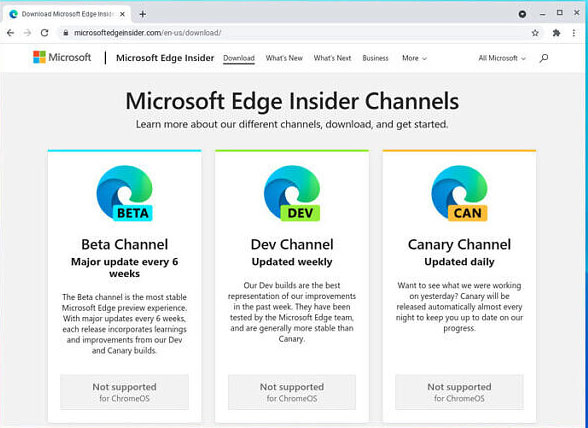
<p style="text-align: justify;"><strong>Bước 2</strong>: Nhấp vào &quot;More platforms and channels&quot;. Một thông báo sẽ được hiển thị, cho bạn biết thêm thông tin về việc Microsoft Edge hiện chưa được hỗ trợ cho Chrome OS. Hãy cuộn xuống cuối và nhấp vào nút download trong phần “Linux (.deb)”.</p>

<p style="text-align: justify;"><img alt="Microsoft Edge hiện chưa được hỗ trợ cho Chrome OS" data-i="1" data-src="https://st.quantrimang.com/photos/image/2021/05/07/cai-dat-microsoft-edge-tren-chromebook2.jpg" data-was-processed="true" height="428" src="https://st.quantrimang.com/photos/image/2021/05/07/cai-dat-microsoft-edge-tren-chromebook2.jpg" width="588" /></p>

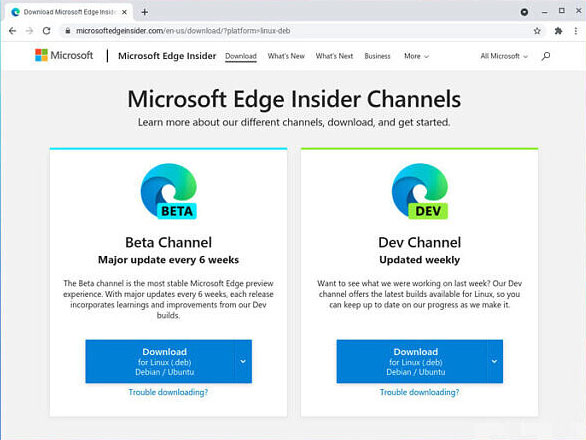
<p style="text-align: justify;"><strong>Bước 3</strong>: Bây giờ, hãy chọn xem bạn muốn Edge Beta hay Edge Dev (phiên bản ổn định (Stable) hiện chưa khả dụng). Bản Beta sẽ được cập nhật sáu tuần một lần (lộ trình sắp tới là bốn tuần một lần), trong khi Edge Dev sẽ được cập nhật hàng tuần.</p>

<p style="text-align: justify;"><img alt="Chọn Edge Beta hoặc Edge Dev" data-i="2" data-src="https://st.quantrimang.com/photos/image/2021/05/07/cai-dat-microsoft-edge-tren-chromebook3.jpg" data-was-processed="true" height="440" src="https://st.quantrimang.com/photos/image/2021/05/07/cai-dat-microsoft-edge-tren-chromebook3.jpg" width="586" /></p>

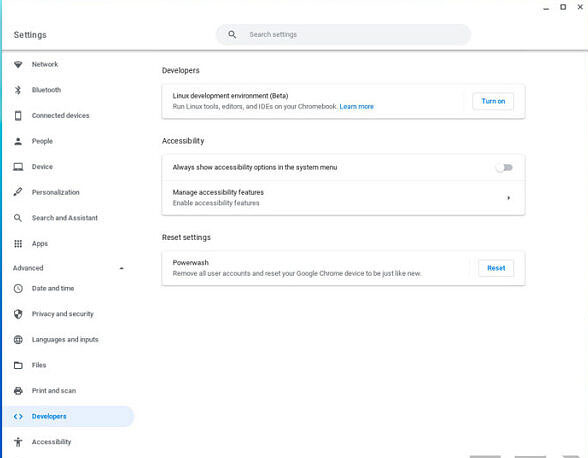
<p style="text-align: justify;"><strong>Bước 4</strong>: Tiếp theo, điều hướng tới “Settings -&gt; Advanced -&gt; Developers”. Trong “Linux development environment (Beta), bạn nhấp vào Turn on”.</p>

<p style="text-align: justify;"><img alt="Điều hướng tới “Settings -&gt; Advanced -&gt; Developers”" data-i="3" data-src="https://st.quantrimang.com/photos/image/2021/05/07/cai-dat-microsoft-edge-tren-chromebook4.jpg" data-was-processed="true" height="458" src="https://st.quantrimang.com/photos/image/2021/05/07/cai-dat-microsoft-edge-tren-chromebook4.jpg" width="588" /></p>

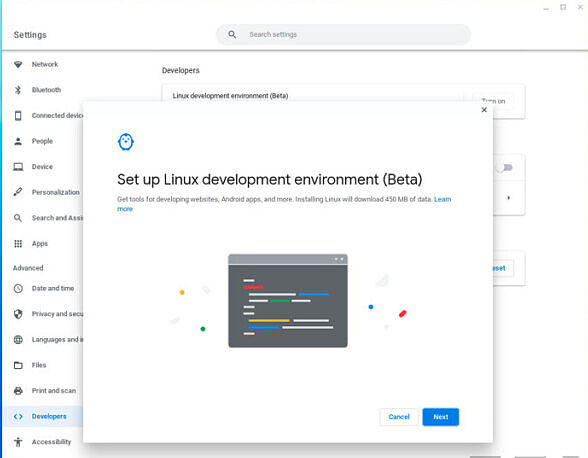
<p style="text-align: justify;"><strong>Bước 5</strong>: Làm theo hướng dẫn trên màn hình để thiết lập môi trường Linux.</p>

<p style="text-align: justify;"><img alt="Thiết lập môi trường Linux" data-i="4" data-src="https://st.quantrimang.com/photos/image/2021/05/07/cai-dat-microsoft-edge-tren-chromebook5.jpg" data-was-processed="true" height="458" src="https://st.quantrimang.com/photos/image/2021/05/07/cai-dat-microsoft-edge-tren-chromebook5.jpg" width="588" /></p>

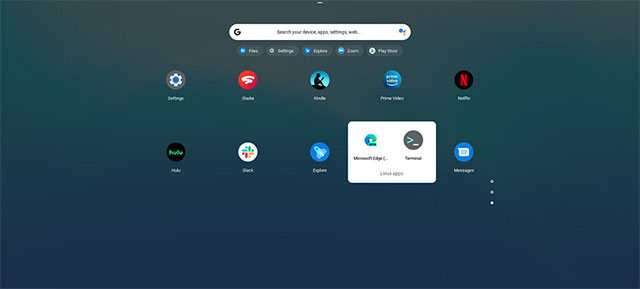
<p style="text-align: justify;"><strong>Bước 6</strong>: Sau khi hoàn tất, hãy mở tệp cài đặt Microsoft Edge mà bạn đã tải xuống. Quá trình này khá đơn giản. Bạn sẽ tìm thấy nó trong phần ứng dụng thuộc thư mục &quot;Linux apps&quot;.</p>

<p style="text-align: justify;"><img alt="" data-i="5" data-src="https://st.quantrimang.com/photos/image/2021/05/07/cai-dat-microsoft-edge-tren-chromebook6.jpg" data-was-processed="true" height="289" src="https://st.quantrimang.com/photos/image/2021/05/07/cai-dat-microsoft-edge-tren-chromebook6.jpg" width="640" /></p>

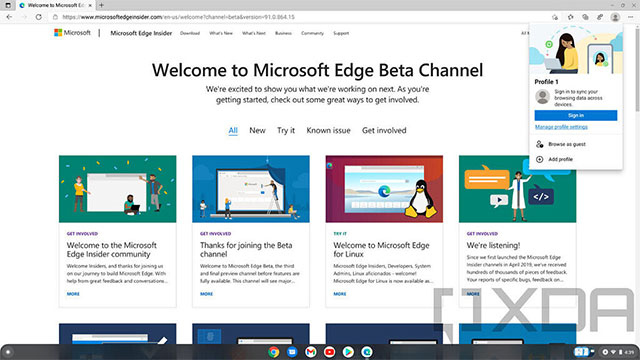
<p style="text-align: justify;"><strong>Bước 7</strong>: Nếu muốn, bạn có thể đăng nhập bằng tài khoản Microsoft. Điều này sẽ cho phép bạn đồng bộ hóa các mục yêu thích, lịch sử, mật khẩu, v.v. trên trình duyệt.</p>

<p style="text-align: justify;"><img alt="Edge đã được cài đặt" data-i="6" data-src="https://st.quantrimang.com/photos/image/2021/05/07/cai-dat-microsoft-edge-tren-chromebook7.jpg" data-was-processed="true" height="360" src="https://st.quantrimang.com/photos/image/2021/05/07/cai-dat-microsoft-edge-tren-chromebook7.jpg" width="640" /></p>

<p style="text-align: justify;">Quá trình cài đặt đã hoàn tất và bạn hiện đã có thể trải nghiệm Edge trên Chromebook của mình. Tuy nhiên, Chrome sẽ vẫn là trình duyệt mặc định của bạn. Nếu muốn một hệ điều hành mở hơn, bạn có thể xem xét chuyển sang sử dụng Linux hoặc Windows.</p>
		</div>
				<div id="author">
						<p>
				<strong>Nguồn tin:</strong>
				Quantrimang.com
			</p>
		</div>
	</div>
	<div id="footer" class="clearfix">
		<div id="url">
			<strong>URL của bản tin này: </strong><a href="https://www.nguoicodonvn2008.info/vi/news/savefile/kien-thuc-may-tinh/cach-cai-dat-microsoft-edge-tren-chromebook-4133.html" title="Cách cài đặt Microsoft Edge trên Chromebook">https://www.nguoicodonvn2008.info/vi/news/savefile/kien-thuc-may-tinh/cach-cai-dat-microsoft-edge-tren-chromebook-4133.html</a>

		</div>
		<div class="clear"></div>
		<div class="copyright">
			&copy; .&#x3A; Nguoicodonvn2008.info - Cõi lòng người cô đơn &#x3A;.
		</div>
		<div id="contact">
			<a href="mailto:admin@nguoicodonvn2008.info">admin@nguoicodonvn2008.info</a>
		</div>
	</div>
</div>
        <div id="timeoutsess" class="chromeframe">
            Bạn đã không sử dụng Site, <a onclick="timeoutsesscancel();" href="https://www.nguoicodonvn2008.info/#">Bấm vào đây để duy trì trạng thái đăng nhập</a>. Thời gian chờ: <span id="secField"> 60 </span> giây
        </div>
        <div id="openidResult" class="nv-alert" style="display:none"></div>
        <div id="openidBt" data-result="" data-redirect=""></div>
		</script>
		<div class="car-top">
  <span><img src="https://www.nguoicodonvn2008.info/themes/default/images/car.png" alt=""></span>
</div>
<script src="https://www.nguoicodonvn2008.info/assets/js/jquery/jquery.min.js"></script>
<script>var nv_base_siteurl="/",nv_lang_data="vi",nv_lang_interface="vi",nv_name_variable="nv",nv_fc_variable="op",nv_lang_variable="language",nv_module_name="news",nv_func_name="savefile",nv_is_user=0, nv_my_ofs=-4,nv_my_abbr="EDT",nv_cookie_prefix="nv4c_e856T",nv_check_pass_mstime=1738000,nv_area_admin=0,nv_safemode=0,theme_responsive=0,nv_recaptcha_ver=2,nv_recaptcha_sitekey="",nv_recaptcha_type="image",XSSsanitize=1;</script>
<script src="https://www.nguoicodonvn2008.info/assets/js/language/vi.js"></script>
<script src="https://www.nguoicodonvn2008.info/assets/js/DOMPurify/purify3.js"></script>
<script src="https://www.nguoicodonvn2008.info/assets/js/global.js"></script>
<script src="https://www.nguoicodonvn2008.info/assets/js/site.js"></script>
<script src="https://www.nguoicodonvn2008.info/themes/default/js/news.js"></script>
<script src="https://www.nguoicodonvn2008.info/themes/default/js/main.js"></script>
<script src="https://www.nguoicodonvn2008.info/themes/default/js/custom.js"></script>
<script type="application/ld+json">
        {
            "@context": "https://schema.org",
            "@type": "Organization",
            "url": "https://www.nguoicodonvn2008.info",
            "logo": "https://www.nguoicodonvn2008.info/uploads/angel.gif"
        }
        </script>
<script src="https://www.nguoicodonvn2008.info/themes/default/js/bootstrap.min.js"></script>
<script type="text/javascript">
var $scrolltop = $('.car-top');
$scrolltop.on('click', function () {
    $('html,body').animate({
        scrollTop: 0
    }, 800);
    $(this).addClass("car-run");
    setTimeout(function(){ $scrolltop.removeClass('car-run');}, 1000);
    return false;
});
$(window).on('scroll', function ()
{ 
    if($(window).scrollTop() >= 200)
    {
        $scrolltop.addClass("show");
        $scrolltop.addClass("car-down");
    }
    else
    {
       $scrolltop.removeClass("show");
       setTimeout(function(){ $scrolltop.removeClass('car-down');}, 300);
    }
});
</script>
</body>
</html>