<!DOCTYPE html>
    <html lang="vi" xmlns="http://www.w3.org/1999/xhtml" prefix="og: http://ogp.me/ns#">
    <head>
<title>Cách cài đặt fcgiwrap cho Nginx trên Ubuntu 20.04</title>
<meta name="description" content="Cách cài đặt fcgiwrap cho Nginx trên Ubuntu 20.04 - Savefile - Tin Tức -...">
<meta name="author" content=".: Nguoicodonvn2008.info - Cõi lòng người cô đơn :.">
<meta name="copyright" content=".: Nguoicodonvn2008.info - Cõi lòng người cô đơn :. [admin@nguoicodonvn2008.info]">
<meta name="robots" content="index, archive, follow, noodp">
<meta name="googlebot" content="index,archive,follow,noodp">
<meta name="msnbot" content="all,index,follow">
<meta name="generator" content="NukeViet v4.5">
<meta http-equiv="Content-Type" content="text/html; charset=utf-8">
<meta property="og:title" content="Cách cài đặt fcgiwrap cho Nginx trên Ubuntu 20.04">
<meta property="og:type" content="website">
<meta property="og:description" content="Savefile - Tin Tức - https&#x3A;&#x002F;&#x002F;www.nguoicodonvn2008.info&#x002F;vi&#x002F;news&#x002F;savefile&#x002F;kien-thuc-may-tinh&#x002F;cach-cai-dat-fcgiwrap-cho-nginx-tren-ubuntu-20-04-2314.html">
<meta property="og:site_name" content=".&#x3A; Nguoicodonvn2008.info - Cõi lòng người cô đơn &#x3A;.">
<meta property="og:url" content="https://www.nguoicodonvn2008.info/vi/news/savefile/kien-thuc-may-tinh/cach-cai-dat-fcgiwrap-cho-nginx-tren-ubuntu-20-04-2314.html">
<link rel="shortcut icon" href="https://www.nguoicodonvn2008.info/favicon.ico">
<link rel="canonical" href="https://www.nguoicodonvn2008.info/vi/news/savefile/kien-thuc-may-tinh/cach-cai-dat-fcgiwrap-cho-nginx-tren-ubuntu-20-04-2314.html">
<link rel="alternate" href="https://www.nguoicodonvn2008.info/vi/news/rss/" title="Tin Tức" type="application/rss+xml">
<link rel="alternate" href="https://www.nguoicodonvn2008.info/vi/news/rss/karaoke-dual/" title="Tin Tức - Karaoke Dual" type="application/rss+xml">
<link rel="alternate" href="https://www.nguoicodonvn2008.info/vi/news/rss/nhac-tre/" title="Tin Tức - Nhạc trẻ" type="application/rss+xml">
<link rel="alternate" href="https://www.nguoicodonvn2008.info/vi/news/rss/tru-tinh/" title="Tin Tức - Trữ tình" type="application/rss+xml">
<link rel="alternate" href="https://www.nguoicodonvn2008.info/vi/news/rss/nuoc-ngoai/" title="Tin Tức - Nước ngoài" type="application/rss+xml">
<link rel="alternate" href="https://www.nguoicodonvn2008.info/vi/news/rss/remix/" title="Tin Tức - Remix" type="application/rss+xml">
<link rel="alternate" href="https://www.nguoicodonvn2008.info/vi/news/rss/tam-su-tinh-yeu/" title="Tin Tức - Tâm sự tình yêu" type="application/rss+xml">
<link rel="alternate" href="https://www.nguoicodonvn2008.info/vi/news/rss/tho-suu-tam/" title="Tin Tức - Thơ sưu tầm" type="application/rss+xml">
<link rel="alternate" href="https://www.nguoicodonvn2008.info/vi/news/rss/cuoc-song/" title="Tin Tức - Cuộc sống" type="application/rss+xml">
<link rel="alternate" href="https://www.nguoicodonvn2008.info/vi/news/rss/phan-mem/" title="Tin Tức - Phần mềm" type="application/rss+xml">
<link rel="alternate" href="https://www.nguoicodonvn2008.info/vi/news/rss/kien-thuc-may-tinh/" title="Tin Tức - Kiến thức máy tính" type="application/rss+xml">
<link rel="alternate" href="https://www.nguoicodonvn2008.info/vi/news/rss/hoc-tap/" title="Tin Tức - Học tập" type="application/rss+xml">
<link rel="alternate" href="https://www.nguoicodonvn2008.info/vi/news/rss/tai-lieu/" title="Tin Tức - Tài liệu" type="application/rss+xml">
<link rel="alternate" href="https://www.nguoicodonvn2008.info/vi/news/rss/de-thi/" title="Tin Tức - Đề thi" type="application/rss+xml">
<link rel="preload" as="style" href="https://www.nguoicodonvn2008.info/assets/css/font-awesome.min.css" type="text/css">
<link rel="preload" as="style" href="https://www.nguoicodonvn2008.info/themes/default/css/bootstrap.non-responsive.css" type="text/css">
<link rel="preload" as="style" href="https://www.nguoicodonvn2008.info/themes/default/css/style.css" type="text/css">
<link rel="preload" as="style" href="https://www.nguoicodonvn2008.info/themes/default/css/style.non-responsive.css" type="text/css">
<link rel="preload" as="style" href="https://www.nguoicodonvn2008.info/themes/default/css/news.css" type="text/css">
<link rel="preload" as="style" href="https://www.nguoicodonvn2008.info/themes/default/css/custom.css" type="text/css">
<link rel="preload" as="script" href="https://www.nguoicodonvn2008.info/assets/js/jquery/jquery.min.js" type="text/javascript">
<link rel="preload" as="script" href="https://www.nguoicodonvn2008.info/assets/js/language/vi.js" type="text/javascript">
<link rel="preload" as="script" href="https://www.nguoicodonvn2008.info/assets/js/DOMPurify/purify3.js" type="text/javascript">
<link rel="preload" as="script" href="https://www.nguoicodonvn2008.info/assets/js/global.js" type="text/javascript">
<link rel="preload" as="script" href="https://www.nguoicodonvn2008.info/assets/js/site.js" type="text/javascript">
<link rel="preload" as="script" href="https://www.nguoicodonvn2008.info/themes/default/js/news.js" type="text/javascript">
<link rel="preload" as="script" href="https://www.nguoicodonvn2008.info/themes/default/js/main.js" type="text/javascript">
<link rel="preload" as="script" href="https://www.nguoicodonvn2008.info/themes/default/js/custom.js" type="text/javascript">
<link rel="preload" as="script" href="https://www.nguoicodonvn2008.info/themes/default/js/bootstrap.min.js" type="text/javascript">
<link rel="stylesheet" href="https://www.nguoicodonvn2008.info/assets/css/font-awesome.min.css">
<link rel="stylesheet" href="https://www.nguoicodonvn2008.info/themes/default/css/bootstrap.non-responsive.css">
<link rel="stylesheet" href="https://www.nguoicodonvn2008.info/themes/default/css/style.css">
<link rel="stylesheet" href="https://www.nguoicodonvn2008.info/themes/default/css/style.non-responsive.css">
<link rel="StyleSheet" href="https://www.nguoicodonvn2008.info/themes/default/css/news.css">
<link rel="stylesheet" href="https://www.nguoicodonvn2008.info/themes/default/css/custom.css">
<style type="text/css">
	body{background: #fff;}
</style>
    </head>
    <body>
<div id="print">
	<div id="hd_print">
		<h2 class="pull-left">.&#x3A; Nguoicodonvn2008.info - Cõi lòng người cô đơn &#x3A;.</h2>
		<p class="pull-right"><a title=".&#x3A; Nguoicodonvn2008.info - Cõi lòng người cô đơn &#x3A;." href="https://www.nguoicodonvn2008.info/">https://www.nguoicodonvn2008.info</a></p>
	</div>
	<div class="clear"></div>
	<hr />
	<div id="content">
		<h1>Cách cài đặt fcgiwrap cho Nginx trên Ubuntu 20.04</h1>
		<ul class="list-inline">
			<li>Thứ hai - 06/07/2020 00:54</li>
			<li class="hidden-print txtrequired"><em class="fa fa-print">&nbsp;</em><a title="In ra" href="javascript:;" onclick="window.print()">In ra</a></li>
			<li class="hidden-print txtrequired"><em class="fa fa-power-off">&nbsp;</em><a title="Đóng cửa sổ này" href="javascript:;" onclick="window.close()">Đóng cửa sổ này</a></li>
		</ul>
		<div class="clear"></div>
		<div id="hometext">
		</div>
				<div class="imghome">
			<img alt="Cách cài đặt fcgiwrap cho Nginx trên Ubuntu 20.04" src="https://st.quantrimang.com/photos/image/2020/07/06/cai-dat-fcgiwrap-tren-linux-1.jpg" width="460" class="img-thumbnail" />
		</div>
		<div class="clear"></div>
		<div id="bodytext" class="clearfix">
			<p style="text-align: justify;">Fcgiwrap là một server đơn giản dùng để chạy các ứng dụng CGI qua FastCGI. Chúng ta có thể sử dụng nó để cung cấp hỗ trợ CGI sạch cho&nbsp;webserver nginx. Nó là một máy chủ nhẹ với các tùy chọn cấu hình bằng không, cho phép sử dụng cùng một nhóm để chạy các trang web khác nhau. Dưới đây là cách cài đặt fcgiwrap trên Ubuntu 20.04.</p>

<p style="text-align: justify;">CGI (Common Gateway Interface) là phương pháp ban đầu để tạo các trang web động. Hướng dẫn dưới đây giả định rằng bạn đã cài đặt và có cấu hình máy chủ Nginx trên Ubuntu Linux 20.04 LTS.</p>

<h2 style="text-align: justify;">Cài đặt fcgiwrap trên Ubuntu 20.04</h2>

<p style="text-align: justify;">Mở terminal và nhập các lệnh sau để cập nhật các gói đã cài đặt bảo mật trên Ubuntu 20.04:</p>

<pre id="pre0">
<code>$ sudo apt update
 $ sudo apt upgrade</code></pre>

<p style="text-align: justify;">Để cài đặt các gói fcgiwrap cho Nginx, hãy chạy lệnh sau với tư cách root user với sự trợ giúp của &#91;nixmcd name=”apt”&#93;:</p>

<pre id="pre1">
<code>$ sudo apt install fcgiwrap</code></pre>

<div style="text-align: justify;">&nbsp;</div>

<h2 style="text-align: justify;">Bật dịch vụ fcgiwrap trên Ubuntu 20.04</h2>

<p style="text-align: justify;">Sử dụng lệnh systemctl như sau:</p>

<pre id="pre2">
<code>$ sudo systemctl enable fcgiwrap
 $ sudo systemctl start fcgiwrap
 $ sudo systemctl status fcgiwrap</code></pre>

<h2 style="text-align: justify;">Cấu hình fcgiwrap cho Nginx</h2>

<p style="text-align: justify;">Bây giờ, chúng ta đã cài đặt fcgiwrap, tiếp theo là tạo cấu hình mới cho tệp FastCGI:</p>

<pre id="pre3">
<code>sudo nano /etc/nginx/fcgiwrap.conf</code></pre>

<p style="text-align: justify;">Nối các cấu hình sau:</p>

<pre id="pre4">
<code>location /cgi-bin/ { 
   # Disable gzip (it makes scripts feel slower since they have to complete
   # before getting gzipped)
   gzip off;
   # Set the root to /usr/lib (inside this location this means that we are
   # giving access to the files under /usr/lib/cgi-bin)
   root	/usr/lib;
   # Fastcgi socket
   fastcgi_pass  unix:/var/run/fcgiwrap.socket;
   # Fastcgi parameters, include the standard ones
   include /etc/nginx/fastcgi_params;
   # Adjust non standard parameters (SCRIPT_FILENAME)
   fastcgi_param SCRIPT_FILENAME  /usr/lib$fastcgi_script_name;
 }</code></pre>

<p style="text-align: justify;">Chỉnh sửa nginx.conf hoặc file domain ảo. Ví dụ:</p>

<pre id="pre5">
<code>sudo nano /etc/nginx/nginx.conf
 ## OR ##
 sudo nano /etc/nginx/sites-enabled/default</code></pre>

<p style="text-align: justify;">Tiếp theo, xác định vị trí server và thêm chỉ thị sau:</p>

<pre id="pre6">
<code>## Trun on /cgi-bin/ support to run CGI apps ##
 include /etc/nginx/fcgiwrap.conf;</code></pre>

<p style="text-align: justify;">Lưu và đóng file. Tải lại hoặc khởi động lại server Nginx:</p>

<pre id="pre7">
<code>$ sudo nginx -t
 $ sudo nginx -s reload</code></pre>

<div style="text-align: justify;">&nbsp;</div>

<h2 style="text-align: justify;">Viết script CGI cơ bản</h2>

<p style="text-align: justify;">Viết một script CGI cơ bản bằng FastCGI khá đơn giản. Trước tiên, chúng ta phải tạo một thư mục cgi-bin trong /usr/lib/ bằng cách sử dụng lệnh mkdir:</p>

<pre id="pre8">
<code>$ sudo mkdir -vp /usr/lib/cgi-bin/
 mkdir: created directory &#039;/usr/lib/cgi-bin/&#039;</code></pre>

<p style="text-align: justify;">&nbsp;</p>

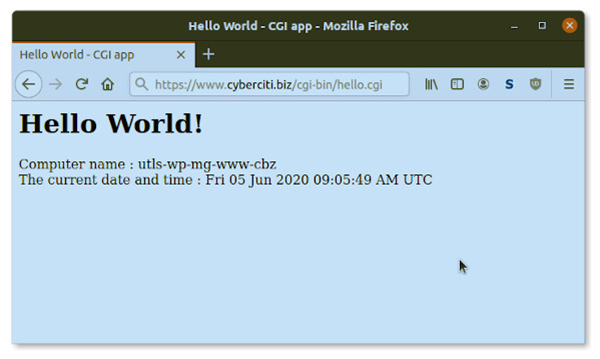
<h2 style="text-align: justify;">Script Hello World CGI trong Bash</h2>

<figure>
<div style="text-align: justify;"><img alt="Hello World - CGI app " data-i="0" data-src="https://st.quantrimang.com/photos/image/2020/07/06/cai-dat-fcgiwrap-tren-linux-1.jpg" data-was-processed="true" height="359" src="https://st.quantrimang.com/photos/image/2020/07/06/cai-dat-fcgiwrap-tren-linux-1.jpg" width="600" /></div>

<figcaption>
<div style="text-align: justify;">Hello World - CGI app</div>
</figcaption>
</figure>

<p style="text-align: justify;">Mở trình soạn thảo văn bản và tạo tệp sau:</p>

<pre id="pre9">
<code>sudo vi /usr/lib/cgi-bin/hello.cgi</code></pre>

<p style="text-align: justify;">Nối mã bash sau:</p>

<pre id="pre10">
<code>#!/usr/bin/env bash
 echo &quot;Content-type: text/html&quot;
 echo &quot;&quot;
 now=&quot;06/07/2020&quot;
 echo &#039;&lt;html&gt;&lt;head&gt;&lt;title&gt;Hello World - CGI app&lt;/title&gt;&lt;/head&gt;&#039;
 echo &#039;&lt;body&gt;&#039;
 echo &#039;&lt;h2&gt;Hello World!&lt;/h2&gt;&#039;
 echo &quot;Computer name : $HOSTNAME&lt;br/&gt;&quot;
 echo &quot;The current date and time : ${now}&lt;br/&gt;&quot;
 echo &#039;&lt;/body&gt;&#039;
 echo &#039;&lt;/html&gt;&#039;</code></pre>

<p style="text-align: justify;">Đặt quyền thực thi trên /usr/lib/cgi-bin/hello.cgi bằng lệnh chmod và lệnh chown:</p>

<pre id="pre11">
<code>$ sudo chmod +x -v /usr/lib/cgi-bin/hello.cgi
 mode of &#039;/usr/lib/cgi-bin/hello.cgi&#039; changed from 0644 (rw-r--r--) to 0755 (rwxr-xr-x)</code></pre>

<p style="text-align: justify;">Kiểm tra bằng cách mở trình duyệt web và nhập url:</p>

<pre id="pre12">
<code>https://your-domain-here/cgi-bin/hello.cgi
 ## For instance ##
 https://www.cyberciti.biz/cgi-bin/hello.cgi</code></pre>

<p style="text-align: justify;">Bạn có thể viết các ứng dụng hoặc script CGI bằng bất kỳ ngôn ngữ lập trình nào. CGI cho các app/script có thể xuất hiện đơn giản và dễ dàng, nhưng để viết được các ứng dụng đó lại không hề đơn giản.</p>
		</div>
				<div id="author">
						<p>
				<strong>Nguồn tin:</strong>
				Quantrimang.com
			</p>
		</div>
	</div>
	<div id="footer" class="clearfix">
		<div id="url">
			<strong>URL của bản tin này: </strong><a href="https://www.nguoicodonvn2008.info/vi/news/savefile/kien-thuc-may-tinh/cach-cai-dat-fcgiwrap-cho-nginx-tren-ubuntu-20-04-2314.html" title="Cách cài đặt fcgiwrap cho Nginx trên Ubuntu 20.04">https://www.nguoicodonvn2008.info/vi/news/savefile/kien-thuc-may-tinh/cach-cai-dat-fcgiwrap-cho-nginx-tren-ubuntu-20-04-2314.html</a>

		</div>
		<div class="clear"></div>
		<div class="copyright">
			&copy; .&#x3A; Nguoicodonvn2008.info - Cõi lòng người cô đơn &#x3A;.
		</div>
		<div id="contact">
			<a href="mailto:admin@nguoicodonvn2008.info">admin@nguoicodonvn2008.info</a>
		</div>
	</div>
</div>
        <div id="timeoutsess" class="chromeframe">
            Bạn đã không sử dụng Site, <a onclick="timeoutsesscancel();" href="https://www.nguoicodonvn2008.info/#">Bấm vào đây để duy trì trạng thái đăng nhập</a>. Thời gian chờ: <span id="secField"> 60 </span> giây
        </div>
        <div id="openidResult" class="nv-alert" style="display:none"></div>
        <div id="openidBt" data-result="" data-redirect=""></div>
		</script>
		<div class="car-top">
  <span><img src="https://www.nguoicodonvn2008.info/themes/default/images/car.png" alt=""></span>
</div>
<script src="https://www.nguoicodonvn2008.info/assets/js/jquery/jquery.min.js"></script>
<script>var nv_base_siteurl="/",nv_lang_data="vi",nv_lang_interface="vi",nv_name_variable="nv",nv_fc_variable="op",nv_lang_variable="language",nv_module_name="news",nv_func_name="savefile",nv_is_user=0, nv_my_ofs=-4,nv_my_abbr="EDT",nv_cookie_prefix="nv4c_e856T",nv_check_pass_mstime=1738000,nv_area_admin=0,nv_safemode=0,theme_responsive=0,nv_recaptcha_ver=2,nv_recaptcha_sitekey="",nv_recaptcha_type="image",XSSsanitize=1;</script>
<script src="https://www.nguoicodonvn2008.info/assets/js/language/vi.js"></script>
<script src="https://www.nguoicodonvn2008.info/assets/js/DOMPurify/purify3.js"></script>
<script src="https://www.nguoicodonvn2008.info/assets/js/global.js"></script>
<script src="https://www.nguoicodonvn2008.info/assets/js/site.js"></script>
<script src="https://www.nguoicodonvn2008.info/themes/default/js/news.js"></script>
<script src="https://www.nguoicodonvn2008.info/themes/default/js/main.js"></script>
<script src="https://www.nguoicodonvn2008.info/themes/default/js/custom.js"></script>
<script type="application/ld+json">
        {
            "@context": "https://schema.org",
            "@type": "Organization",
            "url": "https://www.nguoicodonvn2008.info",
            "logo": "https://www.nguoicodonvn2008.info/uploads/angel.gif"
        }
        </script>
<script src="https://www.nguoicodonvn2008.info/themes/default/js/bootstrap.min.js"></script>
<script type="text/javascript">
var $scrolltop = $('.car-top');
$scrolltop.on('click', function () {
    $('html,body').animate({
        scrollTop: 0
    }, 800);
    $(this).addClass("car-run");
    setTimeout(function(){ $scrolltop.removeClass('car-run');}, 1000);
    return false;
});
$(window).on('scroll', function ()
{ 
    if($(window).scrollTop() >= 200)
    {
        $scrolltop.addClass("show");
        $scrolltop.addClass("car-down");
    }
    else
    {
       $scrolltop.removeClass("show");
       setTimeout(function(){ $scrolltop.removeClass('car-down');}, 300);
    }
});
</script>
</body>
</html>