<!DOCTYPE html>
    <html lang="vi" xmlns="http://www.w3.org/1999/xhtml" prefix="og: http://ogp.me/ns#">
    <head>
<title>Cách cài đặt Debian Buster &#40;Debian 10&#41; trên Chromebook</title>
<meta name="description" content="Cách cài đặt Debian Buster &#40;Debian 10&#41; trên Chromebook - Savefile - Tin Tức -...">
<meta name="author" content=".: Nguoicodonvn2008.info - Cõi lòng người cô đơn :.">
<meta name="copyright" content=".: Nguoicodonvn2008.info - Cõi lòng người cô đơn :. [admin@nguoicodonvn2008.info]">
<meta name="robots" content="index, archive, follow, noodp">
<meta name="googlebot" content="index,archive,follow,noodp">
<meta name="msnbot" content="all,index,follow">
<meta name="generator" content="NukeViet v4.5">
<meta http-equiv="Content-Type" content="text/html; charset=utf-8">
<meta property="og:title" content="Cách cài đặt Debian Buster &#40;Debian 10&#41; trên Chromebook">
<meta property="og:type" content="website">
<meta property="og:description" content="Savefile - Tin Tức - https&#x3A;&#x002F;&#x002F;www.nguoicodonvn2008.info&#x002F;vi&#x002F;news&#x002F;savefile&#x002F;kien-thuc-may-tinh&#x002F;cach-cai-dat-debian-buster-debian-10-tren-chromebook-1626.html">
<meta property="og:site_name" content=".&#x3A; Nguoicodonvn2008.info - Cõi lòng người cô đơn &#x3A;.">
<meta property="og:url" content="https://www.nguoicodonvn2008.info/vi/news/savefile/kien-thuc-may-tinh/cach-cai-dat-debian-buster-debian-10-tren-chromebook-1626.html">
<link rel="shortcut icon" href="https://www.nguoicodonvn2008.info/favicon.ico">
<link rel="canonical" href="https://www.nguoicodonvn2008.info/vi/news/savefile/kien-thuc-may-tinh/cach-cai-dat-debian-buster-debian-10-tren-chromebook-1626.html">
<link rel="alternate" href="https://www.nguoicodonvn2008.info/vi/news/rss/" title="Tin Tức" type="application/rss+xml">
<link rel="alternate" href="https://www.nguoicodonvn2008.info/vi/news/rss/karaoke-dual/" title="Tin Tức - Karaoke Dual" type="application/rss+xml">
<link rel="alternate" href="https://www.nguoicodonvn2008.info/vi/news/rss/nhac-tre/" title="Tin Tức - Nhạc trẻ" type="application/rss+xml">
<link rel="alternate" href="https://www.nguoicodonvn2008.info/vi/news/rss/tru-tinh/" title="Tin Tức - Trữ tình" type="application/rss+xml">
<link rel="alternate" href="https://www.nguoicodonvn2008.info/vi/news/rss/nuoc-ngoai/" title="Tin Tức - Nước ngoài" type="application/rss+xml">
<link rel="alternate" href="https://www.nguoicodonvn2008.info/vi/news/rss/remix/" title="Tin Tức - Remix" type="application/rss+xml">
<link rel="alternate" href="https://www.nguoicodonvn2008.info/vi/news/rss/tam-su-tinh-yeu/" title="Tin Tức - Tâm sự tình yêu" type="application/rss+xml">
<link rel="alternate" href="https://www.nguoicodonvn2008.info/vi/news/rss/tho-suu-tam/" title="Tin Tức - Thơ sưu tầm" type="application/rss+xml">
<link rel="alternate" href="https://www.nguoicodonvn2008.info/vi/news/rss/cuoc-song/" title="Tin Tức - Cuộc sống" type="application/rss+xml">
<link rel="alternate" href="https://www.nguoicodonvn2008.info/vi/news/rss/phan-mem/" title="Tin Tức - Phần mềm" type="application/rss+xml">
<link rel="alternate" href="https://www.nguoicodonvn2008.info/vi/news/rss/kien-thuc-may-tinh/" title="Tin Tức - Kiến thức máy tính" type="application/rss+xml">
<link rel="alternate" href="https://www.nguoicodonvn2008.info/vi/news/rss/hoc-tap/" title="Tin Tức - Học tập" type="application/rss+xml">
<link rel="alternate" href="https://www.nguoicodonvn2008.info/vi/news/rss/tai-lieu/" title="Tin Tức - Tài liệu" type="application/rss+xml">
<link rel="alternate" href="https://www.nguoicodonvn2008.info/vi/news/rss/de-thi/" title="Tin Tức - Đề thi" type="application/rss+xml">
<link rel="preload" as="style" href="https://www.nguoicodonvn2008.info/assets/css/font-awesome.min.css" type="text/css">
<link rel="preload" as="style" href="https://www.nguoicodonvn2008.info/themes/default/css/bootstrap.non-responsive.css" type="text/css">
<link rel="preload" as="style" href="https://www.nguoicodonvn2008.info/themes/default/css/style.css" type="text/css">
<link rel="preload" as="style" href="https://www.nguoicodonvn2008.info/themes/default/css/style.non-responsive.css" type="text/css">
<link rel="preload" as="style" href="https://www.nguoicodonvn2008.info/themes/default/css/news.css" type="text/css">
<link rel="preload" as="style" href="https://www.nguoicodonvn2008.info/themes/default/css/custom.css" type="text/css">
<link rel="preload" as="script" href="https://www.nguoicodonvn2008.info/assets/js/jquery/jquery.min.js" type="text/javascript">
<link rel="preload" as="script" href="https://www.nguoicodonvn2008.info/assets/js/language/vi.js" type="text/javascript">
<link rel="preload" as="script" href="https://www.nguoicodonvn2008.info/assets/js/DOMPurify/purify3.js" type="text/javascript">
<link rel="preload" as="script" href="https://www.nguoicodonvn2008.info/assets/js/global.js" type="text/javascript">
<link rel="preload" as="script" href="https://www.nguoicodonvn2008.info/assets/js/site.js" type="text/javascript">
<link rel="preload" as="script" href="https://www.nguoicodonvn2008.info/themes/default/js/news.js" type="text/javascript">
<link rel="preload" as="script" href="https://www.nguoicodonvn2008.info/themes/default/js/main.js" type="text/javascript">
<link rel="preload" as="script" href="https://www.nguoicodonvn2008.info/themes/default/js/custom.js" type="text/javascript">
<link rel="preload" as="script" href="https://www.nguoicodonvn2008.info/themes/default/js/bootstrap.min.js" type="text/javascript">
<link rel="stylesheet" href="https://www.nguoicodonvn2008.info/assets/css/font-awesome.min.css">
<link rel="stylesheet" href="https://www.nguoicodonvn2008.info/themes/default/css/bootstrap.non-responsive.css">
<link rel="stylesheet" href="https://www.nguoicodonvn2008.info/themes/default/css/style.css">
<link rel="stylesheet" href="https://www.nguoicodonvn2008.info/themes/default/css/style.non-responsive.css">
<link rel="StyleSheet" href="https://www.nguoicodonvn2008.info/themes/default/css/news.css">
<link rel="stylesheet" href="https://www.nguoicodonvn2008.info/themes/default/css/custom.css">
<style type="text/css">
	body{background: #fff;}
</style>
    </head>
    <body>
<div id="print">
	<div id="hd_print">
		<h2 class="pull-left">.&#x3A; Nguoicodonvn2008.info - Cõi lòng người cô đơn &#x3A;.</h2>
		<p class="pull-right"><a title=".&#x3A; Nguoicodonvn2008.info - Cõi lòng người cô đơn &#x3A;." href="https://www.nguoicodonvn2008.info/">https://www.nguoicodonvn2008.info</a></p>
	</div>
	<div class="clear"></div>
	<hr />
	<div id="content">
		<h1>Cách cài đặt Debian Buster &#40;Debian 10&#41; trên Chromebook</h1>
		<ul class="list-inline">
			<li>Thứ tư - 05/02/2020 00:00</li>
			<li class="hidden-print txtrequired"><em class="fa fa-print">&nbsp;</em><a title="In ra" href="javascript:;" onclick="window.print()">In ra</a></li>
			<li class="hidden-print txtrequired"><em class="fa fa-power-off">&nbsp;</em><a title="Đóng cửa sổ này" href="javascript:;" onclick="window.close()">Đóng cửa sổ này</a></li>
		</ul>
		<div class="clear"></div>
		<div id="hometext">
		</div>
		<div id="bodytext" class="clearfix">
			<p style="text-align: justify;">Linux trên&nbsp;Chromebook, còn được gọi là Project Crostini, đã được công bố vào năm 2018 và kể từ đó, nó đã sử dụng Debian Stretch (Debian 9) làm cơ sở.</p>

<p style="text-align: justify;">Bây giờ, bạn có thể chuyển sang Debian 10 mới nhất trên Chromebook. Bản cập nhật mới sẽ mang đến&nbsp;Linux Kernel&nbsp;4.19 LTS, hỗ trợ cho các bo mạch ARM64, Bash 5.0, v.v... Ngoài ra, bạn sẽ thấy một bước nhảy vọt về hiệu suất trong khi sử dụng các ứng dụng Linux trên Chromebook của mình. Bây giờ, hãy tìm hiểu cách cài đặt Debian Buster trên Chromebook.</p>

<h2 style="text-align: justify;">Cài đặt Debian Buster trên Chromebook</h2>

<p style="text-align: justify;">Nếu bạn đã sử dụng Linux trên Chromebook trong kênh Stable, Beta hoặc Dev thì bạn sẽ phải vô hiệu hóa&nbsp;Linux&nbsp;và bật lại để nhận bản cập nhật Buster mới nhất. Tất nhiên, vào tháng 3 tới, bạn sẽ nhận được bản cập nhật Chrome 81 ổn định, được trang bị Buster theo mặc định, nhưng một lần nữa, hướng dẫn này không dành cho những người có thể chờ đợi.</p>

<p style="text-align: justify;">Vì vậy, nếu bạn sẵn sàng thiết lập lại Linux một lần nữa, hãy tiếp tục đọc bài viết và thưởng thức Debian 10 mới nhất trên Chromebook ngay bây giờ.</p>

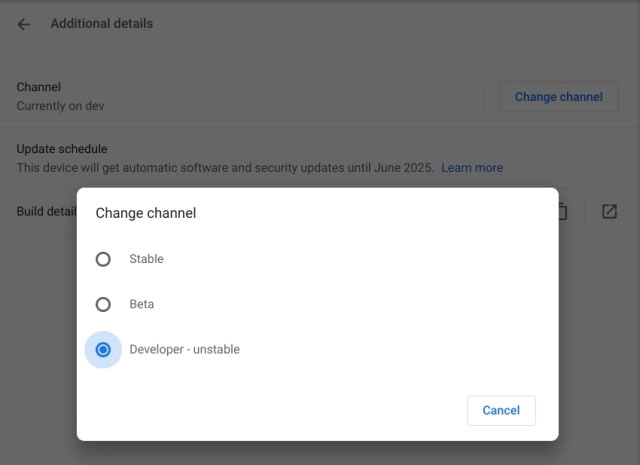
<p style="text-align: justify;">1. Nếu bạn đang ở trên kênh&nbsp;<strong>Stable</strong>&nbsp;hoặc&nbsp;<strong>Beta</strong>&nbsp;thì bạn sẽ phải chuyển sang kênh&nbsp;<strong>Dev</strong>. Bản cập nhật Buster chỉ khả dụng trên kênh Dev phiên bản 81.0.4037.0 của Chrome OS. Để thay đổi kênh cập nhật, hãy mở&nbsp;<strong>Settings &gt; About Chrome OS &gt; Additional Details &gt; Change Channel &gt; Choose Developer-unstable</strong>. Bây giờ, hãy quay lại trang&nbsp;<strong>“About Chrome OS”</strong>&nbsp;và kiểm tra các bản cập nhật.</p>

<figure>
<div style="text-align: justify;"><img alt="Bạn phải chuyển sang kênh Dev" data-i="0" data-src="https://st.quantrimang.com/photos/image/2020/02/04/cai-debian-buster-debian-10-tren-chromebook-1.jpg" data-was-processed="true" height="465" src="https://st.quantrimang.com/photos/image/2020/02/04/cai-debian-buster-debian-10-tren-chromebook-1.jpg" width="640" /></div>

<figcaption>
<div style="text-align: justify;">Bạn phải chuyển sang kênh Dev</div>
</figcaption>
</figure>

<p style="text-align: justify;">2. Bây giờ, bạn đang ở trên kênh Dev, hãy mở&nbsp;<strong>chrome://flags</strong>&nbsp;và bật 3 flag Chrome này:&nbsp;<strong>New Crostini containers use Buster, Allow resizing Crostini disk</strong>&nbsp;và<strong>&nbsp;Allow picking your Crostini username</strong>. Sau khi thực hiện các thay đổi, hãy khởi động lại Chromebook.</p>

<p style="text-align: justify;">3. Tiếp theo, mở&nbsp;<strong>Settings</strong>&nbsp;và di chuyển đến menu&nbsp;<strong>Linux (Beta)</strong>. Tại đây, nhấp vào nút&nbsp;<strong>“Remove”</strong>&nbsp;và vô hiệu hóa Linux. Cuối cùng, khởi động lại Chromebook. Hãy ghi nhớ, điều này sẽ gỡ cài đặt tất cả các ứng dụng Linux và xóa các file khỏi thư mục Linux. Vì vậy, trước khi xóa Linux, hãy đảm bảo di chuyển tất cả các file Linux sang thư mục&nbsp;<strong>Google Drive</strong>&nbsp;hoặc&nbsp;<strong>Download.</strong></p>

<div style="text-align: justify;">&nbsp;</div>

<p style="text-align: justify;"><strong>Lưu ý</strong>: Nếu bạn không sử dụng Linux trước đó thì bạn có thể bỏ qua bước này.</p>

<p style="text-align: justify;">4. Sau khi khởi động lại, hãy mở lại&nbsp;<strong>Settings</strong>&nbsp;và chuyển đến menu&nbsp;<strong>Linux (Beta)</strong>.&nbsp;Bây giờ, hãy nhấp vào nút&nbsp;<strong>“Turn on”</strong>&nbsp;và để cho nó tải xuống tất cả các file cần thiết. Lần này, thiết lập Linux sẽ cài đặt bản build Buster trên Chromebook.</p>

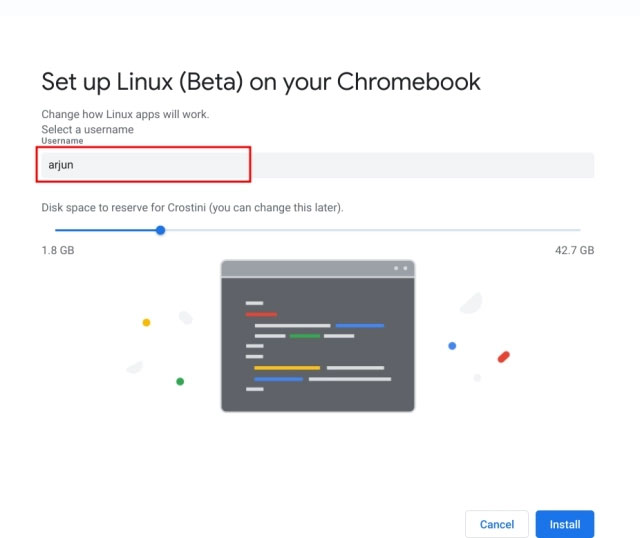
<p style="text-align: justify;">5. Trong quá trình này, nó sẽ hỏi dung lượng ổ đĩa Linux. Bạn có thể chọn bất cứ thứ gì trên 1,8GB tùy thuộc vào bộ nhớ trong có sẵn của bạn. Đối với Chromebook trong ví dụ, mức 12GB đã được chọn để lưu trữ các ứng dụng và file Linux. Ngoài ra, không giống như trước đây, bây giờ, bạn có thể chọn tên người dùng Linux của mình.</p>

<figure>
<div style="text-align: justify;"><img alt="Chọn dung lượng phù hợp" data-i="1" data-src="https://st.quantrimang.com/photos/image/2020/02/04/cai-debian-buster-debian-10-tren-chromebook-2.jpg" data-was-processed="true" height="538" src="https://st.quantrimang.com/photos/image/2020/02/04/cai-debian-buster-debian-10-tren-chromebook-2.jpg" width="640" /></div>

<figcaption>
<div style="text-align: justify;">Chọn dung lượng phù hợp</div>
</figcaption>
</figure>

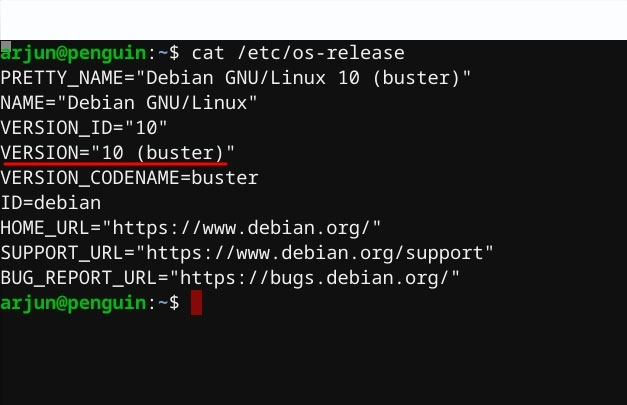
<p style="text-align: justify;">6. Sau khi cài đặt, bạn có thể sử dụng Debian Buster trên Chromebook. Bạn có thể kiểm tra phiên bản bằng cách&nbsp;<a href="https://quantrimang.com/4-cach-truy-cap-nhanh-toi-mot-terminal-trong-linux-69438" title="5 cách truy cập nhanh tới một Terminal trong Linux">mở terminal</a>&nbsp;và thực thi lệnh bên dưới. Nếu nó hiển thị&nbsp;<strong>“Buster”</strong>&nbsp;và&nbsp;<strong>“10”</strong>&nbsp;thì bạn đã chuyển thành công sang Debian 10 trên Chromebook.</p>

<pre id="pre0">
<code>cat /etc/os-release</code></pre>

<figure>
<div style="text-align: justify;"><img alt="Kiểm tra cài đặt đã thành công chưa" data-i="2" data-src="https://st.quantrimang.com/photos/image/2020/02/04/cai-debian-buster-debian-10-tren-chromebook-3.jpg" data-was-processed="true" height="405" src="https://st.quantrimang.com/photos/image/2020/02/04/cai-debian-buster-debian-10-tren-chromebook-3.jpg" width="627" /></div>

<figcaption>
<div style="text-align: justify;">Kiểm tra cài đặt đã thành công chưa</div>
</figcaption>
</figure>
		</div>
				<div id="author">
						<p>
				<strong>Nguồn tin:</strong>
				Quantrimang.com
			</p>
		</div>
	</div>
	<div id="footer" class="clearfix">
		<div id="url">
			<strong>URL của bản tin này: </strong><a href="https://www.nguoicodonvn2008.info/vi/news/savefile/kien-thuc-may-tinh/cach-cai-dat-debian-buster-debian-10-tren-chromebook-1626.html" title="Cách cài đặt Debian Buster &#40;Debian 10&#41; trên Chromebook">https://www.nguoicodonvn2008.info/vi/news/savefile/kien-thuc-may-tinh/cach-cai-dat-debian-buster-debian-10-tren-chromebook-1626.html</a>

		</div>
		<div class="clear"></div>
		<div class="copyright">
			&copy; .&#x3A; Nguoicodonvn2008.info - Cõi lòng người cô đơn &#x3A;.
		</div>
		<div id="contact">
			<a href="mailto:admin@nguoicodonvn2008.info">admin@nguoicodonvn2008.info</a>
		</div>
	</div>
</div>
        <div id="timeoutsess" class="chromeframe">
            Bạn đã không sử dụng Site, <a onclick="timeoutsesscancel();" href="https://www.nguoicodonvn2008.info/#">Bấm vào đây để duy trì trạng thái đăng nhập</a>. Thời gian chờ: <span id="secField"> 60 </span> giây
        </div>
        <div id="openidResult" class="nv-alert" style="display:none"></div>
        <div id="openidBt" data-result="" data-redirect=""></div>
		</script>
		<div class="car-top">
  <span><img src="https://www.nguoicodonvn2008.info/themes/default/images/car.png" alt=""></span>
</div>
<div id="run_cronjobs" style="visibility:hidden;display:none;"><img alt="cron" src="/index.php?second=cronjobs&amp;p=i448f492" width="1" height="1" /></div>
<script src="https://www.nguoicodonvn2008.info/assets/js/jquery/jquery.min.js"></script>
<script>var nv_base_siteurl="/",nv_lang_data="vi",nv_lang_interface="vi",nv_name_variable="nv",nv_fc_variable="op",nv_lang_variable="language",nv_module_name="news",nv_func_name="savefile",nv_is_user=0, nv_my_ofs=-4,nv_my_abbr="EDT",nv_cookie_prefix="nv4c_e856T",nv_check_pass_mstime=1738000,nv_area_admin=0,nv_safemode=0,theme_responsive=0,nv_recaptcha_ver=2,nv_recaptcha_sitekey="",nv_recaptcha_type="image",XSSsanitize=1;</script>
<script src="https://www.nguoicodonvn2008.info/assets/js/language/vi.js"></script>
<script src="https://www.nguoicodonvn2008.info/assets/js/DOMPurify/purify3.js"></script>
<script src="https://www.nguoicodonvn2008.info/assets/js/global.js"></script>
<script src="https://www.nguoicodonvn2008.info/assets/js/site.js"></script>
<script src="https://www.nguoicodonvn2008.info/themes/default/js/news.js"></script>
<script src="https://www.nguoicodonvn2008.info/themes/default/js/main.js"></script>
<script src="https://www.nguoicodonvn2008.info/themes/default/js/custom.js"></script>
<script type="application/ld+json">
        {
            "@context": "https://schema.org",
            "@type": "Organization",
            "url": "https://www.nguoicodonvn2008.info",
            "logo": "https://www.nguoicodonvn2008.info/uploads/angel.gif"
        }
        </script>
<script src="https://www.nguoicodonvn2008.info/themes/default/js/bootstrap.min.js"></script>
<script type="text/javascript">
var $scrolltop = $('.car-top');
$scrolltop.on('click', function () {
    $('html,body').animate({
        scrollTop: 0
    }, 800);
    $(this).addClass("car-run");
    setTimeout(function(){ $scrolltop.removeClass('car-run');}, 1000);
    return false;
});
$(window).on('scroll', function ()
{ 
    if($(window).scrollTop() >= 200)
    {
        $scrolltop.addClass("show");
        $scrolltop.addClass("car-down");
    }
    else
    {
       $scrolltop.removeClass("show");
       setTimeout(function(){ $scrolltop.removeClass('car-down');}, 300);
    }
});
</script>
</body>
</html>