<!DOCTYPE html>
    <html lang="vi" xmlns="http://www.w3.org/1999/xhtml" prefix="og: http://ogp.me/ns#">
    <head>
<title>Cách cài đặt Arch Linux trong Windows Subsystem for Linux</title>
<meta name="description" content="Cách cài đặt Arch Linux trong Windows Subsystem for Linux - Savefile - Tin Tức -...">
<meta name="author" content=".: Nguoicodonvn2008.info - Cõi lòng người cô đơn :.">
<meta name="copyright" content=".: Nguoicodonvn2008.info - Cõi lòng người cô đơn :. [admin@nguoicodonvn2008.info]">
<meta name="robots" content="index, archive, follow, noodp">
<meta name="googlebot" content="index,archive,follow,noodp">
<meta name="msnbot" content="all,index,follow">
<meta name="generator" content="NukeViet v4.5">
<meta http-equiv="Content-Type" content="text/html; charset=utf-8">
<meta property="og:title" content="Cách cài đặt Arch Linux trong Windows Subsystem for Linux">
<meta property="og:type" content="website">
<meta property="og:description" content="Savefile - Tin Tức - https&#x3A;&#x002F;&#x002F;www.nguoicodonvn2008.info&#x002F;vi&#x002F;news&#x002F;savefile&#x002F;kien-thuc-may-tinh&#x002F;cach-cai-dat-arch-linux-trong-windows-subsystem-for-linux-10389.html">
<meta property="og:site_name" content=".&#x3A; Nguoicodonvn2008.info - Cõi lòng người cô đơn &#x3A;.">
<meta property="og:url" content="https://www.nguoicodonvn2008.info/vi/news/savefile/kien-thuc-may-tinh/cach-cai-dat-arch-linux-trong-windows-subsystem-for-linux-10389.html">
<link rel="shortcut icon" href="https://www.nguoicodonvn2008.info/favicon.ico">
<link rel="canonical" href="https://www.nguoicodonvn2008.info/vi/news/savefile/kien-thuc-may-tinh/cach-cai-dat-arch-linux-trong-windows-subsystem-for-linux-10389.html">
<link rel="alternate" href="https://www.nguoicodonvn2008.info/vi/news/rss/" title="Tin Tức" type="application/rss+xml">
<link rel="alternate" href="https://www.nguoicodonvn2008.info/vi/news/rss/karaoke-dual/" title="Tin Tức - Karaoke Dual" type="application/rss+xml">
<link rel="alternate" href="https://www.nguoicodonvn2008.info/vi/news/rss/nhac-tre/" title="Tin Tức - Nhạc trẻ" type="application/rss+xml">
<link rel="alternate" href="https://www.nguoicodonvn2008.info/vi/news/rss/tru-tinh/" title="Tin Tức - Trữ tình" type="application/rss+xml">
<link rel="alternate" href="https://www.nguoicodonvn2008.info/vi/news/rss/nuoc-ngoai/" title="Tin Tức - Nước ngoài" type="application/rss+xml">
<link rel="alternate" href="https://www.nguoicodonvn2008.info/vi/news/rss/remix/" title="Tin Tức - Remix" type="application/rss+xml">
<link rel="alternate" href="https://www.nguoicodonvn2008.info/vi/news/rss/tam-su-tinh-yeu/" title="Tin Tức - Tâm sự tình yêu" type="application/rss+xml">
<link rel="alternate" href="https://www.nguoicodonvn2008.info/vi/news/rss/tho-suu-tam/" title="Tin Tức - Thơ sưu tầm" type="application/rss+xml">
<link rel="alternate" href="https://www.nguoicodonvn2008.info/vi/news/rss/cuoc-song/" title="Tin Tức - Cuộc sống" type="application/rss+xml">
<link rel="alternate" href="https://www.nguoicodonvn2008.info/vi/news/rss/phan-mem/" title="Tin Tức - Phần mềm" type="application/rss+xml">
<link rel="alternate" href="https://www.nguoicodonvn2008.info/vi/news/rss/kien-thuc-may-tinh/" title="Tin Tức - Kiến thức máy tính" type="application/rss+xml">
<link rel="alternate" href="https://www.nguoicodonvn2008.info/vi/news/rss/hoc-tap/" title="Tin Tức - Học tập" type="application/rss+xml">
<link rel="alternate" href="https://www.nguoicodonvn2008.info/vi/news/rss/tai-lieu/" title="Tin Tức - Tài liệu" type="application/rss+xml">
<link rel="alternate" href="https://www.nguoicodonvn2008.info/vi/news/rss/de-thi/" title="Tin Tức - Đề thi" type="application/rss+xml">
<link rel="preload" as="style" href="https://www.nguoicodonvn2008.info/assets/css/font-awesome.min.css" type="text/css">
<link rel="preload" as="style" href="https://www.nguoicodonvn2008.info/themes/default/css/bootstrap.non-responsive.css" type="text/css">
<link rel="preload" as="style" href="https://www.nguoicodonvn2008.info/themes/default/css/style.css" type="text/css">
<link rel="preload" as="style" href="https://www.nguoicodonvn2008.info/themes/default/css/style.non-responsive.css" type="text/css">
<link rel="preload" as="style" href="https://www.nguoicodonvn2008.info/themes/default/css/news.css" type="text/css">
<link rel="preload" as="style" href="https://www.nguoicodonvn2008.info/themes/default/css/custom.css" type="text/css">
<link rel="preload" as="script" href="https://www.nguoicodonvn2008.info/assets/js/jquery/jquery.min.js" type="text/javascript">
<link rel="preload" as="script" href="https://www.nguoicodonvn2008.info/assets/js/language/vi.js" type="text/javascript">
<link rel="preload" as="script" href="https://www.nguoicodonvn2008.info/assets/js/DOMPurify/purify3.js" type="text/javascript">
<link rel="preload" as="script" href="https://www.nguoicodonvn2008.info/assets/js/global.js" type="text/javascript">
<link rel="preload" as="script" href="https://www.nguoicodonvn2008.info/assets/js/site.js" type="text/javascript">
<link rel="preload" as="script" href="https://www.nguoicodonvn2008.info/themes/default/js/news.js" type="text/javascript">
<link rel="preload" as="script" href="https://www.nguoicodonvn2008.info/themes/default/js/main.js" type="text/javascript">
<link rel="preload" as="script" href="https://www.nguoicodonvn2008.info/themes/default/js/custom.js" type="text/javascript">
<link rel="preload" as="script" href="https://www.nguoicodonvn2008.info/themes/default/js/bootstrap.min.js" type="text/javascript">
<link rel="stylesheet" href="https://www.nguoicodonvn2008.info/assets/css/font-awesome.min.css">
<link rel="stylesheet" href="https://www.nguoicodonvn2008.info/themes/default/css/bootstrap.non-responsive.css">
<link rel="stylesheet" href="https://www.nguoicodonvn2008.info/themes/default/css/style.css">
<link rel="stylesheet" href="https://www.nguoicodonvn2008.info/themes/default/css/style.non-responsive.css">
<link rel="StyleSheet" href="https://www.nguoicodonvn2008.info/themes/default/css/news.css">
<link rel="stylesheet" href="https://www.nguoicodonvn2008.info/themes/default/css/custom.css">
<style type="text/css">
	body{background: #fff;}
</style>
    </head>
    <body>
<div id="print">
	<div id="hd_print">
		<h2 class="pull-left">.&#x3A; Nguoicodonvn2008.info - Cõi lòng người cô đơn &#x3A;.</h2>
		<p class="pull-right"><a title=".&#x3A; Nguoicodonvn2008.info - Cõi lòng người cô đơn &#x3A;." href="https://www.nguoicodonvn2008.info/">https://www.nguoicodonvn2008.info</a></p>
	</div>
	<div class="clear"></div>
	<hr />
	<div id="content">
		<h1>Cách cài đặt Arch Linux trong Windows Subsystem for Linux</h1>
		<ul class="list-inline">
			<li>Thứ sáu - 16/05/2025 00:35</li>
			<li class="hidden-print txtrequired"><em class="fa fa-print">&nbsp;</em><a title="In ra" href="javascript:;" onclick="window.print()">In ra</a></li>
			<li class="hidden-print txtrequired"><em class="fa fa-power-off">&nbsp;</em><a title="Đóng cửa sổ này" href="javascript:;" onclick="window.close()">Đóng cửa sổ này</a></li>
		</ul>
		<div class="clear"></div>
		<div id="hometext">
		</div>
				<div class="imghome">
			<img alt="Cách cài đặt Arch Linux trong Windows Subsystem for Linux" src="https://st.quantrimang.com/photos/image/2025/05/14/cai-arch-linux-trong-windows-subsystem-for-linux-3.jpg" width="460" class="img-thumbnail" />
		</div>
		<div class="clear"></div>
		<div id="bodytext" class="clearfix">
			<h1>&nbsp;</h1>

<p style="text-align: justify;">Trong khi các bản phân phối phổ biến như&nbsp;Ubuntu,&nbsp;Debian&nbsp;và Fedora đã có sẵn trên&nbsp;&nbsp;Windows&nbsp;Subsystem for Linux (WSL) trong một thời gian, thì giờ đây bạn cũng có thể chính thức cài đặt và sử dụng Arch Linux. Arch Linux nổi tiếng với thiết kế cơ bản, mô hình phát hành liên tục và khái niệm lấy người dùng làm trung tâm. Chạy nó bên trong WSL trên&nbsp;&nbsp;Windows&nbsp;mang đến cho bạn những điều tốt nhất của cả hai thế giới: Một bản phân phối Linux tối giản, tiên tiến cùng với các công cụ Windows của bạn. Hướng dẫn này cung cấp tổng quan ngắn gọn về WSL và giải thích cách cài đặt Arch Linux trên đó.</p>

<h2 style="text-align: justify;">Thiết lập Arch Linux trên WSL2</h2>

<p style="text-align: justify;">Việc chạy Arch Linux trên WSL 2 hiện rất đơn giản nhờ có image chính thức. Tuy nhiên, hãy đảm bảo rằng WSL đã được cài đặt trước. Nếu bạn không chắc chắn WSL đã được cài đặt hay chưa, cách dễ nhất để xác nhận và cài đặt là thông qua&nbsp;PowerShell.</p>

<p style="text-align: justify;">Mở PowerShell và chạy lệnh sau:</p>

<pre id="pre0">
<code>wsl --install --no-distribution</code></pre>

<figure>
<div style="text-align: justify;"><img alt="Tải xuống Windows Subsystem For Linux" data-i="0" data-src="https://st.quantrimang.com/photos/image/2025/05/14/cai-arch-linux-trong-windows-subsystem-for-linux-1.jpg" data-was-processed="true" height="184" src="https://st.quantrimang.com/photos/image/2025/05/14/cai-arch-linux-trong-windows-subsystem-for-linux-1.jpg" width="771" /></div>

<figcaption>
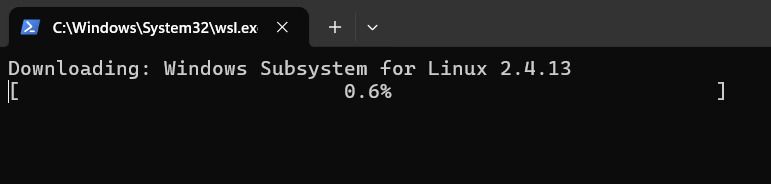
<div style="text-align: justify;">Tải xuống Windows Subsystem For Linux</div>
</figcaption>
</figure>

<p style="text-align: justify;">Lệnh này cài đặt các tính năng và thành phần WSL cần thiết cho những ứng dụng GUI. Ngoài ra, bạn có thể cần khởi động lại hệ thống sau khi quá trình cài đặt hoàn tất.</p>

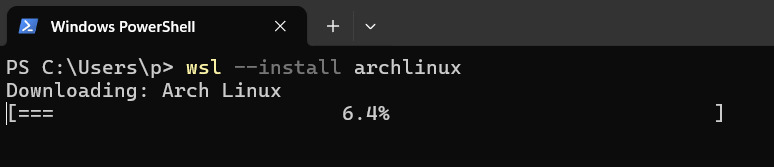
<p style="text-align: justify;">Sau khi khởi động lại, hãy mở lại PowerShell và cài đặt Arch Linux bằng lệnh sau:</p>

<pre id="pre1">
<code>wsl --install archlinux</code></pre>

<figure>
<div style="text-align: justify;"><img alt="Tải xuống Arch Linux trong Windows PowerShell trên WSL." data-i="1" data-src="https://st.quantrimang.com/photos/image/2025/05/14/cai-arch-linux-trong-windows-subsystem-for-linux-2.jpg" data-was-processed="true" height="167" src="https://st.quantrimang.com/photos/image/2025/05/14/cai-arch-linux-trong-windows-subsystem-for-linux-2.jpg" width="774" /></div>

<figcaption>
<div style="text-align: justify;">Tải xuống Arch Linux trong Windows PowerShell trên WSL.</div>
</figcaption>
</figure>

<p style="text-align: justify;">Lệnh này tải xuống image Arch Linux WSL chính thức và thiết lập nó thành phiên bản phân phối mới trong môi trường WSL của bạn.</p>

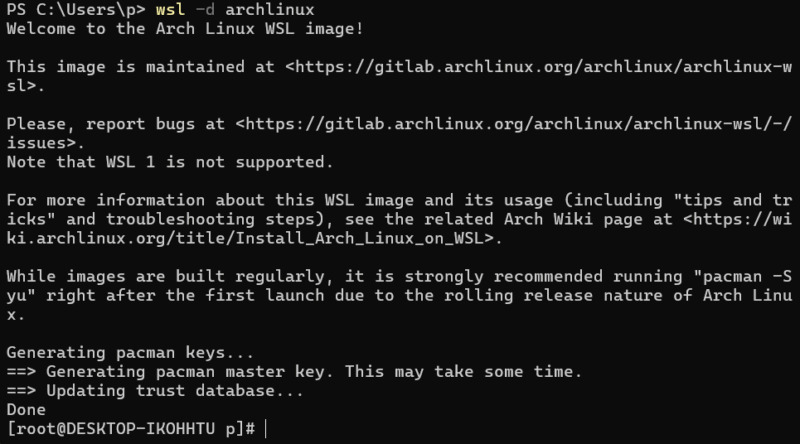
<p style="text-align: justify;">Sau khi quá trình cài đặt hoàn tất, bạn có thể khởi chạy Arch Linux bằng lệnh sau:</p>

<pre id="pre2">
<code>wsl -d archlinux</code></pre>

<figure>
<div style="text-align: justify;"><img alt="Khởi chạy Arch Linux trên Windows Subsystem for Linux." data-i="2" data-src="https://st.quantrimang.com/photos/image/2025/05/14/cai-arch-linux-trong-windows-subsystem-for-linux-3.jpg" data-was-processed="true" height="444" src="https://st.quantrimang.com/photos/image/2025/05/14/cai-arch-linux-trong-windows-subsystem-for-linux-3.jpg" width="800" /></div>

<figcaption>
<div style="text-align: justify;">Khởi chạy Arch Linux trên Windows Subsystem for Linux.</div>
</figcaption>
</figure>

<p style="text-align: justify;">Khi khởi chạy phiên bản Arch Linux WSL lần đầu tiên, bạn cần cập nhật danh sách gói và nâng cấp tất cả các gói đã cài đặt lên phiên bản mới nhất bằng lệnh sau:</p>

<pre id="pre3">
<code>sudo pacman -Syu</code></pre>

<p style="text-align: justify;">Xác nhận mọi lời nhắc để tiếp tục đồng bộ và nâng cấp. Bây giờ, bạn có thể tiến hành cài đặt phần mềm bổ sung và tùy chỉnh môi trường của mình bằng Pacman.</p>

<div style="text-align: justify;">Phần mềm bán hàng</div>

<h2 style="text-align: justify;">Giới hạn của Arch Linux WSL</h2>

<p style="text-align: justify;">Mặc dù chạy Arch Linux trên WSL 2 cung cấp môi trường mạnh mẽ cho nhiều tác vụ, nhưng điều quan trọng cần lưu ý là thiết lập này không giống hệt với cài đặt Arch Linux gốc. Nhiều hạn chế phát sinh do bản chất chạy trong hệ sinh thái Windows.</p>

<p style="text-align: justify;">Một hạn chế đáng chú ý là hỗ trợ cho PC Windows chạy ARM. Hiện tại, image Arch Linux WSL chính thức chủ yếu khả dụng cho kiến ​​trúc amd64. Điều này có nghĩa là người dùng có thiết bị Windows chạy ARM (chẳng hạn như một số mẫu Surface Pro hoặc Dell XPS có bộ xử lý Snapdragon) có thể không cài đặt và sử dụng image Arch chính thức. Tuy nhiên, các bản phân phối Linux khác khả dụng cho ARM on WSL. Việc không có bản build ARM chính thức phản ánh sự tập trung của hệ điều hành Arch Linux độc lập vào amd64.</p>

<p style="text-align: justify;">Những hạn chế chung bổ sung của WSL so với cài đặt gốc bao gồm thiếu quyền truy cập phần cứng trực tiếp, hỗ trợ mô-đun kernel hạn chế, sắc thái trong tích hợp systemd và các vấn đề về hiệu suất hệ thống file chéo. Tuy nhiên, đối với quy trình phát triển thông thường, sử dụng tiện ích dòng lệnh và khám phá Linux nói chung, Arch Linux trên WSL 2 cung cấp chức năng đáng kể.</p>

<p style="text-align: justify;">Việc bổ sung image Arch Linux chính thức vào dòng sản phẩm WSL là một sự phát triển đáng hoan nghênh đối với bất kỳ người dùng Linux nào đánh giá cao triết lý và quản lý gói của Arch. Ngoài ra, nó không phải là sự thay thế hoàn toàn cho cài đặt gốc do quyền truy cập phần cứng hạn chế và không hỗ trợ systemd.</p>

<p style="text-align: justify;">Tuy nhiên, nếu Arch Linux có vẻ quá nâng cao, bạn cũng có thể cân nhắc dùng thử Ubuntu hoặc Debian trên WSL vì chúng thân thiện hơn với người mới bắt đầu.</p>
		</div>
				<div id="author">
						<p>
				<strong>Nguồn tin:</strong>
				Quantrimang.com:
			</p>
		</div>
	</div>
	<div id="footer" class="clearfix">
		<div id="url">
			<strong>URL của bản tin này: </strong><a href="https://www.nguoicodonvn2008.info/vi/news/savefile/kien-thuc-may-tinh/cach-cai-dat-arch-linux-trong-windows-subsystem-for-linux-10389.html" title="Cách cài đặt Arch Linux trong Windows Subsystem for Linux">https://www.nguoicodonvn2008.info/vi/news/savefile/kien-thuc-may-tinh/cach-cai-dat-arch-linux-trong-windows-subsystem-for-linux-10389.html</a>

		</div>
		<div class="clear"></div>
		<div class="copyright">
			&copy; .&#x3A; Nguoicodonvn2008.info - Cõi lòng người cô đơn &#x3A;.
		</div>
		<div id="contact">
			<a href="mailto:admin@nguoicodonvn2008.info">admin@nguoicodonvn2008.info</a>
		</div>
	</div>
</div>
        <div id="timeoutsess" class="chromeframe">
            Bạn đã không sử dụng Site, <a onclick="timeoutsesscancel();" href="https://www.nguoicodonvn2008.info/#">Bấm vào đây để duy trì trạng thái đăng nhập</a>. Thời gian chờ: <span id="secField"> 60 </span> giây
        </div>
        <div id="openidResult" class="nv-alert" style="display:none"></div>
        <div id="openidBt" data-result="" data-redirect=""></div>
		</script>
		<div class="car-top">
  <span><img src="https://www.nguoicodonvn2008.info/themes/default/images/car.png" alt=""></span>
</div>
<div id="run_cronjobs" style="visibility:hidden;display:none;"><img alt="cron" src="/index.php?second=cronjobs&amp;p=q2mLzev1" width="1" height="1" /></div>
<script src="https://www.nguoicodonvn2008.info/assets/js/jquery/jquery.min.js"></script>
<script>var nv_base_siteurl="/",nv_lang_data="vi",nv_lang_interface="vi",nv_name_variable="nv",nv_fc_variable="op",nv_lang_variable="language",nv_module_name="news",nv_func_name="savefile",nv_is_user=0, nv_my_ofs=-4,nv_my_abbr="EDT",nv_cookie_prefix="nv4c_e856T",nv_check_pass_mstime=1738000,nv_area_admin=0,nv_safemode=0,theme_responsive=0,nv_recaptcha_ver=2,nv_recaptcha_sitekey="",nv_recaptcha_type="image",XSSsanitize=1;</script>
<script src="https://www.nguoicodonvn2008.info/assets/js/language/vi.js"></script>
<script src="https://www.nguoicodonvn2008.info/assets/js/DOMPurify/purify3.js"></script>
<script src="https://www.nguoicodonvn2008.info/assets/js/global.js"></script>
<script src="https://www.nguoicodonvn2008.info/assets/js/site.js"></script>
<script src="https://www.nguoicodonvn2008.info/themes/default/js/news.js"></script>
<script src="https://www.nguoicodonvn2008.info/themes/default/js/main.js"></script>
<script src="https://www.nguoicodonvn2008.info/themes/default/js/custom.js"></script>
<script type="application/ld+json">
        {
            "@context": "https://schema.org",
            "@type": "Organization",
            "url": "https://www.nguoicodonvn2008.info",
            "logo": "https://www.nguoicodonvn2008.info/uploads/angel.gif"
        }
        </script>
<script src="https://www.nguoicodonvn2008.info/themes/default/js/bootstrap.min.js"></script>
<script type="text/javascript">
var $scrolltop = $('.car-top');
$scrolltop.on('click', function () {
    $('html,body').animate({
        scrollTop: 0
    }, 800);
    $(this).addClass("car-run");
    setTimeout(function(){ $scrolltop.removeClass('car-run');}, 1000);
    return false;
});
$(window).on('scroll', function ()
{ 
    if($(window).scrollTop() >= 200)
    {
        $scrolltop.addClass("show");
        $scrolltop.addClass("car-down");
    }
    else
    {
       $scrolltop.removeClass("show");
       setTimeout(function(){ $scrolltop.removeClass('car-down');}, 300);
    }
});
</script>
</body>
</html>